Why API Security Matters More Than Ever
APIs power almost every modern application. From mobile apps to microservices, they move data and manage user interactions. However, with more connections come more risks — leaked tokens, misused permissions, and unrevoked sessions can all expose sensitive data.
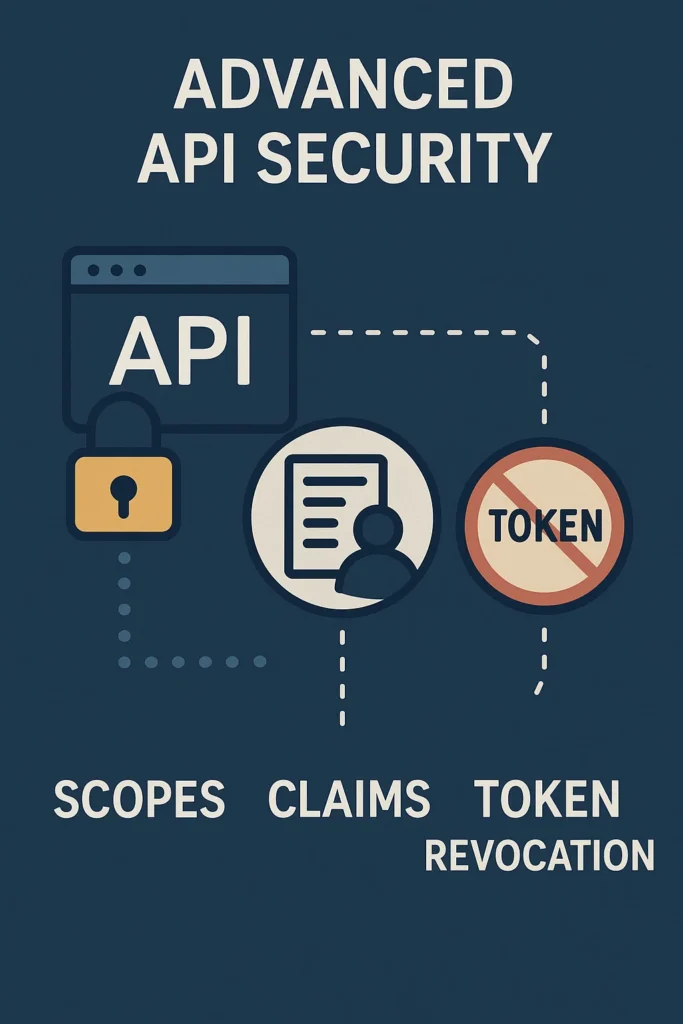
To secure your systems, you need fine-grained control over what each user or app can do. This is where scopes, claims, and token revocation come in. In this comprehensive guide, you’ll learn how to implement production-ready API security with OAuth2 and JWT, including real code examples for validation, scope enforcement, and token management.
Understanding Access Tokens
Access tokens are small, signed pieces of data that represent a user’s identity and permissions. They are used by APIs to verify requests without needing to log in repeatedly.
JWT Structure
JSON Web Tokens (JWTs) are the most common token format. They consist of three parts: header, payload, and signature.
# JWT Structure
# =============
# eyJhbGciOiJSUzI1NiIsInR5cCI6IkpXVCJ9.  <-- Header (base64)
# eyJzdWIiOiIxMjM0NTYiLCJyb2xlIjoiYWRtaW4ifQ.  <-- Payload (base64)
# SflKxwRJSMeKKF2QT4fwpMeJf36POk6yJV_adQssw5c  <-- Signature

# Header - Algorithm and token type
{
  "alg": "RS256",
  "typ": "JWT",
  "kid": "key-id-123"  # Key ID for key rotation
}

# Payload - Claims about the user
{
  "iss": "https://auth.example.com",      # Issuer
  "sub": "user-123456",                    # Subject (user ID)
  "aud": "https://api.example.com",        # Audience
  "exp": 1704067200,                        # Expiration time
  "iat": 1704063600,                        # Issued at
  "nbf": 1704063600,                        # Not valid before
  "scope": "read:users write:users",       # Granted scopes
  "roles": ["admin", "user"],              # Custom claim
  "org_id": "org-abc123"                   # Custom claim
}
Token Types
| Token Type | Lifetime | Use Case | Storage |
|---|---|---|---|
| Access Token | 15 min – 1 hour | API authentication | Memory only |
| Refresh Token | 7 – 30 days | Obtain new access tokens | Secure HTTP-only cookie |
| ID Token | Matches access token | User identity (OpenID Connect) | Memory only |
Scopes: Defining What Clients Can Do
A scope limits what actions a client can perform. It’s like giving a key that only opens certain doors. Scopes support the principle of least privilege, ensuring tokens only have the permissions they actually need.
Designing Scope Hierarchies
# Scope naming conventions
# resource:action pattern

# User management
read:users        # View user profiles
write:users       # Create and update users
delete:users      # Remove users
admin:users       # Full user management

# Order management
read:orders       # View orders
write:orders      # Create orders
manage:orders     # Update and cancel orders

# Hierarchical scopes (optional)
users             # Implies read:users
users:write       # Implies users (read) + write
users:admin       # Implies all user permissions
Scope Validation in Node.js
// middleware/scopeValidator.js
const jwt = require('jsonwebtoken');

/**
 * Middleware factory that validates required scopes
 * @param {string[]} requiredScopes - Scopes needed for this endpoint
 */
function requireScopes(...requiredScopes) {
  return (req, res, next) => {
    const token = req.headers.authorization?.replace('Bearer ', '');

    if (!token) {
      return res.status(401).json({
        error: 'unauthorized',
        message: 'No token provided'
      });
    }

    try {
      // Verify and decode the token
      const decoded = jwt.verify(token, process.env.JWT_PUBLIC_KEY, {
        algorithms: ['RS256'],
        issuer: process.env.JWT_ISSUER,
        audience: process.env.JWT_AUDIENCE,
      });

      // Parse scopes from token (space-separated string or array)
      const tokenScopes = Array.isArray(decoded.scope)
        ? decoded.scope
        : (decoded.scope || '').split(' ');

      // Check if all required scopes are present
      const hasAllScopes = requiredScopes.every(scope =>
        tokenScopes.includes(scope) || tokenScopes.includes('admin') // admin has all
      );

      if (!hasAllScopes) {
        return res.status(403).json({
          error: 'insufficient_scope',
          message: `Required scopes: ${requiredScopes.join(', ')}`,
          required: requiredScopes,
          provided: tokenScopes
        });
      }

      // Attach decoded token to request
      req.user = decoded;
      req.scopes = tokenScopes;
      next();

    } catch (error) {
      if (error.name === 'TokenExpiredError') {
        return res.status(401).json({
          error: 'token_expired',
          message: 'Token has expired'
        });
      }
      return res.status(401).json({
        error: 'invalid_token',
        message: 'Token validation failed'
      });
    }
  };
}

module.exports = { requireScopes };
// routes/users.js - Using scope validation
const express = require('express');
const { requireScopes } = require('../middleware/scopeValidator');
const router = express.Router();
// GET /users - requires read:users scope
router.get('/users',
requireScopes('read:users'),
async (req, res) => {
const users = await userService.findAll();
res.json(users);
}
);
// POST /users - requires write:users scope
router.post('/users',
requireScopes('write:users'),
async (req, res) => {
const user = await userService.create(req.body);
res.status(201).json(user);
}
);
// DELETE /users/:id - requires delete:users scope
router.delete('/users/:id',
requireScopes('delete:users'),
async (req, res) => {
await userService.delete(req.params.id);
res.status(204).send();
}
);
// PUT /users/:id/role - requires admin:users scope
router.put('/users/:id/role',
requireScopes('admin:users'),
async (req, res) => {
const user = await userService.updateRole(req.params.id, req.body.role);
res.json(user);
}
);
module.exports = router;Claims: Describing Who the User Is
A claim is a piece of information inside a token — like user ID, role, or organization. Claims help APIs understand who is calling and what context applies.
Standard vs Custom Claims
// Standard claims (defined by JWT/OIDC spec)
{
  "iss": "https://auth.example.com",  // Issuer - who created the token
  "sub": "user-123456",                // Subject - user identifier
  "aud": "https://api.example.com",    // Audience - intended recipient
  "exp": 1704067200,                    // Expiration - Unix timestamp
  "iat": 1704063600,                    // Issued At - when token was created
  "nbf": 1704063600,                    // Not Before - when token becomes valid
  "jti": "unique-token-id-xyz",        // JWT ID - unique identifier

  // OpenID Connect standard claims
  "name": "John Doe",
  "email": "john@example.com",
  "email_verified": true,
  "picture": "https://example.com/avatar.jpg"
}

// Custom claims (application-specific)
{
  // Use namespaced keys to avoid conflicts
  "https://myapp.com/claims/roles": ["admin", "user"],
  "https://myapp.com/claims/org_id": "org-abc123",
  "https://myapp.com/claims/permissions": ["manage_team", "view_analytics"],
  "https://myapp.com/claims/subscription_tier": "enterprise"
}
Claim-Based Authorization
// middleware/claimValidator.js

/**
 * Validate that a specific claim exists and matches expected value(s)
 */
function requireClaim(claimName, expectedValues) {
  const values = Array.isArray(expectedValues) ? expectedValues : [expectedValues];

  return (req, res, next) => {
    if (!req.user) {
      return res.status(401).json({ error: 'Authentication required' });
    }

    const claimValue = req.user[claimName];

    if (claimValue === undefined) {
      return res.status(403).json({
        error: 'missing_claim',
        message: `Required claim '${claimName}' not present in token`
      });
    }

    // Handle array claims (like roles)
    const claimValues = Array.isArray(claimValue) ? claimValue : [claimValue];
    const hasMatch = values.some(v => claimValues.includes(v));

    if (!hasMatch) {
      return res.status(403).json({
        error: 'invalid_claim',
        message: `Claim '${claimName}' does not match required values`
      });
    }

    next();
  };
}

/**
 * Ensure user belongs to the organization in the request
 */
function requireOrgAccess() {
  return (req, res, next) => {
    const requestedOrgId = req.params.orgId || req.body?.orgId;
    const userOrgId = req.user['https://myapp.com/claims/org_id'];

    if (!requestedOrgId) {
      return next(); // No org context required
    }

    // Admins can access any org
    const roles = req.user['https://myapp.com/claims/roles'] || [];
    if (roles.includes('super_admin')) {
      return next();
    }

    if (requestedOrgId !== userOrgId) {
      return res.status(403).json({
        error: 'org_access_denied',
        message: 'You do not have access to this organization'
      });
    }

    next();
  };
}

module.exports = { requireClaim, requireOrgAccess };
// routes/organizations.js - Using claim validation
const express = require('express');
const { requireScopes } = require('../middleware/scopeValidator');
const { requireClaim, requireOrgAccess } = require('../middleware/claimValidator');
const router = express.Router();
// Only enterprise tier can access analytics
router.get('/analytics',
requireScopes('read:analytics'),
requireClaim('https://myapp.com/claims/subscription_tier', ['enterprise', 'business']),
async (req, res) => {
const analytics = await analyticsService.getForOrg(req.user.org_id);
res.json(analytics);
}
);
// Organization-scoped resources
router.get('/organizations/:orgId/members',
requireScopes('read:members'),
requireOrgAccess(),
async (req, res) => {
const members = await orgService.getMembers(req.params.orgId);
res.json(members);
}
);
module.exports = router;Token Revocation: Taking Back Access in Real Time
Even with scopes and claims, tokens can become a risk if not managed correctly. What happens when a user logs out, changes their password, or a device gets stolen? Token revocation lets you invalidate a token before it naturally expires.
Revocation Strategies
| Strategy | Pros | Cons | Best For |
|---|---|---|---|
| Short-lived tokens | Simple, no state | Frequent refreshes | Stateless APIs |
| Token blocklist | Immediate revocation | Storage overhead | High-security apps |
| Token versioning | Revoke all user tokens | DB lookup required | Password changes |
| Refresh token rotation | Detect stolen tokens | Complex implementation | Long sessions |
Implementing Token Blocklist with Redis
// services/tokenRevocation.js
const Redis = require('ioredis');
const jwt = require('jsonwebtoken');

const redis = new Redis(process.env.REDIS_URL);
const BLOCKLIST_PREFIX = 'revoked:';

class TokenRevocationService {
  /**
   * Revoke a specific token
   * @param {string} token - The JWT to revoke
   */
  async revokeToken(token) {
    try {
      // Decode without verification to get jti and exp
      const decoded = jwt.decode(token);
      if (!decoded || !decoded.jti) {
        throw new Error('Token missing jti claim');
      }

      // Calculate TTL (time until token expires)
      const now = Math.floor(Date.now() / 1000);
      const ttl = decoded.exp - now;

      if (ttl <= 0) {
        return; // Token already expired
      }

      // Add to blocklist with expiration matching token expiry
      await redis.setex(
        `${BLOCKLIST_PREFIX}${decoded.jti}`,
        ttl,
        JSON.stringify({
          revokedAt: new Date().toISOString(),
          userId: decoded.sub,
          reason: 'user_logout'
        })
      );

      console.log(`Token ${decoded.jti} revoked, TTL: ${ttl}s`);
    } catch (error) {
      console.error('Token revocation failed:', error);
      throw error;
    }
  }

  /**
   * Revoke all tokens for a user (e.g., password change)
   * @param {string} userId - User ID
   * @param {Date} revokedBefore - Revoke tokens issued before this time
   */
  async revokeAllUserTokens(userId, revokedBefore = new Date()) {
    const key = `user_tokens_revoked:${userId}`;
    const ttl = 86400 * 30; // Keep for 30 days

    await redis.setex(key, ttl, revokedBefore.toISOString());

    console.log(`All tokens for user ${userId} issued before ${revokedBefore} revoked`);
  }

  /**
   * Check if a token is revoked
   * @param {object} decodedToken - Decoded JWT payload
   * @returns {Promise} - True if revoked
   */
  async isTokenRevoked(decodedToken) {
    // Check individual token revocation
    if (decodedToken.jti) {
      const revoked = await redis.get(`${BLOCKLIST_PREFIX}${decodedToken.jti}`);
      if (revoked) {
        return true;
      }
    }

    // Check user-wide revocation
    const userRevokedAt = await redis.get(`user_tokens_revoked:${decodedToken.sub}`);
    if (userRevokedAt) {
      const tokenIssuedAt = new Date(decodedToken.iat * 1000);
      const revokedBefore = new Date(userRevokedAt);

      if (tokenIssuedAt < revokedBefore) {
        return true;
      }
    }

    return false;
  }
}

module.exports = new TokenRevocationService();
// middleware/authWithRevocation.js
const jwt = require('jsonwebtoken');
const tokenRevocation = require('../services/tokenRevocation');
async function authenticateWithRevocationCheck(req, res, next) {
const token = req.headers.authorization?.replace('Bearer ', '');
if (!token) {
return res.status(401).json({ error: 'No token provided' });
}
try {
// Verify token signature and standard claims
const decoded = jwt.verify(token, process.env.JWT_PUBLIC_KEY, {
algorithms: ['RS256'],
issuer: process.env.JWT_ISSUER,
audience: process.env.JWT_AUDIENCE,
});
// Check if token has been revoked
const isRevoked = await tokenRevocation.isTokenRevoked(decoded);
if (isRevoked) {
return res.status(401).json({
error: 'token_revoked',
message: 'This token has been revoked'
});
}
req.user = decoded;
req.token = token;
next();
} catch (error) {
if (error.name === 'TokenExpiredError') {
return res.status(401).json({ error: 'Token expired' });
}
return res.status(401).json({ error: 'Invalid token' });
}
}
module.exports = { authenticateWithRevocationCheck };Refresh Token Rotation
// services/refreshTokenService.js
const crypto = require('crypto');
const Redis = require('ioredis');
const jwt = require('jsonwebtoken');

const redis = new Redis(process.env.REDIS_URL);

class RefreshTokenService {
  /**
   * Generate a new refresh token
   */
  async generateRefreshToken(userId, deviceId) {
    const tokenId = crypto.randomUUID();
    const token = crypto.randomBytes(64).toString('base64url');

    const data = {
      userId,
      deviceId,
      tokenId,
      createdAt: new Date().toISOString(),
      rotationCount: 0
    };

    // Store with 30-day expiration
    const ttl = 86400 * 30;
    await redis.setex(`refresh:${token}`, ttl, JSON.stringify(data));

    // Track token family for rotation detection
    await redis.sadd(`refresh_family:${tokenId}`, token);
    await redis.expire(`refresh_family:${tokenId}`, ttl);

    return { token, tokenId };
  }

  /**
   * Rotate refresh token - issue new one and invalidate old
   */
  async rotateRefreshToken(oldToken) {
    const data = await redis.get(`refresh:${oldToken}`);
    if (!data) {
      throw new Error('Invalid refresh token');
    }

    const tokenData = JSON.parse(data);

    // Check if this token was already used (replay attack detection)
    const family = await redis.smembers(`refresh_family:${tokenData.tokenId}`);
    const tokenIndex = family.indexOf(oldToken);

    if (tokenIndex < family.length - 1) {
      // This token was already rotated! Possible theft.
      // Revoke entire token family
      await this.revokeTokenFamily(tokenData.tokenId);
      throw new Error('Refresh token reuse detected - all sessions revoked');
    }

    // Generate new refresh token in same family
    const newToken = crypto.randomBytes(64).toString('base64url');
    const newData = {
      ...tokenData,
      rotationCount: tokenData.rotationCount + 1,
      rotatedAt: new Date().toISOString()
    };

    const ttl = 86400 * 30;
    await redis.setex(`refresh:${newToken}`, ttl, JSON.stringify(newData));
    await redis.sadd(`refresh_family:${tokenData.tokenId}`, newToken);

    // Generate new access token
    const accessToken = jwt.sign(
      {
        sub: tokenData.userId,
        jti: crypto.randomUUID(),
        scope: 'read:users write:users' // Get from user's permissions
      },
      process.env.JWT_PRIVATE_KEY,
      {
        algorithm: 'RS256',
        expiresIn: '15m',
        issuer: process.env.JWT_ISSUER,
        audience: process.env.JWT_AUDIENCE
      }
    );

    return {
      accessToken,
      refreshToken: newToken,
      expiresIn: 900 // 15 minutes
    };
  }

  /**
   * Revoke all tokens in a family (used when theft detected)
   */
  async revokeTokenFamily(tokenId) {
    const family = await redis.smembers(`refresh_family:${tokenId}`);

    for (const token of family) {
      await redis.del(`refresh:${token}`);
    }

    await redis.del(`refresh_family:${tokenId}`);
    console.log(`Revoked token family ${tokenId} with ${family.length} tokens`);
  }
}

module.exports = new RefreshTokenService();
Complete Auth Endpoint Example
// routes/auth.js
const express = require('express');
const jwt = require('jsonwebtoken');
const refreshTokenService = require('../services/refreshTokenService');
const tokenRevocation = require('../services/tokenRevocation');
const { authenticateWithRevocationCheck } = require('../middleware/authWithRevocation');

const router = express.Router();

// Login - issue tokens
router.post('/login', async (req, res) => {
  const { email, password } = req.body;

  // Validate credentials (simplified)
  const user = await userService.validateCredentials(email, password);
  if (!user) {
    return res.status(401).json({ error: 'Invalid credentials' });
  }

  // Generate access token
  const accessToken = jwt.sign(
    {
      sub: user.id,
      jti: crypto.randomUUID(),
      email: user.email,
      scope: user.scopes.join(' '),
      'https://myapp.com/claims/roles': user.roles,
      'https://myapp.com/claims/org_id': user.orgId
    },
    process.env.JWT_PRIVATE_KEY,
    {
      algorithm: 'RS256',
      expiresIn: '15m',
      issuer: process.env.JWT_ISSUER,
      audience: process.env.JWT_AUDIENCE
    }
  );

  // Generate refresh token
  const { token: refreshToken } = await refreshTokenService.generateRefreshToken(
    user.id,
    req.headers['x-device-id'] || 'unknown'
  );

  res.json({
    access_token: accessToken,
    refresh_token: refreshToken,
    token_type: 'Bearer',
    expires_in: 900
  });
});

// Refresh tokens
router.post('/refresh', async (req, res) => {
  const { refresh_token } = req.body;

  if (!refresh_token) {
    return res.status(400).json({ error: 'Refresh token required' });
  }

  try {
    const tokens = await refreshTokenService.rotateRefreshToken(refresh_token);
    res.json({
      access_token: tokens.accessToken,
      refresh_token: tokens.refreshToken,
      token_type: 'Bearer',
      expires_in: tokens.expiresIn
    });
  } catch (error) {
    res.status(401).json({ error: error.message });
  }
});

// Logout - revoke tokens
router.post('/logout', authenticateWithRevocationCheck, async (req, res) => {
  // Revoke the current access token
  await tokenRevocation.revokeToken(req.token);

  // Optionally revoke refresh token if provided
  if (req.body.refresh_token) {
    await redis.del(`refresh:${req.body.refresh_token}`);
  }

  res.status(204).send();
});

// Password change - revoke all tokens
router.post('/change-password', authenticateWithRevocationCheck, async (req, res) => {
  const { currentPassword, newPassword } = req.body;

  // Update password (simplified)
  await userService.changePassword(req.user.sub, currentPassword, newPassword);

  // Revoke all existing tokens for this user
  await tokenRevocation.revokeAllUserTokens(req.user.sub);

  res.json({ message: 'Password changed. Please log in again.' });
});

module.exports = router;
Common Mistakes to Avoid
1. Missing Token Expiration
// BAD: Token never expires
const token = jwt.sign({ sub: userId }, secret);

// GOOD: Always set expiration
const token = jwt.sign(
  { sub: userId },
  secret,
  { expiresIn: '15m' }
);
2. Storing Tokens in localStorage
// BAD: Vulnerable to XSS attacks
localStorage.setItem('token', accessToken);

// GOOD: Use HTTP-only cookies for refresh tokens
// Access tokens can stay in memory
res.cookie('refresh_token', refreshToken, {
  httpOnly: true,
  secure: true,
  sameSite: 'strict',
  maxAge: 30 * 24 * 60 * 60 * 1000 // 30 days
});
3. Not Validating Audience and Issuer
// BAD: Only verifying signature
const decoded = jwt.verify(token, secret);

// GOOD: Validate all claims
const decoded = jwt.verify(token, publicKey, {
  algorithms: ['RS256'],
  issuer: 'https://auth.example.com',
  audience: 'https://api.example.com'
});
4. Using Symmetric Keys in Distributed Systems
// BAD: Shared secret must be distributed to all services
const token = jwt.sign(payload, 'shared-secret');

// GOOD: Use asymmetric keys (RS256)
// Auth server signs with private key
const token = jwt.sign(payload, privateKey, { algorithm: 'RS256' });
// API servers verify with public key (can be shared safely)
const decoded = jwt.verify(token, publicKey, { algorithms: ['RS256'] });
5. Sensitive Data in Claims
// BAD: PII and secrets in token
{
  "ssn": "123-45-6789",
  "credit_card": "4111-1111-1111-1111",
  "password_hash": "$2b$10$..."
}

// GOOD: Only include identifiers, fetch sensitive data from DB
{
  "sub": "user-123",
  "roles": ["user"],
  "org_id": "org-456"
}
Security Best Practices
- Use short-lived access tokens (15 minutes or less) with refresh token rotation.
- Always validate all claims — issuer, audience, expiration, and custom claims.
- Implement token revocation for logout, password changes, and security incidents.
- Use asymmetric algorithms (RS256, ES256) for distributed systems.
- Store refresh tokens in HTTP-only cookies with secure and SameSite flags.
- Include jti (JWT ID) claim for token tracking and revocation.
- Rotate secrets and keys regularly using key versioning (kid header).
- Log authentication events for security monitoring and incident response.
Final Thoughts
Strong API security is about more than just authentication — it's about controlling what happens after a user is authenticated. Scopes define what clients can do, claims describe who users are, and token revocation ensures you can take back access when needed. Together, they build trustworthy, fine-grained access systems.
Modern identity platforms like Auth0, Keycloak, and Okta implement these patterns out of the box, but understanding the underlying mechanisms helps you configure them correctly and troubleshoot issues when they arise.
To see how these concepts fit into larger systems, read Advanced API Gateway Patterns for SaaS Applications. For implementing secure service-to-service communication, see Service Discovery with Spring Cloud Eureka. You can also explore Auth0's guide to token best practices for more real-world implementation details.