Introduction
Code reviews are essential for catching bugs, ensuring quality, and maintaining consistency across a team. But manual reviews can be time-consuming and prone to human error. A single senior developer might spend 20-30% of their time reviewing pull requests, and even then, subtle issues slip through.
That’s where AI-powered code review tools step in. These tools use large language models (LLMs) and machine learning to assist developers by spotting issues, suggesting improvements, and even automating parts of the review process. In 2025, these tools have matured significantly, with better context awareness and fewer false positives than their early predecessors.
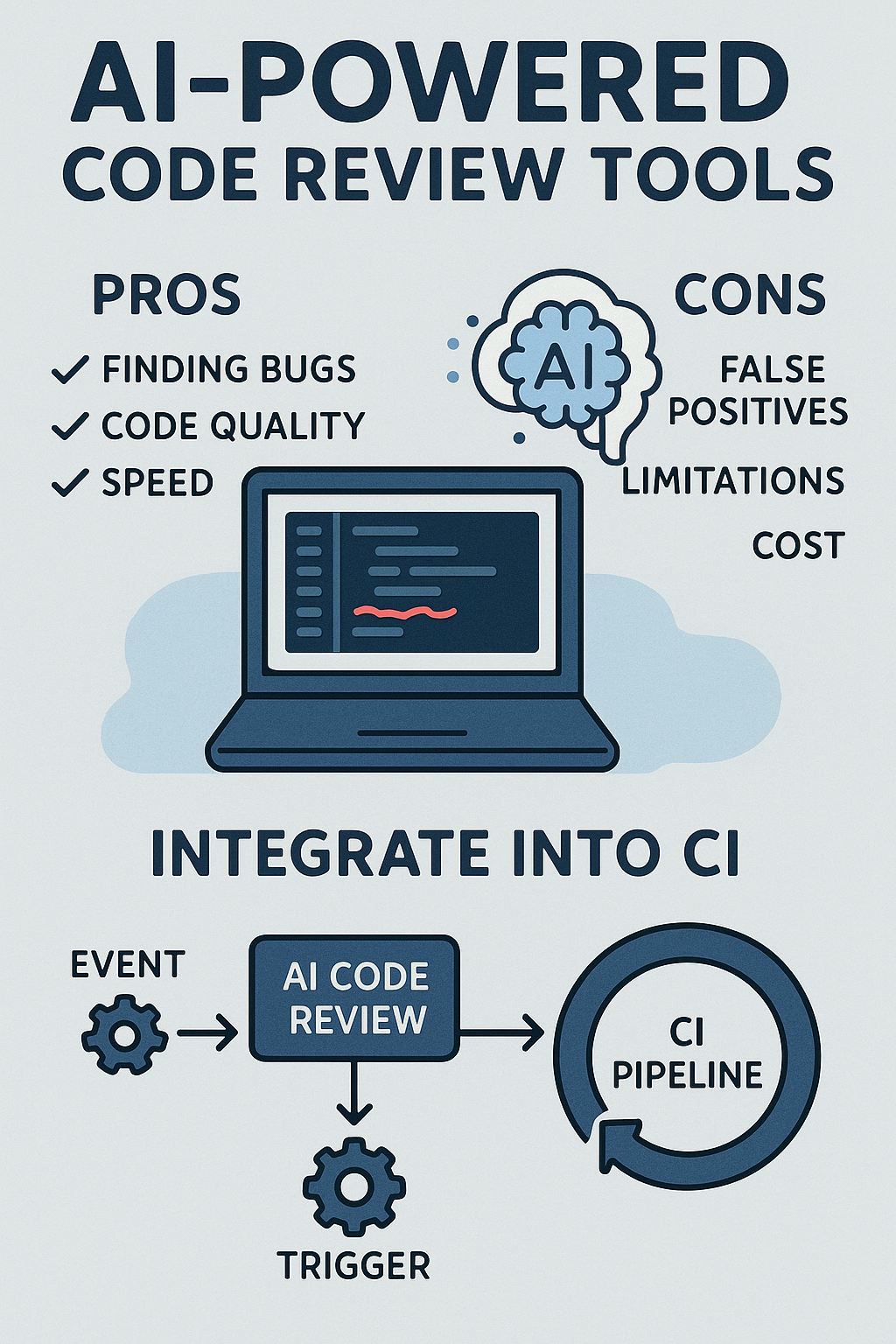
In this article, we’ll explore the pros and cons of using AI for code reviews, compare popular tools, and show you exactly how to integrate these tools into your CI pipeline with working code examples.
Benefits of AI-Powered Code Review Tools
Faster Feedback
AI can instantly analyze pull requests and suggest fixes, reducing the time developers wait for feedback from hours to seconds. This immediate feedback loop keeps developers in flow state and reduces context-switching costs.
Consistency Across Reviews
While human reviewers may overlook issues based on fatigue, time pressure, or varying expertise levels, AI enforces consistent rules and patterns across the entire codebase. Every PR gets the same thorough analysis regardless of when it was submitted.
Early Bug Detection
Modern AI tools can spot potential vulnerabilities, unused variables, memory leaks, race conditions, and performance bottlenecks before they reach production. This shifts security and quality left in your development lifecycle.
Knowledge Sharing
AI often provides explanations with its suggestions, helping junior developers learn best practices. Rather than just flagging an issue, good AI tools explain why something is problematic and how to fix it properly.
Comparing Popular AI Code Review Tools
Let’s examine the leading tools available in 2025:
GitHub Copilot Code Review
Built directly into GitHub, Copilot’s code review feature understands your repository context deeply. It analyzes PRs against your existing codebase patterns and suggests improvements that align with your team’s conventions.
CodiumAI (Qodo)
Specializes in test generation alongside code review. It doesn’t just find problems—it generates comprehensive test cases to prevent regressions. Excellent for teams looking to improve test coverage automatically.
SonarQube with AI
The industry-standard static analysis tool now includes AI-powered suggestions. Combines traditional rule-based analysis with LLM insights for comprehensive coverage.
Amazon CodeWhisperer
AWS’s offering includes security scanning that integrates well with AWS services. Best for teams already invested in the AWS ecosystem.
Drawbacks to Consider
False Positives
AI may flag code that’s acceptable within your project’s context, leading to noise in the review process. Careful tuning and rule configuration are essential to maintain signal-to-noise ratio.
Limited Context Awareness
Unlike senior developers, AI tools don’t fully understand business logic, architectural trade-offs, or the reasoning behind unconventional decisions. They may suggest “improvements” that break intentional design choices.
Over-Reliance Risk
Teams that depend too heavily on AI might skip deeper reviews, letting complex issues slip through. AI should augment human review, not replace it entirely.
Privacy and Security Concerns
Cloud-based AI tools send your code to external servers. For sensitive projects, consider self-hosted options or tools with enterprise data protection agreements.
Integrating AI Code Review into GitHub Actions
Here’s a complete GitHub Actions workflow that integrates AI code review:
# .github/workflows/ai-code-review.yml
name: AI Code Review

on:
  pull_request:
    types: [opened, synchronize, reopened]
    branches: [main, develop]

permissions:
  contents: read
  pull-requests: write

jobs:
  ai-review:
    runs-on: ubuntu-latest
    name: AI Code Analysis

    steps:
      - name: Checkout repository
        uses: actions/checkout@v4
        with:
          fetch-depth: 0

      - name: Get changed files
        id: changed-files
        uses: tj-actions/changed-files@v44
        with:
          files: |
            **/*.js
            **/*.ts
            **/*.jsx
            **/*.tsx
            **/*.py
            **/*.java

      - name: Setup Node.js
        uses: actions/setup-node@v4
        with:
          node-version: '20'
          cache: 'npm'

      - name: Install dependencies
        run: npm ci

      - name: Run ESLint with AI rules
        if: steps.changed-files.outputs.any_changed == 'true'
        run: |
          npx eslint ${{ steps.changed-files.outputs.all_changed_files }} \
            --format json \
            --output-file eslint-report.json || true

      - name: Run AI Code Review
        if: steps.changed-files.outputs.any_changed == 'true'
        uses: coderabbitai/ai-pr-reviewer@latest
        env:
          GITHUB_TOKEN: ${{ secrets.GITHUB_TOKEN }}
          OPENAI_API_KEY: ${{ secrets.OPENAI_API_KEY }}
        with:
          debug: false
          review_comment_lgtm: false
          path_filters: |
            !**/*.md
            !**/*.json
            !**/package-lock.json

      - name: SonarQube Scan
        uses: SonarSource/sonarqube-scan-action@master
        env:
          SONAR_TOKEN: ${{ secrets.SONAR_TOKEN }}
          SONAR_HOST_URL: ${{ secrets.SONAR_HOST_URL }}
        with:
          args: >
            -Dsonar.projectKey=${{ github.repository_owner }}_${{ github.event.repository.name }}
            -Dsonar.pullrequest.key=${{ github.event.pull_request.number }}
            -Dsonar.pullrequest.branch=${{ github.head_ref }}
            -Dsonar.pullrequest.base=${{ github.base_ref }}

      - name: Post review summary
        if: always()
        uses: actions/github-script@v7
        with:
          script: |
            const fs = require('fs');

            let summary = '## 🤖 AI Code Review Summary\n\n';

            // Parse ESLint results
            if (fs.existsSync('eslint-report.json')) {
              const eslintReport = JSON.parse(fs.readFileSync('eslint-report.json', 'utf8'));
              const errorCount = eslintReport.reduce((acc, file) => acc + file.errorCount, 0);
              const warningCount = eslintReport.reduce((acc, file) => acc + file.warningCount, 0);

              summary += `### ESLint Results\n`;
              summary += `- ❌ Errors: ${errorCount}\n`;
              summary += `- ⚠️ Warnings: ${warningCount}\n\n`;
            }

            summary += `---\n`;
            summary += `*Review powered by AI - Please verify suggestions before applying*`;

            await github.rest.issues.createComment({
              owner: context.repo.owner,
              repo: context.repo.repo,
              issue_number: context.issue.number,
              body: summary
            });
Custom AI Review Bot Implementation
For teams wanting more control, here’s a custom Node.js implementation that integrates with OpenAI for code review:
// src/ai-reviewer/index.ts
import { Octokit } from '@octokit/rest';
import OpenAI from 'openai';

interface ReviewConfig {
  maxFilesToReview: number;
  skipPatterns: string[];
  severityThreshold: 'error' | 'warning' | 'info';
}

interface FileChange {
  filename: string;
  patch: string;
  status: string;
}

interface ReviewComment {
  path: string;
  line: number;
  body: string;
  severity: 'error' | 'warning' | 'info';
}

const defaultConfig: ReviewConfig = {
  maxFilesToReview: 20,
  skipPatterns: ['*.md', '*.json', 'package-lock.json', '*.lock'],
  severityThreshold: 'warning'
};

export class AICodeReviewer {
  private octokit: Octokit;
  private openai: OpenAI;
  private config: ReviewConfig;

  constructor(githubToken: string, openaiKey: string, config?: Partial<ReviewConfig>) {
    this.octokit = new Octokit({ auth: githubToken });
    this.openai = new OpenAI({ apiKey: openaiKey });
    this.config = { ...defaultConfig, ...config };
  }

  async reviewPullRequest(owner: string, repo: string, prNumber: number): Promise<void> {
    console.log(`Starting AI review for ${owner}/${repo}#${prNumber}`);

    // Get PR files
    const { data: files } = await this.octokit.pulls.listFiles({
      owner,
      repo,
      pull_number: prNumber,
      per_page: 100
    });

    // Filter files based on config
    const filesToReview = files
      .filter(file => !this.shouldSkipFile(file.filename))
      .slice(0, this.config.maxFilesToReview);

    console.log(`Reviewing ${filesToReview.length} files`);

    const allComments: ReviewComment[] = [];

    for (const file of filesToReview) {
      if (file.patch) {
        const comments = await this.analyzeFile(file);
        allComments.push(...comments);
      }
    }

    // Post review
    await this.postReview(owner, repo, prNumber, allComments);
  }

  private shouldSkipFile(filename: string): boolean {
    return this.config.skipPatterns.some(pattern => {
      const regex = new RegExp(pattern.replace('*', '.*'));
      return regex.test(filename);
    });
  }

  private async analyzeFile(file: FileChange): Promise<ReviewComment[]> {
    const prompt = this.buildAnalysisPrompt(file);

    const response = await this.openai.chat.completions.create({
      model: 'gpt-4-turbo-preview',
      messages: [
        {
          role: 'system',
          content: `You are an expert code reviewer. Analyze the code diff and identify:
1. Security vulnerabilities (SQL injection, XSS, etc.)
2. Performance issues
3. Logic errors or bugs
4. Code style violations
5. Missing error handling

Respond with JSON array of issues found:
[{"line": number, "severity": "error"|"warning"|"info", "message": "description"}]

Only report actual issues, not style preferences. Be specific and actionable.`
        },
        { role: 'user', content: prompt }
      ],
      temperature: 0.3,
      response_format: { type: 'json_object' }
    });

    try {
      const content = response.choices[0]?.message?.content;
      if (!content) return [];

      const parsed = JSON.parse(content);
      const issues = parsed.issues || parsed;

      return issues.map((issue: any) => ({
        path: file.filename,
        line: issue.line,
        body: `**${issue.severity.toUpperCase()}**: ${issue.message}`,
        severity: issue.severity
      }));
    } catch (error) {
      console.error(`Failed to parse AI response for ${file.filename}:`, error);
      return [];
    }
  }

  private buildAnalysisPrompt(file: FileChange): string {
    return `
File: ${file.filename}
Change type: ${file.status}

Diff:
\`\`\`
${file.patch}
\`\`\`

Analyze this code change and report any issues.
`;
  }

  private async postReview(
    owner: string,
    repo: string,
    prNumber: number,
    comments: ReviewComment[]
  ): Promise<void> {
    // Filter comments by severity threshold
    const severityOrder = ['info', 'warning', 'error'];
    const thresholdIndex = severityOrder.indexOf(this.config.severityThreshold);

    const filteredComments = comments.filter(
      c => severityOrder.indexOf(c.severity) >= thresholdIndex
    );

    if (filteredComments.length === 0) {
      // Post approval comment
      await this.octokit.pulls.createReview({
        owner,
        repo,
        pull_number: prNumber,
        event: 'APPROVE',
        body: '✅ AI Code Review: No significant issues found.'
      });
      return;
    }

    // Get the latest commit SHA
    const { data: pr } = await this.octokit.pulls.get({
      owner,
      repo,
      pull_number: prNumber
    });

    // Post review with comments
    const hasErrors = filteredComments.some(c => c.severity === 'error');

    await this.octokit.pulls.createReview({
      owner,
      repo,
      pull_number: prNumber,
      commit_id: pr.head.sha,
      event: hasErrors ? 'REQUEST_CHANGES' : 'COMMENT',
      body: `🤖 AI Code Review found ${filteredComments.length} issue(s)`,
      comments: filteredComments.map(c => ({
        path: c.path,
        line: c.line,
        body: c.body
      }))
    });
  }
}

// CLI entry point
if (require.main === module) {
  const reviewer = new AICodeReviewer(
    process.env.GITHUB_TOKEN!,
    process.env.OPENAI_API_KEY!
  );

  const [owner, repo] = (process.env.GITHUB_REPOSITORY || '').split('/');
  const prNumber = parseInt(process.env.PR_NUMBER || '0', 10);

  reviewer.reviewPullRequest(owner, repo, prNumber)
    .then(() => console.log('Review complete'))
    .catch(err => {
      console.error('Review failed:', err);
      process.exit(1);
    });
}
Setting Up Quality Gates
Quality gates prevent problematic code from being merged. Here’s how to configure them effectively:
# .github/workflows/quality-gate.yml
name: Quality Gate

on:
  pull_request:
    branches: [main]

jobs:
  quality-gate:
    runs-on: ubuntu-latest
    steps:
      - uses: actions/checkout@v4

      - name: Run comprehensive analysis
        id: analysis
        run: |
          # Run linting
          npm run lint -- --format json > lint-results.json 2>&1 || true

          # Run tests with coverage
          npm run test:coverage -- --json --outputFile=test-results.json || true

          # Parse results and set outputs
          LINT_ERRORS=$(jq '[.[].errorCount] | add // 0' lint-results.json)
          COVERAGE=$(jq '.total.lines.pct' coverage/coverage-summary.json)

          echo "lint_errors=$LINT_ERRORS" >> $GITHUB_OUTPUT
          echo "coverage=$COVERAGE" >> $GITHUB_OUTPUT

      - name: Check quality gate
        run: |
          LINT_ERRORS=${{ steps.analysis.outputs.lint_errors }}
          COVERAGE=${{ steps.analysis.outputs.coverage }}

          FAILED=false
          MESSAGE="## Quality Gate Results\n\n"

          # Check lint errors (must be 0)
          if [ "$LINT_ERRORS" -gt 0 ]; then
            MESSAGE+="❌ **Lint Errors**: $LINT_ERRORS (must be 0)\n"
            FAILED=true
          else
            MESSAGE+="✅ **Lint Errors**: 0\n"
          fi

          # Check coverage (must be >= 80%)
          if (( $(echo "$COVERAGE < 80" | bc -l) )); then
            MESSAGE+="❌ **Code Coverage**: ${COVERAGE}% (minimum 80%)\n"
            FAILED=true
          else
            MESSAGE+="✅ **Code Coverage**: ${COVERAGE}%\n"
          fi

          echo -e "$MESSAGE"

          if [ "$FAILED" = true ]; then
            exit 1
          fi
GitLab CI Integration
For GitLab users, here's an equivalent configuration:
# .gitlab-ci.yml
stages:
  - lint
  - test
  - ai-review
  - quality-gate

variables:
  NODE_VERSION: "20"

lint:
  stage: lint
  image: node:${NODE_VERSION}
  script:
    - npm ci
    - npm run lint -- --format gitlab > gl-codequality.json || true
  artifacts:
    reports:
      codequality: gl-codequality.json
    expire_in: 1 week

test:
  stage: test
  image: node:${NODE_VERSION}
  script:
    - npm ci
    - npm run test:coverage
  coverage: '/Lines\s*:\s*(\d+\.?\d*)%/'
  artifacts:
    reports:
      coverage_report:
        coverage_format: cobertura
        path: coverage/cobertura-coverage.xml

ai-review:
  stage: ai-review
  image: node:${NODE_VERSION}
  only:
    - merge_requests
  script:
    - npm ci
    - |
      node -e "
        const { AICodeReviewer } = require('./src/ai-reviewer');
        const reviewer = new AICodeReviewer(
          process.env.GITLAB_TOKEN,
          process.env.OPENAI_API_KEY
        );
        reviewer.reviewMergeRequest(
          process.env.CI_PROJECT_ID,
          process.env.CI_MERGE_REQUEST_IID
        );
      "
  allow_failure: true

quality-gate:
  stage: quality-gate
  image: sonarsource/sonar-scanner-cli:latest
  script:
    - sonar-scanner
        -Dsonar.projectKey=${CI_PROJECT_NAME}
        -Dsonar.sources=src
        -Dsonar.host.url=${SONAR_HOST_URL}
        -Dsonar.token=${SONAR_TOKEN}
        -Dsonar.qualitygate.wait=true
Creating Custom Review Rules
Define project-specific rules that AI should enforce:
// .ai-review-config.json
{
  "rules": {
    "security": {
      "enabled": true,
      "severity": "error",
      "checks": [
        "sql-injection",
        "xss",
        "path-traversal",
        "hardcoded-secrets",
        "insecure-crypto"
      ]
    },
    "performance": {
      "enabled": true,
      "severity": "warning",
      "checks": [
        "n-plus-one-queries",
        "missing-indexes",
        "memory-leaks",
        "unbounded-loops"
      ]
    },
    "architecture": {
      "enabled": true,
      "severity": "warning",
      "patterns": {
        "controllers": "src/controllers/**/*.ts",
        "services": "src/services/**/*.ts",
        "repositories": "src/repositories/**/*.ts"
      },
      "rules": [
        "controllers-no-db-access",
        "services-no-http-handling",
        "repositories-no-business-logic"
      ]
    },
    "testing": {
      "enabled": true,
      "minimumCoverage": 80,
      "requireTests": ["src/services/**/*.ts", "src/utils/**/*.ts"]
    }
  },
  "ignore": [
    "**/migrations/**",
    "**/generated/**",
    "**/*.test.ts",
    "**/*.spec.ts"
  ],
  "customPrompts": {
    "codeStyle": "Ensure code follows our functional programming style with immutable data patterns.",
    "errorHandling": "All async functions must have proper error handling with typed errors."
  }
}
Common Mistakes to Avoid
Blindly Accepting AI Suggestions
AI tools don't understand your business context. A suggestion to "simplify" a complex conditional might break edge cases that are intentionally handled. Always verify suggestions against your requirements.
Not Tuning False Positive Rates
If your team starts ignoring AI feedback because of too many false positives, the tool becomes useless. Regularly review and adjust rules to maintain a high signal-to-noise ratio.
Replacing Human Review Entirely
AI excels at catching mechanical issues—security vulnerabilities, style violations, common bugs. But it can't evaluate architecture decisions, business logic correctness, or code maintainability from a team perspective.
Ignoring Privacy Implications
Sending proprietary code to cloud AI services may violate compliance requirements. For sensitive projects, use self-hosted models or ensure your AI provider has appropriate data handling agreements.
Not Measuring Effectiveness
Track metrics like "bugs caught by AI vs. human review," "false positive rate," and "time saved per PR." Without data, you can't know if the tool is actually helping.
Best Practices
- Treat AI suggestions as helpful hints, not absolute truth
- Educate your team on when to accept or reject AI feedback
- Keep improving test coverage to back up AI reviews
- Review integration performance regularly to ensure it's saving time
- Create feedback loops where developers can flag incorrect AI suggestions
- Use AI for first-pass review, humans for final approval on critical paths
Conclusion
AI-powered code review tools can dramatically speed up development, improve consistency, and catch issues earlier. But they aren't a replacement for human judgment. The best approach is hybrid: let AI handle repetitive tasks and style enforcement, while developers focus on design, architecture, and business-critical logic.
The implementation examples in this article give you everything needed to integrate AI review into your CI pipeline—whether you're using GitHub Actions, GitLab CI, or building a custom solution. Start with the basic GitHub Actions workflow, then customize based on your team's needs.
If you're already using modern CI pipelines, integrating AI tools is a natural next step. For example, pairing them with practices like CI/CD using GitHub Actions, Firebase Hosting & Docker makes the process even more powerful. To dive deeper into automated code quality checks, you can also explore SonarQube's official documentation.