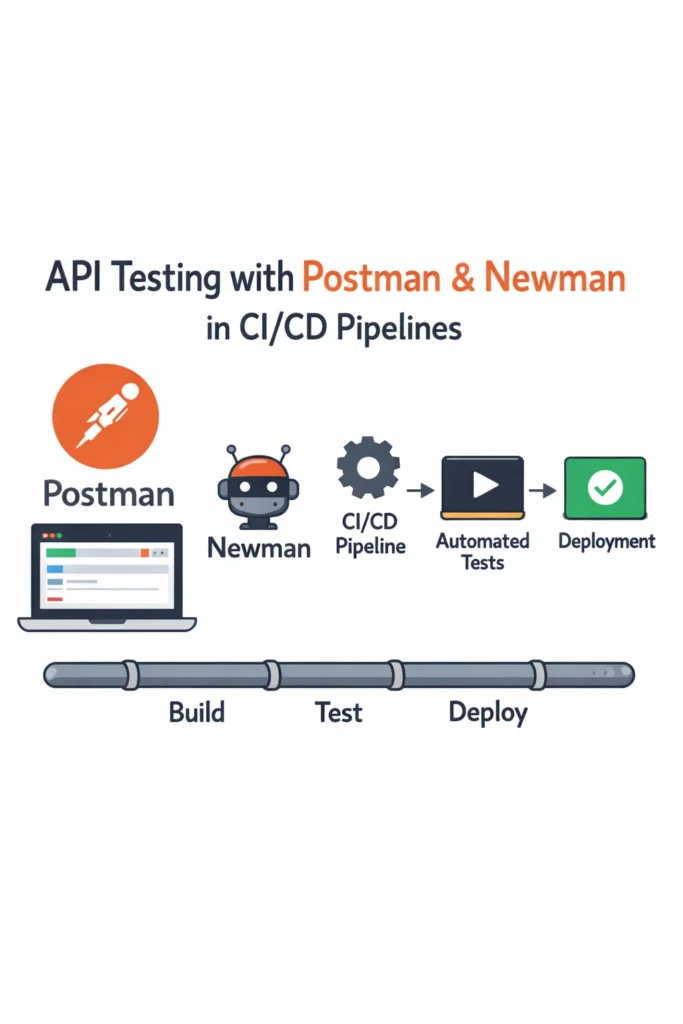
If your team tests APIs by manually clicking through Postman before every release, you’re spending time that automation should handle. API testing with Postman and Newman gives you a workflow that starts with interactive exploration in Postman and graduates to fully automated test runs in your CI/CD pipeline. This guide walks through building a Postman collection with assertions, parameterizing it with environment variables, running it headlessly with Newman, and integrating everything into GitHub Actions. By the end, your API tests will run on every pull request without anyone opening Postman.
What Is Postman and Why Newman?
Postman is a widely used API development tool that lets you send HTTP requests, inspect responses, and organize requests into collections. Most developers use it for manual API exploration, but Postman also supports test scripts written in JavaScript that run after each request. These scripts turn a collection of requests into an executable test suite.
Newman is Postman’s official command-line collection runner. It takes an exported Postman collection and runs every request and test script from the terminal, without the Postman GUI. As a result, Newman fits naturally into CI/CD pipelines where you need headless execution with exit codes that signal pass or fail. Additionally, Newman supports multiple reporter formats including CLI, JSON, JUnit XML, and HTML, which integrate with most CI/CD platforms and test dashboards.
Creating Your First Postman Collection
A Postman collection groups related API requests together. For testing purposes, think of a collection as a test suite and each request as a test case.
Start by creating a collection in Postman and adding requests for the endpoints you want to test. Here’s an example structure for a user management API:
User API Tests/
  ├── POST /api/users        (Create User)
  ├── GET /api/users/:id      (Get User by ID)
  ├── PUT /api/users/:id      (Update User)
  ├── GET /api/users           (List All Users)
  └── DELETE /api/users/:id    (Delete User)
Order matters in Postman collections. Requests run sequentially from top to bottom, so place the POST request first to create a resource that subsequent requests can reference. This ordering creates a natural test flow: create, read, update, list, delete.
Writing Test Scripts in Postman
Postman test scripts run after a request completes and use a JavaScript-based assertion library. The pm object provides access to the response, environment variables, and test utilities.
Status Code and Response Time Checks
// Tests tab for POST /api/users
pm.test("Status code is 201 Created", function () {
    pm.response.to.have.status(201);
});

pm.test("Response time is under 500ms", function () {
    pm.expect(pm.response.responseTime).to.be.below(500);
});

pm.test("Response has correct content type", function () {
    pm.response.to.have.header("Content-Type", /application\/json/);
});
Response Body Validation
// Validate the response body structure and values
pm.test("Response body contains user with correct fields", function () {
    const response = pm.response.json();

    pm.expect(response).to.have.property("id");
    pm.expect(response).to.have.property("email");
    pm.expect(response).to.have.property("name");
    pm.expect(response.email).to.eql("alice@example.com");
});

// Store the created user ID for subsequent requests
const response = pm.response.json();
pm.environment.set("userId", response.id);
The last two lines are critical for chaining requests. By storing the userId in an environment variable, the next request can reference {{userId}} in its URL path to fetch, update, or delete the same user. This technique turns independent requests into a connected test workflow.
Schema Validation
For thorough API testing, validate that the response matches an expected JSON schema. This catches structural regressions like missing fields or changed types.
// Validate response against a JSON schema
const schema = {
    type: "object",
    required: ["id", "email", "name", "createdAt"],
    properties: {
        id: { type: "number" },
        email: { type: "string", format: "email" },
        name: { type: "string" },
        createdAt: { type: "string" },
        active: { type: "boolean" }
    }
};

pm.test("Response matches user schema", function () {
    pm.response.to.have.jsonSchema(schema);
});
Schema validation is particularly valuable because it catches changes that status code checks miss. An endpoint might return 200 OK but include a renamed field or a changed type that breaks your frontend. For more on API design patterns that make testing easier, see our guide on REST vs GraphQL vs gRPC.
Using Environment Variables
Environment variables in Postman let you run the same collection against different servers without modifying requests. Create separate environments for development, staging, and production.
{
    "id": "dev-environment",
    "name": "Development",
    "values": [
        {
            "key": "baseUrl",
            "value": "http://localhost:3000",
            "enabled": true
        },
        {
            "key": "apiKey",
            "value": "dev-api-key-123",
            "enabled": true
        },
        {
            "key": "userId",
            "value": "",
            "enabled": true
        }
    ]
}
Reference variables in your requests using double-brace syntax:
- URL:
{{baseUrl}}/api/users/{{userId}} - Headers:
Authorization: Bearer {{apiKey}} - Request body:
{ "email": "{{testEmail}}" }
The userId variable starts empty and gets populated by the POST request’s test script. Subsequent requests pick up the value automatically. This pattern makes your collection self-contained — it creates its own test data, uses it, and cleans it up.
Pre-Request Scripts for Dynamic Data
Pre-request scripts run before a request is sent. Use them to generate unique test data that avoids collisions when tests run in parallel or repeatedly.
// Pre-request script for POST /api/users
const timestamp = Date.now();
pm.environment.set("testEmail", `testuser_${timestamp}@example.com`);
pm.environment.set("testName", `Test User ${timestamp}`);
This ensures every test run creates a user with a unique email, which prevents failures from duplicate-key database errors on repeated runs.
Running Collections with Newman
Export your collection and environment from Postman, then run them with Newman from the command line.
# Install Newman globally
npm install -g newman

# Run a collection with an environment file
newman run user-api-tests.postman_collection.json \
  -e development.postman_environment.json \
  --reporters cli,json \
  --reporter-json-export results.json

# Expected output:
# User API Tests
#
# → Create User
#   POST http://localhost:3000/api/users [201 Created, 245B, 89ms]
#   ✓ Status code is 201 Created
#   ✓ Response time is under 500ms
#   ✓ Response body contains user with correct fields
#
# → Get User by ID
#   GET http://localhost:3000/api/users/42 [200 OK, 198B, 23ms]
#   ✓ Status code is 200 OK
#   ✓ Response matches user schema
Newman exits with code 0 when all tests pass and code 1 when any test fails. This exit code behavior is what makes Newman work in CI/CD pipelines — a non-zero exit code fails the pipeline step automatically.
Useful Newman Options
# Run with a delay between requests (useful for rate-limited APIs)
newman run collection.json --delay-request 200

# Run multiple iterations with different data
newman run collection.json --iteration-data testdata.csv --iteration-count 5

# Set timeout for individual requests
newman run collection.json --timeout-request 10000

# Override environment variables from the command line
newman run collection.json --env-var "baseUrl=https://staging.api.com"
The --env-var flag is especially useful in CI/CD because it lets you inject environment-specific values without maintaining separate environment files for every deployment target.
Integrating Newman into CI/CD
API testing with Postman and Newman delivers the most value when tests run automatically on every code change. Here’s a production-ready GitHub Actions workflow that runs your Postman collection against your API.
# .github/workflows/api-tests.yml
name: API Tests

on:
  pull_request:
    branches: [main]
  push:
    branches: [main]

jobs:
  api-test:
    runs-on: ubuntu-latest
    timeout-minutes: 10

    services:
      postgres:
        image: postgres:16
        env:
          POSTGRES_DB: testdb
          POSTGRES_USER: testuser
          POSTGRES_PASSWORD: testpass
        ports:
          - 5432:5432
        options: >-
          --health-cmd pg_isready
          --health-interval 10s
          --health-timeout 5s
          --health-retries 5

    steps:
      - uses: actions/checkout@v4

      - uses: actions/setup-node@v4
        with:
          node-version: 20
          cache: 'npm'

      - name: Install dependencies
        run: npm ci

      - name: Start API server
        run: npm start &
        env:
          DATABASE_URL: postgresql://testuser:testpass@localhost:5432/testdb
          PORT: 3000

      - name: Wait for API to be ready
        run: |
          for i in $(seq 1 30); do
            curl -s http://localhost:3000/health && break
            sleep 1
          done

      - name: Install Newman
        run: npm install -g newman newman-reporter-htmlextra

      - name: Run API tests
        run: |
          newman run tests/postman/collection.json \
            -e tests/postman/ci-environment.json \
            --reporters cli,htmlextra,junit \
            --reporter-htmlextra-export reports/api-test-report.html \
            --reporter-junit-export reports/api-test-results.xml

      - name: Upload test report
        uses: actions/upload-artifact@v4
        if: ${{ !cancelled() }}
        with:
          name: api-test-report
          path: reports/
          retention-days: 14
This workflow starts a PostgreSQL service container, launches your API server, waits for it to be healthy, and then runs the Postman collection with Newman. The JUnit XML reporter integrates with GitHub’s test summary feature, and the HTML report provides detailed request/response inspection for debugging failures. For more CI/CD patterns, see our guide on CI/CD for Node.js projects using GitHub Actions.
Data-Driven Testing with External Files
Newman supports data-driven testing through CSV or JSON files. Instead of hardcoding test data in pre-request scripts, you can feed different inputs for each iteration.
email,name,expectedStatus
valid@example.com,Valid User,201
,Missing Name,400
invalid-email,Bad Email,400
valid2@example.com,Another User,201
// Pre-request script reads from the data file
const email = pm.iterationData.get("email");
const name = pm.iterationData.get("name");

pm.environment.set("testEmail", email);
pm.environment.set("testName", name);
// Test script validates against the expected status from the data file
const expectedStatus = pm.iterationData.get("expectedStatus");

pm.test(`Status code is ${expectedStatus}`, function () {
    pm.response.to.have.status(parseInt(expectedStatus));
});
Run it with:
newman run collection.json --iteration-data test-users.csv
Newman runs the entire collection once per row in the CSV file. This approach is particularly effective for testing validation rules, because you can define dozens of input combinations without duplicating requests. As a result, a single collection covers both happy paths and error cases systematically.
Version Controlling Your Collections
Store your Postman collections and environment files in your Git repository alongside your application code. Export them as JSON from Postman and commit them to a tests/postman/ directory.
project-root/
  ├── src/
  ├── tests/
  │   ├── postman/
  │   │   ├── collection.json
  │   │   ├── ci-environment.json
  │   │   └── test-data.csv
  │   └── unit/
  └── .github/workflows/
This ensures your API tests evolve with your code. When a developer changes an endpoint, they update the corresponding Postman tests in the same pull request. Furthermore, code reviews can catch test gaps before they merge. For enforcing this workflow automatically, consider adding Git hooks for code quality checks that verify the collection runs cleanly before pushing.
Real-World Scenario: Adding API Tests to a Microservices Backend
Consider a small team running three Node.js microservices behind an API gateway. Each service has solid unit test coverage, but integration bugs keep slipping into production — a renamed field in the user service breaks the billing service, and nobody catches it until customers report errors.
The team creates one Postman collection per service, each testing the service’s public API contract. They also create a cross-service collection that tests the full workflow: create a user, add a payment method, create a subscription, and verify the billing record. Newman runs all four collections sequentially in the CI pipeline.
Within the first month, the cross-service collection catches three contract-breaking changes during code review. The key insight is that the cross-service tests caught issues that individual service tests missed, because each service’s tests only validated its own behavior in isolation. However, the trade-off is maintenance — when a shared data model changes intentionally, the team must update test assertions across multiple collections. They mitigate this by using shared environment variables for common field names, so a single variable update propagates across tests.
The important lesson is that API tests complement unit tests rather than replacing them. Unit tests verify internal logic, while API tests verify that services communicate correctly at their boundaries. If you want to go further with contract testing between services, see our guide on testing Spring Boot apps using Testcontainers for database-backed integration testing patterns.
When to Use API Testing with Postman and Newman
- Your application exposes REST APIs that multiple clients or services consume
- You need to verify that API contracts remain stable across deployments and dependency updates
- Your team already uses Postman for manual API exploration and wants to formalize those tests
- You need automated integration tests that verify request/response behavior end to end
- Your CI/CD pipeline needs API smoke tests that run before deployment to production
When NOT to Use Postman and Newman
- You need to test individual functions or classes in isolation — unit tests with frameworks like Jest or Vitest are faster and more targeted
- Your API tests require complex programmatic setup that exceeds what Postman scripts handle comfortably — consider a code-native testing framework like Supertest or pytest instead
- You’re testing GraphQL APIs with deeply nested queries — Postman’s GraphQL support works but dedicated GraphQL testing tools provide better schema validation
- Your team prefers code-first testing and finds the Postman GUI workflow friction rather than convenience
Common Mistakes with API Testing in Postman
- Not cleaning up test data after runs. If your tests create records in a real database, add a cleanup request at the end of the collection. Otherwise, repeated runs pollute the database and tests start failing on duplicate constraints.
- Hardcoding URLs and credentials in the collection. Use environment variables for every value that changes between environments. Hardcoded values break the moment you run tests against a different server and risk leaking secrets if the collection is shared.
- Writing tests that depend on external state. Tests that assume specific records exist in the database are fragile. Design your collection to create its own test data at the start and clean it up at the end. Each run should be self-contained.
- Ignoring response time assertions. Status code checks confirm correctness, but they miss performance regressions. Add response time thresholds to critical endpoints so Newman flags slowdowns before they affect users.
- Exporting collections manually before each CI run. Store collections in Git and update them through version control. Manual exports create drift between what developers test locally and what runs in CI.
- Testing only happy paths. Your collection should include requests with invalid data, missing authentication, and malformed payloads. The error responses are part of your API contract, and regressions in error handling break clients just as much as regressions in success responses.
Conclusion
API testing with Postman and Newman bridges the gap between manual API exploration and fully automated test pipelines. Start by converting your existing Postman requests into a collection with test scripts, parameterize it with environment variables, and use Newman to run it headlessly in GitHub Actions. Data-driven testing with CSV files lets you cover dozens of input combinations without duplicating requests, and storing collections in Git keeps your tests in sync with your code.
The real value arrives when Newman runs on every pull request, catching contract-breaking changes before they reach production. For your next step, explore how to build the APIs that these tests validate with our FastAPI REST API guide, or set up CI/CD for Node.js projects to integrate Newman into a broader pipeline.