Introduction
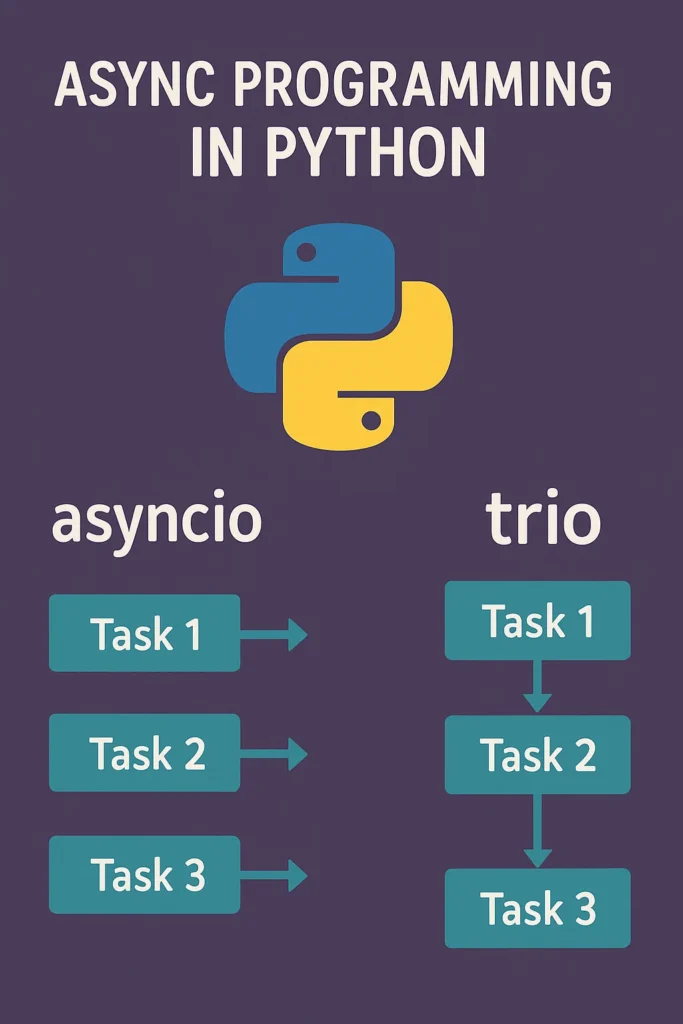
As modern applications become more network-heavy and I/O-bound, Python developers increasingly rely on asynchronous programming to improve performance and responsiveness. Two powerful libraries—asyncio and Trio—provide different approaches to concurrency, with distinct philosophies and APIs. While asyncio is Python’s built-in solution with a massive ecosystem, Trio offers a safer, more structured approach to concurrent programming. This comprehensive guide explains how both work, provides production-ready code examples, covers advanced patterns, and helps you choose the right tool for your next Python project.
What Is Asynchronous Programming?
Asynchronous programming allows your application to perform multiple operations without blocking the main thread. Instead of waiting for tasks like API calls, file reads, or database queries, the runtime suspends tasks until they are ready and switches to other tasks meanwhile. This cooperative multitasking model differs fundamentally from threading or multiprocessing.
Sync vs Async Comparison
# Synchronous - blocks on each request
import requests
import time

def fetch_sync(urls: list[str]) -> list[str]:
    """Fetch URLs sequentially - slow!"""
    results = []
    for url in urls:
        response = requests.get(url)
        results.append(response.text[:100])
    return results

# This takes ~5 seconds for 5 URLs (1 second each)
start = time.time()
urls = ["https://httpbin.org/delay/1"] * 5
results = fetch_sync(urls)
print(f"Sync took: {time.time() - start:.2f}s")  # ~5.00s


# Asynchronous - concurrent requests
import asyncio
import aiohttp

async def fetch_async(urls: list[str]) -> list[str]:
    """Fetch URLs concurrently - fast!"""
    async with aiohttp.ClientSession() as session:
        tasks = []
        for url in urls:
            tasks.append(fetch_one(session, url))
        return await asyncio.gather(*tasks)

async def fetch_one(session: aiohttp.ClientSession, url: str) -> str:
    async with session.get(url) as response:
        text = await response.text()
        return text[:100]

# This takes ~1 second for 5 URLs (all concurrent)
start = time.time()
results = asyncio.run(fetch_async(urls))
print(f"Async took: {time.time() - start:.2f}s")  # ~1.00s
This results in:
- Better performance for I/O-bound workloads (5x faster in this example)
- Improved throughput handling thousands of concurrent connections
- More efficient resource usage with a single thread
- Faster user experiences in networked applications
asyncio: Python’s Built-In Async Framework
asyncio is Python’s official async library, included in the standard library since Python 3.4 and significantly improved in Python 3.7+. It provides the core primitives for coroutines, tasks, event loops, and async I/O that power modern async Python applications.
Event Loop Fundamentals
The event loop is the engine that schedules and runs asynchronous tasks. Understanding how it works is crucial for writing efficient async code.
import asyncio
from typing import Any

# Basic event loop usage (Python 3.7+)
async def main():
    print("Hello from asyncio")
    await asyncio.sleep(1)
    print("After 1 second delay")

# Recommended way to run async code
asyncio.run(main())


# Advanced: Accessing the running loop
async def get_loop_info():
    loop = asyncio.get_running_loop()
    print(f"Loop implementation: {type(loop).__name__}")
    print(f"Loop is running: {loop.is_running()}")
    print(f"Loop debug mode: {loop.get_debug()}")
    return loop

asyncio.run(get_loop_info())


# Running blocking code in executor
import concurrent.futures

def blocking_io_operation(data: str) -> str:
    """Simulate blocking I/O (e.g., file read, CPU work)"""
    import time
    time.sleep(1)  # This would block the event loop!
    return f"Processed: {data}"

async def run_blocking_safely():
    loop = asyncio.get_running_loop()

    # Run in thread pool (for I/O-bound blocking code)
    with concurrent.futures.ThreadPoolExecutor() as pool:
        result = await loop.run_in_executor(
            pool,
            blocking_io_operation,
            "my data"
        )
    print(result)

    # Run in process pool (for CPU-bound code)
    with concurrent.futures.ProcessPoolExecutor() as pool:
        result = await loop.run_in_executor(
            pool,
            blocking_io_operation,
            "cpu intensive"
        )
    print(result)

asyncio.run(run_blocking_safely())
Coroutines and Tasks
Coroutines are functions defined with async def that can be awaited. Tasks are scheduled coroutines that run concurrently in the event loop.
import asyncio
from dataclasses import dataclass
from typing import Optional

@dataclass
class FetchResult:
    url: str
    status: int
    size: int
    error: Optional[str] = None

async def fetch_with_timeout(
    url: str,
    timeout: float = 10.0
) -> FetchResult:
    """Fetch URL with timeout and error handling."""
    import aiohttp

    try:
        async with asyncio.timeout(timeout):
            async with aiohttp.ClientSession() as session:
                async with session.get(url) as response:
                    content = await response.read()
                    return FetchResult(
                        url=url,
                        status=response.status,
                        size=len(content)
                    )
    except asyncio.TimeoutError:
        return FetchResult(
            url=url,
            status=0,
            size=0,
            error="Request timed out"
        )
    except Exception as e:
        return FetchResult(
            url=url,
            status=0,
            size=0,
            error=str(e)
        )


async def main():
    urls = [
        "https://httpbin.org/get",
        "https://httpbin.org/delay/5",  # Will timeout
        "https://python.org",
        "https://invalid.example.com",  # Will fail
    ]

    # Method 1: Create tasks and gather results
    tasks = [asyncio.create_task(fetch_with_timeout(url, timeout=2.0))
             for url in urls]
    results = await asyncio.gather(*tasks)

    for result in results:
        if result.error:
            print(f"❌ {result.url}: {result.error}")
        else:
            print(f"✓ {result.url}: {result.status} ({result.size} bytes)")

    # Method 2: Process results as they complete
    print("\n--- Processing as completed ---")
    tasks = [asyncio.create_task(fetch_with_timeout(url, timeout=2.0))
             for url in urls]

    for coro in asyncio.as_completed(tasks):
        result = await coro
        print(f"Completed: {result.url}")

asyncio.run(main())
Task Groups (Python 3.11+)
Python 3.11 introduced TaskGroups, which provide structured concurrency similar to Trio’s nurseries.
import asyncio

async def worker(name: str, delay: float) -> str:
    print(f"Worker {name} starting")
    await asyncio.sleep(delay)
    print(f"Worker {name} done")
    return f"Result from {name}"

async def worker_that_fails(name: str) -> str:
    await asyncio.sleep(0.5)
    raise ValueError(f"Worker {name} failed!")


async def main_with_taskgroup():
    """TaskGroup ensures all tasks complete or cancel together."""
    results = []

    try:
        async with asyncio.TaskGroup() as tg:
            # All tasks run concurrently
            task1 = tg.create_task(worker("A", 1.0))
            task2 = tg.create_task(worker("B", 0.5))
            task3 = tg.create_task(worker("C", 1.5))

        # Only reached if all tasks succeed
        results = [task1.result(), task2.result(), task3.result()]
        print(f"All results: {results}")

    except* ValueError as eg:
        # ExceptionGroup handling (Python 3.11+)
        print(f"Some tasks failed: {eg.exceptions}")


async def main_with_failure():
    """Demonstrate TaskGroup exception handling."""
    try:
        async with asyncio.TaskGroup() as tg:
            tg.create_task(worker("A", 2.0))
            tg.create_task(worker_that_fails("B"))  # Fails after 0.5s
            tg.create_task(worker("C", 1.0))

    except* ValueError as eg:
        # Worker B failed, A and C are cancelled
        print(f"Caught failures: {[str(e) for e in eg.exceptions]}")

asyncio.run(main_with_taskgroup())
asyncio.run(main_with_failure())
Synchronization Primitives
asyncio provides locks, semaphores, events, and conditions for coordinating async tasks.
import asyncio
from collections import deque
from typing import Any

# Semaphore for rate limiting
async def fetch_with_rate_limit(
    urls: list[str],
    max_concurrent: int = 5
) -> list[str]:
    """Limit concurrent requests using a semaphore."""
    semaphore = asyncio.Semaphore(max_concurrent)

    async def fetch_one(url: str) -> str:
        async with semaphore:
            print(f"Fetching {url} (active: {max_concurrent - semaphore._value})")
            await asyncio.sleep(1)  # Simulate request
            return f"Response from {url}"

    tasks = [fetch_one(url) for url in urls]
    return await asyncio.gather(*tasks)


# Lock for protecting shared state
class AsyncCounter:
    """Thread-safe async counter using Lock."""

    def __init__(self):
        self._value = 0
        self._lock = asyncio.Lock()

    async def increment(self) -> int:
        async with self._lock:
            self._value += 1
            return self._value

    async def get(self) -> int:
        async with self._lock:
            return self._value


# Event for signaling between tasks
async def producer_consumer_with_event():
    """Use Event to signal between producer and consumer."""
    event = asyncio.Event()
    data = []

    async def producer():
        for i in range(5):
            await asyncio.sleep(0.5)
            data.append(f"item_{i}")
            print(f"Produced item_{i}")
        event.set()  # Signal that production is complete

    async def consumer():
        print("Consumer waiting for signal...")
        await event.wait()
        print(f"Consumer received signal, processing {len(data)} items")
        for item in data:
            print(f"Consuming {item}")

    await asyncio.gather(producer(), consumer())


# Queue for producer-consumer pattern
async def producer_consumer_with_queue():
    """Producer-consumer using asyncio.Queue."""
    queue: asyncio.Queue[str | None] = asyncio.Queue(maxsize=10)

    async def producer(name: str, count: int):
        for i in range(count):
            item = f"{name}_item_{i}"
            await queue.put(item)
            print(f"Produced: {item}")
            await asyncio.sleep(0.1)
        await queue.put(None)  # Sentinel to stop consumer

    async def consumer(name: str):
        while True:
            item = await queue.get()
            if item is None:
                queue.task_done()
                break
            print(f"Consumer {name} got: {item}")
            await asyncio.sleep(0.2)
            queue.task_done()

    await asyncio.gather(
        producer("P1", 5),
        consumer("C1")
    )

asyncio.run(producer_consumer_with_queue())
Trio: A Safer Approach with Structured Concurrency
Trio is an alternative async framework built around structured concurrency and developer ergonomics. Instead of giving you raw primitives with sharp edges, Trio provides a safer, more consistent environment where task lifecycles are predictable and errors propagate sanely.
Nurseries: The Core Concept
Tasks in Trio run inside “nurseries,” which act as scoped containers that manage task lifecycles.
import trio

async def child_task(name: str, delay: float) -> None:
    """A simple child task that runs in a nursery."""
    print(f"Task {name} starting")
    await trio.sleep(delay)
    print(f"Task {name} completed after {delay}s")

async def main():
    print("Main starting")

    # The nursery ensures ALL child tasks complete
    # before the async with block exits
    async with trio.open_nursery() as nursery:
        nursery.start_soon(child_task, "A", 1.0)
        nursery.start_soon(child_task, "B", 0.5)
        nursery.start_soon(child_task, "C", 1.5)
        print("All tasks started")

    # This line only runs after ALL tasks complete
    print("All tasks finished, nursery closed")

trio.run(main)

# Output:
# Main starting
# All tasks started
# Task A starting
# Task B starting
# Task C starting
# Task B completed after 0.5s
# Task A completed after 1.0s
# Task C completed after 1.5s
# All tasks finished, nursery closed
Exception Handling in Trio
Trio’s structured concurrency ensures exceptions propagate properly and don’t leave orphan tasks.
import trio

async def good_task(delay: float) -> None:
    await trio.sleep(delay)
    print("Good task completed")

async def bad_task(delay: float) -> None:
    await trio.sleep(delay)
    raise ValueError("Something went wrong!")

async def main_with_exception():
    """Demonstrate how Trio handles exceptions."""
    try:
        async with trio.open_nursery() as nursery:
            nursery.start_soon(good_task, 2.0)  # Would take 2s
            nursery.start_soon(bad_task, 0.5)   # Fails after 0.5s
            nursery.start_soon(good_task, 1.0)  # Would take 1s
    except ValueError as e:
        # When bad_task fails:
        # 1. All other tasks are cancelled
        # 2. Nursery waits for cancellations to complete
        # 3. Exception propagates to caller
        print(f"Caught error: {e}")
        print("All tasks were properly cancelled")

trio.run(main_with_exception)


# Handling multiple exceptions
async def failing_task(name: str, delay: float) -> None:
    await trio.sleep(delay)
    raise ValueError(f"Task {name} failed")

async def main_multiple_failures():
    """Multiple tasks can fail - all exceptions are collected."""
    try:
        async with trio.open_nursery() as nursery:
            nursery.start_soon(failing_task, "A", 0.3)
            nursery.start_soon(failing_task, "B", 0.5)
            nursery.start_soon(failing_task, "C", 0.1)
    except* ValueError as excgroup:
        # Trio uses ExceptionGroup (MultiError in older versions)
        print(f"Multiple failures: {len(excgroup.exceptions)} errors")
        for exc in excgroup.exceptions:
            print(f"  - {exc}")

trio.run(main_multiple_failures)
Cancellation in Trio
Trio provides explicit cancellation scopes that make timeout and cancellation handling clear.
import trio

async def long_running_task() -> str:
    """A task that takes a long time."""
    print("Starting long task...")
    await trio.sleep(10)  # Takes 10 seconds
    return "completed"

async def main_with_timeout():
    """Using cancel scopes for timeouts."""

    # Method 1: move_on_after (returns None on timeout)
    with trio.move_on_after(2) as cancel_scope:
        result = await long_running_task()
        print(f"Result: {result}")

    if cancel_scope.cancelled_caught:
        print("Task timed out, moving on")

    # Method 2: fail_after (raises Cancelled on timeout)
    try:
        with trio.fail_after(2):
            result = await long_running_task()
    except trio.Cancelled:
        print("Task was cancelled due to timeout")


async def main_nested_cancellation():
    """Nested cancel scopes for complex timeout logic."""

    async def fetch_with_retry(url: str, retries: int = 3) -> str:
        for attempt in range(retries):
            try:
                # Each attempt has its own timeout
                with trio.fail_after(2):
                    print(f"Attempt {attempt + 1} for {url}")
                    await trio.sleep(3)  # Simulates slow request
                    return f"Response from {url}"
            except trio.Cancelled:
                if attempt < retries - 1:
                    print(f"Attempt {attempt + 1} timed out, retrying...")
                    continue
                raise
        return "All retries failed"

    # Overall timeout for all retries
    with trio.move_on_after(10):
        result = await fetch_with_retry("https://slow-api.com")
        print(result)

trio.run(main_with_timeout)
Trio Channels for Communication
Trio provides memory channels for safe communication between tasks.
import trio
from typing import AsyncIterator

async def producer(
    send_channel: trio.MemorySendChannel[str],
    name: str,
    count: int
) -> None:
    """Produce items and send through channel."""
    async with send_channel:
        for i in range(count):
            item = f"{name}_item_{i}"
            await send_channel.send(item)
            print(f"Produced: {item}")
            await trio.sleep(0.1)

async def consumer(
    receive_channel: trio.MemoryReceiveChannel[str],
    name: str
) -> None:
    """Consume items from channel."""
    async with receive_channel:
        async for item in receive_channel:
            print(f"Consumer {name} received: {item}")
            await trio.sleep(0.2)

async def main_channels():
    """Producer-consumer with Trio channels."""
    # Create a channel with buffer size 10
    send_channel, receive_channel = trio.open_memory_channel[str](10)

    async with trio.open_nursery() as nursery:
        # Clone channels for multiple producers
        nursery.start_soon(producer, send_channel.clone(), "P1", 5)
        nursery.start_soon(producer, send_channel.clone(), "P2", 5)

        # Close original send channel (clones keep it open)
        await send_channel.aclose()

        # Start consumer
        nursery.start_soon(consumer, receive_channel, "C1")

trio.run(main_channels)


# Advanced: Fan-out pattern with multiple consumers
async def main_fanout():
    """Multiple consumers processing from the same channel."""
    send_channel, receive_channel = trio.open_memory_channel[int](100)
    results = []

    async def producer():
        async with send_channel:
            for i in range(20):
                await send_channel.send(i)
                await trio.sleep(0.05)

    async def consumer(name: str):
        async with receive_channel.clone() as rc:
            async for item in rc:
                print(f"{name} processing {item}")
                await trio.sleep(0.1)
                results.append((name, item))

    async with trio.open_nursery() as nursery:
        nursery.start_soon(producer)
        # Multiple consumers share the work
        nursery.start_soon(consumer, "Worker-1")
        nursery.start_soon(consumer, "Worker-2")
        nursery.start_soon(consumer, "Worker-3")
        await receive_channel.aclose()

    print(f"Processed {len(results)} items across workers")

trio.run(main_fanout)
AnyIO: Write Once, Run Anywhere
AnyIO is a compatibility layer that lets you write async code that works with both asyncio and Trio. This is invaluable for library authors and teams that want flexibility.
import anyio
from anyio import create_task_group, sleep
from anyio.abc import TaskGroup

async def worker(name: str, delay: float) -> None:
    """A worker that runs on any async backend."""
    print(f"Worker {name} starting")
    await sleep(delay)
    print(f"Worker {name} done")

async def main():
    """Code that works with both asyncio and Trio."""
    async with create_task_group() as tg:
        tg.start_soon(worker, "A", 1.0)
        tg.start_soon(worker, "B", 0.5)
        tg.start_soon(worker, "C", 1.5)
    print("All workers completed")

# Run with asyncio backend
anyio.run(main, backend="asyncio")

# Run with trio backend
# anyio.run(main, backend="trio")


# AnyIO for HTTP requests (works with both backends)
async def fetch_urls(urls: list[str]) -> list[str]:
    import httpx

    results = []

    async def fetch_one(url: str) -> None:
        async with httpx.AsyncClient() as client:
            response = await client.get(url)
            results.append(f"{url}: {response.status_code}")

    async with create_task_group() as tg:
        for url in urls:
            tg.start_soon(fetch_one, url)

    return results

# Semaphore for rate limiting (AnyIO style)
async def fetch_with_limit(urls: list[str], max_concurrent: int = 5):
    from anyio import Semaphore
    import httpx

    semaphore = Semaphore(max_concurrent)
    results = []

    async def fetch_one(url: str):
        async with semaphore:
            async with httpx.AsyncClient() as client:
                response = await client.get(url)
                results.append((url, response.status_code))

    async with create_task_group() as tg:
        for url in urls:
            tg.start_soon(fetch_one, url)

    return results
Real-World Async Patterns
Async Context Managers
import asyncio
from contextlib import asynccontextmanager
from typing import AsyncIterator
import aiohttp

@asynccontextmanager
async def managed_session() -> AsyncIterator[aiohttp.ClientSession]:
    """Async context manager for HTTP session lifecycle."""
    session = aiohttp.ClientSession(
        timeout=aiohttp.ClientTimeout(total=30),
        headers={"User-Agent": "MyApp/1.0"}
    )
    try:
        print("Session created")
        yield session
    finally:
        await session.close()
        print("Session closed")

async def main():
    async with managed_session() as session:
        async with session.get("https://httpbin.org/get") as response:
            print(f"Status: {response.status}")

asyncio.run(main)


# Database connection pool example
@asynccontextmanager
async def database_pool(dsn: str, min_size: int = 5, max_size: int = 20):
    """Manage async database connection pool."""
    import asyncpg

    pool = await asyncpg.create_pool(
        dsn,
        min_size=min_size,
        max_size=max_size
    )
    try:
        yield pool
    finally:
        await pool.close()

async def query_database():
    async with database_pool("postgresql://localhost/mydb") as pool:
        async with pool.acquire() as connection:
            rows = await connection.fetch("SELECT * FROM users LIMIT 10")
            return rows
Async Generators and Iterators
import asyncio
from typing import AsyncIterator

async def async_range(start: int, stop: int, delay: float = 0.1) -> AsyncIterator[int]:
    """Async generator that yields numbers with delay."""
    for i in range(start, stop):
        await asyncio.sleep(delay)
        yield i

async def paginated_fetch(url: str, page_size: int = 100) -> AsyncIterator[dict]:
    """Async generator for paginated API responses."""
    import aiohttp

    page = 1
    async with aiohttp.ClientSession() as session:
        while True:
            async with session.get(
                url,
                params={"page": page, "per_page": page_size}
            ) as response:
                data = await response.json()

                if not data.get("items"):
                    break

                for item in data["items"]:
                    yield item

                if not data.get("has_more"):
                    break

                page += 1

async def main():
    # Using async for with generator
    async for num in async_range(0, 10):
        print(f"Got: {num}")

    # Collect all items
    items = [item async for item in async_range(0, 5)]
    print(f"Collected: {items}")

    # Process paginated results
    count = 0
    async for item in paginated_fetch("https://api.example.com/items"):
        print(f"Processing: {item}")
        count += 1
        if count >= 50:  # Limit for demo
            break

asyncio.run(main())
Graceful Shutdown Pattern
import asyncio
import signal
from typing import Set

class GracefulServer:
    """Server with graceful shutdown handling."""

    def __init__(self):
        self.running = True
        self.active_tasks: Set[asyncio.Task] = set()

    async def handle_request(self, request_id: int) -> None:
        """Handle a single request."""
        print(f"Processing request {request_id}")
        await asyncio.sleep(2)  # Simulate work
        print(f"Completed request {request_id}")

    async def accept_requests(self) -> None:
        """Accept incoming requests."""
        request_id = 0
        while self.running:
            request_id += 1
            task = asyncio.create_task(self.handle_request(request_id))
            self.active_tasks.add(task)
            task.add_done_callback(self.active_tasks.discard)
            await asyncio.sleep(0.5)  # Simulate incoming requests

    async def shutdown(self) -> None:
        """Gracefully shut down the server."""
        print("\nShutdown initiated...")
        self.running = False

        if self.active_tasks:
            print(f"Waiting for {len(self.active_tasks)} active tasks...")
            await asyncio.gather(*self.active_tasks, return_exceptions=True)

        print("Shutdown complete")

    async def run(self) -> None:
        """Run the server with signal handling."""
        loop = asyncio.get_running_loop()

        # Setup signal handlers
        for sig in (signal.SIGTERM, signal.SIGINT):
            loop.add_signal_handler(
                sig,
                lambda: asyncio.create_task(self.shutdown())
            )

        try:
            await self.accept_requests()
        except asyncio.CancelledError:
            await self.shutdown()

async def main():
    server = GracefulServer()
    await server.run()

# Run with: python script.py
# Press Ctrl+C to trigger graceful shutdown
if __name__ == "__main__":
    asyncio.run(main())
asyncio vs Trio: Detailed Comparison
| Feature | asyncio | Trio |
|---|---|---|
| Standard library | Yes (Python 3.4+) | No (pip install) |
| Ecosystem size | Extensive | Growing |
| Concurrency model | Unstructured (TaskGroup in 3.11+) | Structured (nurseries) |
| Error handling | Manual propagation | Automatic propagation |
| Cancellation | CancelledError exception | Cancel scopes |
| Learning curve | Medium-High | Low-Medium |
| Performance | Highly optimized | Good (slightly lower) |
| Debugging | More complex | Clearer stack traces |
| Best for | Production servers, API clients | Complex workflows, safety-critical code |
Common Mistakes to Avoid
Mistake 1: Forgetting to Await Coroutines
# ❌ Wrong - coroutine never executes
async def main():
    fetch_data()  # Returns coroutine object, doesn't run!
    print("Done")  # Prints immediately

# ✅ Correct - await the coroutine
async def main():
    await fetch_data()  # Actually runs
    print("Done")
Mistake 2: Blocking the Event Loop
import asyncio
import time

# ❌ Wrong - blocks entire event loop
async def bad_sleep():
    time.sleep(5)  # Blocks all other tasks!
    return "done"

# ✅ Correct - use async sleep
async def good_sleep():
    await asyncio.sleep(5)  # Other tasks can run
    return "done"

# ✅ For blocking I/O, use executor
async def blocking_io():
    loop = asyncio.get_running_loop()
    result = await loop.run_in_executor(
        None,  # Use default executor
        time.sleep,  # Blocking function
        5  # Arguments
    )
    return result
Mistake 3: Creating Tasks Without Awaiting
import asyncio

async def worker():
    await asyncio.sleep(1)
    print("Worker done")

# ❌ Wrong - task may not complete before program exits
async def bad_main():
    asyncio.create_task(worker())  # Fire and forget
    print("Main done")
    # Worker may never print!

# ✅ Correct - await the task
async def good_main():
    task = asyncio.create_task(worker())
    print("Main continuing...")
    await task  # Wait for completion
    print("Main done")

# ✅ Or use TaskGroup (Python 3.11+)
async def better_main():
    async with asyncio.TaskGroup() as tg:
        tg.create_task(worker())
        print("Main continuing...")
    print("Main done")  # All tasks guaranteed complete
Mistake 4: Sharing State Without Synchronization
import asyncio

# ❌ Wrong - race condition
counter = 0

async def increment_bad():
    global counter
    for _ in range(1000):
        temp = counter
        await asyncio.sleep(0)  # Yield control
        counter = temp + 1

# ✅ Correct - use Lock
lock = asyncio.Lock()
counter = 0

async def increment_good():
    global counter
    for _ in range(1000):
        async with lock:
            counter += 1
Mistake 5: Ignoring Exceptions in gather()
import asyncio

async def may_fail(n: int):
    if n == 2:
        raise ValueError("Task 2 failed!")
    return n

# ❌ Dangerous - exceptions hidden
async def bad_gather():
    results = await asyncio.gather(
        may_fail(1),
        may_fail(2),
        may_fail(3),
        return_exceptions=True
    )
    # results = [1, ValueError(...), 3]
    # Easy to forget to check for exceptions!
    for r in results:
        print(r)  # Prints exception object, doesn't raise

# ✅ Better - let exceptions propagate
async def good_gather():
    try:
        results = await asyncio.gather(
            may_fail(1),
            may_fail(2),
            may_fail(3)
        )
    except ValueError as e:
        print(f"A task failed: {e}")

# ✅ Best - use TaskGroup (Python 3.11+)
async def best_approach():
    try:
        async with asyncio.TaskGroup() as tg:
            tg.create_task(may_fail(1))
            tg.create_task(may_fail(2))
            tg.create_task(may_fail(3))
    except* ValueError as eg:
        for exc in eg.exceptions:
            print(f"Task failed: {exc}")
Choosing the Right Tool
Choose asyncio when:
- You need maximum library compatibility (aiohttp, FastAPI, SQLAlchemy async)
- You're building production web servers or API clients
- You want zero external dependencies
- Performance is critical and you need the most optimized solution
- Your team is already familiar with asyncio patterns
Choose Trio when:
- Code correctness and safety are paramount
- You're building complex concurrent workflows
- You want clearer error messages and debugging
- You prefer structured concurrency principles
- You're teaching async programming concepts
Choose AnyIO when:
- You're writing libraries that should work with any backend
- You want to switch between asyncio and Trio without code changes
- You want structured concurrency with asyncio compatibility
Conclusion
Python's async ecosystem is rich and evolving. asyncio provides a powerful, standard foundation for async programming and integrates deeply with web frameworks like FastAPI and database clients. Trio brings a cleaner, safer, and more structured approach that can significantly improve the developer experience and code correctness. AnyIO bridges both worlds, letting you write framework-agnostic async code.
The right choice depends on your project's constraints, your team's experience, and your long-term maintainability goals. For most production applications, asyncio remains the practical choice due to its vast ecosystem. For complex workflows or when safety is paramount, Trio's structured concurrency model offers significant advantages. Either way, mastering async programming in Python opens doors to building highly concurrent, efficient applications.
For more Python patterns, explore our guide on Building Microservices with Python and gRPC. For official documentation, visit the Python asyncio documentation and Trio documentation.
1 Comment