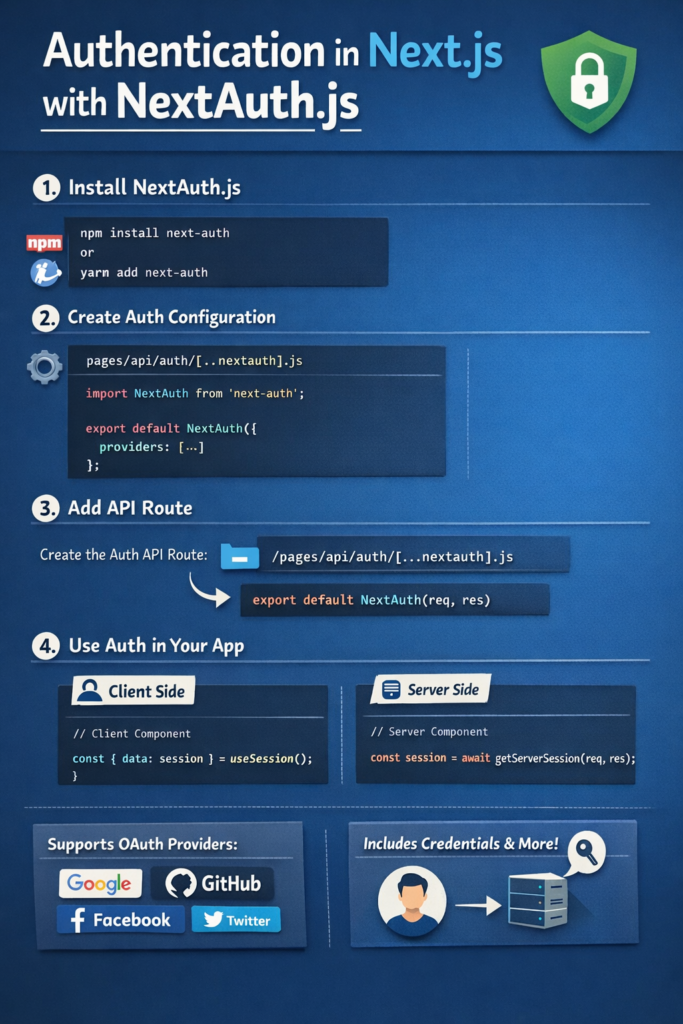
Authentication is one of the hardest parts of building web applications correctly. You need secure sessions, provider integrations, protected routes, and a clean developer experience all without leaking sensitive data or overcomplicating your architecture.
That’s exactly where NextAuth.js, now known as Auth.js, fits into the Next.js ecosystem.
Auth.js provides a production-ready authentication solution that integrates deeply with Next.js, supports OAuth providers, credentials-based login, JWTs, and database-backed sessions all with minimal boilerplate.
In this guide, you’ll learn how authentication in Next.js works with NextAuth.js, when to use each strategy, and how to structure auth in real-world apps.
What Is NextAuth.js (Auth.js)?
NextAuth.js started as a Next.js–specific authentication library. It later evolved into Auth.js, a framework-agnostic authentication solution with first-class support for Next.js.
At its core, Auth.js handles:
- User authentication
- Session management
- OAuth provider flows
- Secure cookies and tokens
You configure authentication once, and Auth.js handles the rest.
The official Auth.js documentation explains how the library standardizes auth across frameworks while keeping Next.js deeply optimized.
Why Use NextAuth.js in Next.js Apps?
Building authentication manually often leads to:
- Insecure cookie handling
- Broken session logic
- Repeated boilerplate across apps
- Difficult OAuth integrations
NextAuth.js solves these problems by:
- Handling cookies securely by default
- Supporting many OAuth providers out of the box
- Integrating with both App Router and Pages Router
- Reducing auth logic to configuration instead of custom code
This approach aligns well with the server-first philosophy explained in Server Actions in Next.js: Full-Stack Without an API.
Core Authentication Concepts
Before implementing anything, it helps to understand the building blocks.
Providers
A provider defines how users authenticate:
- OAuth (Google, GitHub, Apple, etc.)
- Credentials (email/password)
- Email magic links
Sessions
Sessions track who the user is after login. NextAuth supports:
- JWT-based sessions
- Database-backed sessions
Callbacks
Callbacks let you control:
- What goes into the session
- How JWTs are shaped
- Authorization logic
Understanding these concepts makes advanced setups much easier.
Basic Setup in Next.js App Router
With the App Router, authentication is configured using route handlers.
import NextAuth from "next-auth";
import GitHub from "next-auth/providers/github";

export const { handlers, auth } = NextAuth({
  providers: [
    GitHub({
      clientId: process.env.GITHUB_ID!,
      clientSecret: process.env.GITHUB_SECRET!,
    }),
  ],
});
You then export the handlers in route.ts:
export const { GET, POST } = handlers;
This setup works seamlessly with server components and Server Actions.
Protecting Routes and Server Components
One major advantage of Auth.js is server-side protection.
import { auth } from "@/auth";

export default async function DashboardPage() {
  const session = await auth();

  if (!session) {
    redirect("/login");
  }

  return <Dashboard />;
}
Because this check runs on the server, protected data never reaches unauthenticated users.
This pattern fits naturally with React Server Components Explained.
Using Credentials Authentication
OAuth is not always enough. Many apps still need email/password login.
import Credentials from "next-auth/providers/credentials";

Credentials({
  name: "Credentials",
  credentials: {
    email: {},
    password: {},
  },
  async authorize(credentials) {
    const user = await verifyUser(credentials);
    return user ?? null;
  },
});
Credentials providers give you full control, but they also make security your responsibility. Always:
- Hash passwords
- Rate-limit login attempts
- Validate inputs on the server
These concerns are closely related to API security topics covered in API Rate Limiting 101.
JWT vs Database Sessions
NextAuth lets you choose how sessions are stored.
JWT Sessions
JWT-based sessions:
- Do not require a database
- Scale easily
- Are stateless
However, they can grow large and are harder to revoke.
Database Sessions
Database sessions:
- Allow easy revocation
- Store less data in cookies
- Work well for enterprise apps
The official session strategy documentation explains the trade-offs in detail.
Accessing Session Data on the Client
Client components can access session data using hooks.
"use client";

import { useSession } from "next-auth/react";

export function UserMenu() {
  const { data: session } = useSession();
  return <span>{session?.user?.email}</span>;
}
Keep client-side usage minimal. Prefer server checks whenever possible for better security and performance.
Authorization vs Authentication
Authentication answers who the user is. Authorization answers what the user can do.
NextAuth handles authentication, but authorization is up to you. Common patterns include:
- Role checks in callbacks
- Permission checks inside Server Actions
- Route-level guards
This separation mirrors the guidance in Advanced API Security: Scopes, Claims, and Token Revocation.
Common Mistakes
Avoid these issues:
- Trusting client-side session data
- Skipping authorization checks
- Storing sensitive data in JWTs
- Mixing auth logic into UI components
Keeping auth logic server-side leads to cleaner and safer code.
When NextAuth.js Is the Right Choice
NextAuth.js is a great fit when:
- You build with Next.js
- You need OAuth and credentials support
- You want secure defaults
- You prefer configuration over custom auth logic
It may not be ideal if:
- You need a standalone auth service for many clients
- You require custom token formats for legacy systems
How Auth.js Fits Modern Next.js Architecture
Auth.js integrates naturally with:
- App Router
- Server Actions
- React Server Components
Instead of treating auth as a separate backend concern, it becomes part of your application’s core infrastructure.
This tight integration matches the broader Next.js direction discussed in Next.js App Router vs Pages Router: Migration Guide.
Conclusion
Authentication in Next.js becomes significantly easier with NextAuth.js (Auth.js). By handling sessions, providers, and security concerns for you, it lets you focus on building features instead of reimplementing auth flows.
Use Auth.js when:
- You want secure authentication with minimal setup
- You rely on server-first rendering
- You need OAuth and credentials in one system
With proper authorization checks and thoughtful session strategies, NextAuth.js provides a strong foundation for modern Next.js applications in 2026.


1 Comment