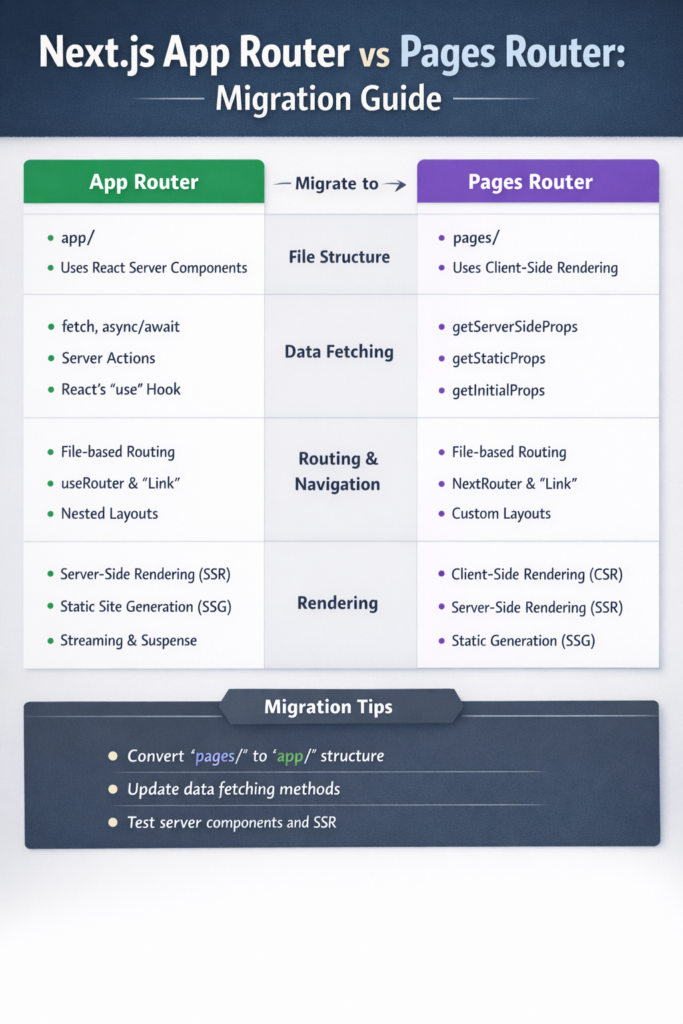
Next.js has gone through one of its biggest architectural shifts with the introduction of the App Router. While the Pages Router powered Next.js for years, modern versions encourage developers to adopt the App Router for new projects.
However, migration is not always obvious or necessary.
This guide explains Next.js App Router vs Pages Router, outlines the real differences, and shows how to migrate safely without breaking production applications.
Pages Router: The Traditional Model
The Pages Router is based on the /pages directory. Each file automatically becomes a route, and data fetching relies on well-known functions such as getStaticProps, getServerSideProps, and getStaticPaths.
This model is:
- Simple to understand
- Proven in production
- Well suited for traditional SSR and SSG
Many long-running projects still rely on this router successfully, especially those built before Next.js 13.
If you are already comfortable with file-based routing concepts, this approach feels similar to patterns discussed in Building a React App with Next.js 14.
Strengths of the Pages Router
- Clear mental model
- Stable and predictable behavior
- Mature ecosystem and tutorials
Limitations
- No native support for React Server Components
- Less flexible layouts
- Data fetching tightly coupled to routes
As applications grow, these constraints become more noticeable.
App Router: The Modern Architecture
The App Router introduces the /app directory and shifts Next.js toward a server-first mindset.
Key concepts include:
- React Server Components by default
- Nested layouts
- Streaming and suspense
- Colocated data fetching
This architecture reduces client-side JavaScript and improves performance for data-heavy applications.
The Next.js App Router documentation explains this shift as a foundational change rather than a simple API update.
Key Differences at a Glance
Routing
- Pages Router: file-based routes in
/pages - App Router: segment-based routing in
/app
Layouts
- Pages Router:
_app.tsxand_document.tsx - App Router: nested
layout.tsxfiles per route segment
Data Fetching
- Pages Router:
getStaticProps,getServerSideProps - App Router:
fetch()with caching, revalidation, and server components
Rendering Model
- Pages Router: client-first
- App Router: server-first
These changes closely align with concepts discussed in React Server Components Explained.
When You Should Migrate
Migration makes sense when:
- You want to adopt React Server Components
- Your app benefits from streaming and partial rendering
- You need flexible, nested layouts
- You are starting major refactors anyway
In contrast, migration may not be worth it if:
- The app is stable and mature
- You rely heavily on
getServerSidePropspatterns - The team lacks App Router experience
Next.js does not force migration. Both routers remain supported.
Migration Strategy: Step by Step
1. Start with a Hybrid Approach
Next.js allows using both routers in the same project. This makes incremental migration possible.
You can:
- Keep existing routes in
/pages - Add new routes in
/app
This reduces risk and avoids a full rewrite.
2. Move Layout Logic First
Extract global layout logic from _app.tsx into app/layout.tsx.
// app/layout.tsx
export default function RootLayout({ children }) {
  return (
    <html>
      <body>{children}</body>
    </html>
  );
}
Layouts are one of the biggest improvements in the App Router.
3. Replace Data Fetching Gradually
Instead of getServerSideProps, fetch data directly in server components:
const data = await fetch("https://api.example.com/data").then(res => res.json());
Caching and revalidation are handled automatically.
This mirrors patterns discussed in State Management in React 2026, where server state is treated differently from UI state.
4. Identify Client Components Explicitly
Components that use hooks or browser APIs must be marked:
"use client";

import { useState } from "react";
This boundary is essential for correct behavior.
5. Introduce Suspense and Streaming
Use <Suspense> to improve perceived performance:
<Suspense fallback={<Loading />}>
  <UserList />
</Suspense>
Streaming works naturally with server components and improves load times for complex pages.
Common Migration Pitfalls
Avoid these mistakes:
- Marking everything as
"use client" - Fetching data in client components unnecessarily
- Expecting App Router to behave like Pages Router
- Migrating everything at once
Most problems come from mixing old mental models with new architecture.
SEO and Metadata Differences
The App Router introduces a new metadata API:
export const metadata = {
  title: "My Page",
};
This replaces many next/head use cases and improves consistency.
For content-heavy sites, this change works well with SEO strategies discussed in Clean Code in Flutter—clear structure leads to better maintainability.
Performance Considerations
The App Router often delivers better performance because:
- Less JavaScript reaches the browser
- Data fetching runs on the server
- Streaming reduces blocking renders
However, misuse of client components can eliminate these benefits. Profiling and discipline still matter, just as they do in Flutter Performance Optimization Tips.
When Pages Router Still Makes Sense
Pages Router remains valid when:
- The app relies heavily on client-side logic
- Migration risk outweighs benefits
- The team prioritizes stability over new features
There is no penalty for staying on Pages Router.
Conclusion
The debate around Next.js App Router vs Pages Router is not about which one is “better.” It is about choosing the right tool for your application today.
- Pages Router offers stability and simplicity
- App Router enables modern, server-first architecture
A gradual migration allows teams to adopt new features without disrupting production systems.
If you plan to build or scale a Next.js app in 2026, understanding both routers and knowing when to migrate will save time, bugs, and future rewrites.

1 Comment