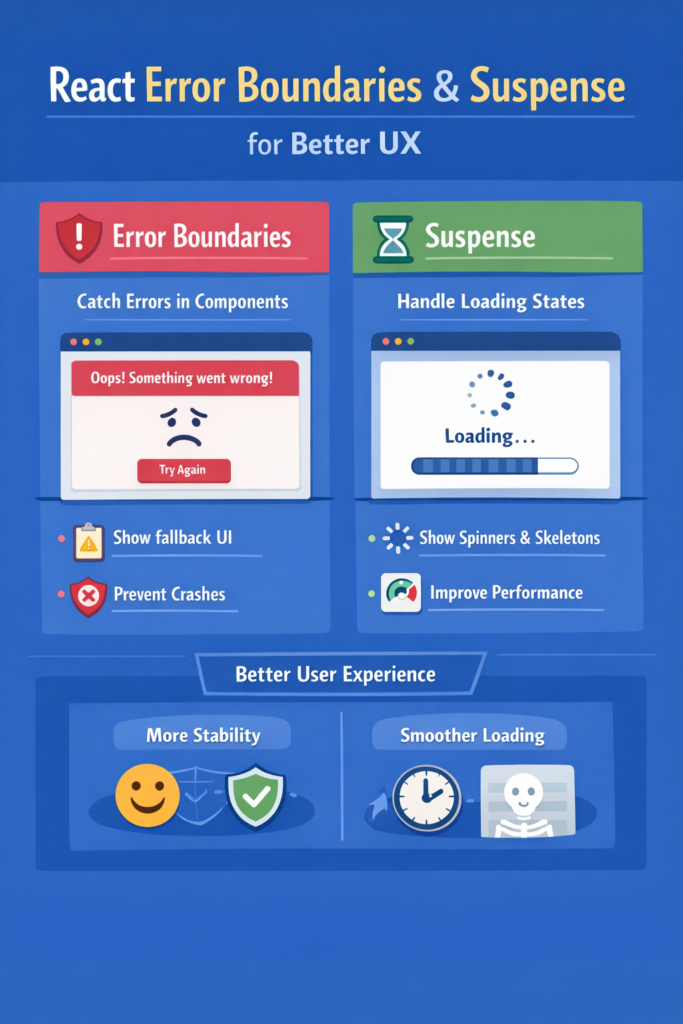
Even well-written React applications fail sometimes. APIs go down, data arrives late, and unexpected runtime errors still happen. The difference between a fragile app and a resilient one is how those failures are handled.
React provides two powerful tools to improve user experience during failures and loading states:
- Error Boundaries for runtime errors
- Suspense for asynchronous loading states
Used correctly, they prevent blank screens, reduce crashes, and keep users informed instead of confused.
In this guide, you’ll learn how to combine React Error Boundaries and Suspense to build smoother, more fault-tolerant user interfaces.
Why UX Suffers Without Proper Error Handling
When errors are not handled explicitly:
- The entire React tree can crash
- Users see a white screen
- Debugging becomes harder
- Trust in the product erodes
This problem becomes more visible in complex interfaces like dashboards, especially when rendering charts and tables together. That’s why resilient UI patterns matter in setups such as Building a Dashboard with React, Recharts, and TanStack Table.
What Are React Error Boundaries?
Error Boundaries are React components that catch JavaScript errors anywhere in their child component tree. They prevent the entire app from crashing and allow you to render a fallback UI instead.
Important to note:
- Error Boundaries catch rendering errors
- They do not catch async errors in event handlers
- They work only in class components (for now)
Basic Error Boundary Example
import React from "react";

class ErrorBoundary extends React.Component<
  { children: React.ReactNode },
  { hasError: boolean }
> {
  constructor(props: any) {
    super(props);
    this.state = { hasError: false };
  }

  static getDerivedStateFromError() {
    return { hasError: true };
  }

  componentDidCatch(error: Error, info: React.ErrorInfo) {
    console.error("Error caught:", error, info);
  }

  render() {
    if (this.state.hasError) {
      return <h2>Something went wrong.</h2>;
    }

    return this.props.children;
  }
}
This pattern ensures that a single broken component does not take down the entire application.
Where to Place Error Boundaries
Placement matters more than implementation.
Good locations include:
- Around major routes
- Around complex widgets (charts, tables)
- Around third-party components
Avoid wrapping the entire app in one boundary. Smaller, targeted boundaries produce better UX and easier debugging.
This layered approach mirrors defensive strategies used in backend systems, similar to how failure isolation is discussed in Understanding CAP Theorem and Practical Tradeoffs.
What Is React Suspense?
Suspense lets React pause rendering while waiting for something asynchronous, such as:
- Lazy-loaded components
- Data fetching (with compatible libraries)
- Code splitting
Instead of managing isLoading flags manually, Suspense renders a fallback UI until the content is ready.
Basic Suspense Example
import { Suspense, lazy } from "react";

const Chart = lazy(() => import("./Chart"));

export function Dashboard() {
  return (
    <Suspense fallback={<p>Loading chart...</p>}>
      <Chart />
    </Suspense>
  );
}
The user sees a loading indicator instead of a blank space.
Suspense for Data Fetching
Suspense becomes even more powerful when combined with server-state libraries. For example, TanStack Query can integrate with Suspense to simplify loading logic.
This approach aligns with patterns discussed in React Query (TanStack Query) for Server State Management, where loading and error states are handled declaratively instead of imperatively.
Error Boundaries vs Suspense: Different Responsibilities
Although they often appear together, they solve different problems:
- Error Boundaries handle what happens when things break
- Suspense handles what happens while things load
Think of them as safety nets at different stages of the rendering lifecycle.
Used together, they create resilient UI flows:
- Suspense handles waiting states
- Error Boundaries handle unexpected failures
Combining Error Boundaries and Suspense
Here’s a common and effective pattern:
<ErrorBoundary>
  <Suspense fallback={<Spinner />}>
    <ExpensiveComponent />
  </Suspense>
</ErrorBoundary>
With this setup:
- Loading states remain controlled
- Runtime crashes are isolated
- The rest of the app keeps working
This structure works especially well for data-heavy screens, real-time widgets, and third-party integrations.
Handling Async Errors Correctly
A common mistake is assuming Error Boundaries catch async errors. They don’t.
Async errors must be handled:
- Inside data-fetching libraries
- Via rejected promises
- Through controlled error states
Libraries like TanStack Query surface these errors cleanly, which can then be caught by Error Boundaries when thrown during render.
For real-time systems, error handling often pairs with retry and event-driven logic, similar to patterns discussed in Redis Pub/Sub for Real-Time Applications.
UX Best Practices for Fallback UI
Fallbacks should be:
- Informative but minimal
- Context-aware
- Non-blocking when possible
Good fallback examples:
- Skeleton loaders
- Inline spinners
- Partial UI placeholders
Avoid:
- Generic “Something went wrong” screens everywhere
- Blocking the entire app for one failed widget
Common Mistakes
Avoid these pitfalls:
- One global Error Boundary for the entire app
- Catching errors and silently ignoring them
- Using Suspense everywhere without intent
- Mixing loading logic and error handling inconsistently
Good UX comes from predictable failure behavior, not from hiding errors.
How This Fits Modern React Architecture
Modern React favors:
- Declarative data loading
- Server-first rendering
- Component-level fault isolation
Error Boundaries and Suspense support this direction by letting React control failure and loading flows instead of pushing everything into manual state management.
These ideas align with broader architectural discussions across the ecosystem, including structured async handling in React Hooks Deep Dive.
When to Use Each Tool
Use Error Boundaries when:
- Components may crash at render time
- Third-party code is involved
- You want graceful degradation
Use Suspense when:
- Components load asynchronously
- Data or code splitting affects render timing
- You want consistent loading UX
Most real-world apps benefit from using both together, not choosing one over the other.
Conclusion
React Error Boundaries and Suspense are essential tools for building better user experiences. Instead of letting errors crash your app or loading states block your UI, they give you structured control over failure and waiting.
By:
- Placing Error Boundaries strategically
- Using Suspense for async rendering
- Designing meaningful fallback UI
You can build React applications that feel stable, responsive, and professional—even when things go wrong.
In modern React development, resilience is not optional. It is part of good UX.