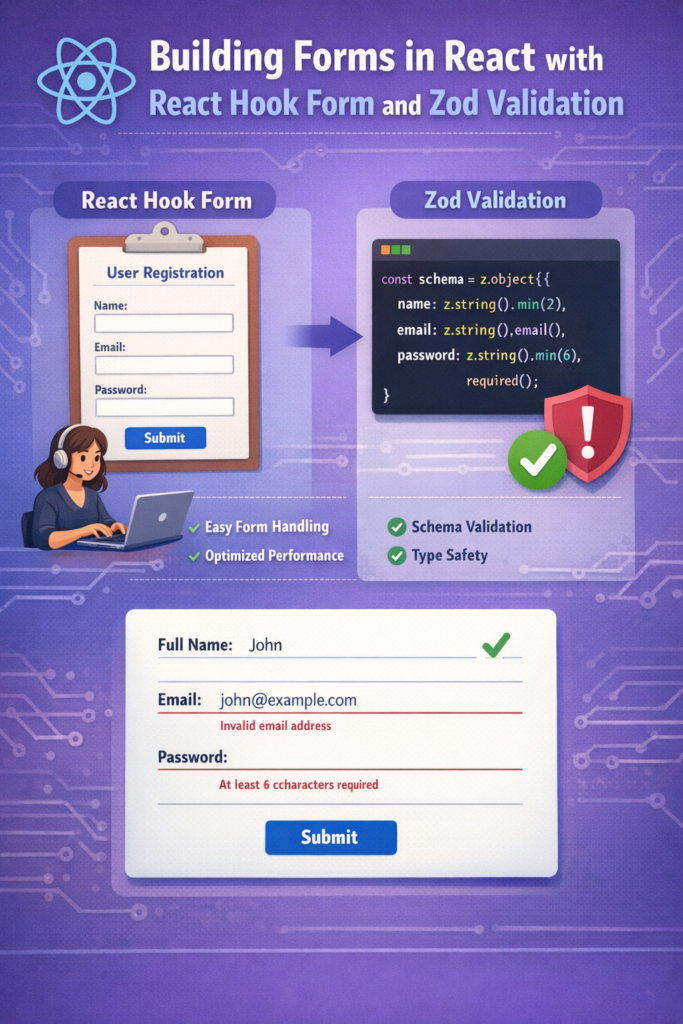
Forms are one of the hardest parts of frontend development. They combine user input, validation rules, async submission, error handling, accessibility, and performance concerns—all in one place.
In modern React applications, the combination of React Hook Form and Zod has become a reliable default for building forms that are fast, scalable, and easy to maintain. This approach avoids unnecessary re-renders, keeps validation logic explicit, and scales well as forms grow in complexity.
This guide shows how to build production-ready React forms using React Hook Form and Zod, with patterns that hold up in real applications.
Why Forms Are Still Hard in React
Many form implementations fail over time because they mix too many responsibilities:
- UI rendering
- State tracking
- Validation rules
- Error messages
- Submission logic
When everything lives in the same component, forms become brittle and hard to refactor.
Libraries like React Hook Form solve this by separating concerns, while schema validators like Zod make validation explicit and reusable.
Why React Hook Form Is the Go-To Choice
React Hook Form focuses on uncontrolled inputs and subscriptions instead of re-rendering on every keystroke. This design drastically improves performance compared to traditional controlled forms.
According to the React Hook Form documentation, the library is built around performance, minimal re-renders, and native HTML behavior.
Key Benefits
- Minimal re-renders
- Small bundle size
- Native form semantics
- Excellent TypeScript support
This makes React Hook Form a natural fit for large forms and complex flows, similar to how modern state management libraries reduce unnecessary updates, as discussed in state management in React 2026.
Why Zod Works So Well for Validation
Zod is a TypeScript-first schema validation library. Instead of scattering validation rules across components, you define them once in a schema.
The Zod documentation emphasizes strong typing, composability, and runtime safety—all critical for reliable forms.
What Zod Solves
- Single source of truth for validation
- Strongly typed form values
- Reusable schemas across frontend and backend
- Clear, readable validation rules
Zod fits especially well in projects where validation logic must stay consistent, such as APIs built with shared contracts or backend validation systems.
Connecting React Hook Form and Zod
React Hook Form integrates with schema validators through resolvers. This allows form validation to run against a Zod schema instead of ad-hoc rules.
Here’s a realistic example.
Step 1: Define a Zod Schema
import { z } from "zod";

export const loginSchema = z.object({
  email: z.string().email("Invalid email address"),
  password: z.string().min(8, "Password must be at least 8 characters"),
});

export type LoginFormValues = z.infer<typeof loginSchema>;
This schema becomes the single authority for validation.
Step 2: Create the Form with React Hook Form
import { useForm } from "react-hook-form";
import { zodResolver } from "@hookform/resolvers/zod";
import { loginSchema, LoginFormValues } from "./schema";

export function LoginForm() {
  const {
    register,
    handleSubmit,
    formState: { errors, isSubmitting },
  } = useForm<LoginFormValues>({
    resolver: zodResolver(loginSchema),
  });

  const onSubmit = async (data: LoginFormValues) => {
    console.log(data);
  };

  return (
    <form onSubmit={handleSubmit(onSubmit)}>
      <input {...register("email")} placeholder="Email" />
      {errors.email && <p>{errors.email.message}</p>}

      <input type="password" {...register("password")} placeholder="Password" />
      {errors.password && <p>{errors.password.message}</p>}

      <button disabled={isSubmitting}>Submit</button>
    </form>
  );
}
Validation now happens automatically, based on the schema, with no duplicated logic.
Handling Errors the Right Way
One common mistake is treating all errors the same. In real apps, you usually have:
- Client-side validation errors
- Server-side validation errors
- Network or unexpected errors
React Hook Form cleanly separates these concerns. Client validation errors live in formState.errors, while server errors can be injected manually using setError.
This approach mirrors best practices used when handling API errors gracefully, where different error sources require different UX responses.
Performance Considerations
Forms can quickly become performance bottlenecks if every keystroke triggers re-renders.
React Hook Form avoids this by:
- Subscribing only to fields that change
- Updating errors without re-rendering the entire form
- Keeping input state outside React where possible
These ideas align closely with React’s broader performance guidance and complement patterns discussed in React Server Components explained, where unnecessary client-side state is reduced.
Scaling Forms in Large Applications
As forms grow, structure becomes critical.
Recommended Patterns
- Keep schemas in separate files
- Group forms by feature
- Reuse Zod schemas across multiple forms
- Extract field components for consistency
For multi-step forms, keep a single form instance and conditionally render steps instead of splitting state across components.
Accessibility and Native Behavior
React Hook Form works with native HTML forms, which means:
- Browser validation behaviors still apply
- Screen readers work as expected
- Keyboard navigation remains intact
Always associate labels with inputs, surface error messages clearly, and avoid hiding validation feedback behind custom abstractions.
Common Mistakes to Avoid
- Mixing schema validation and inline rules
- Overusing controlled inputs
- Duplicating validation logic in UI and submit handlers
- Ignoring server-side validation errors
Most form bugs come from duplicated logic, not from the libraries themselves.
When This Stack Is Not Enough
React Hook Form + Zod covers most use cases. However, very dynamic form builders or visual editors may require additional abstractions.
Even then, this stack often forms the foundation, with higher-level components built on top.
Conclusion
Building forms in React does not have to be painful.
React Hook Form provides performance and simplicity, while Zod delivers strong, reusable validation. Together, they form a scalable, type-safe approach that works for small forms and complex workflows alike.
If you are building modern React applications in 2026, this combination is one of the safest long-term choices you can make.

2 Comments