Most React apps get “state” wrong by treating server data like normal UI state. A list from an API, a dashboard report, and a user profile behave differently than a modal toggle or a text input. Server data can change outside your app, it becomes stale, and it needs caching plus synchronization.
That is exactly what React Query (TanStack Query) solves.
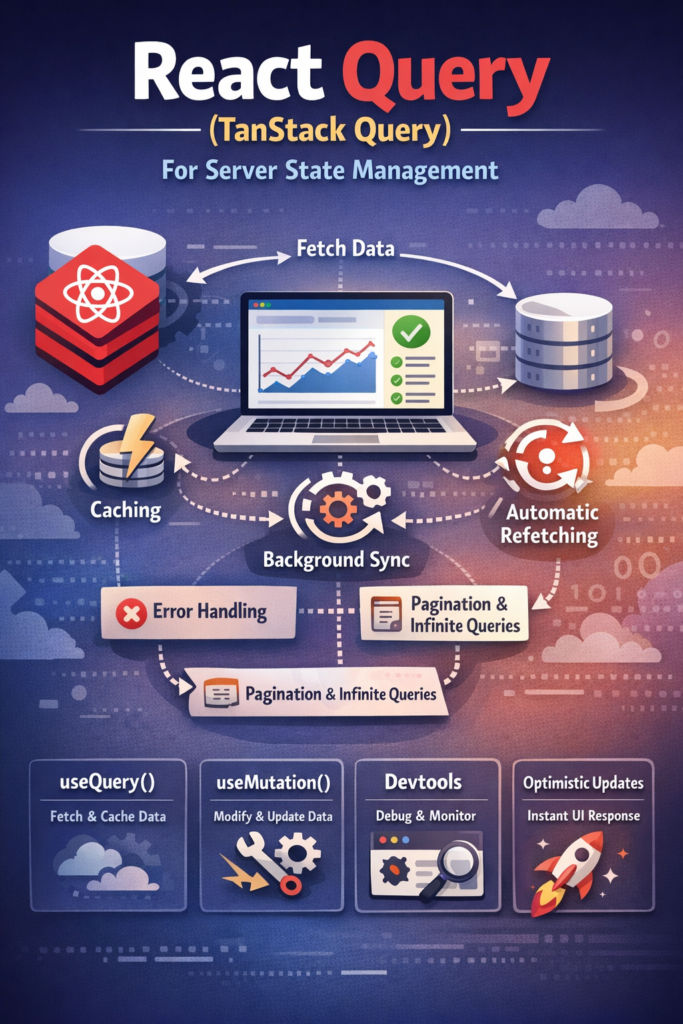
TanStack Query gives you a dedicated layer for server state management. Instead of fetching data in useEffect, storing it in random global state, and fighting invalidation bugs, you let the query cache do the heavy lifting.
What “Server State” Actually Means
Server state is data that:
- lives remotely (API, DB, third-party services)
- can change without user actions
- needs caching and refetch rules
- becomes stale by default
Examples:
- “Users” list in an admin dashboard
- Revenue totals over the last 30 days
- Search results and filters
- Permissions and feature flags fetched from a backend
By contrast, UI state stays local and predictable. If you mix them, you often end up with stale screens and weird refresh logic.
Why TanStack Query Exists
Without React Query, many teams build the same fragile pipeline:
- fetch in
useEffect - store results in local state or a global store
- track loading/error flags manually
- implement retries and cache invalidation yourself
That approach works for one screen. However, it becomes painful across a whole product.
TanStack Query exists to:
- cache responses automatically
- track loading/error states consistently
- refetch at the right time (focus, interval, invalidation)
- keep UI synced with backend changes
The official reference is the TanStack Query documentation.
Installation and Setup
npm install @tanstack/react-query
Create a QueryClient and add the provider at the root:
import { QueryClient, QueryClientProvider } from "@tanstack/react-query";

const queryClient = new QueryClient();

export function App({ children }: { children: React.ReactNode }) {
  return (
    <QueryClientProvider client={queryClient}>
      {children}
    </QueryClientProvider>
  );
}
That’s your cache layer.
Fetching Data with useQuery
useQuery is the core hook.
import { useQuery } from "@tanstack/react-query";

async function fetchUsers() {
  const res = await fetch("/api/users");
  if (!res.ok) throw new Error("Failed to fetch users");
  return res.json();
}

export function UsersList() {
  const { data, isLoading, isError, error } = useQuery({
    queryKey: ["users"],
    queryFn: fetchUsers,
    staleTime: 30_000, // 30s
  });

  if (isLoading) return <p>Loading...</p>;
  if (isError) return <p>{(error as Error).message}</p>;

  return (
    <ul>
      {data.map((u: any) => (
        <li key={u.id}>{u.email}</li>
      ))}
    </ul>
  );
}
Notice what you did not write:
- no
useEffect - no
setStatefor loading/errors - no manual caching logic
Query Keys: Your Caching Contract
Query keys define identity.
Good keys are stable and descriptive:
["users"]["users", userId]["orders", { status, page }]
Bad keys cause accidental refetching or stale screens.
A good mental model: treat query keys like indexes. If your key design is sloppy, your cache behavior will be sloppy too.
Mutations: Writing Data + Cache Invalidation
Queries fetch. Mutations change.
import { useMutation, useQueryClient } from "@tanstack/react-query";

async function createUser(body: { email: string }) {
  const res = await fetch("/api/users", {
    method: "POST",
    headers: { "content-type": "application/json" },
    body: JSON.stringify(body),
  });
  if (!res.ok) throw new Error("Failed to create user");
  return res.json();
}

export function CreateUserButton() {
  const queryClient = useQueryClient();

  const { mutate, isPending } = useMutation({
    mutationFn: createUser,
    onSuccess: () => {
      queryClient.invalidateQueries({ queryKey: ["users"] });
    },
  });

  return (
    <button disabled={isPending} onClick={() => mutate({ email: "a@b.com" })}>
      {isPending ? "Creating..." : "Create user"}
    </button>
  );
}
This pattern is extremely useful in forms too. If you want a clean form setup, pair this with Building Forms in React with React Hook Form and Zod Validation.
Optimistic Updates (Fast UX, Real Discipline)
Optimistic updates make UIs feel instant. You update the cache first, then roll back if the server fails.
import { useMutation, useQueryClient } from "@tanstack/react-query";

useMutation({
  mutationFn: updateUser,
  onMutate: async (nextUser) => {
    await queryClient.cancelQueries({ queryKey: ["users"] });

    const previous = queryClient.getQueryData(["users"]);
    queryClient.setQueryData(["users"], (old: any) =>
      old.map((u: any) => (u.id === nextUser.id ? { ...u, ...nextUser } : u))
    );

    return { previous };
  },
  onError: (_err, _nextUser, ctx) => {
    queryClient.setQueryData(["users"], ctx?.previous);
  },
  onSettled: () => {
    queryClient.invalidateQueries({ queryKey: ["users"] });
  },
});
Use optimistic updates when the UX benefit is real. Otherwise, prefer simple invalidation.
Pagination and Infinite Queries
Dashboards and search screens need pagination.
Offset / page-based pagination
useQuery({
  queryKey: ["orders", page],
  queryFn: () => fetchOrders({ page }),
  keepPreviousData: true,
});
Cursor-based pagination with infinite scroll
useInfiniteQuery({
  queryKey: ["feed"],
  queryFn: ({ pageParam }) => fetchFeed({ cursor: pageParam }),
  getNextPageParam: (lastPage) => lastPage.nextCursor,
});
These patterns map directly to real reporting screens, especially if you use the table setup shown in Building a Dashboard with React, Recharts, and TanStack Table.
Real-Time Data: What React Query Is (and Isn’t)
React Query handles caching and background sync. It does not magically give you real-time events.
If you need real-time, you typically combine:
- WebSockets / SSE / Pub/Sub for events
- React Query invalidation or cache updates when events arrive
For real-time patterns, a good companion read is Redis Pub/Sub for Real-Time Applications.
Common Mistakes
Avoid these:
- Using React Query for local UI state
- Building unstable query keys (objects recreated every render)
- Forgetting invalidation after mutations
- Refetching too aggressively with no
staleTime - Duplicating server cache into Redux/Context “just because”
When you treat server state as a first-class layer, the rest of your UI becomes simpler.
When React Query Is the Right Choice
TanStack Query is an excellent default when:
- your app consumes lots of remote data
- caching and consistency matter
- you need stable loading/error patterns
- you want fewer “data fetching” bugs
For tiny apps or mostly static pages, it can be overkill. For real products, it pays off fast.
Conclusion
React Query (TanStack Query) changes the way you build React apps because it gives server state a dedicated home. Instead of pushing server responses into random stores, you rely on a predictable cache with clear invalidation rules.
If you build modern React apps in 2026, TanStack Query is one of the best tools you can add to your stack especially when you combine it with strong forms, structured dashboards, and real-time invalidation patterns.