Introduction
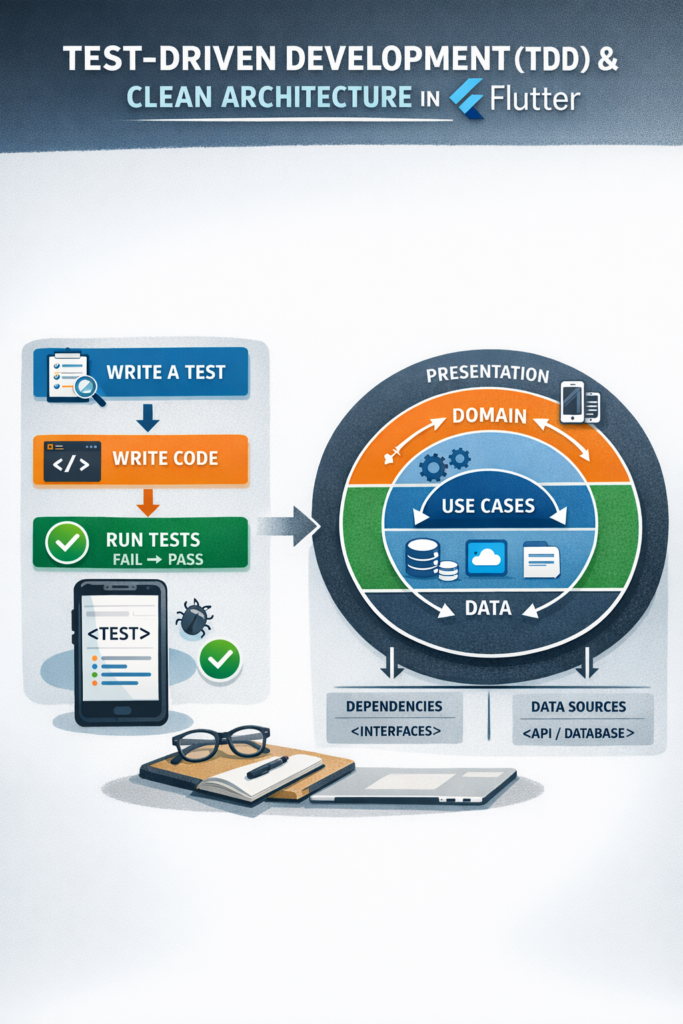
Building Flutter apps that scale over time requires more than working features. Code must be easy to test, simple to change, and safe to refactor. Test-Driven Development (TDD) and Clean Architecture work especially well together to achieve these goals. TDD ensures your code is testable from the start, while Clean Architecture provides the structure that makes testing straightforward. In this comprehensive guide, you will learn how TDD fits into Flutter development, how Clean Architecture structures your code into testable layers, and how combining both leads to maintainable, reliable, and scalable applications.
Why TDD Matters in Flutter
Flutter apps often grow quickly, especially when features and UI evolve together. Without tests, refactoring becomes risky and slow. TDD changes this workflow by putting tests first, which leads to better design decisions and more reliable code.
- Catch bugs early in development before they reach production
- Improve confidence when refactoring or adding features
- Encourage simpler and cleaner code through testability requirements
- Reduce regression issues with comprehensive test coverage
- Act as living documentation that explains how code should behave
As a result, teams spend less time fixing bugs and more time building features that users love.
What Is Test-Driven Development?
TDD follows a simple and repeatable cycle known as Red-Green-Refactor:
- Red: Write a failing test that describes desired behavior
- Green: Write the minimum code to make the test pass
- Refactor: Improve the code while keeping tests green
This cycle keeps development focused and prevents over-engineering by only implementing what tests require.
// Step 1: RED - Write a failing test
void main() {
  group('EmailValidator', () {
    test('returns true for valid email', () {
      final validator = EmailValidator();
      expect(validator.isValid('user@example.com'), isTrue);
    });

    test('returns false for invalid email', () {
      final validator = EmailValidator();
      expect(validator.isValid('invalid-email'), isFalse);
    });

    test('returns false for empty string', () {
      final validator = EmailValidator();
      expect(validator.isValid(''), isFalse);
    });
  });
}

// Step 2: GREEN - Implement minimum code to pass
class EmailValidator {
  bool isValid(String email) {
    if (email.isEmpty) return false;
    final emailRegex = RegExp(r'^[\w-\.]+@([\w-]+\.)+[\w-]{2,4}$');
    return emailRegex.hasMatch(email);
  }
}

// Step 3: REFACTOR - Improve while keeping tests green
class EmailValidator {
  static final _emailRegex = RegExp(r'^[\w-\.]+@([\w-]+\.)+[\w-]{2,4}$');

  bool isValid(String email) {
    return email.isNotEmpty && _emailRegex.hasMatch(email);
  }
}
Clean Architecture Overview
Clean Architecture separates concerns clearly by organizing code into layers with strict dependency rules. Each layer has specific responsibilities, and dependencies always point inward toward the domain layer.
┌─────────────────────────────────────────────────────┐
│                 Presentation Layer                   │
│            (Widgets, BLoCs, Cubits)                 │
├─────────────────────────────────────────────────────┤
│                   Domain Layer                       │
│      (Entities, Use Cases, Repository Interfaces)   │
├─────────────────────────────────────────────────────┤
│                    Data Layer                        │
│    (Repositories, Data Sources, DTOs, Mappers)      │
└─────────────────────────────────────────────────────┘

Dependency Rule: Outer layers depend on inner layers
                 Inner layers know nothing about outer layers
This structure aligns naturally with unit testing and TDD because:
- Business logic is framework-independent and can be tested without Flutter
- UI depends on abstractions, not concrete implementations
- Data sources are replaceable with mocks for testing
- Dependencies point inward, making each layer independently testable
Domain Layer: The Core of Your Application
The domain layer contains pure business logic with no Flutter or framework dependencies, making it the easiest layer to test and the best place to start with TDD.
Entities
Entities represent core business objects that encapsulate business rules:
// lib/domain/entities/user.dart
import 'package:equatable/equatable.dart';

class User extends Equatable {
  final String id;
  final String email;
  final String name;
  final DateTime createdAt;
  final UserRole role;

  const User({
    required this.id,
    required this.email,
    required this.name,
    required this.createdAt,
    this.role = UserRole.user,
  });

  bool get isAdmin => role == UserRole.admin;
  bool get isNewUser => DateTime.now().difference(createdAt).inDays < 30;

  @override
  List get props => [id, email, name, createdAt, role];
}

enum UserRole { user, admin, moderator }

// lib/domain/entities/auth_credentials.dart
class AuthCredentials extends Equatable {
  final String email;
  final String password;

  const AuthCredentials({
    required this.email,
    required this.password,
  });

  @override
  List get props => [email, password];
}
Repository Interfaces
Repository interfaces define contracts that the data layer must implement:
// lib/domain/repositories/auth_repository.dart
import 'package:dartz/dartz.dart';
import '../entities/user.dart';
import '../failures/failure.dart';

abstract class AuthRepository {
  /// Authenticates user with email and password
  Future> login(String email, String password);

  /// Registers a new user account
  Future> register({
    required String email,
    required String password,
    required String name,
  });

  /// Returns currently authenticated user or null
  Future> getCurrentUser();

  /// Signs out the current user
  Future> logout();

  /// Sends password reset email
  Future> resetPassword(String email);
}

// lib/domain/failures/failure.dart
abstract class Failure extends Equatable {
  final String message;
  const Failure(this.message);

  @override
  List get props => [message];
}

class ServerFailure extends Failure {
  const ServerFailure([String message = 'Server error occurred'])
      : super(message);
}

class NetworkFailure extends Failure {
  const NetworkFailure([String message = 'No internet connection'])
      : super(message);
}

class AuthFailure extends Failure {
  const AuthFailure([String message = 'Authentication failed'])
      : super(message);
}

class ValidationFailure extends Failure {
  const ValidationFailure(String message) : super(message);
}
Use Cases
Use cases encapsulate single business operations and are perfect for TDD:
// lib/domain/usecases/login_usecase.dart
import 'package:dartz/dartz.dart';
import '../entities/user.dart';
import '../failures/failure.dart';
import '../repositories/auth_repository.dart';

class LoginUseCase {
  final AuthRepository _repository;

  LoginUseCase(this._repository);

  Future> call({
    required String email,
    required String password,
  }) async {
    // Validation logic in the use case
    if (email.isEmpty) {
      return const Left(ValidationFailure('Email is required'));
    }
    if (password.isEmpty) {
      return const Left(ValidationFailure('Password is required'));
    }
    if (password.length < 6) {
      return const Left(
        ValidationFailure('Password must be at least 6 characters'),
      );
    }

    return _repository.login(email, password);
  }
}

// lib/domain/usecases/register_usecase.dart
class RegisterUseCase {
  final AuthRepository _repository;

  RegisterUseCase(this._repository);

  Future> call({
    required String email,
    required String password,
    required String confirmPassword,
    required String name,
  }) async {
    if (name.trim().isEmpty) {
      return const Left(ValidationFailure('Name is required'));
    }
    if (email.isEmpty || !_isValidEmail(email)) {
      return const Left(ValidationFailure('Valid email is required'));
    }
    if (password.length < 8) {
      return const Left(
        ValidationFailure('Password must be at least 8 characters'),
      );
    }
    if (password != confirmPassword) {
      return const Left(ValidationFailure('Passwords do not match'));
    }

    return _repository.register(
      email: email,
      password: password,
      name: name.trim(),
    );
  }

  bool _isValidEmail(String email) {
    return RegExp(r'^[\w-\.]+@([\w-]+\.)+[\w-]{2,4}$').hasMatch(email);
  }
}
Applying TDD to the Domain Layer
The domain layer is the best place to start with TDD because it has no external dependencies. Let's write tests first for our use cases:
// test/domain/usecases/login_usecase_test.dart
import 'package:dartz/dartz.dart';
import 'package:flutter_test/flutter_test.dart';
import 'package:mockito/annotations.dart';
import 'package:mockito/mockito.dart';

import 'login_usecase_test.mocks.dart';

@GenerateMocks([AuthRepository])
void main() {
  late LoginUseCase useCase;
  late MockAuthRepository mockRepository;

  setUp(() {
    mockRepository = MockAuthRepository();
    useCase = LoginUseCase(mockRepository);
  });

  const tEmail = 'test@example.com';
  const tPassword = 'password123';
  final tUser = User(
    id: '1',
    email: tEmail,
    name: 'Test User',
    createdAt: DateTime.now(),
  );

  group('LoginUseCase', () {
    test('should return User when login is successful', () async {
      // Arrange
      when(mockRepository.login(any, any))
          .thenAnswer((_) async => Right(tUser));

      // Act
      final result = await useCase(
        email: tEmail,
        password: tPassword,
      );

      // Assert
      expect(result, Right(tUser));
      verify(mockRepository.login(tEmail, tPassword)).called(1);
      verifyNoMoreInteractions(mockRepository);
    });

    test('should return ValidationFailure when email is empty', () async {
      // Act
      final result = await useCase(
        email: '',
        password: tPassword,
      );

      // Assert
      expect(
        result,
        const Left(ValidationFailure('Email is required')),
      );
      verifyZeroInteractions(mockRepository);
    });

    test('should return ValidationFailure when password is empty', () async {
      // Act
      final result = await useCase(
        email: tEmail,
        password: '',
      );

      // Assert
      expect(
        result,
        const Left(ValidationFailure('Password is required')),
      );
      verifyZeroInteractions(mockRepository);
    });

    test('should return ValidationFailure when password is too short',
        () async {
      // Act
      final result = await useCase(
        email: tEmail,
        password: '12345',
      );

      // Assert
      expect(
        result,
        const Left(
          ValidationFailure('Password must be at least 6 characters'),
        ),
      );
      verifyZeroInteractions(mockRepository);
    });

    test('should return AuthFailure when credentials are invalid', () async {
      // Arrange
      when(mockRepository.login(any, any))
          .thenAnswer((_) async => const Left(AuthFailure('Invalid credentials')));

      // Act
      final result = await useCase(
        email: tEmail,
        password: tPassword,
      );

      // Assert
      expect(
        result,
        const Left(AuthFailure('Invalid credentials')),
      );
    });

    test('should return NetworkFailure when no internet', () async {
      // Arrange
      when(mockRepository.login(any, any))
          .thenAnswer((_) async => const Left(NetworkFailure()));

      // Act
      final result = await useCase(
        email: tEmail,
        password: tPassword,
      );

      // Assert
      expect(result.isLeft(), isTrue);
      result.fold(
        (failure) => expect(failure, isA()),
        (_) => fail('Expected failure'),
      );
    });
  });
}
Data Layer: Implementing Repository Contracts
The data layer provides implementations for repository interfaces, handling API calls, local storage, and data mapping.
// lib/data/models/user_model.dart
import '../../domain/entities/user.dart';

class UserModel extends User {
  const UserModel({
    required super.id,
    required super.email,
    required super.name,
    required super.createdAt,
    super.role,
  });

  factory UserModel.fromJson(Map json) {
    return UserModel(
      id: json['id'] as String,
      email: json['email'] as String,
      name: json['name'] as String,
      createdAt: DateTime.parse(json['created_at'] as String),
      role: UserRole.values.firstWhere(
        (r) => r.name == json['role'],
        orElse: () => UserRole.user,
      ),
    );
  }

  Map toJson() {
    return {
      'id': id,
      'email': email,
      'name': name,
      'created_at': createdAt.toIso8601String(),
      'role': role.name,
    };
  }
}

// lib/data/datasources/auth_remote_datasource.dart
abstract class AuthRemoteDataSource {
  Future login(String email, String password);
  Future register(String email, String password, String name);
  Future logout();
  Future resetPassword(String email);
}

class AuthRemoteDataSourceImpl implements AuthRemoteDataSource {
  final http.Client _client;
  final String _baseUrl;

  AuthRemoteDataSourceImpl({
    required http.Client client,
    required String baseUrl,
  })  : _client = client,
        _baseUrl = baseUrl;

  @override
  Future login(String email, String password) async {
    final response = await _client.post(
      Uri.parse('$_baseUrl/auth/login'),
      headers: {'Content-Type': 'application/json'},
      body: jsonEncode({'email': email, 'password': password}),
    );

    if (response.statusCode == 200) {
      final json = jsonDecode(response.body) as Map;
      return UserModel.fromJson(json['user']);
    } else if (response.statusCode == 401) {
      throw AuthException('Invalid credentials');
    } else {
      throw ServerException('Server error: ${response.statusCode}');
    }
  }

  @override
  Future register(
    String email,
    String password,
    String name,
  ) async {
    final response = await _client.post(
      Uri.parse('$_baseUrl/auth/register'),
      headers: {'Content-Type': 'application/json'},
      body: jsonEncode({
        'email': email,
        'password': password,
        'name': name,
      }),
    );

    if (response.statusCode == 201) {
      final json = jsonDecode(response.body) as Map;
      return UserModel.fromJson(json['user']);
    } else if (response.statusCode == 409) {
      throw AuthException('Email already exists');
    } else {
      throw ServerException('Server error: ${response.statusCode}');
    }
  }

  @override
  Future logout() async {
    await _client.post(Uri.parse('$_baseUrl/auth/logout'));
  }

  @override
  Future resetPassword(String email) async {
    final response = await _client.post(
      Uri.parse('$_baseUrl/auth/reset-password'),
      headers: {'Content-Type': 'application/json'},
      body: jsonEncode({'email': email}),
    );

    if (response.statusCode != 200) {
      throw ServerException('Failed to send reset email');
    }
  }
}

// lib/data/repositories/auth_repository_impl.dart
class AuthRepositoryImpl implements AuthRepository {
  final AuthRemoteDataSource _remoteDataSource;
  final AuthLocalDataSource _localDataSource;
  final NetworkInfo _networkInfo;

  AuthRepositoryImpl({
    required AuthRemoteDataSource remoteDataSource,
    required AuthLocalDataSource localDataSource,
    required NetworkInfo networkInfo,
  })  : _remoteDataSource = remoteDataSource,
        _localDataSource = localDataSource,
        _networkInfo = networkInfo;

  @override
  Future> login(
    String email,
    String password,
  ) async {
    if (!await _networkInfo.isConnected) {
      return const Left(NetworkFailure());
    }

    try {
      final user = await _remoteDataSource.login(email, password);
      await _localDataSource.cacheUser(user);
      return Right(user);
    } on AuthException catch (e) {
      return Left(AuthFailure(e.message));
    } on ServerException catch (e) {
      return Left(ServerFailure(e.message));
    } catch (e) {
      return Left(ServerFailure(e.toString()));
    }
  }

  @override
  Future> getCurrentUser() async {
    try {
      final user = await _localDataSource.getCachedUser();
      return Right(user);
    } catch (e) {
      return const Right(null);
    }
  }

  @override
  Future> logout() async {
    try {
      await _localDataSource.clearUser();
      if (await _networkInfo.isConnected) {
        await _remoteDataSource.logout();
      }
      return const Right(null);
    } catch (e) {
      return Left(ServerFailure(e.toString()));
    }
  }
}
TDD in the Data Layer
Data layer tests focus on API interactions, data mapping, and error handling:
// test/data/repositories/auth_repository_impl_test.dart
@GenerateMocks([AuthRemoteDataSource, AuthLocalDataSource, NetworkInfo])
void main() {
  late AuthRepositoryImpl repository;
  late MockAuthRemoteDataSource mockRemoteDataSource;
  late MockAuthLocalDataSource mockLocalDataSource;
  late MockNetworkInfo mockNetworkInfo;

  setUp(() {
    mockRemoteDataSource = MockAuthRemoteDataSource();
    mockLocalDataSource = MockAuthLocalDataSource();
    mockNetworkInfo = MockNetworkInfo();
    repository = AuthRepositoryImpl(
      remoteDataSource: mockRemoteDataSource,
      localDataSource: mockLocalDataSource,
      networkInfo: mockNetworkInfo,
    );
  });

  group('login', () {
    const tEmail = 'test@example.com';
    const tPassword = 'password123';
    final tUserModel = UserModel(
      id: '1',
      email: tEmail,
      name: 'Test User',
      createdAt: DateTime(2024, 1, 1),
    );

    test('should check if device is online', () async {
      // Arrange
      when(mockNetworkInfo.isConnected).thenAnswer((_) async => true);
      when(mockRemoteDataSource.login(any, any))
          .thenAnswer((_) async => tUserModel);
      when(mockLocalDataSource.cacheUser(any)).thenAnswer((_) async {});

      // Act
      await repository.login(tEmail, tPassword);

      // Assert
      verify(mockNetworkInfo.isConnected).called(1);
    });

    group('device is online', () {
      setUp(() {
        when(mockNetworkInfo.isConnected).thenAnswer((_) async => true);
      });

      test('should return User when remote call is successful', () async {
        // Arrange
        when(mockRemoteDataSource.login(any, any))
            .thenAnswer((_) async => tUserModel);
        when(mockLocalDataSource.cacheUser(any)).thenAnswer((_) async {});

        // Act
        final result = await repository.login(tEmail, tPassword);

        // Assert
        expect(result, Right(tUserModel));
        verify(mockRemoteDataSource.login(tEmail, tPassword)).called(1);
        verify(mockLocalDataSource.cacheUser(tUserModel)).called(1);
      });

      test('should cache user locally when login is successful', () async {
        // Arrange
        when(mockRemoteDataSource.login(any, any))
            .thenAnswer((_) async => tUserModel);
        when(mockLocalDataSource.cacheUser(any)).thenAnswer((_) async {});

        // Act
        await repository.login(tEmail, tPassword);

        // Assert
        verify(mockLocalDataSource.cacheUser(tUserModel)).called(1);
      });

      test('should return AuthFailure when credentials are invalid', () async {
        // Arrange
        when(mockRemoteDataSource.login(any, any))
            .thenThrow(AuthException('Invalid credentials'));

        // Act
        final result = await repository.login(tEmail, tPassword);

        // Assert
        expect(result, const Left(AuthFailure('Invalid credentials')));
        verifyZeroInteractions(mockLocalDataSource);
      });

      test('should return ServerFailure when server error occurs', () async {
        // Arrange
        when(mockRemoteDataSource.login(any, any))
            .thenThrow(ServerException('Server error'));

        // Act
        final result = await repository.login(tEmail, tPassword);

        // Assert
        expect(result.isLeft(), isTrue);
        result.fold(
          (failure) => expect(failure, isA()),
          (_) => fail('Expected failure'),
        );
      });
    });

    group('device is offline', () {
      setUp(() {
        when(mockNetworkInfo.isConnected).thenAnswer((_) async => false);
      });

      test('should return NetworkFailure when device is offline', () async {
        // Act
        final result = await repository.login(tEmail, tPassword);

        // Assert
        expect(result, const Left(NetworkFailure()));
        verifyZeroInteractions(mockRemoteDataSource);
        verifyZeroInteractions(mockLocalDataSource);
      });
    });
  });
}
Presentation Layer: BLoC with Clean Architecture
The presentation layer contains UI logic and state management. Using BLoC or Cubit keeps business logic testable and separate from widgets.
// lib/presentation/bloc/auth/auth_state.dart
import 'package:equatable/equatable.dart';
import '../../../domain/entities/user.dart';

abstract class AuthState extends Equatable {
  const AuthState();

  @override
  List get props => [];
}

class AuthInitial extends AuthState {
  const AuthInitial();
}

class AuthLoading extends AuthState {
  const AuthLoading();
}

class AuthAuthenticated extends AuthState {
  final User user;

  const AuthAuthenticated(this.user);

  @override
  List get props => [user];
}

class AuthUnauthenticated extends AuthState {
  const AuthUnauthenticated();
}

class AuthError extends AuthState {
  final String message;

  const AuthError(this.message);

  @override
  List get props => [message];
}

// lib/presentation/bloc/auth/auth_cubit.dart
import 'package:flutter_bloc/flutter_bloc.dart';
import '../../../domain/usecases/login_usecase.dart';
import '../../../domain/usecases/logout_usecase.dart';
import '../../../domain/usecases/get_current_user_usecase.dart';
import 'auth_state.dart';

class AuthCubit extends Cubit {
  final LoginUseCase _loginUseCase;
  final LogoutUseCase _logoutUseCase;
  final GetCurrentUserUseCase _getCurrentUserUseCase;

  AuthCubit({
    required LoginUseCase loginUseCase,
    required LogoutUseCase logoutUseCase,
    required GetCurrentUserUseCase getCurrentUserUseCase,
  })  : _loginUseCase = loginUseCase,
        _logoutUseCase = logoutUseCase,
        _getCurrentUserUseCase = getCurrentUserUseCase,
        super(const AuthInitial());

  Future checkAuthStatus() async {
    emit(const AuthLoading());

    final result = await _getCurrentUserUseCase();

    result.fold(
      (failure) => emit(const AuthUnauthenticated()),
      (user) {
        if (user != null) {
          emit(AuthAuthenticated(user));
        } else {
          emit(const AuthUnauthenticated());
        }
      },
    );
  }

  Future login({
    required String email,
    required String password,
  }) async {
    emit(const AuthLoading());

    final result = await _loginUseCase(
      email: email,
      password: password,
    );

    result.fold(
      (failure) => emit(AuthError(failure.message)),
      (user) => emit(AuthAuthenticated(user)),
    );
  }

  Future logout() async {
    emit(const AuthLoading());

    final result = await _logoutUseCase();

    result.fold(
      (failure) => emit(AuthError(failure.message)),
      (_) => emit(const AuthUnauthenticated()),
    );
  }
}
Testing the Presentation Layer
Use bloc_test to test BLoC and Cubit logic:
// test/presentation/bloc/auth_cubit_test.dart
import 'package:bloc_test/bloc_test.dart';
import 'package:dartz/dartz.dart';
import 'package:flutter_test/flutter_test.dart';
import 'package:mockito/annotations.dart';
import 'package:mockito/mockito.dart';

import 'auth_cubit_test.mocks.dart';

@GenerateMocks([LoginUseCase, LogoutUseCase, GetCurrentUserUseCase])
void main() {
  late AuthCubit cubit;
  late MockLoginUseCase mockLoginUseCase;
  late MockLogoutUseCase mockLogoutUseCase;
  late MockGetCurrentUserUseCase mockGetCurrentUserUseCase;

  setUp(() {
    mockLoginUseCase = MockLoginUseCase();
    mockLogoutUseCase = MockLogoutUseCase();
    mockGetCurrentUserUseCase = MockGetCurrentUserUseCase();
    cubit = AuthCubit(
      loginUseCase: mockLoginUseCase,
      logoutUseCase: mockLogoutUseCase,
      getCurrentUserUseCase: mockGetCurrentUserUseCase,
    );
  });

  tearDown(() {
    cubit.close();
  });

  final tUser = User(
    id: '1',
    email: 'test@example.com',
    name: 'Test User',
    createdAt: DateTime(2024, 1, 1),
  );

  group('login', () {
    blocTest(
      'emits [AuthLoading, AuthAuthenticated] when login succeeds',
      build: () {
        when(mockLoginUseCase(email: anyNamed('email'), password: anyNamed('password')))
            .thenAnswer((_) async => Right(tUser));
        return cubit;
      },
      act: (cubit) => cubit.login(
        email: 'test@example.com',
        password: 'password123',
      ),
      expect: () => [
        const AuthLoading(),
        AuthAuthenticated(tUser),
      ],
      verify: (_) {
        verify(mockLoginUseCase(
          email: 'test@example.com',
          password: 'password123',
        )).called(1);
      },
    );

    blocTest(
      'emits [AuthLoading, AuthError] when login fails',
      build: () {
        when(mockLoginUseCase(email: anyNamed('email'), password: anyNamed('password')))
            .thenAnswer((_) async => const Left(AuthFailure('Invalid credentials')));
        return cubit;
      },
      act: (cubit) => cubit.login(
        email: 'test@example.com',
        password: 'wrong',
      ),
      expect: () => [
        const AuthLoading(),
        const AuthError('Invalid credentials'),
      ],
    );

    blocTest(
      'emits [AuthLoading, AuthError] when validation fails',
      build: () {
        when(mockLoginUseCase(email: anyNamed('email'), password: anyNamed('password')))
            .thenAnswer((_) async => const Left(ValidationFailure('Email is required')));
        return cubit;
      },
      act: (cubit) => cubit.login(email: '', password: 'password'),
      expect: () => [
        const AuthLoading(),
        const AuthError('Email is required'),
      ],
    );
  });

  group('checkAuthStatus', () {
    blocTest(
      'emits [AuthLoading, AuthAuthenticated] when user is logged in',
      build: () {
        when(mockGetCurrentUserUseCase())
            .thenAnswer((_) async => Right(tUser));
        return cubit;
      },
      act: (cubit) => cubit.checkAuthStatus(),
      expect: () => [
        const AuthLoading(),
        AuthAuthenticated(tUser),
      ],
    );

    blocTest(
      'emits [AuthLoading, AuthUnauthenticated] when no user is logged in',
      build: () {
        when(mockGetCurrentUserUseCase())
            .thenAnswer((_) async => const Right(null));
        return cubit;
      },
      act: (cubit) => cubit.checkAuthStatus(),
      expect: () => [
        const AuthLoading(),
        const AuthUnauthenticated(),
      ],
    );
  });

  group('logout', () {
    blocTest(
      'emits [AuthLoading, AuthUnauthenticated] when logout succeeds',
      build: () {
        when(mockLogoutUseCase()).thenAnswer((_) async => const Right(null));
        return cubit;
      },
      act: (cubit) => cubit.logout(),
      expect: () => [
        const AuthLoading(),
        const AuthUnauthenticated(),
      ],
    );
  });
}
Dependency Injection Setup
Proper dependency injection is essential for testing. Use get_it with injectable for clean setup:
// lib/injection.dart
import 'package:get_it/get_it.dart';
import 'package:injectable/injectable.dart';
import 'package:http/http.dart' as http;

final getIt = GetIt.instance;

@InjectableInit()
void configureDependencies() => getIt.init();

@module
abstract class RegisterModule {
  @lazySingleton
  http.Client get httpClient => http.Client();

  @lazySingleton
  @Named('baseUrl')
  String get baseUrl => 'https://api.example.com';
}

// lib/injection.config.dart (generated)
// Use: flutter pub run build_runner build

// Manual registration example:
void setupDependencies() {
  // External
  getIt.registerLazySingleton(() => http.Client());
  getIt.registerLazySingleton(() => NetworkInfoImpl());

  // Data sources
  getIt.registerLazySingleton(
    () => AuthRemoteDataSourceImpl(
      client: getIt(),
      baseUrl: 'https://api.example.com',
    ),
  );
  getIt.registerLazySingleton(
    () => AuthLocalDataSourceImpl(),
  );

  // Repositories
  getIt.registerLazySingleton(
    () => AuthRepositoryImpl(
      remoteDataSource: getIt(),
      localDataSource: getIt(),
      networkInfo: getIt(),
    ),
  );

  // Use cases
  getIt.registerLazySingleton(() => LoginUseCase(getIt()));
  getIt.registerLazySingleton(() => LogoutUseCase(getIt()));
  getIt.registerLazySingleton(() => GetCurrentUserUseCase(getIt()));
  getIt.registerLazySingleton(() => RegisterUseCase(getIt()));

  // BLoCs/Cubits
  getIt.registerFactory(
    () => AuthCubit(
      loginUseCase: getIt(),
      logoutUseCase: getIt(),
      getCurrentUserUseCase: getIt(),
    ),
  );
}
Widget Testing with TDD
Test widgets after business logic is solid:
// test/presentation/pages/login_page_test.dart
import 'package:flutter/material.dart';
import 'package:flutter_bloc/flutter_bloc.dart';
import 'package:flutter_test/flutter_test.dart';
import 'package:mocktail/mocktail.dart';

class MockAuthCubit extends MockCubit implements AuthCubit {}

void main() {
  late MockAuthCubit mockAuthCubit;

  setUp(() {
    mockAuthCubit = MockAuthCubit();
  });

  Widget createTestWidget() {
    return MaterialApp(
      home: BlocProvider.value(
        value: mockAuthCubit,
        child: const LoginPage(),
      ),
    );
  }

  group('LoginPage', () {
    testWidgets('displays login form initially', (tester) async {
      when(() => mockAuthCubit.state).thenReturn(const AuthInitial());

      await tester.pumpWidget(createTestWidget());

      expect(find.byType(TextFormField), findsNWidgets(2));
      expect(find.text('Email'), findsOneWidget);
      expect(find.text('Password'), findsOneWidget);
      expect(find.byType(ElevatedButton), findsOneWidget);
    });

    testWidgets('shows loading indicator when AuthLoading', (tester) async {
      when(() => mockAuthCubit.state).thenReturn(const AuthLoading());

      await tester.pumpWidget(createTestWidget());

      expect(find.byType(CircularProgressIndicator), findsOneWidget);
    });

    testWidgets('calls login when form is submitted', (tester) async {
      when(() => mockAuthCubit.state).thenReturn(const AuthInitial());
      when(() => mockAuthCubit.login(
            email: any(named: 'email'),
            password: any(named: 'password'),
          )).thenAnswer((_) async {});

      await tester.pumpWidget(createTestWidget());

      await tester.enterText(
        find.byKey(const Key('email_field')),
        'test@example.com',
      );
      await tester.enterText(
        find.byKey(const Key('password_field')),
        'password123',
      );
      await tester.tap(find.byType(ElevatedButton));
      await tester.pump();

      verify(() => mockAuthCubit.login(
            email: 'test@example.com',
            password: 'password123',
          )).called(1);
    });

    testWidgets('shows error snackbar when AuthError', (tester) async {
      whenListen(
        mockAuthCubit,
        Stream.fromIterable([
          const AuthLoading(),
          const AuthError('Invalid credentials'),
        ]),
        initialState: const AuthInitial(),
      );

      await tester.pumpWidget(createTestWidget());
      await tester.pumpAndSettle();

      expect(find.text('Invalid credentials'), findsOneWidget);
    });
  });
}
Common Mistakes to Avoid
Mistake 1: Testing Widgets Before Business Logic
// ❌ Wrong - Starting with widget tests
testWidgets('login button works', (tester) async {
  // Testing UI before domain logic is solid
});

// ✅ Correct - Start with domain layer tests
test('LoginUseCase validates credentials', () async {
  // Test business logic first
});
Mistake 2: Skipping the Refactor Step
// ❌ Wrong - Writing code just to pass tests, never refactoring
class LoginUseCase {
  Future> call(String e, String p) async {
    if (e == '') return Left(ValidationFailure(''));
    if (p == '') return Left(ValidationFailure(''));
    // Messy code that "works"
  }
}

// ✅ Correct - Refactor after tests pass
class LoginUseCase {
  Future> call({
    required String email,
    required String password,
  }) async {
    final validationResult = _validate(email, password);
    if (validationResult != null) return Left(validationResult);
    return _repository.login(email, password);
  }

  ValidationFailure? _validate(String email, String password) {
    if (email.isEmpty) return const ValidationFailure('Email is required');
    if (password.isEmpty) return const ValidationFailure('Password is required');
    return null;
  }
}
Mistake 3: Over-Mocking Implementation Details
// ❌ Wrong - Mocking internal implementation
test('login calls repository.login then caches user', () {
  // Testing implementation details, not behavior
  verify(mockRepository.login(any, any)).called(1);
  verify(mockCache.set('user', any)).called(1);
  verify(mockLogger.info(any)).called(1);
});

// ✅ Correct - Test behavior and outcomes
test('login returns user when credentials are valid', () async {
  when(mockRepository.login(any, any))
      .thenAnswer((_) async => Right(tUser));

  final result = await useCase(email: email, password: password);

  expect(result, Right(tUser));
});
Mistake 4: Tight Coupling Between Layers
// ❌ Wrong - Domain layer depends on data layer
import 'package:http/http.dart'; // Framework dependency in domain!

class LoginUseCase {
  final http.Client client; // Direct dependency on HTTP client
}

// ✅ Correct - Domain depends on abstractions
class LoginUseCase {
  final AuthRepository _repository; // Depends on interface
}
Recommended Project Structure
lib/
├── core/
│   ├── error/
│   │   ├── exceptions.dart
│   │   └── failures.dart
│   ├── network/
│   │   └── network_info.dart
│   └── usecases/
│       └── usecase.dart
├── data/
│   ├── datasources/
│   │   ├── auth_local_datasource.dart
│   │   └── auth_remote_datasource.dart
│   ├── models/
│   │   └── user_model.dart
│   └── repositories/
│       └── auth_repository_impl.dart
├── domain/
│   ├── entities/
│   │   └── user.dart
│   ├── repositories/
│   │   └── auth_repository.dart
│   └── usecases/
│       ├── login_usecase.dart
│       ├── logout_usecase.dart
│       └── register_usecase.dart
├── presentation/
│   ├── bloc/
│   │   └── auth/
│   │       ├── auth_cubit.dart
│   │       └── auth_state.dart
│   ├── pages/
│   │   ├── login_page.dart
│   │   └── home_page.dart
│   └── widgets/
│       └── auth_form.dart
└── injection.dart

test/
├── data/
│   ├── datasources/
│   └── repositories/
├── domain/
│   └── usecases/
├── presentation/
│   ├── bloc/
│   └── pages/
└── fixtures/
Conclusion
Test-Driven Development and Clean Architecture form a strong foundation for scalable Flutter apps. By testing business logic first and structuring code into clear layers, you gain confidence, flexibility, and long-term stability. The domain layer becomes the heart of your application, completely independent of Flutter and easily testable. The data layer handles external concerns while remaining swappable. The presentation layer stays thin and focused on UI logic.
Although TDD feels slower at first, it pays off quickly with fewer production bugs, faster refactoring, and higher developer confidence. When applied correctly, TDD and Clean Architecture transform Flutter development into a predictable and maintainable process.
If you want to deepen your Flutter architecture skills, read Clean Architecture with BLoC in Flutter. For state management patterns, explore State Management in Flutter: BLoC, Riverpod, and Provider. You can also reference the official Flutter testing documentation and BLoC library documentation.



2 Comments