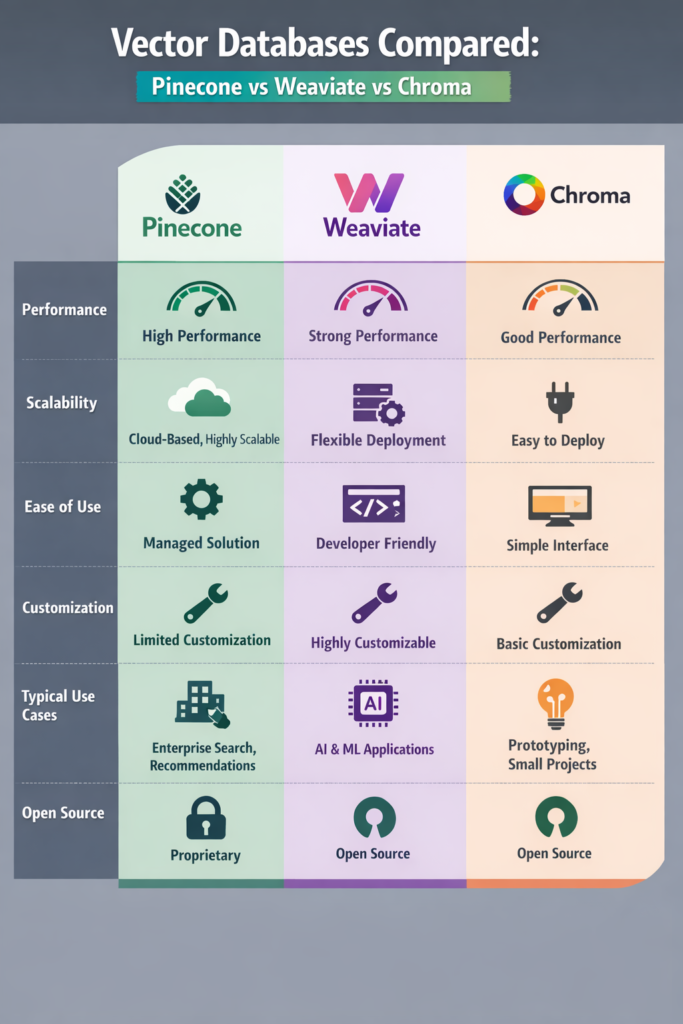
Vector databases play a central role in modern AI systems. However, choosing the right one often causes confusion. This vector databases compared guide focuses on Pinecone, Weaviate, and Chroma, three popular options with very different goals and trade-offs.
If you are building semantic search, recommendations, or retrieval-augmented generation (RAG), this article helps you decide which database fits your needs before scale and cost become hard to change.
Why Vector Databases Matter in AI Systems
Traditional databases excel at exact matches. By contrast, vector databases focus on similarity. They store embeddings and retrieve results based on meaning rather than keywords.
This approach underpins many AI workflows described in building apps with OpenAI API, where embeddings enrich chat responses with relevant internal data.
Under the hood, vector databases rely on approximate nearest neighbor algorithms. As a result, they trade perfect accuracy for speed and scalability. Understanding this balance helps avoid poor performance decisions later.
Pinecone: Fully Managed and Scalable by Design
Pinecone targets production workloads where reliability matters more than customization. It provides a fully managed service that hides infrastructure details.
Architecture Overview
Pinecone handles storage, indexing, and querying behind a hosted API. Meanwhile, it manages replicas, scaling, and tuning automatically.
This model mirrors the trade-offs discussed in multi-tenant SaaS app design, where managed services often reduce operational risk at the cost of flexibility.
Strengths
- Eliminates infrastructure management
- Delivers predictable performance at scale
- Provides strong uptime guarantees
Limitations
- Introduces vendor lock-in
- Becomes expensive at high volume
- Limits control over indexing internals
Teams usually choose Pinecone when speed of delivery and stability outweigh deep system control.
Weaviate: Flexible and Open-Source Friendly
Weaviate offers an open-source vector database with rich query features. Unlike Pinecone, it supports both self-hosted and managed deployments.
Architecture Overview
Weaviate combines vector similarity with structured filters and hybrid keyword search. As a result, teams can query embeddings alongside traditional fields.
This flexibility aligns with API design choices discussed in REST vs GraphQL vs gRPC, where query expressiveness often drives architectural decisions.
Strengths
- Supports open-source and self-hosted setups
- Enables hybrid vector and keyword search
- Handles structured metadata well
Limitations
- Requires more setup and tuning
- Adds operational responsibility when self-hosted
- Demands deeper system understanding at scale
Weaviate works best when domain data and embeddings must live side by side.
Chroma: Simple and Developer-Focused
Chroma prioritizes ease of use and local workflows. Developers often adopt it for experimentation, small projects, or early-stage RAG systems.
Architecture Overview
Chroma runs locally or as a lightweight service. Instead of focusing on distributed scale, it optimizes for fast setup and tight tooling integration.
Because of this, it fits naturally into early AI pipelines, similar to patterns used in LangChain fundamentals.
Strengths
- Extremely fast to set up
- Ideal for local testing and prototypes
- Integrates well with LLM tooling
Limitations
- Lacks high availability guarantees
- Does not scale to large datasets
- Offers limited production safeguards
Chroma works best as a development tool rather than long-term infrastructure.
Performance and Scalability Considerations
Performance depends on dataset size, vector dimensions, and query frequency. In practice, each database behaves differently.
For example, Pinecone scales horizontally with minimal effort. By contrast, Weaviate scales well but needs careful tuning. Meanwhile, Chroma performs well locally but slows down as data grows.
These trade-offs resemble broader infrastructure decisions described in infrastructure as code with Terraform, where tooling maturity directly affects outcomes.
Real-World Scenario: Choosing for a RAG Pipeline
Consider a mid-sized SaaS product adding semantic search for internal documents. Initially, the team uses Chroma for local experiments. Later, as usage increases, they evaluate Weaviate to support metadata filtering. Eventually, they migrate to Pinecone to meet uptime and scale requirements.
This progression highlights a common pattern. Teams often start simple and move toward managed services as reliability becomes critical.
Cost, Operations, and Maintenance
Cost grows quickly with vector databases. Storage size, index complexity, and query volume all contribute.
- Pinecone pricing scales with usage and availability needs
- Weaviate costs depend on hosting and tuning choices
- Chroma has minimal cost but limited guarantees
Therefore, teams should monitor usage early, following the same discipline outlined in API rate limiting 101.
When to Use Pinecone
Use Pinecone if:
- Uptime and horizontal scaling are critical
- You want to avoid managing infrastructure
- You serve user-facing AI features at scale
When to Use Weaviate
Weaviate is a strong choice when:
- Hybrid vector and keyword search is required
- Open-source control matters
- Structured metadata drives queries
When to Use Chroma
Chroma works best in cases such as:
- Prototyping or early experimentation
- Local or small-scale pipelines
- Situations where simplicity matters more than durability
Common Mistakes
- Treating vector databases like traditional databases
- Ignoring cost growth from embeddings
- Indexing low-value or noisy data
- Choosing a solution without a migration plan
Conclusion and Next Steps
Vector databases are not interchangeable. Pinecone focuses on managed scale, Weaviate balances flexibility and control, and Chroma optimizes for developer speed. Choosing correctly depends on scale, reliability needs, and team experience.
As a next step, estimate your embedding volume and query frequency. That analysis usually clarifies which database fits long before production traffic arrives.

4 Comments