Choosing between Vercel vs Netlify vs Cloudflare used to be a question about developer experience. In 2026 it is mostly a question about metering, because all three rewrote their pricing inside the last two years and no two of them charge for the same thing any more. Vercel bills a platform fee plus a monthly credit you burn down. Netlify converted every meter it has into credits. Cloudflare still refuses to charge for bandwidth at all. Line those three models up and the cheapest platform changes completely depending on which workload you feed it.
This post is for the engineer who has to defend a hosting line item, either in a migration proposal or in an invoice that grew faster than traffic did. Every rate below was read from the vendor on one stated day, and every monthly total is computed from those rates by arithmetic printed in full, so you can re-check it when the prices move. They will move, because two of these three have changed their billing model since 2025.
The short version, argued in detail below: on a static site Cloudflare is free and the other two land within a dollar of each other. On a server-rendered app Netlify undercuts Vercel by about twenty percent while Cloudflare costs an order of magnitude less. On anything bandwidth-heavy, Netlify becomes the most expensive option of the three by a wide margin, and Vercel only stays sane if you buy a flat-rate tier that its own fair-use policy may not let you keep.
Where These Vercel vs Netlify vs Cloudflare Prices Came From
Every rate here came from the vendor’s own pricing or documentation page, read on the same afternoon. Nothing is quoted from a summary, a comparison site, or a sales deck.
Prices read 2026-09-22
Region: Vercel iad1 (Washington D.C.), US list pricing, monthly billing
Vercel:     Pro platform fee, iad1 on-demand rates, Flat Rate CDN tiers
Netlify:    credit-based plans, Pro credit tiers, published credit meters
Cloudflare: Workers Paid (Standard), Pages, R2, Images list rates
Units: 1 GB = 1,000 MB and 1 MB = 1,000 KB, the convention all three bill in
Excluded: annual prepay discounts, enterprise contracts, support plans,
          WAF and firewall add-ons, SAML, databases, third-party services
The primary sources are Vercel pricing with its iad1 regional rate card, Netlify pricing with the credit meter documentation, and Cloudflare Workers pricing. Check any figure below against them before you act on it.
Three exclusions matter, and hiding them would make the totals dishonest. First, annual prepay is out, which costs Cloudflare a small discount on its Pro zone plan. Second, databases are out entirely, since all three now sell one and comparing them would double the length of this post. Third, observability add-ons and WAF rules are out, because each is optional on all three platforms and each is priced differently enough to deserve separate treatment.
The Three Platforms Do Not Meter the Same Things
Before any number means anything, look at what each vendor actually counts. This is the table that explains every result further down.
| Metered resource | Vercel Pro | Netlify Pro | Cloudflare |
|---|---|---|---|
| Data transfer out | $0.15 per GB | 20 credits per GB (about $0.133) | Not metered |
| HTTP requests | $2.00 per 1M edge requests | 2 credits per 10,000 (about $0.133 per 1M) | Static assets free and unlimited |
| Function invocations | $0.60 per 1M | Not metered separately | 10M included, then $0.30 per 1M |
| Compute time | $0.128 per Active CPU hour | 10 credits per GB-hour (about $0.067) | $0.02 per 1M CPU-milliseconds |
| Memory while waiting on I/O | $0.0106 per GB-hour, billed | Billed as GB-hours | Not billed |
| Production deploys | Build minutes at $0.007 | 15 credits each (about $0.10) | Free to 500 builds a month |
| Deploy previews | Build minutes at $0.007 | 0 credits | Free within the build allowance |
| Team seats that deploy | $20 per month each | Unlimited, included | Not seat-based |
| Base fee | $20 per month, includes $20 credit | $20 per month, includes 3,000 credits | $5 per month for Workers Paid |
Two rows decide most of the outcome
The first is data transfer, where Cloudflare’s zero is not a promotional rate but a standing position it has held for years. The second is the memory-while-waiting row: Vercel bills provisioned memory for the whole life of a function instance including time spent blocked on a database, Netlify bills wall-clock GB-hours which amounts to the same thing, and Cloudflare bills only CPU milliseconds actually consumed. For an I/O-bound API that difference is not a rounding error.
Base fees work like prepaid credit, not floors
Vercel’s $20 Pro fee is not a floor with usage stacked on top in the usual way. Instead it includes $20 of usage credit that expires monthly, so a team using $15 of infrastructure pays $20, while a team using $85 pays $20 plus $65. Netlify’s $20 works the same way in credits. Cloudflare’s $5 Workers subscription, by contrast, behaves like a conventional base fee with allowances attached.
Workload A: A Static Marketing Site at 125 GB a Month
The first workload is the one most teams actually run: a content or marketing site with no server-side rendering at all.
500,000 page views per month
12 HTTP requests per page view  = 6,000,000 requests
250 KB transferred per page view = 125 GB
60 production deploys per month, 3 build minutes each = 180 build minutes
1 developer, no server-side compute
Pricing the static site on Vercel: $32.01
The arithmetic runs against the iad1 rate card. Edge requests come to 6,000,000 at $2.00 per million, which is $12.00. Fast Data Transfer adds 125 GB at $0.15, which is $18.75. Build minutes on a Basic machine cost 180 at $0.007, or $1.26. That totals $32.01 of usage, the $20 monthly credit absorbs the first $20 of it, and the $20 platform fee sits underneath. The bill is $32.01.
Notice what did not happen. The Pro plan includes the lowest Flat Rate CDN tier at no cost, and that tier covers 1 million CDN requests and 1 TB of data transfer. This site uses 6 million requests against 125 GB. It blows through the request allowance six times over while consuming an eighth of the bandwidth allowance. Vercel’s included CDN capacity is request-bound rather than bandwidth-bound, so on a normal site you hit the request wall long before you notice the bandwidth one.
Converting the same traffic into Netlify credits: $33.00
Bandwidth costs 125 GB at 20 credits per GB, which is 2,500 credits. Web requests cost 6,000,000 divided by 10,000, then doubled, which is 1,200 credits. Production deploys cost 60 at 15 credits each, or 900 credits. The total is 4,600 credits against the 3,000 the base Pro plan includes. Two auto-recharge packs at 1,500 credits for $10 would cost $20 on top of the $20 base, so the better move is the 5,000-credit tier at a flat $33.00.
Serving it from Cloudflare Pages: $0.00
Requests to static assets are free and unlimited on both the free and paid plans, bandwidth is not metered, and 60 deploys sit comfortably inside the free plan’s 500 builds a month. The only thing you give up is build concurrency, which the free plan caps at one build at a time.
Comparing the four configurations
| Platform | Configuration | Monthly bill |
|---|---|---|
| Cloudflare Pages | Free plan | $0.00 |
| Vercel Pro | On-demand CDN | $32.01 |
| Netlify Pro | 5,000-credit tier | $33.00 |
| Vercel Pro | Flat Rate CDN, $20 tier | $40.00 |
That last row deserves a pause, because it is the single most common mispurchase on Vercel. Buying up to the $20 Flat Rate CDN tier costs $40 a month for traffic that costs $32.01 on demand. Flat Rate CDN is spike insurance rather than a discount, and at low volume the premium is real.
Workload B: A Next.js SaaS App With SSR and API Routes
The second workload adds server-side rendering, API routes and a team. Here the three billing models genuinely diverge.
2,000,000 page views per month
8 HTTP requests per page view = 16,000,000 requests
180 KB transferred per page view = 360 GB
4,000,000 function invocations (SSR pages plus API routes)
Per invocation: 50 ms active CPU, 250 ms instance lifetime, 2 GB memory
120 production deploys per month, 4 build minutes each = 480 build minutes
3 developers who deploy
Splitting the Vercel bill across five meters: $144.76
The function side decomposes into three of them. Active CPU is 4,000,000 invocations at 50 ms, which is 200,000 seconds or 55.56 hours, and at $0.128 per hour that is $7.11. Provisioned memory is 2 GB held for 250 ms across 4,000,000 invocations, which is 2,000,000 GB-seconds or 555.56 GB-hours, and at $0.0106 per GB-hour that is $5.89. Invocations themselves cost 4,000,000 at $0.60 per million, or $2.40. Compute therefore totals $15.40, which is genuinely cheap.
The delivery side is not. Edge requests run 16,000,000 at $2.00 per million for $32.00, and Fast Data Transfer runs 360 GB at $0.15 for $54.00. Build minutes add $3.36. Usage comes to $104.76, the credit absorbs $20, and the platform fee plus two additional deploying seats at $20 each adds $60. The bill is $144.76. Buying the $100 Flat Rate CDN tier that this request volume would require pushes it to $158.76, so on-demand again wins.
Counting the same app in Netlify credits: $115.00
Netlify meters this workload differently. Bandwidth is 360 GB at 20 credits, or 7,200 credits. Web requests are 16,000,000 at 2 credits per 10,000, or 3,200 credits. Compute is the same 555.56 GB-hours at 10 credits each, or 5,556 credits. Deploys are 120 at 15 credits, or 1,800 credits. That totals 17,756 credits. The 15,000-credit tier at $95 plus two recharge packs at $10 covers it for $115.00, and every one of those three developers is free, because Pro includes unlimited members.
Billing only CPU milliseconds on Cloudflare: $8.40
Cloudflare bills almost none of this. Static asset requests are free, so only the 4,000,000 dynamic requests count, and those sit inside the 10 million included with Workers Paid. CPU time is 4,000,000 invocations at 50 ms, which is 200 million CPU-milliseconds against 30 million included, leaving 170 million at $0.02 per million, or $3.40. Bandwidth is $0.00. With the $5 subscription the bill is $8.40, rising to $33.40 if the team buys the Cloudflare Pro zone plan at $25 a month for five concurrent builds.
Reading that gap honestly
| Platform | What dominates the bill | Monthly bill |
|---|---|---|
| Cloudflare Workers Paid | CPU milliseconds only | $8.40 |
| Netlify Pro | Bandwidth, then compute GB-hours | $115.00 |
| Vercel Pro | Data transfer, then edge requests, then seats | $144.76 |
The seventeenfold spread across that table is real, but it comes with a caveat. Workers is not Node. It runs V8 isolates with a Web-standard API surface, which means no filesystem, no native modules and a different adapter for Next.js. Consequently the engineering you pay instead is just as real as the saving. That trade is priced properly further down.
Workload C: An Image-Heavy Store Pushing 5.1 TB
The third workload ends arguments, because bandwidth stops being a rounding error and becomes the entire bill.
1,500,000 page views per month
20 HTTP requests per page view = 30,000,000 requests
3.4 MB transferred per page view = 5,100 GB
60,000 unique image transformations per month
8 images delivered per view = 12,000,000 image cache reads
60 production deploys per month, 3 build minutes each = 180 build minutes
1 developer, static pages plus an image pipeline
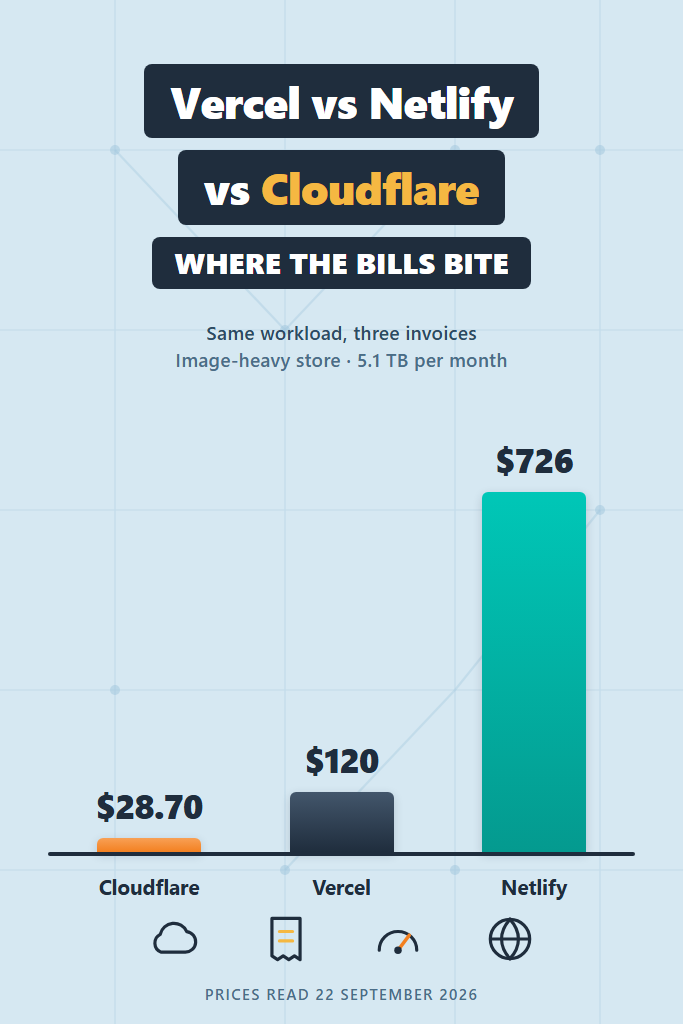
Watching Vercel data transfer reach $834.30
On-demand pricing is brutal here. Edge requests cost 30,000,000 at $2.00 per million, or $60.00. Fast Data Transfer costs 5,100 GB at $0.15, or $765.00. Image optimization adds 60 thousand-blocks of transformations at $0.05 ($3.00), 12 million cache reads at $0.40 per million ($4.80) and 60,000 cache writes at $4.00 per million ($0.24). With build minutes the usage reaches $834.30, and after the credit and platform fee the bill is $834.30.
Capping the same traffic with Flat Rate CDN: $120.00
This is precisely the case Flat Rate CDN exists for. The $100 tier covers 50 million CDN requests and 50 TB of transfer, which swallows both the 30 million requests and the 5.1 TB whole. The remaining $9.30 of image and build charges disappears into the monthly credit, so the bill drops to $120.00. That is a sevenfold reduction for changing a toggle, and it is the strongest argument in this post for reading a pricing page carefully rather than assuming usage-based billing is always fairer.
There is a catch, and it is written into the policy. Vercel’s Flat Rate CDN eligibility rules exclude large-scale delivery of media or files where such delivery makes up the majority of bandwidth usage, and they reserve the right to move offending projects onto the Flex CDN tier. A store serving 5.1 TB of product photography is not obviously outside that line, but it is not obviously inside it either. Budget for a conversation.
Paying Netlify $726.00, almost all of it bandwidth
Netlify has no equivalent lever. Bandwidth alone is 5,100 GB at 20 credits, which is 102,000 credits. Requests add 6,000 credits and deploys add 900, for 108,900 credits in total. The largest published Pro tier is 20,000 credits at $126, and the remaining 88,900 credits come from auto-recharge packs at 1,500 for $10, which needs 60 packs at $600. The bill is $726.00, and $680 of that is bandwidth.
Storing and transforming on Cloudflare: $28.70
Cloudflare charges for the images and nothing else. Transformations cost 60,000 with the first 5,000 included, leaving 55 thousand-blocks at $0.50, or $27.50. Storing 80 GB of originals in R2 costs $1.20 at $0.015 per GB-month, and R2 egress is free. Bandwidth, requests and delivery are all $0.00. The bill is $28.70.
Ranking the four configurations
| Platform | Configuration | Monthly bill |
|---|---|---|
| Cloudflare Pages plus R2 and Images | Transformations and storage only | $28.70 |
| Vercel Pro | Flat Rate CDN, $100 tier | $120.00 |
| Netlify Pro | 20,000-credit tier plus 60 recharges | $726.00 |
| Vercel Pro | On-demand CDN | $834.30 |
All Three Workloads Side by Side
Here is every result in one place. Each cell holds the cheapest correct configuration for that platform and workload.
| Workload | Vercel Pro | Netlify Pro | Cloudflare |
|---|---|---|---|
| A. Static site, 125 GB, 6M requests | $32.01 | $33.00 | $0.00 |
| B. Next.js SaaS, 360 GB, 16M requests, 4M invocations, 3 devs | $144.76 | $115.00 | $8.40 |
| C. Image-heavy store, 5.1 TB, 30M requests | $120.00 | $726.00 | $28.70 |
The ordering flips between rows, which is the entire point. Vercel and Netlify trade places between workloads A and B because Netlify gives away seats while Vercel charges $20 for each one. Netlify then collapses in workload C, since it is the only platform of the three with an uncapped per-gigabyte bandwidth charge and no flat-rate escape hatch. Cloudflare wins every row, and pays for it in runtime constraints rather than dollars.
Where Each Platform’s Bill Actually Bites
Every platform has one meter that surprises people. Knowing which one saves more money than switching vendors does.
Vercel bites on edge requests, not bandwidth
The Pro plan’s included CDN capacity is 1 million requests against 1 TB of transfer. One million requests per month is roughly 33,000 a day, which a modest site with a dozen assets per page reaches at under 3,000 daily visitors. Meanwhile the 1 TB of transfer would carry that same site for years. Whenever a Vercel bill grows unexpectedly, count requests before you count gigabytes, then look hard at how many separate assets each page pulls.
Netlify bites on the per-gigabyte rate
At 20 credits per GB, Netlify’s bandwidth works out to roughly $0.133 per gigabyte, which is the highest of the three by definition, since Cloudflare charges nothing. Below a terabyte that difference costs tens of dollars. Above a few terabytes it becomes the entire invoice, as workload C shows. Watch the deploy meter too, because production deploys cost 15 credits each, so a team merging thirty times a day spends about $45 a month on deploys alone. Deploy previews, by contrast, are genuinely free.
Cloudflare bites in the runtime, not the invoice
Nothing about Cloudflare’s bill is surprising. What surprises people is the port. Workers runs V8 isolates rather than Node, so native modules, filesystem access and long-lived connections all need rethinking, and Next.js runs through a community adapter rather than a first-party integration. Budget engineering days instead of dollars, and treat the savings as a payback period rather than an immediate win.
Everything bites on the meters you did not model
All three platforms sell databases, observability, WAF rules and image pipelines that this post excluded. Those add-ons are where a $40 bill becomes a $200 bill without traffic changing at all. The same pattern shows up in cloud invoices generally, which is the thread running through AWS cost optimization and through the way serverless framework tooling quietly provisions billable resources on your behalf.
Choosing Between Vercel, Netlify and Cloudflare
The numbers above narrow the decision without making it. These four rules finish the job.
Stay on Vercel when the framework is the product
If the application is Next.js and the team ships features rather than infrastructure, Vercel’s integration is worth a premium that workloads A and B price at somewhere between $30 and $145 a month. Preview deployments, ISR and the App Router all behave the way the framework documentation says they behave, which is not guaranteed elsewhere. Teams mid-migration between routers, for instance while working through an App Router migration, have a specific reason to stay put until that migration lands.
Pick Netlify when the team is larger than the traffic
Netlify’s unlimited included members is the most underrated line on its pricing page. A six-developer team on Vercel pays $100 a month in seats before serving a single request, and pays $0 for the same team on Netlify. Below roughly a terabyte of monthly transfer, that seat difference outweighs every other gap between the two, which is exactly what workload B demonstrates.
Move to Cloudflare when bandwidth or CPU dominates
Once transfer passes roughly a terabyte a month, or once function invocations pass a few million, Cloudflare stops being marginally cheaper and starts being a different order of magnitude. Workload C saves $691 a month against Netlify, which funds a lot of porting effort. Sites that are mostly static assets with a thin dynamic layer port in days rather than weeks.
Avoid Cloudflare when the runtime fights you
Do not move an application that depends on Node built-ins, long-running processes, native binaries, or a framework without a maintained Workers adapter. The bill will be lovely and the migration will not finish. Equally, do not move for a saving of $30 a month, since that is two engineering hours and the port will cost considerably more.
Common Mistakes When Comparing These Bills
Five errors account for most bad platform decisions, and four of them come from comparing numbers that were never comparable.
Comparing included bandwidth across all three is the first and worst, because only two of them meter bandwidth. Unlimited bandwidth on Cloudflare is not a generous allowance, it is the absence of a meter, and no amount of free-tier arithmetic on the other two closes that gap.
Treating base fees as floors is the second. Both Vercel’s $20 and Netlify’s $20 include usage credit that expires monthly, so a quiet month costs the same as a busy one up to the credit line, then scales from there. Reading either as twenty dollars plus usage overstates small bills while understating large ones.
Buying flat-rate capacity as a discount is the third. Workload A costs $32.01 on demand and $40.00 on the cheapest paid Flat Rate CDN tier. The tier only pays for itself once on-demand CDN charges exceed it, which on these rates means several terabytes or tens of millions of requests.
Forgetting seats is the fourth. Vercel charges $20 per deploying member beyond the first, Netlify charges nothing, and Cloudflare does not price by seat at all. On a six-person team that is a $100 monthly difference no traffic model will ever surface.
Benchmarking with an empty app is the fifth. Provisioned memory and GB-hours both scale with how long a function stays alive waiting on a database, not with how much work it does, so a synthetic hello-world route underprices a real API by a factor that depends entirely on your query latency. Measure with realistic I/O, much as you would when pricing LLM calls per task rather than per token.
A Realistic Scenario: The Launch That Triples the Bill
Consider a product team running workload B on Vercel at $144.76 a month. Marketing ships a campaign, traffic triples for three weeks, and the invoice arrives at roughly $340, because edge requests and data transfer both scale linearly while the $20 credit does not.
The instinct is to migrate. The arithmetic says otherwise, at least at first. Enabling the $100 Flat Rate CDN tier caps the delivery side at $100 regardless of the spike, which brings the invoice back to about $175 and takes one toggle rather than one sprint. A team that also moves its static assets and images onto R2 behind Cloudflare, while leaving the SSR routes on Vercel, removes most of the transfer from the bill without touching the framework integration at all.
Migration becomes the right answer when the spike turns out to be the new baseline and transfer settles above a terabyte or two. At that point the numbers in workload C apply, the saving runs into the hundreds monthly, and the porting effort has a payback period measured in weeks. The order matters: cap the bleeding with pricing levers first, then migrate deliberately, rather than porting a framework under invoice pressure.
What to Do Next
Comparing Vercel vs Netlify vs Cloudflare on list price alone produces the wrong answer roughly half the time, because the three platforms meter different resources and the binding constraint moves between workloads. Cloudflare is cheapest in every scenario priced here, yet its bill excludes a runtime port that the other two do not require. Netlify wins on team size and loses badly on bandwidth. Vercel sits in the middle and offers the only flat-rate escape hatch of the three, which is worth more than most teams realise.
The concrete next step is to pull your own three numbers before trusting anyone’s comparison table, including this one: monthly data transfer in gigabytes, monthly HTTP requests, and monthly function invocations with their average active CPU time. Your billing dashboard has all three. Drop them into the rate tables above, redo the arithmetic, and the decision usually makes itself in about ten minutes.
Then set a calendar reminder for three months. Two of these three vendors changed their billing model since 2025, so a hosting comparison older than a quarter is simply a wrong answer wearing the clothes of an old one.
Last Updated: September 2026
1 Comment
Comments are closed.