Introduction
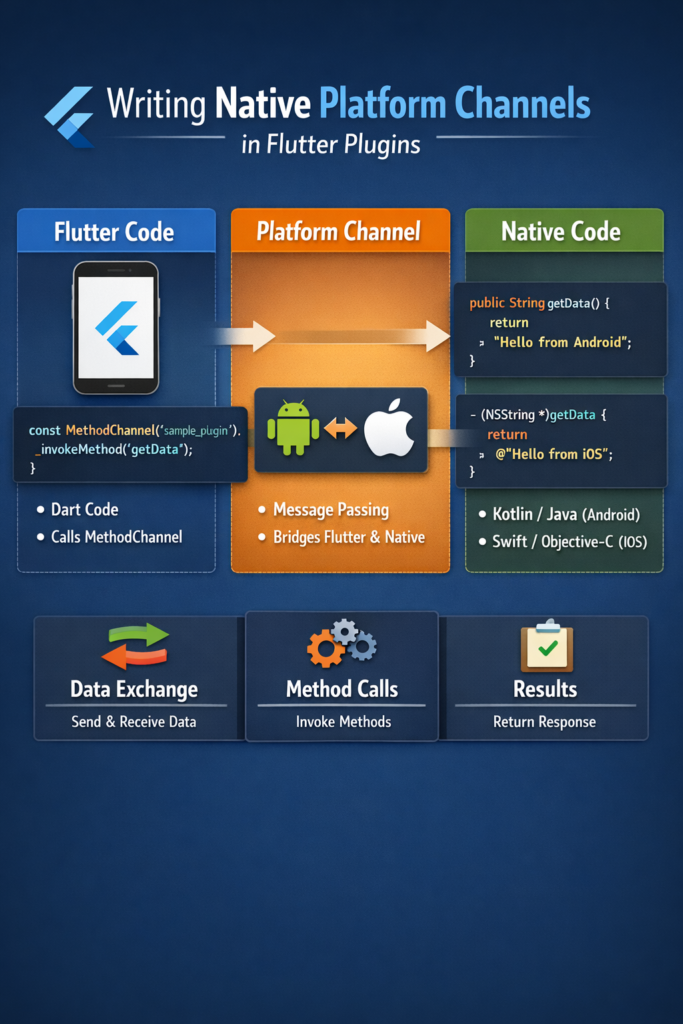
Flutter provides a rich set of cross-platform APIs. However, some features still require direct access to native Android or iOS code—whether it’s integrating a device-specific SDK, accessing hardware sensors, or reusing existing native libraries. Platform channels make this possible by allowing Flutter to communicate with native code safely and efficiently. In this comprehensive guide, you will learn how platform channels work under the hood, implement all three channel types with production-ready code, handle complex data types and errors, and design clean, maintainable native integrations. By the end, you will understand how to extend Flutter beyond its built-in capabilities.
Understanding Platform Channel Architecture
Platform channels use a message-passing system between Dart and the host platform. Messages are encoded using a binary codec, sent across the platform boundary, decoded, and processed by handlers on each side.
┌─────────────────────────────────────────────────────────────────┐
│                        Flutter App (Dart)                        │
│  ┌────────────────────────────────────────────────────────────┐ │
│  │              Platform Channel (Dart side)                  │ │
│  │  • MethodChannel - Request/Response calls                  │ │
│  │  • EventChannel  - Continuous data streams                 │ │
│  │  • BasicMessageChannel - Custom message passing            │ │
│  └─────────────────────────┬──────────────────────────────────┘ │
└────────────────────────────┼────────────────────────────────────┘
                             │ Binary Message
                             │ (StandardMessageCodec)
                             ▼
┌─────────────────────────────────────────────────────────────────┐
│                    Platform Binary Messenger                     │
└─────────────────────────────────────────────────────────────────┘
                             │
          ┌──────────────────┴──────────────────┐
          ▼                                     ▼
┌─────────────────────┐             ┌─────────────────────┐
│   Android (Kotlin)  │             │    iOS (Swift)      │
│  ┌───────────────┐  │             │  ┌───────────────┐  │
│  │ Method Handler│  │             │  │ Method Handler│  │
│  └───────────────┘  │             │  └───────────────┘  │
│  ┌───────────────┐  │             │  ┌───────────────┐  │
│  │ Native APIs   │  │             │  │ Native APIs   │  │
│  │ • Camera      │  │             │  │ • HealthKit   │  │
│  │ • Bluetooth   │  │             │  │ • Core ML     │  │
│  │ • Sensors     │  │             │  │ • ARKit       │  │
│  └───────────────┘  │             │  └───────────────┘  │
└─────────────────────┘             └─────────────────────┘
Types of Platform Channels
MethodChannel
Used for one-time request/response method calls. This is the most common channel type.
- Invoke native methods from Dart
- Receive single responses asynchronously
- Ideal for API calls, data retrieval, and actions
EventChannel
Used for continuous data streams from native to Dart.
- Sends multiple events over time
- Ideal for sensors, location updates, and real-time data
- Supports broadcast-style updates
BasicMessageChannel
Used for custom message passing with custom codecs.
- Supports bidirectional messaging
- Flexible for custom protocols
- Less commonly used than the others
Creating a Flutter Plugin
# Create a new plugin with Kotlin and Swift support
flutter create --template=plugin \
  --platforms=android,ios \
  --org com.yourcompany \
  device_info_plugin

cd device_info_plugin
This generates a complete plugin structure:
device_info_plugin/
├── lib/
│   ├── device_info_plugin.dart           # Dart API
│   ├── device_info_plugin_platform_interface.dart
│   └── device_info_plugin_method_channel.dart
├── android/
│   └── src/main/kotlin/.../DeviceInfoPlugin.kt
├── ios/
│   └── Classes/DeviceInfoPlugin.swift
├── example/                               # Example app
└── pubspec.yaml
Complete MethodChannel Implementation
Dart API Layer
// lib/device_info_plugin.dart
import 'dart:async';
import 'package:flutter/services.dart';

/// Device information retrieved from native platform
class DeviceInfo {
  final String platform;
  final String osVersion;
  final String deviceModel;
  final String deviceId;
  final int totalMemory;
  final int availableMemory;
  final double batteryLevel;
  final bool isPhysicalDevice;

  DeviceInfo({
    required this.platform,
    required this.osVersion,
    required this.deviceModel,
    required this.deviceId,
    required this.totalMemory,
    required this.availableMemory,
    required this.batteryLevel,
    required this.isPhysicalDevice,
  });

  factory DeviceInfo.fromMap(Map map) {
    return DeviceInfo(
      platform: map['platform'] as String,
      osVersion: map['osVersion'] as String,
      deviceModel: map['deviceModel'] as String,
      deviceId: map['deviceId'] as String,
      totalMemory: map['totalMemory'] as int,
      availableMemory: map['availableMemory'] as int,
      batteryLevel: (map['batteryLevel'] as num).toDouble(),
      isPhysicalDevice: map['isPhysicalDevice'] as bool,
    );
  }
}

/// Plugin for accessing device information
class DeviceInfoPlugin {
  static const MethodChannel _channel = MethodChannel(
    'com.yourcompany/device_info',
  );

  /// Get comprehensive device information
  static Future getDeviceInfo() async {
    try {
      final Map? result =
          await _channel.invokeMethod('getDeviceInfo');

      if (result == null) {
        throw PlatformException(
          code: 'NULL_RESPONSE',
          message: 'Native platform returned null',
        );
      }

      return DeviceInfo.fromMap(result);
    } on PlatformException catch (e) {
      throw DeviceInfoException(
        code: e.code,
        message: e.message ?? 'Unknown error',
        details: e.details,
      );
    }
  }

  /// Get platform version string
  static Future getPlatformVersion() async {
    final String? version = await _channel.invokeMethod('getPlatformVersion');
    return version ?? 'Unknown';
  }

  /// Check if device is physical or emulator
  static Future isPhysicalDevice() async {
    final bool? isPhysical = await _channel.invokeMethod('isPhysicalDevice');
    return isPhysical ?? false;
  }

  /// Get battery level (0.0 - 1.0)
  static Future getBatteryLevel() async {
    final double? level = await _channel.invokeMethod('getBatteryLevel');
    return level ?? -1.0;
  }

  /// Open native settings
  static Future openSettings({String? section}) async {
    final bool? result = await _channel.invokeMethod(
      'openSettings',
      {'section': section},
    );
    return result ?? false;
  }

  /// Save data to native secure storage
  static Future saveSecureData({
    required String key,
    required String value,
  }) async {
    await _channel.invokeMethod('saveSecureData', {
      'key': key,
      'value': value,
    });
  }

  /// Retrieve data from native secure storage
  static Future getSecureData(String key) async {
    return await _channel.invokeMethod('getSecureData', {'key': key});
  }
}

/// Custom exception for device info errors
class DeviceInfoException implements Exception {
  final String code;
  final String message;
  final dynamic details;

  DeviceInfoException({
    required this.code,
    required this.message,
    this.details,
  });

  @override
  String toString() => 'DeviceInfoException($code): $message';
}
Android Implementation (Kotlin)
// android/src/main/kotlin/.../DeviceInfoPlugin.kt
package com.yourcompany.device_info_plugin

import android.app.Activity
import android.content.Context
import android.content.Intent
import android.os.BatteryManager
import android.os.Build
import android.provider.Settings
import androidx.annotation.NonNull
import androidx.security.crypto.EncryptedSharedPreferences
import androidx.security.crypto.MasterKey
import io.flutter.embedding.engine.plugins.FlutterPlugin
import io.flutter.embedding.engine.plugins.activity.ActivityAware
import io.flutter.embedding.engine.plugins.activity.ActivityPluginBinding
import io.flutter.plugin.common.MethodCall
import io.flutter.plugin.common.MethodChannel
import io.flutter.plugin.common.MethodChannel.MethodCallHandler
import io.flutter.plugin.common.MethodChannel.Result
import kotlinx.coroutines.*
import java.util.*

class DeviceInfoPlugin : FlutterPlugin, MethodCallHandler, ActivityAware {
    private lateinit var channel: MethodChannel
    private lateinit var context: Context
    private var activity: Activity? = null
    private val scope = CoroutineScope(Dispatchers.Main + SupervisorJob())

    override fun onAttachedToEngine(
        @NonNull flutterPluginBinding: FlutterPlugin.FlutterPluginBinding
    ) {
        context = flutterPluginBinding.applicationContext
        channel = MethodChannel(
            flutterPluginBinding.binaryMessenger,
            "com.yourcompany/device_info"
        )
        channel.setMethodCallHandler(this)
    }

    override fun onMethodCall(@NonNull call: MethodCall, @NonNull result: Result) {
        when (call.method) {
            "getPlatformVersion" -> {
                result.success("Android ${Build.VERSION.RELEASE}")
            }

            "getDeviceInfo" -> {
                scope.launch {
                    try {
                        val info = withContext(Dispatchers.IO) {
                            getDeviceInfoMap()
                        }
                        result.success(info)
                    } catch (e: Exception) {
                        result.error(
                            "DEVICE_INFO_ERROR",
                            e.message,
                            e.stackTraceToString()
                        )
                    }
                }
            }

            "isPhysicalDevice" -> {
                val isPhysical = !isEmulator()
                result.success(isPhysical)
            }

            "getBatteryLevel" -> {
                val batteryLevel = getBatteryLevel()
                result.success(batteryLevel)
            }

            "openSettings" -> {
                val section = call.argument("section")
                val opened = openSettings(section)
                result.success(opened)
            }

            "saveSecureData" -> {
                val key = call.argument("key")
                val value = call.argument("value")
                if (key != null && value != null) {
                    scope.launch(Dispatchers.IO) {
                        try {
                            saveToSecureStorage(key, value)
                            withContext(Dispatchers.Main) {
                                result.success(null)
                            }
                        } catch (e: Exception) {
                            withContext(Dispatchers.Main) {
                                result.error("SECURE_STORAGE_ERROR", e.message, null)
                            }
                        }
                    }
                } else {
                    result.error("INVALID_ARGS", "Key and value are required", null)
                }
            }

            "getSecureData" -> {
                val key = call.argument("key")
                if (key != null) {
                    scope.launch(Dispatchers.IO) {
                        try {
                            val value = getFromSecureStorage(key)
                            withContext(Dispatchers.Main) {
                                result.success(value)
                            }
                        } catch (e: Exception) {
                            withContext(Dispatchers.Main) {
                                result.error("SECURE_STORAGE_ERROR", e.message, null)
                            }
                        }
                    }
                } else {
                    result.error("INVALID_ARGS", "Key is required", null)
                }
            }

            else -> result.notImplemented()
        }
    }

    private fun getDeviceInfoMap(): Map {
        val runtime = Runtime.getRuntime()
        val activityManager = context.getSystemService(Context.ACTIVITY_SERVICE)
                as android.app.ActivityManager
        val memoryInfo = android.app.ActivityManager.MemoryInfo()
        activityManager.getMemoryInfo(memoryInfo)

        return mapOf(
            "platform" to "Android",
            "osVersion" to Build.VERSION.RELEASE,
            "deviceModel" to "${Build.MANUFACTURER} ${Build.MODEL}",
            "deviceId" to getDeviceId(),
            "totalMemory" to memoryInfo.totalMem,
            "availableMemory" to memoryInfo.availMem,
            "batteryLevel" to getBatteryLevel(),
            "isPhysicalDevice" to !isEmulator(),
            "sdkVersion" to Build.VERSION.SDK_INT,
            "brand" to Build.BRAND,
            "board" to Build.BOARD,
            "hardware" to Build.HARDWARE
        )
    }

    private fun getDeviceId(): String {
        return Settings.Secure.getString(
            context.contentResolver,
            Settings.Secure.ANDROID_ID
        ) ?: UUID.randomUUID().toString()
    }

    private fun isEmulator(): Boolean {
        return (Build.FINGERPRINT.startsWith("generic")
                || Build.FINGERPRINT.startsWith("unknown")
                || Build.MODEL.contains("google_sdk")
                || Build.MODEL.contains("Emulator")
                || Build.MODEL.contains("Android SDK built for x86")
                || Build.MANUFACTURER.contains("Genymotion")
                || Build.BRAND.startsWith("generic")
                || Build.DEVICE.startsWith("generic")
                || Build.PRODUCT == "sdk"
                || Build.PRODUCT == "google_sdk"
                || Build.PRODUCT == "sdk_gphone_x86")
    }

    private fun getBatteryLevel(): Double {
        val batteryManager = context.getSystemService(Context.BATTERY_SERVICE)
                as BatteryManager
        val level = batteryManager.getIntProperty(
            BatteryManager.BATTERY_PROPERTY_CAPACITY
        )
        return level / 100.0
    }

    private fun openSettings(section: String?): Boolean {
        return try {
            val intent = when (section) {
                "wifi" -> Intent(Settings.ACTION_WIFI_SETTINGS)
                "bluetooth" -> Intent(Settings.ACTION_BLUETOOTH_SETTINGS)
                "location" -> Intent(Settings.ACTION_LOCATION_SOURCE_SETTINGS)
                "notification" -> Intent(Settings.ACTION_APP_NOTIFICATION_SETTINGS).apply {
                    putExtra(Settings.EXTRA_APP_PACKAGE, context.packageName)
                }
                else -> Intent(Settings.ACTION_SETTINGS)
            }
            intent.flags = Intent.FLAG_ACTIVITY_NEW_TASK
            context.startActivity(intent)
            true
        } catch (e: Exception) {
            false
        }
    }

    private fun getEncryptedPrefs(): android.content.SharedPreferences {
        val masterKey = MasterKey.Builder(context)
            .setKeyScheme(MasterKey.KeyScheme.AES256_GCM)
            .build()

        return EncryptedSharedPreferences.create(
            context,
            "secure_prefs",
            masterKey,
            EncryptedSharedPreferences.PrefKeyEncryptionScheme.AES256_SIV,
            EncryptedSharedPreferences.PrefValueEncryptionScheme.AES256_GCM
        )
    }

    private fun saveToSecureStorage(key: String, value: String) {
        getEncryptedPrefs().edit().putString(key, value).apply()
    }

    private fun getFromSecureStorage(key: String): String? {
        return getEncryptedPrefs().getString(key, null)
    }

    override fun onDetachedFromEngine(@NonNull binding: FlutterPlugin.FlutterPluginBinding) {
        scope.cancel()
        channel.setMethodCallHandler(null)
    }

    override fun onAttachedToActivity(binding: ActivityPluginBinding) {
        activity = binding.activity
    }

    override fun onDetachedFromActivityForConfigChanges() {
        activity = null
    }

    override fun onReattachedToActivityForConfigChanges(binding: ActivityPluginBinding) {
        activity = binding.activity
    }

    override fun onDetachedFromActivity() {
        activity = null
    }
}
iOS Implementation (Swift)
// ios/Classes/DeviceInfoPlugin.swift
import Flutter
import UIKit
import Security

public class DeviceInfoPlugin: NSObject, FlutterPlugin {
    private var channel: FlutterMethodChannel?

    public static func register(with registrar: FlutterPluginRegistrar) {
        let channel = FlutterMethodChannel(
            name: "com.yourcompany/device_info",
            binaryMessenger: registrar.messenger()
        )
        let instance = DeviceInfoPlugin()
        instance.channel = channel
        registrar.addMethodCallDelegate(instance, channel: channel)
    }

    public func handle(
        _ call: FlutterMethodCall,
        result: @escaping FlutterResult
    ) {
        switch call.method {
        case "getPlatformVersion":
            result("iOS \(UIDevice.current.systemVersion)")

        case "getDeviceInfo":
            DispatchQueue.global(qos: .userInitiated).async {
                let info = self.getDeviceInfoMap()
                DispatchQueue.main.async {
                    result(info)
                }
            }

        case "isPhysicalDevice":
            result(!isSimulator())

        case "getBatteryLevel":
            UIDevice.current.isBatteryMonitoringEnabled = true
            let level = UIDevice.current.batteryLevel
            result(Double(level))

        case "openSettings":
            if let args = call.arguments as? [String: Any],
               let section = args["section"] as? String {
                openSettings(section: section, result: result)
            } else {
                openSettings(section: nil, result: result)
            }

        case "saveSecureData":
            if let args = call.arguments as? [String: Any],
               let key = args["key"] as? String,
               let value = args["value"] as? String {
                let success = saveToKeychain(key: key, value: value)
                if success {
                    result(nil)
                } else {
                    result(FlutterError(
                        code: "KEYCHAIN_ERROR",
                        message: "Failed to save to keychain",
                        details: nil
                    ))
                }
            } else {
                result(FlutterError(
                    code: "INVALID_ARGS",
                    message: "Key and value are required",
                    details: nil
                ))
            }

        case "getSecureData":
            if let args = call.arguments as? [String: Any],
               let key = args["key"] as? String {
                let value = getFromKeychain(key: key)
                result(value)
            } else {
                result(FlutterError(
                    code: "INVALID_ARGS",
                    message: "Key is required",
                    details: nil
                ))
            }

        default:
            result(FlutterMethodNotImplemented)
        }
    }

    private func getDeviceInfoMap() -> [String: Any] {
        UIDevice.current.isBatteryMonitoringEnabled = true

        let processInfo = ProcessInfo.processInfo
        let device = UIDevice.current

        return [
            "platform": "iOS",
            "osVersion": device.systemVersion,
            "deviceModel": getDeviceModel(),
            "deviceId": getDeviceId(),
            "totalMemory": Int(processInfo.physicalMemory),
            "availableMemory": getAvailableMemory(),
            "batteryLevel": Double(device.batteryLevel),
            "isPhysicalDevice": !isSimulator(),
            "systemName": device.systemName,
            "name": device.name,
            "model": device.model,
            "localizedModel": device.localizedModel
        ]
    }

    private func getDeviceModel() -> String {
        var systemInfo = utsname()
        uname(&systemInfo)
        let machineMirror = Mirror(reflecting: systemInfo.machine)
        let identifier = machineMirror.children.reduce("") { identifier, element in
            guard let value = element.value as? Int8, value != 0 else {
                return identifier
            }
            return identifier + String(UnicodeScalar(UInt8(value)))
        }
        return identifier
    }

    private func getDeviceId() -> String {
        return UIDevice.current.identifierForVendor?.uuidString ?? UUID().uuidString
    }

    private func isSimulator() -> Bool {
        #if targetEnvironment(simulator)
        return true
        #else
        return false
        #endif
    }

    private func getAvailableMemory() -> Int {
        var taskInfo = task_vm_info_data_t()
        var count = mach_msg_type_number_t(
            MemoryLayout.size
        ) / 4
        let result: kern_return_t = withUnsafeMutablePointer(to: &taskInfo) {
            $0.withMemoryRebound(
                to: integer_t.self,
                capacity: 1
            ) {
                task_info(
                    mach_task_self_,
                    task_flavor_t(TASK_VM_INFO),
                    $0,
                    &count
                )
            }
        }
        if result == KERN_SUCCESS {
            return Int(ProcessInfo.processInfo.physicalMemory) -
                   Int(taskInfo.phys_footprint)
        }
        return 0
    }

    private func openSettings(
        section: String?,
        result: @escaping FlutterResult
    ) {
        var urlString: String

        switch section {
        case "wifi":
            urlString = "App-Prefs:root=WIFI"
        case "bluetooth":
            urlString = "App-Prefs:root=Bluetooth"
        case "location":
            urlString = "App-Prefs:root=Privacy&path=LOCATION"
        case "notification":
            urlString = UIApplication.openSettingsURLString
        default:
            urlString = UIApplication.openSettingsURLString
        }

        DispatchQueue.main.async {
            if let url = URL(string: urlString),
               UIApplication.shared.canOpenURL(url) {
                UIApplication.shared.open(url, options: [:]) { success in
                    result(success)
                }
            } else {
                result(false)
            }
        }
    }

    // MARK: - Keychain Operations

    private func saveToKeychain(key: String, value: String) -> Bool {
        let data = value.data(using: .utf8)!

        // Delete existing item first
        let deleteQuery: [String: Any] = [
            kSecClass as String: kSecClassGenericPassword,
            kSecAttrAccount as String: key
        ]
        SecItemDelete(deleteQuery as CFDictionary)

        // Add new item
        let query: [String: Any] = [
            kSecClass as String: kSecClassGenericPassword,
            kSecAttrAccount as String: key,
            kSecValueData as String: data,
            kSecAttrAccessible as String: kSecAttrAccessibleWhenUnlocked
        ]

        let status = SecItemAdd(query as CFDictionary, nil)
        return status == errSecSuccess
    }

    private func getFromKeychain(key: String) -> String? {
        let query: [String: Any] = [
            kSecClass as String: kSecClassGenericPassword,
            kSecAttrAccount as String: key,
            kSecReturnData as String: true,
            kSecMatchLimit as String: kSecMatchLimitOne
        ]

        var result: AnyObject?
        let status = SecItemCopyMatching(query as CFDictionary, &result)

        if status == errSecSuccess,
           let data = result as? Data,
           let value = String(data: data, encoding: .utf8) {
            return value
        }
        return nil
    }
}
EventChannel Implementation
EventChannels are perfect for streaming continuous data like sensor readings:
// lib/battery_stream.dart
import 'dart:async';
import 'package:flutter/services.dart';

class BatteryStream {
  static const EventChannel _eventChannel = EventChannel(
    'com.yourcompany/battery_stream',
  );

  static Stream get batteryStateStream {
    return _eventChannel.receiveBroadcastStream().map((event) {
      final map = Map.from(event as Map);
      return BatteryState(
        level: (map['level'] as num).toDouble(),
        isCharging: map['isCharging'] as bool,
        temperature: (map['temperature'] as num?)?.toDouble(),
      );
    });
  }
}

class BatteryState {
  final double level;
  final bool isCharging;
  final double? temperature;

  BatteryState({
    required this.level,
    required this.isCharging,
    this.temperature,
  });
}
// Android EventChannel handler (Kotlin)
class BatteryStreamHandler(private val context: Context) : EventChannel.StreamHandler {
private var eventSink: EventChannel.EventSink? = null
private var batteryReceiver: BroadcastReceiver? = null
override fun onListen(arguments: Any?, events: EventChannel.EventSink?) {
eventSink = events
batteryReceiver = object : BroadcastReceiver() {
override fun onReceive(context: Context?, intent: Intent?) {
intent?.let {
val level = it.getIntExtra(BatteryManager.EXTRA_LEVEL, -1)
val scale = it.getIntExtra(BatteryManager.EXTRA_SCALE, -1)
val status = it.getIntExtra(BatteryManager.EXTRA_STATUS, -1)
val temp = it.getIntExtra(BatteryManager.EXTRA_TEMPERATURE, -1)
val batteryPct = level * 100 / scale.toFloat()
val isCharging = status == BatteryManager.BATTERY_STATUS_CHARGING ||
status == BatteryManager.BATTERY_STATUS_FULL
eventSink?.success(mapOf(
"level" to batteryPct / 100.0,
"isCharging" to isCharging,
"temperature" to temp / 10.0
))
}
}
}
val filter = IntentFilter(Intent.ACTION_BATTERY_CHANGED)
context.registerReceiver(batteryReceiver, filter)
}
override fun onCancel(arguments: Any?) {
batteryReceiver?.let { context.unregisterReceiver(it) }
batteryReceiver = null
eventSink = null
}
}Type-Safe Channels with Pigeon
For larger plugins, use Pigeon to generate type-safe platform channel code:
// pigeons/messages.dart
import 'package:pigeon/pigeon.dart';

@ConfigurePigeon(PigeonOptions(
  dartOut: 'lib/src/messages.g.dart',
  kotlinOut: 'android/src/main/kotlin/Messages.g.kt',
  swiftOut: 'ios/Classes/Messages.g.swift',
))
class DeviceInfo {
  String? platform;
  String? osVersion;
  String? deviceModel;
  double? batteryLevel;
  bool? isPhysicalDevice;
}

@HostApi()
abstract class DeviceInfoApi {
  DeviceInfo getDeviceInfo();
  String getPlatformVersion();
  bool isPhysicalDevice();
  @async
  double getBatteryLevel();
}

@FlutterApi()
abstract class DeviceInfoFlutterApi {
  void onBatteryLevelChanged(double level);
}
# Generate type-safe code
flutter pub run pigeon --input pigeons/messages.dartCommon Mistakes to Avoid
Mistake 1: Mismatched Channel Names
// WRONG - Channel names don't match
// Dart
const MethodChannel _channel = MethodChannel('my_plugin');

// Kotlin
MethodChannel(messenger, "myPlugin") // Different name!

// CORRECT - Exact match
// Dart
const MethodChannel _channel = MethodChannel('com.company/my_plugin');

// Kotlin
MethodChannel(messenger, "com.company/my_plugin")
Mistake 2: Blocking the Main Thread
// WRONG - Heavy work on main thread
override fun onMethodCall(call: MethodCall, result: Result) {
    val data = heavyComputation() // Blocks UI!
    result.success(data)
}

// CORRECT - Use coroutines or background thread
override fun onMethodCall(call: MethodCall, result: Result) {
    scope.launch {
        val data = withContext(Dispatchers.IO) {
            heavyComputation()
        }
        result.success(data)
    }
}
Mistake 3: Generic Error Messages
// WRONG - Unhelpful error
result.error("ERROR", "Something went wrong", null)

// CORRECT - Descriptive error with details
result.error(
    "PERMISSION_DENIED",
    "Camera permission not granted",
    mapOf(
        "requestedPermission" to "android.permission.CAMERA",
        "currentStatus" to "denied"
    )
)
Conclusion
Platform channels allow Flutter plugins to communicate directly with native Android and iOS code, unlocking access to device APIs, native SDKs, and platform-specific features. By using MethodChannel for request/response calls and EventChannel for continuous streams, you can extend Flutter apps while keeping Dart APIs clean and intuitive. For complex plugins, consider using Pigeon to generate type-safe code and reduce boilerplate.
For push notification integration, read Push Notifications in Flutter with Firebase FCM. For offline-first patterns, see Building Offline-First Flutter Apps. Reference the official Flutter platform channels documentation and Pigeon package for advanced patterns.

1 Comment
Comments are closed.