When a single API serves both a feature-rich web application and a bandwidth-constrained mobile app, compromises are inevitable. The web app needs detailed product data with reviews, recommendations, and related items in a single page load. The mobile app needs a lightweight payload with just the product name, price, and primary image. A generic API either over-fetches for mobile (wasting bandwidth and battery) or under-fetches for web (requiring multiple round trips).
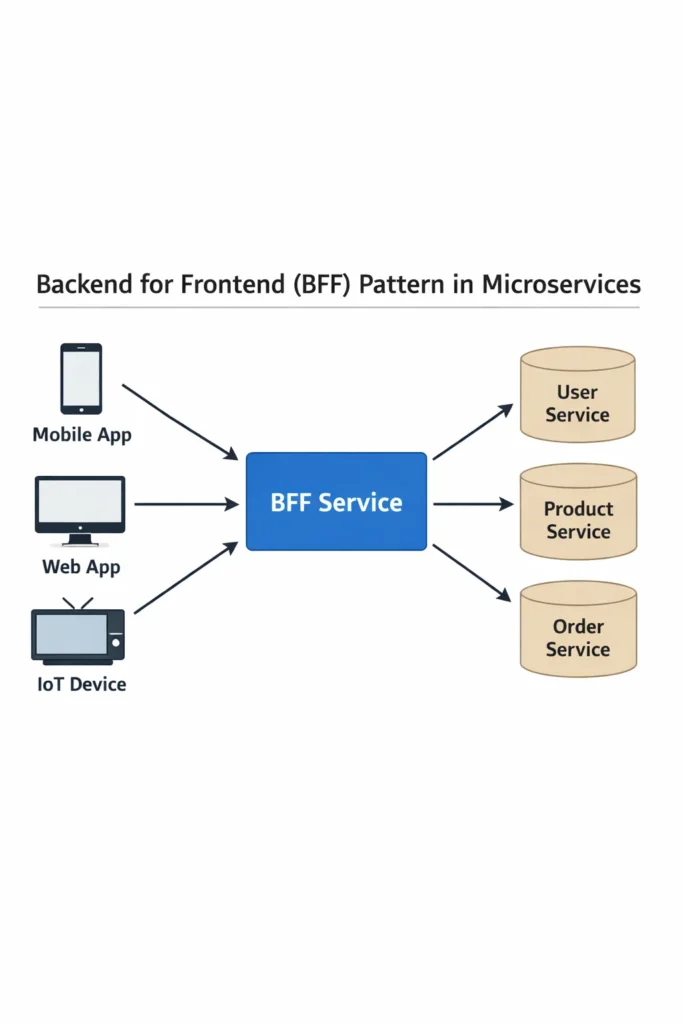
The backend for frontend pattern solves this by creating a dedicated backend layer for each client type. Instead of one API serving all clients, each frontend gets its own backend that aggregates, transforms, and optimizes data specifically for that client’s needs. The BFF sits between the frontend and the downstream microservices, acting as a translation layer that speaks each client’s language.
This deep dive covers when the backend for frontend pattern makes sense, how it differs from a generic API gateway, implementation strategies with production code, and the trade-offs that determine whether BFF simplifies or complicates your architecture.
The Problem BFF Solves
In a microservices architecture, a single page or screen often requires data from multiple services. A product detail page might need:
- Product information from the catalog service
- Current price and discounts from the pricing service
- Stock availability from the inventory service
- Customer reviews from the reviews service
- Personalized recommendations from the recommendation service
Without a BFF, the frontend has two options, and neither is good.
Option 1: Client-Side Aggregation
The frontend makes separate API calls to each service and assembles the data on the client.
// Mobile app making 5 separate API calls for one screen
const [product, price, stock, reviews, recommendations] = await Promise.all([
  fetch('/api/catalog/products/123'),
  fetch('/api/pricing/products/123'),
  fetch('/api/inventory/products/123'),
  fetch('/api/reviews/products/123'),
  fetch('/api/recommendations/products/123'),
]);
Problems: Five round trips from a mobile device on a cellular connection add significant latency. Each response includes fields the mobile app does not need. The client bears the complexity of aggregating and error-handling five independent responses. Furthermore, if the reviews service is slow, the entire page load is delayed.
Option 2: Generic API That Serves Everyone
Build a single aggregation endpoint that returns everything any client might need.
{
  "product": { "id": 123, "name": "...", "description": "...", "specs": {...}, "images": [...] },
  "pricing": { "basePrice": 99.99, "discounts": [...], "taxDetails": {...} },
  "inventory": { "inStock": true, "quantity": 47, "warehouses": [...] },
  "reviews": { "average": 4.5, "count": 238, "items": [...] },
  "recommendations": { "similar": [...], "frequentlyBought": [...] }
}
Problems: The mobile app receives the full specs object, all warehouse details, and complete review text — data it will never display. The web app gets exactly what it needs, but adding a field for the web means the mobile payload grows too. Over time, the generic API becomes a lowest-common-denominator compromise that serves no client well.
The BFF Solution
Create separate backends for each client type, each returning exactly what its frontend needs.
Web App      → Web BFF      → Microservices
Mobile App   → Mobile BFF   → Microservices
Partner API  → Partner BFF  → Microservices
Each BFF calls the same downstream microservices but aggregates and transforms the responses differently based on its client’s requirements.
BFF vs API Gateway
The backend for frontend pattern is often confused with the API gateway pattern. They serve different purposes despite sitting in a similar position in the architecture.
API Gateway
An API gateway is a single entry point that handles cross-cutting concerns: authentication, rate limiting, request routing, SSL termination, and logging. It routes requests to the appropriate microservice but typically does not transform or aggregate data. One API gateway serves all clients.
Backend for Frontend
A BFF is client-specific. It aggregates data from multiple services, transforms responses for a specific frontend, and can contain presentation logic (formatting dates, computing display strings, selecting image sizes). Each client type gets its own BFF.
When They Work Together
In most production architectures, the API gateway and BFF coexist. The gateway handles cross-cutting concerns at the edge, and the BFF handles client-specific aggregation behind it.
Web App → API Gateway → Web BFF → [Catalog, Pricing, Inventory]
Mobile  → API Gateway → Mobile BFF → [Catalog, Pricing, Inventory]
The API gateway authenticates the request, applies rate limiting, and routes to the correct BFF. The BFF then handles the client-specific data aggregation and transformation.
Implementing a BFF
Web BFF: Rich Data for Desktop
The web BFF returns detailed data optimized for a feature-rich desktop experience.
import express from 'express';

const app = express();

app.get('/web/products/:id', async (req, res) => {
  const productId = req.params.id;

  // Parallel calls to downstream services
  const [catalog, pricing, inventory, reviews, recommendations] = await Promise.allSettled([
    fetchFromService('catalog', `/products/${productId}`),
    fetchFromService('pricing', `/products/${productId}`),
    fetchFromService('inventory', `/products/${productId}`),
    fetchFromService('reviews', `/products/${productId}?limit=10`),
    fetchFromService('recommendations', `/products/${productId}?count=8`),
  ]);

  // Aggregate and transform for web
  res.json({
    product: {
      ...getResult(catalog),
      price: getResult(pricing),
      availability: formatAvailability(getResult(inventory)),
    },
    reviews: {
      summary: getResult(reviews)?.summary,
      items: getResult(reviews)?.items || [],
    },
    recommendations: getResult(recommendations)?.items || [],
    // Web-specific: include full description, all images, specs table
    fullDescription: getResult(catalog)?.fullDescription,
    images: getResult(catalog)?.images,
    specifications: getResult(catalog)?.specifications,
  });
});

function getResult(settled: PromiseSettledResult<any>): any {
  return settled.status === 'fulfilled' ? settled.value : null;
}

function formatAvailability(inventory: any): string {
  if (!inventory) return 'Check availability';
  if (inventory.quantity > 10) return 'In Stock';
  if (inventory.quantity > 0) return `Only ${inventory.quantity} left`;
  return 'Out of Stock';
}
Mobile BFF: Lean Data for Bandwidth Efficiency
The mobile BFF returns a minimal payload optimized for smaller screens and cellular connections.
app.get('/mobile/products/:id', async (req, res) => {
  const productId = req.params.id;

  // Mobile only needs three services, not five
  const [catalog, pricing, inventory] = await Promise.allSettled([
    fetchFromService('catalog', `/products/${productId}`),
    fetchFromService('pricing', `/products/${productId}`),
    fetchFromService('inventory', `/products/${productId}`),
  ]);

  const product = getResult(catalog);
  const price = getResult(pricing);

  res.json({
    id: productId,
    name: product?.name,
    // Mobile-specific: only the primary image, sized for mobile screens
    image: product?.images?.[0]?.replace('.jpg', '-mobile.jpg'),
    price: price?.displayPrice,
    originalPrice: price?.hasDiscount ? price?.originalPrice : undefined,
    inStock: getResult(inventory)?.quantity > 0,
    // No reviews, no recommendations, no full description
    // Mobile loads these on-demand when user scrolls
  });
});
The mobile response is roughly 200 bytes compared to 5-10 KB for the web response. On a slow cellular connection, this difference translates directly to faster load times and reduced data usage.
Handling Partial Failures
A critical advantage of the BFF is graceful degradation. When one downstream service fails, the BFF can return partial data instead of failing the entire request.
app.get('/web/products/:id', async (req, res) => {
  const productId = req.params.id;

  const results = await Promise.allSettled([
    fetchFromService('catalog', `/products/${productId}`),
    fetchFromService('pricing', `/products/${productId}`),
    fetchFromService('inventory', `/products/${productId}`),
    fetchFromService('reviews', `/products/${productId}?limit=10`),
  ]);

  const [catalog, pricing, inventory, reviews] = results;

  // Catalog is essential — fail if it's missing
  if (catalog.status === 'rejected') {
    return res.status(502).json({ error: 'Product data unavailable' });
  }

  const product = catalog.value;

  res.json({
    product: {
      ...product,
      // Price falls back to catalog's cached price if pricing service is down
      price: pricing.status === 'fulfilled'
        ? pricing.value.displayPrice
        : product.cachedPrice,
      availability: inventory.status === 'fulfilled'
        ? formatAvailability(inventory.value)
        : 'Check availability',
    },
    // Reviews are optional — return empty array if service is down
    reviews: reviews.status === 'fulfilled' ? reviews.value.items : [],
    // Flag which sections are degraded so the frontend can show appropriate UI
    degraded: results
      .map((r, i) => r.status === 'rejected' ? ['catalog', 'pricing', 'inventory', 'reviews'][i] : null)
      .filter(Boolean),
  });
});
The degraded array tells the frontend which sections have fallback data. The web app can display a subtle indicator (“Reviews temporarily unavailable”) instead of a full error page. This partial failure handling is much harder to implement on the client side because it requires the frontend to understand the failure modes of each downstream service.
BFF and GraphQL: An Alternative Approach
Some teams use GraphQL as an alternative to the backend for frontend pattern. With GraphQL, the client specifies exactly which fields it needs, and the server returns only those fields. This achieves similar bandwidth optimization without maintaining separate BFF services.
# Mobile query — requests minimal fields
query MobileProductDetail($id: ID!) {
  product(id: $id) {
    name
    primaryImage
    price
    inStock
  }
}

# Web query — requests everything
query WebProductDetail($id: ID!) {
  product(id: $id) {
    name
    description
    images
    specifications
    price
    originalPrice
    availability
    reviews(limit: 10) {
      summary
      items { author, rating, text }
    }
    recommendations(count: 8) {
      name
      image
      price
    }
  }
}
However, GraphQL and BFF solve different problems. GraphQL gives clients field-level control over responses, but the server still needs to resolve data from multiple services. A BFF handles the aggregation logic, error handling, and service-specific optimizations that GraphQL resolvers alone do not address. In practice, some teams combine both — using GraphQL as the API contract within a BFF layer. For a detailed comparison of REST, GraphQL, and gRPC, the protocol choice affects how BFFs communicate with both clients and downstream services.
BFF Ownership and Team Structure
The backend for frontend pattern works best when the team that owns the frontend also owns the BFF. This alignment eliminates the coordination overhead between frontend and backend teams.
Frontend Team Owns the BFF
The web team writes and deploys the web BFF. The mobile team writes and deploys the mobile BFF. Each team can modify their BFF without coordinating with other teams or waiting for a shared backend team to prioritize their changes.
This ownership model is why BFFs are often written in the same language as the frontend team’s comfort zone. Web BFFs frequently use Node.js or TypeScript because the web team already knows JavaScript. Mobile BFFs might use Kotlin or Swift for teams that prefer staying in their language ecosystem.
When to Share BFF Logic
If the web and mobile BFFs share significant aggregation logic, extract that shared logic into a library rather than duplicating it. However, resist the urge to merge the BFFs back into a single service — the moment you do, you are back to the generic API problem where changes for one client affect another.
BFF in Modern Frameworks
Modern frameworks blur the line between frontend and BFF. React Server Components fetch data on the server and stream it to the client, effectively acting as a built-in BFF for React applications. Similarly, Next.js Server Actions allow frontend code to call server-side functions directly, handling data aggregation without a separate BFF service.
These framework-level solutions work well when a single team owns both the frontend and the data fetching logic. For organizations with separate frontend and backend teams, or when multiple client types (web, mobile, partner API) need different data shapes, a dedicated BFF service provides clearer boundaries.
Real-World Scenario: Adding a BFF to a Multi-Platform Fintech App
A fintech company offers a web dashboard and a mobile app for personal finance management. Both clients consume a shared REST API that returns account data, transactions, and budget summaries. The shared API was designed primarily for the web dashboard, which displays detailed transaction breakdowns, spending charts, and multi-account comparisons.
The mobile team consistently struggles with the API. Transaction list responses average 15 KB per page because they include fields the mobile app never displays (merchant category codes, internal processing metadata, full address details). The mobile app’s “account overview” screen requires three API calls that could be a single call returning just balances and recent activity.
The team introduces a mobile BFF that sits between the mobile app and the existing microservices. The mobile BFF exposes three endpoints: /mobile/accounts/overview (aggregates balances from the accounts service and last five transactions from the transactions service), /mobile/transactions (returns a slimmed-down transaction list with only display-relevant fields), and /mobile/budget/summary (combines budget rules with current spending into a single progress indicator).
After deploying the mobile BFF, the mobile team reports that the account overview screen loads 60% faster on cellular connections because the payload dropped from 45 KB (three separate API calls) to 8 KB (one BFF call). The web dashboard continues using the original API unchanged. Crucially, the mobile team now deploys mobile-specific API changes without coordinating with the web team or waiting for shared API modifications.
The web team later builds their own web BFF when they redesign the dashboard to use a new layout that requires different data groupings. Both BFFs call the same downstream services, but each shapes the data for its specific client’s needs.
When to Use the Backend for Frontend Pattern
- Multiple client types (web, mobile, partner API) consume the same microservices but need different data shapes, payload sizes, or aggregation logic
- Mobile clients suffer from over-fetching because the API was designed for web
- Frontend teams are blocked waiting for backend teams to build client-specific endpoints
- Different clients have different performance constraints (bandwidth, latency, battery)
- The aggregation and transformation logic is complex enough that pushing it to the client creates fragile, hard-to-maintain frontend code
When NOT to Use the Backend for Frontend Pattern
- A single client type consumes your API — one BFF for one client is just an unnecessary extra layer
- Your API already returns appropriately sized responses for all clients, or you use GraphQL with field-level selection
- The team is too small to maintain multiple BFF services alongside the downstream microservices
- Client differences are minor (slightly different field sets) and can be handled with query parameters or field selection on the existing API
- Adding a BFF introduces more latency than it saves — if downstream services already respond quickly and payloads are small, the extra network hop through the BFF makes things slower
Common Mistakes with the Backend for Frontend Pattern
- Building one “BFF” that serves all client types — this is just an API gateway with extra steps, not a true backend for frontend pattern
- Putting business logic in the BFF instead of keeping it in the downstream services — the BFF should aggregate and transform, not validate business rules or manage state
- Not assigning BFF ownership to the frontend team, which recreates the coordination bottleneck that BFF was designed to eliminate
- Creating too many BFFs (one per device model or screen) when one per platform (web, iOS, Android) provides sufficient separation
- Duplicating downstream service logic in the BFF instead of calling the services — the BFF queries services and reshapes responses, it does not replicate their functionality
- Ignoring caching in the BFF layer — aggregated responses are excellent candidates for short-lived caching because the same product detail page serves thousands of users with the same data
- Not handling partial failures gracefully — when the BFF fails the entire request because one of five downstream services is slow, users see error pages instead of degraded but functional screens
Completing the Backend for Frontend Pattern
The backend for frontend pattern gives each client type a dedicated backend that aggregates, transforms, and optimizes data from shared microservices. Web clients get rich, detailed responses. Mobile clients get lean, focused payloads. Partner APIs get stable, versioned contracts. Each BFF evolves independently, owned by the team that understands its client best.
Start by identifying which client is suffering the most from the current API design. If mobile users experience slow load times from over-fetched data and multiple round trips, a mobile BFF provides the highest immediate impact. Build the BFF as a thin aggregation layer — call downstream services, reshape the responses, handle partial failures, and return exactly what the frontend needs. Keep business logic out of the BFF, and let the frontend team own it end to end.