If your React Native app still runs on the old bridge, or you inherited one pinned to 0.7x, the window for putting this off has closed. Since React Native 0.82, the legacy architecture cannot be turned back on, so a React Native New Architecture migration is now part of every upgrade past 0.81. This guide is for developers who own that upgrade. It explains which version is the last safe stop, what to check before you flip the flag, which native code breaks and why, and the order that keeps every step reversible. In the end, you get a migration plan that never forces a version upgrade and an architecture change into the same release.
What Changed, and When
Every version fact in this post comes from the official React Native release posts and the Expo changelog, read on the day of writing. Release dates come from the npm registry.
Checked 2026-10-13
react-native latest: 0.87.1 (next: 0.88.0-rc.5)
Expo SDK latest: 57
Sources: https://reactnative.dev/blog and https://expo.dev/changelog
Next scheduled re-check: 2027-01-13, or on the 0.88 release
The New Architecture did not arrive in one release. Instead, it moved from opt-in to default, then to mandatory, and now legacy code is being deleted release by release. The table below is the short version.
| Version | Released | What it means for the migration |
|---|---|---|
| 0.76 | 2024-10-23 | New Architecture on by default in new projects; opt-out still works |
| 0.80 | 2025-06-12 | Legacy architecture frozen, warnings for APIs that will stop working |
| 0.81 / Expo SDK 54 | 2025-08-12 | Last versions where the legacy architecture can be enabled |
| 0.82 | 2025-10-08 | New Architecture only; newArchEnabled=false is ignored |
| 0.83 | 2025-12-10 | No breaking changes |
| Expo SDK 55 (RN 0.83) | 2026-02-25 | Expo removes the newArchEnabled option entirely |
| 0.84 | 2026-02-11 | Legacy code compiled out on iOS, legacy Android classes removed, Hermes V1 default |
| 0.85 | 2026-04-07 | CatalystInstanceImpl removed, more Android legacy classes deprecated or stubbed |
| 0.86 | 2026-06-11 | No breaking changes |
| 0.87 | 2026-08-11 | Strict TypeScript API by default, useTurboModules flag removed |
Two dates matter more than the rest. First, React Native 0.82 states that setting newArchEnabled=false on Android, or installing pods with RCT_NEW_ARCH_ENABLED=0 on iOS, “will be ignored and your app will still run using the New Architecture.” Second, the same post names 0.81 and Expo SDK 54 as “the last versions that allow you to use the Legacy Architecture.” Those two sentences define the whole migration order below.
What Is the React Native New Architecture?
The React Native New Architecture replaces the asynchronous JSON bridge with JSI, a C++ interface that lets JavaScript hold direct references to native objects. It has three parts: TurboModules for native modules, Fabric for rendering, and bridgeless mode, which removes the bridge entirely. Together they allow synchronous calls, concurrent React features and lazy module loading.
In practice, the part that breaks apps is not JSI itself. Instead, it is code that assumed a bridge exists. Old native modules extend ReactContextBaseJavaModule and register through a ReactPackage. Old view managers extend SimpleViewManager with @ReactProp setters. Neither has a codegen spec. React Native runs that code through interop layers, which translate old-style modules and views into the new system at runtime.
The 0.82 post is explicit that the interop layers stay “for the foreseeable future.” That is good news, because most legacy-style libraries keep working without changes. However, the interop layers only cover the public module and view APIs. Code that reached past them, into the bridge object or the old UI manager, has nothing to translate to.
Why the Migration Order Matters
The most common way this migration goes wrong is a single pull request that bumps React Native from 0.7x to the latest version. That pull request changes three things at once: the React Native version, the architecture, and often Hermes and the Android toolchain. When the app crashes on launch, nothing tells you which of the three caused it.
0.81 is the only version that lets you separate them. On 0.81 you can upgrade with the legacy architecture still enabled, ship that, then flip one flag and ship again. If the flag flip breaks something, you flip it back while you fix it. On 0.82 and later that escape hatch is gone, so every bug you find there has to be fixed before release.
Expo apps follow the same logic, one layer up. SDK 54 runs React Native 0.81 and still accepts newArchEnabled: false in app.json. SDK 55 removed the option, so the Expo New Architecture guide recommends moving one SDK at a time and stopping at 54 first.
The React Native New Architecture Migration, Step by Step
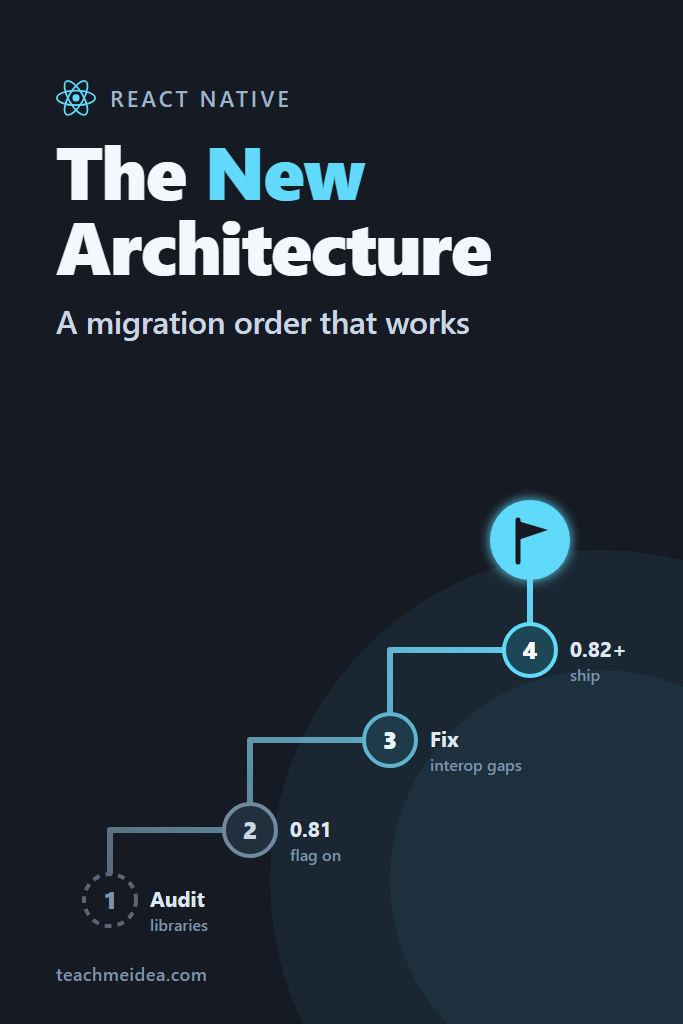
Here is the order, as a numbered list you can paste into a migration ticket:
- Audit every native dependency against the New Architecture
- Upgrade to React Native 0.81 (or Expo SDK 54) with the legacy architecture still on
- Ship that release and let it settle
- Flip the New Architecture flag on 0.81 and run a full regression pass
- Fix your own native code that bypasses the interop layers
- Ship 0.81 on the New Architecture to production
- Upgrade to 0.82, then move one minor version at a time to the current release
- Migrate your own modules from interop to TurboModules and Fabric
Steps 1 to 6 happen on 0.81, and each one can be rolled back. After step 7 they cannot, which is exactly why it comes last.
Step 1: Audit Native Dependencies First
Start with the dependency list, not with code. A library that does not support the New Architecture blocks the whole migration, and finding that out after the upgrade is the most expensive way to learn it.
For bare React Native projects, check each package with native code on React Native Directory, which tracks New Architecture support per library. For Expo projects, run the doctor command, which checks the same data:
# Flags dependencies with known New Architecture problems and version mismatches
npx expo-doctor@latest
Treat the directory flag as a starting point, not a verdict. A missing flag often means the maintainers never filled in the metadata, not that the library is broken. Libraries built on the Expo Modules API, for example, support both architectures even when the directory shows no flag, since Expo SDK 55 and later cannot run any other way.
For every native dependency, sort it into one of four buckets:
| Bucket | What to do |
|---|---|
| Supports the New Architecture in its current version | Upgrade to that version during step 2 |
| Old-style module or view, actively maintained | Keep it; the interop layer covers it, but test it in step 4 |
| Unmaintained, no New Architecture support | Replace it before you start, or fork it |
Touches the bridge or UIManagerModule directly | Expect it to break; replace or patch before step 4 |
The last row is the dangerous one. Libraries in it still compile, so the build stays green while the runtime behaviour quietly changes. Therefore, read the Kotlin and Java deprecation warnings in your Android build log rather than scrolling past them. Any warning that names a legacy class such as UIManagerModule points at a file that will stop compiling once that class is removed.
If you need replacements, the React Native libraries roundup covers the maintained options in most categories.
Step 2: Upgrade to 0.81 With the Legacy Architecture On
Next, upgrade React Native to 0.81 while explicitly keeping the old architecture. Use the React Native Upgrade Helper to diff your native project files against the template, rather than guessing which lines changed.
On Android, the flag lives in android/gradle.properties:
# android/gradle.properties
# Keep the legacy architecture for this release only; flipped in step 4
newArchEnabled=false
hermesEnabled=true
On iOS, the architecture is chosen when the pods are installed, so the flag goes on the install command:
cd ios
RCT_NEW_ARCH_ENABLED=0 bundle exec pod install
For Expo SDK 54, set it in app.json:
{
  "expo": {
    "name": "my-app",
    "newArchEnabled": false
  }
}
One 0.81-era behaviour change deserves a warning before you ship. The 0.82 post notes that uncaught promise rejections now raise console.error, and that “due to a bug, these were completely swallowed and ignored previously.” So expect old, silent errors to appear in your logs and error tracker during this upgrade, and do not mistake them for migration bugs.
Step 3: Ship the Version Upgrade on Its Own
This step sounds like ceremony, but it does real work. A production release on 0.81 with the legacy architecture gives you a baseline crash rate and a baseline set of error reports for the new version. Then, when you flip the architecture in step 4, any new crash is the architecture’s fault and nothing else’s.
How long to wait depends on your release cadence. For most teams, one full release cycle with normal traffic is enough to see the regressions that matter.
Step 4: Flip the New Architecture Flag on 0.81
Now change one line per platform. On Android, set newArchEnabled=true in gradle.properties. On iOS, reinstall pods with the New Architecture:
cd ios
RCT_NEW_ARCH_ENABLED=1 bundle exec pod install
On Expo SDK 54, set "newArchEnabled": true in app.json and rebuild the development build. Expo Go is no help for this comparison, since it ships a fixed native runtime that ignores your project’s flag.
Before testing anything else, confirm the flag actually took effect. A stale build cache or a pod install with the wrong environment variable leaves you testing the old architecture without knowing it. A dev-only check at startup removes the doubt:
// src/debug/logArchitecture.ts
// Logs which architecture the running app actually uses. Call once from index.js in dev builds.
export function logArchitecture(): void {
  if (!__DEV__) {
    return;
  }
  const runtime = globalThis as any;
  console.log(
    '[arch]',
    JSON.stringify({
      bridgeless: runtime.RN$Bridgeless === true,
      fabric: runtime.nativeFabricUIManager != null,
      turboModules: runtime.__turboModuleProxy != null,
    }),
  );
}
On the legacy architecture all three values are false. On the New Architecture in 0.81 and later, bridgeless and fabric should both be true. If they are not, rebuild from a clean state before you file a single bug.
Windows developers should also expect a new build step here. The New Architecture compiles the codegen output as C++ through CMake and Ninja, which are subject to the classic 260-character path limit on Windows. So if the Android build starts failing in a CMake task right after the flag flip, check the project’s folder depth before anything else.
Step 5: Fix Native Code That Bypasses the Interop Layers
Most legacy-style modules keep working through interop. For instance, methods marked @ReactMethod, promises, synchronous methods, constants, and events sent through RCTDeviceEventEmitter are all part of the public module API the interop layer maps. Similarly, requireNativeComponent with a classic SimpleViewManager is covered by the view interop.
What breaks is code that reaches underneath that API. Work through your own native code and your patched dependencies looking for these patterns.
Code That Uses the Bridge Object
Any call to reactContext.catalystInstance assumes a bridge exists. In bridgeless mode there is none. Moreover, the concrete class behind it, CatalystInstanceImpl, was removed in 0.85. So code that casts to it, or reaches through it to call JavaScript modules or the native module registry, is on a deletion path. Replace bridge lookups with reactContext.getNativeModule(...) or reactContext.getJSModule(...), which work in both modes.
Code That Uses UIManagerModule
UIManagerModule is the legacy UI manager. Libraries that call it directly to look up views by tag, dispatch commands, or listen to layout batches have no equivalent under Fabric. React Native 0.85 deprecated UIManagerHelper and stubbed out NativeViewHierarchyManager. So this code keeps compiling for now but does nothing useful. On the JavaScript side, prefer ref-based APIs such as ref.current.measure(...) over UIManager.measure(findNodeHandle(ref)), since Fabric host components expose measurement directly.
Classes Removed Outright in 0.84
React Native 0.84 removed a list of Android classes that only existed for the bridge. If your code or a dependency imports any of these, it stops compiling on 0.84:
com.facebook.react.LazyReactPackagecom.facebook.react.bridge.CxxModuleWrapperandCxxModuleWrapperBasecom.facebook.react.bridge.CallbackImplcom.facebook.react.bridge.OnBatchCompleteListenercom.facebook.react.devsupport.BridgeDevSupportManagercom.facebook.react.uimanager.NativeKindcom.facebook.react.uimanager.layoutanimation.LayoutAnimationController
The full list is in the 0.84 release post. Searching for these imports takes a minute, so do it here on 0.81, not later on 0.84 when the build is already red.
Step 6: Ship 0.81 on the New Architecture
Ship it. This is the release that proves the migration, because it runs the architecture you will be on for the life of the app, on the last version where you can still roll back with one flag.
Watch three things after release: crash rate compared with the step 3 baseline, startup time, and any screen that uses a native view from a library you marked “keep” in step 1. Interop view managers are where layout differences surface, because Fabric computes layout differently from the old UI manager.
If something serious appears, set the flag back to false, rebuild, and ship a fix release. That option is the whole reason for this order.
Step 7: Upgrade Past 0.82, One Minor at a Time
Once 0.81 runs cleanly on the New Architecture in production, upgrading to 0.82 changes very little about runtime behaviour. Your app already runs the architecture 0.82 forces. The flag becomes dead configuration, and you can delete it.
The template also changed shape in 0.82. The ReactNativeHost that used to carry the architecture flags is gone from MainApplication.kt. Here is the 0.81 template version:
// MainApplication.kt, React Native 0.81 template
override val reactNativeHost: ReactNativeHost =
    object : DefaultReactNativeHost(this) {
      override fun getPackages(): List<ReactPackage> =
          PackageList(this).packages.apply {
            add(MyAppPackage())
          }

      override fun getJSMainModuleName(): String = "index"

      override fun getUseDeveloperSupport(): Boolean = BuildConfig.DEBUG

      override val isNewArchEnabled: Boolean = BuildConfig.IS_NEW_ARCHITECTURE_ENABLED
      override val isHermesEnabled: Boolean = BuildConfig.IS_HERMES_ENABLED
    }

override val reactHost: ReactHost
  get() = getDefaultReactHost(applicationContext, reactNativeHost)
And the 0.82 template, where the host is built straight from the package list:
// MainApplication.kt, React Native 0.82 template and later
override val reactHost: ReactHost by lazy {
  getDefaultReactHost(
    context = applicationContext,
    packageList =
      PackageList(this).packages.apply {
        add(MyAppPackage())
      },
  )
}
ReactNativeHost is deprecated, and its architecture flags no longer mean anything once 0.82 ignores them. So move to the new shape during this upgrade, since that is when you are already diffing MainApplication.kt in the Upgrade Helper.
After 0.82, go one minor version at a time. The releases after it each carry one notable change worth its own test pass:
- 0.84: Hermes V1 becomes the default engine, iOS ships precompiled binaries by default, legacy iOS code is compiled out, and Node.js 22.11 is required
- 0.85: the Jest preset moves to
@react-native/jest-preset, andStyleSheet.absoluteFillObjectis removed in favour ofabsoluteFill - 0.87: the Strict TypeScript API becomes the default, so deep imports into
react-native/Libraries/*turn into type errors; Node.js 22.13 and Kotlin 2.0 become the minimums
The 0.83 and 0.86 releases had no breaking changes, so those hops are usually fast.
Step 8: Move Your Own Modules Off the Interop Layer
The interop layers are a bridge across the migration, not a permanent home. They have no removal date. Still, the 0.82 post promises “further updates in the future regarding the removal of Interop Layers,” which means one is coming. Your own native modules are the code you control, so convert them before you have to.
A TurboModule starts from a typed spec in TypeScript, which codegen turns into a native base class:
// specs/NativeDeviceInfoLite.ts
import type { TurboModule } from 'react-native';
import { TurboModuleRegistry } from 'react-native';

export interface Spec extends TurboModule {
  getDeviceLocale(): string;
  getBatteryLevel(): Promise<number>;
}

// getEnforcing throws at startup if the native module is missing, instead of failing later
export default TurboModuleRegistry.getEnforcing<Spec>('DeviceInfoLite');
Then point codegen at the spec folder in package.json:
{
  "codegenConfig": {
    "name": "AppSpecs",
    "type": "modules",
    "jsSrcsDir": "specs",
    "android": {
      "javaPackageName": "com.myapp.specs"
    }
  }
}
On Android, the module now extends the generated NativeDeviceInfoLiteSpec instead of ReactContextBaseJavaModule:
// android/app/src/main/java/com/myapp/DeviceInfoLiteModule.kt
package com.myapp

import android.content.Context
import android.os.BatteryManager
import com.facebook.react.bridge.Promise
import com.facebook.react.bridge.ReactApplicationContext
import com.myapp.specs.NativeDeviceInfoLiteSpec
import java.util.Locale

class DeviceInfoLiteModule(reactContext: ReactApplicationContext) :
    NativeDeviceInfoLiteSpec(reactContext) {

  override fun getName(): String = NAME

  // Synchronous: the spec declares a plain string return, so JS gets the value directly
  override fun getDeviceLocale(): String = Locale.getDefault().toLanguageTag()

  override fun getBatteryLevel(promise: Promise) {
    val manager = reactApplicationContext.getSystemService(Context.BATTERY_SERVICE) as? BatteryManager
    if (manager == null) {
      promise.reject("E_NO_BATTERY_SERVICE", "BatteryManager is not available")
      return
    }
    promise.resolve(manager.getIntProperty(BatteryManager.BATTERY_PROPERTY_CAPACITY).toDouble())
  }

  companion object {
    const val NAME = "DeviceInfoLite"
  }
}
Why this is worth the effort: the spec becomes the contract between JavaScript and native code. A renamed method or a wrong argument type is now a build error rather than a runtime undefined is not a function. Moreover, synchronous calls go straight through JSI without the interop layer’s translation step. The official TurboModules guide covers registration through BaseReactPackage and the iOS side.
If your existing modules follow the classic pattern from the custom native modules guide, the conversion is mostly mechanical. Write the spec from the methods you already expose, extend the generated class, and delete the @ReactMethod annotations.
Real-World Scenario: A Two-Version Jump That Stalled
Consider a mid-sized consumer app with a few dozen screens, maintained by a small team, sitting on React Native 0.74. The team plans a single upgrade to the current release over a few weeks, since every minor version in between looked small on its own.
The upgrade compiles. However, on first launch on Android, a map screen renders blank and a payments SDK crashes when its native sheet opens. With the version, the architecture, Hermes V1 and the Android Gradle Plugin all changed together, the team spends days bisecting before it can even name the cause. And because the target is past 0.82, setting newArchEnabled=false to test the theory does nothing.
The recovery follows the order in this post. The team drops back to 0.81, keeps the legacy architecture, and ships. Next, it flips the flag on 0.81 alone. The two failures reproduce immediately, and both trace to libraries that called UIManagerModule directly. One has a newer release with Fabric support. The other needs a small patch until its maintainer ships a fix. After that, the move to the current version takes a fraction of the original effort, because it no longer carries the architecture change with it.
The trade-off is real: the ordered path means two or three extra releases instead of one. For a team that ships weekly, that is a small cost. For an app released every quarter, it can mean months, so those teams should start step 1 well before they need the new version.
When to Use This Migration Order
- Your app is on React Native 0.80 or earlier, or on Expo SDK 53 or earlier
- You maintain your own native modules or view managers written before codegen
- Your dependency list includes native libraries you have not audited
- Your release process allows a rollback within days, so the 0.81 flag flip can be undone quickly
- Several teams own native code, and each needs a clean signal about whose change broke what
When NOT to Use It
- Your app is already on 0.82 or later, so the architecture question is settled and only steps 5, 7 and 8 apply
- The app is a small JavaScript-only project with no custom native code and only well-maintained libraries, where a direct upgrade is a reasonable risk
- You are starting a new project, which runs the New Architecture from day one with nothing to migrate
- You depend on a library that cannot run on the New Architecture and has no replacement yet; fix that blocker first, because no migration order works around it
Common Mistakes with the React Native New Architecture Migration
- Upgrading the version and the architecture in one release, which leaves no way to tell which change caused a crash
- Jumping straight past 0.81, which removes the only rollback switch
- Testing the New Architecture on a stale build, then trusting results from the old one
- Reading “no flag” on React Native Directory as “broken,” and replacing libraries that already work
- Ignoring Android deprecation warnings about Legacy Architecture classes, which are the list of files that stop compiling later
- Treating the interop layers as permanent and never converting your own modules
- Blaming the migration for promise rejection errors that 0.81 merely stopped hiding
Is the React Native New Architecture Faster?
Usually, though the gains depend on the app. The structural wins are real: synchronous native calls without serialization, lazy loading of TurboModules at startup, and concurrent React features. For example, the 0.82 post reports Hermes V1 results on the Expensify app of 7.6% faster total time to interactive on low-end Android and 2.5% on iOS, while also cautioning that “the improvements strongly depend on the details of your apps.” Measure your own startup time at step 3 and again at step 6 rather than assuming a number. If animation is your bottleneck, the Reanimated guide is the place to look, since that work moves off the JavaScript thread on either architecture.
Can You Still Disable the New Architecture?
Only on React Native 0.81 or earlier, or Expo SDK 54 or earlier. From 0.82 on, the Android newArchEnabled=false property and the iOS RCT_NEW_ARCH_ENABLED=0 variable are ignored, and the app starts on the New Architecture regardless. Expo removed the newArchEnabled key from app.json in SDK 55. If a library forces you to need the legacy architecture today, staying on 0.81 is a temporary holding position, not a plan, since that version no longer receives fixes.
Next Steps for Your Migration
A React Native New Architecture migration goes smoothly when each release changes one thing. Audit the libraries, stop at 0.81, flip the flag there, and only then move on to 0.82 and later. The rollback switch exists on exactly one version, so plan the migration around it.
Your next action is step 1: list every dependency with native code and check each one today, before any version changes. If the audit makes you rethink the stack itself, the Expo vs React Native CLI comparison and the Flutter vs React Native performance breakdown cover the larger decision.