React Server Components (RSC) are one of the biggest architectural changes in React in years. Even so, many teams either avoid them completely or adopt them without fully understanding the trade-offs. As a result, projects often end up with unnecessary complexity or missed performance gains.
This article explains React Server Components from a practical perspective. You will learn what they are, why React introduced them, when they make sense, and when they create more problems than they solve. Most importantly, you will see how they affect data fetching, rendering boundaries, and long-term application structure.
Why React Introduced Server Components
Classic React applications run mostly on the client. Even when server-side rendering is involved, the same components still hydrate and execute in the browser. Over time, this model created several pain points:
- Large JavaScript bundles sent to users
- Repeated data fetching on server and client
- Sensitive logic leaking into client code
- Slower initial loads on weaker devices
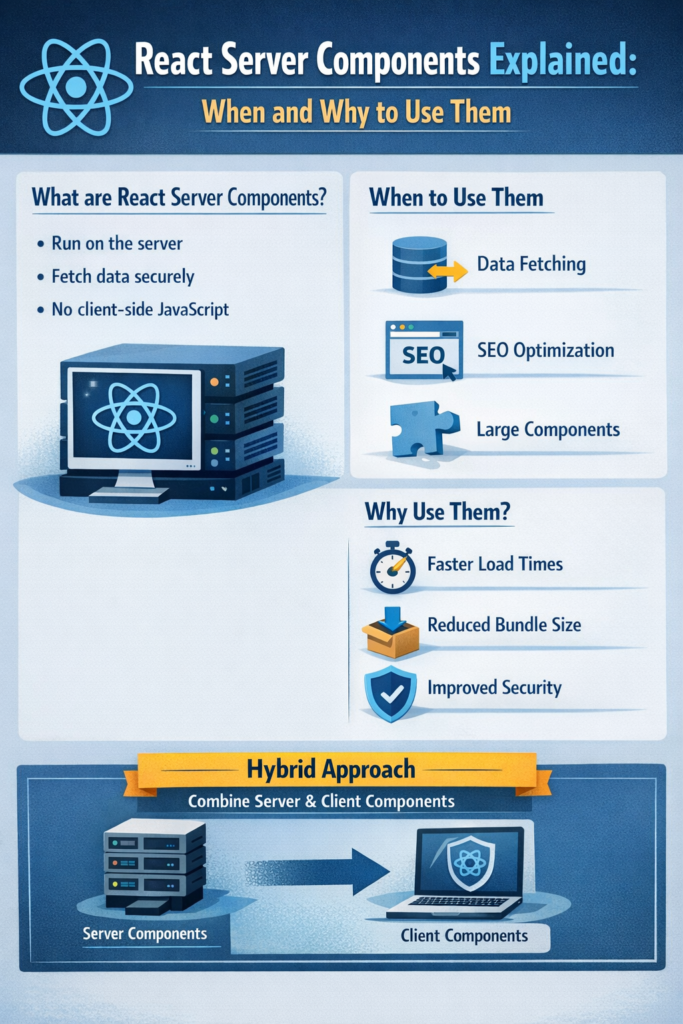
React Server Components address these issues by allowing certain components to run only on the server. Their code never reaches the browser, which immediately reduces bundle size and improves security.
React’s core team explains the motivation behind this approach in the official React documentation on server components, which clarifies why this model exists and what problems it targets.
What React Server Components Actually Are
A React Server Component renders on the server and sends a serialized result to the client. Unlike traditional components, it does not ship JavaScript for execution in the browser.
This creates a clear distinction:
- Server Components render on the server and never hydrate
- Client Components render in the browser and support interactivity
In practice, this boundary forces you to think carefully about which parts of your UI truly need client-side logic.
This distinction becomes especially clear when working with the Next.js App Router, which uses Server Components by default, as shown in building a React app with Next.js 14.
A Practical Mental Model for Server vs Client Components
React Server Components require a different way of thinking compared to classic React.
Server Components are good at:
- Fetching data directly from databases or internal APIs
- Accessing secrets and environment variables
- Performing heavy computation
- Rendering static or streaming UI
Server Components cannot:
- Use browser-only APIs
- Manage interactive state
- Use hooks like
useStateoruseEffect
Client Components are good at:
- Handling user interaction
- Managing local state
- Accessing browser APIs
Client Components cannot:
- Access secure server-only resources
- Reduce bundle size on their own
This separation encourages a cleaner architecture, similar in spirit to ideas discussed in clean architecture in Flutter, even though the technologies differ.
Data Fetching With Server Components
One of the biggest benefits of Server Components is how they simplify data fetching. Instead of calling APIs from the browser or duplicating logic across layers, you can fetch data directly where it is needed.
// Server Component
async function ProductsPage() {
  const products = await db.products.findMany();
  return <ProductList products={products} />;
}
This code never runs in the browser. Because of that, you avoid extra API routes, client-side fetch calls, and hydration costs.
The same server-first mindset appears in fullstack Flutter with Serverpod, where backend logic stays on the server and the client focuses purely on presentation.
Streaming and Progressive Rendering
Server Components support streaming out of the box. Instead of waiting for all data to load, the server can send parts of the UI as soon as they are ready.
This enables:
- Faster time to first byte
- Progressive loading states
- Better perceived performance
Streaming works closely with Suspense, which has become a core part of React’s data loading story. React’s documentation on Suspense explains how streaming and partial rendering work together to improve user experience.
Where React Server Components Shine
Server Components are not a universal solution. However, they work extremely well in certain scenarios.
They are a strong fit when:
- Pages are data-heavy but lightly interactive
- SEO and initial load speed matter
- Sensitive logic must stay on the server
- Reducing JavaScript payload is a priority
Common examples include dashboards, documentation pages, content listings, and admin interfaces.
These performance benefits echo similar trade-offs discussed in Flutter vs React Native performance comparisons, where reducing runtime work leads to measurable gains.
When Server Components Are a Poor Fit
Despite their advantages, Server Components introduce constraints that are not always acceptable.
They are usually a poor choice when:
- The UI is highly interactive
- Most components depend on local state
- The team has limited backend experience
- Deployment infrastructure cannot handle streaming
In these cases, traditional client components or a hybrid approach often work better.
Common Mistakes Teams Make
Several issues appear repeatedly in real-world projects:
- Treating Server Components as a replacement for Client Components
- Forcing interactivity into server-only code
- Overusing
"use client"and losing bundle-size benefits - Ignoring caching and revalidation strategies
Most of these problems come from misunderstanding the boundary between server and client responsibilities.
Caching, Revalidation, and Performance
Server Components integrate closely with caching mechanisms. Frameworks like Next.js allow you to cache responses, revalidate data, or stream content based on configuration.
This shifts performance tuning from an afterthought to a design concern, similar to patterns described in API rate limiting and caching strategies.
Understanding cache lifetimes becomes just as important as writing the component itself.
Real-World Scenario: Reducing a Client-Heavy App
Consider a content-heavy SaaS dashboard built entirely with client-side React. Over time, bundle size grows and initial load performance suffers.
By converting non-interactive sections into Server Components:
- JavaScript payload shrinks
- Data fetching logic becomes simpler
- Sensitive queries move off the client
The result is a faster application without sacrificing interactivity where it actually matters.
Tooling and Ecosystem Support
Today, Server Components are most mature in Next.js. Other frameworks experiment with similar ideas, but production-ready support varies widely.
Next.js documents its Server Component implementation clearly in its App Router documentation, which makes it the safest option for teams adopting this model today.
When to Use React Server Components
Use Server Components if:
- You want to minimize client-side JavaScript
- You fetch data from secure server sources
- SEO and performance are important
- You can clearly separate interactive and non-interactive UI
When Client Components Make More Sense
Stick with Client Components if:
- Interactivity dominates the UI
- State primarily lives in the browser
- Simpler deployment outweighs performance gains
Pitfalls to Avoid
- Mixing server and client responsibilities
- Overusing
"use client"without reason - Treating RSC as a drop-in optimization
- Ignoring streaming and caching capabilities
Conclusion and Next Steps
React Server Components are not just a performance trick. They introduce a clearer separation between server and client responsibilities, which leads to better architecture when used intentionally.
As a next step, review one real page in your application. Identify which parts truly need interactivity and which do not. That exercise alone often reveals where Server Components provide real value instead of added complexity.


2 Comments