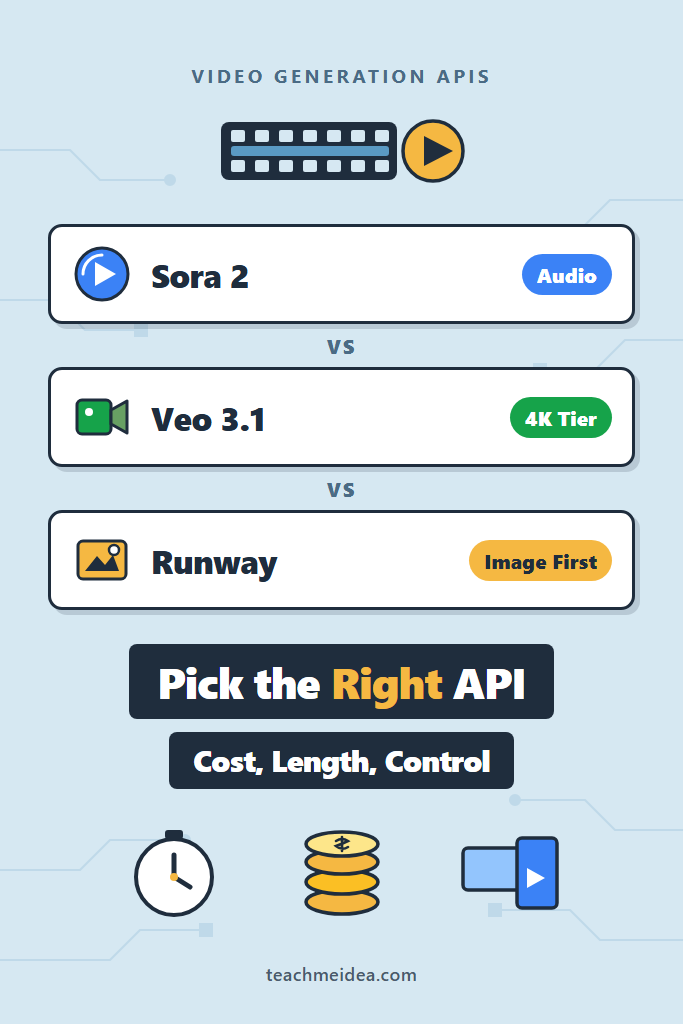
If you are adding generated video to a product and need to pick a provider, the Sora vs Veo vs Runway decision comes down to four things: cost per second, clip length, whether you need audio, and how much control you have over the result. This comparison is for backend and full-stack engineers who have already shipped an LLM feature and now need video, not for filmmakers evaluating creative tools. By the end, you will know which API fits your workload, what each one costs in practice, and which production problems all three share.
Text-to-video APIs behave very differently from the chat and image endpoints you are used to. Every request is a long-running job, generations take minutes rather than seconds, and the output files are large enough that storage and delivery become real design decisions. Therefore, the API you choose shapes your job infrastructure as much as your output quality.
Sora vs Veo vs Runway at a Glance
| Factor | Sora 2 (OpenAI) | Veo 3.1 (Google) | Runway |
|---|---|---|---|
| Flagship model ID | sora-2, sora-2-pro | veo-3.1-generate-preview | gen4.5, seedance2_5 |
| Native audio | Yes | Yes | Not on the Gen-4 family |
| Clip length per request | 4, 8, or 12 seconds | 4, 6, or 8 seconds | 5 or 10 seconds typical |
| Max resolution | 1080p tier on sora-2-pro | 4K on Veo 3.1 | 1080p tier via Seedance |
| Entry price per second | $0.10 | $0.05 (Lite, 720p) | $0.05 (gen4_turbo) |
| Flagship price per second | $0.70 (Pro, 1080p) | $0.40 (720p/1080p) | $0.12 (gen4.5) |
| Video-to-video editing | Edits and extensions endpoints | Video extension | Aleph, purpose-built |
| Access model | OpenAI platform key | Gemini API or Vertex AI | Runway developer account |
Prices come from the OpenAI pricing page, Gemini API pricing, and the Runway pricing guide. Runway bills in credits at one cent each, so a 12-credit-per-second model works out to $0.12 per second.
What Each Video Generation API Actually Is
Sora 2: OpenAI’s Video Endpoint
Sora 2 is a text-to-video model exposed through a job-based endpoint on the OpenAI platform. You submit a prompt to POST /v1/videos, poll the returned job until it reports completed, then download an MP4 from a separate content endpoint. Two variants exist: sora-2 for iteration speed and sora-2-pro for final renders.
The practical draw is integration. If your app already holds an OpenAI key and uses the same SDK for image generation with the Images API, adding video means one more method call rather than a new vendor relationship. Furthermore, Sora generates synchronized dialogue and sound effects in the same pass, so you skip a separate audio pipeline.
Sora also ships companion endpoints for extensions, edits, and character references. Consequently, you can build iterative workflows where a user tweaks one shot instead of regenerating a whole sequence from scratch.
Veo 3.1: Google’s Model Across Two Clouds
Veo 3.1 generates video with native audio and is available through both the Gemini API and Vertex AI. The model family splits three ways: veo-3.1-generate-preview for quality, veo-3.1-fast-generate-preview for throughput, and a Lite tier for cheap drafts. Notably, Veo is the only one of the three that documents a 4K output path.
Requests return a long-running operation object rather than a finished file. You poll that operation with the SDK until done flips to true, then download the result. Importantly, Google stores generated videos on its servers for only two days, so your download step is not optional.
Veo’s tiering is its real advantage. Because Lite costs $0.05 per second and the standard model costs $0.40, you can run cheap drafts during prompt iteration and re-render only the approved shot at full quality. If you already use Gemini for multimodal vision and video understanding, the credentials and SDK carry over directly.
Runway: The Editing-First Platform
Runway approaches the problem from the opposite direction. Its API centers on image_to_video, which means the usual workflow starts from a still frame you control rather than from text alone. As a result, you get far more deterministic composition, since the first frame is an input rather than a guess.
The current lineup includes gen4.5 for general generation, gen4_turbo as the cheap option, seedance2_5 for longer cinematic clips, and Aleph on the video_to_video endpoint for editing footage that already exists. Requests go to https://api.dev.runwayml.com/v1 with an X-Runway-Version header, and the official SDKs expose a helper that waits for task output for you.
The trade-off is audio. The Gen-4 family does not generate a soundtrack, so you will need a separate step. In practice teams pair it with a text-to-speech provider and mix the tracks afterward.
Generating Video With the Sora API
The Sora flow is submit, poll, download. Here is a production-shaped version with timeout handling, since a hung poll loop is the most common way this code fails in a worker.
import time
from pathlib import Path
from openai import OpenAI, APIError

client = OpenAI()

def generate_sora_clip(
    prompt: str,
    out_path: Path,
    model: str = "sora-2",
    seconds: str = "8",
    size: str = "1280x720",
    timeout_s: int = 900,
) -> Path:
    """Submit a Sora job, poll to completion, and write the MP4 to disk."""
    video = client.videos.create(
        model=model,
        prompt=prompt,
        seconds=seconds,   # allowed values: "4", "8", "12"
        size=size,         # e.g. "1280x720" landscape, "720x1280" portrait
    )

    deadline = time.monotonic() + timeout_s
    while video.status in ("queued", "in_progress"):
        if time.monotonic() > deadline:
            # Leave the job running server-side; do not block the worker forever.
            raise TimeoutError(f"Sora job {video.id} exceeded {timeout_s}s")
        time.sleep(10)
        video = client.videos.retrieve(video.id)

    if video.status != "completed":
        raise APIError(f"Sora job {video.id} failed: {video.status}", request=None, body=None)

    content = client.videos.download_content(video.id, variant="video")
    content.write_to_file(out_path)
    return out_path
Two details matter here. First, the loop raises on timeout instead of looping forever, because a stuck job otherwise holds a worker slot indefinitely and silently drains your queue. Second, download URLs stay valid for roughly an hour, so treat the download as part of the job rather than something a user triggers later.
For higher-quality renders, switch model to sora-2-pro. However, do that only after the prompt is settled, since Pro costs three to seven times more per second depending on resolution.
Generating Video With the Veo API
Veo uses the operations pattern from the Google GenAI SDK. The object you get back is a handle you refresh, not a status string you read.
import time
from google import genai
from google.genai import types

client = genai.Client()  # reads GEMINI_API_KEY

def generate_veo_clip(prompt: str, out_path: str, draft: bool = True) -> str:
    """Generate a Veo clip. Use the Lite tier for drafts to keep costs down."""
    model = "veo-3.1-fast-generate-preview" if draft else "veo-3.1-generate-preview"

    operation = client.models.generate_videos(
        model=model,
        prompt=prompt,
        config=types.GenerateVideosConfig(
            aspect_ratio="16:9",     # or "9:16" for vertical
            resolution="720p",       # "1080p" and "4k" cost more per second
        ),
    )

    while not operation.done:
        time.sleep(10)
        operation = client.operations.get(operation)

    if operation.error:
        raise RuntimeError(f"Veo generation failed: {operation.error}")

    generated = operation.response.generated_videos[0]
    client.files.download(file=generated.video)
    generated.video.save(out_path)   # download within 2 days or the file is gone
    return out_path
The draft flag is the pattern worth copying. Because the Fast and Lite tiers cost a fraction of the standard model, running iteration on a cheap tier and promoting only approved prompts keeps a prompt-tuning session from turning into a four-figure bill.
Also note the two-day retention window. If your product lets users revisit generations, you must copy the file into your own object storage immediately. Video objects are large enough that lifecycle rules and storage class actually move your bill.
Generating Video With the Runway API
Runway’s SDK hides the polling loop entirely, which makes the happy path short. The interesting part is that you supply a starting image.
import RunwayML from '@runwayml/sdk';
import { writeFile } from 'node:fs/promises';

const client = new RunwayML(); // reads RUNWAYML_API_SECRET

export async function generateRunwayClip(
  promptImage: string,   // public URL or data URI of the first frame
  promptText: string,
  outPath: string,
): Promise<string> {
  const task = await client.imageToVideo
    .create({
      model: 'gen4.5',
      promptImage,
      promptText,
      ratio: '1280:720',
      duration: 5,
    })
    .waitForTaskOutput({ timeout: 15 * 60 * 1000 });

  if (task.status !== 'SUCCEEDED' || !task.output?.length) {
    throw new Error(`Runway task ${task.id} ended as ${task.status}`);
  }

  const res = await fetch(task.output[0]);
  if (!res.ok) throw new Error(`Download failed: HTTP ${res.status}`);

  await writeFile(outPath, Buffer.from(await res.arrayBuffer()));
  return outPath;
}
The image-first approach changes how you build features. Instead of hoping a text prompt produces the right framing, you generate or upload a still, let a human approve it, and only then spend credits on motion. For products that already generate stills through Flux or Stable Diffusion on Replicate, that pipeline slots in cleanly.
Confirm duration and ratio values against the API reference for whichever model you pick, because the accepted enums differ between gen4_turbo, gen4.5, and seedance2_5.
How Much Do Video Generation APIs Cost?
Video pricing is per second of output, which makes it far more predictable than token billing. However, the spread across tiers is wide enough that model choice dominates your bill.
| Model | Price per second | Cost of a 5-second clip |
|---|---|---|
veo-3.1-lite (720p) | $0.05 | $0.25 |
gen4_turbo (Runway) | $0.05 | $0.25 |
sora-2 (720p) | $0.10 | $0.50 |
veo-3.1-fast (720p) | $0.10 | $0.50 |
gen4.5 (Runway) | $0.12 | $0.60 |
sora-2-pro (720p) | $0.30 | $1.50 |
seedance2_5 (720p) | $0.30 | $1.50 |
veo-3.1 (720p/1080p) | $0.40 | $2.00 |
sora-2-pro (1080p) | $0.70 | $3.50 |
Two structural notes. OpenAI offers a 50% discount through its Batch API tier, which is worth using for anything not user-facing. Meanwhile, Seedance bills separately for reference video input, so video-to-video work costs more than the output rate suggests.
The number that surprises teams is the cost of iteration, not production. A prompt that takes fifteen attempts to get right costs fifteen times the sticker price, which is exactly why the cheap tiers exist.
Audio, Duration, and Control: Where They Diverge
Native audio is the cleanest dividing line. Sora and Veo both generate dialogue, ambience, and effects in a single pass, whereas Runway’s Gen-4 models return silent video. If your output needs speech, choosing Runway means committing to a second pipeline stage and a mixing step.
Duration is the second constraint, and every option is shorter than people expect. Veo caps a single request at 8 seconds, Sora at 12, and Runway’s Gen-4 models at roughly 10. Consequently, anything longer than a social clip requires stitching, and both OpenAI and Google document extension endpoints for exactly that reason.
Control is where Runway pulls ahead. Because generation starts from an image you provide, the composition, subject, and color are fixed before the model runs. In contrast, text-only generation gives you a lottery ticket per attempt, which is fine for background footage and frustrating for brand-specific work.
Production Patterns for Long-Running Video Jobs
Regardless of vendor, the shape of a production integration is the same: submit, persist, poll or receive a webhook, then store. The mistake is treating generation as a request-response call inside an HTTP handler.
- Submit and persist immediately. Write the provider job ID to your database before returning to the user. Otherwise a crashed worker orphans a job you have already paid for.
- Poll from a background worker, not the web tier. A queue-backed consumer with a hard timeout keeps a stalled generation from occupying a request thread.
- Copy outputs to your own storage on completion. Provider-hosted files expire, sometimes in hours, sometimes in days.
- Back off on failures. Video endpoints rate-limit aggressively, so apply the same retry and rate-limit strategies you would use for any LLM call.
- Budget per user, not per request. At $0.40 per second, a single enthusiastic user can spend real money in an afternoon.
Sora and Runway both support webhooks, which removes polling entirely and is worth the extra endpoint once your volume grows past occasional use.
Real-World Scenario: Product Clips for an E-Commerce Catalog
Consider a small team at a mid-sized e-commerce company that wants short looping clips for a few thousand catalog items. The naive plan is to describe each product in text and let a model generate the shot. In practice that approach fails, because the generated product never quite matches the real one, and shoppers notice.
The workflow that holds up starts from the existing product photograph and animates it. A Runway image_to_video call with the real photo as the first frame preserves the actual product, while the model only supplies camera motion. Since the clips are silent b-roll, the lack of native audio costs nothing here.
Cost drives the second decision. At roughly $0.25 to $0.60 for a five-second clip, a catalog of a few thousand items lands in the low four figures for one full pass, which is an ordinary content budget. However, the same catalog rendered on a flagship 1080p tier would cost several times that, and the quality difference is invisible at thumbnail size.
The trade-off worth naming is regeneration. Product catalogs change, and every refresh repeats the full cost. Therefore, teams that treat generated clips as durable assets and cache them aggressively spend far less than teams that regenerate on demand.
When to Use Each Video Generation API
Reach for Sora 2 When
- You already run on the OpenAI platform and want one vendor, one key, and one SDK
- Your clips need synchronized dialogue or sound effects without a separate audio stage
- You want 12-second segments, the longest single-request duration of the three
- Batch pricing applies because the work is offline rather than user-facing
Reach for Veo 3.1 When
- Cost control matters and you want Lite, Fast, and standard tiers behind one interface
- You need 4K output, which neither competitor documents
- Your stack is already on Gemini or Vertex AI and enterprise controls are a requirement
- Native audio is required but the flagship Sora price is out of budget
Reach for Runway When
- You need the output to match a specific image, product, or brand asset
- Your pipeline already produces stills that can act as first frames
- You are editing existing footage, where Aleph has no real equivalent elsewhere
- Silent b-roll is acceptable, or you are mixing audio separately anyway
When NOT to Use These Video Generation APIs
Skip Generated Video Entirely When
- The content must be factually accurate, since none of these models guarantee correctness
- You need clips longer than a minute, where stitching artifacts compound badly
- Human likeness is involved and you lack rights or consent for the depiction
- A static image or a screen recording would communicate the same thing for a fraction of the cost
Skip a Specific Provider When
- You need audio and are evaluating Runway’s Gen-4 models, which do not generate it
- You need precise visual matching and are evaluating text-only Sora or Veo calls
- Your compliance posture forbids the vendor, which is a real constraint on all three
- Your latency budget is under a minute, because none of these APIs reliably return that fast
Common Mistakes with Video Generation APIs
- Polling inside an HTTP request handler. Generations run for minutes, so this ties up threads and eventually times out at the load balancer.
- Skipping the download step. Provider-hosted files expire, and Veo’s two-day window is shorter than most teams assume.
- Iterating on the flagship tier. Prompt tuning on
sora-2-proor standard Veo costs several times what the same iteration costs on a draft tier. - Ignoring per-user spend limits. Unlike text generation, a handful of requests can cost dollars, so unmetered access is a genuine financial risk.
- Assuming deterministic output. The same prompt produces different video each run, which breaks any test that asserts on visual content.
- Treating aspect ratio as an afterthought. Rendering landscape then cropping to vertical wastes both money and framing; pass the ratio you actually need up front.
- Forgetting content policy failures. Jobs can fail on moderation after you have already waited several minutes, so surface that state distinctly from a technical error.
Which Video Generation API Should You Choose?
For most teams the Sora vs Veo vs Runway decision resolves along a single axis: what you already have. If your product runs on OpenAI and needs sound, sora-2 gives you the shortest path from prompt to finished clip. If cost control across a wide quality range matters more, Veo 3.1’s Lite-to-4K tiering is the most flexible option available. If your output must match real assets, Runway’s image-first workflow is the only one that reliably delivers that.
The pattern that matters more than the vendor choice is treating video as asynchronous, expensive work: persist job IDs, poll from a worker, copy files to your own storage, and cap per-user spend. Start with the cheapest tier from whichever provider you already have credentials for, get one clip end to end, and only then compare quality on a prompt that reflects your actual use case. Next, read our guide to the OpenAI Image API in production if your pipeline needs first frames before it needs motion.