If you deploy serious workloads on AWS, understanding AWS IAM roles and policies is mandatory. This guide is for developers and DevOps engineers who want to design secure cloud architectures instead of guessing their way through permission errors.
Many teams start with broad permissions just to “make it work.” However, that approach eventually leads to security risks, accidental data exposure, and difficult audits. This article explains how IAM actually works, how roles and policies interact, and how to structure permissions correctly in production.
By the end, you will understand:
- What IAM roles and policies are
- How trust and permission policies differ
- How to implement least privilege properly
- Common production mistakes
- When to use specific IAM patterns
What Are AWS IAM Roles and Policies?
At a practical level:
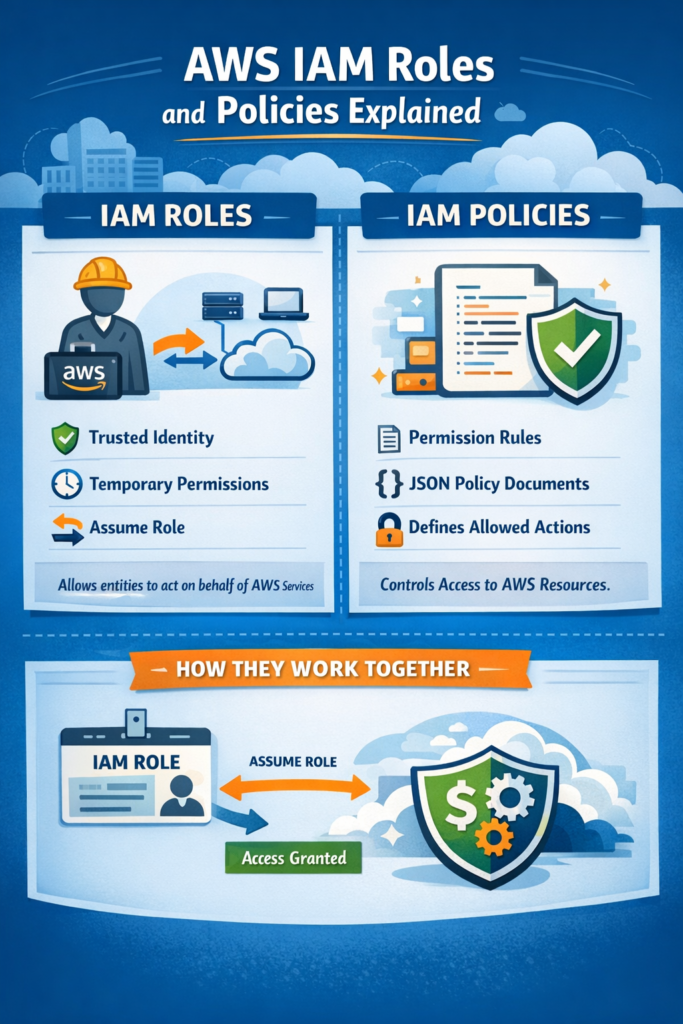
- Policies define permissions.
- Roles define who or what can use those permissions.
According to the official AWS IAM documentation, IAM enables you to securely control access to AWS services and resources. However, that definition is abstract. Let’s translate it into engineering terms.
IAM is the authorization layer for AWS APIs. Every action creating an S3 object, writing to DynamoDB, invoking Lambda is checked against IAM.
IAM Policy: The Permission Document
An IAM policy is a JSON document that specifies:
- Effect – Allow or Deny
- Action – Which API calls are permitted
- Resource – Which AWS resources those actions apply to
Example:
{
  "Version": "2012-10-17",
  "Statement": [
    {
      "Effect": "Allow",
      "Action": "s3:GetObject",
      "Resource": "arn:aws:s3:::my-production-bucket/*"
    }
  ]
}
This policy allows reading objects from a specific bucket.
Importantly, a policy alone does nothing. It must be attached to an identity typically a role.
IAM Role: The Identity Wrapper
An IAM role is an AWS identity that:
- Has no long-term credentials
- Can be assumed temporarily
- Has one or more permission policies attached
- Has a trust policy defining who can assume it
Roles are typically used by:
- EC2 instances
- Lambda functions
- ECS tasks
- CI/CD pipelines
- Cross-account integrations
For example, if you deploy a backend for a PWA (see Building a Progressive Web App (PWA) from Scratch), your API server will likely run with an IAM role that allows access to S3, DynamoDB, or SQS.
The application never stores AWS credentials directly. Instead, AWS provides temporary credentials automatically through the role.
This design reduces the risk of credential leaks.
How AWS IAM Roles and Policies Work Together
To fully understand AWS IAM roles and policies, you must distinguish between two different documents:
- Trust policy – Who can assume the role
- Permission policy – What they can do after assuming it
Trust Policy Example
{
  "Version": "2012-10-17",
  "Statement": [
    {
      "Effect": "Allow",
      "Principal": {
        "Service": "lambda.amazonaws.com"
      },
      "Action": "sts:AssumeRole"
    }
  ]
}
This allows AWS Lambda to assume the role.
If the trust relationship is incorrect, the service cannot use the role even if permissions are correct.
This separation is a common source of confusion.
Real-World Scenario: Over-Permissioned Microservices
Consider a mid-sized SaaS application with:
- 20–30 microservices
- A small engineering team
- Development over several months
Initially, the team attaches AdministratorAccess to every service role. It accelerates early development.
However, over time:
- A staging service accidentally modifies production resources
- A misconfigured Lambda deletes a bucket
- Security reviews fail due to excessive permissions
This scenario is common in growing startups. The early speed trade-off becomes a long-term risk.
A better structure is:
- One IAM role per service
- Separate roles per environment (dev, staging, prod)
- Explicit resource scoping
- Minimal allowed actions
This design isolates failures and limits blast radius.
Types of IAM Policies
Understanding policy types prevents architectural mistakes.
Identity-Based Policies
Attached to users, groups, or roles. These are the most common policies you create manually.
Resource-Based Policies
Attached directly to AWS resources such as:
- S3 buckets
- Lambda functions
- SNS topics
For example, an S3 bucket policy can grant cross-account access.
AWS Managed Policies
Predefined policies like:
AmazonS3ReadOnlyAccessAdministratorAccess
They are convenient but often overly broad for production.
Customer Managed Policies
Custom policies defined by your team.
In production systems, these are preferred because they provide precise control.
Principle of Least Privilege in Practice
AWS strongly recommends the principle of least privilege.
Instead of:
"Action": "s3:*",
"Resource": "*"
Use:
"Action": [
  "s3:GetObject",
  "s3:PutObject"
],
"Resource": "arn:aws:s3:::app-prod-bucket/*"
This prevents accidental destructive actions and restricts access to specific resources.
In production, least privilege is not optional. It is fundamental risk control.
IAM Roles Across Compute Services
Different AWS services assume roles differently.
EC2
EC2 instances use an instance profile. Credentials are retrieved from the metadata service.
Lambda
Lambda execution roles are attached directly in configuration. AWS injects temporary credentials automatically.
ECS
ECS defines task roles inside task definitions, isolating permissions per container task.
Although implementation differs, all rely on AWS STS for temporary credentials.
IAM vs Application-Level Permissions
IAM secures infrastructure-level access.
It does NOT replace:
- Application RBAC
- Business logic authorization
- Multi-tenant isolation
For example, when integrating payments in a Flutter backend (see Integrating Payment Gateways (Stripe, PayPal) in Flutter), IAM controls backend access to cloud services. However, user-level payment permissions must be handled inside your application.
Similarly, if you build tooling or client applications such as:
- Building Browser Extensions with JavaScript
- Flutter Desktop Apps: building and distributing Windows/macOS/Linux apps
- Google Antigravity Editor: What It Is and How It Changes Your Workflow
Your frontend or client logic enforces business rules. IAM protects backend infrastructure.
These layers are complementary.
Debugging IAM Permission Errors
A common runtime error:
AccessDeniedException: User is not authorized to perform: dynamodb:PutItem
To debug:
- Identify which role is assumed
- Inspect attached permission policies
- Confirm the correct resource ARN
- Use IAM Policy Simulator
- Check for explicit Deny statements
Most IAM errors result from:
- Incorrect resource ARNs
- Missing actions
- Misconfigured trust relationships
Systematic debugging is more effective than trial-and-error policy changes.
When to Use AWS IAM Roles and Policies
- When running services on AWS (Lambda, EC2, ECS)
- When enabling cross-account access
- When implementing least privilege in production
- When separating environments securely
- When designing secure CI/CD pipelines
When NOT to Use AWS IAM Roles and Policies
- For application-level user permissions
- For database row-level authorization
- For frontend access control
- As a shortcut using wildcard permissions in production
Common Mistakes
- Attaching
AdministratorAccessduring development and never removing it - Using
"Resource": "*"unnecessarily - Forgetting to configure trust policies
- Sharing a single role across unrelated services
- Never auditing IAM policies after initial deployment
Final Thoughts
Understanding AWS IAM roles and policies is critical for secure cloud architecture. Policies define what actions are allowed. Roles define who can assume those permissions. Together, they enforce least privilege and reduce operational risk.
Start by auditing your existing IAM roles. Remove wildcard permissions. Separate environments. Then gradually refine your policies as your architecture grows.
If you are building backend systems or distributed applications, IAM design is not a secondary concern. It is foundational to production reliability and security.