Every API call to AWS is authenticated and authorized through IAM (Identity and Access Management). Understanding AWS IAM roles and policies is not optional — it is the foundation that determines whether your application can access the resources it needs and, equally important, whether unauthorized access is blocked.
Most developers first encounter IAM when something does not work. A Lambda function cannot read from S3. A CI/CD pipeline cannot deploy to ECS. An EC2 instance cannot pull from ECR. The error is always some variation of “Access Denied,” and the fix always involves IAM. However, understanding IAM before you hit those errors saves hours of debugging and prevents the security shortcuts (wildcard permissions, overly broad roles) that create vulnerabilities later.
This tutorial covers AWS IAM roles and policies from the ground up: what each component does, how they connect, and how to write policies that follow least privilege without making your team’s life miserable.
The IAM Building Blocks
IAM has four core concepts. Everything else in AWS authorization builds on these.
Users
An IAM user represents a person or application with long-lived credentials (access key + secret key, or console password). Users are primarily for human access — developers logging into the AWS console or running CLI commands locally.
# Configure AWS CLI with IAM user credentials
aws configure
# AWS Access Key ID: AKIAEXAMPLE123
# AWS Secret Access Key: wJalrXUtn...
# Default region name: us-east-1
Important: IAM users with programmatic access keys are a security risk if those keys leak. For applications running on AWS (Lambda, EC2, ECS), never use IAM users — use roles instead.
Roles
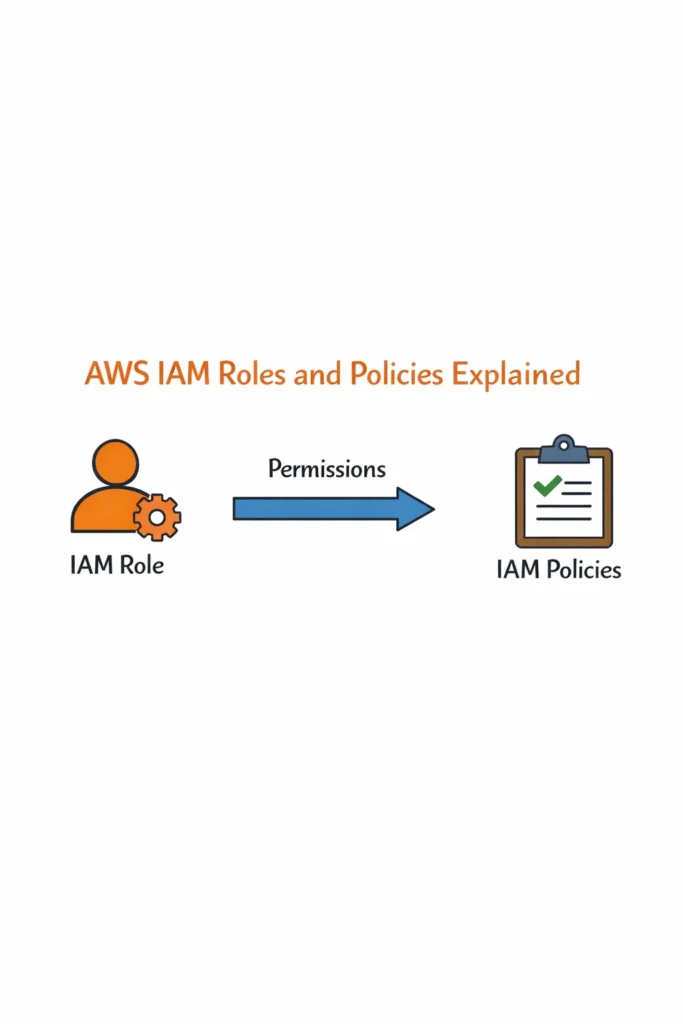
An IAM role is an identity with temporary credentials that AWS services, users, or external identities can assume. Unlike users, roles do not have permanent passwords or access keys. Instead, whoever assumes the role receives temporary credentials that expire automatically.
Why roles matter: A Lambda function that needs to read from S3 does not store AWS credentials. Instead, it assumes an execution role, and AWS provides temporary credentials valid for the function’s execution. If those credentials leak, they expire within hours rather than being permanently valid.
Policies
A policy is a JSON document that defines permissions — which actions are allowed or denied on which resources. Policies attach to users, groups, or roles. Without an attached policy, an identity has zero permissions.
Groups
A group is a collection of users that share the same policies. Instead of attaching policies to individual users, attach them to a group and add users to the group. When someone joins or leaves the team, you modify group membership rather than individual policy attachments.
Understanding Policy Documents
Every IAM policy follows the same JSON structure. Once you understand this structure, you can read and write any IAM policy.
{
  "Version": "2012-10-17",
  "Statement": [
    {
      "Sid": "AllowS3ReadAccess",
      "Effect": "Allow",
      "Action": [
        "s3:GetObject",
        "s3:ListBucket"
      ],
      "Resource": [
        "arn:aws:s3:::my-app-bucket",
        "arn:aws:s3:::my-app-bucket/*"
      ]
    }
  ]
}
Statement Fields Explained
Effect: Either Allow or Deny. Deny always wins — if any policy denies an action, the action is denied regardless of other Allow statements.
Action: The specific AWS API operations permitted. Actions follow the format service:Operation. Use wildcards carefully: s3:* grants every S3 operation, while s3:Get* grants only read operations starting with “Get.”
Resource: The specific AWS resources the policy applies to, identified by ARN (Amazon Resource Name). The two-line resource for S3 buckets is a common pattern: the bucket itself (arn:aws:s3:::my-app-bucket for ListBucket) and the objects within it (arn:aws:s3:::my-app-bucket/* for GetObject).
Condition (optional): Additional constraints on when the policy applies. Conditions can restrict by IP address, time, MFA status, encryption requirements, and dozens of other factors.
{
  "Effect": "Allow",
  "Action": "s3:PutObject",
  "Resource": "arn:aws:s3:::my-app-bucket/*",
  "Condition": {
    "StringEquals": {
      "s3:x-amz-server-side-encryption": "aws:kms"
    }
  }
}
This statement allows uploading objects only if KMS encryption is specified. Without the encryption header, the upload is denied even though PutObject is allowed.
Roles in Practice
Roles are how AWS services get permissions. Every Lambda function, EC2 instance, ECS task, and CodeBuild project uses a role to access other AWS services.
Lambda Execution Role
When you create a Lambda function, you assign it an execution role. The function’s code runs with whatever permissions that role grants.
import boto3

# This works because the Lambda's execution role has s3:GetObject permission
s3 = boto3.client('s3')
response = s3.get_object(Bucket='my-app-bucket', Key='config/settings.json')
The Lambda function does not contain any credentials. AWS injects temporary credentials into the function’s environment based on the execution role. For teams building serverless applications on Lambda, getting the execution role right is the most common IAM task.
Minimal Lambda execution role for an API that reads from DynamoDB and writes to SQS:
{
  "Version": "2012-10-17",
  "Statement": [
    {
      "Sid": "ReadDynamoDB",
      "Effect": "Allow",
      "Action": [
        "dynamodb:GetItem",
        "dynamodb:Query"
      ],
      "Resource": "arn:aws:dynamodb:us-east-1:123456789012:table/orders"
    },
    {
      "Sid": "WriteSQS",
      "Effect": "Allow",
      "Action": "sqs:SendMessage",
      "Resource": "arn:aws:sqs:us-east-1:123456789012:order-notifications"
    },
    {
      "Sid": "WriteCloudWatchLogs",
      "Effect": "Allow",
      "Action": [
        "logs:CreateLogGroup",
        "logs:CreateLogStream",
        "logs:PutLogEvents"
      ],
      "Resource": "arn:aws:logs:us-east-1:123456789012:*"
    }
  ]
}
Each statement grants the minimum actions on the specific resources the function needs. The CloudWatch Logs statement is required for every Lambda function — without it, the function runs but you see no logs.
EC2 Instance Role (Instance Profile)
EC2 instances assume roles through instance profiles. Applications running on the instance use the AWS SDK, which automatically retrieves temporary credentials from the instance metadata service.
# On an EC2 instance with a role, no credentials needed in code
import boto3

# boto3 automatically uses the instance role's temporary credentials
s3 = boto3.client('s3')
s3.upload_file('backup.tar.gz', 'my-backup-bucket', 'daily/backup.tar.gz')
This is why you should never hardcode AWS credentials in application code or store them in environment variables on EC2. The instance role provides credentials automatically, and those credentials rotate without any application changes.
ECS Task Role
ECS tasks have two types of roles:
- Task execution role: Permissions ECS needs to manage the task (pulling container images from ECR, writing logs to CloudWatch)
- Task role: Permissions your application code needs to access AWS services (reading from S3, writing to DynamoDB)
{
  "Version": "2012-10-17",
  "Id": "ECSTaskRole",
  "Statement": [
    {
      "Sid": "AppAccessS3",
      "Effect": "Allow",
      "Action": ["s3:GetObject", "s3:PutObject"],
      "Resource": "arn:aws:s3:::my-app-uploads/*"
    },
    {
      "Sid": "AppAccessSecrets",
      "Effect": "Allow",
      "Action": "secretsmanager:GetSecretValue",
      "Resource": "arn:aws:secretsmanager:us-east-1:123456789012:secret:my-app/*"
    }
  ]
}
The task role allows the application to access S3 and Secrets Manager, while the execution role (separate policy) handles the ECS infrastructure permissions.
Trust Policies: Who Can Assume a Role
Every role has a trust policy that defines which principals (users, services, accounts) can assume it. The trust policy answers the question: “Who is allowed to use this role?”
Service Trust Policy
Most roles trust an AWS service. A Lambda execution role trusts the Lambda service:
{
  "Version": "2012-10-17",
  "Statement": [
    {
      "Effect": "Allow",
      "Principal": {
        "Service": "lambda.amazonaws.com"
      },
      "Action": "sts:AssumeRole"
    }
  ]
}
This trust policy says: “Only the Lambda service can assume this role.” An EC2 instance or a user cannot assume it, even if they know the role ARN.
Cross-Account Trust Policy
When another AWS account needs access to your resources, create a role that trusts that account:
{
  "Version": "2012-10-17",
  "Statement": [
    {
      "Effect": "Allow",
      "Principal": {
        "AWS": "arn:aws:iam::987654321098:root"
      },
      "Action": "sts:AssumeRole",
      "Condition": {
        "StringEquals": {
          "sts:ExternalId": "partner-integration-2026"
        }
      }
    }
  ]
}
The ExternalId condition prevents the confused deputy problem — without it, any user in the trusted account could assume your role. With the external ID, only principals that know the agreed-upon ID can assume it.
CI/CD Pipeline Role
CI/CD pipelines need IAM roles to deploy infrastructure and applications. GitHub Actions, GitLab CI, and similar platforms support OIDC (OpenID Connect) federation, which lets your pipeline assume a role without storing long-lived AWS credentials as secrets.
{
  "Version": "2012-10-17",
  "Statement": [
    {
      "Effect": "Allow",
      "Principal": {
        "Federated": "arn:aws:iam::123456789012:oidc-provider/token.actions.githubusercontent.com"
      },
      "Action": "sts:AssumeRoleWithWebIdentity",
      "Condition": {
        "StringEquals": {
          "token.actions.githubusercontent.com:aud": "sts.amazonaws.com"
        },
        "StringLike": {
          "token.actions.githubusercontent.com:sub": "repo:my-org/my-repo:ref:refs/heads/main"
        }
      }
    }
  ]
}
This trust policy allows only the main branch of a specific GitHub repository to assume the deployment role. Other branches and other repositories are denied. This is significantly more secure than storing AWS access keys as GitHub secrets.
Defining Policies with CDK
Writing IAM policies in JSON is tedious and error-prone. When managing infrastructure with AWS CDK, you can define policies programmatically with type safety and auto-completion.
import * as cdk from 'aws-cdk-lib';
import * as iam from 'aws-cdk-lib/aws-iam';
import * as lambda from 'aws-cdk-lib/aws-lambda';
import * as s3 from 'aws-cdk-lib/aws-s3';
import * as dynamodb from 'aws-cdk-lib/aws-dynamodb';

// CDK automatically creates the execution role with least-privilege permissions
const fn = new lambda.Function(this, 'OrderProcessor', {
  runtime: lambda.Runtime.NODEJS_20_X,
  handler: 'index.handler',
  code: lambda.Code.fromAsset('lambda'),
});

// Grant specific permissions — CDK generates the precise IAM statements
const bucket = s3.Bucket.fromBucketName(this, 'UploadsBucket', 'my-app-uploads');
bucket.grantRead(fn);  // Adds s3:GetObject + s3:ListBucket for this bucket only

const table = dynamodb.Table.fromTableName(this, 'OrdersTable', 'orders');
table.grantReadWriteData(fn);  // Adds DynamoDB read/write for this table only
CDK’s grant* methods generate IAM policies scoped to the specific resources. bucket.grantRead(fn) creates a policy allowing s3:GetObject and s3:ListBucket on exactly that bucket — no wildcards, no overly broad permissions. This makes least privilege the default rather than an extra step.
The Principle of Least Privilege in Practice
Least privilege means granting only the permissions an identity actually needs to perform its function. In theory, this is obvious. In practice, it requires discipline because overly broad permissions “just work” and are faster to configure.
The Wildcard Trap
The most common IAM anti-pattern is granting * actions on * resources:
{
  "Effect": "Allow",
  "Action": "*",
  "Resource": "*"
}
This grants full administrator access to every AWS service and every resource in the account. Developers add this when debugging “Access Denied” errors because it makes the error go away immediately. However, it also means a compromised Lambda function can delete databases, modify IAM roles, and access every secret in the account.
Progressive Permission Narrowing
Start broad during development (but not *), then narrow before production:
Development phase: Use AWS-managed policies like AmazonS3ReadOnlyAccess or AmazonDynamoDBFullAccess. These are broader than necessary but scoped to a single service.
Pre-production phase: Use CloudTrail logs to identify which specific API actions your application actually calls. The IAM Access Analyzer can generate a least-privilege policy based on observed activity.
Production phase: Apply a custom policy with only the specific actions and resources your application uses.
# Use IAM Access Analyzer to generate a policy from CloudTrail logs
aws accessanalyzer generate-policy \
  --cloud-trail-details trailArn=arn:aws:cloudtrail:us-east-1:123456789012:trail/main,startTime=2026-03-01,endTime=2026-04-01 \
  --principal-arn arn:aws:iam::123456789012:role/my-lambda-role
Permission Boundaries
Permission boundaries cap the maximum permissions a role can have, regardless of what policies are attached. They are useful for delegation — allowing developers to create IAM roles for their services without the risk of those roles exceeding a defined permission ceiling.
{
  "Version": "2012-10-17",
  "Statement": [
    {
      "Effect": "Allow",
      "Action": [
        "s3:*",
        "dynamodb:*",
        "sqs:*",
        "logs:*"
      ],
      "Resource": "*"
    },
    {
      "Effect": "Deny",
      "Action": [
        "iam:*",
        "organizations:*",
        "account:*"
      ],
      "Resource": "*"
    }
  ]
}
This boundary allows roles to work with S3, DynamoDB, SQS, and CloudWatch Logs, but explicitly denies IAM, Organizations, and account management actions. Even if someone attaches an admin policy to a role with this boundary, the role still cannot modify IAM.
Real-World Scenario: Securing IAM for a Multi-Team Application
A SaaS company with three development teams (payments, notifications, and analytics) shares a single AWS account. Initially, all developers use a single IAM role with broad permissions across all services. This works at first, but problems emerge as the organization grows.
The analytics team accidentally deletes an SQS queue used by the payments team. A notification service developer discovers they can read payment database tables they should never access. During a security review, the auditor flags that every developer can modify IAM roles, creating a privilege escalation risk.
The team restructures IAM with clear boundaries. Each team gets a dedicated IAM group with policies scoped to their resources. The payments team’s role accesses only the payments DynamoDB table, the payments S3 bucket, and the payments SQS queue. The notifications team’s role accesses only the notifications SNS topics and SES configuration. Permission boundaries prevent any team’s roles from modifying IAM, deleting CloudFormation stacks, or accessing other teams’ resources.
CI/CD pipelines for each team use OIDC federation with GitHub Actions, each assuming a team-specific deployment role. The payments pipeline can deploy to the payments ECS service but cannot touch the notifications infrastructure. Deployment roles include condition keys that restrict assumption to specific repository branches.
After the restructuring, cross-team incidents from misconfigured permissions drop to zero. New team members receive access by being added to their team’s IAM group — a single operation that grants exactly the permissions they need. The security auditor approves the setup because every role follows least privilege and no long-lived credentials exist in CI/CD pipelines.
When to Use Roles vs Users
- Roles: Always use roles for AWS services (Lambda, EC2, ECS), CI/CD pipelines (via OIDC federation), and cross-account access
- Users: Only for human access to the AWS console and CLI, and always with MFA enabled
- Groups: Organize users by team or function, attach policies to groups instead of individual users
- Access keys: Avoid for applications running on AWS. Use only for local development, and rotate regularly
When NOT to Over-Engineer IAM
- Small teams (1-3 developers) with a single project can start with AWS-managed policies and refine later — spending days crafting perfect least-privilege policies before writing application code is premature optimization
- Development and sandbox accounts can have broader permissions than production — the goal is to prevent mistakes and breaches in production, not to make development painful
- If IAM complexity blocks developer velocity, you have gone too far — the policies should protect without creating constant “Access Denied” friction
Common Mistakes with AWS IAM Roles and Policies
- Using wildcard
*for actions and resources to fix “Access Denied” errors, then never narrowing the permissions before production — this is the single most common IAM security failure - Storing AWS access keys in application code, environment variables, or Git repositories instead of using IAM roles — leaked keys are a leading cause of AWS account compromise
- Creating individual IAM users for each application service instead of using roles — users have permanent credentials that do not expire, while roles provide temporary credentials that rotate automatically
- Not enabling MFA for IAM users with console access — a compromised password without MFA gives an attacker full account access
- Forgetting the trust policy when creating cross-account or service roles, then spending hours debugging why
AssumeRolefails with “Access Denied” - Attaching policies directly to IAM users instead of groups — when the user leaves, the policies are orphaned or forgotten, and when a new person joins, they must be individually configured
- Not using permission boundaries for delegated administration, allowing developers who can create roles to accidentally create roles with more permissions than their own
Building Secure AWS IAM Roles and Policies
AWS IAM roles and policies control every interaction with AWS services. Roles provide temporary credentials to services and applications, eliminating the need for stored access keys. Policies define exactly what each identity can do, scoped to specific actions and resources. Trust policies control who can assume each role, adding a second layer of authorization.
Start with IAM roles for every AWS service, OIDC federation for CI/CD pipelines, and IAM groups for human users. Apply least privilege progressively — use managed policies during development, then narrow with custom policies using IAM Access Analyzer before production. The investment in proper AWS IAM roles and policies pays off every time an “Access Denied” error means the system is working correctly, not that something is misconfigured.