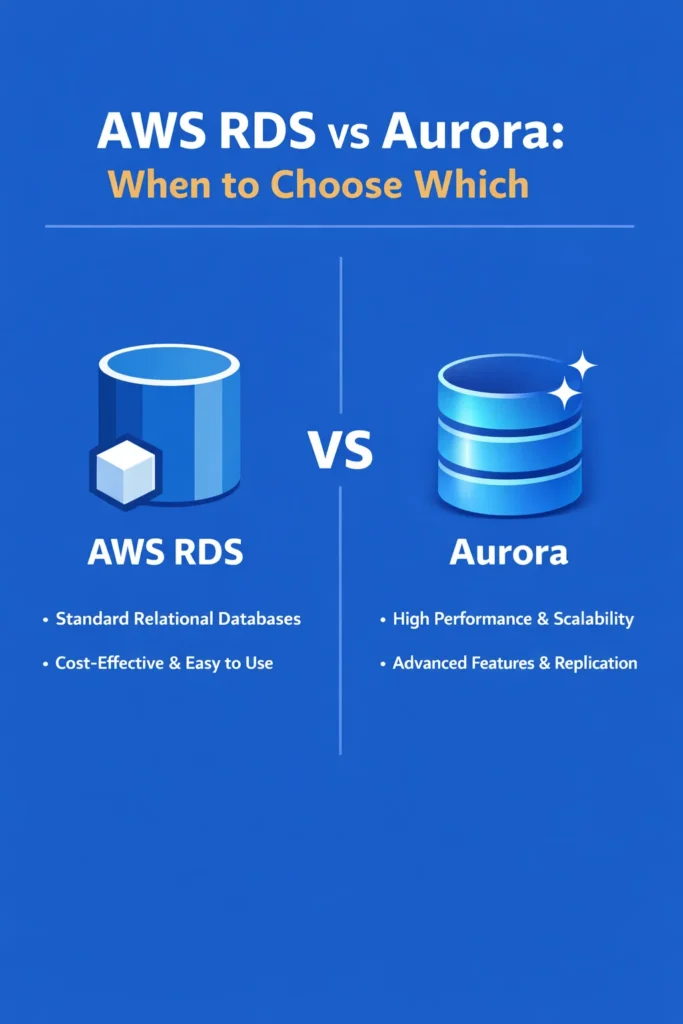
Both RDS and Aurora are managed relational database services from AWS. Both support PostgreSQL and MySQL. Both handle backups, patching, and replication. So why do two services exist, and when should you choose one over the other?
The short answer: Aurora is AWS’s re-engineered storage layer for relational databases, offering higher throughput, faster replication, and automatic storage scaling — at a higher price point. Standard RDS runs the community editions of PostgreSQL and MySQL on EC2 instances with managed operations. The right choice between AWS RDS vs Aurora depends on your performance requirements, availability needs, and budget constraints.
This comparison breaks down the architectural differences, real-world performance characteristics, cost implications, and specific scenarios where each service is the stronger choice.
Architecture: Where They Actually Differ
The fundamental difference between RDS and Aurora is the storage layer. Understanding this explains most of the performance and availability differences.
Standard RDS Architecture
Standard RDS runs a database engine (PostgreSQL, MySQL, MariaDB, Oracle, or SQL Server) on an EC2 instance with an EBS volume for storage. It is essentially a managed version of running the database yourself on EC2.
RDS Instance → EBS Volume (single AZ)
    or
RDS Primary Instance → EBS Volume (AZ-1)
RDS Standby Instance → EBS Volume (AZ-2)  [Multi-AZ]
Storage: EBS volumes with a maximum of 64 TB. You provision a specific storage size and can enable auto-scaling up to a configured maximum. Storage type choices include General Purpose (gp3) and Provisioned IOPS (io1/io2).
Replication: Multi-AZ deployment creates a synchronous standby replica in a different availability zone. Read replicas use asynchronous replication and can lag behind the primary by seconds to minutes depending on write volume.
Aurora Architecture
Aurora separates compute from storage. The database engine runs on instances, but the storage layer is a distributed, fault-tolerant system shared across three availability zones. Data is automatically replicated six ways across those AZs.
Aurora Writer Instance ─┐
Aurora Reader Instance ──┤── Shared Distributed Storage (3 AZs, 6 copies)
Aurora Reader Instance ──┘
Storage: Automatically scales from 10 GB to 128 TB in 10 GB increments. You never provision storage size — Aurora grows and (with limitations) shrinks as your data changes. The storage layer is designed specifically for database workloads with high write throughput.
Replication: Up to 15 read replicas that share the same storage volume. Because replicas read from the same storage rather than replicating data, replica lag is typically under 20 milliseconds — dramatically lower than standard RDS read replica lag.
Performance Comparison
Aurora claims up to 5x throughput over standard MySQL and 3x over standard PostgreSQL. These numbers come from AWS benchmarks under specific conditions. Real-world results vary, but Aurora consistently outperforms standard RDS in several measurable ways.
Write Performance
Aurora’s distributed storage writes data to 4 of 6 storage nodes in parallel before acknowledging a commit. This sounds slower than writing to a single EBS volume, but Aurora only writes redo log records to storage — the database pages are constructed asynchronously. This design reduces the I/O per transaction compared to standard PostgreSQL or MySQL, which write full data pages.
In practice: Write-heavy workloads see the most significant improvement. Applications performing thousands of writes per second benefit from Aurora’s parallel storage writes. For workloads under a few hundred writes per second, the performance difference is negligible.
Read Performance
With standard RDS, read replicas maintain their own copy of the data via asynchronous replication. Each replica has its own EBS volume and can lag behind the primary. With Aurora, read replicas share the same storage volume, so they always read current data (with sub-20ms lag).
In practice: Applications that distribute reads across replicas get more consistent results with Aurora because the replica lag is minimal. Teams managing database connection pools across primary and replica endpoints see fewer stale-read issues with Aurora.
Failover Speed
When an RDS primary fails in a Multi-AZ deployment, the standby takes over. This process involves DNS propagation and takes 60-120 seconds on average.
When an Aurora writer fails, one of the existing read replicas is promoted. Because replicas share the same storage, promotion does not require data copying. Failover completes in approximately 30 seconds, and with Aurora Global Database, cross-region failover happens within a minute.
Feature Comparison
| Feature | Standard RDS | Aurora |
|---|---|---|
| Engines | PostgreSQL, MySQL, MariaDB, Oracle, SQL Server | PostgreSQL, MySQL (Aurora editions) |
| Max storage | 64 TB | 128 TB |
| Storage provisioning | Manual (with auto-scaling option) | Automatic |
| Read replicas | Up to 5 (15 for MySQL) | Up to 15 |
| Replica lag | Seconds to minutes | Typically under 20ms |
| Failover time | 60-120 seconds | ~30 seconds |
| Backtrack | Not available | Available (MySQL only) — rewind DB to a point in time without restore |
| Global Database | Not available | Cross-region replication with <1 second lag |
| Serverless option | Not available | Aurora Serverless v2 — auto-scales compute |
| Clone | Snapshot + restore (slow) | Fast clone (copy-on-write, near-instant) |
| Engine compatibility | Full community compatibility | Mostly compatible (minor differences in some edge cases) |
Aurora Serverless v2
Aurora Serverless v2 automatically scales compute capacity based on demand. Instead of choosing a fixed instance size, you configure minimum and maximum ACU (Aurora Capacity Units). The database scales up during traffic spikes and scales down during quiet periods.
# Aurora Serverless v2 scaling range
Minimum: 0.5 ACU (1 GB RAM)
Maximum: 128 ACU (256 GB RAM)
Scaling increment: 0.5 ACU
Use Serverless v2 when: Traffic is unpredictable with significant peaks and valleys (development environments, batch processing, applications with off-hours), and you want to avoid paying for idle capacity.
Skip Serverless v2 when: Traffic is steady and predictable — a provisioned instance with reserved pricing is cheaper for consistent workloads.
Aurora Cloning
Aurora clones create a copy of your database in minutes using copy-on-write storage. The clone initially shares storage with the original — only pages that change after cloning consume additional space. This makes clones nearly instant and nearly free until data diverges.
Use clones for: Creating staging environments from production data, testing database migrations against real data, debugging production issues with a full data copy, and running analytics queries without impacting production.
With standard RDS, the equivalent process requires creating a snapshot and restoring it to a new instance — which can take hours for large databases.
Cost Comparison
Cost is often the deciding factor between AWS RDS vs Aurora, and the comparison is not straightforward. Aurora’s higher per-unit cost can result in lower total cost at scale, while standard RDS is cheaper for smaller workloads.
Instance Pricing
Aurora instances cost approximately 20-30% more than equivalent RDS instances for the same engine.
| Instance | RDS PostgreSQL (monthly) | Aurora PostgreSQL (monthly) |
|---|---|---|
| db.r6g.large (2 vCPU, 16 GB) | ~$175 | ~$230 |
| db.r6g.xlarge (4 vCPU, 32 GB) | ~$350 | ~$460 |
| db.r6g.2xlarge (8 vCPU, 64 GB) | ~$700 | ~$920 |
Prices approximate for us-east-1, on-demand. Reserved instances reduce both by 30-60%.
Storage Pricing
RDS charges for provisioned storage: $0.115/GB/month for General Purpose (gp3). You pay for the storage you provision, not what you use.
Aurora charges for consumed storage: $0.10/GB/month. You pay only for the data you actually store. Additionally, Aurora I/O costs $0.20 per million requests, which adds up for I/O-intensive workloads.
Where Aurora storage wins: If you provision 500 GB on RDS but only use 100 GB, you pay for 500 GB. Aurora charges for 100 GB. As your data grows, Aurora’s auto-scaling avoids the operational overhead of increasing RDS storage.
Where Aurora storage loses: I/O-heavy workloads (high transaction rates, large scans) can generate significant I/O charges. Aurora I/O-Optimized instances eliminate per-I/O charges for a 30% increase in instance price, which is often cheaper for write-heavy applications.
Total Cost Scenarios
Small application (under 100 GB, moderate traffic):
- RDS: db.t3.medium ($50) + 100 GB gp3 ($11.50) = ~$62/month
- Aurora: db.t3.medium ($65) + 100 GB storage ($10) + I/O (~$15) = ~$90/month
- Winner: RDS — 30% cheaper for a workload that does not need Aurora’s features
Medium application (500 GB, high read traffic):
- RDS: db.r6g.large ($175) + 2 read replicas ($350) + 500 GB gp3 ($57.50) = ~$583/month
- Aurora: db.r6g.large ($230) + 2 read replicas ($460) + 500 GB ($50) + I/O (~$40) = ~$780/month
- Winner: RDS on raw price, but Aurora provides faster failover, lower replica lag, and simpler replica management. The $200/month difference buys significant operational benefits.
Large application (2 TB, write-heavy, high availability):
- RDS: db.r6g.2xlarge Multi-AZ ($1,400) + 2 TB gp3 ($230) = ~$1,630/month
- Aurora: db.r6g.2xlarge ($920) + 1 reader ($920) + 2 TB ($200) + I/O-Optimized = ~$2,040/month
- Aurora provides 128 TB auto-scaling, 30-second failover, and near-instant cloning. At this scale, the operational savings often justify the premium.
For broader strategies on managing database costs within your AWS bill, reserved instances and savings plans apply to both RDS and Aurora.
Real-World Scenario: Migrating from RDS to Aurora
A B2B SaaS platform runs a PostgreSQL database on RDS (db.r6g.xlarge, Multi-AZ) with two read replicas. The database holds 400 GB of data and handles around 2,000 transactions per second during peak business hours. The team faces two problems.
First, read replica lag spikes to 5-10 seconds during batch processing jobs that run every hour. The application occasionally serves stale data from replicas, causing inconsistencies in customer-facing reports. The team has compensated by routing time-sensitive queries to the primary, which increases primary load.
Second, failover testing reveals a 90-second window where the application returns errors during RDS Multi-AZ failover. For a platform that guarantees 99.95% uptime in customer SLAs, a 90-second outage during every failover event is problematic.
The team migrates to Aurora PostgreSQL using AWS Database Migration Service. The migration completes with under 5 minutes of downtime during the final cutover. After migration, read replica lag drops to consistently under 20 milliseconds, eliminating the stale-data problem. The team removes the primary-routing workaround and distributes all reads across replicas, which reduces primary instance load by roughly 40%. Failover testing shows a 25-second recovery time — well within their SLA tolerance.
The monthly cost increases by approximately $250 (from $1,400 to $1,650), but the team offsets part of this by downsizing the primary instance. Because reads are now properly distributed across replicas with reliable consistency, the primary handles less load and can run on a smaller instance class.
When to Use Standard RDS
- Your database is under 100 GB and traffic is moderate — RDS is simpler and cheaper at small scale
- You need Oracle, SQL Server, or MariaDB — Aurora only supports PostgreSQL and MySQL
- Budget is the primary constraint and you do not need Aurora’s performance or availability features
- Your workload is predictable with steady traffic, and RDS Multi-AZ provides sufficient availability
- You need full community PostgreSQL or MySQL compatibility without any deviation — Aurora is mostly compatible but has minor behavioral differences in edge cases
When to Use Aurora
- Read replica lag is a problem and your application needs consistent, near-real-time reads from replicas
- Failover speed matters — 30 seconds versus 60-120 seconds is significant for applications with strict availability SLAs
- Storage needs are growing unpredictably and you want automatic scaling without provisioning overhead
- You need more than 5 read replicas for distributing read traffic
- Aurora Serverless v2 fits your traffic pattern — development environments, variable workloads, or applications with significant idle periods
- You frequently need database clones for testing, staging, or analytics against production data
Common Mistakes When Choosing Between AWS RDS vs Aurora
- Defaulting to Aurora for every new project without evaluating whether RDS handles the workload at lower cost — Aurora’s benefits only materialize at certain scale and access patterns
- Ignoring Aurora I/O costs when estimating the monthly bill — for write-heavy workloads, I/O charges can exceed instance costs if you are not using I/O-Optimized instances
- Assuming Aurora is “faster” for all queries — Aurora’s performance advantage comes from the storage layer and replication, not from query execution speed on a single instance
- Not testing failover before going to production with either service — understanding the actual failover duration prevents SLA surprises
- Choosing Aurora Serverless v2 for steady-state production workloads where a reserved provisioned instance would cost significantly less
- Overlooking PostgreSQL-level tuning — Aurora’s storage improvements do not compensate for missing indexes, unoptimized queries, or misconfigured connection pools
- Migrating to Aurora to solve a performance problem that is actually caused by application-level issues (N+1 queries, missing indexes, excessive connections) — the database engine is rarely the bottleneck
Making the Right Choice Between AWS RDS vs Aurora
The decision between AWS RDS vs Aurora is not about which service is “better” — it is about which matches your specific requirements and budget. Standard RDS is the pragmatic default for applications under moderate load, especially when cost matters and you need broad engine support. Aurora earns its premium when you need sub-second replica lag, fast failover, automatic storage scaling, or the operational convenience of instant clones.
Start with RDS for new projects unless you have a clear requirement that only Aurora satisfies. As your application grows, the migration path from RDS PostgreSQL to Aurora PostgreSQL is well-documented and typically involves minimal downtime. Making the switch later is straightforward — choosing Aurora prematurely costs more without delivering proportional value.