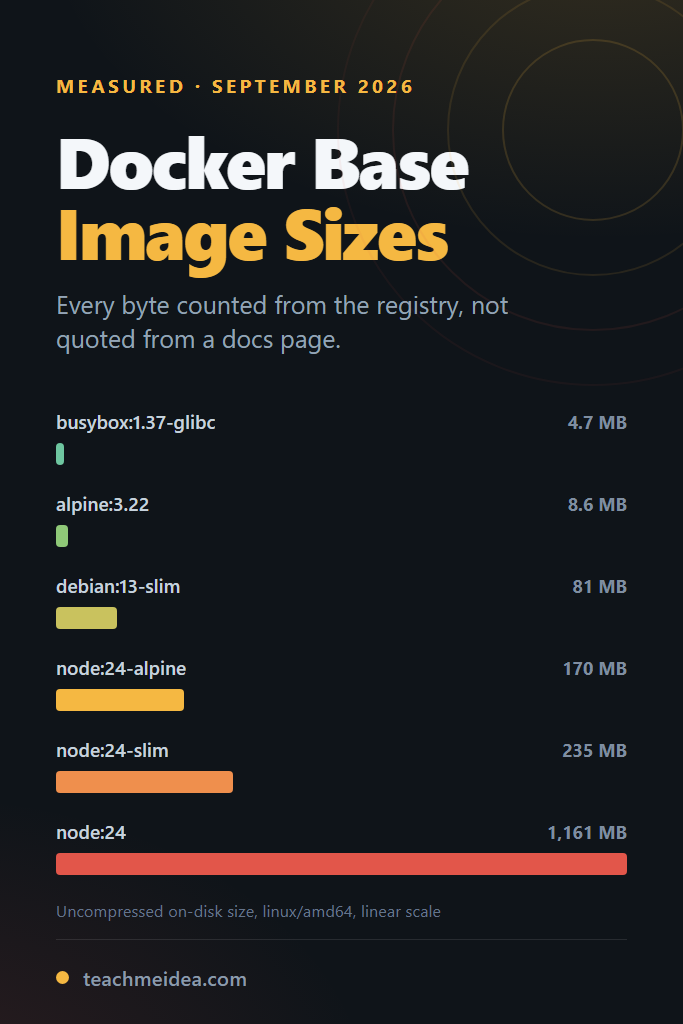
Almost every Docker base image size you have read in a blog post is a number somebody copied from another blog post. Tags move weekly, the maintainers rebuild on new upstream releases, and the figure that was correct in 2023 is off by hundreds of megabytes today. This post takes fifteen tags that real services actually start from, reads their exact byte counts out of the registry on one dated afternoon, and pastes the commands so you can re-run every row yourself.
This is for developers who own a Dockerfile and a CI bill. Specifically, it answers the question behind the search: if you switch the first line of your Dockerfile from node:24 to node:24-alpine, how many megabytes do you actually save, and where do you save them? The answer turns out to be two different numbers that most comparisons quietly merge into one.
How These Docker Base Image Size Numbers Were Measured
Every figure below came from the OCI registry itself rather than from a running Docker daemon. That choice is deliberate, because it makes the measurement reproducible on any machine with a shell and an internet connection, including CI runners and locked-down laptops where installing Docker is not an option. The endpoints used are the ones in the OCI distribution specification, so the same script works against any compliant registry.
Here is the exact environment:
Measured 2026-09-14
Windows 11 Pro 25H2 (build 26200), AMD Ryzen 5 8600G (6C/12T), 15.2 GB RAM, NVMe SSD
PowerShell 5.1.26100.9444, bsdtar 3.8.8 (libarchive 3.8.8)
Registries: registry-1.docker.io (Docker Hub), gcr.io (Google Container Registry)
Platform selected for every image: linux/amd64
Tags resolved at measurement time; digests pinned in the table below
Sizes do not vary between runs, so no repeat count applies. A blob is a fixed number of bytes, and the same digest returns the same bytes every time. What does vary is the tag: node:24 today is a different digest from node:24 last month, which is exactly why the manifest digest for each image appears alongside its size.
The method has four steps. First, the script asks the registry’s token endpoint for anonymous pull credentials. Next, it resolves the multi-platform index down to the single linux/amd64 manifest. Then it sums the size field of every layer for the compressed number, and streams each layer through a gzip decoder counting the bytes that come out for the uncompressed number. Finally, for the smaller images, it lists every archive entry with bsdtar and reads /etc/os-release and the package database out of the layers.
That second number is the one docker images reports in its SIZE column. Consequently, the table below reproduces what you would see after docker pull, without needing the pull.
One deliberate limitation: this counts the bytes in the layer archives, not the blocks those files occupy on a particular storage driver. Overlay2 on a filesystem with 4 KB blocks rounds small files up, so the figure the daemon prints for an image full of tiny files can run slightly above the archive total.
Docker Base Image Size: The Full Table
Both columns matter, and they are not the same number. Pull is what crosses the network and what your registry bills for. Disk is what the layer occupies once the daemon has unpacked it, which is what fills a node’s filesystem and what docker images prints.
| Image | Pull (MB) | Disk (MB) | Layers |
|---|---|---|---|
gcr.io/distroless/static-debian12 | 0.72 | 3.18 | 12 |
busybox:1.37-glibc | 2.21 | 4.66 | 1 |
alpine:3.22 | 3.79 | 8.58 | 1 |
python:3.13-alpine | 19.46 | 54.11 | 4 |
ubuntu:24.04 | 29.76 | 80.69 | 1 |
debian:13-slim | 29.79 | 81.07 | 1 |
python:3.13-slim | 45.97 | 130.38 | 4 |
gcr.io/distroless/nodejs24-debian12 | 52.74 | 147.66 | 19 |
node:24-alpine | 58.58 | 170.22 | 4 |
eclipse-temurin:21-jre-alpine | 74.07 | 209.15 | 5 |
node:24-slim | 80.81 | 235.27 | 5 |
eclipse-temurin:21-jdk | 230.08 | 504.60 | 6 |
golang:1.25 | 305.36 | 873.67 | 7 |
node:24 | 409.70 | 1,161.32 | 8 |
python:3.13 | 412.87 | 1,134.45 | 7 |
Megabytes here are decimal, meaning bytes divided by one million, because that is the unit the Docker CLI uses in its SIZE column.
Four results are worth pausing on before the analysis. Firstly, ubuntu:24.04 and debian:13-slim land within half a percent of each other, which contradicts the common assumption that Ubuntu is the heavier choice. Secondly, node:24-alpine at 170 MB on disk is more than twice the size of a bare debian:13-slim, so “alpine” in a tag name is a relative claim, not an absolute one. Thirdly, the two full language images both cross a gigabyte on disk while their Alpine variants sit under 200 MB.
The fourth is the one that surprises people. Google’s distroless nodejs24-debian12 is a glibc image built on Debian, yet at 147.66 MB it comes in 22.56 MB smaller on disk than node:24-alpine. Cutting the shell, the package manager and npm out of a Debian base does more for Docker base image size than swapping glibc for musl does.
The Raw Byte Counts and Pinned Digests
Tags move. Every row above was resolved to a specific linux/amd64 manifest at measurement time, and these are the digests that produced the numbers, so anyone re-running this in six months can tell a genuine change from a rebuild.
image                                  pull (bytes)   disk (bytes)  linux/amd64 manifest digest
gcr.io/distroless/static-debian12           715,727      3,180,032  sha256:6d635b323e6ab633016668144d38e368e2894bd824500369151573225078ee03
busybox:1.37-glibc                        2,211,507      4,659,200  sha256:7a3ebe5bfd1a4a19797d20b0c0bb39d44393e9a03fd852c0865b0f540d868df0
alpine:3.22                               3,787,595      8,575,488  sha256:7c8cb692ae09657cbc4a3f3cbd0e8d5a2690ba38386aaaf252dbb060bf5eb2e6
python:3.13-alpine                       19,464,726     54,112,256  sha256:46ee549c88617e9bc8acb843a326f1a5c0fa5608d7f9703509efe6d53b55f318
ubuntu:24.04                             29,763,253     80,686,592  sha256:a61567bd31828687156d735ea8eb01ba4e37636e225dd6a48ba94136a70d9d61
debian:13-slim                           29,792,658     81,070,080  sha256:abc9cb88a5587630d7f915f47b23b0668fe250fbfc6457aa4d52b534c1bbf73f
python:3.13-slim                         45,967,048    130,382,848  sha256:cc9dffa47c8294ba9bb795a8dfaeb7b76f2b30acade2c52a461a2999d127eb00
gcr.io/distroless/nodejs24-debian12      52,739,253    147,662,336  sha256:fb614bb0790340827f5bddb1a4f70039cb79b13cd4afdafb744da67fa8008a4f
node:24-alpine                           58,580,899    170,222,080  sha256:333f6b3eca25980d5682c26207665b93c9417786b21760b2764d5821d9704c8a
eclipse-temurin:21-jre-alpine            74,068,088    209,147,392  sha256:4cbffea0432e0209a002c816a9fad6557d83147e56d5df6a73cdeec3c03ea522
node:24-slim                             80,809,937    235,267,072  sha256:713cfbf4a0ac19f40e1bb9919893e126b74a5c8cf5d0623c9f89515c8f74c6fa
eclipse-temurin:21-jdk                  230,080,573    504,596,480  sha256:b9aaac8b1d81454e2dade3fbb26d9d5a26daa97cc9aefbca66a6c0df296a3dba
golang:1.25                             305,364,640    873,673,728  sha256:54b6b88db6fe375c6676625d87d668273f85c6d09153635d0cbba89cba7a207a
node:24                                 409,701,629  1,161,324,544  sha256:b977d0f785d96029d8d4c0790b6bf1c2a4c72e0f26319808e7ba2e9d966a1ac3
python:3.13                             412,872,069  1,134,447,104  sha256:de8ba566572ebcb35cbd10e03f5f351cad00a0d0d50a11e084f1a0fd24a0c41a
To confirm any single row, pull the digest rather than the tag. For example, docker pull node@sha256:333f6b3eca25980d5682c26207665b93c9417786b21760b2764d5821d9704c8a fetches the exact image measured here, no matter what node:24-alpine points at by the time you read this.
Pull Size and Disk Size Are Not the Same Number
The gap between the two columns is the single most common source of confusion in Docker base image size discussions. Registry layers ship gzip-compressed. The daemon decompresses them on arrival, so the bytes you transfer and the bytes you store differ by the compression ratio of that particular layer’s contents.
| Image | Pull (MB) | Disk (MB) | Disk ÷ Pull |
|---|---|---|---|
gcr.io/distroless/static-debian12 | 0.72 | 3.18 | 4.44 |
busybox:1.37-glibc | 2.21 | 4.66 | 2.11 |
eclipse-temurin:21-jdk | 230.08 | 504.60 | 2.19 |
alpine:3.22 | 3.79 | 8.58 | 2.26 |
ubuntu:24.04 | 29.76 | 80.69 | 2.71 |
debian:13-slim | 29.79 | 81.07 | 2.72 |
python:3.13 | 412.87 | 1,134.45 | 2.75 |
python:3.13-alpine | 19.46 | 54.11 | 2.78 |
gcr.io/distroless/nodejs24-debian12 | 52.74 | 147.66 | 2.80 |
eclipse-temurin:21-jre-alpine | 74.07 | 209.15 | 2.82 |
node:24 | 409.70 | 1,161.32 | 2.83 |
python:3.13-slim | 45.97 | 130.38 | 2.84 |
golang:1.25 | 305.36 | 873.67 | 2.86 |
node:24-alpine | 58.58 | 170.22 | 2.91 |
node:24-slim | 80.81 | 235.27 | 2.91 |
The ratios cluster near 2.8, but the outliers explain something useful. Debian-derived images compress well because a large share of their contents is text: manual pages, locale data, copyright files and shell scripts. Alpine compresses worse, at 2.26, because what remains after Alpine strips the documentation is mostly already-dense binary.
This has a practical consequence that cuts against intuition. Alpine’s advantage over Debian is larger on disk than it is on the wire. Against debian:13-slim, Alpine is 7.9 times smaller to pull but 9.4 times smaller to store. Therefore, if your constraint is node disk pressure rather than pull bandwidth, the Alpine saving is bigger than the registry numbers suggest.
The JDK runs the other way at 2.19. Java’s modules file inside a JDK is already a compressed archive, so gzip has little left to remove. In other words, eclipse-temurin:21-jdk costs proportionally more to transfer than its disk footprint implies.
What a Switch From Full to Alpine Actually Saves
Abstract ratios are less useful than the delta on your own first line. These are the exact savings for the three most common downgrades in the table, in both units.
| Change | Pull saved (MB) | Disk saved (MB) | Disk reduction |
|---|---|---|---|
node:24 to node:24-slim | 328.89 | 926.06 | 4.9x smaller |
node:24 to node:24-alpine | 351.12 | 991.10 | 6.8x smaller |
node:24-slim to node:24-alpine | 22.23 | 65.04 | 1.4x smaller |
python:3.13 to python:3.13-slim | 366.91 | 1,004.06 | 8.7x smaller |
python:3.13 to python:3.13-alpine | 393.41 | 1,080.33 | 21.0x smaller |
python:3.13-slim to python:3.13-alpine | 26.50 | 76.27 | 2.4x smaller |
Notice where the money is. Moving from the full tag to slim captures the overwhelming majority of the saving in both ecosystems: 926 MB of the 991 MB available for Node, and 1,004 MB of the 1,080 MB available for Python. The further step from slim to Alpine adds 65 MB for Node and 76 MB for Python.
That last step is the one that costs you glibc. Python’s case is the sharper of the two, because the jump from slim to Alpine is 2.4 times rather than Node’s 1.4 times, yet it is also where prebuilt wheels stop working. The decision section below covers when that trade is worth making.
Shared Layers Save Less Than the Folklore Claims
The standard reassurance about Docker base image size is that the numbers do not really add up, because layers are content-addressed and a digest already on the host is never pulled or stored twice. That is true, but it only fires when two images reference the byte-identical layer, and across these fifteen tags that happens far less often than expected.
Comparing every layer digest against every other layer digest in the set produced exactly three overlaps:
| Pair | Shared layers | Shared pull (MB) | Shared disk (MB) |
|---|---|---|---|
debian:13-slim and python:3.13-slim | 1 | 29.79 | 81.07 |
node:24-alpine and python:3.13-alpine | 1 | 3.85 | 8.70 |
distroless/static and distroless/nodejs24 | 9 | 0.04 | not measured |
Where sharing does happen, it pays well. The layer python:3.13-slim shares with debian:13-slim is the entire Debian rootfs, so on a host that already holds debian:13-slim the Python image costs 16.17 MB to pull rather than 45.97 MB, a 65% reduction.
Now look at what is missing from that table. node:24 and node:24-slim share nothing at all. Their first layers are 48,497,362 and 28,232,655 bytes respectively, because one derives from the full Debian rootfs and the other from the slim one. Likewise alpine:3.22 shares nothing with node:24-alpine, for a reason worth knowing.
Check Which Debian or Alpine Release You Actually Got
Reading /etc/os-release out of each image explains the misses, and turns up a result most teams get wrong. These are all Docker Official Images, so the release each one pins is a maintainer decision rather than anything you control from your Dockerfile:
| Image | Distribution reported |
|---|---|
alpine:3.22 | Alpine Linux v3.22 |
node:24-alpine | Alpine Linux v3.24 |
python:3.13-alpine | Alpine Linux v3.24 |
debian:13-slim | Debian GNU/Linux 13 (trixie) |
python:3.13-slim | Debian GNU/Linux 13 (trixie) |
node:24-slim | Debian GNU/Linux 12 (bookworm) |
ubuntu:24.04 | Ubuntu 24.04.4 LTS |
gcr.io/distroless/static-debian12 | Debian GNU/Linux 12 (bookworm) |
So node:24-slim is still on Debian 12, a full release behind debian:13-slim and behind python:3.13-slim. Consequently, a cluster running both Node and Python slim services carries two complete Debian rootfs layers, not one, and the CVE surface you patch is two distributions wide rather than one.
The Alpine rows explain the other miss. Both language images track Alpine 3.24 while the alpine:3.22 tag is two releases back, so they share a base with each other but not with the plain Alpine image.
Verify the Overlap Yourself
This prints the layer digests and sizes for any tag, which is all you need to diff two images:
#!/usr/bin/env bash
# Usage: ./layers.sh library/node 24-slim
set -euo pipefail
REPO="${1:?repo}"; TAG="${2:?tag}"
ACCEPT="application/vnd.oci.image.index.v1+json,application/vnd.oci.image.manifest.v1+json"

TOKEN=$(curl -fsS "https://auth.docker.io/token?service=registry.docker.io&scope=repository:${REPO}:pull" | jq -r .token)
DIGEST=$(curl -fsS -H "Authorization: Bearer $TOKEN" -H "Accept: $ACCEPT" \
  "https://registry-1.docker.io/v2/${REPO}/manifests/${TAG}" \
  | jq -r '.manifests[]
           | select(.platform.os=="linux" and .platform.architecture=="amd64")
           | select(.annotations["vnd.docker.reference.type"] == null)
           | .digest' | head -1)

curl -fsS -H "Authorization: Bearer $TOKEN" -H "Accept: $ACCEPT" \
  "https://registry-1.docker.io/v2/${REPO}/manifests/${DIGEST}" \
  | jq -r '.layers[] | "\(.size)\t\(.digest)"'
Run it for two tags, then comm -12 the sorted digest columns. One more result from doing exactly that is instructive: python:3.13 and golang:1.25 share no layers, even though their first three layers measure 49,337,828 against 49,312,314 bytes, 25,639,590 against 25,638,637, and 67,800,074 against 67,797,999. Both descend from the same buildpack-deps lineage, but they were rebuilt days apart, and a rebuild produces new digests. Near-identical content still counts as two separate downloads.
What You Actually Get for Those Megabytes
Bytes alone do not tell you what you gave up. Listing every archive entry in each layer, and counting the installed-package database where one exists, shows what the size difference buys.
| Image | Archive entries | Packages | Disk (MB) |
|---|---|---|---|
busybox:1.37-glibc | 443 | no package manager | 4.66 |
alpine:3.22 | 519 | 28 | 8.58 |
gcr.io/distroless/static-debian12 | 1,477 | no package manager | 3.18 |
eclipse-temurin:21-jre-alpine | 2,406 | 28 | 209.15 |
debian:13-slim | 3,262 | 78 | 81.07 |
python:3.13-alpine | 3,422 | 28 | 54.11 |
ubuntu:24.04 | 3,443 | 92 | 80.69 |
node:24-alpine | 3,538 | 28 | 170.22 |
python:3.13-slim | 5,731 | 78 | 130.38 |
node:24-slim | 7,287 | 88 | 235.27 |
One caveat on that column: it counts archive entries summed across every layer, so a file written in one layer and replaced in a later one is counted twice. For the single-layer images the number is exact, and for the rest it is an upper bound on the file count.
The package column is the more decision-relevant one. Alpine ships 28 packages against Debian slim’s 78 and Ubuntu’s 92, and that ratio, rather than the byte count, is what your vulnerability scanner reports on. Notably, ubuntu:24.04 carries 14 more packages than debian:13-slim while occupying slightly fewer bytes.
Two rows deserve a second look. eclipse-temurin:21-jre-alpine fits an entire Java runtime into 2,406 entries, fewer than a bare debian:13-slim, because a JRE is a handful of large files rather than a distribution’s worth of small ones. Meanwhile distroless/static-debian12 has 1,477 entries and no package manager, which is the whole point: there is nothing in it to upgrade, and nothing for an attacker to run.
Reproduce the Whole Table Without Installing Docker
The measurement needs three things: a token, a manifest and the blobs. This shell version produces the pull total for any image, and it runs anywhere curl and jq exist.
#!/usr/bin/env bash
# Prints the compressed (pull) size of a Docker Hub image for linux/amd64.
# Usage: ./image-size.sh library/node 24-alpine
set -euo pipefail

REPO="${1:?repo, e.g. library/node}"
TAG="${2:?tag, e.g. 24-alpine}"
ACCEPT="application/vnd.oci.image.index.v1+json,application/vnd.oci.image.manifest.v1+json"

TOKEN=$(curl -fsS "https://auth.docker.io/token?service=registry.docker.io&scope=repository:${REPO}:pull" | jq -r .token)

# A tag points at a multi-platform index; pick the plain linux/amd64 entry and
# skip attestation manifests, which carry no rootfs but do carry a size.
DIGEST=$(curl -fsS -H "Authorization: Bearer $TOKEN" -H "Accept: $ACCEPT" \
  "https://registry-1.docker.io/v2/${REPO}/manifests/${TAG}" \
  | jq -r '.manifests[]
           | select(.platform.os == "linux" and .platform.architecture == "amd64")
           | select(.annotations["vnd.docker.reference.type"] == null)
           | .digest' | head -1)

# Total compressed bytes. Divide by 1,000,000 for the MB figure the Docker CLI shows.
curl -fsS -H "Authorization: Bearer $TOKEN" -H "Accept: $ACCEPT" \
  "https://registry-1.docker.io/v2/${REPO}/manifests/${DIGEST}" \
  | jq -r '[.layers[].size] | add'
The select on vnd.docker.reference.type matters more than it looks. Docker Hub now publishes build attestations as extra manifests inside the same index, and they claim linux/amd64 as their platform. Without that filter your total silently includes provenance metadata that never lands on disk.
For the disk column, pipe each layer blob through gunzip and count:
# Uncompressed bytes for one layer, which is what `docker images` totals in SIZE
curl -fsSL -H "Authorization: Bearer $TOKEN" \
  "https://registry-1.docker.io/v2/${REPO}/blobs/${LAYER_DIGEST}" \
  | gunzip -c | wc -c
If you already run a daemon, docker pull followed by docker images --format '{{.Repository}}:{{.Tag}}\t{{.Size}}' gives the same disk figure. The registry route simply avoids downloading a gigabyte to learn a number. For more on keeping a local Docker setup sane, see using Docker for local development.
When to Use Each Docker Base Image
The right base depends on what you are optimising and what your build actually needs to compile. Below, each option is matched to the constraint it solves.
Reach for Alpine if
- Your dependencies are pure interpreted code, or every native module has a musl build
- Node disk pressure is a live problem and you are storing dozens of image versions
- The service is one of many replicas, so the per-node saving multiplies
- Other images on the node already track the same Alpine release, which is what makes the base layer shared
Stay on slim if
- You install Python packages that ship prebuilt manylinux wheels, such as NumPy or Pandas
- A native dependency compiles against glibc and has no musl equivalent
- The 65 MB to 76 MB extra over Alpine is cheaper than debugging a build
- You want
apt-getavailable for a handful of runtime libraries
Choose the full tag if
- The image is a build stage that gets discarded before the final layer
- You need compilers, headers and Git present without installing them
- Developer iteration speed matters more than the runtime footprint
Go distroless if
- The artefact is a static binary, which is the normal case for Go and Rust
- Your security review wants no shell and no package manager in the runtime image
- You want Node on glibc without paying for it, since
distroless/nodejs24is 22.56 MB smaller on disk thannode:24-alpine - You accept that debugging means a sidecar or an ephemeral container, not
exec
When NOT to Use Alpine, Slim or Distroless
Each of these bases has a failure mode that shows up after the Dockerfile already works locally.
Skip Alpine when
- Your Python dependencies need compilation, because musl wheels mostly do not exist and pip falls back to building from source
- DNS resolution behaviour matters, since musl’s resolver has historically differed from glibc’s under load
- You depend on glibc-only behaviour in a third-party binary you cannot rebuild
Avoid the full tag when
- It is your final runtime stage, where a gigabyte buys you nothing at request time
- Your registry charges for storage or egress and you push on every commit
- You are optimising cold-start time on a platform that pulls the image per instance
Rule out distroless when
- Your process needs a shell for an entrypoint script or a health check
- Operators will need to inspect a running container without extra tooling
- The application is interpreted and drags a full runtime along anyway
Common Mistakes with Docker Base Image Size
- Quoting the pull number as the disk number. They differ by roughly 2.8 times, so a “58 MB” Alpine Node image occupies 170 MB on the node.
- Assuming the tag name describes absolute size.
node:24-alpineis 170 MB, which is bigger thanubuntu:24.04at 81 MB. - Chasing the slim-to-Alpine step first. For Node that step is 65 MB, while the full-to-slim step ahead of it is 926 MB.
- Assuming layers are shared. Sharing needs byte-identical digests, and
node:24shares nothing withnode:24-slim, nor doesalpine:3.22withnode:24-alpine. - Not checking which distribution release a tag ships.
node:24-slimis Debian 12 whilepython:3.13-slimis Debian 13, so running both means patching two distributions. - Optimising the builder stage. Build stages are discarded, so their size affects build cache and pull time only, not the shipped artefact.
- Pinning nothing. A floating tag changes size and contents without warning, which is exactly why every row here carries a digest.
- Forgetting the attestation manifests. Automated size checks that skip that filter overcount, then report a regression that never happened.
A Real-World Scenario: Where a Gigabyte Actually Costs Money
Consider a mid-sized backend with roughly a dozen Node services, deployed to a managed Kubernetes cluster, with a CI pipeline that builds and pushes on every merge to main. The team standardised on node:24 years ago because it was the tag in the tutorial, and nobody revisited it.
At 1,161 MB on disk per image, twelve services on a shared node consume more than 13 GB before a single dependency is installed on top. As a result, the cluster’s image garbage collector starts evicting layers under disk pressure, which turns into slow pod starts during exactly the traffic spikes that triggered the scale-up. The symptom looks like a scheduling problem, but the cause is the first line of twelve Dockerfiles.
Switching those services to node:24-slim reclaims roughly 926 MB per distinct image. Crucially, the saving is per image rather than per service, because twelve services on the same tag already share every layer. The pressure comes from holding several different bases plus the history of previous builds, which is where the earlier finding bites: add a Python service on python:3.13-slim and the node now stores a Debian 13 rootfs next to Node’s Debian 12 one.
The trade-off is real though. Any service with a native module compiled against the full image’s build tools now needs those tools added explicitly in a builder stage, which typically surfaces as a broken build on the first attempt rather than a runtime failure later. Teams doing this migration usually find one or two services that resist, and those are the ones that stay on the full tag.
Pull traffic tells a similar story on the CI side. A pipeline that pulls a 409 MB base on every job pays for it in wall-clock time on cold runners, which is the same pattern described in CI/CD for Node.js projects using GitHub Actions.
What This Benchmark Does Not Measure
Every row above is linux/amd64. The arm64 variants differ, often by tens of megabytes, so do not reuse these numbers for Graviton or Apple Silicon nodes without re-running the script against that platform.
Image size is also not the same as attack surface, though the two correlate. A smaller image ships fewer packages and therefore fewer CVEs, but this post counted bytes rather than vulnerabilities. Scanning is a separate exercise, covered from the pipeline side in securing CI/CD pipelines.
Nothing here measures runtime performance. Alpine’s musl allocator behaves differently from glibc’s under some concurrent workloads, and that difference does not show up in a byte count. Similarly, build time, layer cache hit rates and cold-start latency on serverless platforms are all unmeasured.
The layer-sharing comparison covers only these fifteen tags. Two images outside the set may well share a base that nothing here does, so treat the three overlaps found as a floor rather than a complete map. The archive-entry counts also stop at the images small enough to unpack, which leaves node:24, python:3.13, golang:1.25 and eclipse-temurin:21-jdk without a file count.
Finally, these are base images with nothing installed on top. Once npm ci or pip install runs, application dependencies frequently dwarf the base, at which point the first line of your Dockerfile stops being the biggest lever. For a sibling measurement produced with the same discipline, see Bun vs Node vs Deno install, boot and test times measured.
Conclusion
The honest summary of Docker base image size is that one decision dominates and the rest is rounding. Going from a full language image to its slim variant saves 926 MB on Node and 1,004 MB on Python, while the celebrated further step to Alpine adds 65 MB and 76 MB respectively and costs you glibc compatibility. Meanwhile, the pull and disk columns differ by roughly 2.8 times, so quoting one when you mean the other misstates the problem by a factor of three.
Two measured results argue against the common advice. Layer sharing rescued only three pairs out of fifteen images, so the reassurance that sizes do not really add up is mostly wrong in practice. And distroless/nodejs24 came in 22.56 MB smaller on disk than node:24-alpine while keeping glibc, which makes musl a worse trade for Node than its reputation suggests.
The recommendation is straightforward. Take the slim variant for runtime stages by default, use the full tag only inside a discarded builder stage, and reserve Alpine for services whose dependency tree you have confirmed builds on musl. Distroless is the right answer for compiled binaries and for Node services that need no shell, and the wrong answer for anything that does.
The concrete next step takes two minutes: run docker images --format '{{.Repository}}:{{.Tag}}\t{{.Size}}' on a machine that has already pulled your production bases, and compare the total against the table above. If you are orchestrating several of these locally, Docker Compose for local development is the natural companion, and deploying Python apps with Docker and Kubernetes covers the deployment side for the Python rows.