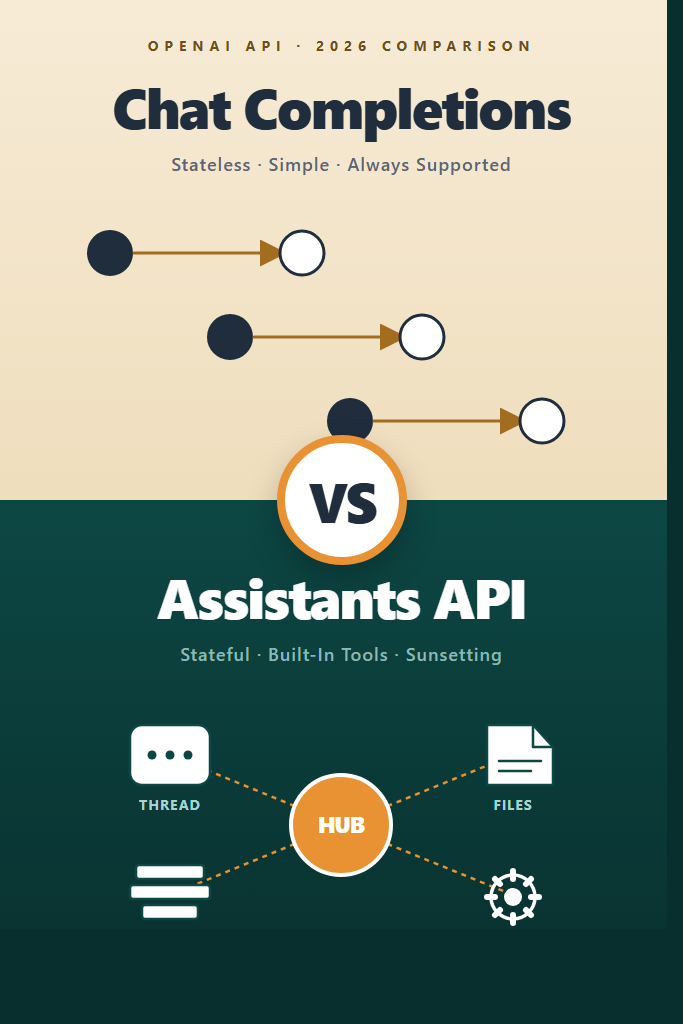
If you are building a production app on OpenAI in 2026, the choice between the OpenAI Assistants API vs Chat Completions is no longer just an architectural debate — it has consequences for your migration timeline. Chat Completions remains the workhorse for stateless inference, while the Assistants API offers managed threads, file search, and code interpreter. Meanwhile, the newer Responses API is positioned as the long-term successor that absorbs the best of both. This guide explains what each endpoint actually does, where they overlap, when each is the right pick, and what to do about the Assistants API deprecation.
The audience here is engineers who already ship LLM features and need to make a concrete call: do I keep things simple with Chat Completions, lean on Assistants for stateful agents, or skip both and build on Responses? The answer is rarely all-or-nothing.
What Is the Chat Completions API?
The Chat Completions API is OpenAI’s stateless message-in, message-out endpoint at /v1/chat/completions. You send the full conversation history as an array of messages on every request, and the server responds with one assistant message. There is no thread, no memory, no server-side state — your application owns everything.
Chat Completions has been the default since GPT-3.5 launched and remains the most widely used OpenAI endpoint. It supports streaming via server-sent events, tool calling (function calling), structured outputs with JSON schema, vision input, audio input on capable models, and predicted outputs for code edits. For most production apps, this is still the right starting point.
from openai import OpenAI

client = OpenAI()

response = client.chat.completions.create(
    model="gpt-5",
    messages=[
        {"role": "system", "content": "You are a senior code reviewer."},
        {"role": "user", "content": "Find bugs in this function: ..."}
    ],
    temperature=0.2
)

print(response.choices[0].message.content)
This pattern works because every request is independent. Therefore, scaling is trivial — you can route requests to any worker, retry safely, and cache aggressively. The cost is that you (or a layer like a vector store) must store conversation history yourself.
What Is the Assistants API?
The Assistants API is OpenAI’s managed agent framework, available at /v1/assistants and /v1/threads. Instead of sending stateless messages, you create an Assistant (a long-lived configuration with instructions, tools, and a model), open a Thread (server-managed conversation state), add Messages, and run the Assistant against the Thread. OpenAI handles the message history, tool execution loops, and retrieval over uploaded files.
The Assistants API ships three built-in tools: code interpreter (sandboxed Python), file search (managed RAG over uploaded documents), and function calling (your own tools). It also supports vector stores attached to threads or assistants. The pitch is simple: skip building your own conversation store, retrieval pipeline, and execution loop.
from openai import OpenAI

client = OpenAI()

assistant = client.beta.assistants.create(
    name="Tax Helper",
    instructions="You answer tax questions using uploaded IRS documents.",
    model="gpt-4o",
    tools=[{"type": "file_search"}]
)

thread = client.beta.threads.create()

client.beta.threads.messages.create(
    thread_id=thread.id,
    role="user",
    content="What's the 2025 contribution limit for a Roth IRA?"
)

run = client.beta.threads.runs.create_and_poll(
    thread_id=thread.id,
    assistant_id=assistant.id
)

messages = client.beta.threads.messages.list(thread_id=thread.id)
Notice the beta namespace. The Assistants API never left beta. As a result, OpenAI announced its deprecation in 2024 with a sunset target in mid-2026, replaced by the Responses API. That detail changes every recommendation in this post.
The Responses API: What Replaces What
The Responses API at /v1/responses is OpenAI’s unified endpoint that combines the simplicity of Chat Completions with the stateful primitives of Assistants. Specifically, it supports server-side conversation state via previous_response_id, built-in tools (web search, file search, code interpreter, computer use), and the same streaming and structured output primitives as Chat Completions. In practice, Responses is what most new code should target.
OpenAI’s published path is straightforward: Chat Completions stays supported indefinitely as the simple stateless option, the Assistants API is deprecated with migration to Responses, and Responses becomes the default for any feature that needs server-managed state, tools, or multimodal inputs. Therefore, the “Assistants vs Chat Completions” decision in 2026 is really a three-way choice — and “stick with Assistants” is the weakest option for greenfield work.
If you are reading this for the first time, treat Responses as the default for new projects, Chat Completions as the fallback for the simplest stateless cases, and Assistants only when you have an existing investment that does not yet justify a migration. For deep coverage of structured JSON output (which works the same way across all three endpoints), see our guide on OpenAI Structured Outputs in production.
Assistants API vs Chat Completions: Key Differences
The differences come down to where state lives, how tools execute, and what you have to build yourself. The table below maps the surface area you will actually feel in production code.
| Feature | Chat Completions | Assistants API |
|---|---|---|
| State management | Client-side (you own history) | Server-side (Threads) |
| Built-in tools | None | Code interpreter, file search |
| Function calling | Yes | Yes |
| Streaming | SSE, simple | SSE, run-event-based |
| File / RAG handling | DIY with vector store | Managed via vector stores |
| Latency profile | Single round trip | Run polling or streaming run events |
| Cost predictability | High (you see every token) | Lower (background tool calls add tokens) |
| Long-term support | Stable, indefinite | Deprecated, sunsetting 2026 |
| Scaling model | Stateless, easy | Stateful threads add coordination |
A few of these deserve more explanation. The Assistants API hides token usage inside tool runs — code interpreter and file search both consume input and output tokens, and they show up in your bill without showing up in your prompts. Furthermore, runs are polled or streamed via run-step events, which is a richer API surface than chat completions but also more code to write and test.
How Tool Calling Differs in Practice
In Chat Completions, function calling is a turn-by-turn handshake: the model returns a tool_calls array, you execute the functions, and you send the results back as tool messages. You drive the loop. With Assistants, the model emits the same kind of tool calls, but the run sits in requires_action status until you submit tool_outputs, and then the run continues server-side. The mental model is different — you are responding to events from a long-lived process, not threading function results back into a request.
For a longer treatment of the tool-calling loop and when each pattern shines, see our overview of building AI agents with tools, planning, and execution.
State, Memory, and Cost
Threads in the Assistants API are append-only conversation logs. As the thread grows, every run sends progressively more context to the model. There is no automatic truncation or summarization, so a long-running thread becomes expensive without warning. With Chat Completions, you face the same physics, but the cost is visible in every request — you trim history yourself.
This is the single biggest source of surprise bills. In production, plan for thread pruning or summarization regardless of which API you pick.
Decision Guide: Picking the Right Endpoint
Use this section to map your use case to an endpoint. The headings combine the per-API decisions with the common mistakes to keep things scannable.
Chat Completions Is the Right Pick When
- You are building a stateless feature: classification, extraction, code generation, single-turn Q&A.
- Your conversation state lives in a database you already operate (Postgres, Redis, DynamoDB).
- You need predictable cost accounting per request.
- You are migrating off Chat Completions today and want minimal API churn before adopting Responses.
- Your retrieval layer is already mature — pgvector, Qdrant, or similar — and you do not want managed file search.
- You need the lowest possible latency on a single-turn request.
Assistants API Is the Right Pick When
- You have an existing Assistants integration shipping in production and the migration cost outweighs the deprecation timeline risk.
- You need code interpreter and do not yet want to build a sandboxed Python execution environment.
- You want managed file search over uploaded PDFs without standing up a vector database.
- Your team is small and prefers managed primitives over custom infrastructure for a short-lived prototype.
- The cost of building threading and tool orchestration yourself is higher than the projected migration cost to Responses.
Where Neither Endpoint Is the Right Choice
- Greenfield projects in 2026 should evaluate the Responses API first, since it covers most Assistants features without the deprecation tax.
- Real-time voice or low-latency multimodal apps belong on the Realtime API, not Chat Completions or Assistants.
- Heavy retrieval workloads with custom ranking belong on a dedicated stack like pgvector or Qdrant — see RAG from scratch for the build-it-yourself path.
Common Mistakes With Both APIs
- Choosing Assistants for new projects in 2026. The deprecation timeline means you are buying technical debt the day you start. Build on Responses or stay on Chat Completions instead.
- Treating Threads as free storage. Thread history grows monotonically and ships every token to the model on each run. Summarize or truncate intentionally.
- Re-implementing your own thread store on top of Chat Completions. If you really need server-side state, the Responses API gives you
previous_response_idwithout the Assistants overhead. - Mixing endpoints for the same conversation. A user session that switches between Chat Completions and Assistants halfway through is hard to debug and pricey to maintain.
- Skipping streaming on long Assistants runs. Run polling adds noticeable latency. Use the streaming runs endpoint for any user-facing flow.
- Hardcoding
gpt-4oor older models. Both endpoints accept newer models likegpt-5; capability bumps often come for free with a model swap.
A Realistic Migration Scenario
Consider a mid-sized SaaS team that shipped a customer support assistant on the Assistants API in 2024. The product uses file search across a few hundred uploaded help-center articles, function calling to look up customer accounts, and threads keyed to user sessions. After the deprecation announcement, the team has two real options: migrate to the Responses API or rebuild on Chat Completions plus a self-hosted vector store.
In practice, migrating from Assistants to Responses is the lower-risk path because the data model is similar — Responses keeps a notion of conversation continuity via previous_response_id, supports the same built-in file search, and maps function calling almost one-to-one. The team replaces client.beta.threads.runs.create_and_poll(...) with client.responses.create(..., previous_response_id=...), ports their vector stores, and rewires their function executors. Most of the rewrite touches the runtime loop, not the prompt logic.
Going to Chat Completions is the higher-effort option but produces the leanest long-term system. The team would need to ship a thread store, a vector store with retrieval and reranking, and a custom tool-execution loop. For teams that already operate Postgres at scale, this is straightforward and predictable. For teams that picked Assistants precisely to avoid that work, the migration to Responses is the better trade.
A common pitfall during either migration is preserving the assistant_id and thread_id references in the application database. These IDs become orphaned after migration and are easy to forget. Plan a schema migration or a soft-delete pass that retires the old records cleanly. Likewise, for streaming clients see our walkthrough on streaming AI chatbot responses — the event shape changes between Chat Completions, Assistants runs, and Responses, and your frontend will need to know.
Cost and Performance Considerations
Cost-wise, Chat Completions is the most predictable: you pay for input tokens (the messages array) plus output tokens, and that is the entire bill for that call. Assistants adds three layers on top: thread tokens (everything in the thread is sent to the model on each run), tool tokens (file search and code interpreter consume tokens transparently), and per-tool surcharges (file search has a per-1000-call fee in addition to tokens).
For latency, Chat Completions wins on single-turn flows because there is exactly one round trip. Assistants runs are inherently multi-step: the run is created, the model executes, tools may be called, and the client either polls or streams events until completion. On simple Q&A, Assistants is measurably slower without offering a benefit. On complex multi-tool flows where the alternative is multiple Chat Completions calls glued together client-side, Assistants can be competitive.
For prompt-level optimization, the same advice applies to both endpoints — prompt caching, careful system prompts, and structured outputs all carry over. Our guide to prompt engineering best practices covers patterns that work across both APIs.
Conclusion
The OpenAI Assistants API vs Chat Completions question has a clearer answer in 2026 than it did at launch. Chat Completions remains the right default for stateless, single-turn features and stays supported indefinitely. The Assistants API is a managed agent framework with real ergonomic wins, but its deprecation timeline means new projects should look past it to the Responses API. If you have an existing Assistants integration, plan a migration to Responses now rather than during the sunset window.
For most teams, the practical next step is to pick the simplest option that meets the requirement: stateless calls go to Chat Completions, stateful or tool-heavy flows go to Responses, and Assistants stays in maintenance mode until you migrate. To see how OpenAI’s primitives compare to Anthropic’s tool-calling model, read our Claude tool use deep dive next, or build your first OpenAI app from scratch if you are starting fresh.