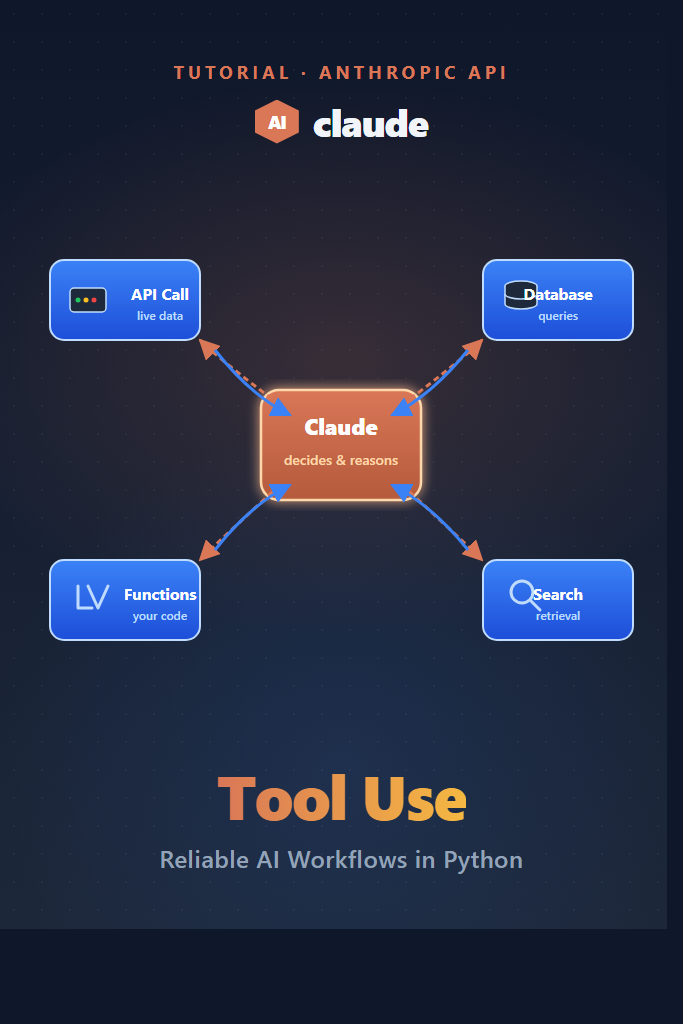
If your LLM app needs to fetch live data, hit a database, or call internal APIs, prompt-only solutions break down fast. Claude tool use solves that gap by letting the model decide when to call a function, what arguments to pass, and how to incorporate the result back into its response. This guide walks through the agentic loop end-to-end, with production-grade patterns for parallel execution, schema design, error handling, and forced tool selection. By the end, you will have a working multi-tool workflow that you can drop into a real backend.
What Is Claude Tool Use?
Claude tool use is a feature in the Anthropic Messages API that lets the model request structured function calls during a conversation. Instead of generating a final answer, Claude returns a tool_use block describing which function to invoke and the JSON arguments. Your code executes the function, sends the result back as a tool_result, and Claude continues reasoning until it produces a normal text response.
This shift from “LLM as autocomplete” to “LLM as orchestrator” is what makes reliable AI workflows possible. Furthermore, because the schema is enforced, you avoid the brittle regex parsing that early function-calling implementations required.
How the Tool Use Loop Works
Tool use is an iterative loop, not a single request. Specifically, every turn in the loop has four phases:
- You send the conversation history plus a
toolsarray to Claude - Claude returns either a final
textblock or one or moretool_useblocks - For each
tool_use, you execute the function locally and append atool_resultblock to the conversation - You send the updated history back to Claude, which either calls more tools or replies with text
The loop ends when Claude returns a stop_reason of end_turn instead of tool_use. As a result, your code needs a while loop, not a single API call. We will build that loop properly in the sections below.
Setting Up the Anthropic SDK
Install the official Python SDK and set your API key as an environment variable:
pip install anthropic
export ANTHROPIC_API_KEY="sk-ant-..."
Then, initialize the client. For this guide we will use Claude Sonnet 4.6, which balances cost and tool-calling reliability for most production workloads:
import os
from anthropic import Anthropic

client = Anthropic(api_key=os.environ["ANTHROPIC_API_KEY"])
MODEL = "claude-sonnet-4-6"
If you have not used the Messages API before, our getting started with Claude API walkthrough covers the basics of streaming, system prompts, and message roles.
Defining Your First Tool
A tool definition is a JSON schema that tells Claude what the function does and what arguments it accepts. The schema must include a name, a description, and an input_schema object that follows JSON Schema syntax. Here is a minimal weather lookup tool:
get_weather_tool = {
    "name": "get_weather",
    "description": (
        "Get the current weather for a city. Returns temperature in Celsius "
        "and a short condition string (e.g., 'sunny', 'cloudy')."
    ),
    "input_schema": {
        "type": "object",
        "properties": {
            "city": {
                "type": "string",
                "description": "The city name, e.g., 'San Francisco' or 'Tokyo'.",
            },
            "units": {
                "type": "string",
                "enum": ["celsius", "fahrenheit"],
                "description": "Temperature units.",
            },
        },
        "required": ["city"],
    },
}
The description field is the most important part. Claude relies on it to decide when to call the tool, so write it like documentation for a junior engineer. Vague descriptions (“get info”) cause Claude to call the wrong tool or skip it entirely. In contrast, specific descriptions with example inputs significantly improve selection accuracy.
Handling the Tool Use Response
A response from the Messages API can contain multiple content blocks. When Claude wants to call a tool, the stop_reason is tool_use and one of the blocks has type: "tool_use". Here is the loop that drives the conversation forward:
def fake_weather_lookup(city: str, units: str = "celsius") -> dict:
    # Replace this with a real API call in production.
    return {"city": city, "temperature": 18, "condition": "cloudy", "units": units}

def run_conversation(user_message: str, tools: list, tool_handlers: dict) -> str:
    messages = [{"role": "user", "content": user_message}]

    while True:
        response = client.messages.create(
            model=MODEL,
            max_tokens=1024,
            tools=tools,
            messages=messages,
        )

        if response.stop_reason == "end_turn":
            return next(
                block.text for block in response.content if block.type == "text"
            )

        if response.stop_reason != "tool_use":
            raise RuntimeError(f"Unexpected stop_reason: {response.stop_reason}")

        messages.append({"role": "assistant", "content": response.content})

        tool_results = []
        for block in response.content:
            if block.type != "tool_use":
                continue
            handler = tool_handlers[block.name]
            result = handler(**block.input)
            tool_results.append({
                "type": "tool_result",
                "tool_use_id": block.id,
                "content": str(result),
            })

        messages.append({"role": "user", "content": tool_results})
Notice that the assistant response is appended as-is to the message history. You must not mutate the content blocks or strip them down to text — Claude needs the original tool_use block to match incoming tool_result IDs. Skipping this step is one of the most common bugs in tool use implementations.
To use the loop, register your handlers and call it:
tool_handlers = {"get_weather": fake_weather_lookup}

answer = run_conversation(
    user_message="What is the weather in Tokyo right now?",
    tools=[get_weather_tool],
    tool_handlers=tool_handlers,
)
print(answer)
Multiple Tools and Parallel Execution
Real workflows need more than one tool. Moreover, Claude can request multiple tools in a single turn, which lets you fan out independent calls in parallel and reduce end-to-end latency. For example, suppose you want to add a flight search tool alongside the weather tool:
search_flights_tool = {
    "name": "search_flights",
    "description": "Search for one-way flights between two airport codes on a given date.",
    "input_schema": {
        "type": "object",
        "properties": {
            "origin": {"type": "string", "description": "IATA code, e.g., 'SFO'."},
            "destination": {"type": "string", "description": "IATA code, e.g., 'NRT'."},
            "date": {"type": "string", "description": "ISO date, e.g., '2026-06-15'."},
        },
        "required": ["origin", "destination", "date"],
    },
}
When the user asks “Find flights from SFO to Tokyo next Tuesday and tell me the weather there,” Claude will typically emit both tool_use blocks in one response. Therefore, you can execute them concurrently with asyncio or a thread pool:
from concurrent.futures import ThreadPoolExecutor

def execute_tools_parallel(blocks, handlers):
    tool_blocks = [b for b in blocks if b.type == "tool_use"]
    with ThreadPoolExecutor(max_workers=8) as pool:
        futures = {
            pool.submit(handlers[b.name], **b.input): b for b in tool_blocks
        }
        results = []
        for future, block in futures.items():
            try:
                output = future.result(timeout=10)
                results.append({
                    "type": "tool_result",
                    "tool_use_id": block.id,
                    "content": str(output),
                })
            except Exception as exc:
                results.append({
                    "type": "tool_result",
                    "tool_use_id": block.id,
                    "content": f"Error: {exc}",
                    "is_error": True,
                })
        return results
Importantly, the is_error: true flag tells Claude that the call failed and lets it decide whether to retry, ask the user for clarification, or fall back to a different tool. Silently swallowing errors and returning empty strings is a common anti-pattern that produces confidently wrong final answers.
Forcing Tool Selection With tool_choice
By default, Claude decides on its own whether to call a tool or respond with text. However, sometimes you need to force the issue. The tool_choice parameter accepts four modes:
| Mode | Behavior | Use Case |
|---|---|---|
{"type": "auto"} | Claude decides (default) | Most general workflows |
{"type": "any"} | Must call some tool | Routing, classification |
{"type": "tool", "name": "X"} | Must call tool X | Forced extraction, validation |
{"type": "none"} | Cannot call any tool | Final summarization step |
For instance, if you are using Claude as a structured-data extractor, force a specific tool so the model never falls back to free-form text:
response = client.messages.create(
    model=MODEL,
    max_tokens=1024,
    tools=[extract_invoice_tool],
    tool_choice={"type": "tool", "name": "extract_invoice"},
    messages=[{"role": "user", "content": invoice_text}],
)
This pattern is far more reliable than asking Claude to “respond with JSON only” in the system prompt. The schema is enforced by the API, not the model’s instruction-following.
Real-World Workflow: Triaging Customer Support Tickets
Consider a mid-sized SaaS team handling several hundred support tickets per day. The current workflow has a human agent reading each ticket, looking up the customer in the CRM, checking their plan tier, and routing the ticket to the right specialist. A Claude tool use workflow can automate the lookup-and-routing step while keeping a human in the loop for the actual response.
The agent would be wired with three tools:
lookup_customer(email)— returns plan tier, signup date, MRRget_recent_tickets(customer_id, limit)— returns the last N tickets and resolutionsroute_to_queue(queue_name, priority)— assigns the ticket to a specialist queue
Claude reads the incoming ticket, calls lookup_customer to get context, calls get_recent_tickets to check whether the issue is recurring, and then calls route_to_queue with a priority based on plan tier and ticket sentiment. The whole loop completes in under three seconds for a typical ticket. As a result, the human agent gets the ticket pre-enriched with context and routed correctly, which cuts time-to-first-response substantially without removing human judgment from the actual reply.
The trade-off is observability. You must log every tool call with arguments and results, because debugging a misrouted ticket means tracing exactly what Claude saw at each step. Plain print statements will not cut it — use a structured logger or an observability tool from day one.
When Claude Tool Use Is the Right Choice
Reach for Claude tool use when:
- Your LLM needs live data that changes faster than you can re-prompt (prices, inventory, user state)
- You need to enforce structured outputs and “respond with JSON” prompting keeps drifting
- A workflow requires multiple steps where each step depends on the previous result
- You are building agent-style flows where the model orchestrates a sequence of actions
- You need parallel execution of independent lookups to reduce latency
When You Should Skip Tool Use
Tool use adds latency, cost, and complexity. Therefore, prefer a simpler approach when:
- A single API call followed by a prompt would do the job (just inject the data in the system prompt)
- The task is pure text transformation with no external state (summarization, translation)
- Your latency budget is under one second end-to-end and you cannot afford the extra round trips
- The workflow is fully deterministic — a plain function call without an LLM is faster, cheaper, and more debuggable
For batch processing of structured data where you do not need orchestration, prompt caching often delivers better cost-per-call than tool use.
Common Mistakes with Claude Tool Use
Watch out for these pitfalls:
- Vague tool descriptions — Claude picks the wrong tool when descriptions are generic. Write them like API docs with concrete examples.
- Mutating the assistant message before sending it back — the
tool_use_idin the original block must match thetool_resultyou return, or the API rejects the request. - Ignoring
is_error— silently returning error strings makes Claude confidently relay failures as facts to the user. Always setis_error: trueon failure. - Unbounded loops — without a max-iteration cap, a misbehaving model can call tools forever. Always wrap your loop in a
for _ in range(MAX_TURNS)guard. - Over-broad input schemas —
"type": "string"with no description gives Claude no reason to format arguments correctly. Use enums, regexpattern, and descriptions liberally. - Forgetting to handle text alongside tool calls — Claude can return both a
textblock (its reasoning) and atool_useblock in the same response. Only act on thetool_useblocks but log the text for debugging.
Combining Tool Use With Extended Thinking
For complex agentic workflows where Claude needs to plan a sequence of tool calls, combining tool use with extended thinking produces noticeably better orchestration. Extended thinking gives the model a scratchpad to plan the call sequence before executing, which reduces wasted tool calls on multi-step problems.
If you are building general-purpose agents that need planning, retrieval, and execution, our deep dive on building AI agents covers the broader patterns that sit on top of tool use.
Conclusion: Ship Reliable Tool-Calling Workflows
Claude tool use turns the LLM from a text generator into a workflow orchestrator. The agentic loop, parallel execution, and tool_choice modes are the three primitives you need to build reliable production workflows. Start with one well-described tool, get the loop working with proper error handling, then scale to multi-tool flows with parallel execution.
For your next step, pair tool use with structured prompting techniques to tighten tool selection accuracy. If you also work with OpenAI’s API, our building apps with OpenAI API guide compares function calling implementations side by side.
4 Comments
Comments are closed.