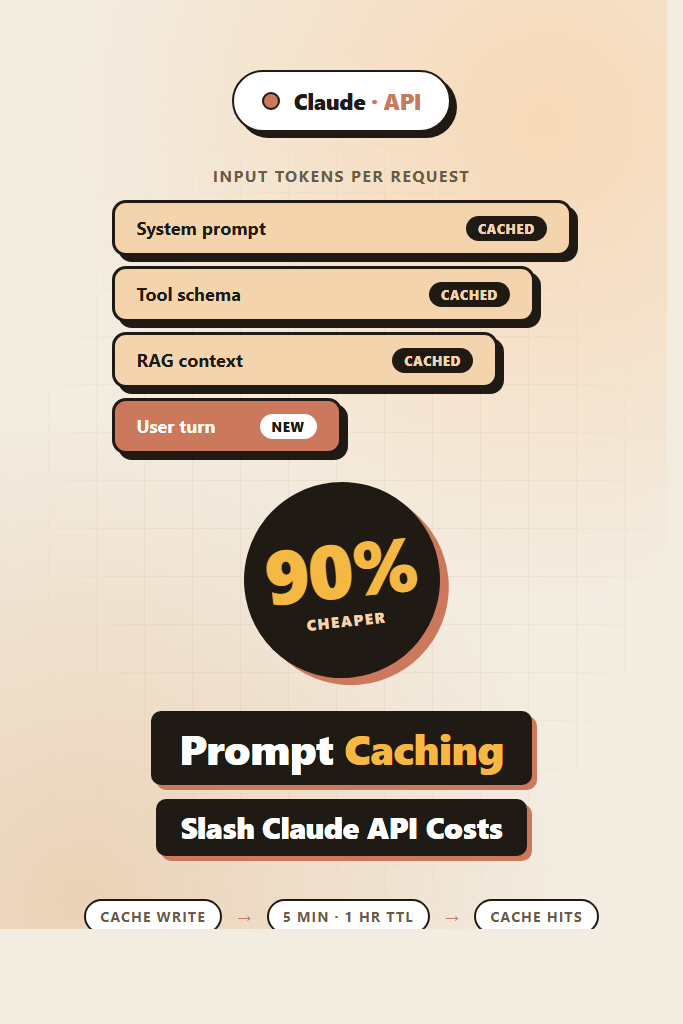
If your app sends Claude the same long system prompt, RAG context, or tool schema on every request, you are paying full input-token price for tokens the model has already seen. Anthropic prompt caching lets Claude reuse that work across requests, cutting input costs by up to 90% and trimming latency on long prompts. This tutorial walks through how the feature actually works, where to place cache_control markers, the new TTL options, and the patterns that move the cost needle in production.
This guide is for developers already shipping Claude API integrations who want to lower bills without rewriting their stack. By the end you will know which prompts to cache, how to verify cache hits, and the mistakes that quietly turn caching off.
What Is Anthropic Prompt Caching?
Anthropic prompt caching is a feature of the Claude API that stores a prefix of your prompt on Anthropic’s servers, so subsequent requests reusing that prefix skip the cost of re-encoding it. Cached input tokens are billed at roughly 10% of the normal input price, while writes cost slightly more (around 1.25x). Cache lifetime defaults to five minutes and can extend to one hour, making it ideal for chat sessions, agent loops, and RAG pipelines.
Caching is opt-in. Nothing happens until you mark a content block with cache_control: { "type": "ephemeral" }. Once marked, that block plus everything before it forms the cache key. The next request that starts with the exact same prefix gets a cache hit on those tokens.
Why It Matters: The Cost Math
Caching changes the unit economics of long-context Claude apps. Consider a customer-support bot that prepends a 8,000-token system prompt and a 12,000-token knowledge-base context, then handles a 200-token user turn. At Claude Sonnet 4.6 input pricing of $3 per million tokens:
| Pattern | Per request | Per 10,000 requests |
|---|---|---|
| No caching | 20,200 input tokens × $3/M = $0.0606 | $606 |
| With caching (cache write once, then hits) | 20,000 cached + 200 new | ~$67 |
| Savings | ~89% | $539 saved |
That math holds anywhere you reuse a long prefix. Furthermore, cached prompts process faster because Claude skips the prefill step on shared tokens — long-context apps often see 30–50% latency reductions on the input phase.
How Anthropic Prompt Caching Works Under the Hood
The cache stores a content-addressed prefix of your prompt. When a new request arrives, Anthropic hashes the prompt up to each cache_control marker and checks for a match. The longest matching prefix wins, and only the suffix after the match counts as fresh input.
Three rules to internalize:
- Order matters. Cache hits require an exact-prefix match. Reordering tools, system blocks, or messages breaks the cache.
- Granularity is per content block, not per token. You mark up to four cache breakpoints in a single request.
- Minimum size applies. Cached prefixes must be at least 1,024 tokens for Claude Sonnet/Opus and 2,048 for Haiku. Below that threshold the marker is silently ignored.
The cache is account-scoped and isolated by API key, so other organizations cannot read your cached prompts. Anthropic also encrypts cache entries at rest.
Setting Up Anthropic Prompt Caching: A Working Example
Here is a complete Python example using the official SDK. This pattern caches a long system prompt and a tool schema, leaving only the user message as fresh input.
from anthropic import Anthropic

client = Anthropic()

LONG_SYSTEM_PROMPT = """You are a senior support agent for Acme Cloud.
Follow these rules strictly: ...
[8,000+ tokens of policies, examples, and tone guidance]
"""

TOOLS = [
    {
        "name": "lookup_account",
        "description": "Fetch a customer record by ID...",
        "input_schema": {
            "type": "object",
            "properties": {"account_id": {"type": "string"}},
            "required": ["account_id"],
        },
        # Cache the tool definition so repeated agent loops reuse it
        "cache_control": {"type": "ephemeral"},
    },
]

def reply(user_message: str):
    response = client.messages.create(
        model="claude-sonnet-4-6",
        max_tokens=1024,
        system=[
            {
                "type": "text",
                "text": LONG_SYSTEM_PROMPT,
                "cache_control": {"type": "ephemeral"},
            }
        ],
        tools=TOOLS,
        messages=[{"role": "user", "content": user_message}],
    )

    usage = response.usage
    print(
        f"input={usage.input_tokens} "
        f"cache_read={usage.cache_read_input_tokens} "
        f"cache_write={usage.cache_creation_input_tokens}"
    )
    return response
The first call pays a small write premium and stores both the system prompt and tools. Subsequent calls within five minutes hit the cache, and the cache_read_input_tokens field confirms it. Importantly, never log the full prompt in production — log only the usage counters.
Reading the Usage Block to Verify Hits
Every Claude response now returns four token counters in response.usage:
input_tokens— fresh tokens not served from cachecache_creation_input_tokens— tokens written into the cache this turncache_read_input_tokens— tokens served from cache this turnoutput_tokens— model output
A healthy production deployment shows large cache_read_input_tokens and small input_tokens after the first request. If cache_creation_input_tokens keeps appearing on every call, your prefix is changing and the cache is missing.
def cache_hit_ratio(usage):
    cached = usage.cache_read_input_tokens
    fresh = usage.input_tokens + usage.cache_creation_input_tokens
    total = cached + fresh
    return cached / total if total else 0.0
Track this ratio per route in your observability stack. A drop below 70% on a route that should cache well usually means a prefix changed — for instance, a timestamp slipped into the system prompt.
Choosing Cache Breakpoints
You can place up to four cache_control markers per request. Place them at semantic boundaries where content stability decreases:
system=[
    {"type": "text", "text": STATIC_INSTRUCTIONS, "cache_control": {"type": "ephemeral"}},
    {"type": "text", "text": TENANT_CONFIG, "cache_control": {"type": "ephemeral"}},
],
tools=[...],  # also marked
messages=[
    {"role": "user", "content": [
        {"type": "text", "text": RAG_CONTEXT, "cache_control": {"type": "ephemeral"}},
        {"type": "text", "text": user_question},
    ]},
],
The four breakpoints here — static instructions, per-tenant config, tool schema, and RAG context — let Claude reuse the maximum amount of work even when the user question changes. Order them from most stable to least stable, since a change at one breakpoint invalidates everything after it.
Extended TTL: One-Hour Caching
The default cache TTL is five minutes from the last access. For long agent runs, scheduled batches, or low-traffic enterprise apps, that is too short. Anthropic now supports a one-hour TTL via a parameter on the cache control object:
"cache_control": {"type": "ephemeral", "ttl": "1h"}
The one-hour cache costs 2x the standard write price (versus 1.25x for five-minute), so use it where traffic is bursty enough that the five-minute window keeps expiring. As a rule of thumb, switch to one-hour TTL when your traffic between cache hits exceeds five minutes more than 20% of the time.
You can mix TTLs in a single request — for example, a one-hour TTL on the static system prompt and a five-minute TTL on dynamic RAG context.
Patterns That Cache Well
Multi-Turn Chat
Cache the system prompt and the conversation history up to the previous turn. Each new user message becomes the only fresh content. This is the highest-value pattern; long sessions show dramatic savings as turn count grows.
RAG With Stable Document Sets
If your retrieval returns the same top-k documents for similar queries, cache the assembled context block. For RAG basics, see our RAG from scratch guide.
Tool-Heavy Agents
Agents that loop through tool calls re-send the same system prompt and tool schema on every step. Caching both can cut input costs by 80%+ on long agent runs. Our building AI agents post covers the broader architecture.
Few-Shot Examples
Long few-shot example sets are perfect cache candidates — they rarely change, sit at the start of the prompt, and add up fast.
When to Use Anthropic Prompt Caching
- Your prompts include 1,024+ tokens of repeated content (system prompt, tools, RAG context, examples)
- You handle multiple requests within five minutes that share a prefix
- You run agent loops, multi-turn chats, or batch jobs against the same context
- Latency on long prompts is hurting user experience
When NOT to Use Anthropic Prompt Caching
- One-off requests where the prefix changes every time (each request would pay the write premium without any reads)
- Prompts under the 1,024-token minimum where the marker is ignored
- Workloads with strict per-request privacy requirements that forbid server-side caching of prompts (rare, but check your compliance policy)
- Traffic patterns where hits would arrive only after the one-hour TTL expires
Common Mistakes With Anthropic Prompt Caching
- Putting volatile content (timestamps, request IDs, user-specific tokens) before a cache breakpoint, which invalidates the prefix on every call
- Reordering tools or system blocks between requests, breaking the exact-prefix match
- Marking content blocks under 1,024 tokens and assuming caching is active — it isn’t
- Forgetting that streaming responses still return usage counters in the final event; instrument them or you will not know whether caching works
- Using one-hour TTL on workloads that hit the cache every 30 seconds, paying the higher write cost without the benefit
- Caching prompts that contain PII without verifying your data-handling policy allows server-side prompt storage
Real-World Scenario: Cutting a Support Bot’s Bill in Half
Consider a mid-sized SaaS team running a Claude-powered support bot that handles 50,000 conversations per week. Each conversation averages six turns, and every turn ships a 9,000-token system prompt plus growing chat history. Without caching, the bot bills around $4,200/week in input tokens.
After enabling caching at two breakpoints — the system prompt and the previous-turn history — the team typically sees cache_read_input_tokens covering 85–90% of their input volume from turn two onward. The bill drops to roughly $1,800/week. The migration itself takes a few hours: add cache_control markers, instrument the usage counters, run a dashboard to watch the hit ratio, and roll out behind a feature flag.
The most common surprise during rollout is a per-tenant config block sneaking volatile fields (like a “current_time” string) into the cached prefix. Once flagged via the hit-ratio dashboard, fixing it is a five-line change — but without observability, the team would have wondered why caching “wasn’t working.”
Caching With Streaming Responses
Streaming and caching work together fine. The cache markers go on the request as usual; the final message_stop event carries the usage block. Make sure your streaming code reads usage from the final event rather than the first, since cache statistics are only finalized at completion.
For an end-to-end streaming integration, see our AI chatbot streaming responses guide.
Combining Caching With Other Cost Levers
Caching stacks with other Claude API features:
- Batch API: 50% discount on top of caching for jobs that tolerate up to 24-hour latency
- Smaller models for routing: Use Haiku to triage and Sonnet for the substantive answer; both can cache
- Prompt compression: Trim your system prompt before caching so you cache fewer tokens
- Tool design: Smaller, focused tool schemas cache more cheaply than sprawling ones
If you are still picking models, our getting started with Claude API guide covers the basics. For a multi-provider perspective, compare with building apps with the OpenAI API, which has a similar caching feature.
Testing and Rolling Out Caching Safely
Treat caching as a behavior-preserving change, but verify it carefully:
- Add
cache_controlmarkers in a feature branch - Write integration tests that assert
cache_read_input_tokens > 0on the second identical request - Run a side-by-side eval comparing cached vs uncached outputs — they should be byte-identical
- Roll out behind a flag with per-route cache-hit metrics
- Watch your hit ratio dashboard for 24 hours before declaring victory
For broader prompt-quality testing techniques, our prompt engineering best practices post covers the patterns that hold up in production.
Cache Invalidation in Practice
You cannot manually purge a cache entry, but invalidation happens automatically when:
- The TTL expires (5 minutes or 1 hour from last access)
- The prefix changes by even a single token
- Anthropic rotates the cache for capacity reasons (rare)
For deploys that change the system prompt, plan for a brief warm-up window where the new prompt pays cache-write costs across the fleet. This is usually invisible at the bill level, but it is worth knowing about during incident reviews.
Conclusion
Anthropic prompt caching is one of the highest-leverage features in the Claude API: drop in a few cache_control markers, instrument the usage block, and watch input costs fall by 80–90% on any workload with a stable prefix. The key is ordering content from stable to volatile, keeping prefixes above the 1,024-token floor, and tracking your cache-hit ratio in production.
Start by adding a single breakpoint after your system prompt, ship it behind a flag, and verify hits with cache_read_input_tokens. From there, expand to tools, RAG context, and conversation history. For your next move, read building AI agents with tools, planning, and execution — agent loops are where caching pays off the most.