If you are deciding between AWS RDS and Amazon Aurora, you are already past the beginner stage. This decision usually comes up when an application starts to scale, availability expectations increase, or database costs become visible. Understanding AWS RDS vs Aurora helps you avoid over-engineering early or hitting painful limits later.
This guide is written for backend and platform engineers who want to make a production-grade database decision, not just compare features on a pricing page.
What AWS RDS Actually Is
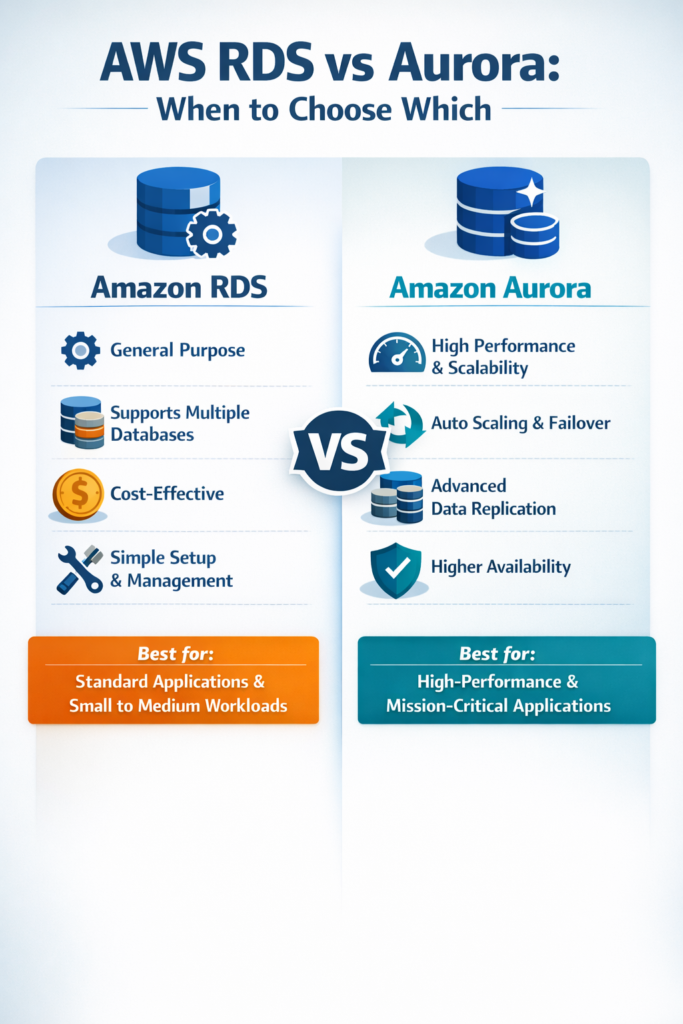
AWS RDS is a managed relational database service supporting engines like MySQL, PostgreSQL, MariaDB, SQL Server, and Oracle. AWS handles provisioning, backups, patching, and failover, while you stay in control of schema design, indexing, and query behavior.
Because RDS stays very close to upstream database engines, behavior is predictable. This matters when you rely on standard SQL features, extensions, or ORMs. For example, teams building Node.js backends often combine RDS with patterns explained in Using TypeORM for Database Access in Node.js, where compatibility and predictable query plans are essential.
What Amazon Aurora Is (And Why It’s Different)
Amazon Aurora is not simply “faster RDS.” It is a cloud-native database engine designed by AWS, compatible with MySQL and PostgreSQL at the protocol level but architecturally different under the hood.
Aurora separates compute from storage and uses a distributed storage layer replicated across multiple Availability Zones. As a result, failovers are typically faster, read scaling is easier, and storage grows automatically.
However, this abstraction introduces AWS-specific behavior. While most applications never notice the difference, some edge cases behave differently compared to vanilla PostgreSQL or MySQL.
Architectural Differences That Actually Matter
The core difference in the AWS RDS vs Aurora debate is architecture.
RDS runs a primary instance with optional replicas. Storage is tied to each instance, and failover requires promoting a replica.
Aurora writes to a shared, distributed storage system that already exists across AZs. Compute nodes can fail and restart independently. Because of this, Aurora usually recovers faster during outages.
If your system demands strict uptime guarantees, Aurora’s architecture is a strong advantage. If not, RDS often provides everything you need with fewer moving parts.
Performance Characteristics in Practice
Performance depends more on workload patterns than marketing benchmarks.
For read-heavy workloads, Aurora read replicas scale efficiently and recover quickly. For write-heavy workloads, Aurora reduces some storage bottlenecks but still requires careful schema design and indexing.
RDS offers consistent and predictable performance when instances are sized correctly. Many teams running JVM backends or REST APIs deployed as containers prefer this stability, especially in architectures like those described in Deploying Spring Boot Microservices to AWS ECS & Fargate.
Cost Model: Where Teams Get Burned
Cost is often underestimated when comparing AWS RDS vs Aurora.
RDS pricing is simple: instance cost, storage, and replicas. This makes forecasting easier.
Aurora pricing includes instance cost, storage usage, I/O operations, and replicas. In write-intensive or spiky workloads, I/O costs can grow faster than expected.
As a result, Aurora usually makes sense when downtime or scaling limits are more expensive than infrastructure costs. Otherwise, RDS is often the more economical choice.
Operational Complexity and Team Experience
Operational overhead is another key difference.
RDS aligns well with teams that want minimal surprises. Debugging, monitoring, and tuning follow familiar database workflows.
Aurora requires deeper AWS-specific knowledge. Metrics, scaling behavior, and troubleshooting often involve understanding internal AWS mechanics. Teams already comfortable with distributed systems especially those running containerized workloads or local clusters as explained in Running a Local Kubernetes Cluster with Minikube or Kind tend to adapt more easily.
A Realistic Production Scenario
Imagine a mid-sized SaaS platform with a REST API, background workers, and a relational database handling transactional data. Traffic is steady during the day and spikes during peak business hours.
Initially, AWS RDS works well. Read replicas handle analytics queries, and occasional failovers are acceptable. Over time, availability expectations increase, and recovery time becomes critical.
At that point, migrating to Aurora can significantly reduce failover time and improve read scalability. However, the team must accept higher costs, AWS-specific behavior, and more complex operations.
This progression is common: start with RDS, move to Aurora when constraints force the decision.
When to Use AWS RDS
- You want predictable, upstream-compatible database behavior
- Your workload scales vertically or with limited replicas
- Cost predictability is important
- Your team prefers simpler operations
When NOT to Use AWS RDS
- You need very fast failover times
- Read traffic scales aggressively and unpredictably
- Storage growth is difficult to forecast
When to Use Amazon Aurora
- High availability is non-negotiable
- Fast recovery from failures matters
- You accept AWS-specific abstractions
- Your team has strong cloud and DevOps experience
When NOT to Use Amazon Aurora
- Your workload is small or cost-sensitive
- You depend on niche database extensions
- You want minimal abstraction and maximum transparency
Common Mistakes
- Choosing Aurora “for performance” without analyzing workload shape
- Ignoring Aurora I/O costs during estimation
- Over-provisioning RDS instead of optimizing queries
- Migrating without realistic load testing
How This Choice Fits a Modern Backend Stack
Database choices influence service design, scaling strategies, and team workflows.
If you are building microservices with Node.js or NestJS, your database decision affects connection pooling and transactional boundaries. For example, teams adopting patterns from Microservices with NestJS: a Progressive Node.js Framework often prioritize database stability early, then evolve toward Aurora as scale increases.
Good operational hygiene also matters. Even basic tooling knowledge covered in Command-Line Tools Every Developer Should Know becomes critical as infrastructure grows more complex.
Conclusion
The AWS RDS vs Aurora decision is not about which service is better. It is about which constraints matter most to your system today.
RDS is the right default for most applications because it is simple, predictable, and cost-effective. Aurora becomes the right choice when availability, scaling, and recovery time turn into hard business requirements.
If you are unsure, start with RDS and design for a future migration. That flexibility usually delivers more long-term value than premature optimization.