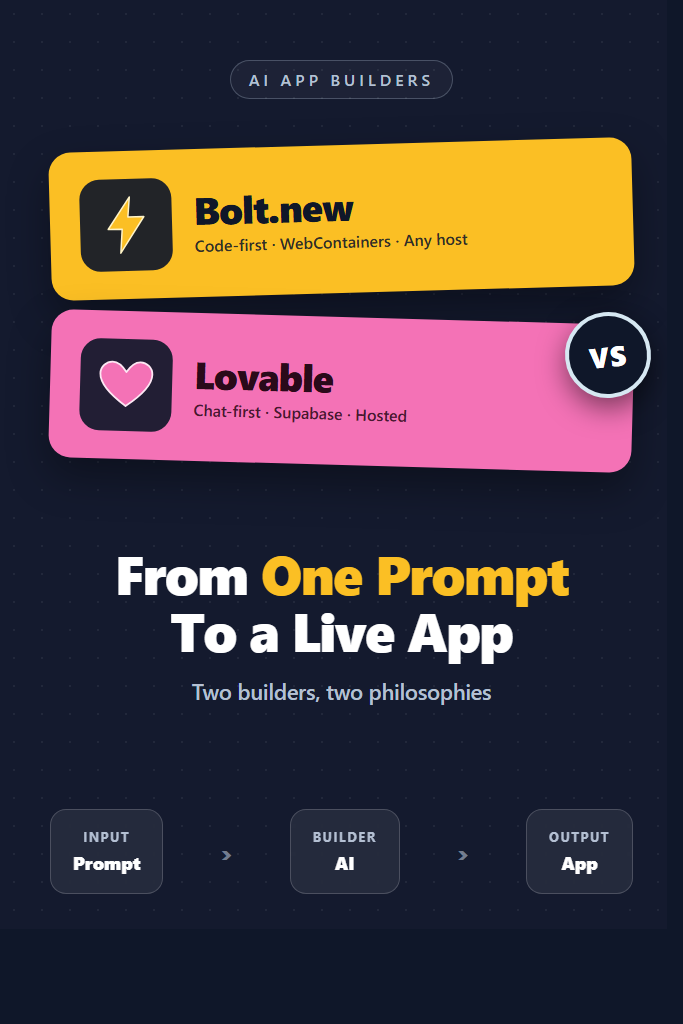
If you have ever typed “build me a SaaS dashboard with auth and Stripe” and watched a working app appear, you have used the new generation of AI app builders. The two leaders in that space are Bolt.new (from StackBlitz) and Lovable (formerly GPT Engineer). Both promise the same outcome — a deployed app from a paragraph of plain English — but they reach it through very different architectures, and that difference matters once you outgrow the demo.
This guide is for developers and technical founders evaluating Bolt.new vs Lovable for real projects: internal tools, MVPs, marketing sites, and prototypes you intend to ship. We will compare them on stack control, deployment targets, pricing, code ownership, and the kinds of applications each one handles well. By the end, you will know which builder fits your next project and where the rough edges are.
If you are still mapping out the broader landscape of AI builders, the companion guide on v0 by Vercel for React UI generation covers the third major player in this category.
What Is Bolt.new?
Bolt.new is a browser-based AI app builder from StackBlitz that generates, runs, and deploys full-stack JavaScript applications inside WebContainers — a Node.js runtime that executes entirely in the browser tab. You describe what you want, an LLM (Anthropic Claude under the hood at time of writing) writes the project, and you can edit, run, and ship it without ever leaving the browser.
The defining trait of Bolt.new is that it gives you the actual file tree. You see a real package.json, a real vite.config.ts, a real src/ directory. You can edit any line, install npm packages, and run terminal commands against a Linux-like environment in the same tab. That makes it feel less like a no-code tool and more like an AI-augmented IDE that happens to live on the web.
Stack-wise, Bolt.new gravitates toward Vite + React + TypeScript by default, but it also handles Next.js, Astro, SvelteKit, Remix, and plain Node.js backends. Deployment is one click to Netlify, with Cloudflare and other targets supported through their integrations. Because the runtime is WebContainers, you are limited to what Node.js can do in the browser — no Python, no Go, no native binaries.
What Is Lovable?
Lovable is an AI app builder that generates React applications backed by Supabase, with a chat-driven iteration loop and one-click hosting on Lovable’s own infrastructure. The product evolved from the open-source GPT Engineer project and rebranded around a more polished, end-to-end SaaS workflow.
Where Bolt.new emphasizes “you can edit anything,” Lovable emphasizes “you can talk through it.” The interface centers on a chat panel and a live preview. You describe a feature, Lovable plans the change, applies it, and refreshes the preview. There is a code view, but most users spend their time in the conversation. Backend logic is handled through Supabase — auth, database, storage, edge functions — wired up automatically when you ask for “user accounts” or “save messages.”
The bias is clearly toward the React + Tailwind + Supabase stack, plus a small set of integrations like Stripe and Resend. That narrowness is intentional: the model has fewer choices to make, so it makes them more reliably. You can connect a GitHub repo, but the canonical workflow is to keep iterating inside Lovable until the app is production-ready, then either deploy on their hosting or push to your own GitHub for further work.
Bolt.new vs Lovable: Key Differences
Here is how the two AI app builders compare across the dimensions that actually drive the choice:
| Feature | Bolt.new | Lovable |
|---|---|---|
| Primary stack | React/Vue/Svelte + any Node backend | React + Tailwind + Supabase |
| Runtime | WebContainers (Node.js in browser) | Server-side build + preview |
| Code editing | Full IDE, edit any file | Code view available, chat-first |
| Backend | You wire it (Supabase, Convex, custom Node) | Supabase auto-wired |
| Auth out of the box | No (you add it) | Yes (Supabase Auth) |
| Database out of the box | No | Yes (Supabase Postgres) |
| Deploy target | Netlify, Cloudflare, others | Lovable hosting + GitHub export |
| Custom domains | Via deploy target | Built-in |
| GitHub sync | One-way export | Two-way sync |
| LLM model | Anthropic Claude | OpenAI + Anthropic (varies) |
| Free tier | Daily token allowance | Daily message limit |
| Best for | Devs who want code control | Founders shipping product fast |
The shorthand: Bolt.new is closer to “Cursor in a browser with a deploy button,” while Lovable is closer to “an AI co-founder that owns the boring parts.”
Code Ownership and Stack Control
This is the biggest practical difference between the two tools.
Bolt.new gives you a project that looks like one a senior engineer would scaffold. You can npm install anything from the registry, restructure folders, swap routers, write your own middleware. If the AI writes code you do not like, you delete it and write your own. Exporting is a download or a GitHub push, and what you get works on any standard Node.js host. Nothing in the project assumes Bolt.new is in the loop afterward.
Lovable is opinionated in a way that speeds up the happy path but can frustrate edge cases. Auth, database tables, row-level-security policies, and edge functions all assume a Supabase project that Lovable provisioned. You can leave Lovable and keep going — the React code is yours, the Supabase project is yours — but you are inheriting a stack you did not pick. If Supabase is fine for your use case, this is a feature; if you need DynamoDB, MySQL, or a Rails backend, this is a wall.
For developers comparing this tradeoff against more traditional AI coding tools, the breakdown of Cursor vs Claude Code shows what the same productivity gains look like on a stack you fully control.
Iteration Loop: Chat vs Code
Both tools accept natural-language prompts. The difference is what happens after the first generation.
In Bolt.new, the second prompt usually means switching to the file tree, opening the file the AI just wrote, and either editing it directly or asking the AI to change a specific block. Power users treat the chat as a junior pair programmer — give it a focused task, review the diff, accept or reject. Because you see every file change, you catch hallucinated imports and stale patterns immediately.
In Lovable, the second prompt typically stays in chat. You say “add a settings page where users can change their email,” and Lovable plans a multi-step change: new route, new form component, update Supabase auth, wire the redirect. You watch the preview, and if something looks off, you say so. The friction of switching to code is real — possible, but the flow is designed around description, not editing.
Each loop has a failure mode. Bolt.new can drown a non-developer in files they did not ask to see. Lovable can land in a state where the chat keeps reapplying the same broken fix because it cannot see what you would see in the code. Knowing your team’s tolerance for “look at this file” matters more than benchmark scores.
Deployment and Hosting
Bolt.new’s deploy story is the standard JS-app one: it scaffolds a project that any host can build. Click “Deploy” and it pushes to Netlify under your account. Want Cloudflare Pages, Vercel, or your own VPS? Export the repo and run npm run build like any other project. Bolt.new does not lock you in.
Lovable hosts the app on its own infrastructure by default. The preview URL is live; promoting it to a custom domain takes a few clicks. The backend (Supabase) is provisioned in your Supabase account, so even if you cancel Lovable, your data and auth keep working — but the frontend hosting is theirs unless you deploy from a GitHub export. For founders who want to share a working URL with users on day one, that’s a feature. For teams with strict cloud or compliance requirements, it is a constraint to plan around.
Pricing in 2026
Both tools follow a freemium model with daily generation limits, then paid tiers for more capacity and team features.
Bolt.new offers a free tier with a daily token allowance — enough to scaffold and iterate on a small project. Paid tiers scale tokens monthly, with team plans adding shared workspaces. Because the runtime is WebContainers, there is no separate hosting cost from Bolt.new itself; you pay the deploy target (often free for small apps).
Lovable charges per “message credit” used in chat. The free tier gets you a daily allowance; paid tiers raise the monthly cap and unlock features like custom domains and private projects. Hosting is included on the paid tiers up to reasonable usage. Supabase has its own free and paid tiers on top, which most projects will not exceed during prototyping.
In practice, Bolt.new is cheaper if you mostly want code generation and bring your own hosting; Lovable is cheaper if you would otherwise pay for a hosting plan and want everything billed in one place. Pricing changes often — always check the current rates before committing.
When to Use Bolt.new
Reach for Bolt.new when:
- You are a developer who wants to keep editing code after the AI has done the boilerplate.
- The project needs a stack outside React + Supabase — Astro, SvelteKit, a custom Node backend, Convex, Drizzle.
- You plan to deploy on your own infrastructure or a host like Vercel, Cloudflare, or AWS.
- You want one-click previews of npm packages or quick reproductions of bug reports inside a real Node environment.
- The team’s workflow is “AI scaffolds, humans refine,” not “AI owns the codebase.”
A practical case: building a marketing-site landing page with a custom contact form that posts to your existing CRM webhook. Bolt.new can scaffold the Astro site, set up Tailwind, drop in the form, and deploy to Netlify in one session — and the resulting repo plugs into your existing CI without any rework.
When to Use Lovable
Reach for Lovable when:
- You are a non-developer or solo founder who wants a working product, not a project to manage.
- The app fits comfortably inside React + Tailwind + Supabase: dashboards, internal tools, lightweight SaaS, community apps.
- You need auth, a database, and file uploads on day one without configuring any of them yourself.
- The iteration model that works for you is “describe a change, see the result,” not “open the file and edit.”
- Time-to-shareable-URL matters more than long-term stack flexibility.
A typical scenario: a product manager prototyping an internal tool to triage support tickets — list view, filter by priority, assign to a teammate, log notes. Lovable can ship a working version with auth in an afternoon. The same project in Bolt.new is faster for a senior dev but requires the dev to wire Supabase by hand or pick a different backend.
Where Each Tool Falls Short
Both AI app builders have real limits. Knowing them up front saves a frustrating Saturday.
Skip Bolt.new If
- You need backend languages or runtimes that are not Node.js (Python, Go, Rust, JVM).
- Your app needs heavy native dependencies — image processing libraries, headless browsers, native bindings — that WebContainers cannot run.
- You are non-technical and the file tree, terminal, and config files will distract more than help.
- You want auth, database, and storage configured without picking the pieces yourself.
- The project is large enough that token limits per response start cutting code in half (consider a desktop AI coding tool for repos beyond a few thousand lines).
Skip Lovable If
- You need a stack that is not React + Supabase (Next.js with a custom backend, Vue, Angular, Rails, Django).
- Your data model has compliance, residency, or vendor restrictions Supabase cannot satisfy.
- You expect to spend most of your time in code rather than chat — the chat-first design fights you.
- The project requires fine-grained backend control: custom queues, complex caching, non-Postgres data stores.
- You want to keep the option of moving the backend later — once the app is deeply tied to Supabase RLS policies, migrating is painful.
Common Mistakes With Bolt.new
A few patterns burn time on Bolt.new specifically.
- Treating it like a traditional IDE for very large projects. WebContainers boot fast, but a 200-file repo with heavy build tooling will feel sluggish compared to local dev. Use Bolt.new for scaffolding and feature spikes; move to local once the app is real.
- Ignoring the deployed URL until the end. Deploy early. The Netlify build environment is not identical to WebContainers, and packages that work in the browser runtime occasionally fail in the cloud build. Catching that on day one is cheap; catching it on launch day is not.
- Over-prompting in one shot. Asking for “a Stripe-powered SaaS with auth, dashboards, billing, and admin panel” produces brittle output. Generate the skeleton, then ask for one feature at a time. The diffs stay reviewable, and the AI keeps more context per turn.
- Forgetting to commit. The browser tab is your editor. If you close it without exporting to GitHub, you are betting on Bolt.new’s session storage. Push early and often.
Common Mistakes With Lovable
Lovable’s failure modes are different and worth flagging.
- Skipping the database review. Lovable will happily generate Postgres tables and RLS policies. Read them before you let real users sign up. Default policies can be more permissive than they look, and “users can read their own rows” is not the same as “users can only read their own rows.”
- Letting the chat fight itself. When a feature breaks, three more chat messages do not always fix it. If the same prompt-and-fail loop happens twice, open the code view, find the actual problem, and either edit directly or describe it surgically.
- Assuming the export is a clean handoff. The exported repo works, but the structure reflects what the AI generated, not what your team would have written. Plan for a refactor pass before scaling the codebase with human contributors.
- Underestimating Supabase costs at scale. Free tier is generous for prototyping. Once you cross into real usage — auth volume, database storage, edge function invocations — Supabase pricing kicks in. Build the cost model before you launch a public app.
Real-World Decision: Internal Tool vs Public SaaS
Imagine two scenarios on the same day:
A four-person startup needs an internal dashboard so non-engineers can update product copy without waiting on a developer. Lovable wins this. The team describes the dashboard, gets auth and a Postgres-backed CMS by lunch, ships a private URL after lunch. Nobody on that team is going to maintain a Next.js codebase, and Supabase covers everything they need.
The same week, a senior engineer at a mid-sized company prototypes a customer-facing pricing page with interactive calculators. Bolt.new wins this one. The page has to deploy to the company’s existing Vercel account, use the in-house design tokens from a private npm package, and integrate with Segment for analytics. The engineer scaffolds in Bolt.new, exports to GitHub, opens the repo locally, and merges it into the company monorepo within a day. None of that is Lovable’s strong suit.
The pattern: the right answer depends less on which tool is “better” and more on who is using it and where the output has to land. For a broader view of how this maps to other AI productivity tools, the overview of AI tools for coding productivity covers where each category fits.
Which AI App Builder Should You Choose?
For most developers shipping real projects, the decision tree is short:
- If you control the stack and want to keep coding after the AI is done, Bolt.new is the better fit.
- If you want a working, hosted product without picking a backend, Lovable is the better fit.
- If you are torn, build the same one-screen prototype in both and see which iteration loop you actually enjoy. The free tiers are generous enough to make that test cheap.
What neither tool replaces is design judgment, product taste, and the ability to debug something they got wrong. Both will save you days of boilerplate; neither will save you from a confused user flow. Use the time they free up to do the parts AI cannot.
Conclusion: Pick the Builder, Then Ship
In the bolt.new vs lovable choice, there is no universal winner — only a fit between the tool’s defaults and the project’s needs. Bolt.new gives developers a real codebase and a deploy button. Lovable gives founders a hosted product and a chat partner. Most teams end up using both: Lovable for fast internal tools and prototypes, Bolt.new when the stack or the host has to be specific.
If your next step is comparing these against the more code-focused side of the AI tooling spectrum, read the v0 by Vercel React UI guide for a third take on prompt-to-app generation, or the Kiro AI IDE spec-driven development tutorial for an approach that treats specs, not chats, as the source of truth. Then pick one builder, build something small that’s actually useful, and ship it before the week is over.