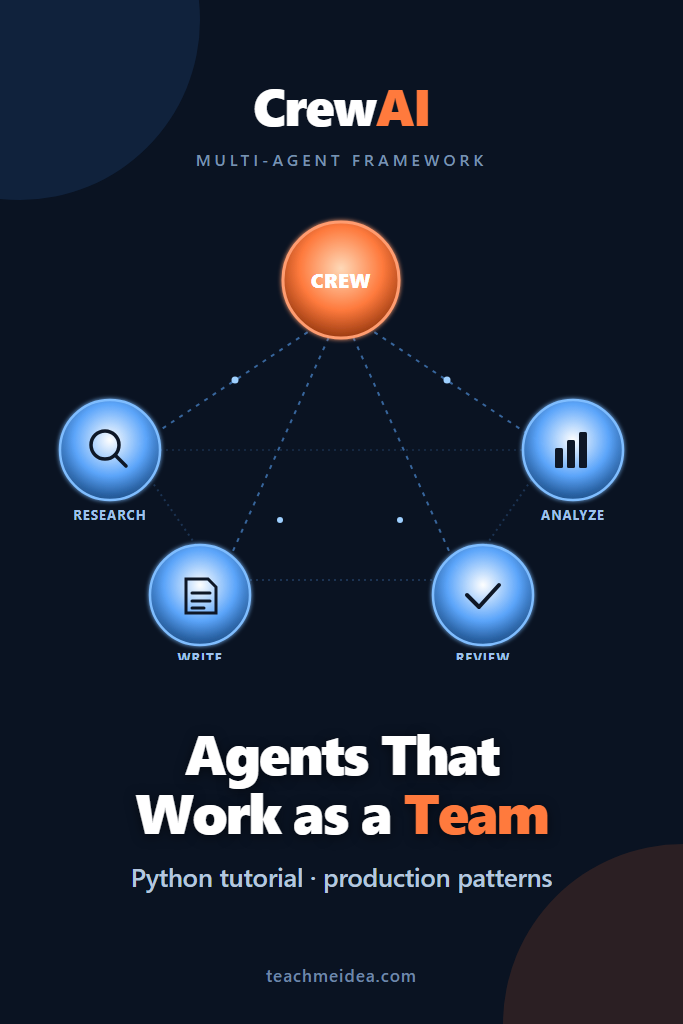
If you have been pushing a single LLM call to do market research, summarize sources, draft a report, and proof-read the output, you have probably noticed the wheels coming off around the third hand-off. A CrewAI multi-agent setup splits that pipeline into specialist agents with their own role, tools, and memory, then routes work between them through structured tasks. This tutorial walks through installing CrewAI, building a research-and-writing crew, plugging in tools, and shipping the result behind an API without the orchestration becoming a tangled mess.
The audience here is intermediate Python developers who already know how to call an LLM API and want to graduate to multi-agent workflows. By the end you will have a working crew, an opinion on when CrewAI beats alternatives, and a checklist of pitfalls that bite teams the first week in production.
What Is CrewAI?
CrewAI is an open-source Python framework for orchestrating role-based AI agents that collaborate on tasks. Each agent has a defined role, goal, and toolkit, and the framework handles the message passing, task sequencing, and state between them. Compared to lower-level toolkits like LangChain, CrewAI optimizes for a specific pattern: small teams of specialist agents that hand structured outputs to each other through a deterministic or manager-led process.
The mental model that helps most is treating CrewAI like a project manager you instantiate in code. You hire agents, write a brief for each task, decide who reports to whom, and press start. The framework does the dispatching. Your job is the casting and the briefing.
Why CrewAI for Multi-Agent Teams
Several frameworks now compete for the multi-agent slot in a Python stack. CrewAI’s pitch sits between LangChain’s flexibility and LangGraph’s graph-based control flow. If you are weighing alternatives, our walkthrough of stateful cyclic agents with LangGraph covers the lower-level option, while this guide focuses on CrewAI’s higher-level conventions.
The framework shines when your workflow has clear role boundaries. For example, a research crew with a researcher, an analyst, and a writer maps cleanly to CrewAI’s primitives. On the other hand, when your agents need cyclic state, branching logic, or human-in-the-loop checkpoints between every step, a graph framework usually serves you better. We will cover those edges in the decision section below.
For broader context on what a “tool-using agent” actually means under the hood, the post on building AI agents with tools, planning, and execution is a useful primer.
Installing CrewAI and Setting Up Your Project
Start with Python 3.10 or newer. CrewAI ships as a single package, with optional extras for tools and vector stores. Create a fresh virtualenv to avoid dependency conflicts with older LangChain installs.
# Create and activate a virtual environment
python -m venv .venv
source .venv/bin/activate  # macOS/Linux
# .venv\Scripts\activate   # Windows PowerShell

# Install CrewAI plus the official tools package
pip install "crewai[tools]==0.86.0"

# Pin LLM provider SDKs you plan to use
pip install openai
Set the API keys CrewAI expects via environment variables. The framework defaults to OpenAI but it routes through LiteLLM under the hood, so any provider LiteLLM supports works the same way. If you want to centralize provider routing later, our LiteLLM setup guide covers the proxy pattern.
# .env
OPENAI_API_KEY=sk-...
SERPER_API_KEY=...   # for the SerperDevTool web search
Project structure stays light. A minimal CrewAI app fits in three files: an agents.py for agent definitions, a tasks.py for task definitions, and a crew.py that wires them up and runs. Larger crews benefit from CrewAI’s CLI scaffolding (crewai create crew my_project), but the manual structure is easier to learn from.
Building Your First CrewAI Multi-Agent Workflow
We will build a research crew that takes a topic, gathers current sources, analyzes them, and produces a one-page brief. Three agents: a researcher, an analyst, and a writer. Three tasks, executed sequentially.
# agents.py
from crewai import Agent
from crewai_tools import SerperDevTool, WebsiteSearchTool

search_tool = SerperDevTool()
scrape_tool = WebsiteSearchTool()

researcher = Agent(
    role="Senior Industry Researcher",
    goal="Surface five credible, recent sources on {topic} and extract the key claims",
    backstory=(
        "You have spent a decade tracking technology trends and you know how to "
        "separate hype from durable signal. You cite primary sources only."
    ),
    tools=[search_tool, scrape_tool],
    allow_delegation=False,
    verbose=True,
)

analyst = Agent(
    role="Strategy Analyst",
    goal="Turn raw research into three sharp insights with concrete implications",
    backstory=(
        "You think in trade-offs. You compress noisy material into decisions "
        "an executive can act on within a week."
    ),
    allow_delegation=False,
    verbose=True,
)

writer = Agent(
    role="Technical Writer",
    goal="Write a one-page brief in plain language that a busy reader can scan in 90 seconds",
    backstory=(
        "You write the way a senior engineer explains things over coffee. "
        "No marketing language, no filler, no jargon without definition."
    ),
    allow_delegation=False,
    verbose=True,
)
A few details matter here. The role, goal, and backstory are not decoration. CrewAI feeds them into the system prompt for each agent’s underlying LLM call, so vague roles produce vague output. Treat the backstory as a one-paragraph hiring brief. The allow_delegation=False flag prevents agents from passing their work to siblings without going through the defined task graph, which keeps the execution path predictable while you are learning.
Next, the tasks:
# tasks.py
from crewai import Task

def build_tasks(researcher, analyst, writer):
    research_task = Task(
        description=(
            "Research the topic: {topic}. Use the search tool to find at least "
            "five sources published in the last 12 months. For each source, "
            "extract: title, URL, publication date, and the single most important "
            "claim. Return the result as a numbered list."
        ),
        expected_output="A numbered list of 5 sources with title, URL, date, and key claim.",
        agent=researcher,
    )

    analysis_task = Task(
        description=(
            "Review the research output. Identify three durable insights about {topic}. "
            "For each insight, write a one-sentence claim and a one-sentence implication "
            "for a product team considering this technology."
        ),
        expected_output="Three insights, each with a claim and an implication.",
        agent=analyst,
        context=[research_task],
    )

    writing_task = Task(
        description=(
            "Write a one-page executive brief on {topic} using the research and analysis. "
            "Structure: 2-sentence summary, 3 insights with implications, 1 paragraph on "
            "what to do next. Plain language. No marketing words."
        ),
        expected_output="A one-page brief in markdown, around 400-500 words.",
        agent=writer,
        context=[research_task, analysis_task],
    )

    return [research_task, analysis_task, writing_task]
The context parameter is the connective tissue. When you list previous tasks in context, CrewAI feeds their outputs into the current task’s prompt automatically. Without it, agents work in isolation and produce disconnected output. This is the most common first-week mistake and a quick win once you spot it.
Finally, the crew itself:
# crew.py
import os
from dotenv import load_dotenv
from crewai import Crew, Process

from agents import researcher, analyst, writer
from tasks import build_tasks

load_dotenv()

def run_crew(topic: str) -> str:
    tasks = build_tasks(researcher, analyst, writer)
    crew = Crew(
        agents=[researcher, analyst, writer],
        tasks=tasks,
        process=Process.sequential,
        verbose=True,
        memory=True,
    )

    result = crew.kickoff(inputs={"topic": topic})
    return result.raw

if __name__ == "__main__":
    brief = run_crew(topic="On-device LLM inference for mobile apps in 2026")
    print(brief)
Running this will print a verbose trace of each agent’s reasoning, then the final brief. The first run typically takes 60-120 seconds and costs around 5-15 cents on GPT-4o-class models, depending on how much the researcher scrapes.
Sequential vs Hierarchical Process
CrewAI offers two process modes. The sequential process runs tasks in the order you declare them, passing context forward. This is what we used above. It is predictable, cheap to debug, and almost always the right starting point.
The hierarchical process introduces a manager agent that decides which agent handles each task and can re-route work. You declare process=Process.hierarchical and supply a manager_llm. The manager reads the task, picks an agent from the crew, and may loop back if the output is unsatisfactory.
from crewai import Crew, Process
from langchain_openai import ChatOpenAI

crew = Crew(
    agents=[researcher, analyst, writer],
    tasks=tasks,
    process=Process.hierarchical,
    manager_llm=ChatOpenAI(model="gpt-4o", temperature=0),
    verbose=True,
)
Hierarchical mode is powerful but adds latency and cost because the manager runs its own reasoning loop between every task. Reserve it for crews where the routing decision genuinely depends on intermediate output, such as quality gates or error recovery. For linear pipelines like research-analyze-write, sequential mode wins on every axis.
Adding Tools to Agents
Tools are how agents reach beyond the LLM’s training data. CrewAI ships with web search, scraping, file I/O, and code execution tools, and integrates with LangChain tools through a thin wrapper. Custom tools are a Python function decorated with @tool.
from crewai.tools import tool
import httpx

@tool("Fetch JSON from URL")
def fetch_json(url: str) -> dict:
    """
    Fetch JSON from a public URL. Use this when you need structured data
    from a public API that does not require authentication.
    """
    response = httpx.get(url, timeout=10.0)
    response.raise_for_status()
    return response.json()

researcher = Agent(
    role="Senior Industry Researcher",
    goal="...",
    backstory="...",
    tools=[search_tool, scrape_tool, fetch_json],
    verbose=True,
)
Two rules that save you debugging time. First, the docstring of a custom tool becomes part of the prompt the agent uses to decide whether to call it, so write it like a usage example for a colleague, not a Python reference. Second, return JSON-serializable values. Tools that return Python objects with complex __repr__ confuse the agent’s downstream reasoning. For a deeper look at how LLMs reason about tool selection, our post on Claude’s tool use API covers the same primitives at a lower level.
Structured Outputs and Validation
Free-form agent output is fine for human-in-the-loop reports but breaks the moment you try to chain a crew into a larger system. CrewAI supports Pydantic output schemas at the task level.
from pydantic import BaseModel, Field
from typing import List

class Source(BaseModel):
    title: str
    url: str
    date: str
    key_claim: str

class ResearchOutput(BaseModel):
    topic: str
    sources: List[Source] = Field(min_length=3, max_length=10)

research_task = Task(
    description="Research the topic: {topic}...",
    expected_output="A structured ResearchOutput with at least 5 sources.",
    agent=researcher,
    output_pydantic=ResearchOutput,
)
The output_pydantic schema is enforced via the underlying LLM’s structured output mode where supported, with a parse-and-retry fallback otherwise. If you have not yet adopted structured outputs as a default for any LLM workflow, our guide on OpenAI’s structured outputs feature explains why it should be table stakes for production agents.
A Real-World Crew: Customer Onboarding Assistant
Consider a mid-sized B2B SaaS team building an onboarding assistant. The crew has four agents: an account-context agent that reads the customer’s signup metadata, an integration-recommender that suggests which integrations to enable, a content-curator that picks relevant docs and videos, and a message-drafter that writes the welcome email. Tasks run sequentially, with the content curator’s output feeding the message drafter through context.
The team typically reports two early wins and one persistent pain point. The wins are predictable: prompt iteration becomes localized (you tune the message-drafter without touching the recommender) and onboarding email quality is more consistent than a single-LLM prompt could deliver. The pain point is token cost. Multi-agent crews can cost three to five times a single-call equivalent because each agent re-reads context, and the manager mode amplifies that further. Budget for it from day one and instrument token spend per task before the bill surprises you. For background on related production patterns, agentic RAG covers how to combine agent reasoning with retrieval without exploding cost.
Wrapping a Crew Behind an API
Crews run nicely from a FastAPI endpoint with one important caveat: a kickoff is synchronous and can take a minute or more, so do not block your request thread. Push the call onto a worker and return a job ID.
from fastapi import FastAPI, BackgroundTasks
from uuid import uuid4

app = FastAPI()
JOBS = {}  # In production, use Redis or a job queue

@app.post("/briefs")
def create_brief(topic: str, background_tasks: BackgroundTasks):
    job_id = str(uuid4())
    JOBS[job_id] = {"status": "running", "result": None}
    background_tasks.add_task(execute_crew, job_id, topic)
    return {"job_id": job_id}

def execute_crew(job_id: str, topic: str):
    try:
        result = run_crew(topic)
        JOBS[job_id] = {"status": "done", "result": result}
    except Exception as exc:
        JOBS[job_id] = {"status": "failed", "result": str(exc)}

@app.get("/briefs/{job_id}")
def get_brief(job_id: str):
    return JOBS.get(job_id, {"status": "unknown"})
This is a deliberately small pattern. For real workloads, swap BackgroundTasks and the in-memory dict for a job queue like Celery or RQ, persist results in Postgres, and stream agent thought traces over Server-Sent Events if your UI needs visibility.
When to Use CrewAI
- Your workflow maps cleanly to specialist roles with well-defined hand-offs
- You want sensible defaults for agent prompts, memory, and task sequencing without writing a graph by hand
- The team is mostly Python and wants framework-level conventions rather than DIY orchestration
- You need to ship a working multi-agent pipeline this week, not next quarter
When NOT to Use CrewAI
- Your workflow is genuinely a graph with cycles, branching, and human checkpoints (use LangGraph instead)
- A single LLM call with good prompt engineering already solves the problem (do not add agents for show)
- You need fine-grained control over every prompt token sent to the LLM
- You are running a high-volume, low-latency endpoint where multi-agent overhead is unaffordable
Common Mistakes with CrewAI Multi-Agent Crews
- Vague agent roles and backstories that produce equally vague outputs. Write them like hiring briefs, not job titles.
- Forgetting to wire tasks together with
context, so agents run blind to each other’s work - Reaching for hierarchical process before you actually need routing logic, paying for the manager round-trip on every task
- Ignoring token cost until the invoice arrives; multi-agent crews can be 3-5x a single-call baseline
- Returning unstructured strings between agents instead of Pydantic schemas, which makes the next agent guess at parsing
- Running crews synchronously from a request handler and timing out at the load balancer
Wrapping Up
A CrewAI multi-agent setup gives you a fast path from a single overworked prompt to a small team of specialists with clear roles, tools, and outputs. Start with sequential process, define each agent like you are writing a job description, and enforce structured outputs between tasks. Add hierarchical routing and custom tools only when the workflow demands it.
The next step is to take the research crew above, swap in a topic relevant to your own product, and instrument token spend per task before you scale up. If your problem ends up needing tighter control flow, the LangGraph stateful agents tutorial is the natural follow-up read.