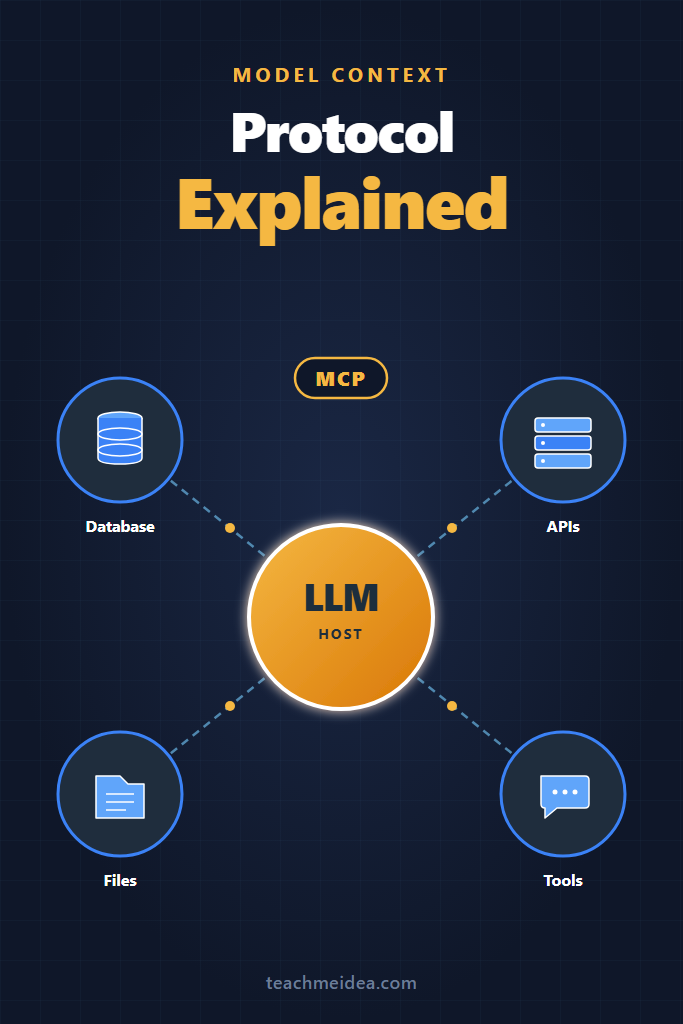
If you’ve ever wired the same database connector into three different LLM apps, you already understand the problem the MCP protocol was built to solve. Model Context Protocol is Anthropic’s open standard for connecting language models to external systems through a single, reusable interface. This guide explains what MCP is, how it works under the hood, and when it’s the right tool to reach for, written for engineers who already build with LLM APIs and want a clearer mental model before adopting it.
By the end, you’ll understand the protocol’s architecture, how it compares to function calling and plugins, and the specific situations where MCP saves you weeks of integration work, plus the ones where it adds unnecessary complexity.
What Is the MCP Protocol?
The MCP protocol, short for Model Context Protocol, is an open standard introduced by Anthropic in late 2024 that defines how AI applications expose tools, data, and context to large language models. It works like a universal adapter: instead of writing a custom integration for every model and every tool, you implement the protocol once on either side, and any compliant client can talk to any compliant server.
In practice, this means a single MCP server for, say, your Postgres database can be consumed by Claude Desktop, Cursor, your in-house agent, and any future client that speaks the protocol. The model never touches the database directly. Instead, it asks the host application, which routes the request through an MCP client to the appropriate server.
The protocol is built on JSON-RPC 2.0 and supports multiple transports, including standard input/output for local processes and HTTP with Server-Sent Events for remote servers. Because it’s open and language-agnostic, official SDKs exist for TypeScript, Python, Java, Kotlin, C#, and Swift.
How MCP Works: The Architecture
MCP defines three roles. Understanding the distinction between them is the fastest way to internalize the protocol.
Host: The AI application the user interacts with. Claude Desktop, an IDE, or a custom agent runtime. The host decides which servers to launch and which capabilities to expose to the model.
Client: A connector inside the host that manages exactly one connection to one MCP server. If the host needs three servers, it spins up three clients. Each client handles its own session lifecycle, capability negotiation, and message routing.
Server: A separate process or remote service that exposes capabilities. A server might wrap a database, a Git repository, a Slack workspace, or a custom internal API. Crucially, servers don’t know which model is consuming them, which keeps them portable across hosts.
Servers expose three primitives to the host:
- Tools: Functions the model can invoke, such as
query_databaseorsend_email. Tools have JSON schemas for their inputs and return structured results. - Resources: Read-only data the host can attach as context, such as files, database rows, or API responses. Resources are addressed by URI.
- Prompts: Reusable prompt templates the host can surface to users, such as slash commands or quick actions.
When a session starts, the client and server perform a capability handshake. The server declares which primitives it supports, the client declares what the host can render, and only the intersection is used. This negotiation is what lets newer servers stay backward-compatible with older clients.
MCP vs. Function Calling vs. Plugins
The protocol fills a gap that function calling and proprietary plugin systems leave open. Here’s how the three approaches compare on the criteria that actually matter for production work:
| Capability | Function Calling | Vendor Plugins | MCP Protocol |
|---|---|---|---|
| Portable across model providers | No | No | Yes |
| Discoverable at runtime | No | Limited | Yes |
| Supports local-only tools | Yes | No | Yes |
| Supports remote-hosted tools | Yes | Yes | Yes |
| Bidirectional messaging | No | No | Yes (notifications, sampling) |
| Resource attachment (not just tools) | No | Limited | Yes |
| Open standard with multiple SDKs | No | No | Yes |
| Best for | Single-model apps | Single-vendor ecosystems | Multi-client tool reuse |
Function calling, available in the OpenAI, Anthropic, and Gemini APIs, is excellent for a single application calling a fixed set of tools you control. The model returns a structured request, your code executes it, and the result feeds back into the next turn. The tradeoff is that every tool definition lives inside the application and is tightly coupled to one provider’s schema.
Plugin systems like ChatGPT plugins or vendor-specific agent marketplaces solve discoverability but lock you into one ecosystem. If you want the same Jira integration to work in your IDE, your chat client, and your internal agent, you would historically write it three times.
The MCP protocol decouples the tool from the consumer. Write the server once, and any host that speaks MCP can use it. For an example of where this matters in practice, see our walkthrough of setting up MCP servers in Claude Code, which uses the same servers that work in Claude Desktop.
A Realistic Example: Connecting Claude to a Postgres Database
Picture a mid-sized engineering team that wants their support agents to query the production read replica through Claude. Without MCP, the path looks like this: build a function-calling wrapper inside the chat app, build a separate REST endpoint for the Slack bot, build a third integration for the internal dashboard. Three implementations, three sets of auth handling, three places to audit when the schema changes.
With MCP, the team writes one Postgres server. It exposes a query_read_only tool that accepts a SQL string, validates it against a parser to block writes, executes it against the replica with a row limit, and returns results as a structured resource. The server runs as a sidecar process in each host environment, or as a remote service behind their existing auth proxy.
Now Claude Desktop, the Slack bot built on the Claude API, and the internal dashboard all consume the same server. When the team needs to add row-level redaction for PII, they change one file. When a new client appears, such as a future agent framework, it works on day one because the server speaks a standard protocol.
The Python SDK makes the server itself short. A minimal implementation, omitting auth and validation for brevity, looks like this:
from mcp.server import Server
from mcp.server.stdio import stdio_server
import asyncpg

app = Server("postgres-readonly")

@app.list_tools()
async def list_tools():
    return [{
        "name": "query_read_only",
        "description": "Run a read-only SQL query against the replica",
        "inputSchema": {
            "type": "object",
            "properties": {"sql": {"type": "string"}},
            "required": ["sql"]
        }
    }]

@app.call_tool()
async def call_tool(name: str, arguments: dict):
    if name != "query_read_only":
        raise ValueError(f"Unknown tool: {name}")

    sql = arguments["sql"]
    if not sql.strip().lower().startswith("select"):
        raise ValueError("Only SELECT queries allowed")

    conn = await asyncpg.connect(dsn=os.environ["DATABASE_URL"])
    try:
        rows = await conn.fetch(sql + " LIMIT 100")
        return [{"type": "text", "text": str([dict(r) for r in rows])}]
    finally:
        await conn.close()

async def main():
    async with stdio_server() as (read, write):
        await app.run(read, write, app.create_initialization_options())
The validation here is intentionally minimal for the example. A production server would use a proper SQL parser, scope queries to specific schemas, enforce per-user row limits, and stream results rather than buffering them. The point is that all of that logic lives in one server, not scattered across every host that needs database access.
When to Use the MCP Protocol
- You’re building tools that will be consumed by more than one AI application
- Your team already standardizes on Claude, Cursor, or another MCP-native host
- You want to expose internal company data sources to multiple agent workflows
- You need tool discoverability at runtime rather than hardcoded schemas
- You’re building developer tools where users bring their own LLM client
- Local-first integrations matter, such as filesystem or Git access where remote APIs are a non-starter
When NOT to Use the MCP Protocol
- A single application talks to a single model and a small set of fixed tools, where native function calling is simpler
- You need sub-50ms tool latency and the extra process boundary is a real cost
- Your only host is a model provider that doesn’t yet support MCP natively
- The tool requires complex streaming responses the protocol doesn’t cleanly express, such as bidirectional video
- You’re prototyping and the integration may not survive to v2, where investing in protocol compliance is premature
For straightforward single-app cases, our guide on Claude tool use covers the function-calling pattern that often fits better.
Common Mistakes With the MCP Protocol
Treating MCP servers as untrusted code while running them with full host privileges: The protocol does nothing to sandbox a server. If you install a community server, it runs with whatever permissions the host process has. Audit servers before installing them, and prefer running them in containers or with restricted users when possible.
Building one giant server that exposes every internal API: This defeats the modularity that makes MCP useful. Smaller, focused servers are easier to version, audit, and swap out. A “company tools” megaservr usually becomes a deployment bottleneck within a few months.
Skipping capability negotiation in custom clients: Newer servers may declare capabilities like progress notifications or resource subscriptions. If your client ignores the handshake and assumes a fixed feature set, you’ll break when a server advertises something you don’t handle. Always inspect the server’s declared capabilities and degrade gracefully.
Confusing resources with tools: Resources are read-only data the host attaches to context. Tools are functions the model invokes. Mixing them, such as implementing a “get latest invoice” as a tool when it’s clearly resource data, makes servers harder for hosts to render correctly. Use resources for context the user might pin or browse, and tools for actions with side effects.
Forgetting that MCP doesn’t authenticate the user: The server only knows the host connected to it. If your server needs per-user authorization, the host has to forward identity, usually through environment variables or a header on the HTTP transport. Designing as if the model itself has a user identity will produce broken access control. For deeper coverage of identity patterns in agent systems, see our guide on building AI agents with tools, planning, and execution.
How MCP Fits Into the Broader Agent Stack
The MCP protocol isn’t a replacement for agent frameworks. It sits below them. A framework like LangGraph or CrewAI handles planning, memory, and orchestration; MCP handles the I/O layer between the agent and the outside world. If you’re new to that layer, our LangChain fundamentals guide covers the orchestration side that complements MCP nicely.
Similarly, MCP doesn’t replace model APIs. You still call the Claude or OpenAI API to run inference. What changes is that the tools and resources the model sees come from MCP servers rather than hardcoded function definitions. If you’re starting from scratch, getting started with the Claude API gives you the inference layer; MCP gives you the integration layer on top.
The Future of the MCP Protocol
Adoption has moved faster than most protocols of similar scope. As of mid-2026, native MCP support exists in Claude Desktop, Cursor, Windsurf, several JetBrains and VS Code extensions, and a growing list of agent runtimes. Anthropic publishes a registry of community and official servers, and the protocol itself continues to add capabilities such as elicitation, where servers can ask the host to prompt the user for input mid-call.
The bet behind the protocol is that LLM integration will look more like Language Server Protocol did for IDEs: one shared standard that lets tools and clients evolve independently. Whether MCP becomes that standard depends partly on whether OpenAI, Google, and the open-source ecosystem fully adopt it, but the trajectory through 2026 has been promising.
Conclusion: When MCP Is Worth the Investment
The MCP protocol earns its place when the same tool needs to work across multiple AI applications. For a single chat app calling a fixed set of functions, native function calling stays simpler and faster. For a team standardizing internal integrations across IDEs, chat clients, and custom agents, MCP collapses three integration projects into one server.
Start by identifying the tool integrations you’d build more than once. If you have at least two consumers in mind, an MCP server is almost always the better long-term investment than parallel custom integrations. Next, work through our Claude Code MCP servers walkthrough to see a complete server in action against a real host.
7 Comments
Comments are closed.