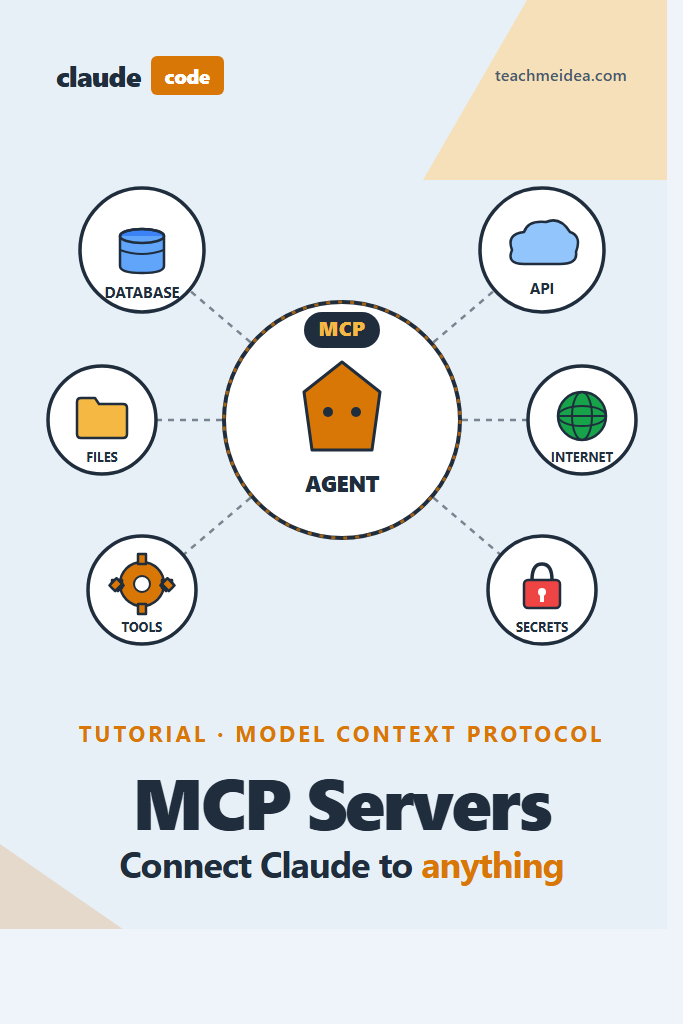
If you’ve used Claude Code for a few weeks and hit the wall where it can read your files but can’t query your database, open a Jira ticket, or check a Grafana dashboard, you’ve found the gap that Claude Code MCP servers fill. The Model Context Protocol is how Claude talks to the rest of your stack, and once it’s wired up, your terminal agent stops being a smart autocomplete and starts behaving like a junior engineer with real access to your tools.
This tutorial walks through configuring Claude Code MCP servers from scratch: where the config lives, the three transports you can choose from, which pre-built servers actually earn their keep, how to add permissions safely, and how to build a custom server when nothing off the shelf fits. It’s aimed at developers who already use Claude Code day-to-day and want to extend it beyond the default file-system and bash tools.
What Are Claude Code MCP Servers?
Claude Code MCP servers are external processes that expose tools, resources, and prompts to Claude Code over the Model Context Protocol. Claude connects to each server, reads its tool schema at startup, and can invoke those tools during a conversation just like the built-in Read or Bash tools. In practice, they let Claude query databases, hit internal APIs, control browsers, or call anything you can wrap in a small program.
A server is just a program that speaks MCP. Anthropic maintains the protocol spec; the servers themselves run on your machine (or on a remote URL) under your control.
Prerequisites Before You Start
Before wiring up Claude Code MCP servers, confirm the following:
- Claude Code installed and working. If you haven’t set it up yet, start with our guide on Claude Code setup and first workflow.
- Node.js 18+ and npm available on your PATH. Most community MCP servers ship as npm packages you run via
npx. - Python 3.10+ if you plan to run or build Python MCP servers.
- A project directory where you actually want Claude to help. MCP config is scoped per directory by default.
- Credentials for whatever you plan to connect. Database URLs, GitHub tokens, API keys — MCP servers need these as environment variables, not as prompt input.
If you’re brand new to AI-powered developer tooling in general, the broader landscape in AI tools for coding productivity gives useful context for where MCP fits.
Where MCP Configuration Lives: Three Scopes
Claude Code reads MCP server configuration from three places, in order of precedence:
| Scope | File | When to Use |
|---|---|---|
| Project | .mcp.json in repo root | Servers every contributor on the project should share |
| User | ~/.claude.json (or platform equivalent) | Personal servers you want in every project |
| Managed | Enterprise policy file | Org-wide servers pushed by IT/security |
Project scope is the one you’ll touch most. A .mcp.json file checked into git means a new engineer clones the repo, runs Claude Code, and immediately has the same tools everyone else does — including the company-specific database access and internal API wrappers.
User scope is for things that are genuinely personal: your GitHub token, a scratchpad server, a local notes integration. Don’t put project secrets here; they won’t travel with the codebase.
Adding Your First MCP Server
The fastest way to try MCP is the official filesystem server, which gives Claude sandboxed read/write over a directory tree you pick explicitly.
Add it at project scope by creating .mcp.json in your repo root:
{
  "mcpServers": {
    "filesystem": {
      "command": "npx",
      "args": [
        "-y",
        "@modelcontextprotocol/server-filesystem",
        "/Users/you/projects/my-app"
      ]
    }
  }
}
Restart Claude Code in that directory and run /mcp — you should see the filesystem server listed as connected, exposing tools like read_file, write_file, list_directory, and search_files.
Why this matters: Claude Code already has its own file tools, but the filesystem MCP server is a useful first test because it always works and the tool names are obvious. Once you see filesystem__read_file appear in a transcript, you know MCP is wired up correctly.
A note on security: pass the allowed directories as command-line args, not environment variables. The filesystem server restricts access to exactly those paths, and anything outside — including your home directory or .ssh — will be rejected.
MCP Server Transports: stdio, SSE, HTTP
MCP servers speak one of three transports. You pick based on where the server runs.
stdio (most common)
Claude spawns the server as a child process and communicates over stdin/stdout. Config shape:
{
  "mcpServers": {
    "my-server": {
      "command": "npx",
      "args": ["-y", "@scope/some-mcp-server"],
      "env": {
        "API_KEY": "sk-..."
      }
    }
  }
}
Use stdio for anything that runs on your laptop. It’s the default for nearly every published server.
HTTP (remote servers)
For servers hosted elsewhere — an internal dev tools team runs the MCP gateway, or you’re using a SaaS-managed MCP — use HTTP:
{
  "mcpServers": {
    "company-api": {
      "type": "http",
      "url": "https://mcp.internal.corp/v1",
      "headers": {
        "Authorization": "Bearer ${COMPANY_MCP_TOKEN}"
      }
    }
  }
}
Environment variable interpolation with ${VAR} works in both env blocks and header values, which means you keep secrets out of checked-in config.
SSE (legacy streaming)
Server-Sent Events was the older remote transport. New servers should use HTTP streaming instead, but you’ll encounter SSE in existing setups. The config shape is the same as HTTP, with "type": "sse".
Popular Pre-Built MCP Servers Worth Knowing
You can burn hours evaluating MCP servers. These are the ones that consistently pay off on real work:
@modelcontextprotocol/server-filesystem — sandboxed file access. Useful when you want Claude editing files outside the project it was launched in, without giving it shell access.
@modelcontextprotocol/server-github — GitHub issues, PRs, code search, and repo management. Needs a personal access token with the scopes you’re comfortable granting. Extremely useful for “triage this label” or “summarize open PRs touching auth/” workflows.
@modelcontextprotocol/server-postgres — read-only Postgres queries against a connection string. The read-only default is deliberate; pair it with a dedicated read-only database role and you have a safe way to ask Claude “why is this user locked out” without risking UPDATE statements.
@modelcontextprotocol/server-puppeteer — headless Chrome automation. Screenshots, form fills, scraping. Flakier than the others, but the only way to give Claude a real browser.
@modelcontextprotocol/server-slack — read channels, post messages, search history. Treat write access carefully.
@modelcontextprotocol/server-memory — a persistent key-value store Claude can use across sessions. Handy for long-running projects where you want the agent to remember decisions without stuffing them in CLAUDE.md.
Install any of them the same way: add the entry to .mcp.json, supply the credentials via env, restart. If a server fails to start, /mcp shows the error output — almost always a missing env var or a bad token.
Using MCP Tools Inside Claude Code
Once a server is connected, its tools become available as <server-name>__<tool-name>. You don’t call them explicitly; Claude decides when to use them.
Example session with the Postgres server connected:
> Why are users from the 'acme-corp' tenant getting 403s on /api/projects?

I'll check the tenant's role assignments.

[Claude invokes postgres__query with:
 SELECT u.email, r.name AS role, p.enabled
 FROM users u
 JOIN user_roles ur ON ur.user_id = u.id
 JOIN roles r ON r.id = ur.role_id
 JOIN permissions p ON p.role_id = r.id
 WHERE u.tenant = 'acme-corp' AND p.resource = 'projects'
 LIMIT 50;]

Looks like 12 users in acme-corp have the 'viewer' role but
p.enabled is false for the 'projects.read' permission. That's
why they're getting 403s. You'd want to either re-enable that
permission on the viewer role or bump them to 'contributor'.
Why this works: Claude picked the right tool (postgres instead of guessing at code), wrote a query scoped to the question, and grounded the answer in real data instead of speculation. None of that happens without the MCP connection — Claude by default has no way to see your database.
The first time Claude invokes a new MCP tool, Claude Code prompts you to approve it. You can approve once, always-for-this-project, or deny. For servers you trust, permanent approval is fine; for destructive ones (anything that writes), keep approvals manual.
Building a Custom MCP Server
Most teams eventually need a server nobody else has written — a wrapper around an internal status page, a custom deployment tool, a Jira-like system that isn’t Jira. Building one is smaller than it looks. Here’s a minimal Python server that exposes a single “get deployment status” tool:
# deploy_mcp_server.py
import asyncio
import os
from mcp.server import Server
from mcp.server.stdio import stdio_server
from mcp.types import Tool, TextContent
import httpx

server = Server("deploy-status")

DEPLOY_API = os.environ["DEPLOY_API_URL"]
DEPLOY_TOKEN = os.environ["DEPLOY_TOKEN"]


@server.list_tools()
async def list_tools() -> list[Tool]:
    return [
        Tool(
            name="get_deployment_status",
            description=(
                "Fetch the current deployment status for a service. "
                "Returns environment, version, and last deploy time."
            ),
            inputSchema={
                "type": "object",
                "properties": {
                    "service": {
                        "type": "string",
                        "description": "Service name, e.g. 'checkout-api'",
                    },
                    "environment": {
                        "type": "string",
                        "enum": ["staging", "production"],
                    },
                },
                "required": ["service", "environment"],
            },
        )
    ]


@server.call_tool()
async def call_tool(name: str, arguments: dict) -> list[TextContent]:
    if name != "get_deployment_status":
        raise ValueError(f"Unknown tool: {name}")

    async with httpx.AsyncClient(timeout=10.0) as client:
        response = await client.get(
            f"{DEPLOY_API}/status",
            params={
                "service": arguments["service"],
                "env": arguments["environment"],
            },
            headers={"Authorization": f"Bearer {DEPLOY_TOKEN}"},
        )
        response.raise_for_status()
        data = response.json()

    summary = (
        f"Service: {data['service']}\n"
        f"Environment: {data['environment']}\n"
        f"Version: {data['version']}\n"
        f"Deployed: {data['deployed_at']}\n"
        f"Status: {data['status']}"
    )
    return [TextContent(type="text", text=summary)]


async def main():
    async with stdio_server() as (read_stream, write_stream):
        await server.run(read_stream, write_stream, server.create_initialization_options())


if __name__ == "__main__":
    asyncio.run(main())
Why each piece matters:
@server.list_tools()is how Claude discovers what your server can do. Write thoroughdescriptionfields — Claude uses them to decide when to call the tool, so vague descriptions mean unused tools.inputSchemais JSON Schema. Be strict:requiredarrays,enumfor fixed choices, anddescriptionon every property. Claude follows the schema more reliably than it follows prose.call_tool()is where real work happens. Raise clear errors on bad input; Claude reads them and adjusts.- Returning
TextContentwith a plain-text summary is the simplest response shape. You can also return structured JSON or images, but text is easiest to start with.
Register the server in .mcp.json:
{
  "mcpServers": {
    "deploy-status": {
      "command": "python",
      "args": ["/Users/you/scripts/deploy_mcp_server.py"],
      "env": {
        "DEPLOY_API_URL": "https://deploy.internal.corp",
        "DEPLOY_TOKEN": "${DEPLOY_TOKEN}"
      }
    }
  }
}
Restart Claude Code, run /mcp, and you should see deploy-status connected with one tool exposed.
Managing Permissions and Approvals
MCP servers make Claude more capable, which also makes mistakes more consequential. Two habits keep this safe.
First, match the scope of credentials to the scope of the task. Don’t give the Postgres MCP server a superuser connection string when read-only would do. Don’t give the GitHub server a token with repo:delete scope. The server happily uses whatever access you give it, so constrain at the credential layer.
Second, use Claude Code’s permission system instead of blanket approvals. In .claude/settings.json:
{
  "permissions": {
    "allow": [
      "mcp__filesystem__read_file",
      "mcp__filesystem__list_directory",
      "mcp__postgres__query"
    ],
    "ask": [
      "mcp__filesystem__write_file",
      "mcp__github__create_issue"
    ],
    "deny": [
      "mcp__github__delete_repository"
    ]
  }
}
Read-only tools on allow, writes on ask, destructive operations on deny. This pairs well with Claude Code hooks for linting, tests, and commits — hooks run automatically, but destructive MCP tool calls still stop and ask.
If you’re building repeatable workflows on top of MCP, layer Claude Code slash commands on top so common queries become a single keyword.
Real-World Scenario: Debugging a Production Incident
Consider a mid-sized team running a multi-tenant SaaS on Postgres, with GitHub for code and issues, and an internal deploy tool. An on-call engineer gets paged: a single tenant is seeing intermittent 500s on one endpoint.
Without MCP, helping Claude triage means copy-pasting logs, query results, and commit diffs into the conversation — a process that dilutes context and loses fidelity every step.
With Postgres, GitHub, and a deploy-status MCP server configured, the same triage flows differently. Claude queries the database for recent errors scoped to that tenant, pulls the commit history for the affected endpoint from GitHub, checks whether the current production version matches staging, and surfaces the commit that changed the query plan three deploys ago. The engineer reads the summary, opens the commit to verify, and writes the rollback.
The scenario is plausible because each step is grounded in a real tool output — not a guess. The point isn’t that Claude does the debugging; it’s that the plumbing between Claude and your systems collapses from “engineer copy-pastes into chat” to “agent queries the systems directly with scoped credentials.” That gap is why MCP matters.
When to Use Claude Code MCP Servers
- You repeatedly paste output from the same tool into Claude (logs, DB rows, API responses) — automate the loop
- Your team shares a set of internal tools and you want new hires productive on day one
- You’re building agent workflows where Claude should act on real data, not placeholder text
- You have internal APIs that would benefit from a conversational interface
- You want to give Claude controlled access to production read-only views without granting shell access
When NOT to Use Claude Code MCP Servers
- A single bash command or
curlwould solve the problem — MCP is overkill for one-off calls - The tool you want to wrap has no stable API (brittle scraping plus MCP compounds failures)
- You can’t secure the credentials the server would need — prefer waiting until you can
- The task needs auditable, deterministic automation — a cron job or CI pipeline is a better fit than an agent
- You’re tempted to expose write access to production systems to save typing — don’t
Common Mistakes with Claude Code MCP Servers
- Writing vague tool descriptions. Claude picks tools based on the
descriptionfield. “Runs a query” is useless; “Executes a read-only SQL query against the production analytics replica” is actionable. - Hardcoding secrets in
.mcp.json. Use${VAR}interpolation so the file is safe to commit. Supply the real values via your shell or a.envloader. - Giving the server more database privileges than the task needs. Create a dedicated role. Read-only is the default answer unless you’ve thought carefully about writes.
- Skipping the permissions config. Without an
allow/ask/denylist, every new tool triggers a prompt, and engineers start clicking through blindly. Explicit permissions keep approvals meaningful. - Running too many servers. Every connected server adds tool definitions to Claude’s context. Ten rarely-used servers make the useful ones harder for Claude to pick. Trim aggressively.
- Assuming stdio servers restart cleanly. If an MCP server crashes mid-session, Claude Code doesn’t always re-spawn it. Run
/mcpto check status after unexpected errors. - Forgetting that MCP tools are part of your supply chain. A compromised MCP server is a compromised Claude Code. Pin versions, read the source of community servers before running them, and prefer first-party servers where possible.
Conclusion: Get One Server Running, Then Expand
Claude Code MCP servers are the difference between an AI that can only see your files and one that can reason across your stack. Start small: add the filesystem or Postgres server, get comfortable with how tool invocations show up in transcripts, then graduate to a custom server when you hit the first internal system Claude keeps asking about.
The combination of MCP servers, hooks, and slash commands turns Claude Code from an editor assistant into a genuine workflow engine. Next, build the reflexes around it by reading Claude Code hooks for linting, tests, and commits and, if you’re weighing Claude against other tools, AI code assistants compared for a broader view. If you’re building directly against Claude itself rather than through the CLI, getting started with the Claude API is the right next step.
4 Comments
Comments are closed.