Introduction
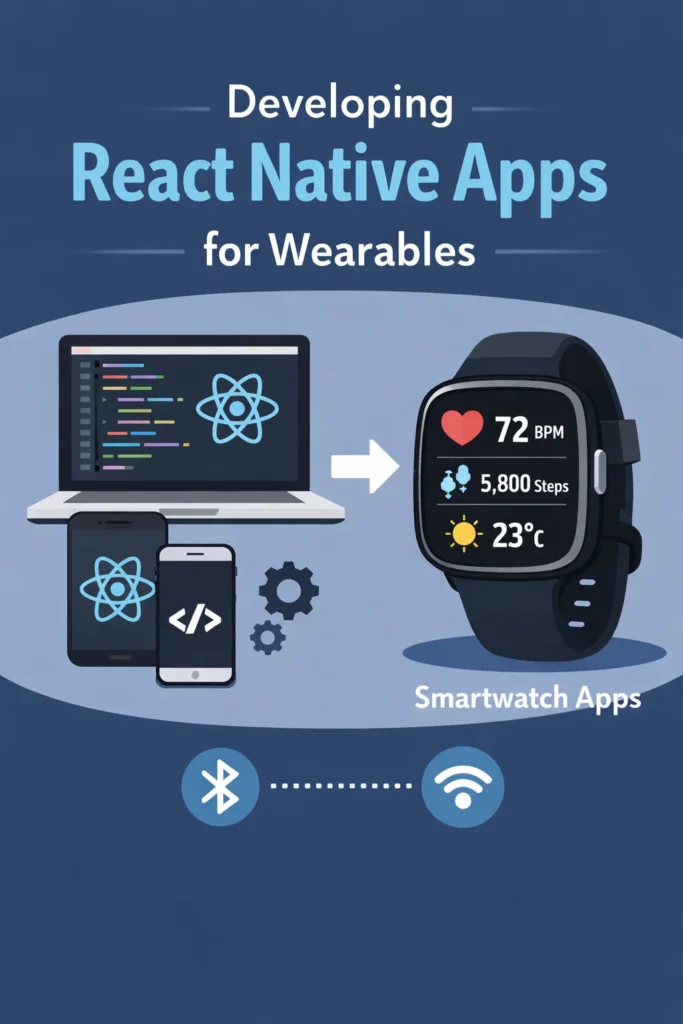
Wearable devices have become an important extension of mobile apps. Smartwatches provide quick access to information, lightweight interactions, and real-time updates directly on the wrist. With over 200 million smartwatches sold annually, developing wearable experiences has become essential for many mobile applications. Although React Native is primarily designed for mobile phones, it can still play a key role in wearable app development when used with the right architecture. In this guide, you will learn how React Native fits into smartwatch ecosystems, which platforms are supported, and how to design efficient wearable experiences that complement your React Native mobile apps.
Why Build Apps for Wearables
Smartwatches are designed for speed and convenience. Users expect to complete tasks in seconds rather than minutes. Therefore, wearable apps must deliver value immediately without requiring sustained attention.
• Quick glanceable information like weather, calendar, and notifications
• Lightweight interactions requiring minimal input
• Hands-free or one-tap actions for busy situations
• Real-time notifications with actionable responses
• Health and activity tracking with instant feedback
• Authentication and payments through quick gestures
When designed well, wearables enhance user engagement without replacing the mobile app. They serve as a convenient extension that handles specific use cases better than pulling out a phone.
Understanding Wearable Platforms
Before using React Native for wearable development, it is important to understand the differences between major platforms and their technical constraints.
Apple Watch (watchOS)
Apple Watch dominates the smartwatch market with approximately 50% market share.
• Native development uses Swift and SwiftUI exclusively
• Watch apps must be paired with an iOS companion app
• Communication happens via Watch Connectivity framework
• Limited UI capabilities with small screen real estate
• Strict background execution limits to preserve battery
• Complications provide glanceable data on watch faces
• HealthKit integration for fitness and health data
Wear OS (Android)
Wear OS runs on devices from Samsung, Google, Fossil, and other manufacturers.
• Supports Kotlin and Java for native development
• Apps can be standalone or paired with a phone
• Uses standard Android APIs adapted for wearables
• More flexible background execution than watchOS
• Tiles provide quick information access
• Health Services API for fitness tracking
• Google Play Store distribution for watch apps
Because of these platform differences, React Native is typically part of a hybrid architecture rather than running directly on the watch.
Where React Native Fits in Wearable Development
React Native typically powers the mobile companion app, not the watch UI itself. This architecture leverages React Native’s strengths while respecting platform limitations.
• React Native builds the iOS and Android phone app
• Native Swift/Kotlin code builds the watch app
• Phone and watch communicate through platform bridges
• Shared business logic stays centralized on the phone
• Backend APIs serve both phone and watch consistently
This approach balances developer productivity with optimal watch performance. The watch app remains fast and battery-efficient while the React Native app handles complex logic and data management.
Architecture for React Native + Wearables
A clean architecture separates responsibilities clearly between phone and watch.
┌─────────────────────────────────────────────────────────┐
│                    Backend Server                        │
│              (REST API / GraphQL / gRPC)                │
└─────────────────────┬───────────────────────────────────┘
                      │
        ┌─────────────┴─────────────┐
        │                           │
┌───────┴───────┐           ┌───────┴───────┐
│  Phone App    │           │  Watch App    │
│ (React Native)│◄─────────►│   (Native)    │
│               │  Platform │               │
│ • Full UI     │   APIs    │ • Minimal UI  │
│ • Business    │           │ • Quick       │
│   Logic       │           │   Actions     │
│ • Data Sync   │           │ • Glanceable  │
└───────────────┘           └───────────────┘
• React Native app handles UI, state management, and network logic
• Watch app focuses on presentation and quick actions only
• Shared backend serves both phone and watch with consistent data
• Sync happens through platform-specific APIs
• Native modules bridge React Native to platform communication APIs
This structure keeps wearable apps fast and reliable while maximizing code reuse in the React Native layer.
Communication Between Phone and Watch
Reliable communication is critical for wearable apps. Both platforms provide different APIs for phone-watch data exchange.
iOS Communication with Watch Connectivity
On iOS, the Watch Connectivity framework enables data transfer between iPhone and Apple Watch.
// Native iOS bridge module for React Native
import WatchConnectivity

@objc(WatchBridge)
class WatchBridge: NSObject, WCSessionDelegate {
  private var session: WCSession?

  override init() {
    super.init()
    if WCSession.isSupported() {
      session = WCSession.default
      session?.delegate = self
      session?.activate()
    }
  }

  @objc func sendMessage(_ message: NSDictionary) {
    guard let session = session, session.isReachable else {
      return
    }
    session.sendMessage(message as! [String: Any], replyHandler: nil)
  }

  @objc func updateApplicationContext(_ context: NSDictionary) {
    try? session?.updateApplicationContext(context as! [String: Any])
  }
}
Communication patterns include:
• sendMessage: Instant updates when watch is reachable
• updateApplicationContext: Latest state sync on next wake
• transferUserInfo: Queued delivery for important data
• transferFile: Large asset transfers
The React Native app exposes data through this native bridge, which forwards it to the watch.
Android Communication with Data Layer
On Android, Wear OS uses the Data Layer API for phone-watch communication.
// Native Android bridge module for React Native
class WearBridge(reactContext: ReactApplicationContext) :
    ReactContextBaseJavaModule(reactContext),
    DataClient.OnDataChangedListener {

  private val dataClient = Wearable.getDataClient(reactContext)

  @ReactMethod
  fun sendData(path: String, data: ReadableMap) {
    val request = PutDataMapRequest.create(path).apply {
      dataMap.putString("payload", data.toString())
      dataMap.putLong("timestamp", System.currentTimeMillis())
    }.asPutDataRequest().setUrgent()

    dataClient.putDataItem(request)
  }

  @ReactMethod
  fun sendMessage(nodeId: String, path: String, data: String) {
    Wearable.getMessageClient(reactApplicationContext)
      .sendMessage(nodeId, path, data.toByteArray())
  }
}
Data Layer capabilities include:
• Data items: Automatically sync across devices
• Messages: Low-latency one-way communication
• Assets: Transfer larger binary payloads
• Channels: Stream large data efficiently
Implementing the Native Bridge
To use these communication APIs from React Native, you need to create native modules that expose functionality to JavaScript.
// React Native JavaScript interface
import { NativeModules, NativeEventEmitter } from 'react-native';

const { WatchBridge } = NativeModules;
const watchEvents = new NativeEventEmitter(WatchBridge);

export const WatchCommunication = {
  sendMessage: (data) => {
    WatchBridge.sendMessage(data);
  },

  updateContext: (context) => {
    WatchBridge.updateApplicationContext(context);
  },

  onMessage: (callback) => {
    return watchEvents.addListener('watchMessage', callback);
  },

  isReachable: async () => {
    return WatchBridge.isReachable();
  },
};
This abstraction allows your React Native code to communicate with the watch without dealing with platform-specific details directly.
Notifications and Wearables
Notifications are the most common wearable feature and often require no additional development. When properly configured, push notifications from your React Native app automatically mirror to the watch.
• Phone app receives push notification
• System automatically mirrors notification to watch
• Watch provides quick actions configured in notification payload
• User interaction syncs back to phone and server
// Rich notification with watch actions
const notification = {
  title: 'New Message',
  body: 'John: Are you free for lunch?',
  data: {
    conversationId: '123',
  },
  android: {
    actions: [
      { title: 'Reply', action: 'REPLY', input: true },
      { title: 'Like', action: 'LIKE' },
    ],
  },
  ios: {
    categoryId: 'MESSAGE',
  },
};
React Native handles notification logic, while the operating system displays it appropriately on the watch.
Designing UI for Small Screens
Wearable UI design follows strict constraints that differ significantly from mobile design principles.
• Use large, readable text with minimum 22pt font size
• Avoid complex layouts that require precision tapping
• Focus on one action per screen to reduce cognitive load
• Prefer vertical scrolling over horizontal navigation
• Minimize navigation depth to three screens maximum
• Use high contrast colors for outdoor visibility
• Design for both round and square watch faces
// watchOS SwiftUI example for companion watch app
struct TaskView: View {
    let task: Task

    var body: some View {
        VStack(alignment: .leading, spacing: 8) {
            Text(task.title)
                .font(.headline)
                .lineLimit(2)

            Text(task.dueDate, style: .relative)
                .font(.caption)
                .foregroundColor(.secondary)

            Button(action: completeTask) {
                Label("Complete", systemImage: "checkmark")
            }
            .buttonStyle(.borderedProminent)
        }
        .padding()
    }
}
Simple design improves usability and extends battery life by reducing rendering complexity.
Performance and Battery Considerations
Wearables have extremely limited resources. A typical smartwatch has 1GB RAM and must last an entire day on a small battery. Therefore, efficiency is essential.
• Minimize data transfer to reduce radio usage
• Batch updates instead of sending frequent small messages
• Avoid polling and use event-driven sync instead
• Cache data on the watch to reduce phone dependency
• Keep animations subtle and avoid continuous updates
• Use complications/tiles for passive data display
• Implement background refresh judiciously
// Efficient data sync strategy
const syncToWatch = debounce(async (data) => {
  // Only sync essential fields
  const compactData = {
    tasks: data.tasks.slice(0, 5).map(t => ({
      id: t.id,
      title: t.title.slice(0, 50),
      due: t.dueDate,
    })),
    lastSync: Date.now(),
  };

  await WatchCommunication.updateContext(compactData);
}, 5000); // Debounce to prevent excessive updates
These practices prevent battery drain and sluggish behavior that frustrates users.
Sharing Logic Between Phone and Watch
Business logic should not be duplicated across phone and watch codebases.
• Keep calculations and transformations in the phone app
• Expose processed data through native modules
• Use backend APIs as the single source of truth
• Sync only the minimal data the watch needs to display
• Handle offline scenarios with appropriate fallbacks
This approach reduces bugs, maintenance effort, and watch app complexity.
Testing Wearable Apps
Testing ensures reliability across the diverse landscape of wearable devices.
• Use Apple Watch Simulator and Wear OS emulator for initial development
• Test on real hardware before release due to performance differences
• Validate connectivity loss scenarios and recovery
• Monitor battery impact with profiling tools
• Verify notification behavior in all app states
• Test with airplane mode to simulate disconnection
• Validate complications and tiles update correctly
Wearable-specific bugs often appear only on physical devices due to resource constraints that emulators do not accurately simulate.
Common Mistakes to Avoid
Treating Watches Like Phones
Wearables require fundamentally different interaction patterns. Users glance at watches for seconds, not minutes.
Sending Too Much Data
Large payloads slow sync, drain battery, and may be rejected by platform limits. Transfer only essential information.
Ignoring Offline Scenarios
Watches often lose connection temporarily. Design for graceful degradation when the phone is unreachable.
Complex Navigation
Deep navigation hierarchies frustrate users. Keep everything accessible within two taps.
Avoiding these mistakes improves user experience significantly.
When React Native Is a Good Choice for Wearables
React Native works well for wearable projects when:
• You already have a React Native mobile app to extend
• The watch serves as a companion to the phone app
• Business logic should remain centralized
• You want fast cross-platform phone development
• The wearable experience is supplementary, not standalone
For fully standalone watch apps with no phone dependency, native-only development is usually the better choice because React Native cannot run directly on watch operating systems.
Conclusion
Developing wearable apps with React Native is most effective when React Native powers the mobile companion app and native code handles the watch interface. By using clear architecture, efficient communication through platform bridges, and wearable-first design principles, you can deliver fast and reliable smartwatch experiences. The key is respecting the constraints of wearable devices while leveraging React Native’s strengths for the phone app. If you are building complex mobile systems, read Creating Custom Native Modules for React Native (iOS and Android). For real-time data delivery patterns, see Push Notifications in React Native with Firebase Cloud Messaging. To handle navigation effectively in your companion app, explore Implementing Deep Linking in React Native. You can also reference the Apple Watch app documentation and the Wear OS developer guides. With the right approach, React Native becomes a strong foundation for wearable ecosystems that enhance your mobile app experience.