If you have ever rewritten the same prompt for the fifth time because a tiny model change broke its output format, the DSPy framework is built for your problem. Instead of crafting brittle text strings, DSPy treats prompting as a programming task: you declare what each step expects and produces, then let an optimizer search for the actual prompt text that makes the model behave. Engineers working on RAG pipelines, agent systems, and structured extraction tasks tend to feel the pain DSPy addresses most acutely, so this deep dive targets developers who have already built at least one production LLM feature and are tired of prompt churn.
This guide walks through how the DSPy framework actually works under the hood, from signatures and modules to the optimizer loop that compiles prompts from examples. Along the way, you will see a multi-hop retrieval pipeline, a comparison against LangChain-style prompt templating, and the production trade-offs that decide whether DSPy belongs in your stack today.
What Is the DSPy Framework?
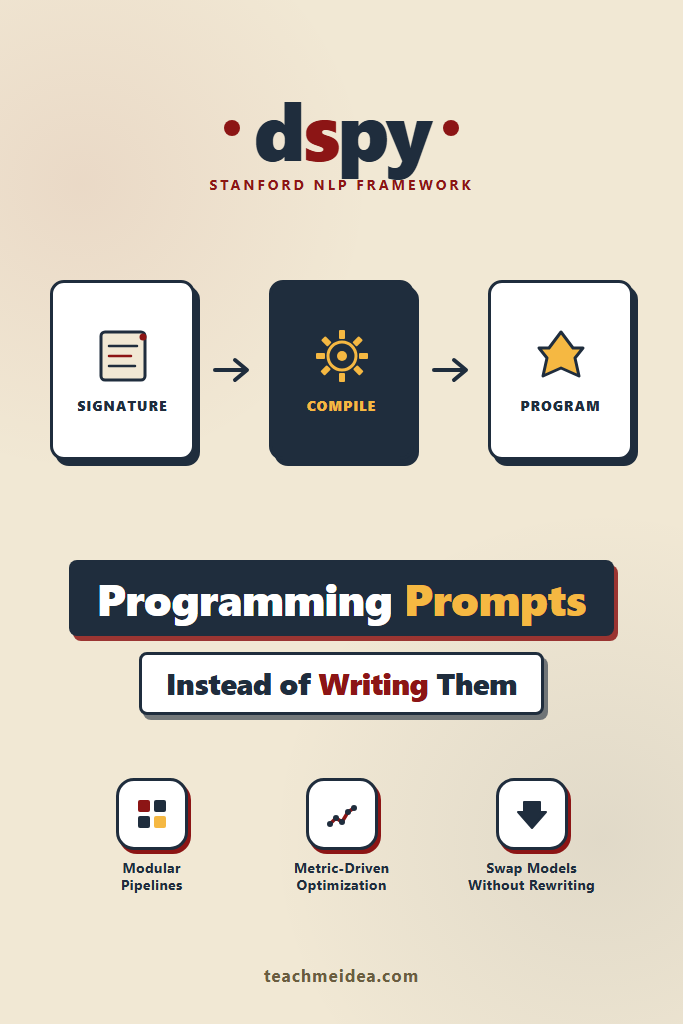
The DSPy framework is a Python library from Stanford NLP that lets you build LLM applications by writing typed modules and signatures instead of hand-tuned prompt strings. You describe each step declaratively (input fields, output fields, task description), compose modules into a pipeline, then call a compiler that searches for prompt instructions, demonstrations, and few-shot examples that maximize a metric you define. The output is a self-improving program, not a static prompt.
The shift in mindset matters. Traditional prompting is closer to copywriting: you tweak phrasing, add instructions, and pray nothing regresses. DSPy is closer to compiler theory: you declare the contract, supply training data, and let the system generate the surface text. Because the search is metric-driven, swapping models or improving the metric automatically improves the prompts.
Why Traditional Prompt Engineering Hits a Wall
Hand-written prompts work fine until you need to do three things simultaneously: chain multiple model calls, swap models without rewriting everything, and improve quality measurably. Furthermore, every model has slightly different sensitivity to formatting, role tags, and instruction phrasing, which means a prompt tuned for GPT-4 may underperform on Claude or a fine-tuned Llama variant.
Several problems compound at scale:
- Prompt drift across model upgrades. A prompt tuned against an older model often regresses when you upgrade, and the failure modes are subtle.
- Cascading edits in multi-step pipelines. Fixing the third step’s output format forces you to revisit the first two.
- No reliable evaluation harness. Without metrics tied directly to the prompt text, every change feels like guesswork.
- Few-shot example management. Picking which examples to include in the prompt becomes its own combinatorial problem.
The DSPy framework treats these as engineering problems with engineering solutions: types, modules, and automated search.
Signatures: Declaring the Input/Output Contract
A DSPy signature describes what a single LLM call should accomplish without specifying how. In practice, signatures are Python classes that declare input and output fields with optional natural-language hints.
import dspy

class ClassifyEmail(dspy.Signature):
    """Classify a customer email by urgency and category."""

    email_subject: str = dspy.InputField(desc="email subject line")
    email_body: str = dspy.InputField(desc="full email body text")
    urgency: str = dspy.OutputField(desc="one of: low, medium, high")
    category: str = dspy.OutputField(desc="billing, technical, sales, or other")
    reasoning: str = dspy.OutputField(desc="one sentence explaining the choice")
Importantly, no prompt text appears here. The docstring becomes the task description, the field descriptions become semantic hints, and DSPy handles the actual prompt construction. Therefore, when you swap the underlying model, the same signature still works because DSPy regenerates the prompt structure to match what that model expects.
Signatures also support inline shorthand for quick experiments:
classify = dspy.Predict("email_subject, email_body -> urgency, category")
The shorthand is fine for prototyping, but the class form pays off the moment you need descriptions for the optimizer to learn from.
Modules: Composable LLM Calls
A DSPy module wraps a signature with a calling strategy. The simplest is dspy.Predict, which runs a single forward pass. For more complex behavior, the DSPy framework ships several built-in modules:
dspy.ChainOfThoughtadds a reasoning step before producing outputs, similar to chain-of-thought prompting.dspy.ReActinterleaves reasoning with tool calls, suitable for agent-style flows.dspy.ProgramOfThoughtgenerates and executes Python code as an intermediate step for numeric tasks.dspy.MultiChainComparisonruns several reasoning chains and picks the best answer.
You compose modules the same way you compose any Python code:
import dspy

lm = dspy.LM("openai/gpt-4o-mini", api_key="...")
dspy.configure(lm=lm)

class SupportRouter(dspy.Module):
    def __init__(self):
        super().__init__()
        self.classify = dspy.ChainOfThought(ClassifyEmail)
        self.summarize = dspy.Predict(
            "email_body -> summary: str"
        )

    def forward(self, subject, body):
        result = self.classify(email_subject=subject, email_body=body)
        summary = self.summarize(email_body=body)
        return dspy.Prediction(
            urgency=result.urgency,
            category=result.category,
            summary=summary.summary,
        )
Notably, the forward method is plain Python. Conditional logic, loops, retries, and calls to non-LLM code all work naturally because DSPy modules are just nn.Module-style classes. As a result, you get type-checked composition rather than a brittle YAML pipeline.
The Optimizer Loop: How DSPy Compiles Prompts
This is where the DSPy framework departs sharply from LangChain-style libraries. An optimizer (called a “teleprompter” in older DSPy versions) takes a program, a metric function, and a small set of training examples, then searches for the prompt instructions and demonstrations that maximize the metric.
A typical optimizer flow looks like this:
from dspy.teleprompt import BootstrapFewShotWithRandomSearch

def accuracy_metric(example, prediction, trace=None):
    return (
        prediction.urgency == example.urgency
        and prediction.category == example.category
    )

trainset = [
    dspy.Example(
        email_subject="Server down for 4 hours",
        email_body="Our production API has been returning 503s since 2pm...",
        urgency="high",
        category="technical",
    ).with_inputs("email_subject", "email_body"),
    # ... 20-50 more examples
]

optimizer = BootstrapFewShotWithRandomSearch(
    metric=accuracy_metric,
    max_bootstrapped_demos=4,
    num_candidate_programs=10,
)

compiled_router = optimizer.compile(
    student=SupportRouter(),
    trainset=trainset,
)
Behind the scenes, the optimizer does three things. First, it runs the unoptimized program against the training set and identifies inputs where the model’s output passes the metric. Second, it uses those successful traces as candidate few-shot demonstrations. Third, it tries multiple combinations of demonstrations and (with more advanced optimizers like MIPROv2) different instruction phrasings, keeping the combination with the highest metric score on a validation set.
The compiled program is a regular Python object you can pickle, save, and load. Consequently, the optimization cost is paid once at “compile time,” and inference uses the resulting prompts directly.
Available DSPy Optimizers
Different optimizers trade compute for quality:
| Optimizer | What It Optimizes | Compute Cost | Best Use Case |
|---|---|---|---|
LabeledFewShot | Picks demonstrations from labeled data | Very low | Quick baseline |
BootstrapFewShot | Generates demos from successful traces | Low | Most projects |
BootstrapFewShotWithRandomSearch | Searches over demo combinations | Medium | Quality-sensitive tasks |
MIPROv2 | Searches over instructions and demos jointly | High | Production deployments |
BootstrapFinetune | Fine-tunes a smaller model on traces | Very high | When you want to distill to a smaller model |
For most teams, BootstrapFewShotWithRandomSearch is the sweet spot during prototyping, with a switch to MIPROv2 when results matter enough to spend a few hours of compute and the equivalent in API costs.
Building a Multi-Hop RAG Pipeline With DSPy
Multi-hop retrieval is where DSPy starts to feel genuinely different from string-template approaches. The pattern is: ask a question, retrieve relevant passages, generate a clarifying sub-question, retrieve again, then synthesize a final answer. Hand-prompting this is painful because each step’s prompt depends on the previous step’s exact output format.
Here is a complete multi-hop RAG module using DSPy:
import dspy
from dspy.retrieve import ColBERTv2

dspy.configure(
    lm=dspy.LM("openai/gpt-4o-mini"),
    rm=ColBERTv2(url="http://your-colbert-server:8000/wiki17_abstracts"),
)

class GenerateSearchQuery(dspy.Signature):
    """Write a search query that finds passages to answer the question."""
    context: list[str] = dspy.InputField(desc="passages found so far")
    question: str = dspy.InputField()
    query: str = dspy.OutputField(desc="search query, max 15 words")


class AnswerFromContext(dspy.Signature):
    """Answer the question using only the provided context passages."""
    context: list[str] = dspy.InputField()
    question: str = dspy.InputField()
    answer: str = dspy.OutputField(desc="concise factual answer")


class MultiHopRAG(dspy.Module):
    def __init__(self, max_hops: int = 3, passages_per_hop: int = 5):
        super().__init__()
        self.max_hops = max_hops
        self.passages_per_hop = passages_per_hop
        self.generate_query = [
            dspy.ChainOfThought(GenerateSearchQuery)
            for _ in range(max_hops)
        ]
        self.retrieve = dspy.Retrieve(k=passages_per_hop)
        self.answer = dspy.ChainOfThought(AnswerFromContext)

    def forward(self, question: str):
        context = []
        for hop in range(self.max_hops):
            query = self.generate_query[hop](
                context=context,
                question=question,
            ).query
            passages = self.retrieve(query).passages
            context = list(set(context + passages))
        return self.answer(context=context, question=question)
This module is roughly 30 lines of code, type-checked, and immediately optimizable. Crucially, the same MultiHopRAG class works with any retrieval backend DSPy supports (ColBERTv2, Pinecone, Weaviate, Qdrant, pgvector) by changing the rm configuration. For a deeper background on how chunking and reranking fit into this pattern, see the RAG from scratch guide and the comparison of LlamaIndex vs LangChain for RAG.
To improve quality, you compile the module against a metric that checks whether the final answer is correct:
from dspy.evaluate import answer_exact_match
from dspy.teleprompt import BootstrapFewShot

optimizer = BootstrapFewShot(metric=answer_exact_match, max_bootstrapped_demos=2)
compiled_rag = optimizer.compile(MultiHopRAG(), trainset=hotpotqa_trainset[:100])
After compilation, the per-hop query generation prompts and the final answer prompt all contain task-specific few-shot examples that the optimizer chose by running the program on training data. Therefore, you never write a query-generation prompt by hand.
DSPy vs LangChain vs Plain API Calls
The DSPy framework occupies a different layer of the stack than LangChain or raw API calls. A direct feature comparison clarifies where each shines.
| Capability | Plain API calls | LangChain | DSPy framework |
|---|---|---|---|
| Prompt as code structure | Strings in your codebase | PromptTemplate objects | Typed signatures and modules |
| Few-shot example management | Manual | Manual or simple selectors | Automated search |
| Multi-step composition | Manual | Chains and LCEL | Module composition |
| Model swapping | Rewrite prompts | Often requires retuning | Recompile against new LM |
| Evaluation harness | Bring your own | Bring your own (LangSmith helps) | Built-in metrics and dspy.Evaluate |
| Prompt optimization | Manual A/B | Manual A/B | Automated optimizers |
| Tool use / agents | DIY | Many built-in agent types | dspy.ReAct plus custom modules |
| Community / ecosystem | N/A | Very large | Smaller but growing |
LangChain is broader: it ships dozens of integrations, document loaders, and pre-built agents. DSPy is deeper: it focuses on programmatically constructing and improving the prompts inside a pipeline. They are not strictly competitors — some teams build the data pipeline with LangChain and the prompt logic with DSPy. If you are new to LangChain, the LangChain fundamentals guide covers the basics first.
For a comparison against general prompt engineering practice, see prompt engineering best practices. And if you want broader context on building agents, the building AI agents guide walks through the planning/execution loop that DSPy’s ReAct module implements.
Real-World Scenario: A Customer Support Triage Pipeline
A common production pattern: a mid-sized SaaS company routes inbound support emails to one of four teams based on urgency, product area, and customer tier. The naive solution is a single prompt that returns a JSON object with three fields. Over time, that prompt accumulates clauses (“if the customer mentions billing AND the urgency is high, route to…”), and accuracy degrades as edge cases pile up.
Replacing the prompt with a DSPy program tends to play out in three phases.
Phase 1: Replicate current behavior. You write the signature, plug in dspy.ChainOfThought, and compile against a labeled sample of (say) 200 historical tickets where the correct routing is known. The compiled program typically matches the hand-tuned prompt’s accuracy on the held-out set within a few hours of work, mostly spent on data preparation rather than prompting.
Phase 2: Improve the metric. Instead of exact-match accuracy, you switch the metric to a weighted score that penalizes high-urgency misroutes more than low-urgency ones. Recompiling against the same training set produces a different program: the model now errs toward escalation when uncertain. Notably, you changed the model’s behavior without writing or editing a single prompt.
Phase 3: Swap models for cost. Six months in, a smaller and cheaper model is available. You change the dspy.configure(lm=...) line, recompile against the same data, and ship. The compiled prompts adapt to the new model’s quirks because the optimizer searches the prompt space for the new model from scratch.
This is the practical payoff of the DSPy framework. The investment is in the metric and the data, not in any individual prompt string, so improvements compound instead of evaporating with each model update.
DSPy Internals: What Actually Happens at Runtime
A common point of confusion is whether DSPy is “doing something magical” at inference time. It is not. After compilation, your program looks like this at runtime:
- A user input arrives and enters the
forwardmethod. - For each module call, DSPy assembles a prompt by combining: the signature’s docstring, the field descriptions, the few-shot demonstrations chosen by the optimizer, and the current input.
- The prompt is sent to the configured LM through a thin adapter.
- The response is parsed back into the typed output fields.
- Python code in
forwardglues the pieces together.
Therefore, latency overhead per call is small (parsing plus prompt assembly), and there is no hidden network hop. You can inspect the actual prompt DSPy sends with dspy.inspect_history(n=1) after a call, which is essential for debugging.
The optimization phase is where the heavy compute happens. A BootstrapFewShotWithRandomSearch run on a 100-example training set with 10 candidate programs can issue a few thousand model calls. You pay for this once, save the compiled state, and then run inference at normal cost.
Production Considerations for the DSPy Framework
Shipping DSPy to production requires answering a few questions that are not obvious from the tutorials.
State persistence. A compiled DSPy program is just a Python object with prompts and demonstrations stored as attributes. Saving via compiled_program.save("path.json") writes a JSON file containing the prompts, demos, and module structure. Loading with program.load("path.json") restores it. Treat this file like any other model artifact: version it, store it in object storage, and deploy it alongside your application code.
Caching. DSPy ships with a built-in cache (backed by litellm under the hood) that deduplicates identical model calls. During optimization, this dramatically cuts cost since the optimizer often re-evaluates the same input multiple times. In production, the cache typically lives in-memory per process; for multi-instance deployments, you can configure a shared Redis-backed cache. For further context on LLM gateways and cross-cutting infrastructure, the LiteLLM setup guide covers the underlying layer DSPy uses.
Observability. dspy.inspect_history() is great for local debugging but not enough for production. Common approaches include wrapping the LM with a custom adapter that logs prompts and responses, or exporting traces to a tool like LangSmith, Langfuse, or Helicone. None of this is DSPy-specific, but you do need to wire it up explicitly.
Cost control. Optimization runs can rack up real API spend. Cap the trainset size during early experiments (50 examples is plenty to validate the approach), use a cheaper model as the “student” during the optimizer’s bootstrapping phase, and only escalate to MIPROv2 when you have evidence the simpler optimizer is the bottleneck.
Evaluation discipline. The metric you optimize is the metric you get. If your metric only checks exact string match on outputs, the optimizer will overfit to formatting quirks. Indeed, the most common DSPy failure mode in practice is a weak metric that lets the optimizer claim victory while the actual user-perceived quality stagnates.
When the DSPy Framework Pays Off
The DSPy framework rewards specific workloads more than others.
- Your LLM pipeline has more than two model calls in sequence
- You can write a deterministic metric that correlates with the user-visible outcome
- You have at least 30-50 labeled examples (more is better)
- You expect to swap models, providers, or prompts over the next year
- Quality matters enough to justify a few hours of optimization compute per release
- You are comfortable with Python and reading library internals when needed
When Other Approaches Beat DSPy
DSPy is not the right hammer for every nail.
- The pipeline is a single prompt call with stable output format requirements
- You have zero labeled data and no way to generate any
- The team is more comfortable with TypeScript than Python (DSPy is Python-only as of writing)
- You need extensive integrations with document loaders, vector stores, and webhooks out of the box (LangChain is broader)
- The application is so latency-sensitive that even one extra reasoning step is unacceptable
- You need to ship in days, and the team has never used DSPy before
Common Mistakes With DSPy
Watch for these failure modes that catch teams new to the framework.
- Treating compilation as a one-time event and never re-running it after upstream changes
- Writing a metric so loose that the optimizer overfits to syntactic patterns rather than semantic correctness
- Optimizing against a single train set with no held-out validation set, which hides overfitting
- Using
BootstrapFewShotwith too few labeled examples, leading to noisy demonstrations - Mixing DSPy modules with raw model API calls in the same pipeline, which fragments the optimization surface
- Forgetting to call
dspy.configure(lm=...)before instantiating modules, which fails confusingly at first invocation - Ignoring
dspy.inspect_history()during debugging and trying to reason about behavior without seeing the actual prompts - Saving and loading compiled programs across DSPy versions without checking the changelog, since the on-disk format is not yet stable
- Confusing the older “teleprompter” API in tutorials with the newer “optimizer” naming in current docs
Where DSPy Is Heading
The DSPy framework is still evolving rapidly. Recent versions have added typed output parsing, better support for streaming, and integration with structured-output APIs (OpenAI’s JSON mode, Anthropic’s tool use). The optimizer roadmap focuses on lower-cost search strategies and tighter integration with fine-tuning workflows via BootstrapFinetune. If you decide DSPy belongs in your stack today, expect the API to settle further over the next year and budget a few hours per quarter to track changes.
For teams not ready to commit, a reasonable hybrid is to use DSPy for the prompt-heavy core of a pipeline (multi-step reasoning, RAG synthesis) and keep the surrounding orchestration in whatever your team already uses. The DSPy programs you compile become artifacts you can call from any Python service. As a result, the blast radius of adopting DSPy is smaller than it looks.
The Bottom Line
The DSPy framework is the strongest argument yet for treating LLM prompts as code rather than copy. Therefore, if you have ever felt the dull pain of rewriting the same prompt across model upgrades or watched a multi-step pipeline degrade silently, DSPy gives you the tools to make those problems engineering problems again. Start by porting a single existing prompt to a dspy.Predict call, write a metric you trust, and compile against 30 examples. From there, the next step is typically replacing a multi-step prompt chain with a dspy.Module and a real optimizer. For a complementary look at when raw fine-tuning beats prompt optimization, the fine-tuning vs RAG guide is a useful next read.