This post is for Node.js developers and tech leads who are starting an Express API, or looking at a src/ folder that no longer fits in their head. Every Express project structure guide draws the same tree: routes/, controllers/, services/, models/. However, Express itself takes no position, and nobody has counted what real apps do. So this post counts it. It reads the server code of 100 active open source Express apps, classifies each layout by a published rule, and splits the result by size, language and Express version. As a result, you get numbers to weigh against the tutorials, plus a clear signal for when a services layer or a modules folder is worth adding.
The numbers in this post came from this environment:
Measured 2026-11-18
Windows 11 Pro 25H2 (build 26200), AMD Ryzen 5 8600G (6C/12T), 16 GB RAM
Git 2.48.1 (Git for Windows), GNU bash 5.2.37, GNU Awk 5.0.0, curl 8.12.1, Dart SDK 3.9.0
GitHub search API read 2026-11-18 at about 09:35 UTC, unauthenticated
Every repo read at its default-branch HEAD SHA on 2026-11-18
These are counts of folders and files, not timings. Therefore the Windows machine does not change them, and there is no run-to-run spread to report. Each tree was read once, at a pinned commit, so anyone can re-run the scripts against the same SHAs and get the same rows.
Express Project Structure in 100 Repos: The Short Answer
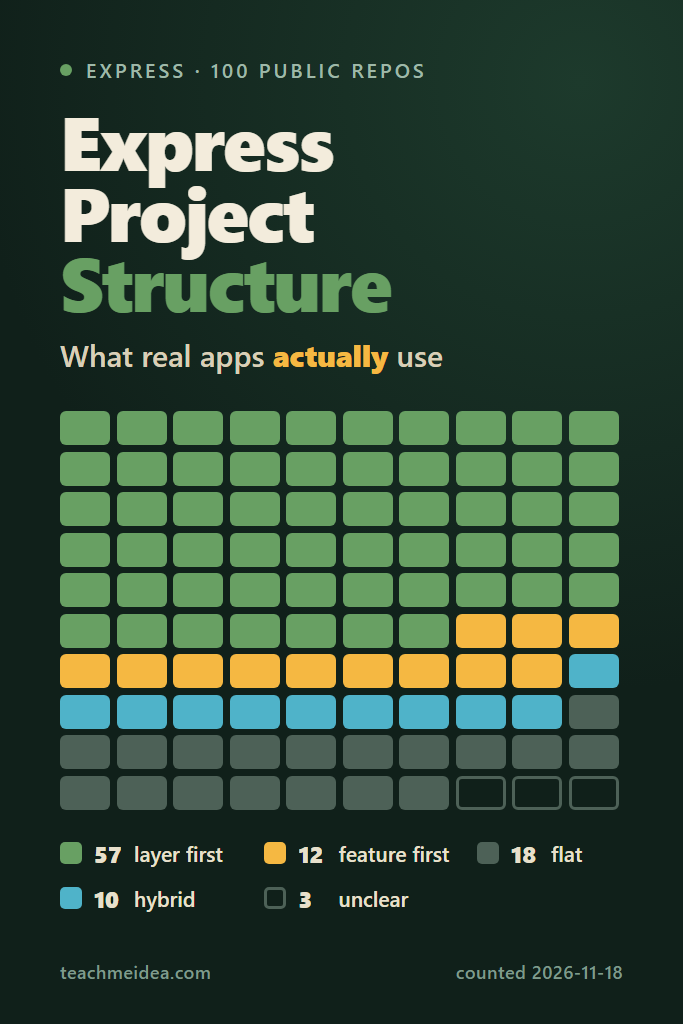
Of 100 active open source Express apps, 57 organize their server code by layer, 12 by feature, 10 mix both, 18 are flat and 3 fit no rule. A routes/ folder is nearly universal, yet only 40 apps have a services layer, and only 23 have the full routes, controllers and services stack.
| Layout at the top of the server code | Apps | What it looks like |
|---|---|---|
| Layer first, by type | 56 | routes/, controllers/, models/, middleware/ |
| Layer first, Clean or hexagonal | 1 | domain/, application/, infrastructure/, adapters/ |
| Feature first, container folder | 7 | modules/users/, domains/auth/ |
| Feature first, named folders | 5 | users/, articles/, comments/ directly under lib/ |
| Hybrid | 10 | modules/ next to a large services/ or infra/ |
| Flat | 18 | Nearly every file in one folder, or one folder plus an entry file |
| Unclear | 3 | Most code in folders that vote neither way |
In other words, the three-layer Express project structure that most tutorials draw is a minority layout in practice. Most Express apps keep routes and models, add middleware, and skip the controller and service layers until something forces them in. The rest of this post shows where that line falls.
How the 100 Repos Were Picked
Express has no app registry, so a survey of Express project structure has to start from GitHub topics. Two unauthenticated searches pulled the most-starred repos tagged express or expressjs, excluding forks and archived repos, and keeping only repos pushed on or after 2025-11-18. The API returns at most 1,000 results per query, so the two topics gave 1,878 unique repos. On the first page, GitHub reported 34,194 matches for express and 15,164 for expressjs.
#!/usr/bin/env bash
# Pull up to 1,000 repos per topic from the GitHub search API, most stars first.
# Unauthenticated search allows 10 requests a minute, hence the 7 s pause.
set -uo pipefail
mkdir -p search
for topic in express expressjs; do
  for page in $(seq 1 10); do
    q="topic:$topic+fork:false+archived:false+pushed:>=2025-11-18"
    curl -s -H 'Accept: application/vnd.github+json' \
      "https://api.github.com/search/repositories?q=$q&sort=stars&order=desc&per_page=100&page=$page" \
      > "search/$topic-$page.json"
    echo "$topic $page $(grep -c '"full_name"' "search/$topic-$page.json")"
    sleep 7
  done
done
A short Dart script merges the 20 pages into one TSV, deduplicated and sorted by stars. Dart is used here only because it parses JSON without extra installs on this machine:
// Merge search pages into one TSV, deduplicated, most stars first.
import 'dart:convert';
import 'dart:io';

void main(List<String> args) {
  final seen = <String, Map<String, dynamic>>{};
  for (final f in Directory(args[0]).listSync().whereType<File>()) {
    final j = jsonDecode(f.readAsStringSync()) as Map<String, dynamic>;
    stderr.writeln('${f.path} total_count=${j['total_count']} incomplete=${j['incomplete_results']}');
    for (final r in (j['items'] as List).cast<Map<String, dynamic>>()) {
      seen[r['full_name'] as String] = r;
    }
  }
  final rows = seen.values.toList()
    ..sort((a, b) => (b['stargazers_count'] as int).compareTo(a['stargazers_count'] as int));
  print('repo\tstars\tpushed_at\tdefault_branch\tlanguage\tdescription');
  for (final r in rows) {
    final d = ((r['description'] ?? '') as String).replaceAll(RegExp(r'[\t\r\n]'), ' ');
    print([r['full_name'], r['stargazers_count'], r['pushed_at'], r['default_branch'], r['language'] ?? '-', d].join('\t'));
  }
}
Reading File Trees Without Downloading the Code
A folder layout lives entirely in Git’s tree objects, so file contents are not needed. A blobless fetch downloads commits and trees but no blobs. Then git ls-tree lists every path at the fetched commit. The only file contents read are the package.json files, pulled one by one from raw.githubusercontent.com, which does not count against the search quota.
#!/usr/bin/env bash
# Read one repo's file tree at its default-branch HEAD, plus every package.json in it.
# Usage: ./scan.sh owner/repo branch
# Writes trees/owner__repo.txt (all paths) and pkgs/owner__repo/<path>.json.
set -uo pipefail
repo="$1"; branch="$2"; key="${repo//\//__}"
dir="repos/$key"
mkdir -p repos trees "pkgs/$key"
[ -d "$dir" ] || { git init -q "$dir"; git -C "$dir" remote add origin "https://github.com/$repo.git"; }
# Commits and trees only; no file contents are downloaded.
if ! git -C "$dir" fetch -q --depth 1 --filter=blob:none origin "$branch" 2>/dev/null; then
  printf '%s\tFAIL\t-\t-\t0\n' "$repo"; exit 0
fi
sha=$(git -C "$dir" rev-parse FETCH_HEAD)
date=$(git -C "$dir" log -1 --format=%cs FETCH_HEAD)
git -C "$dir" ls-tree -r --name-only "$sha" > "trees/$key.txt"
# package.json files outside node_modules, at most four folders deep.
grep -E '(^|/)package\.json$' "trees/$key.txt" | grep -v node_modules \
  | awk -F/ 'NF <= 5' | head -40 > "pkgs/$key/_list.txt"
while read -r p; do
  curl -sf "https://raw.githubusercontent.com/$repo/$sha/$p" -o "pkgs/$key/${p//\//__}"
done < "pkgs/$key/_list.txt"
printf '%s\tOK\t%s\t%s\t%s\n' "$repo" "$sha" "$date" "$(wc -l < "pkgs/$key/_list.txt")"
The --filter=blob:none flag is documented in Git’s partial clone reference. In practice, the top 700 repos were scanned eight at a time through xargs -P 8, which took 3 minutes 46.8 seconds of wall time in one run. Two fetches failed, for the repos ranked 476th and 562nd, so neither touches the sample.
Filtering Out Libraries, Frameworks and Collections
Most of the top-starred Express repos are not apps. Express itself, morgan, cors, http-proxy-middleware and similar middleware dominate the first page. So a second Dart script applies the filter rules to every package.json:
// For each scanned repo, find package.json files that list express in "dependencies"
// and print one TSV row describing the package that will be classified.
// Usage: dart run pkgs.dart scan.tsv > pkgs.tsv
import 'dart:convert';
import 'dart:io';

const skipDir = {'examples', 'example', 'templates', 'template', 'test', 'tests',
  'fixtures', '__fixtures__', 'docs', 'benchmarks', 'benchmark', 'bench', 'samples', 'sample'};
const libFields = ['files', 'exports', 'types', 'typings', 'publishConfig', 'peerDependencies'];
// Frameworks that own the folder layout, so the repo is not an Express layout.
const ownLayout = ['@nestjs/core', '@tsed/common', '@tsed/platform-express', '@loopback/core',
  '@feathersjs/feathers', 'sails', 'next', 'nuxt', '@remix-run/express', '@strapi/strapi', 'payload'];
// Frontend packages lose the pick when a repo has more than one express package.
const frontend = ['react-dom', '@angular/core', 'vue', 'svelte'];

void main(List<String> args) {
  print('repo\tsha\tdate\texpress_pkgs\tapp_dir\texpress_spec\tlibrary_fields\tmodule\tframework\tdeps');
  for (final line in File(args[0]).readAsLinesSync()) {
    final c = line.split('\t');
    if (c[1] != 'OK') continue;
    final key = c[0].replaceAll('/', '__');
    final hits = <Map<String, dynamic>>[];
    for (final p in File('pkgs/$key/_list.txt').readAsLinesSync()) {
      if (p.split('/').any(skipDir.contains)) continue;
      final f = File('pkgs/$key/${p.replaceAll('/', '__')}');
      if (!f.existsSync()) continue;
      Map<String, dynamic> j;
      try { j = jsonDecode(f.readAsStringSync()) as Map<String, dynamic>; } catch (_) { continue; }
      final deps = (j['dependencies'] is Map) ? (j['dependencies'] as Map).cast<String, dynamic>() : <String, dynamic>{};
      if (!deps.containsKey('express')) continue;
      hits.add({'dir': p.substring(0, p.length - 'package.json'.length), 'j': j, 'deps': deps,
        'fe': frontend.any(deps.containsKey) ? 1 : 0, 'depth': '/'.allMatches(p).length});
    }
    if (hits.isEmpty) { print([c[0], c[2], c[3], 0, '-', '-', '-', '-', '-', '-'].join('\t')); continue; }
    // Backend packages first, then the shallowest; ties keep the listed order.
    hits.sort((a, b) {
      final f = (a['fe'] as int).compareTo(b['fe'] as int);
      return f != 0 ? f : (a['depth'] as int).compareTo(b['depth'] as int);
    });
    final h = hits.first;
    final j = h['j'] as Map<String, dynamic>;
    final deps = h['deps'] as Map<String, dynamic>;
    final lib = libFields.where(j.containsKey).join(',');
    final fw = ownLayout.where(deps.containsKey).join(',');
    print([c[0], c[2], c[3], hits.length, h['dir'] == '' ? '.' : h['dir'], deps['express'],
      lib.isEmpty ? '-' : lib, j['type'] == 'module' ? 'esm' : 'cjs', fw.isEmpty ? '-' : fw,
      deps.keys.join(',')].join('\t'));
  }
}
Reading down the list in star order, with ties broken by repo name, the 100th app turned up at repo number 299. Here is the funnel for those 299 repos:
- 299 repos read, the most-starred of the 1,878.
- 168 list
expressunderdependenciesin apackage.jsonoutside example, test, docs and benchmark folders. Middleware usually lists it underdevDependenciesorpeerDependencies, so this drops most libraries. - 153 have none of the fields a published package carries:
files,exports,types,typings,publishConfigorpeerDependencies. - 150 have at most three Express packages. More than three marks a course or example collection.
- 113 have a default-branch commit on or after 2025-11-18, so the app is still maintained.
- 109 are not built on a framework that sets its own folder layout, such as NestJS or Next.js.
- 100 remain after nine hand exclusions, listed below.
The hand exclusions are repos that passed every rule but are not apps: oskardudycz/EventSourcing.NodeJS (tutorial workshops), forms-angular/forms-angular (a framework whose Express package is its website), graphql/graphql-http (a library with a reference implementation), felipebarcelospro/igniter-js (a framework starter), connectrpc/examples-es and stalniy/casl-examples (example collections), robtweed/qewd (a framework), twreporter/twreporter-react (a server-rendered React site) and xizon/fullstack-nextjs-app-template (a Next.js template with a demo API).
How Each Express Folder Structure Was Classified
Any rule for labelling an Express project structure is arguable, so the rule here is spelled out in full, and the per-app numbers are in the data file and the list at the end. First, a lister script decides which files count as server code. It keeps .js, .ts, .mjs and .cjs files under the app’s package, and drops tests, type declarations, config files, build output and any client folder:
#!/usr/bin/env bash
# List the server-side source files of one Express app, relative to its server root.
# Usage: ./files.sh owner/repo <app-dir> <fullstack 0|1>
# Writes srv/owner__repo.txt and prints: repo <server root> <file count>
set -uo pipefail
repo="$1"; app="$2"; fullstack="$3"; key="${repo//\//__}"
[ "$app" = "." ] && app=""
tree="trees/$key.txt"
mkdir -p srv
root="$app"
if [ "$fullstack" = 1 ]; then
  # One package holds both client and server: classify only the server folder.
  root=""
  for d in server backend api src/server src/express src/backend app; do
    if grep -qE "^${app}${d}/.*\.(js|ts|mjs|cjs)$" "$tree"; then root="$app$d/"; break; fi
  done
  [ -z "$root" ] && { echo "$repo NO_SERVER_DIR 0"; exit 0; }
fi
# Folders that hold their own package.json are separate packages (a client, a shared lib).
grep -E '(^|/)package\.json$' "$tree" | grep -v node_modules \
  | sed 's#package\.json$##' | grep -vxF "$app" | grep -F "$root" > "srv/$key.nested"
awk -v r="$root" 'r == "" || index($0, r) == 1' "$tree" \
  | grep -E '\.(js|ts|mjs|cjs)$' \
  | grep -vE '\.d\.ts$|\.(test|spec)\.[cm]?[jt]s$|\.min\.js$|(^|/)[^/]*\.config\.[cm]?[jt]s$|(^|/)\.' \
  | grep -vE '(^|/)(node_modules|dist|build|out|coverage|public|static|test|tests|__tests__|__mocks__|spec|specs|e2e|client|frontend|renderer|docs)/' \
  | awk -v nf="srv/$key.nested" 'FILENAME == nf { if (length($0)) n[++k] = $0; next }
         { for (i = 1; i <= k; i++) if (index($0, n[i]) == 1) next; print }' "srv/$key.nested" - \
  | awk -v r="$root" '{ print substr($0, length(r) + 1) }' > "srv/$key.txt"
rm -f "srv/$key.nested"
echo "$repo ${root:-.} $(wc -l < "srv/$key.txt")"
The fullstack flag matters for six apps in the final sample whose single package.json holds both React or Angular and Express. For those, only the server folder counts, such as server/, backend/ or src/express/. Every candidate up to the 100th had such a folder, so no app was dropped by that rule.
The Classification Rule
Next, the classifier unwraps wrapper folders. If src/, server/ or backend/ holds at least a quarter of the code, or app/, api/, lib/ or website/ holds at least half, it looks inside instead, up to three levels deep. That is how Habitica’s server, which lives in website/server/, gets read correctly. Then every top-level folder gets one of four kinds:
- Feature container:
modules/,features/,components/,domains/orcontexts/. - Layer folder: a name that describes a kind of code, such as
routes/,controllers/,services/,models/,middleware/,db/,jobs/ordomain/. - Shared folder: cross-cutting code such as
config/,utils/,lib/,types/,scripts/ormigrations/. These do not vote. - Named folder: anything else. In practice these are feature names, such as
users/,articles/orsftp/.
Each app is then scored by files, not by folder count. Files in feature containers and named folders vote “feature”, and files in layer folders vote “layer”. If the smaller side holds at least a third of the voting files, the app is hybrid. Otherwise, the larger side wins. An app with fewer than two folders, or with half its files at the top level, counts as flat. Finally, if fewer than a quarter of files vote at all, the app is unclear.
An app counts as TypeScript when more than half of its server files end in .ts, .mts or .cts. Separately, the script records whether each of six roles exists anywhere in the server code: routes, controllers, services, models, middleware and repositories. A role counts as a folder (2) if any folder on a file’s path has the role’s name, or as a suffix (1) if only file names carry it, such as user.controller.ts or bookRoutes.js.
The Classifier Script
The whole rule fits in one awk file, shown here in two parts. The first part holds the name lists and helpers:
# classify.awk: reads server source paths (relative to the server root), prints one TSV row.
# Usage: awk -v repo=owner/name -f classify.awk srv/owner__name.txt
function kind(name,   k) {
  k = tolower(name)
  if (k in FEAT) return "feature_dir"
  if (k in LAYER) return "layer"
  if (k in SHARED) return "shared"
  return "named"
}
# Role of one file: from the nearest role folder on its path, else from its file-name suffix.
function role(path,   n, q, i, b) {
  n = split(tolower(path), q, "/")
  for (i = n - 1; i >= 1; i--) if (q[i] in ROLE) return ROLE[q[i]]
  b = q[n]; sub(/\.[cm]?[jt]s$/, "", b)
  if (b ~ /(^|[._-]|[a-z])controllers?$/) return "controller"
  if (b ~ /(^|[._-]|[a-z])services?$/) return "service"
  if (b ~ /(^|[._-]|[a-z])(routes?|router)$/) return "route"
  if (b ~ /(^|[._-]|[a-z])(models?|schema|entity)$/) return "model"
  if (b ~ /(^|[._-]|[a-z])(repository|repo)$/) return "repository"
  if (b ~ /(^|[._-]|[a-z])middlewares?$/) return "middleware"
  return ""
}
function fromdir(path,   n, q, i) {
  n = split(tolower(path), q, "/")
  for (i = n - 1; i >= 1; i--) if (q[i] in ROLE) return 1
  return 0
}
function set(list, arr,   a, n, i) { n = split(list, a, " "); for (i = 1; i <= n; i++) arr[a[i]] = 1 }
BEGIN {
  OFS = "\t"
  set("modules module features feature components component domains contexts", FEAT)
  set("controllers controller routes route routers router services service models model " \
    "middleware middlewares repositories repository respositories repos dao daos dal entities entity " \
    "schemas schema validators validator validations validation handlers handler db database databases " \
    "data dto dtos domain infrastructure infra application presentation views view resolvers graphql " \
    "jobs workers queues queue cronjobs cron_jobs cron events event listeners subscribers socket sockets " \
    "websocket ws policies serializers providers adapters http usecases use-cases use_cases ports gateways " \
    "mappers mongo mongodb redis webhooks api parsers parser scrapers scraper storage sql queries " \
    "gqlqueries permissions", LAYER)
  set("config configs configuration utils util utilities utility helpers helper lib libs common core " \
    "shared constants const types typings interfaces @types errors error exceptions exception logger " \
    "loggers logs logging loaders startup bootstrap boot init initializers scripts script migrations " \
    "datamigrations seeders seeds seed swagger openapi api-docs i18n locales locale lang assets templates " \
    "template emails email mail mailer plugins decorators enums tools cache security env environments " \
    "setup bin commands classes abstractions container context platform html app src server backend " \
    "main preload", SHARED)
  set("src server backend", WRAP)
  set("domain application infrastructure infra adapters presentation usecases use-cases use_cases " \
    "ports gateways", CLEAN)
  n = split("controllers:controller controller:controller routes:route route:route routers:route " \
    "router:route services:service service:service models:model model:model entities:model " \
    "entity:model schemas:model schema:model repositories:repository repository:repository " \
    "respositories:repository repos:repository dao:repository daos:repository dal:repository " \
    "middleware:middleware middlewares:middleware", g, " ")
  for (i = 1; i <= n; i++) { split(g[i], kv, ":"); ROLE[kv[1]] = kv[2] }
}
The second part, appended to the same file, does the unwrapping, voting and printing:
{ path[++total] = $0; if ($0 ~ /\.[cm]?ts$/) ts++ }
END {
  if (total == 0) { print repo, 0; exit }
  # 1. Unwrap src/, server/ or backend/ holding a quarter of the code,
  #    or app/, api/, lib/ or website/ holding half. Up to three levels.
  wrap = ""
  for (pass = 1; pass <= 3; pass++) {
    delete top; best = ""; bc = 0; cnt = 0
    for (i = 1; i <= total; i++) {
      s = path[i]
      if (wrap != "") { if (index(tolower(s), wrap) != 1) continue; s = substr(s, length(wrap) + 1) }
      cnt++; n = split(s, p, "/"); if (n > 1) top[tolower(p[1])]++
    }
    for (d in top)
      if (((d in WRAP) && top[d] >= cnt / 4) || \
          ((d == "app" || d == "api" || d == "lib" || d == "website") && top[d] >= cnt / 2))
        if (top[d] > bc) { best = d; bc = top[d] }
    if (best == "") break
    wrap = wrap best "/"
  }
  # 2. Votes: feature containers and named folders vote feature, layer folders vote layer.
  for (i = 1; i <= total; i++) {
    s = path[i]
    r = role(s); if (r != "") { has[r] = 1; if (fromdir(s)) hasdir[r] = 1 }
    if (wrap != "") { if (index(tolower(s), wrap) != 1) { outside++; continue } s = substr(s, length(wrap) + 1) }
    n = split(s, p, "/")
    if (n - 1 > maxdepth) maxdepth = n - 1
    if (n == 1) { root++; continue }
    dirs[p[1]]++
    k = kind(p[1])
    if (k == "feature_dir") { fd++; if (n > 2) { feat[p[2]]++; if (r != "") frole[p[2] SUBSEP r] = 1 } }
    else if (k == "named") { named++; nfold[p[1]]++; if (r != "") nrole[p[1] SUBSEP r] = 1 }
    else if (k == "layer") { layer++; if (tolower(p[1]) in CLEAN) clean++ }
    else shared++
  }
  ndirs = 0; for (d in dirs) ndirs++
  fv = fd + named; lv = layer; v = fv + lv; inside = total - outside
  # 3. Class.
  if (ndirs < 2 || root >= inside / 2) cls = "flat"
  else if (v < inside / 4) cls = "unclear"
  else {
    m = (fv < lv ? fv : lv) / v
    if (m >= 1 / 3) cls = "hybrid"
    else if (fv > lv) cls = (fd >= named ? "feature-first (modules/ dir)" : "feature-first (named folders)")
    else cls = (clean >= lv / 2 ? "layer-first (clean/hexagonal)" : "layer-first (by type)")
  }
  # 4. Modules and named folders holding two or more roles (controller, service, route...).
  nf = 0; nlay = 0; nnamed = 0; nnlay = 0
  for (f in feat) { nf++; c = 0; for (key in frole) { split(key, q, SUBSEP); if (q[1] == f) c++ } if (c >= 2) nlay++ }
  for (f in nfold) { nnamed++; c = 0; for (key in nrole) { split(key, q, SUBSEP); if (q[1] == f) c++ } if (c >= 2) nnlay++ }
  # 5. Layer present: 2 = has a folder for it, 1 = only file-name suffixes, 0 = absent.
  split("route controller service model middleware repository", L, " ")
  out = ""; for (i = 1; i <= 6; i++) out = out OFS (hasdir[L[i]] ? 2 : (has[L[i]] ? 1 : 0))
  print repo, total, wrap == "" ? "-" : wrap, root + 0, fd + 0, named + 0, layer + 0, shared + 0, cls, \
    nf, nlay, nnamed, nnlay, (ts > total / 2 ? "ts" : "js"), maxdepth + 0 out
}
The rules were tuned before the final run, by reading the folders of every hybrid, unclear and feature-first app, plus every fifth app in star order. Those reviews caught several misreads, and each fix is now a rule above. For example, src/app/ was first unwrapped too eagerly and hid a sibling domains/ folder. An Electron app’s React renderer/ folder was counted as server code. Habitica was first read through its shared website/common/ library instead of website/server/. In addition, a feature folder (src/chat/) was treated as a wrapper, and folders such as parsers/ and scrapers/ voted as features until they joined the layer list. After the fixes, the 20 apps in the every-fifth sample matched their folders on a final read.
Seven Rows of Raw Output
Here are seven apps that cover every class, straight from the script, with tabs aligned for width. The columns are: repo, server files, unwrapped folder, files at the top level, files in a feature container, files in named folders, files in layer folders, files in shared folders, class, modules, modules with two or more roles, named folders, named folders with two or more roles, language, deepest folder level, then the six role columns (routes, controllers, services, models, middleware, repositories).
heroku/nodejs-getting-started                  2    -         2  0   0   0    0   flat                           0   0   0  0  js  0  0  0  0  0  0  0
lyz05/danmaku                                  11   -         1  0   0   9    1   layer-first (by type)          0   0   0  0  js  2  2  0  0  0  0  0
AAYUSH412/Real-Estate-Website                  91   -         3  0   0   57   31  layer-first (by type)          0   0   0  0  js  2  2  2  2  2  2  0
medevorg/nodetskeleton                         131  src/      1  0   0   130  0   layer-first (clean/hexagonal)  0   0   0  0  ts  5  0  2  0  2  2  2
vyancharuk/nodejs-api-boilerplate              59   src/      2  28  0   17   12  hybrid                         2   2   0  0  ts  3  1  1  1  0  2  1
Ujjalzaman/Doctor-Appointment                  66   src/app/  0  37  0   3    0   feature-first (modules/ dir)   11  11  0  0  ts  2  2  1  1  0  2  0
tanem/express-bookshelf-realworld-example-app  76   lib/      2  0   31  14   9   feature-first (named folders)  0   0   8  8  js  1  1  1  1  1  2  0
For example, lyz05/danmaku is nine route files and nothing else: no controllers, no services, no models. By contrast, tanem/express-bookshelf-realworld-example-app has no modules/ folder at all, yet 31 of its 76 files sit in users/, articles/ and comments/, and 8 of those folders each hold a router, a controller and a service. That is feature first in every way except the folder name.
What the Classifier Found
A driver script chains the steps in order, then a summary script reads the per-app table:
#!/usr/bin/env bash
# Express project structure survey: search, scan, filter, classify. Re-runnable end to end.
set -uo pipefail
[ -d search ] || ./search.sh                                   # 20 search pages
dart run to_tsv.dart search > candidates.tsv                   # 1,878 repos, most stars first
[ -s scan.tsv ] || tail -n +2 candidates.tsv | head -700 | awk -F'\t' '{print $1" "$4}' \
  | xargs -P 8 -L 1 ./scan.sh > scan.tsv                       # trees and package.json files
dart run pkgs.dart scan.tsv > pkgs.tsv
# Automatic rules, hand exclusions, then star order (ties by name).
awk -F'\t' 'NR==FNR{x[$1]=1; next}
  FNR>1 && $4>0 && $7=="-" && $4<=3 && $3>="2025-11-18" && $9=="-" && !($1 in x)' exclude.tsv pkgs.tsv \
  | awk -F'\t' 'NR==FNR{if(FNR>1) s[$1]=$2; next}{print s[$1]"\t"$0}' candidates.tsv - \
  | sort -t$'\t' -k1,1nr -k2,2 > kept.tsv
# Server file lists for the first 100 apps that have a server folder.
awk -F'\t' '{fs = ($11 ~ /(^|,)(react-dom|@angular\/core|vue|svelte)(,|$)/) ? 1 : 0; print $2, $6, fs}' kept.tsv \
  | while read -r r a f; do ./files.sh "$r" "$a" "$f"; done | grep -v NO_SERVER_DIR | head -100 > apps.txt
awk '{print $1}' apps.txt | while read -r r; do awk -v repo="$r" -f classify.awk "srv/${r//\//__}.txt"; done > classes.tsv
Here exclude.tsv holds the hand exclusions, one repo per line with its reason. The per-app table, final.tsv, joins classes.tsv with the stars, commit SHA, Express version and dependencies of each app. It is published as express-project-structure-2026-11-18.tsv alongside this post’s source.
#!/usr/bin/env bash
# Summarise final.tsv (one row per app). Column numbers follow its header.
t=final.tsv
echo "## Classes"
awk -F'\t' 'NR>1{c[$16]++}END{for(k in c) printf "%3d  %s\n", c[k], k}' "$t" | sort -rn
echo "## By size (server source files)"
awk -F'\t' 'NR>1{n=$9; b=(n<20?"a <20":(n<100?"b 20-99":"c 100+")); c=$16; sub(/ \(.*/,"",c); t[b]++; x[b SUBSEP c]++}
  END{for(b in t){printf "%-6s n=%-3d", substr(b,3), t[b]; split("layer-first feature-first hybrid flat unclear",o," "); for(i=1;i<=5;i++) printf "  %s=%d", o[i], x[b SUBSEP o[i]]; print ""}}' "$t" | sort
echo "## Layers (2 = folder, 1 = file-name suffix only)"
awk -F'\t' 'NR>1{for(i=23;i<=28;i++){if($i==2)f[i]++; if($i==1)s[i]++; if($i>0)e[i]++}}
  END{split("routes controllers services models middleware repositories",L," "); for(i=23;i<=28;i++) printf "%-13s folder=%-3d suffix_only=%-3d either=%d\n", L[i-22], f[i], s[i], e[i]}' "$t"
echo "## Layer stacks (folder or suffix)"
awk -F'\t' 'NR>1{r=$23>0; c=$24>0; s=$25>0; m=$26>0; if(r&&c&&s)rcs++; if(r&&c&&m)rcm++; if(r&&c&&s&&m)all++; if(r&&!c&&!s)ronly++}
  END{printf "routes+controllers+services=%d routes+controllers+models=%d all four=%d routes, no controllers, no services=%d\n", rcs, rcm, all, ronly}' "$t"
echo "## Modules inside a modules/, features/, components/, domains/ or contexts/ folder"
awk -F'\t' 'NR>1 && $17>0{a++; f+=$17; l+=$18}END{printf "apps=%d modules=%d with_2plus_roles=%d\n", a, f, l}' "$t"
echo "## Language x Express major"
awk -F'\t' 'NR>1{s=$6; gsub(/[^0-9.]/,"",s); split(s,v,"."); mj=(v[1]==""?"other":v[1]); x[$21 SUBSEP mj]++; L[$21]++}
  END{for(l in L) printf "%s=%d: express4=%d express5=%d other=%d\n", l, L[l], x[l SUBSEP 4], x[l SUBSEP 5], x[l SUBSEP "other"]}' "$t" | sort
echo "## package.json type"
awk -F'\t' 'NR>1{c[$7]++}END{for(k in c) print k, c[k]}' "$t"
## Classes
 56  layer-first (by type)
 18  flat
 10  hybrid
  7  feature-first (modules/ dir)
  5  feature-first (named folders)
  3  unclear
  1  layer-first (clean/hexagonal)
## By size (server source files)
100+   n=19   layer-first=13  feature-first=6  hybrid=0  flat=0  unclear=0
20-99  n=44   layer-first=30  feature-first=3  hybrid=7  flat=2  unclear=2
<20    n=37   layer-first=14  feature-first=3  hybrid=3  flat=16  unclear=1
## Layers (2 = folder, 1 = file-name suffix only)
routes        folder=60  suffix_only=20  either=80
controllers   folder=38  suffix_only=11  either=49
services      folder=29  suffix_only=11  either=40
models        folder=45  suffix_only=14  either=59
middleware    folder=50  suffix_only=4   either=54
repositories  folder=9   suffix_only=8   either=17
## Layer stacks (folder or suffix)
routes+controllers+services=23 routes+controllers+models=33 all four=17 routes, no controllers, no services=24
## Modules inside a modules/, features/, components/, domains/ or contexts/ folder
apps=11 modules=89 with_2plus_roles=80
## Language x Express major
js=51: express4=32 express5=19 other=0
ts=49: express4=21 express5=27 other=1
## package.json type
esm 30
cjs 70
Layer First Is the Default, but a Thin One
Layer first is the most common Express project structure, winning 57 of 100 apps. Moreover, the “by type” variant accounts for 56 of them on its own, while only one app, medevorg/nodetskeleton, uses Clean Architecture’s domain/, application/ and infrastructure/ at the top level. So despite how often hexagonal layouts appear in Node.js talks, they are close to absent from popular open source Express code.
However, “layer first” mostly means routes plus models. Routes exist in 80 apps and models in 59, but controllers appear in only 49. Notably, 24 apps have routes and neither controllers nor services, so their handlers talk to the database straight from the route file. That includes funmusicplace/mirlo, a 405-file music platform whose src/routers/ folder holds one file per endpoint, grouped by resource.
Only 40 Apps Have a Services Layer
This is the number tutorials skip. A services layer, whether a services/ folder or files named like user.service.ts, shows up in 40 of 100 apps. In contrast, the full routes, controllers and services stack appears in only 23. Repositories are rarer still, at 17.
Language shapes the Express project structure here, as the cross-tab script in the Express 5 section below shows. Among TypeScript apps, 28 of 49 have services, against 12 of 51 JavaScript apps. Controllers, by contrast, are evenly split, with 25 TypeScript apps and 24 JavaScript apps. In practice, TypeScript projects tend to start from boilerplates that ship a service layer, while JavaScript apps grow from a single app.js and add folders as they need them.
Feature First Shows Up in Big Apps
Feature first is rare overall, at 12 of 100. Still, size changes the picture. It covers 3 of 37 apps under 20 server files and 3 of 44 between 20 and 99. Then it jumps to 6 of 19 apps at 100 files or more, which is 31.6%. Meanwhile, flat layouts vanish with size: 16 of 37 small apps are flat, against 2 of 44 mid-sized apps and none of the 19 largest. In short, the Express project structure follows app size: small apps stay flat or layered, and only the largest ones reorganize by feature.
Modules Keep Their Layers as Files
Eleven apps have a modules/, features/, components/, domains/ or contexts/ folder, holding 89 modules in total. Of those, 80 hold two or more roles, typically a route, a controller and a service. Unlike Flutter apps, where feature folders split into data/ and presentation/ subfolders, Express modules keep their layers as sibling files. For instance, Ujjalzaman/Doctor-Appointment has appointment.route.ts, appointment.controller.ts and appointment.service.ts side by side in src/app/modules/appointment/.
Are Express Apps Moving to Express 5?
Nearly half have moved. Of the 99 apps with a readable version, 46 pin Express 5 and 53 pin Express 4. The hundredth app uses a workspace catalog: reference, so its version cannot be read from package.json. One of the 46 still pins ^5.0.0-alpha.7, a prerelease.
The npm registry gives the context. Express 5.0.0 was published on 2024-09-10, and 5.1.0 followed on 2025-03-31, when the Express team made version 5 the default latest tag, as announced in the Express 5.1.0 release post. On 2026-11-18, latest points at 5.3.0, published 2026-10-09, while latest-4 points at 4.22.3, published 2026-09-14. So Express 4 still receives releases, and staying on it is not yet a dead end.
#!/usr/bin/env bash
# Cross-tabs on final.tsv: language, Express major, Mongoose, database libraries.
t=final.tsv
major='s=$6; gsub(/[^0-9.]/,"",s); split(s,v,"."); mj=v[1]'
echo "## Services and controllers by language (folder or suffix)"
awk -F'\t' 'NR>1{L[$21]++; if($25>0)s[$21]++; if($24>0)c[$21]++}
  END{for(l in L) printf "%s apps=%d services=%d controllers=%d\n", l, L[l], s[l], c[l]}' "$t" | sort
echo "## Express major by language"
awk -F'\t' "NR>1{$major; L[\$21]++; x[\$21 SUBSEP mj]++}
  END{for(l in L) printf \"%s apps=%d express4=%d express5=%d other=%d\n\", l, L[l], x[l SUBSEP 4], x[l SUBSEP 5], L[l]-x[l SUBSEP 4]-x[l SUBSEP 5]}" "$t" | sort
echo "## Express 5 by class"
awk -F'\t' "NR>1{$major; c=\$16; sub(/ \(.*/,\"\",c); t[c]++; if(mj==5) f[c]++}
  END{for(c in t) printf \"%-14s %d/%d\n\", c, f[c], t[c]}" "$t" | sort
echo "## Mongoose vs a models/ folder"
awk -F'\t' 'NR>1{m=($29 ~ /(^|,)mongoose(,|$)/); f=($26==2); x[m f]++}
  END{printf "mongoose+models/=%d mongoose_only=%d models/_only=%d neither=%d\n", x["11"], x["10"], x["01"], x["00"]}' "$t"
echo "## Database and validation libraries (apps listing each)"
for d in mongoose pg zod express-validator redis ioredis mongodb knex mysql2 @prisma/client better-sqlite3 sequelize drizzle-orm typeorm joi; do
  printf '%-18s %s\n' "$d" "$(awk -F'\t' -v d="$d" 'NR>1{n=split($29,a,","); for(i=1;i<=n;i++) if(a[i]==d) c++} END{print c+0}' "$t")"
done
## Services and controllers by language (folder or suffix)
js apps=51 services=12 controllers=24
ts apps=49 services=28 controllers=25
## Express major by language
js apps=51 express4=32 express5=19 other=0
ts apps=49 express4=21 express5=27 other=1
## Express 5 by class
feature-first  8/12
flat           8/18
hybrid         6/10
layer-first    23/57
unclear        1/3
## Mongoose vs a models/ folder
mongoose+models/=26 mongoose_only=4 models/_only=19 neither=51
## Database and validation libraries (apps listing each)
mongoose           30
pg                 17
zod                18
express-validator  11
redis              11
ioredis            8
mongodb            7
knex               7
mysql2             6
@prisma/client     6
better-sqlite3     5
sequelize          4
drizzle-orm        3
typeorm            2
joi                3
TypeScript apps lead the move, with 27 of 48 readable versions on Express 5, against 19 of 51 JavaScript apps. Similarly, 8 of the 12 feature-first apps run Express 5, against 23 of 57 layer-first apps. Both splits point the same way: newer boilerplates tend to ship with TypeScript, modules and Express 5 together. ES modules are still the minority, though: only 30 of the 100 apps set "type": "module" in package.json. If you are planning the upgrade, the async error behavior is the change that touches structure most, and the guide to Express 5 async error handling covers it.
Does Mongoose Decide Where Models Live?
Largely, yes. Thirty apps depend on Mongoose, and 26 of those have a models/ folder. By contrast, among the 45 apps with a models folder, 19 use no Mongoose at all; they use Sequelize, raw SQL helpers or plain classes. So the models/ folder in a typical Express project structure owes a lot to the MERN tutorials, where a Mongoose schema per file in models/ is the first thing anyone writes.
Prisma apps lean the other way. Only six apps depend on @prisma/client, and five of them have no models/ folder:
awk -F'\t' 'NR>1 && $29 ~ /(^|,)@prisma\/client(,|$)/{print $1, "models="$26}' final.tsv
operational-co/operational.co models=2
Ujjalzaman/Doctor-Appointment models=0
funmusicplace/mirlo models=0
reaishijie/moments models=0
Stellar-Kolo/kolo-backend models=0
ibnusyawall/whisper-api models=0
Six apps are too few for a firm claim. Still, the pattern fits how Prisma works: it generates its client from schema.prisma, so there is little reason for a hand-written models folder. The Prisma ORM guide for Node.js walks through that setup in full.
How Sensitive Is the Result to the Rules?
The hybrid cut-off is the most arguable rule, so the classifier ran three times with different values. Each run replaces the one-third threshold in classify.awk:
for t in 0.25 0.3333 0.5001; do
  sed "s#if (m >= 1 / 3)#if (m >= $t)#" classify.awk > cl_t.awk
  printf 'hybrid cut %s: ' "$t"
  tail -n +2 final.tsv | cut -f1 | while read -r repo; do
    awk -v repo="$repo" -f cl_t.awk "srv/${repo//\//__}.txt"
  done | awk -F'\t' '{c=$9; sub(/ \(.*/,"",c); x[c]++}
    END{printf "layer-first=%d feature-first=%d hybrid=%d flat=%d unclear=%d\n", x["layer-first"], x["feature-first"], x["hybrid"], x["flat"], x["unclear"]}'
done
hybrid cut 0.25: layer-first=57 feature-first=11 hybrid=11 flat=18 unclear=3
hybrid cut 0.3333: layer-first=57 feature-first=12 hybrid=10 flat=18 unclear=3
hybrid cut 0.5001: layer-first=63 feature-first=16 hybrid=0 flat=18 unclear=3
As a result, layer first lands between 57 and 63 apps under every cut-off, and feature first between 11 and 16. The Express project structure headline holds: a clear majority layer first, and roughly one in eight to one in six feature first. Only the hybrid bucket moves.
The Most Common Top-Level Folders in Express Apps
Folder names show the vocabulary teams actually use. This script counts how many of the 100 apps have each name at the top of their server code, after unwrapping and lowercasing:
#!/usr/bin/env bash
# Top-level folder names after unwrapping, counted once per app.
tail -n +2 final.tsv | cut -f1,10 | while IFS=$'\t' read -r r w; do
  [ "$w" = "-" ] && w=""
  grep -i "^$w" "srv/${r//\//__}.txt" | sed "s#^$w##I" | awk -F/ 'NF>1{print tolower($1)}' | sort -u
done | sort | uniq -c | sort -rn | head -14
     52 routes
     30 utils
     29 models
     29 controllers
     26 services
     26 config
     23 middleware
     19 middlewares
     12 scripts
     12 db
     10 types
      9 lib
      7 modules
      7 auth
Notably, routes/ sits at the top of 52 apps, far ahead of utils/ at 30. Also, middleware/ and middlewares/ split 23 to 19, so there is no community standard for that name, much like screens/ and pages/ in Flutter. Meanwhile, only 7 apps have a top-level modules/ folder, which is the same as have auth/.
What Is the Best Folder Structure for an Express App?
There is no single best Express project structure, and the official Express FAQ says so directly: “There is no definitive answer to this question. The answer depends on the scale of your application and the team that is involved.” The data agrees. Start with routes and models, then add layers or modules as size demands.
For a new API, the layout most of this sample converges on looks like this:
src/
  app.ts            # creates the Express app, mounts middleware and routers
  server.ts         # reads config, starts listening
  config/           # env parsing, one place
  routes/           # one router per resource: users.routes.ts, orders.routes.ts
  controllers/      # optional at first; add when route files grow past one screen
  services/         # add when a second caller (a job, a webhook) needs the same logic
  models/           # schemas or entities
  middleware/       # auth, validation, error handler
  utils/
Then, once one resource owns its own routes, logic and data that nothing else touches, move it into modules/<name>/ with its route, controller and service files side by side. The earlier guide to a scalable Express.js project structure explains each layer’s job in detail, and the Node.js project structure and error handling guide covers where the central error handler fits.
A Real Scenario: When Route Files Outgrow Themselves
Consider a small team of two or three developers running an Express API that started from a single app.js and a routes/ folder. Over a year or so, it grows to somewhere between 40 and 80 server files. By then, each route file mixes request parsing, validation, database queries and email sending. Nothing is broken, which is why the routes-only layout survives in 24 of the 100 apps here. The trouble starts when a second entry point appears, such as a queue worker or a webhook that needs to create an order the same way the HTTP route does.
The tempting fix is to rewrite the whole Express project structure into routes/, controllers/, services/ and repositories/ at once. However, that touches every file and stalls feature work for weeks. In contrast, the path the data points to is incremental. First, extract only the logic that has two callers into services/, which is the moment a services layer starts paying for itself. Then add controllers only where route files have grown past what one screen can show. Finally, if one area, say billing, ends up owning its routes, services and models outright, promote it into modules/billing/. The trade-off is a period where three styles coexist, so a short note in the README about which direction is current saves new contributors from guessing.
When to Use Each Express Project Structure
Keep Routes and Models When
- The API has fewer than about 20 server files, where 16 of the 37 surveyed apps stay flat and 14 are layered
- Every handler has exactly one caller, the HTTP route itself
- One or two people own the whole codebase
Add a Services Layer When
- A queue worker, cron job or webhook needs the same logic as an HTTP route
- Route handlers are long enough that tests need a running server to cover business rules
- The project is TypeScript and a service boundary gives you a clean place for typed inputs, as in 28 of 49 surveyed TypeScript apps
Move to Modules When
- The app passes roughly 100 server files, where 6 of the 19 largest surveyed apps already have
- Several developers work on separate resources in parallel
- A resource owns its routes, logic and data, so deleting one folder would remove one feature cleanly
When NOT to Use Feature First in Express
- The “modules” are really database tables, so every module imports three others to answer one request
- The app is under 20 files, where a
modules/folder adds depth without separating anything - The team would rewrite every import at once, when extracting a services folder would solve the actual pain
- Shared logic such as auth and validation has no obvious home, and ends up copied into each module
Common Mistakes with Express Project Structure
- Copying the full routes, controllers, services and repositories stack into a small API; only 17 surveyed apps carry repositories at all
- Adding a services folder that only forwards calls from controllers, which doubles the files without isolating anything
- Mixing
middleware/andmiddlewares/in one codebase, since the community splits almost evenly and new code picks either - Treating
models/as mandatory with Prisma or Drizzle, where the generated client already plays that role - Putting the server inside a frontend package without a clear
server/folder, which makes builds and imports tangle - Picking a layout from a tutorial instead of from app size, language and team, which this survey shows matter more
What This Survey Does Not Cover
First, open source repos are not the whole market. Company APIs live in private repos, and teams with strict review standards may favor services and modules more than hobby projects do. The corpus also depends on authors tagging repos express or expressjs, and sorting by stars favors boilerplates and well-known starters. Several repos here, such as GeekyAnts/express-typescript and edwinhern/express-typescript, are templates rather than running products. So the sample describes what people publish, not necessarily what companies run.
Second, the rule reads folder and file names, not code. It cannot tell whether a route file calls the database directly or delegates to a helper with an unusual name. Similarly, names outside the lists count as feature names, so a folder like sast/ in cr0hn/vulnerable-node votes “feature” even though it holds security lab files. Finally, apps built on NestJS, Next.js and similar frameworks were excluded on purpose, because those frameworks decide the layout for you. Re-run this at 12 months, or sooner if Express 6 changes how apps are typically scaffolded.
Conclusion
The Express project structure debate is louder than the data. In 100 active open source apps, 57 organize code by layer, but most of those are routes plus models rather than the full controller and service stack. Only 40 have a services layer, and only 12 go feature first, with modules clustering in the largest apps. Meanwhile, 46 of 99 readable versions already run Express 5.
So start with routes and models, add a services layer the day a second caller needs the same logic, and move resources into modules once they own their own data. That order matches the Express project structure most maintained apps in this sample already use. Next, see how the same counting method plays out in another ecosystem in the Flutter folder structure survey of 100 apps, or compare it with the feature-first folder structure guide.
The 100 Apps Behind These Numbers
Each repo name below links to the exact commit that was read, so you can open any app and check its class against the rules above. Stars are from 2026-11-18, and the apps are grouped by layout, in descending order of stars.
Layer First, by Type (56)
These apps put routes/, controllers/, models/, middleware/ and similar folders at the top of their server code. In order of stars: HabitRPG/habitica (14319 stars), Worklenz/worklenz (3312 stars), afteracademy/nodejs-backend-architecture-typescript (3076 stars), mrwill84/DOClever (2897 stars), chatgpt-web-dev/chatgpt-web (1870 stars), DavideViolante/Angular-Full-Stack (1566 stars), franklioxygen/MyTube (1296 stars), mdn/express-locallibrary-tutorial (1276 stars), GeekyAnts/express-typescript (1259 stars), edwinhern/express-typescript (1246 stars), OpenUserJS/OpenUserJS.org (1014 stars), hasan-py/Hayroo (1013 stars), ecitlm/Node-SpliderApi (863 stars), alfaarghya/alfa-leetcode-api (843 stars), cefjoeii/mern-crud (763 stars), dimartarmizi/OmniCloud (673 stars), foldergram/foldergram (610 stars), flaviuse/mern-authentication (507 stars), yuvraj24/WhatsApp-Clone (415 stars), CodeverDotDev/codever (387 stars), artsy/metaphysics (369 stars), orifmilod/iCinema (334 stars), spurtcommerce/spurtcommerce (287 stars), moelashmawy/inventory-application (279 stars), coolstartnow/isms-builder (266 stars), funmusicplace/mirlo (253 stars), juffalow/express-graphql-example (253 stars), cially/cially (216 stars), cumt-robin/fullstack-blog (214 stars), softrams/bulwark (187 stars), azharimm/phone-specs-api (182 stars), jungang/alumnet (167 stars), Deen-Bridge/dnb-backend (166 stars), greenroach/express-ts-template (148 stars), reaishijie/moments (145 stars), AAYUSH412/Real-Estate-Website (143 stars), milancodess/universalDownloader (142 stars), arifintahu/project-structure-api (139 stars), Felix-au/OmniKey-AI-Unified-Key-Manager (135 stars), lyz05/danmaku (133 stars), Stellar-Kolo/kolo-backend (131 stars), kalviumcommunity/S74_capstone_yogesh_guessync (127 stars), OpenSourceFellows/amplify (126 stars), TonyMckes/conduit-realworld-example-app (125 stars), PhlexPlexico/G5API (124 stars), nitin27may/mean-docker (118 stars), amiantos/lurker (112 stars), cham11ng/typescript-api-starter (112 stars), Dynesshely/Live-QR (110 stars), pixiv-cat/pixivcat-backend (104 stars), wajik45/wajik-anime-api (102 stars), abiodunjames/NodeJs-Todo-List (101 stars), JawherKl/node-api-postgres (100 stars), ashishnanda19/Video-transcoder (99 stars), ibnusyawall/whisper-api (99 stars), jerrychong25/node-express-mongo-passport-jwt-typescript (98 stars).
Layer First, Clean or Hexagonal (1)
This app uses domain/, application/, infrastructure/ and adapters/ instead: medevorg/nodetskeleton (306 stars).
Feature First With a Modules Folder (7)
Next, these apps keep most of their code inside a modules/, domains/ or components/ container. In order: chrisvel/tududi (3562 stars), watscho/express-mongodb-rest-api-boilerplate (651 stars), Ujjalzaman/Doctor-Appointment (350 stars), watscho/express-graphql-mongodb-boilerplate (349 stars), mzubair481/express-boilerplate (157 stars), rocambille/start-express-react (115 stars), jeffersonRibeiro/react-nodejs-mongodb-crud (100 stars).
Feature First With Named Folders (5)
Similarly, these apps group code by feature, but put the feature folders directly at the top. In order: Heavrnl/nexus-terminal (1803 stars), dabit3/react-native-ai (1305 stars), eeg1412/wikimoeNodeJSBlog (165 stars), AlbertHernandez/express-typescript-service-template (150 stars), tanem/express-bookshelf-realworld-example-app (95 stars).
Hybrid (10)
By contrast, these apps split their code between feature folders and layer folders, with neither side under a third. In order: topfullstack/node-vue-moba (976 stars), ganatan/angular-node-java (827 stars), cr0hn/vulnerable-node (493 stars), operational-co/operational.co (479 stars), santoshshinde2012/node-boilerplate (463 stars), glenndehaan/unifi-voucher-site (312 stars), zhravan/github-readme-quotes (307 stars), vyancharuk/nodejs-api-boilerplate (164 stars), Vladinho10/node-server-template (134 stars), frncsdrk/avatar (113 stars).
Flat (18)
These apps keep nearly every file in one place, or one folder plus an entry file. In order: hotheadhacker/no-as-a-service (8014 stars), heroku/nodejs-getting-started (1085 stars), tngoman/Store-POS (1058 stars), krishnakanthb13/antigravity_phone_chat (821 stars), allgpt-co/QuickVoice (495 stars), mongodb-developer/mern-stack-example (409 stars), syxanash/maxheadbox (356 stars), guyzyl/whatsapp-contact-sync (318 stars), geerlingguy/temperature-monitor (297 stars), joeseesun/qmreader (266 stars), tapter-dev/kaspi-pos-automation (257 stars), nickjj/docker-node-example (230 stars), changhaoting1998-star/factory-safety-loop (195 stars), dtinth/automatron (180 stars), render-examples/express-hello-world (171 stars), sarthakpranesh/PlantRecog (130 stars), ryck/scrobblex (105 stars), apicgg/vite-mern-template (95 stars).
Unclear (3)
Finally, these apps keep most of their code in folders that vote neither way, such as assets/ holding data files, scripts/ holding the API, or an Electron app’s main/ process folder. In order: hitarth-gg/zenshin (784 stars), fedeperin/potterapi (127 stars), evoluteur/evolutility-server-node (116 stars).