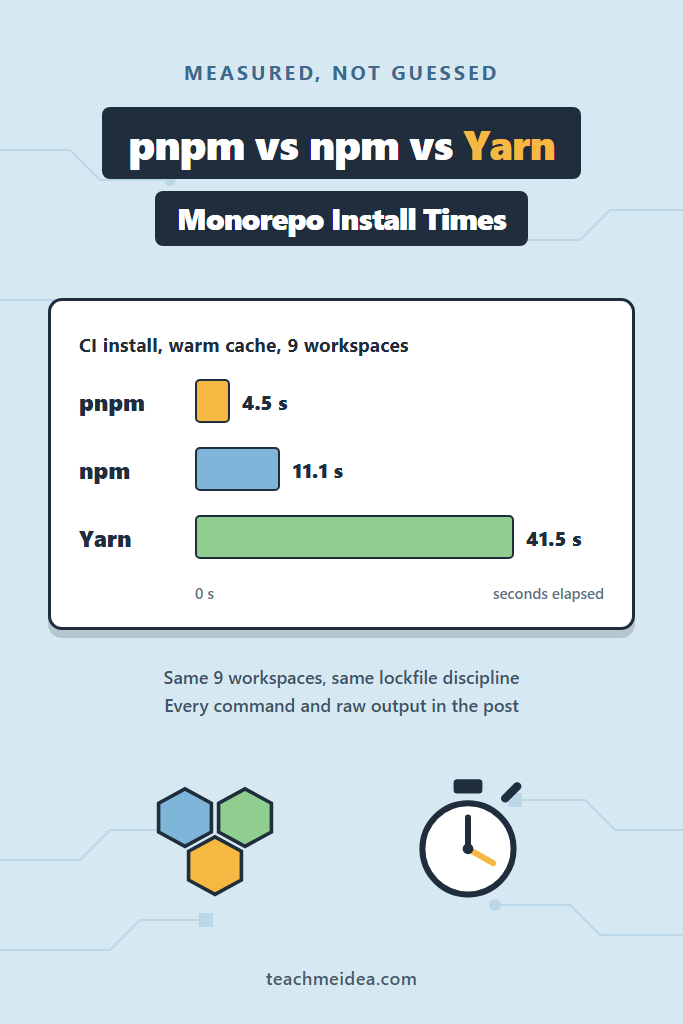
Every pnpm vs npm vs Yarn thread ends the same way: someone claims pnpm is three times faster, someone else says it depends, and nobody re-runs anything. This post builds one nine-workspace monorepo, installs it under five package manager configurations across four cache states, and pastes the commands and raw output for all of it. Two results contradict the usual advice. On a cold CI cache, npm finished in 12.9 seconds while pnpm needed 39.8 seconds, so pnpm’s reputation for speed only survives once its store is warm. Meanwhile the biggest number in the sweep was not a time at all: pnpm’s node_modules consumed 7.9 MB of actual disk where npm’s consumed 384.8 MB.
How These pnpm vs npm vs Yarn Numbers Were Produced
A benchmark is worth exactly what its method survives, so this one is narrow on purpose. One set of manifests, copied into five sibling directories, each given only the config its tool requires. Nothing was tuned to favour anything.
Here is the environment every number below came from:
Measured 2026-09-07
Windows 11 Pro 25H2 (build 26200), AMD Ryzen 5 8600G (6C/12T), 15.2 GB RAM, NVMe SSD
Node 24.20.0 (portable zip, no version manager on PATH)
npm 11.19.0 (the version bundled with Node 24.20.0)
npm 12.0.2 (installed separately)
pnpm 12.3.4 (via Corepack)
Yarn 4.18.0 (via Corepack), measured twice: node-modules linker and PnP
Windows Defender real-time protection: on
Cold scenarios report the median of three runs; warm scenarios report the median of five, after one discarded warm-up run. Every individual run time appears in the tables, because a single timing is an anecdote rather than a result. The stopwatch wraps process creation to process exit, so these are wall-clock seconds a developer actually waits through, not the internal figure each tool prints about itself.
Critically, each tool got its own isolated cache directory, and those directories were deleted between cold runs. That detail matters more than it sounds, and the first version of this benchmark got it wrong. Both pnpm and Yarn keep a second cache outside the one you configure: Yarn maintains a global mirror at %LOCALAPPDATA%\Yarn and pnpm a metadata cache at %LOCALAPPDATA%\pnpm-cache. Clearing only the configured folder leaves those intact, which made Yarn’s “cold” install look like a 6-second miracle. The numbers below clear both.
The Monorepo All Five Configurations Installed
This benchmark runs on a deliberately ordinary product monorepo: three apps, five shared packages, and a root that holds the toolchain. It is dull by design, because a benchmark built on an unusual dependency set measures the dependency set.
acme-monorepo/
  apps/web        React 19, React Router, TanStack Query, Zustand, Vite, Tailwind
  apps/admin      React 19, React Hook Form, TanStack Table, Recharts, date-fns
  apps/api        Express 5, Pino, Zod, BullMQ, ioredis, jsonwebtoken, tsx
  packages/ui     Radix UI primitives, CVA, clsx, lucide-react
  packages/db     Drizzle ORM, pg, postgres
  packages/utils  date-fns, nanoid, remeda, ts-pattern
  packages/config typescript-eslint, ESLint config
  packages/testing Testing Library, MSW, jsdom, happy-dom
The root manifest pins the shared toolchain and declares the workspaces:
{
  "name": "acme-monorepo",
  "private": true,
  "version": "1.0.0",
  "workspaces": ["apps/*", "packages/*"],
  "devDependencies": {
    "typescript": "5.9.3",
    "eslint": "9.39.0",
    "prettier": "3.6.2",
    "vitest": "3.2.4",
    "@types/node": "24.9.2",
    "rimraf": "6.0.1",
    "npm-run-all2": "8.0.4"
  }
}
Each tool counts what it installed differently, which is itself worth knowing. npm reports 658 packages, pnpm reports 640, and yarn.lock carries 775 resolution entries because Yarn records workspace entries and peer-dependency variants that the other two fold away. Consequently, cross-tool package counts are not a like-for-like metric, and only the disk and time figures below are.
The Four Cache States That Decide Your CI Bill
Install benchmarks usually report one number, which hides the only thing that matters: how much of the work was already cached. These four states cover what actually happens to a team.
| Scenario | Lockfile | Cache | node_modules | Real-world equivalent |
|---|---|---|---|---|
| Cold | absent | empty | absent | First clone, first install, no cache anywhere |
| Uncached CI | present | empty | absent | A CI job with no cache restore step configured |
| Cached CI | present | warm | absent | A CI job that restores its cache correctly |
| No-op | present | warm | present | Your laptop after a branch switch |
The commands differ per tool, and the frozen variants are the ones CI should use, because each of them fails loudly rather than silently rewriting the lockfile:
# npm
npm install --no-audit --no-fund   # cold, resolves and writes the lockfile
npm ci --no-audit --no-fund        # frozen, refuses to update package-lock.json

# pnpm
pnpm install                       # cold
pnpm install --frozen-lockfile     # frozen

# Yarn 4
yarn install --no-immutable        # cold, allowed to create yarn.lock
yarn install --immutable           # frozen, the default when CI=true is set
Install Times Compared
Every figure is milliseconds, and lower is better. The bold value in each column is the winner for that cache state.
| Configuration | Cold | Uncached CI | Cached CI | No-op |
|---|---|---|---|---|
| npm 11.19.0 | 64,305 | 12,903 | 11,105 | 1,539 |
| npm 12.0.2 | 62,333 | 13,432 | 11,158 | 1,096 |
| pnpm 12.3.4 | 50,556 | 39,849 | 4,529 | 133 |
| Yarn 4.18.0 node-modules | 60,442 | 52,735 | 41,547 | 872 |
| Yarn 4.18.0 PnP | 20,705 | 12,019 | 1,805 | 743 |
No configuration wins every column, which is why the “pnpm is faster” shorthand keeps producing arguments. Notably, the ranking inverts between the second and third columns.
Cold Install With Nothing Cached
Here are the individual runs, in the order they executed:
| Configuration | Run 1 | Run 2 | Run 3 | Median |
|---|---|---|---|---|
| npm 11.19.0 | 64,305 | 60,089 | 68,021 | 64,305 |
| npm 12.0.2 | 68,756 | 62,333 | 59,828 | 62,333 |
| pnpm 12.3.4 | 49,698 | 50,740 | 50,556 | 50,556 |
| Yarn 4 node-modules | 64,117 | 60,442 | 59,642 | 60,442 |
| Yarn 4 PnP | 21,191 | 20,705 | 20,433 | 20,705 |
Yarn PnP finishes this scenario in under half the time of the next fastest configuration, and in a third of npm’s. However, that is not a fair fight so much as a different job: PnP never builds a node_modules tree at all. It writes a .pnp.cjs resolution map and leaves dependencies sitting in the cache as zip archives, which is why it skips the step that dominates every other row.
The CI Install Nobody Configured a Cache For
This is the state any pipeline lands in when it has no cache restore step, or when the cache key misses after a lockfile change.
| Configuration | Run 1 | Run 2 | Run 3 | Median |
|---|---|---|---|---|
| npm 11.19.0 | 18,085 | 12,865 | 12,903 | 12,903 |
| npm 12.0.2 | 19,071 | 13,249 | 13,432 | 13,432 |
| pnpm 12.3.4 | 46,686 | 38,898 | 39,849 | 39,849 |
| Yarn 4 node-modules | 52,571 | 57,175 | 52,735 | 52,735 |
| Yarn 4 PnP | 17,638 | 11,980 | 12,019 | 12,019 |
Here is the result that contradicts the folklore. With no cache to restore, npm is roughly three times faster than pnpm and four times faster than Yarn’s node-modules linker. The reason is measurable rather than mysterious: npm’s populated cache holds 58.6 MB of compressed tarballs, while pnpm’s store holds 290.5 MB of unpacked content-addressed files and Yarn’s cache holds 346.4 MB of zips. Therefore a cold cache costs npm the least network and the least disk writing, and it wins the scenario outright.
The CI Install With a Warm Cache
Restore the cache, and the ordering flips.
| Configuration | Run 1 | Run 2 | Run 3 | Run 4 | Run 5 | Median |
|---|---|---|---|---|---|---|
| npm 11.19.0 | 11,099 | 11,209 | 11,105 | 11,105 | 11,204 | 11,105 |
| npm 12.0.2 | 11,158 | 11,816 | 14,414 | 11,091 | 11,143 | 11,158 |
| pnpm 12.3.4 | 4,529 | 4,558 | 4,188 | 4,499 | 4,727 | 4,529 |
| Yarn 4 node-modules | 41,547 | 41,894 | 41,536 | 41,554 | 41,509 | 41,547 |
| Yarn 4 PnP | 1,803 | 1,818 | 1,805 | 1,839 | 1,798 | 1,805 |
Now pnpm is 2.5 times faster than npm, which is where the reputation comes from. Here is that pnpm run, unedited:
Scope: all 9 workspace projects
✓ Lockfile passes supply-chain policies (verified 31m ago)
Lockfile is up to date, resolution step is skipped
Packages are hard linked from the content-addressable store to the virtual store.
  Content-addressable store is at: C:/tmib/cache/pnpmstore\v11
  Virtual store is at:             node_modules/.pnpm
Progress: resolved 640, reused 640, downloaded 0, added 640, done

Done in 4.8s using pnpm v12.3.4
And the equivalent npm run:
npm warn deprecated eslint@9.39.0: This version is no longer supported. Please see https://eslint.org/version-support for other options.

added 658 packages in 11s
Why Yarn’s node-modules Linker Loses by 37 Seconds
Yarn 4 with the node-modules linker took 41.5 seconds against pnpm’s 4.5 on identical inputs, which is a large enough gap to suspect the benchmark rather than the tool. Fortunately Yarn reports its own phase breakdown, and it identifies the culprit without ambiguity:
➤ YN0000: ┌ Resolution step
➤ YN0000: └ Completed
➤ YN0000: ┌ Fetch step
➤ YN0000: └ Completed in 0s 358ms
➤ YN0000: ┌ Link step
➤ YN0000: └ Completed in 40s 38ms
➤ YN0000: · Done with warnings in 40s 521ms
Fetching took 358 milliseconds because the cache was warm. Linking took 40 seconds. In other words, none of this is network time; it is the cost of writing 43,045 real files onto NTFS with Defender inspecting them. pnpm writes a comparable tree in 4.5 seconds because it creates hard links to files that already exist in its store instead of copying bytes. That single architectural difference explains the entire gap, and it also explains why this result is the most Windows-specific number in the post.
The No-Op Install, Where npm ci Costs You 13 Seconds
Running the install command when nothing has changed should be nearly free. For three of these tools it is:
| Configuration | Command | Median (ms) |
|---|---|---|
| pnpm 12.3.4 | pnpm install --frozen-lockfile | 133 |
| Yarn 4 PnP | yarn install --immutable | 743 |
| Yarn 4 node-modules | yarn install --immutable | 872 |
| npm 12.0.2 | npm install | 1,096 |
| npm 11.19.0 | npm install | 1,539 |
| npm 12.0.2 | npm ci | 13,621 |
| npm 11.19.0 | npm ci | 13,563 |
The last two rows are the trap. npm ci deletes node_modules before every run by design, so it can never short-circuit. Point it at a tree that is already correct and it rebuilds all 658 packages anyway:
added 658 packages in 13s
Meanwhile npm install on the same directory recognises there is nothing to do:
up to date in 948ms
Consequently, a Makefile or package.json script that calls npm ci as a safety net before every local task is quietly charging developers 13 seconds each time. In CI that behaviour is correct and desirable, since reproducibility is the whole point. On a laptop it is waste, and pnpm’s 133 milliseconds shows how cheap the check can be.
Disk Footprint: The 7.9 MB Result
Summing file sizes across node_modules is the standard way to report install footprint, and it is misleading for any tool that hard-links. So this table reports both: the logical byte sum, and the actual free space consumed on the C: volume, measured before and after materialising the tree from an already-warm cache.
| Configuration | Files | Logical size | Real disk consumed | Lockfile |
|---|---|---|---|---|
| npm 11.19.0 | 37,541 | 288.5 MB | 384.8 MB | 344.4 KB |
| npm 12.0.2 | 37,541 | 288.5 MB | 377.6 MB | 344.4 KB |
| pnpm 12.3.4 | 40,173 | 289.6 MB | 7.9 MB | 230.3 KB |
| Yarn 4 node-modules | 43,045 | 339.4 MB | 410.4 MB | 274.4 KB |
| Yarn 4 PnP | 205 | 46.7 MB | 46.1 MB | 274.4 KB |
Two things stand out. First, pnpm’s tree costs 7.9 MB of real disk because almost every file in it is a hard link into the store, exactly as its output claims. On a laptop carrying eight checkouts of the same monorepo, that is the difference between 3 GB and roughly 60 MB plus one shared store. Second, npm’s real cost exceeds its logical size by 96 MB, because 37,541 mostly-tiny files each round up to a 4 KB NTFS cluster. Reporting only the logical sum understates npm and Yarn while wildly overstating pnpm.
The caches themselves are not free either, and Yarn’s arrangement deserves a warning:
| Cache | Size |
|---|---|
| npm 11 cache | 58.6 MB |
| pnpm store | 290.5 MB |
| pnpm metadata cache | 51.1 MB |
| Yarn project cache | 346.4 MB |
| Yarn global mirror | 346.4 MB |
Yarn keeps the same 346.4 MB twice, once in the project cache and once in the global mirror, for a single dependency set. That is 693 MB to support one monorepo.
Every Tool Needed Different Configuration
The manifests were identical across all five directories. Everything around them differed, and three of those differences will bite anyone migrating.
Workspaces are declared in two incompatible places. npm and Yarn read the workspaces array in package.json, whereas pnpm ignores it and requires pnpm-workspace.yaml. Furthermore, pnpm 12.3.4 does not link workspace packages by version match unless you ask it to, so internal dependencies pinned as "@acme/ui": "1.0.0" are looked up in the registry instead. The install fails with ERR_PNPM_FETCH_404 and a complaint that @acme/ui is not in the npm registry, until you set linkWorkspacePackages or switch those ranges to the workspace:* protocol.
# pnpm-workspace.yaml
packages:
  - "apps/*"
  - "packages/*"
linkWorkspacePackages: true
allowBuilds:
  esbuild: true
  msgpackr-extract: true
  msw: true
Build script approval is now mandatory, and each tool spells it differently. This dependency set contains four packages with install scripts, and pnpm 12 does not merely warn about them. It fails the install outright:
Error: ERR_PNPM_IGNORED_BUILDS
  × installing dependencies
  ╰─▶ Ignored build scripts: esbuild@0.18.20, esbuild@0.25.12, msgpackr-
      extract@3.0.4, msw@2.11.5
  help: Run "pnpm approve-builds" to pick which dependencies should be allowed
        to run scripts.
Note also that the setting older guides name no longer works. Putting onlyBuiltDependencies under a pnpm key in package.json earns an explicit warning that “the pnpm field in package.json is no longer read by pnpm”, and moving that same key into pnpm-workspace.yaml is ignored without any warning at all. The key pnpm 12.3.4 actually honours is allowBuilds. npm 11 has its own version of the same gate, stored as an allowScripts object in package.json and managed with npm install-scripts approve <pkg>. Yarn 4, by contrast, still runs build scripts without asking. All five configurations here were set to run the same four scripts, so the timings compare equal work.
Finally, Yarn 4 treats CI=true as an instruction to run immutably. A cold install in CI therefore fails outright rather than creating the lockfile it needs:
➤ YN0028: · The lockfile would have been created by this install, which is explicitly forbidden.
Is pnpm Actually Faster Than npm?
Yes, but only once its store is warm, and the margin depends entirely on which cache state your pipeline is in. With a warm cache pnpm installed this monorepo in 4.5 seconds against npm’s 11.1, a 2.5x win. On an empty cache pnpm took 39.8 seconds against npm’s 12.9, a 3x loss. For no-op installs pnpm is not merely faster but a different order of magnitude, at 133 milliseconds against 1,539.
Therefore the honest answer to “should we switch to pnpm for speed” is a question back: does your CI restore its package manager cache? If it does not, switching to pnpm will make your pipeline slower until you fix that first, and fixing it is the cheaper change.
What These Numbers Cost a Real Team
Consider a mid-sized product team of six engineers on this kind of monorepo, running roughly 40 CI jobs a day across pull requests and merges. The assumptions matter, so they are stated: 40 jobs, 20 working days a month, one install per job.
With a correctly restored cache, moving from npm’s 11.1 seconds to pnpm’s 4.5 saves 6.6 seconds per job, which is about 88 minutes of billed runner time a month. That is real but unglamorous. By contrast, a pipeline that never restores its cache pays npm’s 12.9 seconds instead of 11.1, losing only 1.8 seconds, while the same pipeline on pnpm pays 39.8 instead of 4.5 and loses 35.3 seconds per job, or roughly eight hours of runner time a month. The cache configuration is worth an order of magnitude more than the tool choice.
On developer laptops the arithmetic reverses in pnpm’s favour. Eight checkouts of this monorepo cost about 3.1 GB under npm and roughly 60 MB plus one shared 290 MB store under pnpm. For an engineer juggling several long-lived branches on a 256 GB machine, that difference is felt weekly, whereas six seconds of CI is not felt at all.
When to Use Each Package Manager
Choose pnpm when
- Your CI reliably restores a cache, which is where its 2.5x warm-cache advantage lives
- Developers keep several checkouts or worktrees of the same repo on one machine
- Disk pressure on laptops is a real complaint rather than a theoretical one
- Strict dependency isolation matters, since pnpm’s layout refuses undeclared imports by default
Stay on npm when
- The pipeline has no cache restore step and nobody is going to add one soon
- Team size is small enough that zero migration cost beats a few seconds per job
- Existing tooling assumes a hoisted
node_modulesand breaks under stricter layouts - Shipping with Node matters, because it removes the Corepack step from your Dockerfile
Reach for Yarn 4 with PnP when
- Install time genuinely dominates your pipeline and a compatibility audit is affordable
- Your dependency tree is modern enough that PnP resolution works without a long
packageExtensionslist - Nobody minds the experimental ESM loader warning Yarn prints on every install
When NOT to Use Each Package Manager
Skip pnpm when
- Your CI cache is unreliable or absent, because a cold pnpm install cost 39.8 seconds here against npm’s 12.9
- Dependencies with undeclared peers sit in your tree and only resolve under hoisting
- Nobody on the team will own
pnpm-workspace.yamland theallowBuildslist
Avoid npm when
- Developers routinely keep multiple checkouts and disk is scarce, given the 384.8 MB per tree
- Local scripts call
npm cidefensively, since that costs 13.6 seconds every time - Strict isolation from a non-hoisted layout is something the codebase actually needs
Rule out Yarn’s node-modules linker when
- Windows is the development platform, where the link step alone took 40 seconds of a 41.5 second install
- Disk budget matters, because it produced the largest tree at 410.4 MB and duplicates its cache
- Speed is the whole reason for adopting Yarn, since PnP is where Yarn’s speed actually is
Common Mistakes with Monorepo Installs
- Quoting one install time without saying which cache state produced it, when the same tools reorder completely between states
- Benchmarking a “cold” install without clearing the tool’s second cache, which is how Yarn appeared to install this repo in 6 seconds
- Summing
node_modulesfile sizes and calling it disk usage, which overstates pnpm by a factor of 37 - Running
npm ciin local scripts as a safety net, paying a full rebuild for a checknpm installdoes in under a second - Migrating to pnpm for CI speed before checking whether the pipeline restores a cache at all
- Copying an older
onlyBuiltDependenciessnippet into pnpm 12, where it is ignored in favour ofallowBuilds - Comparing package counts across tools as if 658, 640 and 775 measured the same thing
What This Benchmark Does Not Measure
Naming the gaps matters more than the numbers, because an unstated limitation turns a measurement into a trap.
This is one machine, one operating system and one dependency set. The Yarn link-step result in particular is a Windows and NTFS finding, and the gap would narrow substantially on Linux, where most CI actually runs. Network conditions were not held constant across the hours the sweep took, which affects the cold-cache rows more than any other. Nothing here measures resolution correctness, lockfile churn in a rebase-heavy repo, pnpm dedupe and its equivalents, monorepo task runners layered on top, or the audit and provenance work each tool can do. Yarn Classic 1.x was excluded entirely as an end-of-life release, so teams still on it should not read these Yarn 4 numbers as their own. Finally, npm 12.0.2 is measured alongside the npm 11.19.0 that ships with Node 24 LTS, and all five tools ship often enough that this ranking can move within a quarter.
For neighbouring ground this site already covers, monorepo tooling with Nx or Turborepo attacks the same wall-clock problem from the task-caching side, and monorepo management with Git strategies and tools covers the repository layout these workspaces assume. The Bun vs Node vs Deno measurements use the same harness and machine on the runtime question. Since cache configuration turned out to matter more than tool choice, CI/CD for Node.js projects with GitHub Actions is where that step belongs, while the build-script approvals discussed above are one piece of securing CI/CD pipelines against supply chain attacks. Readers facing the same decision in another ecosystem can compare Python dependency management with pip, Poetry and uv.
Conclusion
The pnpm vs npm vs Yarn question has no single winner, because each tool wins a different cache state. pnpm takes the warm-cache install at 4.5 seconds and the no-op at 133 milliseconds, npm takes the uncached CI install at 12.9 seconds, and Yarn’s node-modules linker loses every column on Windows while its PnP mode wins the cold install outright at 20.7 seconds.
The finding worth acting on is cheaper than any migration. Before switching package managers for speed, open your CI config and confirm there is a cache restore step keyed on your lockfile. If there is not, adding it is worth more than every second of difference measured here, and switching to pnpm without it will make your pipeline three times slower. Once that step exists, run pnpm install --frozen-lockfile against your own repo and compare it to npm ci on the same runner, because the only numbers that decide your migration are the ones from your dependency tree, not this one.