This post is for Flutter developers and tech leads who are setting up a new project, or staring at a lib/ folder that has grown past comfort. Every Flutter folder structure guide makes the same argument: feature first scales, layer first does not. However, nobody has checked what real apps actually do. So this post counts it. It reads the full lib/ tree of 100 active open source Flutter apps, classifies each one by a published rule, and splits the result by app size. As a result, you get a number to weigh against the advice, plus the layout most teams quietly land on, and a clear signal for when a switch is worth the churn.
The numbers in this post came from this environment:
Measured 2026-11-17
Windows 11 Pro 25H2 (build 26200), AMD Ryzen 5 8600G (6C/12T), 16 GB RAM
Git 2.48.1 (Git for Windows), GNU bash 5.2.37, GNU Awk 5.0.0
Every repo read at the default-branch HEAD SHA recorded on 2026-11-16
Stars as read from the GitHub search API on 2026-11-16
These are counts of folders and files, not timings. Therefore the Windows machine does not change them, and there is no run-to-run spread to report. Each tree was read once, at a pinned commit, so anyone can re-run the script and get the same rows.
Flutter Folder Structure in 100 Real Apps: The Short Answer
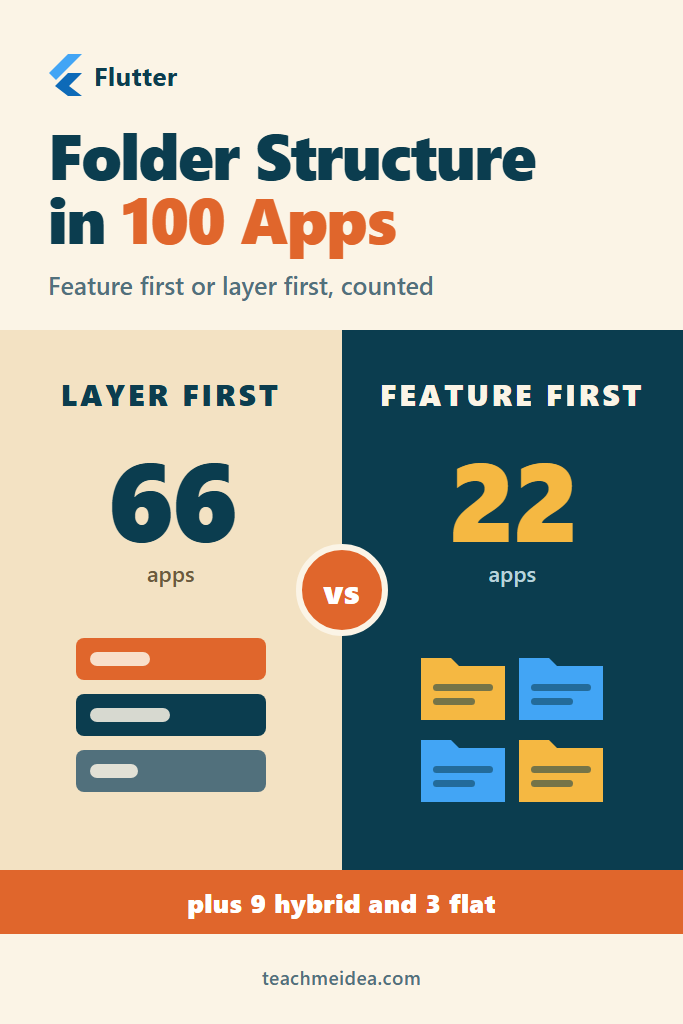
Of 100 active open source Flutter apps, 66 organize lib/ by layer, 22 by feature, 9 mix both, and 3 are flat. However, feature first grows with size: 3 of 24 apps under 50 Dart files use it, against 11 of 33 apps above 150. Meanwhile, 36 of the 66 layer-first apps split their UI folder by feature.
Layout at the top of lib/ | Apps | What it looks like |
|---|---|---|
| Layer first, by type | 59 | models/, screens/, widgets/, services/ |
| Layer first, Clean layers | 7 | data/, domain/, presentation/ |
Feature first, features/ folder | 12 | features/auth/, features/player/ |
| Feature first, named folders | 10 | account/, order/, shop/ directly in lib/ |
| Hybrid | 9 | features/ next to a large data/ or widgets/ |
| Flat | 3 | Nearly every file directly in lib/ |
In other words, the layout that every guide warns against is still the default in two thirds of real apps. That does not make the guides wrong. Instead, it shows that most apps never reach the size where the warning bites, and the size split below shows where that line sits.
The 100 Apps Behind the Count
This survey reuses the corpus from the Flutter state management 2026 survey, so the two posts describe the same apps. In short, that corpus started from the 1,000 most-starred repos in GitHub’s flutter-app topic. Then it dropped forks, archived repos and example collections, and kept apps whose default branch had a commit in the 12 months before 2026-11-16. Finally, it took the 100 most-starred of the 177 that remained.
One change was needed. Between 2026-11-16 and 2026-11-17, abduznik/Freegosy was deleted or made private, and git fetch returned “Repository not found”. So its slot went to the next app in star order, Kaiji-Z/workout-timer (25 stars). Two apps tied at 25 stars, and the one listed first in the saved scan was taken.
Each app has one “main app directory”, the folder holding pubspec.yaml and lib/main.dart. For most repos that is the root. For monorepos, it is a subfolder such as mobile/, recorded during the original scan.
Reading 100 File Trees Without Downloading Any Files
A folder layout lives entirely in Git’s tree objects, so file contents are not needed at all. A blobless fetch downloads commits and trees but no blobs. Then git ls-tree lists every path at the pinned commit. As a result, the whole survey downloads a few megabytes instead of every image and font in 100 apps.
#!/usr/bin/env bash
# List every Dart file under one app's lib/ folder at a pinned commit.
# Usage: ./tree.sh owner/repo <commit-sha> [app-dir/]
# Writes trees/owner__repo.txt with paths relative to lib/.
set -uo pipefail

repo="$1"; sha="$2"; app="${3:-}"
dir="repos/${repo//\//__}"
out="trees/${repo//\//__}.txt"
mkdir -p repos trees

if [ ! -d "$dir" ]; then
  git init -q "$dir"
  git -C "$dir" remote add origin "https://github.com/$repo.git"
fi

# Commits and trees only; no file contents are downloaded.
if ! git -C "$dir" fetch -q --depth 1 --filter=blob:none origin "$sha"; then
  echo "FAIL $repo" >&2
  exit 1
fi

git -C "$dir" ls-tree -r --name-only "$sha" -- "${app}lib/" \
  | grep '\.dart$' \
  | sed "s#^${app}lib/##" > "$out"
echo "$repo $(wc -l < "$out")"
Notably, fetching a commit by SHA works on GitHub because it allows any reachable commit to be requested directly. The --filter=blob:none flag is documented in Git’s partial clone reference. In practice, the 100 fetches ran eight at a time through xargs -P 8, and 99 succeeded on the first try. The one failure was Freegosy, described above.
How Each Flutter Folder Structure Was Classified
Classification rules are arguable, so the rule here is spelled out in full, and the raw per-app numbers are in the table at the end. First, generated files (.g.dart, .freezed.dart, .gr.dart, .mocks.dart, .config.dart) are dropped, because code generation would otherwise inflate whichever folder holds models. Then every top-level folder under lib/ gets one of four kinds:
- Feature container:
features/,feature/,modules/ormodule/. - Layer folder: a name that describes a kind of code, such as
models/,screens/,widgets/,services/,providers/,blocs/,data/,domain/,presentation/orui/. - Shared folder: cross-cutting code such as
core/,common/,utils/,theme/,l10n/,routes/orgenerated/. These do not vote. - Named folder: anything else. In practice these are feature names, such as
account/,podcasts/orsettings/.
Next, each app is scored by files, not by folder count. Files in feature containers and named folders vote “feature”. Files in layer folders vote “layer”. If the smaller side holds at least a third of the voting files, the app is hybrid. Otherwise, the larger side wins.
Two more rules handle edge cases. If lib/app/ or lib/src/ holds at least a quarter of the code, the script looks one level inside it instead, because those folders wrap the real layout. In addition, an app with fewer than two folders, or with half its files directly in lib/, counts as flat. Finally, if fewer than a quarter of files vote at all, the app is marked unclear rather than forced into a class. In this sample, no app hit the unclear rule.
The Classifier Script
The whole rule fits in one awk script. It reads the path list from tree.sh and prints one tab-separated row per app:
# classify.awk: reads Dart paths relative to lib/, one per line, prints one TSV row.
# Usage: awk -v repo=owner/name -f classify.awk paths.txt
function kind(name,   k) {
  k = tolower(name)
  if (k in FEAT) return "feature_dir"
  if (k in LAYER) return "layer"
  if (k in SHARED) return "shared"
  return "named"
}
BEGIN {
  OFS = "\t"
  n = split("features feature modules module", a, " "); for (i = 1; i <= n; i++) FEAT[a[i]] = 1
  n = split("model models entity entities view views screen screens page pages widget widgets " \
    "component components service services provider providers controller controllers " \
    "repository repositories bloc blocs cubit cubits viewmodel viewmodels view_model view_models " \
    "state states notifier notifiers store stores data domain presentation application ui api " \
    "database db dao dto data_sources datasources dialogs logic interface layout infrastructure " \
    "data_models state_notifier bindings coordinators backend", a, " "); for (i = 1; i <= n; i++) LAYER[a[i]] = 1
  n = split("core common shared utils util utilities helpers helper tools tool constants config " \
    "configs configure theme themes style styles resources resource res l10n i18n lang " \
    "localization translation gen generated routes route router routers routing navigation " \
    "extensions extension enum enums mixins di network net http_client http_util logger base " \
    "base_class foundation env environments variables assets static design _classes _configs " \
    "_ext _mixins strings packages exceptions validators shared_pref initializer generic_lib boot", a, " "); for (i = 1; i <= n; i++) SHARED[a[i]] = 1
  n = split("data domain presentation application ui widgets widget screens screen pages page " \
    "views view providers provider controllers controller models model repositories repository " \
    "services service bloc blocs cubit cubits logic state notifiers", a, " "); for (i = 1; i <= n; i++) INNER[a[i]] = 1
  n = split("screens screen pages page views view ui presentation", a, " "); for (i = 1; i <= n; i++) UI[a[i]] = 1
}
/\.(g|freezed|gr|mocks|config)\.dart$/ { next }
{ path[++total] = $0 }
END {
  # 1. Unwrap lib/app/ or lib/src/ when it holds at least a quarter of the code.
  for (i = 1; i <= total; i++) { n = split(path[i], p, "/"); if (n > 1) top[tolower(p[1])]++ }
  wrap = ""
  if (top["src"] >= total / 4) wrap = "src"
  if (top["app"] >= total / 4 && top["app"] > top["src"]) wrap = "app"
  for (i = 1; i <= total; i++) {
    s = path[i]
    if (wrap != "" && tolower(substr(s, 1, length(wrap) + 1)) == wrap "/") s = substr(s, length(wrap) + 2)
    n = split(s, p, "/")
    if (n - 1 > maxdepth) maxdepth = n - 1
    if (n == 1) { root++; continue }
    dirs[p[1]]++
    k = kind(p[1])
    if (k == "feature_dir") { fd++; if (n > 2) { feat[p[2]]++; if (n > 3 && tolower(p[3]) in INNER) inner[p[2] SUBSEP tolower(p[3])] = 1 } }
    else if (k == "named") named++
    else if (k == "layer") { layer++; if (tolower(p[1]) in UI && n > 2) uisub[p[1] SUBSEP p[2]]++
      if (tolower(p[1]) == "data" || tolower(p[1]) == "domain" || tolower(p[1]) == "presentation") clean++ }
    else shared++
  }
  ndirs = 0; for (d in dirs) ndirs++
  fv = fd + named; lv = layer; v = fv + lv
  # 2. Class.
  if (ndirs < 2 || root >= total / 2) cls = "flat"
  else if (v < total / 4) cls = "unclear"
  else {
    m = (fv < lv ? fv : lv) / v
    if (m >= 1 / 3) cls = "hybrid"
    else if (fv > lv) cls = (fd >= named ? "feature-first (features/ dir)" : "feature-first (named folders)")
    else cls = (clean >= lv / 2 ? "layer-first (data/domain/presentation)" : "layer-first (models/screens/services)")
  }
  # 3. Inside: features with a layered inner split; UI layer folders grouped by feature.
  nf = 0; nlayered = 0
  for (f in feat) { nf++; c = 0; for (key in inner) { split(key, q, SUBSEP); if (q[1] == f) c++ } if (c >= 2) nlayered++ }
  nui = 0; for (key in uisub) if (uisub[key] >= 2) nui++
  print repo, total, wrap == "" ? "-" : wrap, root + 0, fd + 0, named + 0, layer + 0, shared + 0, cls, nf, nlayered, nui, maxdepth + 0
}
Specifically, the output columns are: repo, Dart files, unwrapped folder, files in lib/ itself, files in a feature container, files in named folders, files in layer folders, files in shared folders, class, feature count, features with two or more layer subfolders inside, UI subfolders holding at least two files, and the deepest folder level. A UI subfolder is a folder such as screens/home/ inside a UI layer folder.
Five Rows of Raw Output
Here are five apps that cover every class, straight from the script, with the stars and commit columns left out and tabs aligned for width:
simplezhli/flutter_deer  190  -  1  0    125  28   36  feature-first (named folders)           0   0   0   3
Livinglist/Hacki         283  -  1  0    0    235  47  layer-first (models/screens/services)   0   0   6   4
axel10/vynody            483  -  2  0    160  270  51  hybrid                                  0   0   3   3
solguruz/skelter         517  -  3  0    0    462  52  layer-first (data/domain/presentation)  0   0   32  5
GlowLED/BuSic            189  -  2  149  0    0    38  feature-first (features/ dir)           11  10  0   4
For example, flutter_deer has no features/ folder, yet 125 of its 190 files sit in folders named account/, goods/, order/ and shop/. That is feature first in every way except the folder name. By contrast, skelter puts 462 files under layer folders, but its presentation/ folder alone holds 32 feature subfolders such as chat/ and checkout/.
What the Classifier Found
The summary script reads the per-app table and prints the totals:
#!/usr/bin/env bash
# Summarise classes.tsv (one row per app, written by classify.awk).
t=classes.tsv
echo "## Classes"
awk -F'\t' 'NR>1{c[$11]++}END{for(k in c) printf "%3d  %s\n", c[k], k}' "$t" | sort -rn
echo "## By size (Dart files under lib/, generated files excluded)"
awk -F'\t' 'NR>1{n=$4; b=(n<50?"a <50":(n<150?"b 50-149":"c 150+")); c=$11; sub(/ \(.*/,"",c); t[b]++; x[b SUBSEP c]++}
  END{for(b in t){printf "%-9s n=%-3d", substr(b,3), t[b]; split("feature-first layer-first hybrid flat",o," "); for(i=1;i<=4;i++) printf "  %s=%d", o[i], x[b SUBSEP o[i]]; print ""}}' "$t" | sort
echo "## Feature folders (apps with a features/ or modules/ dir)"
awk -F'\t' 'NR>1 && $12>0{a++; f+=$12; l+=$13}END{printf "apps=%d features=%d layered_inside=%d\n", a, f, l}' "$t"
echo "## Layer-first apps whose UI folder is split by feature (3+ subfolders)"
awk -F'\t' 'NR>1 && $11~/^layer/{n++; if($14>=3) g++}END{printf "%d of %d\n", g, n}' "$t"
## Classes
 59  layer-first (models/screens/services)
 12  feature-first (features/ dir)
 10  feature-first (named folders)
  9  hybrid
  7  layer-first (data/domain/presentation)
  3  flat
## By size (Dart files under lib/, generated files excluded)
150+      n=33   feature-first=11  layer-first=20  hybrid=2  flat=0
50-149    n=43   feature-first=8  layer-first=31  hybrid=4  flat=0
<50       n=24   feature-first=3  layer-first=15  hybrid=3  flat=3
## Feature folders (apps with a features/ or modules/ dir)
apps=17 features=159 layered_inside=114
## Layer-first apps whose UI folder is split by feature (3+ subfolders)
36 of 66
Layer First Is Still the Default
Layer first won 66 of 100 apps. Moreover, the plain “by type” variant, with models/, screens/, widgets/ and services/, accounts for 59 of them on its own. Only 7 apps use Clean Architecture’s data/, domain/ and presentation/ at the top level. So despite how often Clean Architecture appears in tutorials, the three-layer split is rare as a top-level layout.
Feature First Grows With App Size
Here is the split that matters most. Feature first covers 3 of 24 apps under 50 Dart files, which is 12.5%. Then it rises to 8 of 43 apps between 50 and 149 files, which is 18.6%. Finally, it reaches 11 of 33 apps at 150 files or more, which is 33.3%. In short, the bigger the app, the more likely its authors reorganized by feature. Even so, layer first still holds 20 of the 33 largest apps, so size alone does not force the switch.
Feature Folders Usually Have Layers Inside
Seventeen apps have a features/ or modules/ folder with feature subfolders, 159 features in total. Of those, 114 features, or 71.7%, split into two or more layer subfolders such as presentation/ and providers/. In other words, feature first in practice means “layers inside each feature”, not “everything for a feature in one folder”.
However, the full Clean Architecture triple is rare even here. Only 21 of the 159 features hold all of data/, domain/ and presentation/, and they all come from four apps:
# Count features holding all three Clean Architecture layers.
awk -F'\t' 'NR>1 && $12>0' classes.tsv | cut -f1 | while read -r r; do
  sed -E 's#^(app|src)/##' "trees/${r//\//__}.txt" \
    | grep -vE '\.(g|freezed|gr|mocks|config)\.dart$' \
    | awk -F/ 'tolower($1) ~ /^(features?|modules?)$/ && NF > 3 { print $2 "|" tolower($3) }' \
    | sort -u \
    | awk -F'|' '{ s[$1] = s[$1] " " $2 " " }
        END { for (k in s) if (s[k] ~ / data / && s[k] ~ / domain / && s[k] ~ / presentation /) n++; print n + 0 }' \
    | sed "s#^#$r #"
done | awk '$2 > 0 { print; t += $2 } END { print "total", t }'
roshancodespace/ShonenX 5
Sameera-Perera/Flutter-TDD-Clean-Architecture-E-Commerce-App 6
minimo-pro/minimo_video 1
GlowLED/BuSic 9
total 21
The most common inner folder is presentation/, followed by widgets/ and providers/. Accordingly, most feature-first apps keep a light split, a UI layer plus a state layer, and skip the domain layer. That matches the cost measured in when Clean Architecture in Flutter costs more than it saves.
Most Layer-First Apps Group Screens by Feature
This is the finding the feature-first versus layer-first debate misses. Of the 66 layer-first apps, 36 split their UI folder into three or more feature subfolders, such as screens/home/ and screens/settings/. Their data code, meanwhile, stays grouped by type in models/ and services/.
That is almost exactly the layout Flutter’s own architecture case study recommends. The guide states that “the data folder organizes code by type, because repositories and services can be used across different features and by multiple view models”, while “the ui folder organizes the code by feature”. Put together, 22 feature-first apps, 9 hybrids and 36 layer-first apps with feature-split UI folders make 67 of 100 apps that group code by feature somewhere. Only the top level differs.
Is Feature First Better Than Layer First in Flutter?
Feature first is better once an app has several independent features and more than one person changing them, because related files sit together and a feature can be deleted in one move. For small apps, however, layer first is simpler and works fine. The data agrees: feature first triples in share from small apps to large ones.
The strongest case for feature first comes from Andrea Bizzotto’s Flutter project structure article, which calls feature first “often a better choice when building medium/large apps”. Notably, the same article warns against deriving features from screens, and defines a feature as something the user does. The sample shows why that warning exists. Several named-folder apps, such as Best-Flutter-UI-Templates, group code by demo screen rather than by user task. The earlier guide to feature-first folder structure in Flutter and React Native covers the mechanics of doing it properly.
Does the State Library Predict the Folder Structure?
Partly. Riverpod apps choose feature first most often, in 8 of 24, while GetX apps almost never do, in 1 of 10. This cross-tab uses each app’s main state library from the sibling survey’s import counts:
awk -F'\t' '
  NR == FNR { if (FNR > 1) { m = "None"; b = 0; split("Riverpod Bloc Provider GetX MobX Redux Signals", h, " ")
      for (i = 4; i <= 10; i++) if ($i > b) { b = $i; m = h[i - 3] }; lib[$1] = m }; next }
  FNR > 1 { c = $11; sub(/ \(.*/, "", c); t[lib[$1]]++; if (c == "feature-first") f[lib[$1]]++ }
  END { for (l in t) printf "%-9s apps=%-3d feature-first=%d\n", l, t[l], f[l] }' imports.tsv classes.tsv
Provider  apps=32  feature-first=6
Riverpod  apps=24  feature-first=8
None      apps=23  feature-first=5
Bloc      apps=11  feature-first=2
GetX      apps=10  feature-first=1
Here imports.tsv is data/flutter-apps-imports-2026-11-16.tsv from the sibling post. Its counts differ by one from that post’s table, because Freegosy (Riverpod) left the sample and workout-timer (Provider) joined it. Admittedly, groups of 10 or 11 apps are too small to support strong claims. Still, the Riverpod lean fits the library’s documentation and community, which lean on feature folders. For the libraries themselves, see Provider vs Riverpod vs Bloc.
How Sensitive Is the Result to the Rules?
The hybrid cut-off is the most arguable rule, so the script ran three times with different values. Each run replaces the one-third threshold in classify.awk:
for t in 0.25 0.3333 0.5001; do
  sed "s#if (m >= 1 / 3)#if (m >= $t)#" classify.awk > cl_t.awk
  printf 'hybrid cut %s: ' "$t"
  cut -f1 final.tsv | while read -r repo; do
    awk -v repo="$repo" -f cl_t.awk "trees/${repo//\//__}.txt"
  done | awk -F'\t' '{c=$9; sub(/ \(.*/,"",c); x[c]++}
    END{printf "feature-first=%d layer-first=%d hybrid=%d flat=%d\n", x["feature-first"], x["layer-first"], x["hybrid"], x["flat"]}'
done
hybrid cut 0.25: feature-first=20 layer-first=64 hybrid=13 flat=3
hybrid cut 0.3333: feature-first=22 layer-first=66 hybrid=9 flat=3
hybrid cut 0.5001: feature-first=26 layer-first=71 hybrid=0 flat=3
As a result, layer first lands between 64 and 71 apps under every cut-off, and feature first between 20 and 26. The headline holds: about two thirds layer first, about a fifth to a quarter feature first. Only the size of the hybrid bucket moves.
The Most Common Top-Level Folders
Folder names show the vocabulary teams actually use. This counts how many of the 100 apps have each name at the top of lib/, lowercased:
for f in trees/*.txt; do
  grep -vE '\.(g|freezed|gr|mocks|config)\.dart$' "$f" | awk -F/ 'NF>1{print tolower($1)}' | sort -u
done | sort | uniq -c | sort -rn | head -12
     33 core
     31 widgets
     29 utils
     29 models
     28 services
     24 l10n
     20 screens
     18 pages
     16 features
     16 data
     14 ui
     14 app
Notably, core/ is the single most common folder, ahead of widgets/. It shows up in feature-first apps as the home for shared code, and in layer-first apps as a catch-all. Also, screens/ and pages/ split the vote almost evenly, so there is no community standard for that name. Only 16 apps have a top-level features/ folder, which is fewer than have l10n/.
A Real Scenario: When a Layer-First App Outgrows Its Folders
Consider a small team of three or four developers maintaining a Flutter app that started layer first. Over a year or two, it grows to somewhere around 150 to 250 Dart files. At that point, screens/ holds dozens of files, widgets/ mixes shared buttons with widgets used by one screen, and every feature change touches four folders. Reviews slow down because nobody can tell which widgets a feature owns.
The tempting fix is a big-bang move to features/ with data/, domain/ and presentation/ inside each one. However, that rewrites every import at once and causes merge conflicts with every open branch. In contrast, the path the data points to is incremental. First, split screens/ into feature subfolders and move single-use widgets next to their screens, the way 36 layer-first apps in this sample already do. Then, once a feature has its own models and state that nothing else uses, promote it into features/<name>/ with a light split inside. The trade-off is a period where both layouts live side by side, which needs a short note in the README so new contributors know which direction is current. The feature-based Flutter project structure guide shows the target layout in full.
When to Use Each Flutter Folder Structure
Keep Layer First When
- The app has fewer than about 50 Dart files, where 15 of the 24 surveyed apps stay layer first
- One or two people own the whole codebase and know where everything lives
- Most screens share the same models and services, so features have no real boundary
Split the UI Folder by Feature When
screens/orpages/holds more files than you can scan in one view- Data code is shared across screens, which is the case Flutter’s architecture guide designs for
- You want the benefit of feature grouping without moving repositories and services
Move to Feature First When
- The app passes roughly 150 Dart files, where a third of surveyed apps have already switched
- Several developers work on separate features in parallel
- Features own their own models and state, so you could delete one folder and lose one feature
When NOT to Use Feature First
- The “features” are really screens, so every folder ends up importing from its neighbours
- The app is a demo or a template collection, where named folders are examples rather than features
- A large rewrite would collide with open branches, and an incremental UI split would solve the pain
- The team adds
data/domain/presentationto every feature by default; in fact, only 21 of 159 surveyed features carry all three
Common Mistakes with Flutter Folder Structure
- Treating the folder name as the architecture;
flutter_deeris feature first without afeatures/folder - Leaving
widgets/as a global dump, so single-use widgets drift away from the screen that owns them - Copying a Clean Architecture template into a small app and paying for three layers per feature
- Letting
core/orutils/grow into a second app, which hides feature code inside shared folders - Mixing
screens/andpages/in one codebase, because the community has no standard and new code picks either - Choosing a structure from a tutorial instead of from the app’s size and team, which this survey shows matter more
What This Survey Does Not Cover
First, open source apps are not the whole market. Commercial apps live in private repos, and agency or enterprise code may favour feature first more than hobby projects do. The corpus also depends on authors tagging repos flutter-app, which is a self-selected group, and sorting by stars favours older, well-known projects.
Second, the rule reads folder names, not code. It cannot tell whether a features/auth/ folder imports from features/profile/, which is where feature first often goes wrong. Similarly, names that are not in the lists count as feature names. For example, santhoshraje/i-attendance has lecturer_states/ and student_states/, which the rule counts as named folders, although a human might call them a state layer. Finally, only lib/ was read. Packages inside a monorepo, such as a separate packages/data/, were not scanned. Re-run this at 12 months, or sooner if Flutter’s architecture guide changes its recommendation.
Conclusion
The Flutter folder structure debate is louder than the data. In 100 active open source apps, two thirds organize lib/ by layer, and only about a fifth go feature first. However, the share of feature first triples from small apps to large ones. Most layer-first apps already group their UI by feature, which is the hybrid Flutter’s own guide recommends.
So start layer first, split the UI folder by feature as soon as it gets crowded, and move whole features into features/ when they own their own models and state. Next, check how state management fits that layout in the Flutter state management 2026 survey, which uses the same 100 apps.
The 100 Apps Behind These Numbers
Each repo name below links to the exact commit that was read, so you can open any app and check its class against the rules above. Stars are from 2026-11-16, and the apps are grouped by layout, in descending order of stars.
Layer First, by Type (59)
These apps put models/, screens/, widgets/, services/ and similar folders at the top of lib/. In order of stars: CarGuo/gsy_github_app_flutter (15515 stars), gokadzev/Musify (4455 stars), anandnet/Harmony-Music (3091 stars), mateusz-bak/openreads (1678 stars), Livinglist/Hacki (1644 stars), openfoodfacts/smooth-app (1455 stars), Kyosee/VeneraX (897 stars), mhmzdev/the-holy-quran-app (893 stars), BoltzmannEntropy/MimikaStudio (752 stars), ferraridamiano/ConverterNOW (632 stars), amugofjava/anytime_podcast_player (627 stars), rignaneseleo/SlimSocial-for-Facebook (571 stars), xiaobaimc/myune_music (502 stars), darkmoonight/Zest (486 stars), DanXi-Dev/DanXi (438 stars), KyleKun/one_second_diary (416 stars), nfcim/nfsee (309 stars), Purehi/wetube_flutter (308 stars), Robert-Stackflow/CloudOTP (275 stars), QuantumPhysique/trale (253 stars), Scriptbash/Wispar (226 stars), shiosyakeyakini-info/miria (216 stars), 93Pd9s8Jt/atba (186 stars), geosmart/lumma (173 stars), shabake/GHMall (172 stars), dz0ny/meshcore-sar (170 stars), DargonLee/easy_pasta (165 stars), lyskouski/app-finance (143 stars), vbalagovic/flutter-presetup (132 stars), J-shw/Menstrudel (116 stars), Robert-Stackflow/Loftify (114 stars), seasonZhu/GetXStudy (111 stars), mo7amedaliEbaid/nibbles-ecommerce-food (106 stars), polilluminato/wassword-flutter (97 stars), DompetApp/Dompet.flutter (95 stars), IstiN/flutter_agent_harness (90 stars), WheretoSleepinNJU/NJU-Class-Shedule-Flutter (89 stars), rsoft-in/scrawler (89 stars), sagarchaulagai/aradia (85 stars), 0-manbir/minimalauncher (83 stars), gnahz77/SchedU (82 stars), Jamalianpour/open-dev (75 stars), padvincenzo/silence-speedup (65 stars), DMouayad/my_quran (55 stars), mikufoxxx/WordFlow (51 stars), FarzinNs83/NetShift (49 stars), maxim-saplin/dikt (48 stars), Jean28518/invoice-creator-german (41 stars), matteo-convertino/otpmanager-app (41 stars), nikhileshmeher0204/ScanMyFood (39 stars), Zhoucheng133/netPlayer-Next (36 stars), Lasslos/EigenPlan (35 stars), vincenzo-afk/GHOSTHUB (33 stars), peercoin/peercoin_flutter (32 stars), BrisaAnahiEscobar/mailflow (31 stars), chathushkaimasara/My-Workouts (31 stars), Swappppy/Openshelf (29 stars), iseruuuuu/food_gram_app (29 stars), Kaiji-Z/workout-timer (25 stars).
Layer First, Clean Layers (7)
These apps use data/, domain/ and presentation/ at the top level instead. In order: elrizwiraswara/flutter_pos (222 stars), solguruz/skelter (136 stars), ChunhThanhDe/cinema-booking (89 stars), mo7amedaliEbaid/islamic (60 stars), jangviktor-web/finance_chart (50 stars), Neiroha/Neiroha (48 stars), JUANIMAN/PerfMTK-Manager (39 stars).
Feature First With a features/ Folder (12)
Next, these apps keep most of their code inside a features/ or modules/ container. In order: iota9star/mikan_flutter (1387 stars), darkmoonight/Rain (1095 stars), adeeteya/Classipod (372 stars), roshancodespace/ShonenX (359 stars), Sameera-Perera/Flutter-TDD-Clean-Architecture-E-Commerce-App (306 stars), enzoftware/hotelyn (190 stars), imshibaji/flutter_clean_architecture (134 stars), Udhay-Adithya/vitap_student_app (127 stars), huffSamuel/upnp_explorer (73 stars), birmehto/Freedium (41 stars), IsKenKenYa/1Panel-Client (40 stars), GlowLED/BuSic (27 stars).
Feature First With Named Folders (10)
Similarly, these apps group code by feature, but put the feature folders directly in lib/. In order: mitesh77/Best-Flutter-UI-Templates (22867 stars), simplezhli/flutter_deer (8628 stars), ZhuJHua/moodiary (2077 stars), freeCodeCamp/mobile (587 stars), enrique-lozano/Monekin (271 stars), JideGuru/animation_playground (154 stars), sunyongsheng/Allpass (122 stars), omegaui/cliptopia (113 stars), HarmanPreet-Singh-XYT/Scolect-ScreenTimeApp (42 stars), santhoshraje/i-attendance (28 stars).
Hybrid (9)
By contrast, these apps split their code between feature folders and layer folders, with neither side under a third. In order: simonbengtsson/airdash (670 stars), AmosHuKe/Mood-Example (651 stars), LumiDesk/verifin (187 stars), axel10/vynody (177 stars), wisamidris77/flux (124 stars), aqsharef/flutter_weather_app (68 stars), alphaolomi/food-app (52 stars), BirjuVachhani/pluto (41 stars), minimo-pro/minimo_video (41 stars).
Flat (3)
Finally, these apps keep nearly every file directly in lib/. In order: mrrfv/open-android-backup (1448 stars), hey24sheep/azure-flutter-tasks (102 stars), imtusharrai/foodordering_flutterapp (33 stars).