Every Flutter team eventually argues about dependencies. Someone claims a package is “heavy”, someone else says tree shaking handles it, and nobody has a number. This post fixes that. It reports the measured Flutter app size cost of fifteen widely used pub.dev packages, each one built into the same throwaway app on the same machine, on the same day. Consequently you get a real byte count per package instead of folklore, plus the exact commands so you can reproduce or challenge every figure. The results are not what most developers guess: one package costs 36 bytes, another costs a full megabyte, and the ranking has very little to do with how “heavy” the package feels.
How These Flutter App Size Numbers Were Produced
The method is deliberately boring, because a benchmark is only worth what its method survives. A shell script drives the whole sweep. First it creates a stock empty Flutter app. Then, for each package, it resets that app to an identical baseline, adds exactly one dependency, and swaps lib/main.dart for a file that genuinely uses that dependency at runtime. Finally it builds the release APK and records the size in bytes.
Byte counts mean nothing without the machine and toolchain that produced them, so here is the exact environment every number in this post came from:
Measured 2026-09-01
Windows 11 Pro 25H2 (build 26200), AMD Ryzen 5 8600G (6C/12T), 16 GB RAM
Flutter 3.35.2, Dart 3.9.0
Android Gradle Plugin 8.9.1, Kotlin 2.1.0, NDK 27.0.12077973
compileSdk 36, minSdk 24, targetSdk 36
Release APK, arm64-v8a only, R8 minification on, debug signing config
That last point matters more than it sounds. Dart’s compiler tree-shakes code that nothing reaches, so a package you import but never call can cost close to nothing. Measuring an unused import would produce a flattering and useless number. Therefore every probe app actually calls into the package from a widget that is built or a callback that is wired up.
Here is the baseline pubspec.yaml that every single build started from:
name: baseline
description: "APK size probe."
publish_to: 'none'
version: 1.0.0+1

environment:
  sdk: ^3.9.0

dependencies:
  flutter:
    sdk: flutter

dev_dependencies:
  flutter_test:
    sdk: flutter

flutter:
  uses-material-design: true
The baseline lib/main.dart is the smallest thing that still renders a Material scaffold. Because it is the control, it has to stay constant:
import 'package:flutter/material.dart';

void main() => runApp(const ProbeApp());

class ProbeApp extends StatelessWidget {
  const ProbeApp({super.key});

  @override
  Widget build(BuildContext context) {
    return MaterialApp(
      home: Scaffold(
        appBar: AppBar(title: const Text('Probe')),
        body: const Center(child: Text('baseline')),
      ),
    );
  }
}
For a package build, the dependency is added with flutter pub add and the main file is swapped for one that exercises it. The http probe, for example, performs a real request from a button callback, so the compiler cannot discard the client:
import 'package:flutter/material.dart';
import 'package:http/http.dart' as http;

void main() => runApp(const ProbeApp());

class ProbeApp extends StatelessWidget {
  const ProbeApp({super.key});

  @override
  Widget build(BuildContext context) {
    return MaterialApp(
      home: Scaffold(
        appBar: AppBar(title: const Text('Probe')),
        body: Center(
          child: ElevatedButton(
            // The await forces the compiler to retain the client and its
            // response parsing. An unused import would be tree-shaken away.
            onPressed: () async {
              final res = await http.get(Uri.parse('https://example.com'));
              debugPrint('Status ${res.statusCode}, ${res.body.length} bytes');
            },
            child: const Text('go'),
          ),
        ),
      ),
    );
  }
}
The Exact Build and Measurement Commands
Two commands produce every number in this post. The build targets a single ABI, because that is what a real user downloads from Play, and a universal APK carrying three ABIs would triple the constant and bury the deltas:
# Build the release APK for one architecture only.
# --target-platform keeps armeabi-v7a and x86_64 out of the artifact.
flutter build apk --release --target-platform=android-arm64

# Read the exact byte count, not the rounded MB the build prints.
stat -c %s build/app/outputs/flutter-apk/app-release.apk
The APK is compared in bytes rather than the megabyte figure Flutter prints, since 13.8MB is far too coarse to resolve a 36-byte or even a 64 KB difference.
Flutter App Size Cost per Package: The Full Table
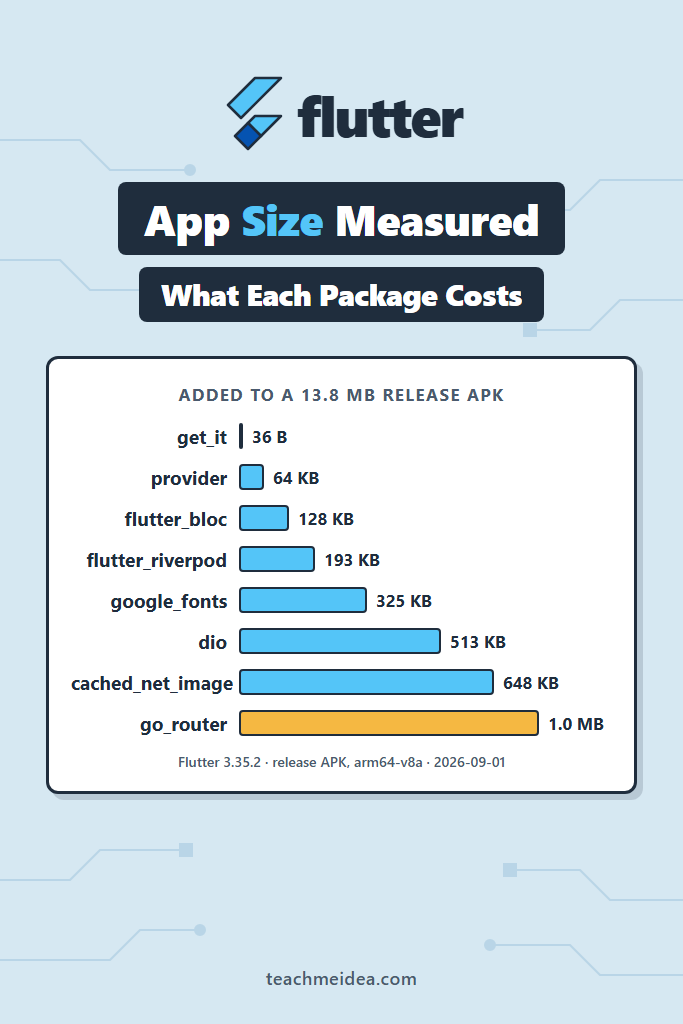
The baseline release APK is 14,427,073 bytes (13.76 MB). Every “added” figure below is that number subtracted from the package build. KB means 1,024 bytes throughout.
| Package | Version | Added to APK | Added (bytes) | Extra packages in pubspec.lock |
|---|---|---|---|---|
| get_it | 9.2.1 | 36 B | 36 | 0 |
| url_launcher | 6.3.2 | 22.5 KB | 23,052 | 10 |
| provider | 6.1.5+1 | 63.8 KB | 65,356 | 1 |
| intl | 0.20.3 | 64.1 KB | 65,640 | 0 |
| image_picker | 1.2.2 | 119.4 KB | 122,264 | 20 |
| flutter_bloc | 9.1.1 | 128.2 KB | 131,268 | 3 |
| sqflite | 2.4.2 | 128.3 KB | 131,384 | 7 |
| firebase_core | 4.14.0 | 161.7 KB | 165,533 | 5 |
| flutter_riverpod | 3.3.2 | 192.6 KB | 197,232 | 39 |
| google_fonts | 8.1.0 | 324.6 KB | 332,373 | 15 |
| http | 1.6.0 | 449.1 KB | 459,844 | 3 |
| dio | 5.11.0 | 513.2 KB | 525,468 | 5 |
| shared_preferences | 2.5.5 | 556.8 KB | 570,166 | 16 |
| cached_network_image | 3.4.1 | 648.2 KB | 663,729 | 29 |
| go_router | 17.2.3 | 1,024.2 KB | 1,048,820 | 2 |
Each package figure comes from a single build. However, the build proved deterministic: the baseline was built twice and flutter_riverpod was built twice, and each pair came back byte-identical. For that reason single runs are reported rather than a median of several.
Raw Output From the Builds
Summarised numbers are easy to fake, so here is what the terminal actually printed. First the baseline:
$ flutter build apk --release --target-platform=android-arm64
Font asset "MaterialIcons-Regular.otf" was tree-shaken, reducing it from 1645184 to 1312 bytes (99.9% reduction). Tree-shaking can be disabled by providing the --no-tree-shake-icons flag when building your app.
Running Gradle task 'assembleRelease'...                           17.2s
√ Built build\app\outputs\flutter-apk\app-release.apk (13.8MB)

$ stat -c %s build/app/outputs/flutter-apk/app-release.apk
14427073
Next get_it, which is the cheapest thing measured:
$ flutter build apk --release --target-platform=android-arm64
Font asset "MaterialIcons-Regular.otf" was tree-shaken, reducing it from 1645184 to 1312 bytes (99.9% reduction). Tree-shaking can be disabled by providing the --no-tree-shake-icons flag when building your app.
Running Gradle task 'assembleRelease'...                           14.8s
√ Built build\app\outputs\flutter-apk\app-release.apk (13.8MB)

$ stat -c %s build/app/outputs/flutter-apk/app-release.apk
14427109
Finally go_router, the most expensive:
$ flutter build apk --release --target-platform=android-arm64
Font asset "MaterialIcons-Regular.otf" was tree-shaken, reducing it from 1645184 to 1420 bytes (99.9% reduction). Tree-shaking can be disabled by providing the --no-tree-shake-icons flag when building your app.
Running Gradle task 'assembleRelease'...                           16.7s
√ Built build\app\outputs\flutter-apk\app-release.apk (14.8MB)

$ stat -c %s build/app/outputs/flutter-apk/app-release.apk
15475893
Notice that Flutter reported both the baseline and the get_it build as 13.8MB. In other words, the tool’s own output cannot distinguish a 36-byte difference, which is precisely why the byte count is read separately.
The Three Flutter App Size Results Worth Arguing About
get_it Is Effectively Free at 36 Bytes
A service locator that many teams treat as architectural overhead costs thirty-six bytes. That is not a rounding artifact, it is the difference between two byte counts from two deterministic builds. The reason is straightforward: get_it is pure Dart, it has no platform channel, it registers no native code, and its runtime is essentially a map lookup. Furthermore it pulls in zero extra packages. If you have been avoiding dependency injection on size grounds, that argument is now closed, and our guide to dependency injection with GetIt in Flutter covers the patterns worth adopting.
go_router Costs a Full Megabyte
At 1,048,820 bytes, go_router costs more than the next two packages combined. That is roughly 7% on top of an empty app. For a declarative router this feels wildly disproportionate, and it is the single most surprising number in the table. The explanation gets its own section below, because it turns out not to be about go_router at all. If you are still weighing routers, our comparison of Navigator 2.0 versus GoRouter covers the ergonomics side of that decision.
shared_preferences Costs More Than a State Management Library
shared_preferences writes key-value pairs. flutter_bloc implements an entire state management architecture. Yet the key-value store costs 556.8 KB while Bloc costs 128.2 KB, a factor of more than four in the direction nobody expects. The cause is federated plugins: shared_preferences ships a platform interface plus separate platform implementations, and it pulls sixteen extra packages into the lock file to do it. Meanwhile Bloc is pure Dart on top of streams. Similarly sqflite, an actual SQL database binding, costs 128.3 KB, which is less than a quarter of what the preferences plugin costs.
Why go_router Costs 1 MB When Its Own Code Is 74 KB
This is where the measurement gets genuinely interesting. Flutter can break an APK down by symbol, so the same two builds were repeated with size analysis switched on:
# Emits a per-package breakdown of the AOT snapshot alongside the APK
flutter build apk --release --target-platform=android-arm64 --analyze-size
For the go_router build, the report attributes only 74 KB to go_router itself:
app-release.apk (total compressed)                                         15 MB
  assets/
    flutter_assets                                                         84 KB
  classes.dex                                                             209 KB
  lib/
    arm64-v8a                                                              14 MB
    Dart AOT symbols accounted decompressed size                            4 MB
      package:flutter                                                       2 MB
      dart:core                                                           238 KB
      dart:ui                                                             191 KB
      dart:typed_data                                                     162 KB
      dart:async                                                            92 KB
      package:material_color_utilities                                     74 KB
      package:go_router                                                    74 KB
So where does the other 950 KB come from? Parsing both analysis files and summing every symbol per package gives the answer:
| AOT symbols | Baseline | With go_router | Change |
|---|---|---|---|
| package:flutter | 1,526,873 B | 2,290,469 B | +763,596 B |
| package:go_router | 0 B | 76,125 B | +76,125 B |
| Total accounted | 2,507,623 B | 3,475,631 B | +968,008 B |
The router’s own code is a rounding error. What actually costs a megabyte is the Flutter framework code that go_router keeps alive. Adding a declarative router reaches into the Navigator 2.0 machinery, the Router and RouteInformationParser stack, and the Cupertino page transitions, and none of it can be tree-shaken any more. The baseline app, which pushes no routes at all, discards that entire slice of the framework.
Two further details confirm the mechanism. First, classes.dex is byte-identical at 213,616 in both builds, so go_router adds no Java or Kotlin whatsoever. Second, the entire delta lands in lib/arm64-v8a, which is the compiled Dart snapshot. This is the general lesson of the whole table: a package’s cost is mostly the framework surface it prevents the compiler from discarding, not the size of the package.
pubspec.lock Bloat Is Not APK Bloat
The last column of the results table exists to kill a common heuristic. Developers often judge a dependency by how much it inflates the lock file, and that instinct is wrong in both directions.
flutter_riverpod 3.3.2 drags 39 extra packages into pubspec.lock, including analyzer, test, shelf and coverage. By dependency count it is by far the worst offender in this set. Yet it adds only 192.6 KB to the APK, less than half of what http costs with its three extra packages. Those analyzer and test packages never reach the device, because nothing the AOT compiler compiles can reach them.
The inverse holds too. go_router adds just two packages to the lock file and costs the most of anything measured. Therefore, if you want to know what a dependency costs your users in Flutter app size, count bytes in the APK rather than lines in the lock file. For the broader trade-offs between the state management options measured here, see our comparison of Riverpod versus Bloc.
What These Numbers Do Not Measure
A benchmark with unstated limits is a trap, so here are the limits.
- One architecture only. These are arm64-v8a builds. A universal APK carrying three ABIs has a much larger constant, although the per-package deltas should stay broadly similar.
- APK, not App Bundle. Play delivers splits derived from an AAB, so what a user actually downloads is smaller than any absolute figure here. The deltas remain the useful part.
- One package at a time. Costs are not additive. Two packages that both drag in the Cupertino stack will not each charge you for it, so a twelve-package app is cheaper than the sum of twelve rows.
- Minimal usage. Each probe touches one entry point. An app that uses the full surface of
dioorintlwill pay more, particularly forintllocale data. - No runtime download counted.
google_fontsmeasures 324.6 KB of code, but by default it fetches font files over the network at first use and caches them on disk. That is real weight the APK never shows. - Versions decay. These are the versions that resolved on 1 September 2026.
go_router18.0.0 already existed but was held back by the Flutter 3.35.2 SDK constraint, so its cost may differ. - Android only. Dart tree shaking behaves similarly on iOS, but the packaging and the framework binary do not.
A Realistic Scenario: Auditing a Feature Branch
Consider a mid-sized app with 20 to 30 screens where the download size has drifted upward over a couple of quarters and nobody can point to the cause. The instinct is usually to hunt for the biggest name in pubspec.yaml and argue about replacing it. Based on the numbers above, that instinct will send a small team after the wrong target for a week.
A more productive approach is to measure the delta of the branch rather than the absolute size of the app. Build the release artifact on main, build it again on the feature branch, and subtract. Where the difference is large, rerun both with --analyze-size and compare the package:flutter line rather than the new dependency’s line. In practice the answer is often that one feature introduced the first route, the first platform channel, or the first network image, and thereby unlocked a whole framework subsystem that had previously been discarded. Removing the package would help, but so would consolidating on a subsystem the app has already paid for.
When to Optimize Flutter App Size
- Your install conversion is measurably sensitive to download size, which is common in emerging markets and on metered connections
- You are near a store or carrier threshold that changes how the app is delivered or warned about
- A single feature branch adds a surprising amount, which usually signals an unintended subsystem rather than a heavy package
- You maintain a white-label or per-tenant build matrix, where a fixed cost is multiplied across many artifacts
- You are choosing between two packages of genuinely equal capability and need a tie-breaker
When NOT to Optimize Flutter App Size
- The candidate saving is under roughly 200 KB, which is invisible next to the fixed Flutter constant of about 13.8 MB
- The replacement package is less maintained, less type-safe, or less familiar to the team
- You would be hand-rolling a platform integration that a federated plugin already handles correctly across OS versions
- The app is pre-launch and has no install funnel to protect yet
- The cost is a runtime download rather than APK weight, in which case caching strategy matters far more than bytes shipped
Common Mistakes with Flutter App Size
- Comparing universal APKs instead of per-ABI artifacts, which inflates every number roughly threefold and buries the deltas
- Reading the rounded
13.8MBfrom the build output instead of the exact byte count - Judging a dependency by its
pubspec.lockfootprint, which as shown above points the wrong way for both Riverpod and go_router - Measuring a package that is imported but never called, so tree shaking removes it and the result looks free
- Assuming per-package costs add up, when overlapping framework usage is shared between them
- Treating debug or profile builds as representative, since neither runs the release AOT pipeline or R8
- Forgetting runtime downloads, which keep the APK small while the user still pays on first launch
How to Measure Your Own Flutter App Size
You do not need this post’s numbers, you need your app’s. The loop is short:
- Commit or stash your work so the tree is clean, then build the release artifact for one ABI with
flutter build apk --release --target-platform=android-arm64 - Record the exact size with
stat -c %s build/app/outputs/flutter-apk/app-release.apk, or with(Get-Item <path>).Lengthin PowerShell - Remove or add the dependency in question, adjust the code so it still compiles and still calls into the package, then rebuild
- Subtract the two byte counts, since the delta is the only number that means anything
- When a delta looks disproportionate, rerun both builds with
--analyze-sizeand diff thepackage:flutterline rather than the dependency’s own line
Flutter’s official guidance on measuring app size documents the DevTools view for the same JSON that --analyze-size emits, which is worth using when you would rather click through the tree than parse it.
Conclusion
The measured Flutter app size cost of a package correlates poorly with how heavy that package feels. A service locator cost 36 bytes, a declarative router cost a megabyte, and a key-value store cost more than four times what a full state management library cost. In every surprising case the explanation was the same: the price is the framework surface the package keeps alive, not the code the package ships.
The practical takeaway is to stop arguing from intuition and spend twenty minutes measuring your own deltas with the two commands above. Start with your router and your storage layer, since those were the two biggest surprises here. From there, our guide to Flutter performance optimization covers the runtime side of the same trade-offs, and our roundup of top Flutter libraries is a reasonable place to look for lighter alternatives worth measuring.