If you have shipped a RAG chatbot and now want to build a Perplexity-style AI search app — one that answers open-ended questions from the live web, streams the answer token by token, and cites every claim — the gap between those two projects is larger than it looks. A chatbot retrieves from a corpus you control. An answer engine retrieves from a web you do not control, in under two seconds, and still has to be right.
This deep dive walks through the full architecture: query planning, retrieval, content extraction, reranking, grounded synthesis, and streaming. Furthermore, it covers the parts that usually break in production — latency budgets, citation drift, follow-up questions, and cost. The code is Python with FastAPI, but the pipeline translates directly to TypeScript.
What a Perplexity-Style AI Search App Actually Does
A Perplexity-style AI search app takes a natural language question, searches the live web, fetches and extracts the top results, reranks the passages by relevance, and asks an LLM to synthesize one answer grounded strictly in those passages — with inline citations pointing back to each source URL. The model supplies fluency; the retrieved documents supply the facts.
That last sentence is the whole design philosophy. Consequently, every architectural decision below serves one goal: give the model the smallest set of genuinely relevant text that fully answers the question, then constrain it to use only that text.
How Is an Answer Engine Different From Standard RAG?
An answer engine retrieves at request time from a corpus it does not control, whereas standard RAG retrieves from an index you built and embedded in advance. That single difference cascades into almost every design decision, as the table below shows.
| Dimension | Standard RAG chatbot | Perplexity-style answer engine |
|---|---|---|
| Corpus | Pre-indexed, known, trusted | Live web, unknown quality |
| Retrieval timing | Vector lookup, milliseconds | Search plus fetch, hundreds of ms |
| Content quality | Clean at ingest time | Paywalls, boilerplate, spam |
| Freshness | As fresh as your last ingest | As fresh as the web |
| Citations | Nice to have | The core product |
| Main failure mode | Missing document in the index | Confident answer from a bad source |
Notice the last row in particular. In a document chatbot, a weak answer usually means retrieval missed something, and the fix is better chunking or a bigger index. In an answer engine, a weak answer often means retrieval succeeded at finding a page that is fluent, well-optimized, and wrong. Because of that, source selection and reranking carry far more weight here than they do in a typical RAG setup.
The upside is that you skip the entire ingestion pipeline. There is no crawler to schedule, no embedding job to re-run, and no stale index to reconcile. Instead, you trade that operational burden for a much harder quality problem at request time.
The Architecture: Five Stages From Query to Cited Answer
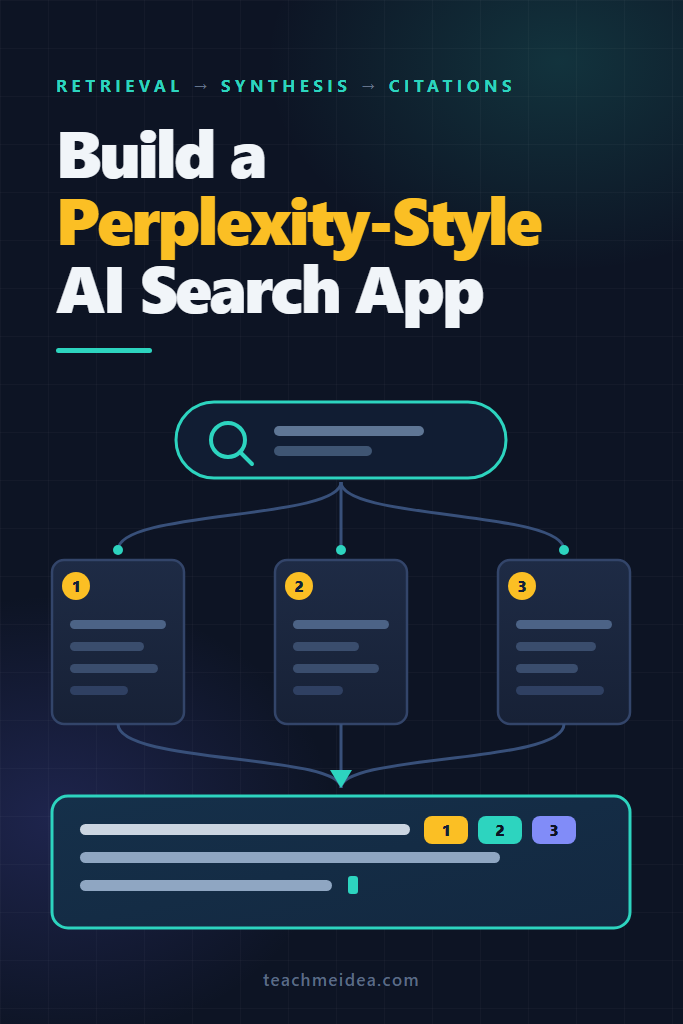
Picture the request flowing left to right through five stages. The user’s question enters a planner, which rewrites it into one or more search queries. Those queries fan out in parallel to a search API, which returns ranked URLs. A fetcher pulls those pages concurrently and strips them down to readable text. A reranker scores every extracted passage against the original question and keeps only the best ones. Finally, a synthesizer streams a cited answer back to the browser over SSE.
Two properties matter more than the stage list itself. First, stages two and three are heavily parallel — you are waiting on the network, not on compute. Second, only the last stage is expensive in tokens, so everything before it should be fast and cheap.
| Stage | Typical latency (estimate) | Failure mode when it goes wrong |
|---|---|---|
| Query planning | 300–700 ms | Over-decomposed queries that dilute results |
| Web search | 200–600 ms | Thin or SEO-spam result sets |
| Fetch + extract | 400–1,500 ms | One slow host blocking the whole request |
| Rerank | 100–300 ms | Passages ranked on keywords, not meaning |
| Answer synthesis | 1–4 s (streamed) | Fluent claims with no supporting source |
Latency figures above are rough working estimates for a single-region deployment hitting commercial APIs, not benchmarks. Measure your own; they shift with provider, region, and page weight.
Stage 1: Query Understanding and Rewriting
Users do not type search queries. They type questions like “is it worth switching our billing to usage-based now that Stripe changed their model” — which is a terrible input for a keyword-based search index. Therefore the first stage rewrites intent into retrieval-friendly queries.
Keep the planner cheap and structured. A small model with a strict JSON schema handles this well, and structured output means you never parse free text.
# planner.py
from openai import AsyncOpenAI
from pydantic import BaseModel, Field

client = AsyncOpenAI()

class QueryPlan(BaseModel):
    search_queries: list[str] = Field(
        description="1-3 keyword-style web search queries", max_length=3
    )
    needs_recency: bool = Field(
        description="True if the answer depends on recent events or current data"
    )

PLANNER_PROMPT = """You turn a user's question into web search queries.
Rules:
- Write queries the way a skilled researcher would type them into a search box.
- Use 1 query for simple factual questions, 2-3 only when the question has
  genuinely separate parts. Extra queries dilute the result set.
- Never invent constraints the user did not state."""

async def plan_query(question: str) -> QueryPlan:
    # Newer SDK versions expose this as client.chat.completions.parse
    completion = await client.beta.chat.completions.parse(
        model="gpt-5-mini",
        messages=[
            {"role": "system", "content": PLANNER_PROMPT},
            {"role": "user", "content": question},
        ],
        response_format=QueryPlan,
    )
    return completion.choices[0].message.parsed
Why this works: the schema forces a bounded list, which stops the classic failure where a model decomposes one question into eight queries and buries the actual answer under tangentially related pages. The needs_recency flag then feeds a freshness filter at the search layer, so evergreen questions are not artificially limited to last week’s pages.
One caution: resist the urge to add query expansion, HyDE, and intent classification on day one. Each addition costs latency at the front of the request, where the user is staring at a spinner.
Stage 2: Retrieval — Search APIs vs Your Own Index
You have two realistic options for the retrieval layer, and mixing them is common.
Option A: a commercial search API. You send a query, you get ranked URLs with snippets. No crawler, no index, no storage. This is the right default for almost everyone.
Option B: your own index. You crawl a defined corpus, embed it, and store vectors in something like pgvector or Qdrant. This makes sense when your answer engine covers a bounded domain — your documentation, your industry’s filings, your internal wiki.
| Retrieval source | Best for | Trade-off |
|---|---|---|
| Brave Search API | General web, independent index | Snippets need enrichment for depth |
| Tavily | LLM-first apps, returns cleaned content | Less control over ranking internals |
| Exa | Semantic/neural queries, research-style questions | Different query style than keyword search |
| SerpAPI | Mirroring mainstream engine results | Scrape-based, priced per search |
| Self-hosted vector index | Bounded private corpora | You own crawling, freshness, and infra |
For a general-purpose Perplexity-style AI search app, start with a commercial API. Building a competitive general web index is not a side quest — it is the entire company.
If you do run your own index, retrieval quality hinges on combining lexical and semantic matching rather than picking one. The reasoning behind that trade-off is worked through in hybrid search with BM25 and vectors for RAG.
# search.py
import asyncio, os, httpx

BRAVE_ENDPOINT = "https://api.search.brave.com/res/v1/web/search"

async def brave_search(
    http: httpx.AsyncClient, query: str, count: int = 8, fresh: bool = False
) -> list[dict]:
    params = {"q": query, "count": count}
    if fresh:
        params["freshness"] = "pm"  # past month; only when recency matters

    response = await http.get(
        BRAVE_ENDPOINT,
        params=params,
        headers={
            "X-Subscription-Token": os.environ["BRAVE_API_KEY"],
            "Accept": "application/json",
        },
        timeout=5.0,
    )
    response.raise_for_status()
    results = response.json().get("web", {}).get("results", [])
    return [
        {"url": r["url"], "title": r["title"], "snippet": r.get("description", "")}
        for r in results
    ]

async def multi_search(queries: list[str], fresh: bool) -> list[dict]:
    """Fan out all planned queries at once, then dedupe by URL."""
    async with httpx.AsyncClient() as http:
        batches = await asyncio.gather(
            *(brave_search(http, q, fresh=fresh) for q in queries),
            return_exceptions=True,
        )

    seen, merged = set(), []
    for batch in batches:
        if isinstance(batch, Exception):
            continue  # one dead query should not kill the request
        for item in batch:
            if item["url"] not in seen:
                seen.add(item["url"])
                merged.append(item)
    return merged
Why return_exceptions=True matters: with a plain gather, a single timeout aborts every sibling task and the user gets nothing. Here, two good query results still produce an answer. In an answer engine, partial retrieval beats a failed request almost every time.
Stage 3: Fetching and Extracting Page Content
Search snippets are roughly 150 characters of marketing copy. They are not enough to ground an answer, so you have to fetch the actual pages. This stage is where most homegrown answer engines quietly fall apart, because the open web is hostile: paywalls, cookie walls, 3 MB of JavaScript, and hosts that take 30 seconds to respond.
Three rules keep this stage sane. First, cap concurrency so you do not open sixty sockets per request. Second, set an aggressive per-host timeout and accept the loss. Third, extract main content rather than dumping raw HTML into the model.
# fetcher.py
import asyncio, httpx, trafilatura

MAX_CHARS = 12_000            # per page, before chunking
FETCH_TIMEOUT = 4.0           # a slow host is a dropped host
CONCURRENCY = 8

HEADERS = {"User-Agent": "MySearchBot/1.0 (+https://example.com/bot)"}

async def fetch_page(
    http: httpx.AsyncClient, sem: asyncio.Semaphore, result: dict
) -> dict | None:
    async with sem:
        try:
            response = await http.get(
                result["url"], timeout=FETCH_TIMEOUT, follow_redirects=True
            )
            response.raise_for_status()
        except (httpx.HTTPError, httpx.TimeoutException):
            return None

    if "text/html" not in response.headers.get("content-type", ""):
        return None

    # trafilatura strips nav, ads, comments, and boilerplate
    text = trafilatura.extract(
        response.text, include_comments=False, include_tables=True
    )
    if not text or len(text) < 400:
        return None  # cookie wall or JS-only page; not worth a context slot

    return {**result, "text": text[:MAX_CHARS]}

async def fetch_all(results: list[dict]) -> list[dict]:
    sem = asyncio.Semaphore(CONCURRENCY)
    async with httpx.AsyncClient(headers=HEADERS) as http:
        pages = await asyncio.gather(
            *(fetch_page(http, sem, r) for r in results)
        )
    return [p for p in pages if p is not None]
Why the 400-character floor: a cookie banner extracts to about 200 characters of “we value your privacy.” Without that check, junk passages compete with real content during reranking, and occasionally win. Similarly, the MAX_CHARS cap exists because a single long-form article can otherwise consume the entire context budget by itself.
Two responsibilities sit outside the code above but inside your obligations. Respect robots.txt and identify your bot honestly in the User-Agent — the official robots.txt specification is the reference. Additionally, cache fetched pages by URL for a short window; popular URLs repeat constantly across users, and a cache hit removes an entire network round trip.
Stage 4: Reranking and Context Assembly
At this point you might have 40,000 words of extracted text and room for maybe 6,000. Search-engine ranking told you which pages look relevant, but it never scored the individual paragraphs. Reranking closes that gap.
Split each page into passages, score every passage against the original question with a cross-encoder, and keep the top handful. Unlike embedding similarity, a cross-encoder reads the query and passage together, so it catches relevance that vector distance misses.
# rerank.py
import cohere, os

co = cohere.AsyncClientV2(api_key=os.environ["COHERE_API_KEY"])

def to_passages(pages: list[dict], words_per_passage: int = 220) -> list[dict]:
    """Split pages into passages that carry their source with them."""
    passages = []
    for page in pages:
        words = page["text"].split()
        for i in range(0, len(words), words_per_passage):
            chunk = " ".join(words[i : i + words_per_passage])
            if len(chunk) > 200:
                passages.append(
                    {"url": page["url"], "title": page["title"], "text": chunk}
                )
    return passages

async def rerank(question: str, passages: list[dict], top_n: int = 12) -> list[dict]:
    if not passages:
        return []

    response = await co.rerank(
        model="rerank-v3.5",
        query=question,          # the ORIGINAL question, not the rewritten query
        documents=[p["text"] for p in passages],
        top_n=min(top_n, len(passages)),
    )
    # Keep the relevance score; you will need it for the confidence gate below.
    return [
        {**passages[r.index], "score": r.relevance_score} for r in response.results
    ]
Why rerank against the original question: the rewritten search query was optimized for a keyword index and has usually lost nuance — negations, qualifiers, and constraints. Scoring passages against what the user actually asked restores that nuance at exactly the moment it matters. For a deeper treatment of the model choices here, see reranking in RAG with Cohere and cross-encoders.
The relevance score also gives you a cheap and valuable safety valve:
CONFIDENCE_FLOOR = 0.2

def has_grounding(ranked: list[dict]) -> bool:
    """If nothing scores above the floor, the web did not answer this question."""
    return bool(ranked) and ranked[0]["score"] >= CONFIDENCE_FLOOR
When has_grounding returns False, say so instead of synthesizing. “I could not find reliable sources for this” is a legitimate answer, and users trust an engine that admits limits far more than one that confabulates smoothly.
Finally, assemble context with stable numbering, because those numbers become the citations:
def build_context(ranked: list[dict]) -> tuple[str, list[dict]]:
    sources, blocks = [], []
    for i, passage in enumerate(ranked, start=1):
        sources.append({"id": i, "url": passage["url"], "title": passage["title"]})
        blocks.append(f"[{i}] {passage['title']}\n{passage['text']}")
    return "\n\n".join(blocks), sources
Stage 5: Grounded Answer Synthesis With Citations
Now the model finally writes. The prompt does three jobs: it restricts the model to the supplied context, it defines the citation format precisely, and it tells the model what to do when the context is insufficient.
# synthesize.py
SYNTHESIS_PROMPT = """You answer questions using ONLY the numbered sources provided.

Citation rules:
- Cite with bracketed numbers matching the source, e.g. [2].
- Every factual sentence must carry at least one citation.
- Cite multiple sources when they agree: [1][4].
- Never cite a number that does not appear in the sources.

Content rules:
- If the sources do not answer the question, say exactly what is missing.
- If sources disagree, present both positions and attribute each one.
- Do not add background knowledge that is absent from the sources.
- Lead with the direct answer, then supporting detail. No preamble."""

async def stream_answer(question: str, context: str, sources: list[dict]):
    stream = await client.chat.completions.create(
        model="gpt-5",
        messages=[
            {"role": "system", "content": SYNTHESIS_PROMPT},
            {"role": "user", "content": f"Sources:\n{context}\n\nQuestion: {question}"},
        ],
        stream=True,
    )
    async for chunk in stream:
        delta = chunk.choices[0].delta.content
        if delta:
            yield delta
Why “say exactly what is missing” beats “say you don’t know”: the second instruction produces a dead end, while the first produces something actionable — the user learns the sources covered pricing but not migration effort, and can refine from there.
Prompting alone does not guarantee honest citations, though. Therefore validate after the fact:
import re

def validate_citations(answer: str, sources: list[dict]) -> dict:
    cited = {int(n) for n in re.findall(r"\[(\d+)\]", answer)}
    valid_ids = {s["id"] for s in sources}

    hallucinated = cited - valid_ids     # numbers pointing at nothing
    unused = valid_ids - cited           # sources the model ignored

    sentences = [s for s in re.split(r"(?<=[.!?])\s+", answer) if len(s) > 40]
    uncited = [s for s in sentences if not re.search(r"\[\d+\]", s)]

    return {
        "hallucinated_citations": sorted(hallucinated),
        "uncited_sentence_ratio": len(uncited) / max(len(sentences), 1),
        "sources_used": sorted(cited & valid_ids),
    }
Log these three numbers on every request. A rising uncited_sentence_ratio after a prompt change is the earliest signal that your answers are drifting away from their sources — long before a user reports it. Only show the sources in sources_used in the UI, since displaying eight sources when the answer relied on three trains users to distrust the citation panel entirely.
For the broader picture of grounding LLMs in retrieved documents, RAG from scratch covers the fundamentals this stage builds on.
Streaming the Answer to the Browser
Perceived speed is the product. An answer that completes in four seconds but starts rendering at 1.5 seconds feels dramatically faster than a four-second wait followed by an instant dump. Server-Sent Events handle this cleanly, since the data flows one way.
Critically, stream events, not just text. The UI should show sources as soon as retrieval finishes, well before the first token arrives.
# main.py
import json
from fastapi import FastAPI
from fastapi.responses import StreamingResponse

app = FastAPI()

def sse(event: str, data: dict) -> str:
    return f"event: {event}\ndata: {json.dumps(data)}\n\n"

async def pipeline(question: str):
    plan = await plan_query(question)
    yield sse("status", {"stage": "searching"})

    results = await multi_search(plan.search_queries, fresh=plan.needs_recency)
    pages = await fetch_all(results[:12])
    yield sse("status", {"stage": "reading", "pages": len(pages)})

    ranked = await rerank(question, to_passages(pages))
    if not has_grounding(ranked):
        yield sse("no_results", {"question": question})
        return

    context, sources = build_context(ranked)
    yield sse("sources", {"sources": sources})   # UI renders the panel now

    buffer = []
    async for token in stream_answer(question, context, sources):
        buffer.append(token)
        yield sse("token", {"t": token})

    yield sse("done", validate_citations("".join(buffer), sources))

@app.post("/api/search")
async def search(payload: dict):
    return StreamingResponse(
        pipeline(payload["question"]),
        media_type="text/event-stream",
        headers={"Cache-Control": "no-cache", "X-Accel-Buffering": "no"},
    )
Why X-Accel-Buffering: no is not optional: nginx buffers proxied responses by default, which holds your tokens until the buffer fills and destroys the streaming effect in production while everything looks perfect locally. That header disables it. The choice between SSE and WebSockets for this workload is worked through in streaming LLM responses with SSE vs WebSockets.
On the client, render each stage as it lands: a status line, then source cards, then streaming markdown with citation numbers as clickable links.
How to Keep Latency Under Control
Naively, the five stages sum to something like six seconds. In practice you can pull that under three by attacking three things.
Parallelize aggressively. Search queries fan out together. Page fetches fan out together. Nothing waits on anything it does not need.
Cap the tail. One host taking 30 seconds must not hold the request. A 4-second fetch timeout and a hard cap of 10–12 pages bounds the worst case, and losing two slow sources rarely changes the answer.
Cache at two layers. Cache extracted page text by URL for hours, since page content changes slowly. Separately, cache full answers by semantic similarity of the question, because “how does X work” and “explain how X works” deserve the same response. The trade-offs are covered in semantic caching for LLM apps.
One tempting optimization deserves a warning. Starting synthesis before reranking finishes — so tokens appear sooner — sounds clever, but it means the model begins reasoning over unranked passages. Answer quality drops in a way that is hard to see in demos and obvious in production.
Handling Follow-Up Questions
Answer engines are conversational, so the second question is usually a fragment: “what about the enterprise tier?” That fragment is useless as a search query on its own.
Resolve it at the planner, not the retriever. Pass the previous question and a compressed summary of the previous answer into the planner, and let it emit a standalone query.
async def plan_followup(question: str, history: list[dict]) -> QueryPlan:
    recent = history[-2:]  # two turns is almost always enough context
    transcript = "\n".join(
        f"Q: {turn['question']}\nA: {turn['answer_summary']}" for turn in recent
    )
    completion = await client.beta.chat.completions.parse(
        model="gpt-5-mini",
        messages=[
            {"role": "system", "content": PLANNER_PROMPT},
            {"role": "user", "content": f"{transcript}\n\nFollow-up: {question}"},
        ],
        response_format=QueryPlan,
    )
    return completion.choices[0].message.parsed
Why summaries instead of full answers: full previous answers are long and citation-heavy, and they push the planner toward repeating prior results rather than searching for new ones. A two-sentence summary carries the topic without the baggage. Store that summary when the answer completes, so the next turn costs nothing extra to prepare.
Real-World Scenario: When Citations Look Right but Are Not
Consider a small team building an internal answer engine over vendor documentation and the public web. During a review, someone notices that answers about pricing tiers cite plausible URLs, yet the numbers occasionally do not appear on the cited page at all.
The pipeline is not hallucinating URLs — the citation validator confirms every bracketed number maps to a real source. The actual root cause is subtler and extremely common: passage boundaries. A 220-word chunk split a pricing table in half, so the model received the tier names from one passage and the prices from another, then merged them into a single sentence with one citation. Both fragments were real; the combination was not.
Two changes address it. First, keep tables intact during extraction rather than splitting mid-structure, which is why include_tables=True and structure-aware chunking matter more here than in a typical document chatbot. Second, ask the model to cite per-clause rather than per-sentence when a sentence draws on two sources. Neither fix is glamorous, but together they turn a trust-destroying bug into a rare edge case.
The broader lesson holds for any Perplexity-style AI search app: citation validity and citation accuracy are different properties. Automated checks catch the first. Only spot-checking real answers against real pages catches the second.
How Do You Evaluate an AI Search App?
Evaluate the stages separately, because a bad answer can originate at any of them and end-to-end scores tell you nothing about which one failed. Build a fixed set of 50–100 real questions from your domain, then measure three things independently.
Retrieval recall. For each question, have a human mark which URLs should appear. Then check how often your pipeline surfaces at least one of them in the top results. When recall is low, no amount of prompt work will save the answer, so fix this layer first.
Grounding. Take each generated answer, split it into claims, and check whether each claim is supported by the passage it cites. This is the metric that catches the pricing-table failure described earlier. Automating it with an LLM judge works reasonably well, provided you calibrate the judge against a few dozen human labels first.
Answer quality. Judge completeness and directness — did the answer address the actual question, or did it summarize the sources without committing to a conclusion? Vague hedging is a common regression after teams tighten grounding rules too aggressively.
Run the suite on every prompt change and every model swap. Meanwhile, in production, track the cheap proxies you already log: uncited_sentence_ratio, the has_grounding abstention rate, and reranker top-1 scores. A drop in top-1 relevance scores usually precedes a wave of poor answers, which makes it a useful early warning rather than a post-mortem statistic.
One evaluation trap deserves a mention. Testing only questions you know the web answers well produces a suite that never exercises abstention. Include a handful of questions with genuinely thin coverage, and verify the engine declines instead of improvising.
What Does It Cost to Run?
Think in tokens per query rather than dollars, since prices change and token counts do not.
| Component | Tokens or calls per query | Notes |
|---|---|---|
| Query planning | ~300 in / ~60 out (small model) | Negligible at any volume |
| Web search | 1–3 API calls | Priced per search, not per token |
| Reranking | 30–60 passages scored | Priced per document scored |
| Answer synthesis | 6,000–9,000 in / 400–800 out | Dominates total cost |
Those ranges assume 12 fetched pages, 220-word passages, and top-12 reranking — change any of those and the numbers move. Synthesis input dominates, which means context size is your main cost lever. Cutting from top-20 to top-12 passages typically reduces cost by roughly a third with little quality loss, because passages ranked 13 through 20 rarely contribute to the final answer anyway. Track tokens per query from day one, since cost regressions hide inside prompt changes that look harmless.
When to Build a Perplexity-Style AI Search App
- Your users ask open-ended questions that span many documents, not lookups that a search box already answers
- Answers must be traceable to sources, and a plain chatbot’s unverifiable claims are unacceptable
- Your domain corpus changes faster than you could reasonably fine-tune a model
- You need synthesis across sources, not a ranked list of links
- Retrieval is over public web content or a corpus you have clear rights to index
When NOT to Build a Perplexity-Style AI Search App
- Your corpus is small and stable, where straightforward RAG over a vector store costs far less and ships sooner
- Sub-second responses are a hard requirement, since the fetch-and-rerank stages make that unreachable
- Questions are navigational (“where is the invoice settings page”), which conventional search handles better
- You need guaranteed answers to every question, because honest abstention on thin sources is a feature you cannot remove
- The value you would add over an existing answer engine is thin, and a general-purpose one already serves your users
Common Mistakes with Perplexity-Style AI Search Apps
- Skipping reranking. Feeding raw search results to the model is the single biggest quality killer, since page-level relevance says nothing about passage-level usefulness.
- Unbounded fetching. No concurrency cap and no timeout means p99 latency is set by the slowest site on the internet.
- Trusting prompts to enforce citations. Prompts reduce citation drift; only post-generation validation and logging detect it.
- Ignoring extraction quality. Passing raw HTML or cookie-banner text to the model wastes context and pollutes reranking.
- Answering everything. An engine that never says “the sources don’t cover this” is an engine whose citations nobody checks twice.
- Optimizing tokens before quality. Shrink context after answers are consistently good, never before.
- Treating follow-ups as new queries. Without history-aware planning, the second question in every conversation retrieves the wrong pages.
Conclusion
A Perplexity-style AI search app is a retrieval system with a language model bolted on at the end — not a language model with search bolted on at the front. Consequently, the wins come from the unglamorous middle: honest extraction, real reranking, tight latency budgets, and citation validation that runs on every request.
Start narrow. Build your Perplexity-style AI search app against a single domain you understand well, instrument uncited_sentence_ratio and per-query token spend before adding features, and only then widen to the open web. For the natural next step — an engine that reads its results and decides to search again — agentic RAG picks up exactly where this pipeline ends.