If you have ever tried to bolt transcription onto a product and discovered that “just call Whisper” is about 10% of the work, this walkthrough is for you. Building an AI meeting notes app means solving audio preprocessing, file size limits, speaker attribution, long-context summarization, and structured extraction — in that order. This guide covers the full pipeline in Python, with production-grade code for each stage, plus the failure modes that only show up once real recordings hit your endpoint.
The target reader is an intermediate backend developer who has called an LLM API before but has not shipped an audio pipeline. By the end, you will have a working service that takes a one-hour recording and returns a summary, decisions, and assigned action items as validated JSON.
What an AI Meeting Notes App Actually Does
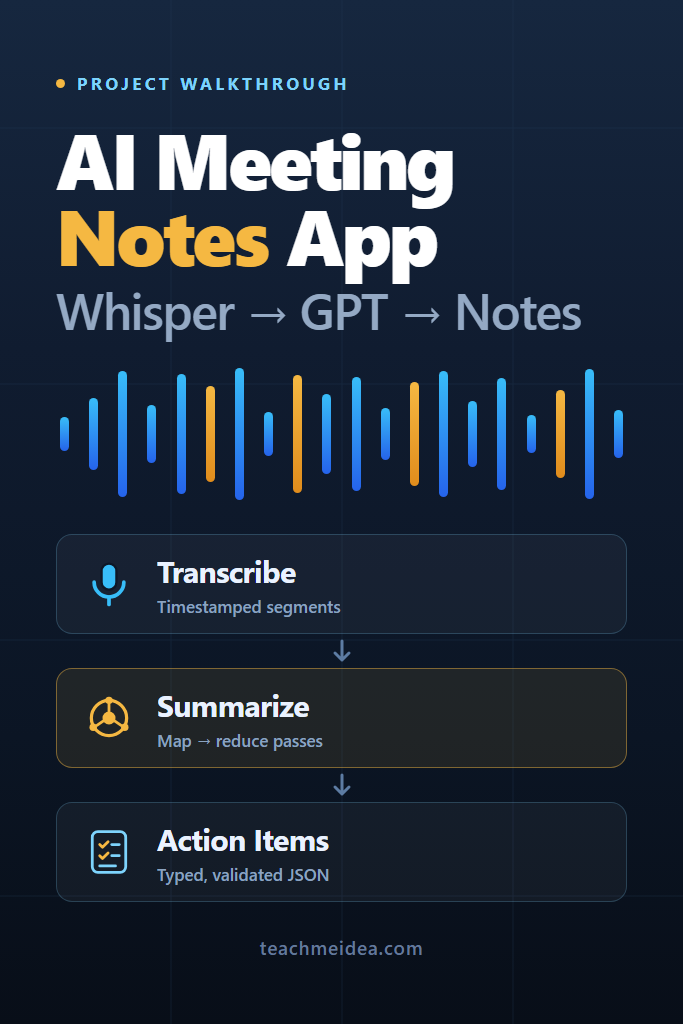
An AI meeting notes app converts recorded audio into structured meeting output through five stages: normalize the audio, transcribe it to text with timestamps, attribute segments to speakers, summarize the transcript in passes, and extract decisions and action items as typed data. Each stage has its own failure mode, so treating the pipeline as one API call is the most common design mistake.
Most teams start by wiring the audio file straight into a transcription endpoint and pasting the result into a summarization prompt. That works for a five-minute demo. However, it breaks the moment someone uploads a 90-minute all-hands recording, because you hit a file size ceiling, a context window ceiling, and a timeout ceiling in the same request.
Pipeline Architecture at a Glance
The design below separates each stage into its own step with its own retry policy. Consequently, a transient failure in summarization does not force you to pay for transcription again.
| Stage | What it does | Primary tool | Typical failure mode |
|---|---|---|---|
| Ingest | Accept upload, queue a job | FastAPI + background worker | Request timeout on large files |
| Normalize | Downmix, resample, compress | ffmpeg | Unsupported codec, silent track |
| Chunk | Split on silence, stay under limits | pydub | Words cut mid-sentence |
| Transcribe | Audio to timestamped text | Whisper API | 25 MB limit, hallucinated filler |
| Attribute | Label who said what | pyannote / per-track audio | Crosstalk, wrong speaker counts |
| Summarize | Condense transcript in passes | GPT map-reduce | Context overflow, lost detail |
| Extract | Pull decisions and action items | Structured outputs | Invented owners and due dates |
| Persist | Store transcript, summary, tasks | Postgres | Losing the raw transcript |
Notice that transcription and summarization are separate jobs. Because transcription is the expensive, slow part, you want its output stored permanently before any LLM call touches it. Then you can re-run summarization with a better prompt next month without re-transcribing a single second of audio.
Prerequisites and Project Setup
You need Python 3.11+, ffmpeg on the system path, and an OpenAI API key. Additionally, install the following:
# Core pipeline dependencies
pip install openai pydub pydantic tenacity fastapi uvicorn

# ffmpeg is a system binary, not a pip package
# macOS:   brew install ffmpeg
# Ubuntu:  sudo apt-get install ffmpeg
# Windows: winget install Gyan.FFmpeg
Set your key as an environment variable rather than hardcoding it. If you are new to working with this API surface, the fundamentals in building apps with the OpenAI API cover client setup, error types, and async patterns that the rest of this post assumes.
import os
from openai import OpenAI

client = OpenAI(api_key=os.environ["OPENAI_API_KEY"])
Step 1: Normalize the Audio Before You Upload It
Raw meeting recordings arrive as stereo 48 kHz files from Zoom, mono AAC from a phone, or 500 MB WAV files from a conference room mic. Transcription models do not need any of that fidelity. Speech recognition operates on 16 kHz mono audio, so anything above that is bandwidth you pay to upload.
# Downmix to mono, resample to 16 kHz, encode as 32 kbps Opus.
# -ac 1  : one channel (speech models are mono anyway)
# -ar 16000 : 16 kHz sample rate, the standard for ASR
# -b:a 32k  : Opus stays intelligible for speech at low bitrates
ffmpeg -i meeting_raw.m4a -ac 1 -ar 16000 -c:a libopus -b:a 32k meeting.ogg
Why this matters: a one-hour stereo recording that starts near 500 MB typically lands under 15 MB after this pass. As a result, most meetings fit in a single API call and never need chunking at all. Furthermore, upload time drops from minutes to seconds, which changes what your job queue timeouts need to be.
Wrap the command in Python so the pipeline stays self-contained:
import subprocess
from pathlib import Path

def normalize_audio(src: Path, dst: Path) -> Path:
    """Downmix to 16 kHz mono Opus. Raises if ffmpeg fails or the file is empty."""
    result = subprocess.run(
        ["ffmpeg", "-y", "-i", str(src),
         "-ac", "1", "-ar", "16000",
         "-c:a", "libopus", "-b:a", "32k", str(dst)],
        capture_output=True, text=True,
    )
    if result.returncode != 0:
        raise RuntimeError(f"ffmpeg failed: {result.stderr[-500:]}")
    if dst.stat().st_size < 1024:
        raise ValueError("Normalized audio is empty — check the source track")
    return dst
The size check catches a surprisingly common case: a screen recording where the participant’s microphone track is silent and only system audio was captured. Otherwise, you would happily transcribe 60 minutes of nothing and bill a customer for it.
Step 2: Chunk Long Recordings on Silence, Not on Time
The audio endpoint accepts files up to 25 MB. Compressed at 32 kbps, that ceiling sits somewhere around 100 minutes of speech, so quarterly reviews and workshops still overflow it.
The naive fix is splitting every 10 minutes. Unfortunately, fixed splits cut mid-word and mid-sentence, which produces garbled text at every seam. Splitting on natural pauses avoids that entirely.
from pydub import AudioSegment
from pydub.silence import detect_silence

MAX_CHUNK_MS = 20 * 60 * 1000  # 20 minutes, comfortably under the size ceiling

def split_on_silence_windows(path: str) -> list[AudioSegment]:
    """Split audio at natural pauses, keeping each chunk under MAX_CHUNK_MS."""
    audio = AudioSegment.from_file(path)
    if len(audio) <= MAX_CHUNK_MS:
        return [audio]

    # Pauses of 700ms+ that are 16 dB quieter than the track average.
    # Relative thresholds survive recordings with different gain levels.
    pauses = detect_silence(audio, min_silence_len=700,
                            silence_thresh=audio.dBFS - 16)
    pause_points = [(start + end) // 2 for start, end in pauses]

    chunks, cursor = [], 0
    while cursor < len(audio):
        target = cursor + MAX_CHUNK_MS
        # Snap to the last natural pause before the target boundary
        candidates = [p for p in pause_points if cursor < p <= target]
        cut = max(candidates) if candidates else min(target, len(audio))
        chunks.append(audio[cursor:cut])
        cursor = cut
    return chunks
Why relative thresholds: audio.dBFS - 16 adapts to the recording’s own loudness. A fixed value such as -40 works on a quiet laptop mic but treats an entire loud conference room as continuous speech, which means you get no split points at all and fall back to hard cuts.
Critically, you must track each chunk’s offset. Timestamps returned for chunk three start at zero, so without the offset your action items point to the wrong minute of the meeting.
Step 3: Transcribe With Whisper and Keep the Timestamps
Now the interesting part. The API exposes several transcription models, and the choice between them is not just about accuracy.
| Model | Timestamps | Streaming | Best for |
|---|---|---|---|
whisper-1 | Segment and word level | No | Meeting notes, anything needing citations |
gpt-4o-transcribe | Not exposed | Yes | Live captions, voice interfaces |
gpt-4o-mini-transcribe | Not exposed | Yes | High-volume, cost-sensitive transcription |
For a meeting notes app, pick whisper-1. Timestamps are what let you link an action item back to the exact moment it was discussed, and that traceability is the feature people trust the product for. The OpenAI Whisper API guide goes deeper on formats, language hints, and accuracy tuning if you need the full parameter surface.
from openai import OpenAI, RateLimitError, APITimeoutError
from tenacity import retry, stop_after_attempt, wait_exponential, retry_if_exception_type

client = OpenAI()

VOCAB_HINT = (
    "Meeting transcript. Terms: Kubernetes, Postgres, pgvector, "
    "SOC 2, ARR, Q3 roadmap, Riverpod, Terraform."
)

@retry(
    retry=retry_if_exception_type((RateLimitError, APITimeoutError)),
    wait=wait_exponential(multiplier=2, min=4, max=60),
    stop=stop_after_attempt(5),
)
def transcribe_chunk(path: str, offset_ms: int) -> list[dict]:
    """Transcribe one chunk and rebase its timestamps onto the full recording."""
    with open(path, "rb") as f:
        result = client.audio.transcriptions.create(
            model="whisper-1",
            file=f,
            response_format="verbose_json",
            timestamp_granularities=["segment"],
            language="en",          # skip auto-detection when you know the language
            prompt=VOCAB_HINT,      # biases spelling of domain terms
            temperature=0,          # reduces creative filler on unclear audio
        )

    offset_s = offset_ms / 1000
    return [
        {
            "start": seg.start + offset_s,
            "end": seg.end + offset_s,
            "text": seg.text.strip(),
        }
        for seg in result.segments
    ]
Three parameters carry most of the quality here. First, prompt biases the decoder toward your domain vocabulary — without it, “pgvector” reliably comes back as “PG vector” or “peachy vector.” Second, language skips detection, which removes a class of errors where a heavily accented first sentence flips the whole file to the wrong language. Third, temperature=0 suppresses the model’s tendency to invent plausible filler during long silences.
That last behavior deserves attention. Whisper models are trained on subtitle data, so silence and background noise sometimes produce artifacts like “Thanks for watching!” or repeated phrases. Filtering helps:
HALLUCINATION_MARKERS = {
    "thanks for watching", "thank you for watching",
    "subscribe", "[music]", "you", "bye.",
}

def drop_artifacts(segments: list[dict]) -> list[dict]:
    """Remove short segments that match known subtitle-training artifacts."""
    cleaned = []
    for seg in segments:
        text = seg["text"].lower().strip(" .!")
        duration = seg["end"] - seg["start"]
        # Artifacts are short, isolated, and match the known marker set
        if text in HALLUCINATION_MARKERS and duration < 3:
            continue
        cleaned.append(seg)
    return cleaned
Because the transcription step is the slowest and most expensive stage, wrap it in retries with exponential backoff. The patterns in LLM rate limiting and retry strategies apply directly to audio endpoints, which share the same rate limit headers.
Can Whisper Identify Different Speakers?
No. The transcription API returns text with timestamps but no speaker labels, because diarization is a separate task from speech recognition. Therefore you need one of three approaches, and the right choice depends on how you capture audio in the first place.
Option 1 — Per-participant tracks (best accuracy). Zoom, Teams, and LiveKit can export one audio file per participant. When you transcribe each track separately, speaker attribution is exact rather than inferred, and you merge the results by timestamp. This is the approach to build toward if you control the recording integration.
Option 2 — Local diarization models. pyannote.audio produces speaker turn boundaries that you align with Whisper segments. Accuracy holds up well on clean audio with 2–5 speakers. However, it degrades noticeably with crosstalk, and it needs a GPU to run at reasonable speed.
Option 3 — LLM inference from context. You can ask a model to guess speakers from the transcript alone. In practice this is unreliable and should be treated as a fallback, not a feature.
Merging pyannote turns with Whisper segments looks like this:
def assign_speakers(segments: list[dict], turns: list[dict]) -> list[dict]:
    """Label each transcript segment with the speaker whose turn overlaps it most."""
    labeled = []
    for seg in segments:
        best_speaker, best_overlap = "UNKNOWN", 0.0
        for turn in turns:
            overlap = min(seg["end"], turn["end"]) - max(seg["start"], turn["start"])
            if overlap > best_overlap:
                best_speaker, best_overlap = turn["speaker"], overlap
        labeled.append({**seg, "speaker": best_speaker})
    return labeled
Maximum-overlap assignment beats midpoint matching, since meeting segments frequently straddle a speaker change when someone interrupts.
Step 4: Summarize Long Transcripts With Map-Reduce
A one-hour meeting produces roughly 8,000–9,000 words at a typical conversational pace of 130–150 words per minute. At the common English ratio of about 0.75 words per token, that is roughly 11,000–12,000 tokens — comfortably inside a modern context window.
So why not send the whole thing in one call? Because quality degrades in a specific, predictable way: models summarizing very long inputs over-weight the opening and closing minutes and compress the middle into generalities. Meetings bury their decisions in minute 34. A map-reduce pass fixes this by giving every section equal attention.
def chunk_segments(segments: list[dict], max_words: int = 1200) -> list[str]:
    """Group timestamped segments into word-bounded blocks for the map stage."""
    blocks, current, count = [], [], 0
    for seg in segments:
        words = len(seg["text"].split())
        if count + words > max_words and current:
            blocks.append("\n".join(current))
            current, count = [], 0
        stamp = f"[{int(seg['start'] // 60):02d}:{int(seg['start'] % 60):02d}]"
        current.append(f"{stamp} {seg.get('speaker', 'SPEAKER')}: {seg['text']}")
        count += words
    if current:
        blocks.append("\n".join(current))
    return blocks


MAP_PROMPT = """You are summarizing one section of a meeting transcript.

Extract only what is actually said. Do not infer conclusions that were not stated.
Preserve the [MM:SS] timestamp next to every decision or commitment.

Return three labeled lists: TOPICS, DECISIONS, COMMITMENTS.
If a list has no entries, write "none".

TRANSCRIPT SECTION:
{section}"""


def map_summaries(blocks: list[str]) -> list[str]:
    """Summarize each block independently so no section gets compressed away."""
    summaries = []
    for block in blocks:
        response = client.responses.create(
            model="gpt-5-mini",  # the map stage is high-volume and mechanical
            input=MAP_PROMPT.format(section=block),
        )
        summaries.append(response.output_text)
    return summaries
Why gpt-5-mini for the map stage: each call handles a bounded extraction task against 1,200 words of text. The reasoning demand is low, whereas the call volume is high — a two-hour meeting produces a dozen or more map calls. Save the stronger model for the reduce stage, where cross-section synthesis actually happens.
REDUCE_PROMPT = """You are writing the final notes for a meeting.

Below are section summaries in chronological order. Merge them into:

1. A 3-4 sentence executive summary
2. Key decisions, each with its [MM:SS] timestamp
3. Open questions that were raised but not resolved

Rules:
- Never invent a decision that is not in the section summaries.
- If two sections contradict each other, report both and mark it unresolved.
- Keep timestamps exactly as they appear.

SECTION SUMMARIES:
{summaries}"""


def reduce_summaries(summaries: list[str]) -> str:
    """Synthesize section summaries into the final meeting note."""
    # Numbering the sections preserves chronology through the merge
    numbered = "\n\n".join(
        f"SECTION {i + 1}:\n{summary}" for i, summary in enumerate(summaries)
    )
    response = client.responses.create(
        model="gpt-5",
        input=REDUCE_PROMPT.format(summaries=numbered),
    )
    return response.output_text
The contradiction rule earns its place quickly. Meetings genuinely reverse decisions — a plan agreed at minute 12 gets overturned at minute 51. A model that silently picks one version produces confidently wrong notes, which is far worse than notes that flag the conflict. Since you are now making several calls per meeting, token counting and budget management for LLM apps is worth reading before you expose this to real usage volume.
Step 5: Extract Action Items as Validated JSON
Free-text summaries read well but integrate poorly. If you want to push tasks into Linear, Jira, or Asana, you need typed data with guaranteed fields. Structured outputs give you exactly that, and the schema itself becomes your specification.
from pydantic import BaseModel, Field
from typing import Literal

class ActionItem(BaseModel):
    task: str = Field(description="What needs to be done, as an imperative sentence")
    owner: str | None = Field(description="Speaker label or name, null if unassigned")
    due: str | None = Field(description="Due date exactly as stated, null if none given")
    timestamp: str = Field(description="MM:SS where this was committed to")
    quote: str = Field(description="Verbatim sentence from the transcript proving this")
    confidence: Literal["explicit", "implied"] = Field(
        description="explicit = someone clearly committed; implied = inferred from context"
    )

class MeetingExtract(BaseModel):
    action_items: list[ActionItem]
    decisions: list[str]
    unresolved: list[str]


def extract_actions(final_summary: str, transcript: str) -> MeetingExtract:
    """Pull typed action items, with a verbatim quote backing each one."""
    response = client.responses.parse(
        model="gpt-5",
        input=[
            {"role": "system", "content":
             "Extract action items from a meeting. Every item must include a verbatim "
             "quote from the transcript. If no quote supports an item, do not include it. "
             "Never guess an owner or a due date — use null instead."},
            {"role": "user", "content":
             f"SUMMARY:\n{final_summary}\n\nTRANSCRIPT:\n{transcript}"},
        ],
        text_format=MeetingExtract,
    )
    return response.output_parsed
Two design choices do the heavy lifting. The quote field forces the model to ground every item in real text, which makes fabricated tasks visible during review instead of invisible in production. Meanwhile, the confidence field separates “Sarah said she’ll send the draft Friday” from “someone should probably update the docs” — and your UI can surface implied items for confirmation rather than auto-creating tickets from them.
Nullable owners matter more than they look. Without an explicit null option, models assign the nearest speaker name to every unowned task, which produces confidently wrong assignments. For deeper patterns on schema design and validation, structured LLM outputs with Instructor and Pydantic covers retry-on-validation-failure loops that pair well with this stage.
Step 6: Wire It Together as a Background Job
Transcription plus summarization takes minutes, not milliseconds. Therefore the HTTP layer must hand off to a worker immediately and let clients poll.
from fastapi import FastAPI, UploadFile, BackgroundTasks, HTTPException
from pathlib import Path
import uuid

app = FastAPI()
jobs: dict[str, dict] = {}  # replace with Postgres or Redis in production

ALLOWED = {".m4a", ".mp3", ".wav", ".ogg", ".mp4", ".webm"}

@app.post("/meetings")
async def create_meeting(file: UploadFile, background: BackgroundTasks):
    suffix = Path(file.filename or "").suffix.lower()
    if suffix not in ALLOWED:
        raise HTTPException(400, f"Unsupported format: {suffix}")

    job_id = str(uuid.uuid4())
    raw_path = Path(f"/tmp/{job_id}{suffix}")
    raw_path.write_bytes(await file.read())

    jobs[job_id] = {"status": "queued", "stage": None}
    background.add_task(run_pipeline, job_id, raw_path)
    return {"job_id": job_id, "status": "queued"}


def run_pipeline(job_id: str, raw_path: Path):
    """Run the full pipeline, persisting the transcript before any LLM call."""
    try:
        jobs[job_id]["stage"] = "normalizing"
        audio = normalize_audio(raw_path, raw_path.with_suffix(".ogg"))

        jobs[job_id]["stage"] = "transcribing"
        segments = drop_artifacts(transcribe_all(audio))
        jobs[job_id]["transcript"] = segments  # persist BEFORE summarizing

        jobs[job_id]["stage"] = "summarizing"
        summary = reduce_summaries(map_summaries(chunk_segments(segments)))

        jobs[job_id]["stage"] = "extracting"
        transcript_text = "\n".join(s["text"] for s in segments)
        jobs[job_id]["extract"] = extract_actions(summary, transcript_text).model_dump()
        jobs[job_id].update(summary=summary, status="done", stage=None)

    except Exception as exc:
        jobs[job_id].update(status="failed", error=str(exc))


@app.get("/meetings/{job_id}")
def get_meeting(job_id: str):
    if job_id not in jobs:
        raise HTTPException(404, "Unknown job")
    return jobs[job_id]
Store the transcript the moment it exists, before summarization runs. When a prompt change or model upgrade arrives later, you re-run stages four and five over stored text for a fraction of a cent instead of re-transcribing your entire archive.
What Does It Cost to Run an AI Meeting Notes App?
Costs come from two meters: audio minutes for transcription and tokens for summarization. Rather than quoting rates that change, work the estimate from your own volume using the current OpenAI pricing page.
For a one-hour meeting, the inputs to that calculation are roughly:
- Transcription: 60 audio minutes, billed per minute
- Map stage: about 8,000–9,000 words of transcript, or roughly 11,000–12,000 input tokens split across 7–8 calls
- Reduce stage: section summaries only, typically under 3,000 input tokens
- Extraction: summary plus transcript, roughly 13,000–15,000 input tokens
Those token figures assume 130–150 words per minute of speech and about 0.75 words per token — reasonable for English business meetings, though dense technical discussion runs higher. Notably, transcription usually dominates the bill, which is another argument for storing transcripts permanently.
Handling Recording Consent and Data Retention
Recording law varies by jurisdiction, and several US states plus much of the EU require all-party consent. Build the guardrails into the product rather than the terms of service: announce recording at join time, expose a per-meeting opt-out, and set a default retention window with automatic deletion.
Additionally, treat transcripts as sensitive data. Meetings contain salary discussions, security incidents, and unannounced plans. Encrypt at rest, scope access to attendees by default, and log every read.
When to Build an AI Meeting Notes App
- You need meeting data inside an existing product workflow, such as CRM notes attached to sales calls
- Your recordings contain domain vocabulary that generic tools consistently mistranscribe
- Compliance requires audio and transcripts to stay in infrastructure you control
- You want action items pushed automatically into your own issue tracker with your own schema
- Meeting volume is high enough that per-seat pricing on a commercial tool exceeds your API spend
When NOT to Build an AI Meeting Notes App
- A small team simply wants notes in Zoom or Teams, where built-in summaries already ship
- Nobody owns the pipeline long term, since model deprecations will require maintenance
- Your recordings are mostly noisy multi-speaker rooms without per-participant tracks, where diarization accuracy will disappoint
- The real requirement is live captioning, which needs a streaming model and a different architecture
- You need certified verbatim transcripts for legal use, where human transcription remains the standard
Common Mistakes When Building an AI Meeting Notes App
- Sending raw uploads straight to the API instead of normalizing, which wastes bandwidth and hits the 25 MB limit early
- Splitting audio on fixed time boundaries, producing garbled text at every seam
- Discarding chunk offsets, so every timestamp after the first chunk points to the wrong moment
- Running summarization inside the HTTP request and hitting gateway timeouts on long meetings
- Skipping the artifact filter, letting subtitle-training phrases leak into customer-visible notes
- Extracting action items as free text, which makes downstream integrations parse prose
- Allowing the model to guess owners and due dates rather than returning null
- Re-transcribing archives after a prompt change because transcripts were never persisted
Real-World Scenario: Rolling It Out Across a 30-Person Company
Consider a mid-sized company deploying internal meeting notes across sales, engineering, and leadership over a few weeks. Sales calls typically succeed first, because they use per-participant recording and follow a predictable structure — speaker attribution is exact, and action items map cleanly to CRM fields.
Engineering standups are where the pipeline gets tested. Rapid crosstalk collapses diarization accuracy, and dense jargon defeats a generic vocabulary hint. The fix is usually unglamorous: maintain a per-team vocabulary list feeding the prompt parameter, and accept speaker labels rather than names for those meetings.
Leadership meetings surface the governance problem instead of a technical one. Once a summary of a compensation discussion lands in a shared workspace, retention and access control stop being a backlog item. Teams that survive this stage generally ship access rules before they ship the summarization quality improvements everyone actually wanted. The trade-off is real: broad rollout drives adoption, whereas narrow rollout keeps the sensitive-data blast radius small.
Conclusion: Ship the Pipeline in Stages
An AI meeting notes app is not a Whisper wrapper. It is a pipeline where audio normalization, silence-aware chunking, timestamped transcription, map-reduce summarization, and schema-validated extraction each solve a distinct problem — and each fails in its own way. Build them as separate, individually retryable stages, and persist the transcript before any LLM touches it.
Start narrow. Ship transcription plus a single summary for one meeting type, verify the output against recordings you already know well, then add structured action items once the transcripts are trustworthy. For the next step, read structured LLM outputs with Instructor and Pydantic to harden the extraction stage against schema drift.