Comparing managed Postgres pricing is harder than it looks, because the four services in this post do not bill for the same things. Amazon RDS sells you hours of a fixed instance. Aurora sells hours plus a charge per I/O request. Neon sells compute units consumed. Supabase sells a platform subscription with a compute add-on bolted on. Put those four models in one table and the winner changes depending on which row you read.
This post is for the engineer who has to defend a database line item, either in a migration proposal or in a bill that grew faster than traffic did. Every rate below was read from the vendor on a stated day, and every monthly total was computed from those rates by a script that is printed near the end. Consequently, you can re-run the whole thing when the prices move, which for two of these vendors happens more often than the marketing pages suggest.
The short version, which the rest of the post argues in detail: for an always-on production database, RDS single-AZ and Supabase land within eight percent of each other, Aurora costs roughly sixty percent more, and Neon is only competitive when the database is idle for a meaningful part of the month.
Where These Managed Postgres Pricing Numbers Came From
Every AWS rate here came out of the same JSON files that the AWS pricing pages themselves render from, not from a summary of them. The Neon and Supabase rates came from their public pricing pages, read on the same afternoon.
Prices read 2026-09-21
Region: US East (N. Virginia), on-demand, no reserved instances or savings plans
AWS metered unit maps published 2026-09-17:
  rds-postgresql-ondemand.json, rds-aurora-ondemand.json,
  rds-aurora-storage.json, rds-storage.json, datatransfer.json
Neon: neon.com/pricing
Supabase: supabase.com/pricing
Month length: 730 hours, the figure AWS uses in its own calculator
The four vendor pages behind those rates are RDS for PostgreSQL pricing, Aurora pricing, Neon pricing and Supabase pricing. Check any number below against them before you act on it, because all four move without notice.
Three exclusions matter, and pretending otherwise would make the totals dishonest. First, reserved instances and savings plans are out, because they change the RDS and Aurora numbers substantially and have no equivalent on Neon or Supabase. Second, backup storage beyond the free allocation is out, since it depends entirely on retention settings. Third, support plans, Performance Insights beyond the free tier, and RDS Proxy are all excluded.
You can pull the AWS side yourself with one request per file. The endpoint is the same one the pricing page uses:
# Downloads the same on-demand rate table that aws.amazon.com/rds/postgresql/pricing renders
$base = 'https://b0.p.awsstatic.com/pricing/2.0/meteredUnitMaps/rds/USD/current/'
Invoke-WebRequest -Uri ($base + 'rds-postgresql-ondemand.json') -OutFile rds-pg.json -UseBasicParsing

$j = Get-Content rds-pg.json -Raw | ConvertFrom-Json
$j.manifest.hawkFilePublicationDate   # when AWS last republished these rates
2026-09-17T23:42:46Z
That publication date is the honest timestamp for every AWS figure in this post. Notably, it is four days older than the day the rest of the prices were read.
The Four Billing Models in One Table
The single most useful thing to understand before reading any managed Postgres pricing page is what each vendor actually meters. Once that is clear, the totals stop being surprising.
| Amazon RDS | Aurora PostgreSQL | Neon | Supabase | |
|---|---|---|---|---|
| Compute billed by | instance-hour | instance-hour or ACU-hour | CU-hour consumed | monthly add-on size |
| Idle compute cost | full price | zero, if min capacity is 0 ACU | zero after scale-to-zero | full price on Pro |
| Storage billed by | GB provisioned | GB used | GB used | GB used above 8 GB |
| Read and write I/O | included in gp3 baseline | billed per request on Standard | included | 3,000 IOPS included |
| Egress allowance | 100 GB across all AWS | 100 GB across all AWS | 500 GB per project | 250 GB per org |
| Platform fee | none | none | none | 25 USD per month |
Two rows carry most of the cost differences. The idle compute row explains why Neon wins staging and loses production. Meanwhile, the I/O row explains why Aurora bills are unpredictable in a way the other three are not.
Rate Card: Compute
These are on-demand hourly rates in US East (N. Virginia), pulled from the AWS files above. RDS multi-AZ came back as exactly double the single-AZ rate for every instance class checked, so only the single-AZ column is worth printing.
| Instance | vCPU / RAM | RDS single-AZ | Aurora Standard | Aurora I/O-Optimized |
|---|---|---|---|---|
| db.t4g.micro | 2 / 1 GiB | 0.016 | not offered | not offered |
| db.t4g.small | 2 / 2 GiB | 0.032 | not offered | not offered |
| db.t4g.medium | 2 / 4 GiB | 0.065 | 0.073 | 0.095 |
| db.t4g.large | 2 / 8 GiB | 0.129 | 0.146 | 0.190 |
| db.m7g.large | 2 / 8 GiB | 0.168 | not offered | not offered |
| db.r7g.large | 2 / 16 GiB | 0.239 | 0.276 | 0.359 |
| db.m7g.xlarge | 4 / 16 GiB | 0.337 | not offered | not offered |
| db.r7g.xlarge | 4 / 32 GiB | 0.478 | 0.553 | 0.719 |
Aurora Serverless v2 is billed per Aurora Capacity Unit hour instead, at 0.12 USD on Standard and 0.16 USD on I/O-Optimized. One ACU is two GiB of memory, and capacity moves in half-ACU steps between 0 and 256.
Neon and Supabase price compute on completely different axes, so a direct row-for-row table would mislead. Neon charges 0.106 USD per CU-hour on Launch and 0.222 USD per CU-hour on Scale, where one CU allocates roughly four GB of RAM with proportional CPU. Supabase instead sells fixed monthly add-ons: Micro at 10 USD, Small at 15, Medium at 60, Large at 110 for two dedicated vCPU and 8 GB, XL at 210, and 2XL at 410 for eight vCPU and 32 GB. Every paid Supabase plan includes 10 USD of compute credit, which exactly covers one Micro.
Rate Card: Storage, I/O and Egress
Storage looks like a rounding error until the database passes a few hundred gigabytes, at which point it starts to matter more than the instance class.
| Line item | Rate | Notes |
|---|---|---|
| RDS gp3 storage, single-AZ | 0.115 USD per GB-month | provisioned, 20 GB minimum |
| RDS gp3 storage, multi-AZ | 0.230 USD per GB-month | doubled, like compute |
| RDS gp3 IOPS above baseline | 0.020 USD per IOPS-month | single-AZ |
| RDS backup storage above free | 0.095 USD per GB-month | free up to allocated size |
| Aurora storage, Standard | 0.100 USD per GB-month | consumed, not provisioned |
| Aurora storage, I/O-Optimized | 0.225 USD per GB-month | I/O requests then cost nothing |
| Aurora I/O requests, Standard | 0.20 USD per million | the unpredictable line |
| Aurora backup storage | 0.021 USD per GB-month | far cheaper than RDS backups |
| Neon storage | 0.35 USD per GB-month | all plans |
| Supabase disk above 8 GB | 0.125 USD per GB-month | general purpose disk |
| AWS egress to internet | 0.09 USD per GB | first 10 TB, after 100 GB free |
| Neon egress | 0.10 USD per GB | after 500 GB per project |
| Supabase egress | 0.09 USD per GB | after 250 GB per organization |
Notice that Neon’s storage rate is three and a half times Aurora’s and nearly triple Supabase’s. That is the trade Neon makes for copy-on-write branching, and it is the reason a Neon bill can look cheap on compute while creeping up on storage.
Scenario 1: A Staging Database Nobody Uses at Night
The first workload is the one most teams have too many of: a staging or preview database holding 10 GB, touched during working hours only, with negligible egress. Assume eight hours a day across twenty-two weekdays, which is 176 active hours out of 730.
| Configuration | Monthly total (USD) |
|---|---|
| RDS db.t4g.small, single-AZ, left running | 25.66 |
| RDS db.t4g.small, stopped nights and weekends | 7.93 |
| Aurora Serverless v2, min 0 ACU, 1 ACU while active | 26.12 |
| Neon Launch, 1 CU with scale-to-zero | 22.16 |
| Supabase Pro, Micro compute covered by credit | 25.25 |
The interesting row is the second one, and it comes with a hard limit. RDS lets you stop an instance, but the AWS documentation on stopping a DB instance is explicit that this lasts “a maximum of 7 consecutive days” before RDS starts it again for you. Automating a nightly stop therefore works, while walking away for a fortnight does not.
Everything else lands between 22 and 27 USD. At this size, in other words, managed Postgres pricing simply does not differentiate the vendors. The decision should be made on branching, extensions and developer ergonomics rather than on a four-dollar spread.
One caveat belongs on the Aurora row. Serverless v2 only scales to zero when minimum capacity is set to 0 ACU, and AWS lists several conditions that silently prevent it: an attached RDS Proxy, logical replication, membership in an Aurora global database, and a zero-ETL integration to Redshift all keep the instance awake. Additionally, the engine must be at least Aurora PostgreSQL 16.3, 15.7, 14.12 or 13.15.
Scenario 2: A Small Production App at 2 vCPU and 8 GB
The second workload is a real production database: two vCPU, 8 GB of memory, always on, 100 GB of data, 500 GB of egress, and 150 million Aurora I/O requests a month.
| Configuration | Monthly total (USD) |
|---|---|
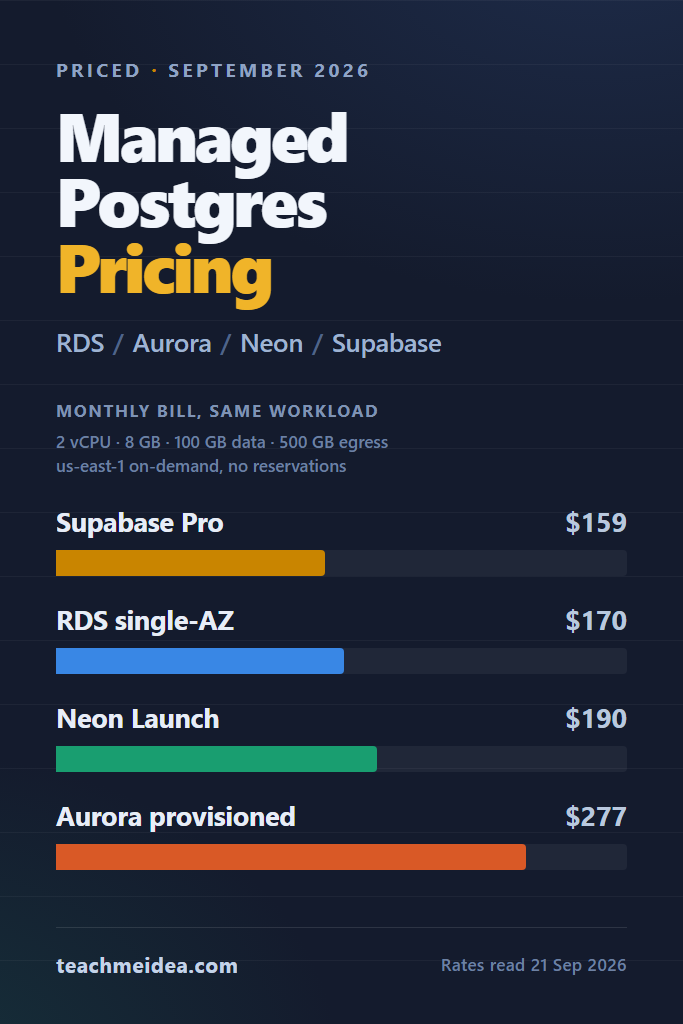
| Supabase Pro plus Large compute | 159.00 |
| RDS db.m7g.large, single-AZ | 170.14 |
| Neon Launch, 2 CU always on | 189.76 |
| Aurora Serverless v2 held at 2 ACU | 251.20 |
| Aurora db.r7g.large provisioned | 277.48 |
| RDS db.m7g.large, multi-AZ | 304.28 |
| Neon Scale, 2 CU always on | 359.12 |
Supabase winning here is the result that surprises people, and it survives scrutiny. The Large add-on gives two dedicated vCPU and 8 GB for 110 USD, the plan credit knocks 10 USD off that, and the 250 GB egress allowance absorbs half the transfer. Still, Supabase Pro never pauses a project, so there is no idle discount hiding in that number.
The Neon rows show the Launch and Scale plans diverging sharply. Scale costs 0.222 USD per CU-hour against Launch’s 0.106, which is a 109 percent premium for branch limits and a configurable scale-to-zero interval rather than for capacity. Unless the project needs more autoscaling headroom than Launch’s 16 CU ceiling, Launch is the row to compare against.
Multi-AZ deserves its own note, because the pricing files make the rule unambiguous: the storage rate doubles alongside the compute rate. A multi-AZ RDS instance is not “compute times two plus the same disk”, it is the entire instance bill times two. That is the price of a synchronous standby, and it is a fair price. Nevertheless, it is not what most cost models assume.
Scenario 3: 4 vCPU, 32 GB and 2 TB of Egress
The third workload scales everything up: four vCPU, 32 GB of memory, 500 GB of data, 2 TB of monthly egress, and one billion Aurora I/O requests.
| Configuration | Monthly total (USD) |
|---|---|
| RDS db.r7g.xlarge, single-AZ | 577.44 |
| Supabase Pro plus 2XL compute | 644.00 |
| Aurora db.r7g.xlarge, I/O-Optimized | 808.37 |
| Aurora db.r7g.xlarge, Standard | 824.69 |
| Neon Launch, 8 CU always on | 944.04 |
| RDS db.r7g.xlarge, multi-AZ | 983.88 |
| Neon Scale, 8 CU always on | 1,621.48 |
At this size the ordering inverts. RDS, which looked unremarkable in scenario two, is now the cheapest option by a clear margin, because its rate card scales linearly while the others add premiums. Neon, which won scenario one, is now roughly 1.6 times the RDS bill on Launch and 2.8 times on Scale, since an always-on 8 CU compute is precisely the shape Neon’s model charges most for.
The Supabase row carries a spec mismatch worth stating plainly. The 2XL add-on is eight vCPU and 32 GB, so it brings twice the CPU of the db.r7g.xlarge it sits next to. Matching memory rather than cores is the fairer comparison for Postgres, yet that choice flatters Supabase on throughput while penalising it on price.
Egress is now the third-largest line on the AWS side at 171 USD, and it is easy to miss because it arrives on the data transfer part of the bill rather than the RDS part. Neon’s 500 GB per-project allowance and Supabase’s 250 GB per-organization allowance both beat the AWS free tier of 100 GB, which is shared across every service in the account.
Is Aurora I/O-Optimized Worth It?
Aurora I/O-Optimized removes the per-request I/O charge entirely, in exchange for a higher compute rate and more than double the storage rate. That trade has an exact break-even point, and it is computable rather than a matter of opinion.
Aurora I/O-Optimized break-even, db.r7g.xlarge, 500 GB
extra compute per month                                  121.18
extra storage per month                                   62.50
premium to recover                                       183.68
break-even, millions of I/O requests/month                918.4
So for this configuration, I/O-Optimized pays for itself above roughly 918 million I/O requests per month, which works out at about 350 requests per second sustained. Below that, Standard is cheaper. Above it, the saving grows without limit, which is the real argument for I/O-Optimized on write-heavy systems.
Two things shift that threshold. A bigger instance raises the compute premium and pushes break-even up. More stored data raises the storage premium and pushes it up further. Therefore the break-even you compute for your own cluster is the only one worth acting on, and the CloudWatch VolumeReadIOPs and VolumeWriteIOPs metrics give you the input.
The Line Items That Surprise People
Four charges account for most of the gap between an estimate and an invoice. None of them are hidden, but all of them sit somewhere other than the headline price.
Pay for RDS Extended Support if You Stayed on PostgreSQL 13
PostgreSQL 13 reached RDS end of standard support on 28 February 2026, and Extended Support year-one pricing started the next day, according to the RDS for PostgreSQL release calendar. The published surcharge is 0.085 USD per vCPU-hour for versions 13, 14 and 15, doubling to 0.17 in year three.
db.m7g.large (2 vCPU) compute at list price              122.64
  Extended Support surcharge, 2 vCPU x 730 h             124.10
db.r7g.xlarge (4 vCPU) compute at list price             348.94
  Extended Support surcharge, 4 vCPU x 730 h             248.20
On a db.m7g.large the surcharge is larger than the instance itself. An overdue major version upgrade has therefore stopped being technical debt and started being a doubled bill.
Budget for Multi-AZ Storage, Not Just Multi-AZ Compute
The multi-AZ rate applies to gp3 storage at 0.230 USD per GB-month, and to provisioned IOPS as well. On a 500 GB database that is an extra 57.50 USD a month that most spreadsheets omit.
Check Whether Scale-to-Zero Can Actually Fire
Aurora’s auto-pause defaults to 300 seconds of idle time and accepts up to 86,400. AWS notes the resume takes “approximately 15 seconds”, stretching to 30 seconds or more once an instance has been paused for over a day. Neon’s free tier scales to zero after five minutes and cannot turn that off, whereas Launch can disable it and Scale makes the interval configurable. Supabase Pro, by contrast, never pauses, and only Free projects are paused after “low activity in a 7-day period”.
Count Egress Where It Actually Lands
AWS gives 100 GB free per month aggregated across every service and region, not per database. If an S3 bucket already consumed it, the database’s first byte out costs 0.09 USD per GB. Both Neon and Supabase scope their allowances to the project or the organization, which is easier to reason about.
A Staging Bill That Outgrew Production
Consider a small team, five or six engineers, running a mid-sized SaaS backend on a single production database. Over a couple of quarters they add a preview database per open pull request, because the workflow is genuinely good and nobody wants to give it up. Each preview environment is small, so each one looks free.
On RDS that pattern bills badly. Every preview instance carries a 20 GB minimum storage allocation regardless of how little data it holds, cannot stay stopped past seven days, and pays full compute price overnight. Twelve preview databases at db.t4g.small therefore cost about 308 USD a month, which is comfortably more than the single db.m7g.large serving real users.
The same twelve previews on Neon Launch, each active a few hours a day and scaled to zero the rest of the time, are dominated by storage rather than by compute. That is the specific shape where branching databases win, and the win comes from the billing model rather than from performance. Conversely, once those previews become long-lived staging environments that never idle, the advantage disappears within a month.
When to Use Each Managed Postgres Option
Choose RDS When the Database Runs Around the Clock
- Your workload is always on, where RDS has the flattest rate card of the four
- You need an extension or a Postgres version that Aurora has not adopted yet
- You are committed enough to AWS to buy reserved instances, which the totals above deliberately exclude
- You want storage and I/O costs that are predictable to the gigabyte
Reach for Aurora When Failover Time or Read Scaling Is the Constraint
- You need more than one reader and want them sharing a single storage layer
- Your write volume exceeds roughly 900 million I/O requests a month, where I/O-Optimized starts paying
- The workload is genuinely spiky and Serverless v2 will average under 2.3 ACU, which is the point where it undercuts a db.r7g.large
- You want backups at 0.021 USD per GB-month instead of 0.095
Pick Neon When the Database Is Idle Most of the Month
- Preview and branch-per-pull-request workflows, which is the case Neon is built for
- Agent or per-tenant workloads that create many small, rarely-touched databases
- Any environment where compute genuinely sits at zero for most hours
- Projects where 500 GB of included egress per project matters more than the storage rate
Stay on Supabase When You Want the Platform, Not Just the Database
- You are using auth, storage, realtime or edge functions alongside Postgres
- You want one predictable monthly figure rather than a metered bill
- Your production instance sits in the Micro to Large range, where Supabase is price-competitive
- You value the 250 GB egress allowance over per-second compute billing
When NOT to Use Managed Postgres
- You need superuser rights, custom C extensions, or filesystem access, none of which any managed provider grants
- Your database is large and stable, where a self-managed instance on reserved capacity can be markedly cheaper
- Regulatory constraints require the data to sit somewhere none of these vendors operate
- You already run a competent platform team and the managed premium buys nothing you do not already have
Common Mistakes with Managed Postgres Pricing
- Comparing instance-hours across vendors while ignoring storage, I/O and egress, which is where the differences actually live
- Assuming Aurora Serverless v2 is cheaper than provisioned, when it only wins below roughly 2.3 average ACU against a db.r7g.large
- Budgeting multi-AZ as double compute, when the storage rate doubles too
- Sizing Neon by vCPU rather than by CU, since one CU allocates about four GB of RAM
- Forgetting that the 100 GB AWS egress allowance is shared with every other service in the account
- Treating a major version upgrade as optional once the Extended Support clock starts
How to Re-Run These Numbers Yourself
Prices move, and a three-month-old cost comparison is a wrong answer rather than an old one. The whole calculation above is one script over the rates in this post, and the structure is short enough to adapt to your own instance classes.
# Rates read 2026-09-21, US East (N. Virginia). Adjust and re-run.
$H = 730
$rdsM7gLarge = 0.168; $rdsGp3Single = 0.115
$neonLaunchCu = 0.106; $neonStorage = 0.35
$sbProBase = 25.0; $sbLarge = 110.0; $sbCredit = 10.0; $sbDiskRate = 0.125

function AwsEgress($gb) { [Math]::Max(0, $gb - 100) * 0.09 }
function SbEgress($gb)  { [Math]::Max(0, $gb - 250) * 0.09 }

$gb = 100; $eg = 500
$rds  = $rdsM7gLarge * $H + $gb * $rdsGp3Single + (AwsEgress $eg)
$neon = 2 * $neonLaunchCu * $H + $gb * $neonStorage
$sb   = $sbProBase + $sbLarge - $sbCredit + ($gb - 8) * $sbDiskRate + (SbEgress $eg)

"{0,-20} {1,10:N2}" -f 'RDS single-AZ', $rds
"{0,-20} {1,10:N2}" -f 'Neon Launch 2 CU', $neon
"{0,-20} {1,10:N2}" -f 'Supabase Pro+Large', $sb
RDS single-AZ            170.14
Neon Launch 2 CU         189.76
Supabase Pro+Large       159.00
Two crossover points are worth keeping in a notebook. Neon Launch at 2 CU matches an always-on db.m7g.large at 578 active hours, which is a 79 percent duty cycle. Aurora Serverless v2 beats a db.r7g.large only below an average of 2.3 ACU.
Conclusion: Which One Should You Pick
Managed Postgres pricing rewards matching the billing model to the workload shape rather than hunting for a cheapest vendor that does not exist. For an always-on production database at four vCPU and above, RDS single-AZ is the cheapest of the four and the most predictable. Below that size, Supabase Pro with a Large add-on edges it out while bundling a whole platform. Neon Launch wins clearly on anything that sits idle for most of the month. Aurora earns its premium only when you need multiple readers, fast failover, or the I/O-Optimized break-even above roughly 918 million requests a month.
The concrete next step is to open your own bill and split it into compute, storage, I/O and egress before comparing anything. Most cost surprises turn out to live in the last two. If you want to shrink the instance before you switch vendors, start with PostgreSQL performance tuning and the measured index type benchmarks, since a query that stops doing sequential scans is cheaper on every provider in this post.
For the architectural side of the RDS decision, RDS vs Aurora: when to choose which covers the failover and replication trade-offs that price alone cannot settle. If serverless compute is on the table, read connection pooling with PgBouncer and HikariCP first, because scale-to-zero and connection pools interact badly by default. Finally, the practices in AWS cost optimization apply directly to the data transfer line that this post kept finding near the bottom of the bill.
These prices will be re-read and this post updated within three months, since a stale price is a wrong answer rather than an old one.
2 Comments
Comments are closed.