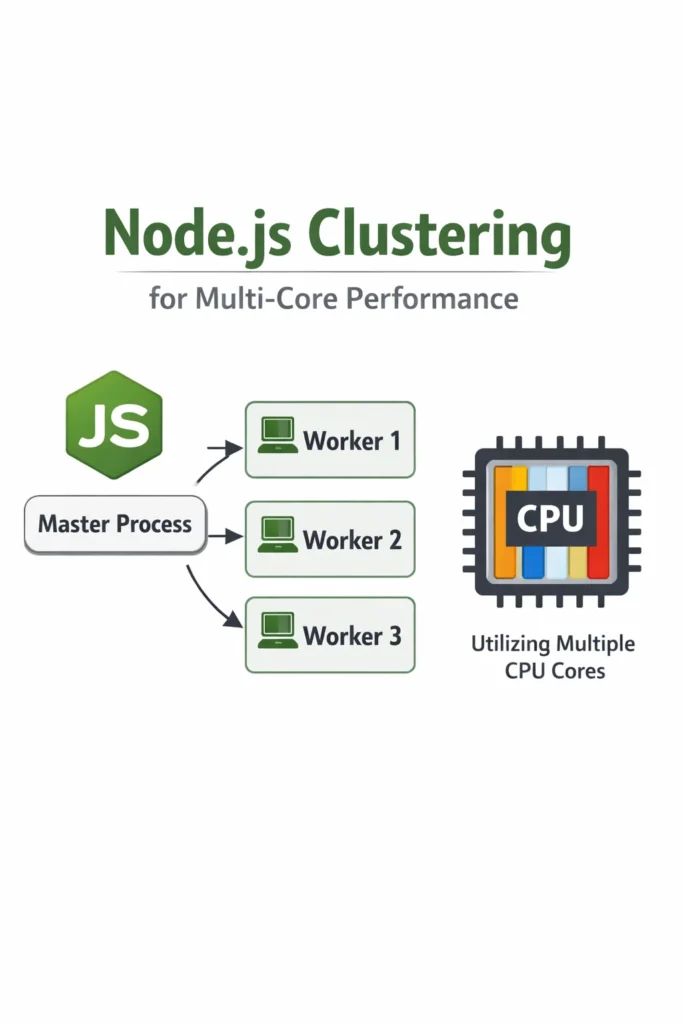
If your Node.js API saturates a single CPU core while the other seven sit idle, you already have the motivation for clustering. Node.js clustering is the built-in mechanism for running multiple Node processes behind a single port, so incoming requests spread across every core instead of queueing on one event loop. This guide shows when clustering actually helps, how to run it safely in production, and where it quietly breaks if you wire it up without thinking.
This post targets intermediate Node.js developers building real APIs, not tutorial-grade servers. By the end, you will know how to pick between the cluster module, a process manager like PM2, and worker threads, plus the operational pitfalls that cause clustered apps to behave worse than a single-process version.
What Is Node.js Clustering?
Node.js clustering is a pattern where a primary process forks multiple worker processes that all share the same server port, allowing Node to use all available CPU cores for incoming traffic. Each worker is a full, isolated Node.js process with its own V8 instance, memory, and event loop. The operating system distributes accepted connections between workers, so a single TCP socket effectively becomes a pool of parallel request handlers.
This matters because Node.js runs application code on a single thread. Without clustering, an eight-core server handling CPU-bound JSON processing will peg one core at 100 percent while the other seven sit near idle. Therefore, clustering is not about making one request faster; it is about stopping the event loop from becoming the bottleneck under concurrent load.
How the Cluster Module Works Under the Hood
The cluster module ships with Node.js core and wraps child_process.fork() with a few extras: an IPC channel between primary and workers, and special handling for shared server sockets. When a worker calls server.listen(3000), it does not actually bind the port. Instead, the primary process binds the port and passes the file descriptor to each worker. The kernel then accepts connections and hands them out to workers using round-robin on Linux and operating-system-default scheduling on Windows.
As a result, you get near-linear scaling up to the number of physical cores on CPU-bound workloads, with no application-level load balancer. However, every worker is a separate process, so anything you cached in memory in one worker is invisible to the others. Furthermore, workers cannot share WebSocket connections or in-process state without an external store.
Minimum Viable Cluster: Code Walkthrough
Here is a production-shaped pattern that forks workers, restarts crashed ones, and shuts down cleanly. This is the shape you actually want, not the three-line example from the docs.
// server.js
import cluster from 'node:cluster';
import os from 'node:os';
import process from 'node:process';
import { startHttpServer } from './app.js';

const WORKERS = Number(process.env.WEB_CONCURRENCY) || os.availableParallelism();

if (cluster.isPrimary) {
  console.log(`Primary ${process.pid} starting ${WORKERS} workers`);

  for (let i = 0; i < WORKERS; i++) {
    cluster.fork();
  }

  cluster.on('exit', (worker, code, signal) => {
    // Restart only on unexpected exits. Signal-initiated shutdowns are intentional.
    if (signal || code !== 0) {
      console.warn(`Worker ${worker.process.pid} died (${signal || code}); forking replacement`);
      cluster.fork();
    }
  });

  const shutdown = () => {
    console.log('Primary received shutdown signal');
    for (const id in cluster.workers) {
      cluster.workers[id].send('shutdown');
    }
  };

  process.on('SIGTERM', shutdown);
  process.on('SIGINT', shutdown);
} else {
  startHttpServer();
}
The os.availableParallelism() call, added in Node 18.14, returns the number of CPUs the process can actually use, respecting cgroup limits in containers. This matters because os.cpus().length reports host cores even inside a container with a one-CPU quota, which is exactly how you accidentally fork eight workers onto one allocated core and make throughput worse.
Now the worker half:
// app.js
import express from 'express';
import process from 'node:process';

export function startHttpServer() {
  const app = express();

  app.get('/health', (_req, res) => res.json({ ok: true, pid: process.pid }));

  // Example CPU-bound handler — the kind of work clustering actually helps with.
  app.post('/render', express.json(), (req, res) => {
    const result = renderReport(req.body); // synchronous, CPU-heavy
    res.json(result);
  });

  const server = app.listen(3000, () => {
    console.log(`Worker ${process.pid} listening`);
  });

  process.on('message', (msg) => {
    if (msg === 'shutdown') {
      server.close(() => process.exit(0));
      // Force exit if connections hang past the grace period.
      setTimeout(() => process.exit(1), 10_000).unref();
    }
  });
}
Notice the shutdown flow: the primary sends a shutdown message over IPC, each worker stops accepting new connections, finishes in-flight requests, then exits. The unref() on the timeout prevents that timer from keeping the event loop alive if everything closes cleanly.
Handling Worker Crashes Without Crash Loops
Respawning dead workers is obvious. The trap is respawning them so fast that a bad deploy melts your server. For instance, if a worker crashes immediately on boot because of a bad config, a naive cluster.fork() inside cluster.on('exit') will fork thousands of processes per minute until something else breaks.
A simple circuit breaker fixes this:
const crashWindowMs = 60_000;
const maxCrashes = 10;
const recentCrashes = [];

cluster.on('exit', (worker, code, signal) => {
  if (!signal && code === 0) return;

  const now = Date.now();
  recentCrashes.push(now);
  while (recentCrashes[0] < now - crashWindowMs) recentCrashes.shift();

  if (recentCrashes.length > maxCrashes) {
    console.error(`Crash loop detected (${recentCrashes.length} in ${crashWindowMs}ms); exiting primary`);
    process.exit(1);
  }

  cluster.fork();
});
When the primary exits, your orchestrator (Kubernetes, systemd, ECS) notices the unhealthy container and handles the real recovery. This is the correct behavior: crash loops should be visible to the platform, not hidden inside your app.
Graceful Rolling Restarts for Zero-Downtime Deploys
One underrated benefit of clustering is that you can restart workers one at a time while others continue serving traffic. This enables zero-downtime config reloads without an external deployer.
function rollingRestart() {
  const workerIds = Object.keys(cluster.workers);
  let i = 0;

  const restartNext = () => {
    if (i >= workerIds.length) return;
    const worker = cluster.workers[workerIds[i++]];
    if (!worker) return restartNext();

    const replacement = cluster.fork();
    replacement.once('listening', () => {
      worker.send('shutdown');
      worker.once('exit', restartNext);
    });
  };

  restartNext();
}

process.on('SIGUSR2', rollingRestart);
Send kill -SIGUSR2 <primary-pid> and the primary rolls workers one by one: fork a new one, wait for it to bind the shared socket, then drain the old one. Consequently, deploys never drop connections as long as requests finish within the shutdown grace period.
Cluster vs PM2 vs Worker Threads
These three get confused constantly, so here is the short version.
| Capability | cluster module | PM2 cluster mode | Worker threads |
|---|---|---|---|
| Scales across CPU cores | Yes | Yes (uses cluster under the hood) | Yes |
| Isolation | Separate processes | Separate processes | Same process, separate threads |
| Memory per unit | One V8 heap each | One V8 heap each | Shared process, separate V8 isolates |
| Shared state | IPC only | IPC only | SharedArrayBuffer, MessageChannel |
| Built-in log aggregation | No | Yes | No |
| Built-in monitoring and auto-restart | No (DIY) | Yes | No |
| Good for | CPU-bound HTTP servers | Production Node hosts | CPU-bound jobs inside one request |
PM2 is essentially the cluster module plus operational tooling: monitoring, log rotation, process lists, zero-config restarts. If you are running on bare VMs or a single host, PM2 saves you from rewriting the primary-process code above. In contrast, if you are on Kubernetes, the platform already gives you restart-on-crash and rolling deploys, so plain cluster is often enough.
Worker threads are a different tool entirely. For background on when threads make sense over processes, see Node.js Worker Threads for CPU-Intensive Tasks. The short rule: clustering scales a whole HTTP server across cores; worker threads offload one heavy task from one request without blocking the event loop.
State, Sessions, and Sticky Connections
Here is where most clustering rollouts get painful. Because each worker has its own memory, anything you stored in a variable is gone the moment a request hits a different worker. In-memory session stores, per-process rate limiters, and local caches all silently break.
The fixes are well-known but non-optional:
- Sessions: Move to Redis, Memcached, or signed JWTs. The
express-sessionmemory store is explicitly labeled as not production-ready for exactly this reason. - Rate limiting: Use a shared store. A per-process counter lets a client send
N × worker_countrequests before getting limited. For a deeper look at the algorithm choices, see Rate Limiting Strategies: Token Bucket, Leaky Bucket, Fixed Window. - Caches: Either accept per-worker duplication (fine for small, read-heavy caches) or move to Redis. For typical caching patterns, see Caching Strategies: Write-Through, Write-Behind, Cache-Aside.
- WebSockets: You need sticky sessions plus a pub/sub backplane. Round-robin routing will bounce the same client between workers and break long-lived connections.
For real-time apps specifically, see Real-Time Notifications with Socket.IO and Redis for the Redis adapter pattern that makes Socket.IO cluster-safe.
When to Use Node.js Clustering
- You have a CPU-bound HTTP workload (JSON parsing, templating, cryptography, image processing) saturating one core
- You run on a VM or bare host where Node is the only process and you want to use all the cores you are paying for
- You want zero-downtime rolling restarts without a full orchestrator
- Your traffic pattern is many small requests, not a few long-lived connections
- You are already using external stores (Redis, Postgres) for session and cache state
When NOT to Use Node.js Clustering
- Your bottleneck is I/O wait, not CPU. Profile first; clustering does not speed up slow database queries or external APIs. Use Profiling CPU and Memory Usage in Python, Node, Java Apps to confirm.
- You are running in Kubernetes with one Node per pod. Horizontal Pod Autoscaler already scales you across machines, and clustering inside a one-CPU container just wastes memory.
- You rely on in-memory state that cannot move to Redis (large local caches, in-process queues, WebSocket fan-out without a backplane)
- You are on AWS Lambda or Cloud Functions. Clustering is meaningless in serverless; see Serverless Node.js on AWS Lambda: Patterns and Pitfalls.
- Your app has heavy startup cost (large models loaded into memory) and N workers would exceed host RAM
Common Mistakes with Node.js Clustering
- Forking
os.cpus().lengthworkers inside a one-CPU container — the kernel time-slices all workers across one core and throughput drops below single-process. Useos.availableParallelism(). - Treating workers as interchangeable for WebSockets — without sticky sessions and a Redis adapter, a reconnecting client lands on a different worker and loses state.
- Forgetting graceful shutdown — dropping in-flight requests on deploy turns every release into a spike of 5xx errors.
- Rate limiting per worker — a clustered app with eight workers and a “100 req/min” limiter actually permits 800 req/min per client.
- Logging to stdout without worker IDs — in aggregated logs, you cannot tell which worker served which request, making debugging painful.
- Respawning crashed workers with no backoff — one bad config turns into a fork bomb.
- Running clustering and PM2 cluster mode together — you end up with nested clusters and workers that cannot bind the port.
Real-World Scenario: When Clustering Finally Paid Off
Consider a mid-sized reporting API running on a single 8-vCPU VM. The service accepts JSON payloads of aggregated analytics data, runs a synchronous transformation step that normalizes and buckets the data, then returns a rendered response. Under load tests of 200 requests per second, p99 latency sits at roughly 2 seconds and one CPU core shows 100 percent utilization while the others idle around 5 percent. This is the textbook clustering scenario.
After switching to a clustered setup with seven workers (one core reserved for the primary and OS work), p99 drops to the low hundreds of milliseconds and overall CPU usage spreads evenly. Throughput scales close to linearly with core count because the workload is embarrassingly parallel at the request boundary. However, two things break immediately in staging: the in-memory LRU cache for normalized dimension tables now has stale copies per worker, and the express-rate-limit middleware, still on its default in-memory store, lets clients send eight times the intended request rate. Both are fixed by moving to Redis, but the lesson is that clustering surfaces state assumptions that a single-process version hid.
For a similar team on Kubernetes with one Node process per pod, the equivalent win comes from horizontal pod autoscaling, not clustering. The trade-off is higher memory overhead per replica (each pod has its own Node, sidecars, and Linux namespaces) against better isolation and simpler operational semantics.
A Note on Benchmarks and Expectations
Do not expect 8x throughput from 8 workers. Realistic gains on CPU-bound HTTP workloads land between 4x and 7x, because shared resources (the kernel network stack, disk I/O, downstream databases) do not scale with your worker count. Meanwhile, on I/O-bound workloads, you may see almost no improvement, because the event loop was never the bottleneck in the first place. Always benchmark before and after with a realistic workload, not a synthetic while(true) loop.
For memory, budget roughly 60 to 150 MB of RSS per worker for a typical Express app at idle, more with heavy dependencies. If your host has 4 GB of RAM and you fork 16 workers with large dependency trees, you will hit swap before you hit CPU ceiling.
Conclusion
Node.js clustering is the right answer when a CPU-bound workload is pinning one core on a multi-core host, and you want to keep a single process manager rather than introduce Kubernetes or PM2. The built-in cluster module gives you fork, restart, rolling-deploy, and port sharing in about fifty lines of code. However, it also exposes every hidden assumption about in-memory state in your app, so plan Redis-backed sessions, shared rate limiters, and sticky WebSockets before you ship.
Start by profiling: if your event loop is idle and your database is the bottleneck, clustering will not help. If your flame graph is a wall of application code on one core, clustering is exactly the tool for the job. For CPU-bound work inside a single request rather than across an entire server, look at Node.js Worker Threads for CPU-Intensive Tasks next.