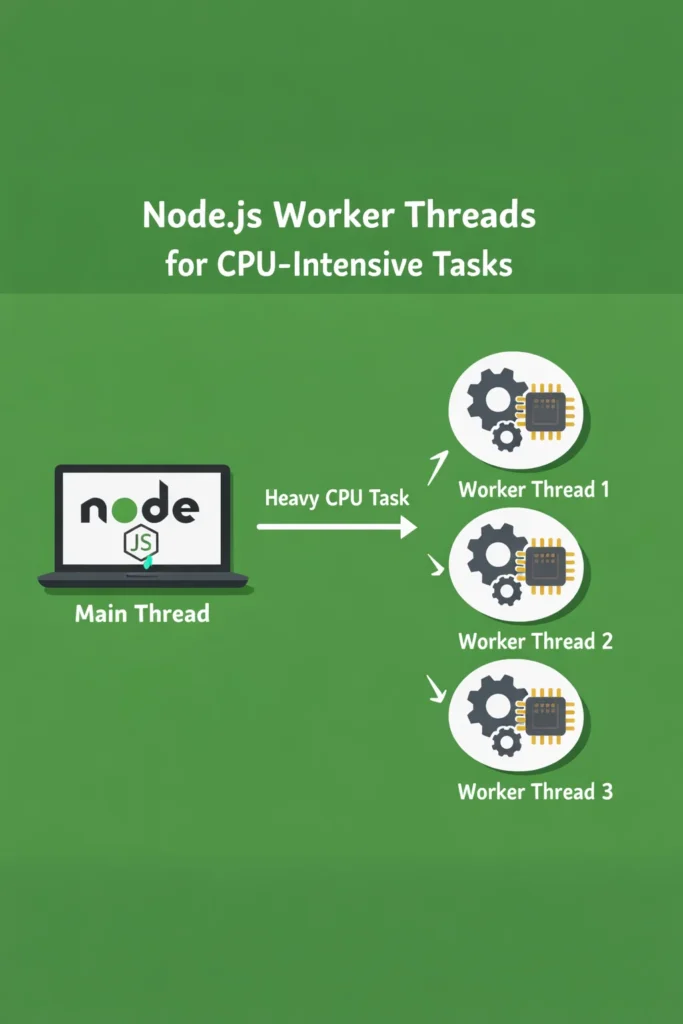
If your Node.js API starts timing out the moment someone uploads a large CSV, generates a PDF, or runs image transformations, the event loop is the problem. Node.js worker threads give you real parallelism for CPU-bound work without spawning child processes or rewriting your service in Go. This deep dive explains the threading model, when to use it, the patterns that hold up in production, and the mistakes that quietly ruin throughput.
Node.js worker threads have been stable since Node 12, and by 2026 they are the default answer for any CPU-heavy task that runs alongside a request-serving process. However, the API is still full of sharp edges. Getting them wrong often produces code that is slower than the single-threaded version it replaced.
Why CPU-Bound Work Breaks the Event Loop
Node.js runs JavaScript on a single thread. Each request, timer, and callback takes its turn on the event loop, and libuv handles I/O asynchronously behind the scenes. This model works beautifully for network servers, where most of the time is spent waiting on sockets, databases, or file systems.
The model breaks when a handler does real computation. A JSON parse on a 50 MB payload, a bcrypt hash with a high cost factor, an in-process image resize, a PDF generation pass — any of these occupy the event loop for hundreds of milliseconds. While they run, every other request queues up behind them. Throughput collapses, p99 latency explodes, and health checks start failing.
Worker threads solve this by running JavaScript on additional OS threads inside the same Node.js process. Each worker has its own event loop, its own V8 isolate, and its own heap. However, they share the process, which makes startup cheap and message passing faster than inter-process communication.
Worker Threads vs Cluster vs child_process
Node.js ships three concurrency primitives, and choosing the wrong one is a common source of pain.
| Primitive | Isolation | Memory sharing | Best for |
|---|---|---|---|
worker_threads | Separate V8 isolate, same process | SharedArrayBuffer, ArrayBuffer transfer | CPU-intensive tasks inside a single service |
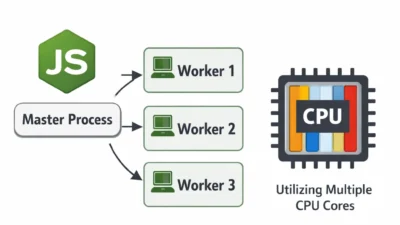
cluster | Separate process per worker | None (IPC only) | Scaling an HTTP server across CPU cores |
child_process | Separate process | None (stdio or IPC) | Running external binaries or isolated scripts |
The rule of thumb: use cluster to scale request handling, use worker_threads to offload CPU work from any one of those workers, and use child_process when you actually need a separate process (different binary, different runtime, or fault isolation).
What Are Node.js Worker Threads?
Node.js worker threads are OS threads that run JavaScript in parallel within a single Node.js process. Each worker has its own V8 instance and event loop, which means they execute truly concurrently on multi-core hardware. Unlike the cluster module, workers share the parent process and can exchange binary data cheaply through MessagePort and SharedArrayBuffer.
The API lives in the built-in worker_threads module. A minimal worker looks like this:
// main.js
import { Worker } from 'node:worker_threads';
import { fileURLToPath } from 'node:url';

const worker = new Worker(fileURLToPath(new URL('./hash-worker.js', import.meta.url)), {
  workerData: { password: 'correct-horse-battery-staple', cost: 12 },
});

worker.on('message', (hash) => {
  console.log('Hashed:', hash);
});

worker.on('error', (err) => {
  console.error('Worker failed:', err);
});

worker.on('exit', (code) => {
  if (code !== 0) console.error(`Worker exited with code ${code}`);
});
// hash-worker.js
import { parentPort, workerData } from 'node:worker_threads';
import bcrypt from 'bcrypt';

const hash = await bcrypt.hash(workerData.password, workerData.cost);
parentPort.postMessage(hash);
The parent posts workerData at spawn time, the worker replies with postMessage, and both sides listen for error and exit. That is the full surface area for a one-shot task. Everything else — pooling, cancellation, backpressure — is something you build on top.
When to Use Node.js Worker Threads
Worker threads shine when the work is CPU-bound, stays in-process, and produces a result that is expensive to recompute. Typical fits:
- Image or video transcoding with
sharp,ffmpegbindings, or custom pixel manipulation - Cryptographic hashing (bcrypt, scrypt, argon2) at high cost factors
- Parsing or validating large payloads — big JSON, CSV, Parquet, Protobuf batches
- PDF and report generation that runs layout or rendering in JavaScript
- Compression and decompression of large buffers
- CPU-bound business logic: pricing models, risk scoring, ML inference in pure JS
In each case, the task blocks the event loop for tens to hundreds of milliseconds, and the result can be sent back as a buffer or serializable object. That is the sweet spot.
When NOT to Use Node.js Worker Threads
Worker threads are not a general-purpose concurrency tool. The cost model matters.
- I/O-bound work. If a task mostly waits on the network or disk, workers add overhead without helping. Async I/O on the main thread is faster and simpler.
- Very short tasks. Spawning a worker costs roughly 10-40 ms depending on the module graph. For a 5 ms JSON parse, the spawn dominates. Use a pool or skip workers entirely.
- Shared mutable state. Workers do not share a heap. If your code assumes a singleton cache, connection pool, or in-memory session store, refactor before introducing threads.
- Native modules that are not thread-safe. Some native addons break under multi-threading. Check the module’s docs before pooling.
- Horizontal scaling. If you need more throughput across many machines, add instances. Worker threads help within one process, not across a fleet.
For scaling HTTP throughput specifically, the scalable Express.js project structure guide covers cluster-based patterns that are usually a better fit than worker threads for request handling.
Message Passing: postMessage, Transfer, and Share
The default postMessage path uses the structured clone algorithm. Node.js serializes the value, copies it to the worker’s heap, and deserializes on the other side. For small objects this is fine. For large buffers, copying doubles memory and burns CPU on both threads.
Two mechanisms avoid the copy.
Transferring ArrayBuffers
If you own a buffer and do not need it on the sending side afterward, transfer it. The sender loses access and the receiver takes ownership without a copy.
// In the parent
const buffer = new ArrayBuffer(50 * 1024 * 1024);
worker.postMessage({ buffer }, [buffer]);
// buffer is now detached on the parent side
The second argument to postMessage is the transfer list. Any ArrayBuffer, MessagePort, or FileHandle in that list moves instead of copying. For a 50 MB image buffer the difference is the difference between a 200 ms hiccup and a few microseconds.
SharedArrayBuffer for Live Shared Memory
When both threads need concurrent read or write access to the same memory, use SharedArrayBuffer backed by Atomics:
import { Worker } from 'node:worker_threads';

const shared = new SharedArrayBuffer(1024);
const view = new Int32Array(shared);

const worker = new Worker('./counter-worker.js', { workerData: { shared } });

// Both threads can now read and write `view` safely using Atomics
Atomics.add(view, 0, 1);
SharedArrayBuffer trades simplicity for speed. In return, you take on every hard problem that C++ and Java programmers deal with: memory ordering, race conditions, deadlocks. Reach for it only when message passing measurably bottlenecks your workload.
Building a Worker Pool
Spawning a worker per task works for batch scripts, but a request-serving API needs a pool. The pattern is the same as a database connection pool: pre-warm N workers, queue incoming tasks, route each task to an idle worker, and resolve the caller’s promise with the worker’s reply.
A minimal pool looks like this:
// worker-pool.js
import { Worker } from 'node:worker_threads';
import { EventEmitter } from 'node:events';
import os from 'node:os';

const kTaskInfo = Symbol('taskInfo');
const kWorkerFreedEvent = Symbol('workerFreedEvent');

class WorkerPool extends EventEmitter {
  constructor(workerPath, size = os.availableParallelism()) {
    super();
    this.workerPath = workerPath;
    this.size = size;
    this.workers = [];
    this.freeWorkers = [];
    this.tasks = [];

    for (let i = 0; i < size; i++) this.addWorker();
  }

  addWorker() {
    const worker = new Worker(this.workerPath);

    worker.on('message', (result) => {
      const { resolve } = worker[kTaskInfo];
      worker[kTaskInfo] = null;
      resolve(result);
      this.freeWorkers.push(worker);
      this.emit(kWorkerFreedEvent);
    });

    worker.on('error', (err) => {
      if (worker[kTaskInfo]) worker[kTaskInfo].reject(err);
      else this.emit('error', err);
      this.workers.splice(this.workers.indexOf(worker), 1);
      this.addWorker(); // Replace dead worker
    });

    this.workers.push(worker);
    this.freeWorkers.push(worker);
    this.emit(kWorkerFreedEvent);
  }

  run(task) {
    return new Promise((resolve, reject) => {
      if (this.freeWorkers.length === 0) {
        this.tasks.push({ task, resolve, reject });
        return;
      }
      const worker = this.freeWorkers.pop();
      worker[kTaskInfo] = { resolve, reject };
      worker.postMessage(task);
    });
  }

  async close() {
    await Promise.all(this.workers.map((w) => w.terminate()));
  }
}

// Drain queued tasks when a worker frees up
WorkerPool.prototype.on(kWorkerFreedEvent, function () {
  if (this.tasks.length > 0 && this.freeWorkers.length > 0) {
    const { task, resolve, reject } = this.tasks.shift();
    const worker = this.freeWorkers.pop();
    worker[kTaskInfo] = { resolve, reject };
    worker.postMessage(task);
  }
});

export default WorkerPool;
The pool size should match os.availableParallelism(), which respects CPU affinity and cgroup limits on Linux containers. Oversizing the pool causes context-switching overhead without adding throughput, and undersizing starves CPUs during bursts.
For production workloads, the piscina library implements this pattern with task timeouts, priority queues, CPU utilization tracking, and zero-copy transfer built in. Reach for it before writing your own pool unless you have an unusual constraint.
Real-World Scenario: PDF Generation Under Load
Consider a mid-sized SaaS that generates invoice PDFs on demand. Before workers, a single request would block the API for 300-500 ms while pdfkit laid out the document. Under light load it was fine. During end-of-month billing runs — when hundreds of customers pulled invoices within minutes — p95 latency climbed from 200 ms to over 8 seconds, and the API failed health checks often enough to trigger unnecessary restarts.
The fix was to move PDF generation into a worker pool sized to availableParallelism() - 1, leaving one core for the main event loop. Each request still awaits the worker reply, but the main thread keeps handling other requests in parallel. After the change, the same billing bursts produced p95 around 400 ms — roughly the single-PDF generation time — and the API stopped restarting.
Two details made the difference. First, the invoice data was transferred as a pre-serialized buffer, not a plain object, to avoid structured-clone overhead on nested data. Second, the pool was warmed at startup so the first requests after deploy did not pay the spawn cost. Both changes are small, and both are easy to miss when first introducing workers.
Error Handling and Lifecycle
Workers can fail in four ways, and each needs a distinct response.
- Uncaught exception inside the worker. Emits
erroron the worker. The worker exits. Your pool must discard it and spawn a replacement, otherwise the pool shrinks over time. - Worker exits with a non-zero code. Emits
exitwith the code. Usually means a native crash orprocess.exit()inside the worker. Treat as fatal for that worker. - Message serialization failure.
postMessagethrows synchronously if the value is not cloneable (for example, a function or a class with non-serializable properties). Validate payloads before posting. - Task timeout. The worker is still running but taking too long. Call
worker.terminate()to kill it, then spawn a replacement. There is no graceful cancellation primitive in Node.js worker threads as of 2026 — termination is your only option.
A production pool wraps each task with an AbortController or timeout, tracks which worker is handling which task, and has a clear policy for terminating a hung worker without leaking pending promises.
Common Mistakes with Worker Threads
- Spawning a worker per task in a hot path. Spawn cost is real. Use a pool.
- Sending large payloads without transfer. Structured clone doubles memory and takes measurable time past a few MB. Transfer
ArrayBuffers when the sender does not need them. - Assuming workers share memory. They do not, unless you explicitly use
SharedArrayBuffer. Modules, globals, caches, and connection pools all exist once per worker. - Forgetting to terminate workers on shutdown. If your process shuts down without awaiting
worker.terminate(), pending tasks may silently drop. Wire workers into your graceful-shutdown path. - Using workers for I/O-bound tasks. Async I/O on the main thread is faster and simpler. Profile before moving work off-thread.
- Ignoring native module compatibility. Some native addons are not thread-safe. Test under concurrent load before shipping.
- Letting the worker pool share state via module globals. Each worker loads modules independently. A singleton in the main thread is a different instance in each worker.
If you are not sure whether your slow endpoint is actually CPU-bound, start with CPU and memory profiling for Python, Node, and Java apps. Worker threads help only after you confirm the bottleneck is computation, not a slow query or an external API.
Performance: What Actually Moves the Needle
The biggest wins come from three places. First, pool size tuning — most apps under-allocate workers and leave cores idle, or over-allocate and thrash. Benchmark with realistic task durations, not synthetic busy loops. Second, payload size — transfer large buffers instead of copying them, and keep inter-thread messages small when possible. Third, warmup — pre-spawning workers before serving traffic eliminates the first-request latency spike.
What does not move the needle: micro-optimizing the worker code, using SharedArrayBuffer for data that fits easily in a transferred buffer, or spawning more workers than you have logical CPUs. Each of these adds complexity without throughput.
Worker Threads With TypeScript and ESM
Modern Node.js projects running TypeScript or ESM have two extra wrinkles. For TypeScript, the worker entry file must be compiled the same way as the main process. Either transpile ahead of time, or use a loader like tsx that supports workers. For ESM, worker entry files are ESM by default when the project has "type": "module", but you must pass { type: 'module' } nowhere — the file extension and package type drive the loader choice. Common pitfall: mixing CommonJS and ESM workers in the same process, which produces silent loader errors that look like “Cannot find module” even when the path is correct.
If you are already thinking about project layout, the Node.js and Deno comparison covers how the two runtimes differ on worker and threading primitives, which matters if you are weighing a migration.
Debugging Worker Threads
Debugging workers is more painful than debugging single-threaded Node.js. Two tips save hours.
First, attach the inspector to workers explicitly. Pass --inspect-brk or use the execArgv option on Worker to open a debug port per worker:
const worker = new Worker('./worker.js', {
  execArgv: ['--inspect-brk=9230'],
});
Chrome DevTools or VS Code will attach to that port separately from the main process.
Second, log with a worker ID. Every log line from a worker should include worker.threadId so you can tell them apart in aggregated logs. Without it, interleaved output from a pool of eight workers is unreadable.
Conclusion
Node.js worker threads turn CPU-heavy endpoints from head-of-line blockers into cleanly parallel workloads — but only when the task actually is CPU-bound, the pool is sized to the hardware, and large payloads use transfer or shared memory instead of structured clone. Start by profiling the slow path, confirm it is computation rather than I/O, then introduce a pool (hand-rolled or piscina) with warmup and timeout handling from day one.
Once you are comfortable with worker threads, the natural next step is deciding when to push further — either splitting work into separate services via NestJS microservices, or moving stream-heavy transformations into Node.js streams, which compose well with workers for pipeline-shaped workloads.

1 Comment
Comments are closed.