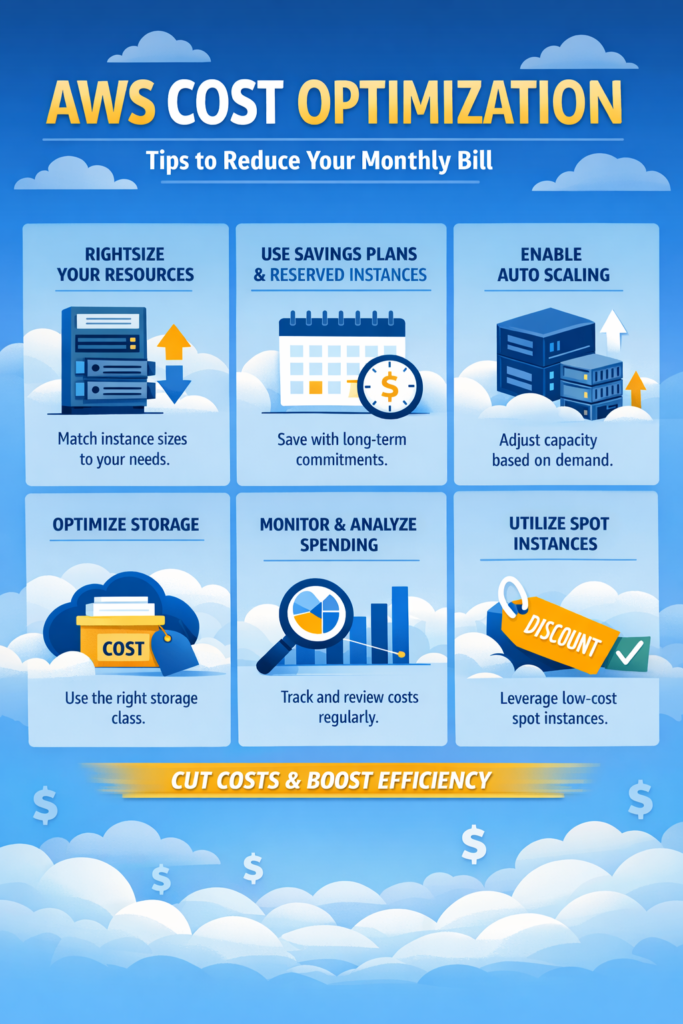
If you’re a backend, DevOps, or SaaS founder running workloads in the cloud, AWS cost optimization is not optional. Without active control, your monthly bill can grow silently as traffic increases, logs accumulate, and services scale automatically.
In this guide, you’ll learn practical AWS cost optimization strategies that reduce waste without harming performance. More importantly, you’ll understand the trade-offs behind each decision so you can optimize safely instead of blindly cutting resources.
Why AWS Bills Grow Faster Than You Expect
Cloud pricing is powerful because it’s usage-based. However, that flexibility also hides inefficiencies.
In practice, AWS bills grow because:
- EC2 instances run 24/7 even when idle
- Over-provisioned RDS databases sit underutilized
- Unused EBS volumes remain attached
- S3 storage grows due to logs and backups
- NAT gateways and data transfer charges spike unexpectedly
For a foundational overview of AWS services and how they impact cost, review AWS for Developers: The Services You Actually Need to Know before diving deeper into optimization.
Start with Cost Visibility (Before Cutting Anything)
Before applying AWS cost optimization tactics, you must understand where your money goes.
Use:
- AWS Cost Explorer
- AWS Budgets
- AWS Cost & Usage Reports
According to the official AWS Cost Management Documentation, tagging and grouping by service is the first step toward meaningful savings.
Action Steps
- Enable cost allocation tags
- Group spending by environment (dev, staging, prod)
- Track cost by service and team
- Set budget alerts
Without visibility, optimization becomes guesswork.
1. Right-Size EC2 and RDS Instances
One of the most common AWS cost optimization wins is right-sizing.
Many teams launch large instances during development. However, they forget to scale down.
How to Optimize
- Use AWS Compute Optimizer recommendations
- Analyze CPU and memory metrics
- Move to burstable instances (T-series) if possible
- Use Graviton (ARM) instances where supported
For compute-heavy React frontends or Node backends that were initially created in legacy setups, modernizing the build system (for example, via Migrating from Create React App to Vite) may reduce server load and therefore reduce infrastructure needs.
Trade-Off
Smaller instances reduce cost. However, aggressive downsizing may increase latency or throttle performance. Therefore, always test before committing.
2. Use Auto Scaling the Right Way
Auto Scaling reduces cost only when configured correctly.
If minimum instance count is too high, you gain no savings. Conversely, if scaling thresholds are too aggressive, performance suffers.
Best Practices
- Set realistic minimum capacity
- Use target tracking policies
- Monitor scale-in behavior carefully
- Separate production from dev/staging groups
In a mid-sized SaaS with 20–40 API endpoints, lowering the minimum instance count during off-peak hours can significantly reduce compute cost over several months.
3. Optimize S3 Storage Classes
S3 often becomes a silent cost driver.
For deeper security and performance considerations, see AWS S3 Best Practices: Security, Performance, and Cost.
Use Storage Classes Strategically
- S3 Standard → frequently accessed data
- S3 Intelligent-Tiering → unpredictable access
- S3 Standard-IA → infrequent access
- S3 Glacier → archival
According to AWS S3 Documentation, lifecycle policies can automatically transition objects between storage classes.
Quick Win
Add lifecycle rules for:
- Old logs
- Backups older than 30–60 days
- User-generated content that is rarely accessed
Trade-Off
Cheaper storage often increases retrieval time and cost. Therefore, do not move hot production data to Glacier.
4. Eliminate Idle Resources
Idle resources are pure waste.
Check regularly for:
- Detached EBS volumes
- Old Elastic IPs
- Unused Load Balancers
- Outdated AMIs
In staging environments, it’s common to find forgotten test stacks. Over a year, even small unused resources add up.
5. Reduce Data Transfer Costs
Data transfer charges can surprise teams, especially when services communicate across regions or availability zones.
Cost Drivers
- Cross-region traffic
- NAT gateway data processing
- Public internet egress
Strategies:
- Keep services in the same region
- Use VPC endpoints instead of NAT where possible
- Cache aggressively
For frontend-heavy apps, improving user experience patterns like React Error Boundaries and Suspense for Better UX can reduce unnecessary retries and backend calls. While this is an application-level improvement, it indirectly reduces data transfer.
6. Use Reserved Instances and Savings Plans
If workloads are stable, Reserved Instances (RIs) and Savings Plans provide significant discounts.
Savings Plans offer:
- Up to ~72% discount compared to On-Demand
- Flexibility across instance types (depending on plan)
Refer to AWS Savings Plans Documentation for official details.
When to Commit
- Production databases running 24/7
- Core backend APIs with predictable traffic
When NOT to Commit
- Experimental AI workloads
- Rapidly evolving architectures
Commitment reduces flexibility. Therefore, analyze usage patterns over at least 2–3 months before purchasing.
7. Clean Up Logging and Monitoring Costs
CloudWatch logs can quietly grow large.
Common issues:
- Debug logs left enabled
- Long log retention periods
- Excessive metric dimensions
Set:
- Log retention to 7–30 days for non-critical logs
- Compression where supported
- Sampling instead of full logging
8. Optimize Architecture Before Scaling
Sometimes AWS cost optimization is not about tuning instances. Instead, it’s about better architecture.
For example:
- Use serverless where appropriate
- Cache frequently accessed data
- Offload static content to CloudFront
If you are building accessible UI systems, as shown in Building Accessible React Components: ARIA and Keyboard Navigation, well-structured components often reduce unnecessary re-renders and backend calls. This indirectly reduces infrastructure load.
Real-World Scenario: SaaS Startup Reducing 28% of Monthly Costs
Consider a small SaaS platform with:
- 30 API endpoints
- 2 RDS databases
- 3 EC2 instances
- Separate staging and production environments
Over several months, costs increased steadily.
After applying AWS cost optimization:
- RDS instances were right-sized
- Old EBS volumes were deleted
- Logs were reduced from 90-day retention to 14 days
- Savings Plans were applied to core services
Within one billing cycle, monthly cost dropped significantly without affecting performance.
The trade-off? Some monitoring visibility decreased due to shorter log retention. However, the team adjusted by exporting critical logs externally.
When to Use AWS Cost Optimization
- Your AWS bill grows month over month
- You have predictable workloads
- You run multiple environments
- You need better cost visibility
When NOT to Use AWS Cost Optimization
- You are still in early experimentation phase
- Traffic patterns are highly unstable
- You lack cost visibility and monitoring
Common Mistakes
- Cutting resources without measuring impact
- Ignoring data transfer charges
- Over-committing to Savings Plans
- Not tagging resources
- Forgetting staging environments
Security vs Cost: Finding Balance
Security should not be sacrificed for savings.
For instance:
- Disabling logging may save money but reduce audit visibility
- Removing redundancy may reduce cost but increase downtime risk
AWS cost optimization must balance reliability, performance, and compliance.
Conclusion
AWS cost optimization is about reducing waste, not blindly cutting resources. By right-sizing instances, optimizing storage classes, reducing idle resources, and committing to Savings Plans wisely, you can significantly lower your monthly bill without harming performance.
Start with visibility. Then apply one optimization at a time and measure impact. Over several months, disciplined AWS cost optimization can reduce cloud spending while maintaining stability.
1 Comment