If you are a backend, DevOps, or full-stack engineer who wants stable cloud environments without huge YAML files, deploying to AWS with CDK is a skill worth learning. Instead of clicking around in the AWS Console or writing large CloudFormation templates, CDK lets you define infrastructure using real programming languages.
In this guide, you will learn how deploying to AWS with CDK works and why it is different from raw CloudFormation. In addition, you will see a realistic production scenario, common mistakes, and clear decision guidance. As a result, you will be able to decide whether CDK fits your stack.
What Is AWS CDK?
The AWS Cloud Development Kit (CDK) is an Infrastructure as Code (IaC) framework developed by Amazon Web Services. It allows you to define AWS resources using TypeScript, JavaScript, Python, Java, or C#.
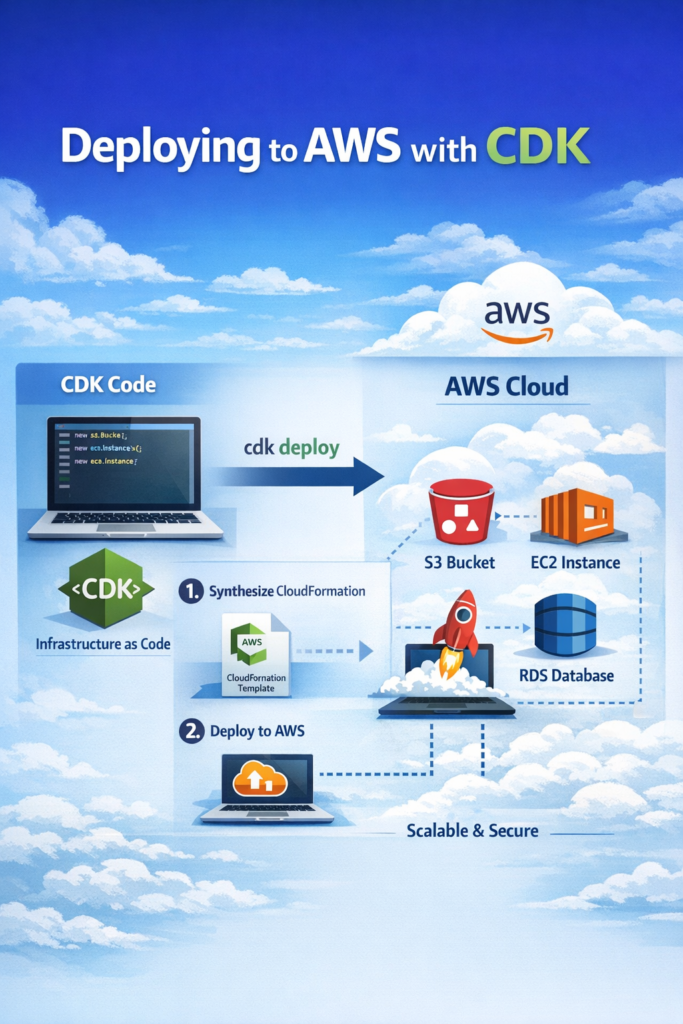
Under the hood, the process is simple:
- First, you write infrastructure in code.
- Then, CDK converts it into a CloudFormation template.
- Finally, AWS CloudFormation provisions the real resources.
Unlike writing raw JSON or YAML, CDK gives you:
- Type safety
- Reusable constructs
- Clear abstractions
- IDE support and linting
You can explore the official documentation at AWS CDK Documentation.
Why Not Just Use the AWS Console?
The AWS Console works for small experiments. However, it does not scale well.
In practice:
- Environments start to drift.
- Changes are not tracked in Git.
- Reproducing setups becomes hard.
- Auditing history becomes unclear.
By contrast, deploying to AWS with CDK keeps infrastructure in your repository. Therefore, every change goes through review. In addition, rollbacks become predictable. Most importantly, environments stay consistent.
For example, if you have already automated authentication flows as shown in Authentication in Next.js with NextAuth.js (Auth.js), CDK extends that automation mindset to infrastructure.
How Deploying to AWS with CDK Works
Step 1: Install CDK
npm install -g aws-cdk
cdk --version
Then initialize a project:
mkdir my-cdk-app
cd my-cdk-app
cdk init app --language typescript
This creates:
- A CDK app
- A stack template
- TypeScript configuration
- Dependency setup
Step 2: Define a Stack
Here is a simple example that provisions an S3 bucket:
import * as cdk from 'aws-cdk-lib';
import { Construct } from 'constructs';
import * as s3 from 'aws-cdk-lib/aws-s3';

export class StorageStack extends cdk.Stack {
  constructor(scope: Construct, id: string, props?: cdk.StackProps) {
    super(scope, id, props);

    new s3.Bucket(this, 'AppBucket', {
      versioned: true,
      encryption: s3.BucketEncryption.S3_MANAGED,
      blockPublicAccess: s3.BlockPublicAccess.BLOCK_ALL,
    });
  }
}
This code:
- Creates an S3 bucket
- Enables versioning
- Enforces encryption
- Blocks public access
Because these rules are defined in code, they cannot be skipped accidentally. As a result, security defaults become part of your system design.
For more details on S3 best practices, see AWS S3 Documentation.
Step 3: Deploy
cdk bootstrap
cdk deploy
First, cdk bootstrap prepares your AWS account. Then, cdk deploy builds and applies the CloudFormation stack.
This workflow is the core of deploying to AWS with CDK.
Real-World Scenario: Scaling an AI Microservice
Consider a mid-sized SaaS product adding AI features. The team has:
- 25–40 API endpoints
- Separate inference services
- Multiple environments
- A small DevOps team
They experiment with AI systems similar to those discussed in Fine-Tuning vs RAG: When to Use Each Approach and orchestration models like Building AI Agents: Tools, Planning, and Execution.
At first, infrastructure was set up manually. However, over time:
- IAM roles became inconsistent.
- Security groups differed across environments.
- Developers could not match production locally.
Eventually, they moved to deploying to AWS with CDK.
As a result:
- Infrastructure became version-controlled.
- IAM rules were centralized.
- Environments were parameterized.
- Security baselines were enforced automatically.
The trade-off was clear. Initially, modeling IAM and networking required effort. However, over several weeks, operational overhead decreased and deployments became predictable.
CDK vs Terraform vs Raw CloudFormation
CDK vs CloudFormation
CloudFormation uses declarative templates. Therefore, it can feel verbose. In addition, reuse is limited.
CDK uses real programming languages. As a result, you can use loops, conditions, and abstraction.
However, CDK still relies on CloudFormation underneath. Therefore, you must understand CloudFormation events for debugging.
CDK vs Terraform
Terraform is cloud-agnostic and works across AWS, Azure, and GCP.
Choose Terraform when:
- You need multi-cloud support.
- Your organization standardizes on Terraform.
Choose CDK when:
- You are fully invested in AWS.
- You want faster support for new AWS features.
- You prefer tight integration with AWS services.
For more details, see HashiCorp Terraform Documentation.
Advanced CDK Patterns
Custom Constructs
Instead of repeating patterns, you can create reusable constructs:
export class SecureBucket extends Construct {
  public readonly bucket: s3.Bucket;

  constructor(scope: Construct, id: string) {
    super(scope, id);

    this.bucket = new s3.Bucket(this, 'Bucket', {
      versioned: true,
      encryption: s3.BucketEncryption.S3_MANAGED,
      blockPublicAccess: s3.BlockPublicAccess.BLOCK_ALL,
    });
  }
}
This approach improves consistency. In addition, it reduces duplication across stacks.
Environment-Specific Configuration
You can pass environment details directly:
new StorageStack(app, 'ProdStack', {
  env: { account: '123456789012', region: 'us-east-1' }
});
As a result, deployments stay reproducible and explicit.
CI/CD Integration
In CI pipelines:
npm run build
cdk synth
cdk deploy --require-approval never
This integrates cleanly with GitHub Actions or CodeBuild. If you already use tools discussed in AI Code Assistants Compared: Copilot vs Cursor vs Codeium, you will benefit from strong IDE integration while writing infrastructure.
When to Use Deploying to AWS with CDK
- You are fully committed to AWS
- Your team prefers TypeScript or Python
- You want reusable infrastructure constructs
- You need consistent environments
- You want infrastructure changes reviewed in pull requests
When NOT to Use Deploying to AWS with CDK
- You operate in multi-cloud setups
- Your organization mandates Terraform
- Your team lacks AWS experience
- You prefer raw template control
Common Mistakes
- Abstracting too early
- Ignoring IAM least privilege
- Skipping
cdk diff - Mixing environments in one stack
- Treating CDK as magic instead of understanding AWS
Performance and Operational Considerations
CDK does not improve runtime performance directly. Instead, it improves how you manage infrastructure.
However, poor configuration can still cause issues:
- Over-sized EC2 instances
- Unnecessary NAT gateways
- High logging costs
Therefore, you must still review architecture carefully.
If your system also depends on search infrastructure, see Full-Text Search: PostgreSQL vs Elasticsearch vs Algolia before provisioning large clusters.
Security Implications
Infrastructure as Code does not automatically mean secure infrastructure.
You must still:
- Enforce least privilege IAM
- Encrypt storage
- Enable logging
- Monitor drift
However, CDK helps encode secure defaults into reusable constructs. As a result, security becomes part of your codebase rather than an afterthought.
Conclusion
Deploying to AWS with CDK allows teams to manage infrastructure in a clear, version-controlled way. Although there is an initial learning curve, the long-term benefits in consistency, reviewability, and stability are significant.
If you are AWS-focused and building production systems, deploying to AWS with CDK is often a practical choice. Start small with one stack. Then, gradually refactor into reusable constructs as your system grows.