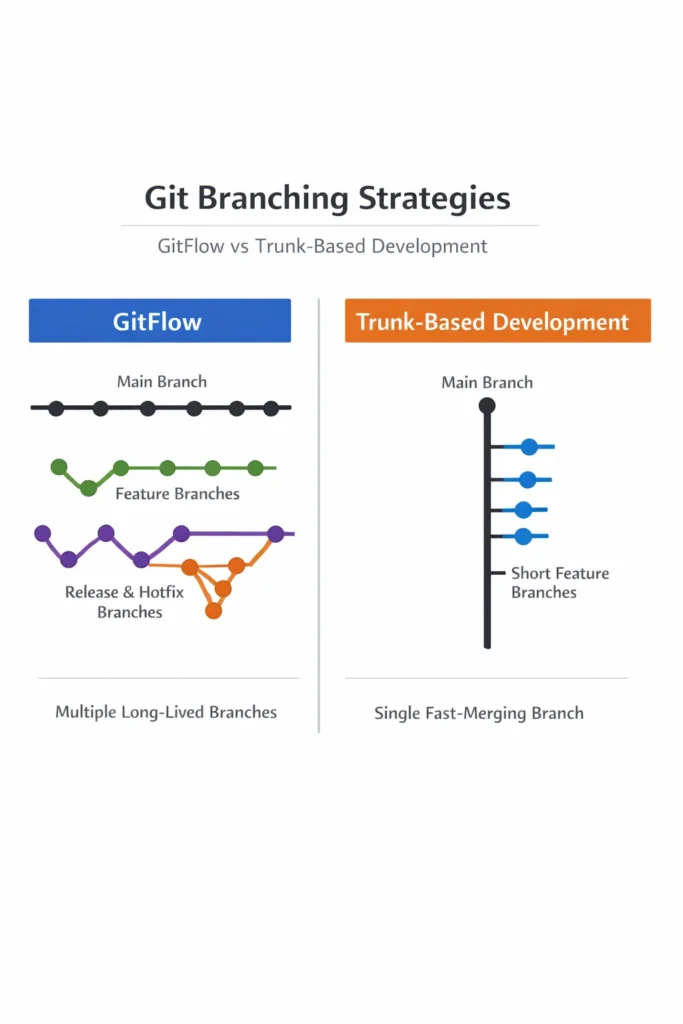
How your team uses branches affects everything downstream — how often you deploy, how painful merges are, how quickly bugs get fixed, and how confidently you ship changes. The two dominant branching strategies, GitFlow and trunk-based development, represent fundamentally different philosophies about when code should be integrated and how releases should be managed.
GitFlow uses long-lived branches to separate development from release, giving teams explicit control over what ships and when. Trunk-based development keeps all developers working on a single branch, relying on frequent integration and automated testing to maintain stability. Choosing between GitFlow vs trunk-based development is not about which strategy is objectively better — it is about which one matches your team’s size, release cadence, and deployment infrastructure.
How GitFlow Works
GitFlow, introduced by Vincent Driessen in 2010, defines a strict branching model with five types of branches, each serving a specific purpose.
Branch Structure
- main: Always reflects production. Every commit on main is a released version
- develop: The integration branch where features merge before release. Represents the next upcoming release
- feature/*: Created from develop for each new feature. Merged back into develop when complete
- release/*: Created from develop when a release is being prepared. Allows final testing and bug fixes without blocking new feature development
- hotfix/*: Created from main for urgent production fixes. Merged into both main and develop
# Start a new feature
git checkout develop
git checkout -b feature/user-dashboard

# Work on the feature...
git commit -m "Add dashboard layout"
git commit -m "Implement chart components"

# Merge back to develop when complete
git checkout develop
git merge --no-ff feature/user-dashboard
git branch -d feature/user-dashboard

# Prepare a release
git checkout develop
git checkout -b release/2.1.0
# Final testing, version bump, docs update...
git checkout main
git merge --no-ff release/2.1.0
git tag -a v2.1.0 -m "Release 2.1.0"
git checkout develop
git merge --no-ff release/2.1.0
git branch -d release/2.1.0
The Release Process
GitFlow’s release branches act as a stabilization gate. When the team decides to release, a release branch is created from develop. Only bug fixes go into the release branch — new features continue merging into develop for the next release. Once the release branch is stable, it merges into both main (for production) and develop (to keep the fix history).
This separation is GitFlow’s core value proposition: it lets teams develop new features and stabilize releases simultaneously without interference.
How Trunk-Based Development Works
Trunk-based development collapses the branch structure to a single primary branch (main or trunk). Developers commit directly to the trunk or use very short-lived feature branches that merge within a day or two.
Branch Structure
- main (trunk): The single source of truth. All developers integrate here
- Short-lived feature branches (optional): Last hours to a couple of days maximum, never more
- No develop branch, no release branches, no long-lived branches of any kind
# Start a small change on a short-lived branch
git checkout main
git checkout -b add-dashboard-header

# Small, focused change
git commit -m "Add dashboard header component"

# Merge back to main quickly (same day or next day)
git checkout main
git pull
git merge add-dashboard-header
git branch -d add-dashboard-header
git push
How Releases Work Without Release Branches
Trunk-based development relies on two mechanisms to manage releases without dedicated branches:
Release from trunk: Every commit to trunk is potentially releasable. CI/CD pipelines run tests on every commit, and passing commits are deployed automatically or tagged for release. Teams using continuous deployment with GitLab CI/CD or similar pipelines deploy from trunk multiple times per day.
Feature flags: Incomplete features are merged to trunk but hidden behind feature flags. The code exists in production but is not visible to users until the flag is enabled. This allows developers to merge work-in-progress without affecting the production experience.
# Feature flag controls visibility, not branch isolation
if feature_flags.is_enabled('new_dashboard', user_id=current_user.id):
    return render_new_dashboard()
else:
    return render_current_dashboard()
GitFlow vs Trunk-Based Development: Feature Comparison
| Factor | GitFlow | Trunk-Based Development |
|---|---|---|
| Branch lifetime | Weeks to months (develop, release) | Hours to days (feature branches only) |
| Integration frequency | When feature is “done” | Daily or more |
| Merge conflicts | Common and often large | Rare and small |
| Release process | Explicit (release branch, QA, merge) | Continuous (every commit is releasable) |
| Parallel releases | Supported natively | Requires feature flags |
| Rollback strategy | Revert merge or hotfix branch | Revert commit or toggle feature flag |
| CI/CD alignment | Periodic deployment | Continuous deployment |
| Team size fit | Works for teams of any size | Best for teams with strong CI/CD |
| Learning curve | Higher (five branch types) | Lower (one branch, simple rules) |
Where GitFlow Excels
Scheduled Release Cycles
If your team ships on a fixed schedule (every two weeks, monthly, quarterly), GitFlow’s release branches provide a natural staging area. The QA team tests the release branch while developers continue working on the next cycle. This separation prevents the “freeze everything for release” pattern that slows down development.
Multiple Supported Versions
If you maintain multiple versions simultaneously (v2.x and v3.x for different customer segments), GitFlow’s branch structure accommodates this naturally. Each major version has its own main-like branch, and hotfixes can target specific versions.
Regulated Environments
Industries with compliance requirements (healthcare, finance, government) often need documented release processes with explicit approval gates. GitFlow’s release branches create natural checkpoints where compliance reviews and sign-offs can occur before merging to main.
Teams Without Comprehensive Automated Testing
GitFlow’s release branch provides a buffer for manual QA. If your team does not have extensive automated test coverage, that manual testing phase catches bugs that would otherwise reach production in a trunk-based model.
Where Trunk-Based Development Excels
Continuous Deployment
If your goal is to deploy multiple times per day, trunk-based development eliminates the branch management overhead that slows GitFlow down. Every merge to trunk triggers the CI/CD pipeline, runs tests, and deploys if everything passes. There is no waiting for a release branch to be created and stabilized.
Reducing Merge Pain
Long-lived branches diverge. The longer a feature branch exists, the more the trunk changes underneath it, and the more painful the eventual merge becomes. Trunk-based development forces frequent integration, which keeps diffs small and merge conflicts manageable. Teams that have experienced multi-day merge conflicts after long-lived feature branches understand this benefit viscerally.
Small to Medium Teams
Teams of 2 to 15 developers benefit most from trunk-based development because coordination overhead is low enough that everyone can integrate frequently. Larger teams can also use trunk-based development, but they need stronger CI/CD infrastructure and coding practices (feature flags, incremental changes) to maintain stability.
Faster Feedback Loops
When code merges to trunk immediately, problems surface within hours rather than weeks. A bug introduced on Monday is discovered Monday afternoon, while the developer still has full context. With GitFlow, the same bug might not surface until the release branch is tested days or weeks later, when context has faded and the bug is harder to diagnose.
The Merge Conflict Reality
Merge conflicts are the most tangible cost difference between these strategies. Consider a concrete example.
GitFlow scenario: Developer A starts feature/checkout-redesign and works on it for two weeks. Developer B starts feature/payment-integration a few days later. Both features modify the same order processing module. When both merge to develop, the second merge hits significant conflicts because neither developer saw the other’s changes during development.
Trunk-based scenario: Developer A makes the first small change to the order module and merges to trunk. Developer B pulls trunk, sees the change, and adapts their work accordingly. Each day, both developers integrate small changes. By the end of two weeks, the same amount of work is done, but no single merge involves more than a day’s worth of changes.
The difference compounds with team size. In a team of 10, GitFlow can produce merge conflicts that take hours to resolve. Trunk-based development limits each conflict to a few lines because the integration window is so short.
Deployment Strategies and Branch Models
Your branching strategy must align with your deployment strategy. A mismatch creates friction that slows the entire team.
GitFlow + scheduled deployments: Release branches map to deployment windows. QA validates the release branch, ops deploys from the tagged main commit. This works well with blue-green or canary deployments where the release is a deliberate event.
Trunk-based + continuous deployment: Every trunk commit is a deployment candidate. Automated tests gate the pipeline — if tests pass, the commit deploys. Feature flags control user-facing changes independently of deployments.
The anti-pattern: Using GitFlow with continuous deployment or trunk-based with manual release processes. GitFlow adds overhead that continuous deployment does not need. Trunk-based development without automated testing makes every commit a risk to production.
Handling Hotfixes
Both strategies handle urgent production fixes, but the mechanics differ.
GitFlow Hotfix
# Create hotfix from main
git checkout main
git checkout -b hotfix/payment-timeout-fix

# Fix the bug
git commit -m "Increase payment gateway timeout to 30s"

# Merge to both main and develop
git checkout main
git merge --no-ff hotfix/payment-timeout-fix
git tag -a v2.1.1 -m "Hotfix: payment timeout"
git checkout develop
git merge --no-ff hotfix/payment-timeout-fix
git branch -d hotfix/payment-timeout-fix
The hotfix must merge to both main and develop to prevent the fix from being lost in the next release. Forgetting the develop merge is a common GitFlow mistake.
Trunk-Based Hotfix
# Fix directly on trunk
git checkout main
git checkout -b fix-payment-timeout

git commit -m "Increase payment gateway timeout to 30s"

git checkout main
git merge fix-payment-timeout
git push  # CI/CD deploys automatically
The fix follows the same path as any other change — merge to trunk, pipeline deploys. No special branch type, no dual merge. If the fix needs to reach production faster than the normal pipeline, you can automate quality checks with git hooks that run a fast validation before pushing.
Real-World Scenario: Migrating from GitFlow to Trunk-Based Development
A SaaS team of 12 developers uses GitFlow with bi-weekly releases. The team spends every other Thursday in “release day” — merging the release branch to main, resolving last-minute conflicts, running manual smoke tests, and deploying. Feature branches routinely live for 5-10 days, and merge conflicts occur on roughly half of all feature merges.
The team decides to transition to trunk-based development. They do it gradually over three months rather than switching overnight.
Month 1: The team keeps the develop branch but shortens feature branch lifetimes to a maximum of two days. Developers break larger features into smaller incremental changes. Merge conflicts drop noticeably because branches diverge less.
Month 2: The team introduces feature flags for changes that cannot ship in two days. Developers merge incomplete work behind flags, which trains the habit of separating “merged” from “released.” The team also invests in expanding test coverage — trunk-based development requires confidence that trunk is always deployable.
Month 3: The team removes the develop branch and merges directly to main. CI/CD deploys every main commit to staging automatically, and production deployments happen twice per week (with a goal of daily). Release days disappear entirely — deployments are routine events rather than team-wide ceremonies.
After the transition, the team reports that “release day” overhead — which consumed roughly 4-8 developer hours every two weeks — is eliminated. Merge conflicts still occur but resolve in minutes instead of hours. The most significant unexpected benefit is that bugs are caught faster because changes reach staging within an hour of merging, and developers fix issues while the code is still fresh in their minds.
When to Use GitFlow
- Your team ships on a fixed schedule (bi-weekly, monthly) with a formal QA phase before each release
- Regulatory or compliance requirements mandate explicit release approval gates
- You maintain multiple production versions simultaneously
- Automated test coverage is insufficient for confidence in continuous deployment
- The team is large (20+ developers) and coordination across feature branches is already established
When to Use Trunk-Based Development
- Your goal is continuous deployment with multiple releases per day or week
- The team is small to medium (2-15 developers) and can coordinate integration easily
- You have strong automated test coverage that catches regressions before they reach production
- Merge conflicts from long-lived branches are a recurring pain point
- Feature flags infrastructure exists or can be adopted to decouple deployment from release
Common Mistakes with Git Branching Strategies
- Choosing GitFlow because it feels “more structured” when the team is three developers deploying weekly — the overhead is not justified at that scale
- Adopting trunk-based development without sufficient automated testing, causing main to break frequently and eroding team confidence
- Keeping feature branches open for weeks in a trunk-based model — if the branch lives longer than two days, you are not doing trunk-based development
- Not merging GitFlow hotfixes into both main and develop, causing the fix to regress in the next release
- Treating the branching strategy as permanent — teams evolve, and the strategy should evolve with them
- Using feature flags as an excuse to merge broken code — the flag hides the feature from users, but broken code still affects the build, test suite, and other developers
- Not cleaning up merged branches, leaving hundreds of stale branches that clutter the repository and confuse new team members
Choosing the Right Git Branching Strategy
The choice between GitFlow vs trunk-based development reflects your team’s deployment culture more than any technical constraint. GitFlow gives you control, separation, and explicit release gates at the cost of branch management overhead and merge complexity. Trunk-based development gives you speed, simplicity, and continuous integration at the cost of requiring strong automated testing and feature flag discipline.
If you are unsure which to choose, start with trunk-based development and short-lived feature branches. It is the simpler model, and you can always add structure later if the team needs it. Moving from trunk-based to GitFlow is straightforward — moving from GitFlow to trunk-based, as the scenario above illustrates, requires changing habits, tooling, and team culture simultaneously.