If your Claude Code sessions slow to a crawl after the first hour, the cause is usually context bloat — not the model. Each grep, file read, and failed test result piles up in the main thread, and by the time you ask for the actual change you wanted, the agent is wading through 80,000 tokens of noise. Claude Code subagents fix that by running scoped tasks in their own clean context windows. They also unlock genuinely parallel work: four searches running at once instead of four sequential round trips.
This deep dive explains what claude code subagents actually are at the protocol level, how the harness orchestrates them, when parallel execution pays off (and when it burns tokens for no reason), and the patterns that hold up in production. By the end, you should be able to pick the right subagent type for a given task, write subagent prompts that don’t waste your turn, and decide when to skip subagents entirely and just call tools directly.
What Claude Code Subagents Actually Are
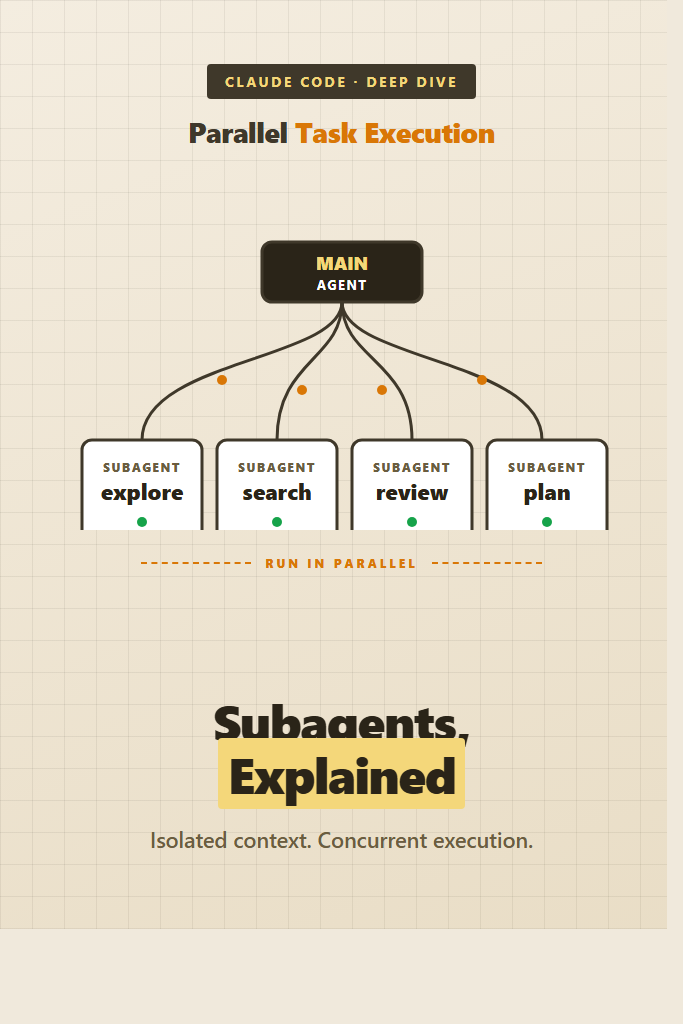
A claude code subagent is a separate Claude conversation, spawned by your main agent through the Agent tool, with its own system prompt, its own tool allowlist, and its own context window. The main agent waits for the subagent to finish, then receives a single text result — none of the subagent’s intermediate tool calls or file reads end up in the main context.
Think of it as a function call that happens to be implemented by another LLM. You hand off a goal, the subagent does the work using whatever tools it has access to, and it returns a summary. The main agent stays focused on the higher-level task.
The key properties to internalize:
- Subagents run in isolated context windows. Their tool calls, search results, and intermediate reasoning never pollute the parent conversation.
- They have their own system prompt, which can be specialized for a narrow job (security review, codebase exploration, plan generation).
- They have their own tool allowlist, often more restricted than the main agent’s.
- They communicate only by returning a final text response to the parent.
- Multiple subagents can run concurrently when invoked in the same parent turn.
That last property is what enables parallel task execution. Spawning four subagents in a single tool block runs them genuinely in parallel — not interleaved, not queued. Four search jobs that would take 40 seconds in series finish in roughly the time of the slowest one.
The Architecture: Main Agent and Workers
The main agent is the conversation you’re talking to. It owns the long-running session, decides when to delegate, and is the only thing that sees your prompts directly. When it calls the Agent tool, the harness:
- Creates a fresh conversation with the chosen subagent’s system prompt
- Injects the parent’s prompt as the first user message in that conversation
- Lets the subagent run its tool loop until it produces a final text response
- Returns that text response as the tool result to the parent
The subagent does not see your earlier conversation. It does not see CLAUDE.md unless its definition explicitly loads it. It does not see prior tool results from the parent. Whatever the parent does not write into the prompt, the subagent does not know.
That isolation is the feature. It also means you, as the user, never see the subagent’s intermediate work. The subagent might read 30 files, run 10 greps, and chase a wrong lead for several minutes — none of that surfaces in your terminal. You see one summary at the end.
Why this matters in practice: the parent’s context is precious. Anthropic’s models compact prior turns automatically as the window fills up, but compaction is lossy. Every kilobyte of search noise that never enters the main conversation is a kilobyte you keep for actual reasoning later in the session.
Built-In Subagent Types
Claude Code ships with several built-in subagent types. The exact list depends on your version, but the canonical ones are:
| Subagent | Purpose | Tool Access |
|---|---|---|
general-purpose | Open-ended research, multi-step tasks, anything not covered by a specialist | All tools |
Explore | Codebase exploration — find files, search code, answer questions about structure | Read-only (no Edit, Write, NotebookEdit) |
Plan | Software architect — design implementation plans without writing code | Read-only |
claude-code-guide | Answer questions about Claude Code, the Agent SDK, and the Anthropic API | Glob, Grep, Read, WebFetch, WebSearch |
statusline-setup | Configure the Claude Code status line | Read, Edit |
The pattern matters more than the specific list. Specialist subagents have narrower tool allowlists, which prevents them from accidentally doing more than they were asked. An Explore agent cannot edit files even if the prompt accidentally suggests it should. A Plan agent cannot commit code. The constraint is enforced at the harness level, not by trusting the model to behave.
For codebase questions, prefer Explore over general-purpose. The Explore agent is tuned for fast file pattern matching and content search, and it knows to cap its own work at the requested depth. For implementation strategy questions, prefer Plan over starting to code. For anything that involves both research and writing, general-purpose is the catchall.
If you need to know what’s currently available in your install, check the Agent tool documentation in your session — the harness exposes the list via the tool’s parameter description.
How Parallel Execution Works
Parallel execution depends on a property of the tool-calling protocol: a single assistant turn can include multiple tool-use blocks, and the harness can execute them concurrently. When the main agent emits a turn containing four Agent tool calls in the same response, the harness fires all four in parallel.
Here’s what that looks like conceptually. The main agent decides it needs to investigate four independent questions:
- “Where does the auth middleware live?”
- “What’s our test setup pattern?”
- “Which routes are public?”
- “What does our logger interface look like?”
Instead of asking these one at a time and waiting, it spawns four Agent calls in a single turn. Each one runs in its own isolated context. The harness collects all four results before returning control to the main agent. The main agent then sees all four summaries at once and can plan the actual work.
The hard rule: parallelism only works when the tasks are independent. If task B needs the result of task A, you cannot run them in parallel — task B doesn’t know what to ask until A finishes. Forcing parallel execution on dependent tasks usually means task B asks the wrong question, and you waste both calls.
For a deeper background on agent orchestration patterns, see our guide on building AI agents with tools, planning, and execution, which covers the same orchestration ideas in a framework-agnostic way.
A Realistic Parallel Pattern
A typical pattern: research-heavy first turn, single-threaded execution after.
Turn 1 (parent):
  Agent(Explore, "find all places that read DATABASE_URL")
  Agent(Explore, "show me how config is loaded across services")
  Agent(Explore, "list every test that touches the database layer")

Turn 2 (parent receives all three summaries):
  -> now plan the change
  -> Edit the actual files
Three searches go out at once. The parent gets three summaries back. Then the parent reasons over the combined picture and starts editing. The total wall time is roughly one search, not three.
Why Sequential Is Sometimes Right
If the parent is investigating one lead — read file, follow a reference, read the next file, follow the next reference — that’s inherently sequential. Spawning a subagent for each step burns tokens and adds latency for no benefit. Just use Read and Grep directly.
The mental rule: parallelize independent searches, serialize dependent reads.
Writing Custom Subagents
Beyond the built-ins, Claude Code lets you define your own subagents. A custom subagent is a markdown file with frontmatter that declares its name, description, system prompt, and tool allowlist. The harness picks it up automatically when present.
The minimal definition looks like this. Save it as .claude/agents/security-reviewer.md in your project (or ~/.claude/agents/ for user-wide agents):
---
name: security-reviewer
description: Reviews diffs for OWASP Top 10 issues, secret leakage, and authentication mistakes. Use after code changes touching auth, input handling, or external requests.
tools: Read, Grep, Glob
---

You are a security reviewer. Your job is to find vulnerabilities in code changes.

For each diff you receive:

1. Identify the change type (auth, data handling, network, infra).
2. Run targeted greps for known anti-patterns:
   - Hardcoded secrets, tokens, API keys
   - SQL string concatenation
   - User input in shell commands
   - Missing CSRF tokens on state-changing routes
3. Report findings as: severity (critical/high/medium/low), location (file:line), explanation, suggested fix.

Be terse. No preamble. If you find nothing, say so in one line.
The frontmatter fields:
name— what you reference when invoking the subagentdescription— when the main agent should pick this subagent (the parent reads this to decide)tools— comma-separated allowlist of tools the subagent can use
The body is the system prompt. It defines the subagent’s role, output format, and any rules it should follow. Keep it focused. A subagent that tries to do five things will do all of them poorly.
When to Define a Custom Subagent
Custom subagents earn their keep when you have a repeated, scoped task with a specific output format. Code review, security audits, performance analysis, and migration scaffolding all fit. One-off tasks do not — just write the prompt inline.
If your team has shared workflows, commit the agent definitions into the repo at .claude/agents/. Everyone gets the same review subagent, the same plan generator, the same scaffolder. Pair this with Claude Code slash commands and Claude Code hooks for a complete project-level automation layer.
Prompt Patterns That Hold Up
The subagent prompt is the only context the worker gets. Treat it like a self-contained briefing for someone who just walked into the room.
Pattern 1: State the Goal, Not the Steps
Bad:
Run grep for “DATABASE_URL”, then read each file that matches, then summarize where it’s used.
Good:
Find every place in the codebase that reads
DATABASE_URL. For each, report the file path, the surrounding function, and whether it’s used at startup or per-request.
The first version prescribes the steps. The second states the goal and lets the subagent pick its own path. Subagents are smart — they know how to grep. Telling them which tool to use forces them down a narrow path that may not be optimal. If the answer happens to live in a config file the subagent finds via a Glob first, you’ve already won.
The exception: when the answer is at a known location. “Read src/db/connection.ts and tell me what driver it imports” is fine — there’s nothing to investigate.
Pattern 2: Give the Subagent Enough Context to Make Judgment Calls
The parent has all the context. The subagent has only the prompt. If the subagent might encounter ambiguity, write the prompt so it can resolve the ambiguity correctly.
Find the rate-limiting implementation. Note: we have two — one in the API gateway (per-IP, in Redis) and one in the application middleware (per-user-id, in-memory). I want the application middleware one. If you find both, tell me about the application one only.
Without that note, the subagent might return both, or pick the wrong one, or ask a clarifying question (which, in a parallel context, is a wasted turn).
Pattern 3: Cap the Output
Subagent results pour back into the parent’s context. A 5,000-word architectural treatise is a 5,000-word loss to the parent’s context budget. Cap aggressively.
Report findings in under 200 words. Bullet points only. No explanation paragraphs.
Or:
Reply with only the file paths, one per line.
You can always send a follow-up call asking for more detail. You cannot un-pollute the parent’s context once a giant summary lands in it.
Pattern 4: Brief Specialist Subagents With the Why
The built-in Explore agent is fast at codebase searches but doesn’t know your project’s conventions. If your project has unusual layout — say, a monorepo with packages/* and apps/* — say so:
Explore this codebase to find auth logic. The repo is a Turborepo monorepo: shared code lives in
packages/, deployable services inapps/. Auth is most likely inpackages/auth-core/but may also have wiring in each app underapps/*/middleware/.
Three sentences, dramatically better results.
For more on prompt design as a craft, the broader patterns covered in our prompt engineering best practices post all apply here — subagent prompts are just prompts with a tighter scope.
Token Cost and Context Window Tradeoffs
Subagents are not free. Every subagent call:
- Bills the input tokens (system prompt + your task brief)
- Bills the subagent’s tool calls and reasoning
- Bills the output tokens it returns to the parent
- Bills those output tokens again when they enter the parent’s context
The last point catches people off guard. If a subagent returns a 1,000-token summary, that 1,000 tokens is paid once on output and paid every subsequent turn as the parent re-reads it. Long sessions can compound this if subagent results stay in the active window.
When subagents save tokens overall:
- The subagent reads 50 files and returns a 500-token summary. Net win — those 50 files never entered the parent.
- Four parallel searches return four short summaries. The parent skipped four serial round trips that would have included all the intermediate noise.
When subagents cost more tokens:
- The task is two file reads and a short answer. Just do it directly. The subagent’s system prompt overhead exceeds the work.
- The subagent’s output is verbose and the parent re-reads it for many turns afterward.
- The subagent fails or returns “I couldn’t find that,” and the parent has to retry with a different approach.
A good heuristic: if you’d expect the work to involve more than ~5 tool calls or read more than ~10 files, a subagent is probably worth it. Below that, direct tool use is cheaper.
If you’re comparing this against other AI coding tools and their orchestration approaches, see our AI code assistants compared and the recent AI tools coding productivity analysis.
When to Use Claude Code Subagents
- You’re investigating a topic that requires reading many files and you only need a summary
- You have multiple independent queries that can run in parallel
- The task fits a built-in specialist (Explore for codebase questions, Plan for strategy)
- You want to keep a long-running session’s main context clean
- A repeated task has a specific output format that benefits from a custom system prompt
- You need read-only investigation and want the harness to enforce that constraint
- The task is open-ended and you’re not sure how many steps it will take
When NOT to Use Claude Code Subagents
- The work is two or three direct tool calls — just call the tools
- The task depends on facts only the parent knows (they’d have to be re-explained)
- You’ll need to iterate on intermediate results — the subagent runs to completion before returning anything
- The task requires the parent’s full context (writing code that fits a larger architectural change in progress)
- You’re working interactively with the user and they need to see each step
- The task is sequential by nature — there’s nothing to parallelize
- You’re already near the context limit; spawning subagents adds parent-side overhead before they even run
Common Mistakes with Claude Code Subagents
Spawning subagents for trivial tasks. A one-line read is faster as a Read call. Subagent overhead — system prompt load, tool loop, output formatting — is roughly fixed regardless of task size, so it dominates on small jobs.
Forcing parallel execution on dependent tasks. If subagent B needs subagent A’s answer, parallel execution silently produces wrong results. B asks its question without the context it needed, gets a generic answer, and you don’t notice until you try to use the combined output.
Letting subagent prompts grow into instruction documents. A 600-word subagent prompt is a sign you’re using a subagent for something a custom slash command or hook would handle better.
Trusting the summary without verification. Subagent summaries are the agent’s intent, not necessarily what happened. If a subagent claims it edited a file, check the diff before reporting the work done. The harness gives the agent the option to lie politely about success.
Pasting too much output back into the parent. A 3,000-word summary that ends with “let me know what to do next” eats parent context. Cap output. Ask for the file paths only, then follow up if you need more.
Using general-purpose when a specialist exists. The built-in Explore and Plan agents have tighter prompts and tool allowlists for their domains. They’re faster and produce more focused results than the catchall.
Spawning a subagent inside a subagent without thinking it through. The harness allows it, but each level adds context isolation, latency, and cost. Two levels deep is usually the practical limit before it stops being worth it.
Real-World Scenario: Refactoring Across a Monorepo
Consider a mid-sized TypeScript monorepo — say, a Turborepo with five apps and a dozen shared packages — where the team is renaming a core type from UserSession to AuthContext. The change touches authentication-adjacent code in roughly half the codebase. A solo engineer is doing the rename over a couple of days.
The naive approach: ask Claude Code to do a project-wide search, then start editing. The session quickly bloats — every grep hit, every file read, every “let me check this related file” goes into the main context. By the time the engineer has reviewed the first batch of changes, the main agent is already losing track of which packages it has visited.
The subagent approach: spawn three parallel Explore subagents in the first turn:
- “Find every reference to
UserSessioninapps/*. Group by app. Don’t read implementations — just list locations.” - “Find every reference to
UserSessioninpackages/*. Group by package. Note which packages export it.” - “Find every test file that mentions
UserSession. Note whether the test is unit, integration, or e2e.”
Three minutes later, the parent has three concise summaries — total maybe 1,500 tokens. The parent then plans the rename order: shared packages first, dependent apps next, tests last. It edits files directly, since editing benefits from full main context.
For verification, after each batch of edits, spawn a fourth subagent: “Confirm there are zero remaining references to UserSession outside of comments and migration notes. Report any hits.” That’s a focused, short task with a clear output format — perfect for a subagent.
The trade-off: the parallel-search turn costs more upfront tokens than a single grep would. But the parent’s context stays clean for the actual editing work, which is the longer-running and more error-prone phase. On a multi-hour refactor, that pays back many times over.
This pattern — parallel exploration up front, single-threaded editing after — is the most common high-value use of claude code subagents. It maps cleanly to how senior engineers actually work: investigate broadly, then converge on the change.
If you’re new to Claude Code in general, start with the Claude Code setup and first workflow tutorial before adopting subagents — knowing the base tool loop makes the subagent value proposition obvious. Once subagents make sense, layer in Claude Code MCP servers so subagents can pull from external systems too.
Conclusion and Next Steps
Claude code subagents solve two specific problems: keeping the main context clean on long sessions, and unlocking genuine parallelism for independent investigations. They are not a magic productivity multiplier — used wrongly, they cost more tokens than direct tool calls and obscure the work behind opaque summaries.
The decision rule is simple. If the task is open-ended research or you have independent queries that can run in parallel, use a subagent. Otherwise, call the tools directly. Specialists like Explore and Plan are sharper than general-purpose for their domains, and custom subagents earn their place when you have a repeated, scoped workflow with a specific output format.
Pick one of your slow-loading sessions from this week and identify the first turn where you spent 5+ tool calls just searching the codebase. That turn is a subagent waiting to happen. For deeper integration, pair subagents with Claude Code hooks for automated quality gates and Claude Code slash commands for repeatable workflows.