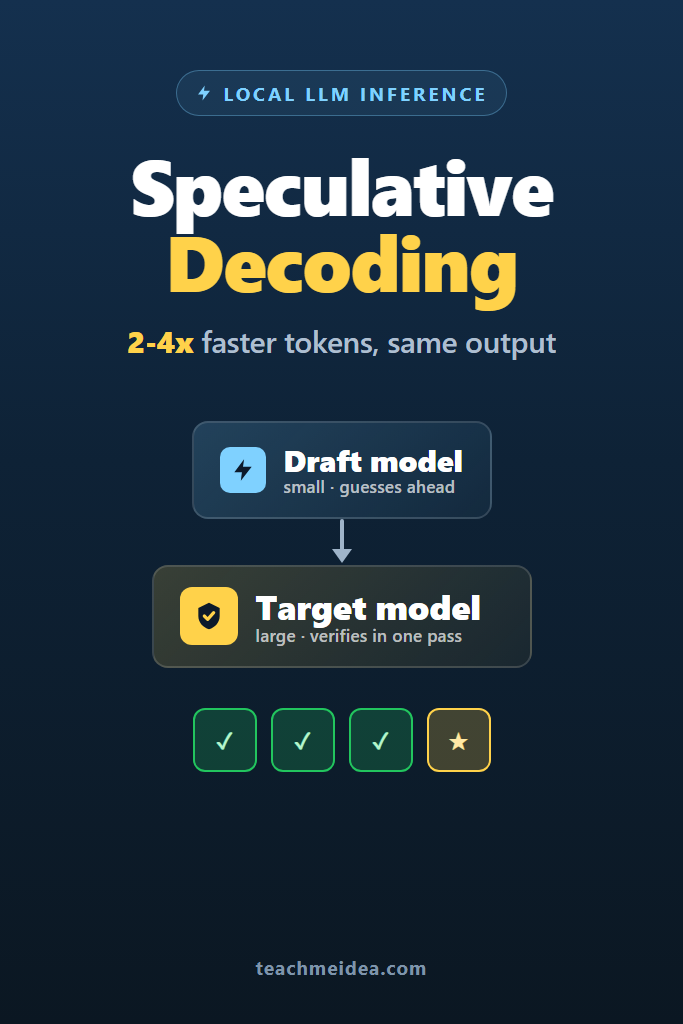
If you run language models on your own hardware, you already know the bottleneck: tokens come out one at a time, and a 70B model on a single GPU can feel painfully slow. Speculative decoding is the technique that breaks this pattern. It lets a small, fast “draft” model guess several tokens ahead while a large “target” model verifies them in a single pass, often delivering 2-4x faster generation with no loss in output quality.
This deep dive is for engineers who serve LLMs locally or on rented GPUs and want lower latency without buying more hardware or accepting worse answers. You will learn why autoregressive decoding is slow in the first place, how speculative decoding exploits that weakness, which variants exist (draft model, Medusa, EAGLE, n-gram lookahead), and how to actually turn it on in vLLM and llama.cpp. Most importantly, you will learn when speculative decoding helps, when it quietly hurts, and the mistakes that make people give up on it too early.
Why Autoregressive Decoding Is Slow
To understand speculative decoding, you first need to understand the problem it solves. A transformer generates text one token at a time. Each new token requires a full forward pass through every layer of the model, and that token depends on all the tokens before it. You cannot compute token 50 until you have token 49.
Here is the counterintuitive part. During this generation phase, a modern GPU is mostly idle. The forward pass for a single token reads billions of weight parameters from memory but performs relatively little math on each one. As a result, the GPU spends most of its time waiting for weights to arrive from high-bandwidth memory rather than doing arithmetic. In other words, single-token decoding is memory-bandwidth bound, not compute bound.
This matters enormously. Processing one token and processing ten tokens through the model take almost the same wall-clock time, because both are limited by how fast you can stream the weights, not by the number of floating-point operations. The model has spare compute sitting unused on every step.
Speculative decoding is, at its heart, a trick to convert that wasted compute into speed. If you could somehow feed the large model several candidate tokens at once and verify them in a single forward pass, you would get multiple tokens for roughly the price of one. That is exactly what happens.
What Is Speculative Decoding?
Speculative decoding is an inference optimization where a small draft model rapidly proposes several future tokens, and the large target model verifies all of them in one forward pass. Accepted tokens are kept, the first rejected token is corrected, and generation continues. The output is mathematically identical to what the target model would produce alone.
That last sentence is the key selling point. Unlike quantization or distillation, speculative decoding does not trade quality for speed. When configured correctly, the distribution of generated text is provably the same as standard sampling from the target model. You get faster tokens, not different tokens.
The mechanism rests on a published technique called speculative sampling, introduced by researchers at DeepMind and Google in 2023. It pairs a “draft” model (small and fast) with a “target” model (large and accurate). The draft model is cheap to run, so generating a short burst of guesses costs little. The target model is expensive, but verifying a batch of guesses costs almost the same as generating a single token, thanks to the memory-bandwidth dynamic described above.
How Speculative Decoding Works Step by Step
The loop is easier to follow as a sequence. Assume a draft window of four tokens.
- The draft model generates four candidate tokens autoregressively. Because it is small, this is fast.
- The target model runs one forward pass over the original context plus all four draft tokens at once.
- For each draft token, the target model checks whether it agrees, using a probabilistic acceptance test.
- Every token up to the first disagreement is accepted. At the first rejection, the target model supplies the correct token itself.
- Generation resumes from the last accepted position, and the cycle repeats.
The acceptance test is what guarantees correctness. For greedy decoding, the rule is simple: accept a draft token only if it matches the target model’s highest-probability token at that position. For sampling, speculative decoding uses a rejection-sampling step that compares the draft and target probabilities and accepts or resamples in a way that preserves the target distribution exactly.
Notice the asymmetry that makes this profitable. If all four draft tokens are accepted, you advanced four positions for the cost of one target forward pass plus four cheap draft passes. Even if only two are accepted on average, you still moved faster than running the target model token by token. The worst case is that zero draft tokens are accepted, in which case you paid a small overhead for the draft model and still got one correct token from the target. You never produce wrong output, only occasionally waste a little effort.
The Acceptance Rate Is Everything
The entire speedup hinges on one number: the average number of tokens accepted per target forward pass, often called the acceptance rate or acceptance length. A higher acceptance rate means more tokens per expensive step, which means more speedup.
What drives acceptance rate? Mainly, how well the draft model predicts the target model. When the two models tend to agree, drafts get accepted in long runs. When they disagree often, you reject early and gain little. This is why draft model selection is the most important decision you will make.
Consider the practical range. On predictable text such as code, structured output, or repetitive boilerplate, acceptance rates run high because the next token is often obvious to both models. On creative or highly variable text, acceptance drops because the draft model guesses wrong more often. Therefore the same setup can deliver a 3x speedup on one workload and a marginal 1.2x on another. Your mileage genuinely varies with the content.
A useful mental model: speculative decoding rewards predictability. The more “guessable” your output is, the more it pays off.
Choosing a Draft Model
The draft model must satisfy two competing constraints. It has to be small enough to run cheaply, yet aligned enough with the target to get its guesses accepted. Getting this balance right separates a real speedup from a disappointment.
A few proven strategies exist for picking a draft model.
Same family, smaller size. The cleanest approach is using a smaller model from the same family as the target. Pairing Llama 3.1 70B (target) with Llama 3.2 1B or 3B (draft) works well because they share a tokenizer and similar training data, so their predictions correlate strongly. Critically, the draft and target must use the same tokenizer. A mismatched vocabulary makes speculative decoding impossible without extra translation machinery.
Heavily quantized version of the target. Some setups use a 2-bit or 3-bit quantization of the target itself as the draft. It predicts similarly to the full model because it is the same model, just lossier. The trade-off is that aggressive quantization makes the draft a bit slower than a tiny dedicated model.
Self-speculation. Newer methods skip the separate draft model entirely. Medusa adds extra prediction “heads” to the target model that propose multiple future tokens in parallel. EAGLE trains a lightweight module that predicts at the feature level rather than the token level, achieving higher acceptance than naive drafting. These approaches avoid the memory cost of loading a second model but require training or downloading the special head weights.
The right choice depends on your constraints. If you already host two model sizes, draft-model speculation is trivial to enable. If GPU memory is tight, a self-speculative method like EAGLE avoids a second set of weights. If you want zero extra weights at all, n-gram speculation (covered next) needs nothing.
N-Gram and Prompt Lookahead Decoding
Not every speculative method uses a neural draft model. Prompt lookahead decoding, sometimes called n-gram speculation, generates draft tokens by copying from the existing context. The idea is that in many tasks, the model is about to repeat text it has already seen.
This shines in retrieval-augmented generation, summarization, code editing, and any task where the output quotes or lightly modifies the input. For instance, when a model summarizes a document and reuses exact phrases, an n-gram drafter can paste those phrases as guesses and get them accepted instantly. Because there is no draft model to run, the overhead is nearly zero.
The limitation is obvious: n-gram speculation only helps when output overlaps with input. On freely generated prose with little repetition, acceptance collapses and you gain nothing. Still, because it costs almost nothing to enable and never hurts correctness, it is a sensible default for RAG-style workloads. Many teams combine it with a draft model so that both repetition and general prediction are covered.
Speculative Decoding in vLLM
vLLM has first-class support for speculative decoding, and it is the most common way to run it in production. You configure it when starting the server or initializing the engine. The following example pairs a Llama 3.1 8B target with a 1B draft model.
from vllm import LLM, SamplingParams

# Target model accelerated by a smaller same-family draft model.
# num_speculative_tokens controls the draft window per step.
llm = LLM(
    model="meta-llama/Llama-3.1-8B-Instruct",
    speculative_config={
        "model": "meta-llama/Llama-3.2-1B-Instruct",
        "num_speculative_tokens": 5,
    },
    gpu_memory_utilization=0.9,
)

# Speculative decoding preserves the target distribution, so sampling
# params behave exactly as they would without it.
params = SamplingParams(temperature=0.7, max_tokens=512)
output = llm.generate("Explain how a B-tree index speeds up queries.", params)
print(output[0].outputs[0].text)
The num_speculative_tokens value is the draft window. Larger windows mean more potential tokens per step but also more wasted draft work when guesses are rejected. Values between three and seven are typical. Start at five, measure, and adjust.
To use n-gram speculation instead of a draft model, vLLM accepts a method-based config that needs no second model:
# N-gram speculation: drafts are copied from the prompt/context.
# Ideal for RAG and summarization where output echoes the input.
llm = LLM(
    model="meta-llama/Llama-3.1-8B-Instruct",
    speculative_config={
        "method": "ngram",
        "num_speculative_tokens": 5,
        "prompt_lookup_max": 4,   # longest n-gram to match against context
    },
)
If you are new to running vLLM as a serving layer, the configuration above slots directly into the setup covered in our guide to vLLM self-hosted LLM serving. The speculative config is simply an extra argument on the engine you already run.
Speculative Decoding in llama.cpp
For CPU-first or Apple Silicon setups, llama.cpp supports speculative decoding through its llama-speculative tool and the --model-draft flag on the server. You supply both a target GGUF and a draft GGUF, and llama.cpp manages the draft-and-verify loop.
# Speculative decoding with a draft model in llama.cpp.
# -m is the target, -md is the draft, --draft sets the draft window.
./llama-speculative \
  -m models/llama-3.1-70b-instruct-q4_k_m.gguf \
  -md models/llama-3.2-1b-instruct-q8_0.gguf \
  --draft 6 \
  -p "Write a Python function that validates an email address." \
  -ngl 99
A few practical notes apply here. First, keep the draft model in higher precision than you might expect; a heavily quantized draft predicts worse and lowers acceptance, which can erase the speedup. Second, the draft model still consumes memory and, on a shared GPU, some VRAM you might have wanted for context. On constrained machines, that trade-off is real.
If your hardware is CPU-bound or you rely on aggressive quantization to fit a model at all, read our breakdown of llama.cpp CPU quantized LLMs first. Speculative decoding stacks on top of quantization, but the two interact, and understanding quantization levels helps you pick a draft that actually accelerates rather than drags.
A Realistic Performance Scenario
Consider a small team self-hosting a code-assistant feature on a single high-memory GPU. They serve a mid-sized instruct model and notice that interactive latency feels sluggish during long completions, especially when generating multi-line functions. The output is mostly code, which is unusually predictable token by token.
This is close to the ideal case for speculative decoding. Code has long stretches where the next token is nearly deterministic: closing brackets, common keywords, repeated variable names, standard library calls. When the team adds a small same-family draft model with a draft window of five, acceptance rates on code completions tend to land high, and perceived latency drops noticeably. On the same setup, free-form chat responses see a smaller improvement because conversational text is less predictable.
The lesson from this kind of deployment is to measure per workload rather than trusting a single benchmark number. A team that tests only on creative writing might conclude speculative decoding “barely helps,” while the same configuration transforms their code and structured-output paths. Over several weeks of tuning, most teams find the draft window and draft model that maximize their specific traffic mix, and the gains concentrate where output is most repetitive. The concrete trade-off is extra memory for the draft model and added configuration complexity, weighed against meaningfully lower latency on predictable generations.
Speculative Decoding vs Other Speedup Techniques
It helps to place speculative decoding among the other levers you can pull. Each targets a different part of the problem, and they generally compose rather than compete.
| Technique | What it speeds up | Quality impact | Stacks with speculative decoding |
|---|---|---|---|
| Speculative decoding | Per-request token latency | None (exact) | N/A |
| Quantization (GGUF, AWQ) | Memory use and throughput | Small, tunable | Yes |
| Continuous batching | Multi-user throughput | None | Yes |
| Smaller/distilled model | Everything | Larger, permanent | Replaces target |
| Prompt caching | Repeated prefixes | None | Yes |
The important takeaway is that speculative decoding is a latency optimization for a single request stream, not a throughput optimization for many concurrent users. Under heavy batched load, the GPU is no longer idle between tokens, because other requests fill the gaps. As a result, the spare compute that speculative decoding exploits disappears, and the speedup shrinks. This is the single most important caveat, and it drives the decision section below.
For raw single-stream speed comparisons, it is worth seeing how a purpose-built inference provider approaches the same goal from the hardware side, which we cover in our look at the Groq API for fast LLM inference. Speculative decoding is the software answer to a problem that specialized chips attack from another angle.
When to Use Speculative Decoding
- You serve a large model with low concurrency, such as a single-user assistant, a developer tool, or a batch job processing one request at a time
- Your latency target is tight and the model frequently feels slow on long generations
- Your output is predictable: code, structured data, JSON, SQL, or text that echoes the input
- You have spare GPU memory for a small draft model, or you can use n-gram speculation with no extra weights
- You need faster tokens without changing the output distribution at all
When NOT to Use Speculative Decoding
- You run high-throughput serving with continuous batching saturating the GPU; speculative gains largely evaporate under load
- Your workload is highly creative or unpredictable, giving low acceptance rates and little payoff
- GPU memory is already maxed out and a draft model would force a smaller context window or evict the target
- You cannot find a draft model that shares the target’s tokenizer, and you do not want to train an EAGLE or Medusa head
- The added configuration and operational complexity outweighs a marginal speedup for your traffic
Common Mistakes with Speculative Decoding
- Picking a draft model that is too large, so the draft generation cost cancels out the savings from accepted tokens
- Quantizing the draft model too aggressively, which lowers acceptance rate until the speedup disappears
- Using a draft model with a different tokenizer than the target, which silently breaks the acceptance test or fails outright
- Setting the draft window too high, wasting draft compute on tokens that get rejected on unpredictable workloads
- Benchmarking only under heavy concurrent load and concluding it “does not work,” when it shines at low concurrency
- Measuring on a single workload type instead of your real traffic mix, missing big wins on code or structured output
- Forgetting that the draft model consumes memory, then being surprised when context length has to shrink
How to Tune for the Best Speedup
Once speculative decoding is enabled, a short tuning loop gets you most of the available gain. First, measure acceptance length on your real prompts, not synthetic benchmarks. Most serving stacks expose this metric; vLLM reports speculative acceptance statistics you can log. Next, sweep the draft window across a few values such as three, five, and seven, and watch where tokens-per-second peaks. Then try one smaller and one larger draft model to see which balances draft cost against acceptance.
Finally, segment by workload. If code and chat share one endpoint, you may find that a single configuration is a compromise. Some teams route predictable traffic through a speculative path and leave unpredictable traffic on the standard path. This kind of routing extracts the gains where they exist without paying overhead where they do not.
Keep in mind that the optimal settings drift as your models change. A new draft model release or a target upgrade can shift acceptance rates, so it is worth re-measuring after any model swap rather than assuming yesterday’s tuning still holds.
Where Speculative Decoding Fits in a Local Stack
Speculative decoding is not a standalone product; it is a feature inside the serving engines you already use. If you run models through a desktop tool, the option may be exposed in settings or not at all, which is one reason serious deployments lean on vLLM or llama.cpp where the controls are explicit. For readers comparing the friendlier on-ramps, our guides to Ollama for local LLMs and LM Studio for local LLMs explain where those tools sit relative to the lower-level engines.
The technique also pairs naturally with large-model-on-modest-hardware setups. When you are already pushing the limits of what a machine can hold, as in our walkthrough of how to run 70B models on a Mac Mini, every bit of latency reduction matters, and a small draft model can make an otherwise sluggish 70B feel usable for interactive work, provided you have the memory headroom for it.
Conclusion
Speculative decoding turns the biggest weakness of autoregressive generation, an idle GPU waiting on memory, into a source of speed by letting a small draft model guess ahead and a large target model verify in bulk. Done right, it delivers 2-4x faster local LLM inference with byte-for-byte identical output, which is a rare free lunch in machine learning. The catch is that the gains concentrate at low concurrency and on predictable text, and they fade under heavy batched load.
Your next step is concrete: enable speculative decoding on a model you already serve, pair it with a small same-family draft, measure acceptance length on your real prompts, and sweep the draft window. If your traffic leans toward code, JSON, or RAG output, you will likely see the speedup immediately. From there, deepen the foundation with our guide to vLLM self-hosted LLM serving, where speculative decoding slots in as a single line of configuration on top of a serving layer you control.

1 Comment
Comments are closed.