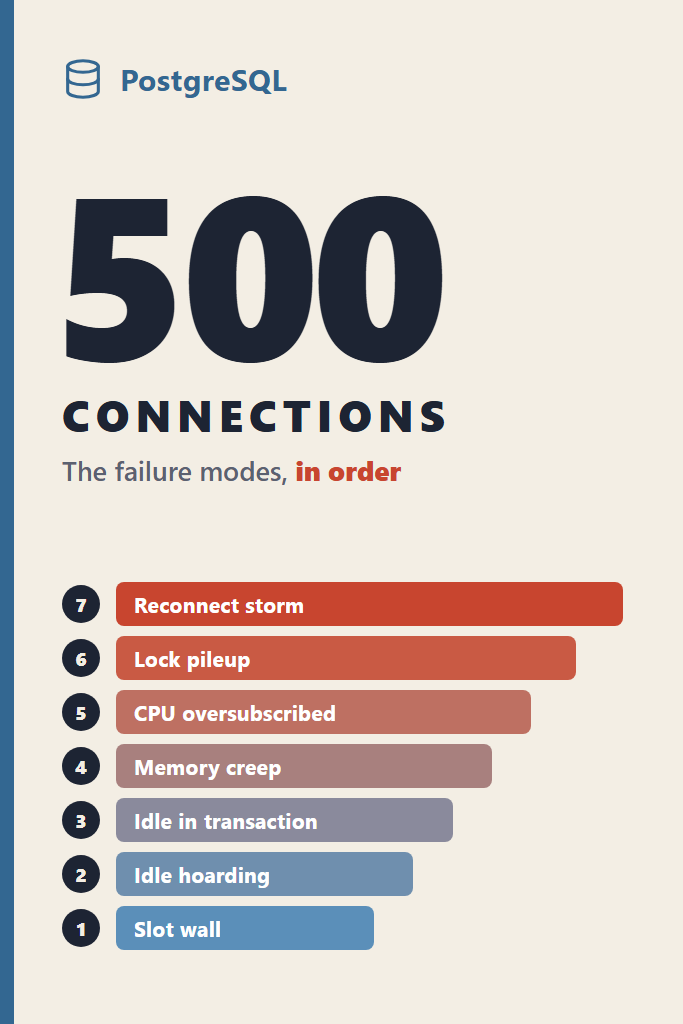
If your team recently raised the Postgres connection limit from 100 to 500 because the app threw “too many clients already”, this post is for you. Raising max_connections usually makes the error go away for a few weeks. However, it also swaps one loud failure for several quieter ones, and those arrive in a fairly predictable order. This guide walks through that order, from the first rejected connection to the reconnect storm that turns a routine failover into an outage. For each stage you get the symptom, the query that confirms it, and the fix that actually addresses it. By the end, you should be able to look at your own database and say which stage you are in and what comes next.
Version facts in this post were checked on 2026-10-19 against the PostgreSQL 18.6 documentation, the PostgreSQL 18 source, and the PgBouncer 1.26.1 changelog.
Why the Postgres Connection Limit Exists at All
Postgres runs one operating system process per connection. When a client connects, the postmaster forks a new backend, and that backend lives until the client disconnects. As a result, every connection costs a process, a slice of private memory, and a slot in shared memory that Postgres sizes at startup. That is why max_connections can only change with a restart.
The default is “typically 100”, in the documentation’s own words. Additionally, three of those slots are held back by superuser_reserved_connections, so ordinary application roles can use 97. Managed services pick their own defaults. For instance, Amazon RDS for PostgreSQL sets max_connections to LEAST({DBInstanceClassMemory/9531392}, 5000), according to the RDS quotas page. In practice, that means bigger instances quietly come with higher limits, which hides the problem until the fleet grows.
The key point is that the limit is not arbitrary. It is a guardrail around a process-per-connection design. Consequently, raising it without changing anything else moves the failure point rather than removing it.
The Failure Modes in Order: Quick Reference
Before going stage by stage, here is the whole sequence in one table. The order reflects what typically bites first as a growing application pushes connection counts from the default toward 500 and beyond.
| Order | Failure mode | What you see | Confirming signal | First fix |
|---|---|---|---|---|
| 1 | Slot wall | FATAL: sorry, too many clients already | Slot count near max_connections | Count the pools, not the queries |
| 2 | Idle hoarding | Slots full, CPU idle | Most backends in idle state | Smaller per-instance pools, a pooler |
| 3 | Idle in transaction | Table bloat, blocked DDL | idle in transaction rows with old xact_start | idle_in_transaction_session_timeout |
| 4 | Memory creep | Swap, then the OOM killer | Backend RSS growing over hours | Fewer backends, max_lifetime on pools |
| 5 | Active oversubscription | Throughput drops as load rises | LWLock waits, run queue above core count | Cap active connections near core count |
| 6 | Lock queue pileup | One migration stalls every request | pg_blocking_pids returns a DDL pid | lock_timeout on migrations |
| 7 | Reconnect storm | Failover takes minutes, not seconds | Connection setup time spikes | Pooler in front, jittered reconnects |
The rest of the post explains each row, including why it happens and how to stop it from happening again.
Stage 1: Hitting the Slot Wall
The first failure is the one everybody recognizes. Once all slots are taken, a new connection attempt gets a fatal error before it can run a single query. Interestingly, there are two different messages, and the order in which they appear tells you something.
With the defaults, the 98th application connection does not get the famous error. Instead, it gets this one, straight from postinit.c in Postgres 18:
FATAL: remaining connection slots are reserved for roles with the SUPERUSER attribute
Only when every slot, including the reserved ones, is in use does Postgres return the classic message:
FATAL: sorry, too many clients already
That ordering explains a confusing pattern. Your migration tool, which often connects as a superuser, keeps working while the application is locked out. Therefore, “the database is fine, migrations ran” is not evidence that the app can connect. Since Postgres 16, there is also a middle tier: reserved_connections holds slots for roles granted pg_use_reserved_connections, which is a good place to put your monitoring and on-call roles.
How to Count Where Your Slots Go
The question to answer at this stage is not “how many queries” but “who holds the slots”. This query groups every client backend by application and state:
-- Who holds connection slots right now, and what are they doing?
SELECT
  coalesce(application_name, '<none>') AS app,
  usename,
  state,
  count(*) AS connections
FROM pg_stat_activity
WHERE backend_type = 'client backend'
GROUP BY 1, 2, 3
ORDER BY connections DESC;
Setting application_name in every client is what makes this query useful. Without it, five services sharing one database role look identical, and nobody can tell which deployment ate the slots.
Stage 2: Idle Connections Hoarding Slots
Once the limit is raised to 500, the next thing most teams discover is that the database is full of connections doing nothing. CPU sits low, queries are fast, and yet new pods cannot connect. This is the most common reason the Postgres connection limit gets hit in the first place.
The cause is arithmetic. Every application instance carries its own pool, and the pools add up. For example, node-postgres defaults to max: 10, HikariCP to maximumPoolSize 10, and SQLAlchemy to pool_size 5 plus max_overflow 10. Multiply that by instances, then by workers per instance, and the numbers grow fast:
connections = pool_max × workers_per_instance × instances × deploy_overlap
The deploy_overlap term is the one teams forget. During a rolling deploy, old and new pods run side by side, so a fleet that sits at 250 connections in steady state can briefly need close to 500. Similarly, an autoscaler that doubles instance count during a traffic spike doubles connection demand at exactly the moment the database is busiest.
Why Idle Connections Are Not Free
Before Postgres 14, idle connections also slowed down active ones. Building a snapshot meant scanning every backend’s entry in shared memory, so thousands of idle sessions made every query slightly slower. Andres Freund’s analysis of connection scalability identified this as the most pressing bottleneck, and Postgres 14 fixed it.
On Postgres 14 and later, an idle connection is cheap in CPU terms. Nevertheless, it still holds a slot, a process, and whatever private memory it accumulated while it was active. In other words, idle connections stopped being a performance problem but remain a capacity problem.
The fix is to size pools per instance from the database’s point of view, not the application’s. Decide how many connections the database should accept in total, subtract headroom for deploys, admin, and replication, and then divide by the maximum instance count. If that leaves each instance with two or three connections, that is the signal you need a pooler, which the connection pooling guide for PgBouncer and HikariCP covers in depth.
Stage 3: Idle in Transaction, the Expensive Kind of Idle
Not all idle connections are equal. A session in state idle in transaction has opened a transaction and then stopped sending queries. Typically, that happens when application code begins a transaction, calls an external API, and waits for the response before committing.
This state is far worse than plain idle for two reasons. First, the transaction may hold row or table locks, and anything that needs those locks waits. Second, an open transaction pins the oldest snapshot the database must preserve, so autovacuum cannot remove dead rows newer than it. As a result, a single forgotten transaction left open for an hour can bloat busy tables across the whole database.
At 500 connections, the odds of at least one such session existing at any moment rise sharply, because there are more code paths and more instances running them. This query finds the offenders:
-- Sessions holding a transaction open while doing nothing
SELECT
  pid,
  application_name,
  now() - xact_start   AS transaction_age,
  now() - state_change AS idle_for,
  left(query, 80)      AS last_query
FROM pg_stat_activity
WHERE state = 'idle in transaction'
ORDER BY xact_start
LIMIT 20;
The last_query column shows the last statement the session ran, not what it is waiting on. Even so, it usually points straight at the code path that opened the transaction.
Timeouts That Belong on the Role, Not the Server
Postgres has three timeouts that cap the damage, and the cleanest place to set them is on the application role:
-- Apply to every new session of the application role
ALTER ROLE app_user SET idle_in_transaction_session_timeout = '30s';
ALTER ROLE app_user SET statement_timeout = '15s';
ALTER ROLE app_user SET lock_timeout = '5s';
Setting them per role rather than in postgresql.conf keeps migrations, analytics jobs, and admin sessions free to run longer. Furthermore, role settings apply at login, so they work through PgBouncer in transaction mode, where a client-side SET would leak between clients. Postgres 17 also added transaction_timeout, which caps the total length of a transaction. The documentation advises against setting it globally, so treat it the same way: per role, where you know the workload.
If transaction isolation and lock behavior still feel fuzzy, the transaction isolation levels explainer is worth reading before tuning these values.
Stage 4: Memory Creep and the OOM Killer
Next comes the failure that looks unrelated to connections until you trace it. Memory usage on the database host climbs over hours or days, swap starts filling, and eventually the Linux OOM killer steps in.
Each backend has private memory beyond the shared buffers. It holds catalog and relation caches for every table and index the session has touched, prepared statement plans, and the working memory for sorts and hashes. The caches are per backend, not shared. Consequently, a long-lived connection in an application with many tables or partitions slowly accumulates its own copy of a large slice of the catalog.
Working memory makes it worse. The work_mem setting applies per sort or hash operation, not per connection, so a single complex query can use several multiples of it. When 500 backends can run such queries at once, the theoretical peak becomes enormous even if the average is small.
Why One OOM Kill Takes Down Every Connection
This is the part that turns memory pressure into an outage. When the OOM killer sends SIGKILL to one backend, the postmaster cannot know whether that process left shared memory in a corrupted state. Therefore, it terminates every other backend and performs crash recovery. Every connection to the database drops at once, including the ones that had nothing to do with the memory spike.
The PostgreSQL documentation on Linux memory overcommit recommends vm.overcommit_memory = 2 on dedicated database hosts so that allocations fail cleanly instead of triggering the OOM killer. On managed services you usually cannot change that, which makes the other fixes more important.
To see where a specific backend’s memory goes, Postgres 14 added a function that dumps its memory contexts to the server log:
-- Find the largest long-lived backends first, then inspect one
SELECT pid, application_name, backend_start, state
FROM pg_stat_activity
WHERE backend_type = 'client backend'
ORDER BY backend_start
LIMIT 10;

-- Writes the memory context breakdown of that pid to the server log
SELECT pg_log_backend_memory_contexts(12345);
The practical fixes are fewer backends and shorter backend lifetimes. Most pools support a maximum connection lifetime, which recycles connections before their caches grow unbounded. For example, HikariCP has maxLifetime and node-postgres has maxLifetimeSeconds. Recycling every 30 to 60 minutes is a common, conservative choice.
Stage 5: Too Many Active Connections for the Cores
Suppose the slots, idle sessions, and memory are all under control. The next ceiling is CPU, and it behaves counterintuitively: past a certain point, adding concurrent queries makes total throughput go down, not flat.
A machine with 16 cores can execute 16 things at once. When 200 connections are all active, the kernel time-slices between them, and each context switch evicts useful data from CPU caches. Meanwhile, backends start contending for shared structures inside Postgres, such as buffer mapping and lock manager partitions, which show up as LWLock waits. Postgres 18 improved locking for queries that touch many relations, according to its release notes, but the general shape of the curve remains.
This query shows what active backends are waiting on:
-- What are the active sessions actually waiting for?
SELECT
  coalesce(wait_event_type, 'CPU') AS wait_type,
  coalesce(wait_event, 'running')  AS wait_event,
  count(*) AS sessions
FROM pg_stat_activity
WHERE backend_type = 'client backend'
  AND state = 'active'
GROUP BY 1, 2
ORDER BY sessions DESC;
A null wait event means the backend is running or waiting for CPU, which this query labels as CPU. If that row alone is several times your core count, or LWLock rows dominate, you are past the useful concurrency for the hardware.
How Many Active Connections Is Right?
A widely cited starting point comes from the HikariCP project’s pool sizing article: connections = (core_count × 2) + effective_spindle_count. On SSD or network storage, the spindle term is fuzzy, so treat the result as a starting point to load test, not a rule. The important insight is the order of magnitude. A 16-core database usually does its best work with a few dozen actively executing queries, not hundreds.
That number is about active queries, not total slots. Consequently, the healthy shape for a busy system is many client connections funneling into a small number of server connections, which is exactly what a transaction-mode pooler provides. The broader PostgreSQL performance tuning guide covers the query-side work that reduces how long each of those connections stays busy.
Stage 6: Lock Queue Pileups From One Migration
This failure mode needs high connection counts to become an outage, which is why it belongs on this list. A single ALTER TABLE can stall every request that touches the table, even if the ALTER itself would take milliseconds.
Here is the mechanism. Most ALTER TABLE forms need an ACCESS EXCLUSIVE lock. If a long-running query or an idle-in-transaction session holds any lock on the table, the ALTER waits. Crucially, Postgres lock queues are fair. Every new query on that table now queues behind the waiting ALTER, even plain SELECTs that would never conflict with the running query.
With 20 connections, that queue is short and the pool times out quickly. With 500, hundreds of requests pile up holding connections, every pool fills, and the application goes down while the database reports almost no CPU use. Afterwards, the post-incident review blames “the migration”, when the real cause was a migration with no lock timeout meeting an old transaction.
This query shows who blocks whom:
-- Sessions that are blocked, and the pids blocking them
SELECT
  pid,
  pg_blocking_pids(pid) AS blocked_by,
  wait_event_type,
  now() - query_start   AS waiting_for,
  left(query, 80)       AS query
FROM pg_stat_activity
WHERE cardinality(pg_blocking_pids(pid)) > 0
ORDER BY query_start;
The fix is to give every migration a short lock_timeout and retry it, rather than letting it queue indefinitely:
-- Fail fast instead of queueing behind a long transaction
SET lock_timeout = '3s';
ALTER TABLE orders ADD COLUMN fulfillment_region text;
If the lock is not available within three seconds, the statement fails and the queue behind it drains. The migration tool retries a few seconds later. For the full expand-and-contract approach to schema changes, the guide on database migrations in production goes further.
Stage 7: The Reconnect Storm After a Failover
The last failure mode is the one that turns a 30-second failover into a 10-minute incident. It only appears at high connection counts, and it tends to show up exactly when you are already under stress.
When the primary restarts or fails over, every client loses its connection at once. Then every pool on every instance tries to reconnect, often immediately and often to its minimum size. Each new connection needs a TCP handshake, usually a TLS handshake, a fork, and authentication. SCRAM-SHA-256 authentication is deliberately CPU-expensive, controlled by scram_iterations since Postgres 16, with a default of 4096.
Five hundred of these arriving in the same second means the freshly promoted primary spends its first moments doing handshakes rather than queries. Clients time out, retry, and add more attempts to the queue. In effect, the recovery itself becomes the load that prevents recovery.
Postgres 18 makes this measurable. Setting log_connections to include setup_durations logs, for every connection, the total setup time, the fork time, and the authentication time:
# postgresql.conf (Postgres 18+)
log_connections = 'setup_durations'
Turning this on for an hour of normal traffic gives you a baseline. Comparing it with the same metric during a failover drill shows how much of the outage was connection setup.
Breaking the Storm
Two changes break the loop. First, put a pooler in front of the database so that application reconnects hit the pooler, which then opens a bounded number of server connections. Second, add jitter to client reconnects so that hundreds of instances do not retry on the same schedule. Exponential backoff with full jitter spreads those attempts over several seconds instead of one.
What a Pooler Fixes and What It Breaks
A transaction-mode pooler like PgBouncer addresses stages 1, 2, 5, and 7 together. Clients can open thousands of connections to it, while it holds a small, fixed number of server connections and lends one out for the duration of each transaction. Here is a production-shaped configuration:
; pgbouncer.ini
[databases]
app = host=10.0.1.20 port=5432 dbname=app

[pgbouncer]
listen_addr = 0.0.0.0
listen_port = 6432
auth_type = scram-sha-256
auth_file = /etc/pgbouncer/userlist.txt

pool_mode = transaction
max_client_conn = 5000
default_pool_size = 40
reserve_pool_size = 10
reserve_pool_timeout = 3
max_db_connections = 60

; Fail queued clients instead of letting them wait forever
query_wait_timeout = 30
server_idle_timeout = 600

; Protocol-level prepared statements in transaction mode
max_prepared_statements = 200
The default_pool_size of 40 is where the core-count reasoning from stage 5 lands. Meanwhile, max_client_conn can be large because client connections to PgBouncer are cheap. The max_prepared_statements setting deserves a note: PgBouncer 1.21 added support for protocol-level prepared statements in transaction mode, and 1.24 turned it on by default at 200. Older guidance that says “prepared statements do not work with PgBouncer” is out of date for drivers that use the protocol-level form.
Session Features That Still Break
Transaction mode lends a server connection only for the duration of one transaction, so anything that depends on session state still breaks. That includes session-level SET commands, session advisory locks, LISTEN/NOTIFY, temporary tables that outlive a transaction, and SQL-level PREPARE statements. Those code paths need either a separate session-mode pool or a direct connection.
On the application side, the pool still matters. This node-postgres configuration points at PgBouncer, keeps the per-instance pool small, and fails fast when the pool is exhausted:
import pg from 'pg';

const { Pool } = pg;

export const pool = new Pool({
  host: process.env.PGBOUNCER_HOST,
  port: 6432,
  database: 'app',
  user: process.env.DB_USER,
  password: process.env.DB_PASSWORD,
  application_name: `orders-api-${process.env.HOSTNAME ?? 'local'}`,
  max: 10,                        // per instance, against PgBouncer
  idleTimeoutMillis: 30_000,      // release idle clients
  connectionTimeoutMillis: 5_000, // fail fast instead of queueing forever
  maxLifetimeSeconds: 1_800,      // recycle before caches grow unbounded
});

pool.on('error', (err) => {
  // Errors on idle clients (e.g. a server restart) must not crash the process
  console.error('Idle Postgres client error', err);
});

export async function withTransaction(work) {
  const client = await pool.connect();
  try {
    await client.query('BEGIN');
    const result = await work(client);
    await client.query('COMMIT');
    return result;
  } catch (err) {
    await client.query('ROLLBACK');
    throw err;
  } finally {
    client.release();
  }
}
The withTransaction helper matters more than it looks. Because the finally block always releases the client, a thrown error cannot leave a connection checked out, and the ROLLBACK ensures it never returns to the pool in the idle in transaction state from stage 3. Equally important, nothing slow belongs inside work: external API calls happen before or after the transaction, never during it.
Real-World Scenario: An Autoscaling API Meets a Rolling Deploy
Consider a mid-sized Node.js API running on Kubernetes, owned by a small backend team, talking directly to a managed Postgres instance with a limit of around 500 connections. Each pod has a pool of 20. In steady state, the deployment runs 10 to 12 pods, so roughly 240 connections, comfortably under the Postgres connection limit.
Then a marketing campaign lands. The autoscaler grows the deployment toward 20 pods over a few minutes, pushing connection demand to around 400. Halfway through the spike, a scheduled deploy starts. Rolling update settings allow extra pods during rollout, so for a few minutes old and new pods coexist, and the theoretical demand climbs past the limit. New pods fail their readiness checks with the reserved-slots error from stage 1, the rollout stalls, and the autoscaler adds even more pods because latency is rising.
The tempting fix is to raise the limit again. However, the database CPU during the incident was moderate, and most of those 500 connections were idle. The actual constraint was pool arithmetic, not database capacity. The durable fix is a pooler in front, per-pod pools reduced to a handful of connections against PgBouncer, and a deploy policy that accounts for surge. The trade-off is real: the team now operates one more component and has to audit code for session-level features before switching to transaction mode. For most teams at this scale, that audit takes days, while the alternative is an incident every time a deploy and a traffic spike overlap.
Serverless backends hit the same wall faster, because every concurrent function invocation can hold its own connection. The serverless Node.js on Lambda patterns post covers that variant.
When to Use a High Postgres Connection Limit
- A small number of long-lived services need many sessions each, and they use session features a pooler would break
- The host has the memory budget for every backend at its realistic peak, not its average
- Active query concurrency stays near the core count even when total connections are high
- A pooler already sits in front, and the higher limit only covers admin, replication, and batch jobs
- You have measured connection setup times and failover behavior at the new limit
When NOT to Raise the Postgres Connection Limit
- Most existing connections are
idle, which means the problem is pool sizing, not capacity - The application runs on autoscaling containers or serverless functions with per-instance pools
- The database host already uses swap or has seen OOM kills
- Active sessions already exceed the core count and
LWLockwaits are climbing - The goal is to stop an alert from firing rather than to understand where the slots went
Common Mistakes with the Postgres Connection Limit
- Sizing each service’s pool in isolation, then discovering the sum exceeds
max_connectionsduring a deploy - Running every workload under one database role, so
pg_stat_activitycannot tell services apart - Setting
idle_session_timeoutglobally, which kills pooler connections that expect to stay open - Calling external APIs inside a transaction and leaving sessions
idle in transaction - Running migrations without
lock_timeout, letting one ALTER queue every request behind it - Using PgBouncer in transaction mode with code that relies on
SET, advisory locks, orLISTEN - Letting every client reconnect immediately after a failover, without backoff or jitter
- Comparing connection limits across managed providers without checking what instance size sets them, which the managed Postgres pricing comparison accounts for
How Do You Know Which Stage You Are In?
Run the slot query from stage 1 and the wait-event query from stage 5 during a normal busy hour. If most connections are idle, you are at stage 2, and pool sizing is the fix. If active sessions far exceed the core count, you are at stage 5, and a pooler with a bounded server pool is the fix. If you see old idle in transaction sessions, fix those first regardless of anything else, because they make every later stage worse.
Conclusion
The Postgres connection limit fails in a fixed order: the slot wall, idle hoarding, idle transactions, memory creep, CPU oversubscription, lock pileups, and finally reconnect storms. Raising max_connections only skips you ahead in that list. The durable answer for almost every team past a few hundred connections is a transaction-mode pooler, small per-instance pools, and role-level timeouts. Today, run the slot query from stage 1 against production, group by application_name, and add up what each service could open during a deploy. Then read the PgBouncer and HikariCP pooling guide to plan the pooler that replaces the next limit increase.